silent-platform
 Gitmushtaq
We are building a product called PulseVision. This is a full-stack AI-powered healthcare platform that helps users understand medical reports and take real-world action. 🧠 CORE VISION PulseVision converts: 👉 Medical Report → Insight → Decision → Action → Follow-up We are NOT building a diagnosis system. We are building a: 👉 Health Decision & Navigation Platform 🎯 PRIMARY USER FLOW A user should be able to: Upload a medical report (PDF/image) System analyzes it Get simplified explanation Understand risk level Get doctor recommendation See nearby hospitals Take action (call / navigate) Save and return later 🏗️ SYSTEM ARCHITECTURE FRONTEND Framework: React (Vite) Styling: Tailwind CSS Routing: React Router Pages: Dashboard Upload Screen Analysis Progress Screen Results Screen Saved Reports BACKEND Framework: FastAPI (Python) Structure: backend/ ├── main.py ├── routes/ ├── services/ ├── utils/ └── models/ AI / PROCESSING LAYER OCR (basic for now) Text parsing Rule-based risk detection Doctor recommendation engine 🧩 CORE FEATURES 1. REPORT UPLOAD Accept PDF / Image Validate file Send to backend 2. OCR + ANALYSIS Backend should: Extract text Identify key values (LDL, sugar, hemoglobin) Normalize values Detect abnormalities 3. RISK ENGINE Output: Risk level: Low / Medium / High Confidence score 4. DECISION ENGINE Map: Biomarkers → Doctor type Example: High cholesterol → Cardiologist Low hemoglobin → General physician 5. RESULTS OUTPUT Frontend should display: Summary (simple language) Risk level Doctor recommendation Detected values Confidence 6. HOSPITAL INTEGRATION Use: Google Maps Places API Fetch: Nearby hospitals Rating Distance Address Phone number 7. ACTION SYSTEM User should: Call hospital (open dialer) Open map (Google Maps) 8. SAVE & RETURN Save report Reopen later Resume action 9. ANALYTICS Track: Upload success Analysis success CTA clicks Call clicks Map clicks Save → return → action 🔄 FRONTEND FLOW Step 1: Dashboard Overview Recent reports “New Analysis” button Step 2: Upload Drag & drop File preview Upload button Step 3: Progress Show steps: Reading report Extracting data Analyzing Generating result Step 4: Results Show: Risk level Doctor Next steps Hospital list CTA button Save option 🔌 API DESIGN POST /upload Input: file Output: job_id GET /analyze/{job_id} Output: { "summary": "", "risk_level": "High", "doctor": "Cardiologist", "confidence": 0.85, "detected_values": [] } GET /hospitals/nearby Input: latitude longitude specialty Output: list of hospitals ⚠️ IMPORTANT RULES Do NOT overcomplicate Do NOT use heavy ML models initially Use rule-based logic first Keep UI clean and professional Keep frontend and backend modular 🚀 DEVELOPMENT PHASES Phase 1: MVP UI screens Mock data Basic flow Phase 2: Real Integration Backend connection OCR Real hospital API Real actions Phase 3: Advanced Better AI models Personalization Notifications Health tracking 📦 FINAL DELIVERABLE A working system where: User uploads report Gets analysis Sees hospitals Takes action 🎯 END GOAL This should feel like: 👉 A real product 👉 Not a prototype 👉 Not a demo

Comments (0)
Sign in to leave a comment
Project Tasks13
Implement Theme & Structure
As a user, I want the app to visually match the mock-design pages exactly, so that the experience feels polished and professional from day one. This task covers: applying the Silent-Platform color palette (#F5F9FC background, #FF6F61 accent, #2C3E50 text, etc.) globally via Tailwind config, setting up shared layout components (header, nav, page wrappers), removing any scaffold pages not present in the design (e.g. login, signup, welcome if not in final designs), and ensuring all existing scaffold pages align with the design system. Reference designs: Dashboard (v2), Saved Reports (v2), Progress (v2), Upload (v1), Results (v1).
Implement Report Upload API
As a user, I want my uploaded medical report to be securely received by the backend so that it can be queued for analysis. Implement the POST /upload FastAPI endpoint that accepts a PDF or image file, validates the file type and size, stores it temporarily, and returns a job_id for polling. Structure: backend/routes/upload.py, backend/services/file_service.py.
Build Dashboard Page
As a user, I want to see a Dashboard overview page so that I can view recent reports and start a new analysis. Implement the Dashboard page based on the existing v2 JSX design. The page should include: overview stats, recent reports list, and a 'New Analysis' CTA button that navigates to the Upload page. Follows the Primary User flow: Dashboard → Upload. Reference: Design Pages - Dashboard (v2).
Build Upload Page
As a user, I want to upload my medical report (PDF or image) so that the system can analyze it. Implement the Upload page based on the existing v1 JSX design. The page should include: drag & drop zone, file type validation (PDF/image), file preview, and an upload submit button that triggers the backend upload API and navigates to the Progress page. Follows the user flow: Dashboard → Upload → Progress. Reference: Design Pages - Upload (v1).
Build Progress Page
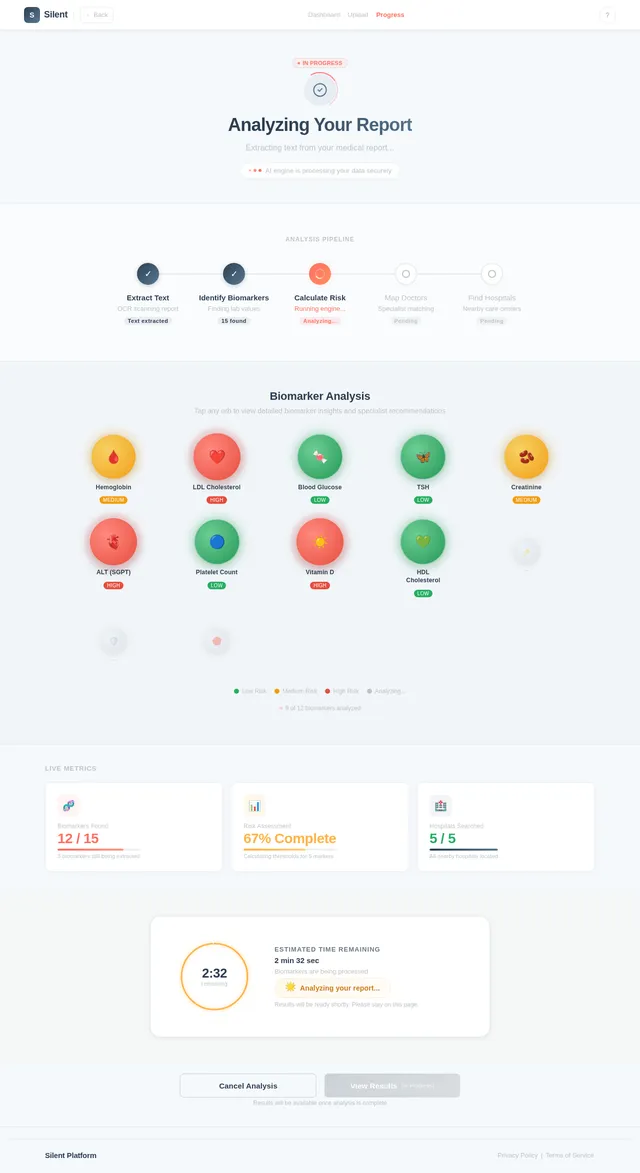
As a user, I want to see a real-time analysis progress screen so that I know the system is processing my report. Implement the Progress page based on the existing v2 JSX design. The page should display step-by-step progress indicators: Reading report → Extracting data → Analyzing → Generating result. Poll the backend GET /analyze/{job_id} endpoint and navigate to the Results page on completion. Reference: Design Pages - Progress (v2).
Build Results Page
As a user, I want to see the results of my medical report analysis so that I can understand my risk level, get doctor recommendations, and find nearby hospitals. Implement the Results page based on the existing v1 JSX design. The page should display: risk level (Low/Medium/High with color coding), simplified summary, doctor recommendation, detected biomarker values, confidence score, nearby hospital list (rating, distance, address, phone), Call and Navigate CTAs, and a Save Report button. Follows the user flow: Progress → Results → Saved Reports or Hospital Actions. Reference: Design Pages - Results (v1).
Build Saved Reports Page
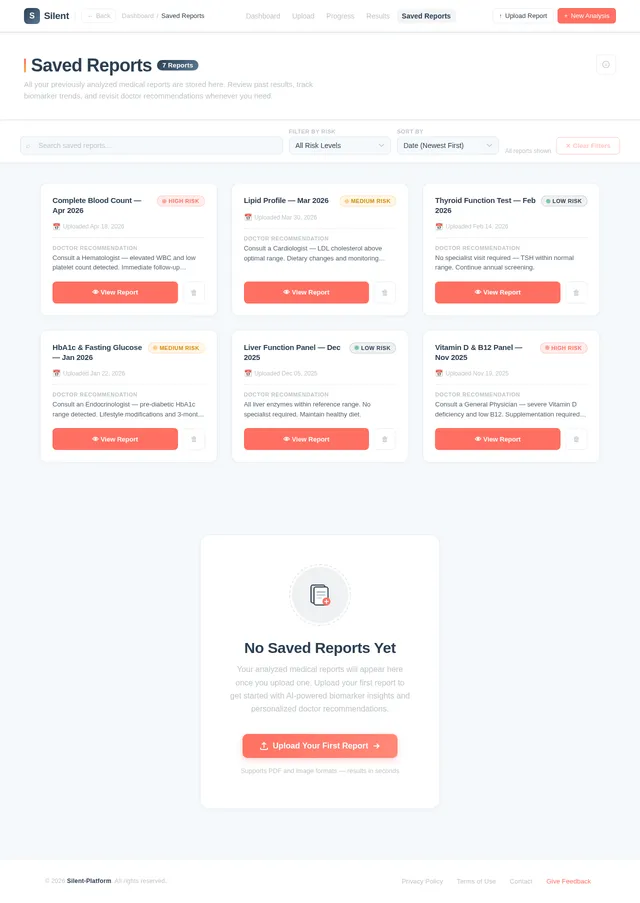
As a user, I want to view and reopen my previously analyzed reports so that I can follow up on my health actions without re-uploading. Implement the Saved Reports page based on the existing v2 JSX design. The page should read from browser localStorage, display a list of saved reports with date, risk level, and summary, and allow the user to reopen any report (navigating back to the Results page with that report's data). Reference: Design Pages - Saved Reports (v2).
Implement OCR Text Extraction
As a user, I want the system to extract readable text from my uploaded report (PDF or image) so that the AI engine can analyze the content. Implement an OCR service in the backend that uses a lightweight OCR library (e.g. pytesseract or pdfplumber) to extract text from the uploaded file. Store the extracted text for downstream analysis. Structure: backend/services/ocr_service.py.
Implement Nearby Hospitals API
As a user, I want to see nearby hospitals filtered by the recommended specialty so that I can quickly find and contact the right medical facility. Implement the GET /hospitals/nearby FastAPI endpoint that accepts latitude, longitude, and specialty parameters. Integrate with Google Maps Places API to fetch nearby hospitals with: name, rating, distance, address, phone number. Structure: backend/routes/hospitals.py, backend/services/maps_service.py.
Implement Rule-Based Risk Engine
As a user, I want the system to evaluate my biomarker values against configurable thresholds so that I receive an accurate risk level (Low/Medium/High). Implement a configurable rule-based risk engine. Store thresholds in a config file (e.g. risk_thresholds.yaml or dict in config.py). Engine should normalize extracted values, compare against thresholds, and output: risk_level, confidence score, and list of flagged biomarkers. Structure: backend/services/risk_engine.py, backend/config/thresholds.py. Example rules: LDL > 160 → High, 130-160 → Medium, < 130 → Low.
Implement Doctor Recommendation Engine
As a user, I want to receive a relevant doctor specialist recommendation based on my biomarker analysis so that I know which type of doctor to consult. Implement a mapping service that maps flagged biomarkers to doctor specialties (e.g. High cholesterol → Cardiologist, Low hemoglobin → General Physician). Store mappings in a configurable dict or YAML file. Structure: backend/services/recommendation_service.py, backend/config/doctor_mappings.py.
Implement Analysis Results API
As a user, I want to poll the analysis status and retrieve my full results so that I can see risk level, doctor recommendation, and detected values after processing. Implement the GET /analyze/{job_id} FastAPI endpoint that returns: summary, risk_level, doctor, confidence, detected_values. Orchestrates OCR → Risk Engine → Doctor Recommendation services. Structure: backend/routes/analyze.py, backend/services/analysis_service.py.
Integrate Frontend with Backend APIs
As a user, I want the frontend pages to connect to the real backend APIs so that my uploaded reports are actually analyzed and results are fetched live. Wire up all frontend pages to the real backend: (1) Upload page → POST /upload, (2) Progress page → poll GET /analyze/{job_id}, (3) Results page → render live API data including hospitals from GET /hospitals/nearby, (4) Saved Reports page → persist results to localStorage after successful analysis. Replace all mock data with real API calls.
No comments yet. Be the first!