silent-platform
 Gitmushtaq
We are building a product called PulseVision. This is a full-stack AI-powered healthcare platform that helps users understand medical reports and take real-world action. 🧠 CORE VISION PulseVision converts: 👉 Medical Report → Insight → Decision → Action → Follow-up We are NOT building a diagnosis system. We are building a: 👉 Health Decision & Navigation Platform 🎯 PRIMARY USER FLOW A user should be able to: Upload a medical report (PDF/image) System analyzes it Get simplified explanation Understand risk level Get doctor recommendation See nearby hospitals Take action (call / navigate) Save and return later 🏗️ SYSTEM ARCHITECTURE FRONTEND Framework: React (Vite) Styling: Tailwind CSS Routing: React Router Pages: Dashboard Upload Screen Analysis Progress Screen Results Screen Saved Reports BACKEND Framework: FastAPI (Python) Structure: backend/ ├── main.py ├── routes/ ├── services/ ├── utils/ └── models/ AI / PROCESSING LAYER OCR (basic for now) Text parsing Rule-based risk detection Doctor recommendation engine 🧩 CORE FEATURES 1. REPORT UPLOAD Accept PDF / Image Validate file Send to backend 2. OCR + ANALYSIS Backend should: Extract text Identify key values (LDL, sugar, hemoglobin) Normalize values Detect abnormalities 3. RISK ENGINE Output: Risk level: Low / Medium / High Confidence score 4. DECISION ENGINE Map: Biomarkers → Doctor type Example: High cholesterol → Cardiologist Low hemoglobin → General physician 5. RESULTS OUTPUT Frontend should display: Summary (simple language) Risk level Doctor recommendation Detected values Confidence 6. HOSPITAL INTEGRATION Use: Google Maps Places API Fetch: Nearby hospitals Rating Distance Address Phone number 7. ACTION SYSTEM User should: Call hospital (open dialer) Open map (Google Maps) 8. SAVE & RETURN Save report Reopen later Resume action 9. ANALYTICS Track: Upload success Analysis success CTA clicks Call clicks Map clicks Save → return → action 🔄 FRONTEND FLOW Step 1: Dashboard Overview Recent reports “New Analysis” button Step 2: Upload Drag & drop File preview Upload button Step 3: Progress Show steps: Reading report Extracting data Analyzing Generating result Step 4: Results Show: Risk level Doctor Next steps Hospital list CTA button Save option 🔌 API DESIGN POST /upload Input: file Output: job_id GET /analyze/{job_id} Output: { "summary": "", "risk_level": "High", "doctor": "Cardiologist", "confidence": 0.85, "detected_values": [] } GET /hospitals/nearby Input: latitude longitude specialty Output: list of hospitals ⚠️ IMPORTANT RULES Do NOT overcomplicate Do NOT use heavy ML models initially Use rule-based logic first Keep UI clean and professional Keep frontend and backend modular 🚀 DEVELOPMENT PHASES Phase 1: MVP UI screens Mock data Basic flow Phase 2: Real Integration Backend connection OCR Real hospital API Real actions Phase 3: Advanced Better AI models Personalization Notifications Health tracking 📦 FINAL DELIVERABLE A working system where: User uploads report Gets analysis Sees hospitals Takes action 🎯 END GOAL This should feel like: 👉 A real product 👉 Not a prototype 👉 Not a demo

Comments (0)
Sign in to leave a comment
System Requirements
System Requirements Document (SRD)
Project Name: Silent-Platform
1. Introduction
Silent-Platform is an AI-powered healthcare platform designed to help users understand medical reports and take real-world action. The system focuses on converting medical data into actionable insights, enabling users to make informed health decisions without overcomplicating the process.
This document outlines the system requirements for Silent-Platform, incorporating Gitmushtaq's recent updates to use a simple rule-based risk engine with configurable thresholds and implement saved reports using frontend local storage for the MVP phase.
2. System Overview
Silent-Platform is a full-stack healthcare solution tailored for users in India (IN). The platform simplifies medical report analysis and provides actionable recommendations, such as risk levels, doctor suggestions, and nearby hospital details.
Key Features:
- Medical Report Upload: Users can upload PDFs or images of their medical reports.
- Risk Analysis: A rule-based engine evaluates biomarkers and assigns risk levels (Low, Medium, High).
- Doctor Recommendations: Maps biomarkers to appropriate specialists.
- Hospital Integration: Displays nearby hospitals using Google Maps Places API.
- Action System: Enables users to call hospitals or navigate to them.
- Saved Reports: Stores analyzed reports locally for easy access and follow-up.
Locale-Specific Defaults:
- Currency: INR
- Timezone: IST (Indian Standard Time)
- Language: English
3. Functional Requirements
As User:
- I should be able to upload a medical report (PDF/image).
- I should be able to see the analysis progress after uploading a report.
- I should receive a simplified explanation of my report.
- I should understand my risk level (Low, Medium, High).
- I should get doctor recommendations based on biomarkers.
- I should see nearby hospitals with details like rating, distance, address, and phone number.
- I should be able to call a hospital directly or navigate to it using Google Maps.
- I should be able to save my analyzed report locally and return to it later.
4. User Personas
1. Primary User:
- Description: Individuals seeking to understand their medical reports and take actionable steps.
- Goals: Simplified report analysis, actionable recommendations, and easy follow-up.
- Technical Proficiency: Moderate (comfortable with basic app usage).
2. Secondary User:
- Description: Caregivers or family members assisting primary users.
- Goals: Help analyze reports and coordinate actions like hospital visits.
- Technical Proficiency: Moderate to high.
5. Visuals Colors and Theme
Color Palette:
Silent-Platform's design will evoke trust, clarity, and professionalism.
- Background:
#F5F9FC(Soft Sky Blue) - Surface:
#FFFFFF(Pure White) - Text:
#2C3E50(Deep Navy Blue) - Accent:
#FF6F61(Warm Coral Red) - Muted Tones:
#BDC3C7(Soft Gray)
6. Signature Design Concept
Interactive Health Dashboard with Dynamic Biomarker Visualization
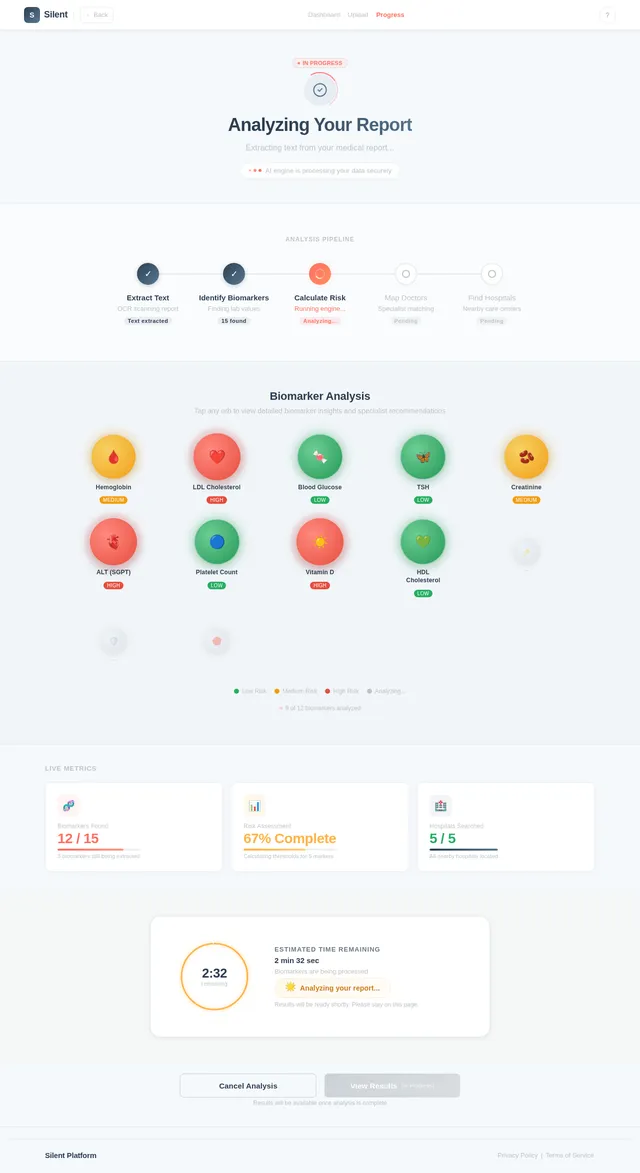
The homepage will feature an interactive health dashboard that visually represents analyzed biomarkers as dynamic, glowing orbs. Each orb will pulse gently to indicate its risk level (green for low, yellow for medium, red for high).
Key Features:
- Hover Interaction: Users can hover over orbs to see detailed biomarker values and explanations.
- Risk Animation: Orbs will subtly expand and contract based on risk severity, creating a living, breathing effect.
- Doctor Mapping: Clicking an orb will display the recommended doctor type and nearby hospitals in a side panel.
- Progressive Loading: As the analysis progresses, orbs will appear one by one, creating a sense of anticipation.
This design will make the platform visually engaging and memorable, while maintaining clarity and professionalism.
7. Non-Functional Requirements
- Performance: The system should analyze reports within 5 seconds for MVP.
- Scalability: The architecture should support future integration of advanced AI models and cloud storage.
- Security: Ensure secure handling of uploaded files and local storage data.
- Usability: The UI should be intuitive and accessible to users with moderate technical proficiency.
- Localization: Default settings tailored for India (IN), including INR currency and IST timezone.
8. Tech Stack
Frontend:
- React (Vite) for web development.
- Tailwind CSS for styling.
- React Router for navigation.
Backend:
- FastAPI (Python) for API development.
Database:
- RDBMS: MySQL or MariaDB (using Alembic for migrations).
AI Models:
- OCR for text extraction.
- Rule-based risk detection engine.
Local Orchestration:
- Docker and docker-compose for containerization.
9. Assumptions and Constraints
Assumptions:
- Users will upload medical reports in standard formats (PDF or image).
- Local storage will suffice for saved reports during MVP.
- Rule-based risk thresholds will be stored in a configurable file for easy updates.
Constraints:
- No heavy ML models for MVP.
- No authentication system or cloud storage in Phase 1.
- Limited to Google Maps Places API for hospital integration.
10. Glossary
- Biomarker: A measurable indicator of biological state or condition (e.g., LDL, hemoglobin).
- Risk Level: Categorization of health risk based on biomarker thresholds (Low, Medium, High).
- Doctor Recommendation: Suggested specialist based on biomarker analysis.
- Local Storage: Browser-based storage for saving user data locally.
- OCR: Optical Character Recognition, used for extracting text from images or PDFs.
This updated SRD reflects the latest decisions and priorities for Silent-Platform's MVP phase. Let me know if further refinements are needed!

Your Health, Simplified.
Upload medical reports and get instant insights — powered by AI to help you make informed health decisions.
Upload Report NowRecent Reports
Complete Blood Count (CBC) Analysis
All blood count parameters within normal range. Hemoglobin and WBC levels are healthy.
Lipid Profile & Cholesterol Panel
LDL cholesterol slightly elevated at 142 mg/dL. HDL within acceptable range. Triglycerides borderline.
Thyroid Function Test (TFT)
TSH levels significantly elevated at 8.2 mIU/L indicating potential hypothyroidism. Immediate consult recommended.
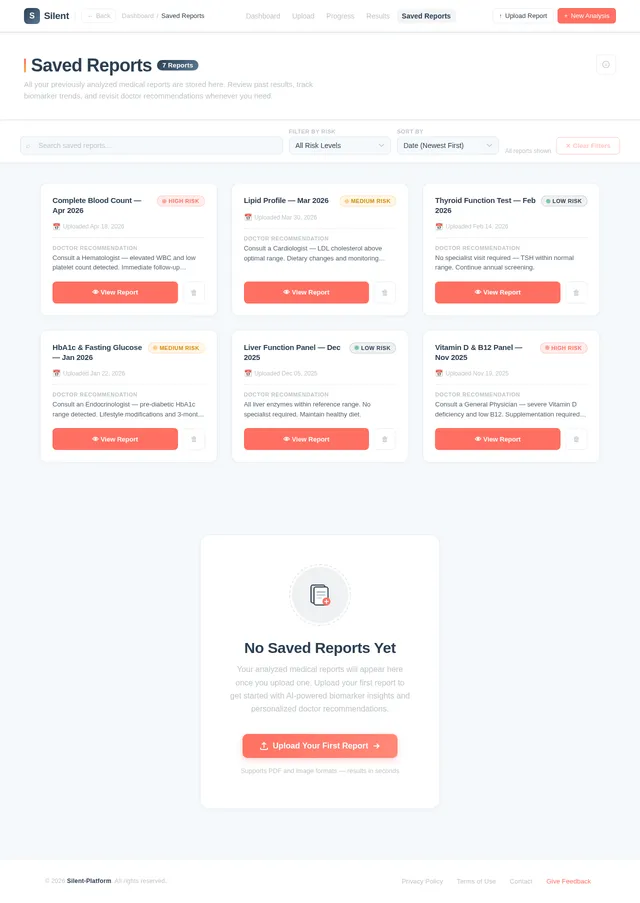
Saved Reports
Access and manage all your analyzed medical reports
| Report Name | Date Analyzed | Risk Level | Last Viewed | Actions |
|---|---|---|---|---|
Complete Blood Count Hematology | 18 Apr 2026 | Low | 20 Apr 2026 | |
Lipid Profile Panel Cardiology | 15 Apr 2026 | Medium | 19 Apr 2026 | |
Liver Function Test Hepatology | 12 Apr 2026 | High | 18 Apr 2026 | |
Thyroid Panel (TSH, T3, T4) Endocrinology | 10 Apr 2026 | Low | 17 Apr 2026 | |
HbA1c - Diabetes Screening Diabetology | 08 Apr 2026 | Medium | 15 Apr 2026 | |
Kidney Function Panel Nephrology | 05 Apr 2026 | Low | 14 Apr 2026 |
Health Summary
Biomarker Visualization
Your latest biomarkers at a glance. Hover to explore detailed values.
Hemoglobin
Blood Glucose
Cholesterol
Vitamin D
TSH
Creatinine
HbA1c
Iron
Platelets
Triglycerides
Some biomarkers require attention. We recommend consulting a specialist for further evaluation.
Doctor Recommendations
Specialists suggested based on your biomarker analysis
Cardiologist
Recommended based on elevated LDL cholesterol and triglyceride levels detected in your report.
Learn More→Endocrinologist
High blood sugar levels suggest a need for specialist evaluation of metabolic function.
Learn More→Hematologist
Low hemoglobin and abnormal RBC count may require further blood disorder assessment.
Learn More→General Physician
For overall health review and coordination of care across multiple mild findings.
Learn More→Pulmonologist
Abnormal oxygen saturation levels suggest a respiratory specialist consultation.
Learn More→Orthopedic Specialist
Low calcium and Vitamin D levels may indicate bone health concerns needing evaluation.
Learn More→Nearby Hospitals
Find hospitals near you based on your report analysis. Call directly or navigate via Google Maps.
Showing 5 hospitals near you
Apollo Hospital, Jubilee Hills
Road No. 72, Film Nagar, Jubilee Hills, Hyderabad, Telangana 500033
KIMS Hospital
1-8-31/1, Minister Road, Secunderabad, Telangana 500003
Yashoda Hospitals, Somajiguda
Raj Bhavan Road, Somajiguda, Hyderabad, Telangana 500082
Care Hospitals, Banjara Hills
Road No. 1, Banjara Hills, Hyderabad, Telangana 500034
Continental Hospitals
Plot No. 3, Road No. 2, IT Park, Nanakramguda, Hyderabad 500032
Ready to take control of your health?
Upload your medical report and get instant AI-powered insights. Understand your biomarkers, discover your risk levels, and receive personalised doctor recommendations — all in minutes.
No comments yet. Be the first!