mmahlatse-ventures
 Mahlatse Shiburi
Build a production-ready micro SaaS called QuoteFlow. TAGLINE: “Turn every quote into a follow-up — and every follow-up into a sale.” TARGET MARKET: South African small service businesses and solo operators such as plumbers, electricians, builders, painters, mechanics, cleaners, photographers, security companies, tutors, landscapers and other businesses that send customer quotations. CORE PROBLEM: Small businesses lose sales because customers receive quotations but nobody remembers to follow up. Existing CRMs are often too complicated. QuoteFlow should be extremely simple and focused on the workflow: CUSTOMER → QUOTE → FOLLOW-UP → ACCEPTED → DEPOSIT/PAID IMPORTANT: Do not build a huge CRM. Build a focused, fast MVP that can be launched and tested immediately. CORE FEATURES: 1. AUTHENTICATION - Email/password signup - Login - Logout - Password reset - Secure user sessions - Each business can only access its own data 2. BUSINESS PROFILE Allow the owner to enter: - Business name - Logo - Owner name - Phone - WhatsApp number - Email - Address - Website - Default currency: South African Rand (ZAR) 3. CUSTOMER MANAGEMENT Users can: - Add customer - Edit customer - Delete customer - Customer name - Phone - WhatsApp number - Email - Notes - Customer history 4. QUOTE CREATOR Create a quote containing: - Quote number - Customer - Project/service description - Line items - Quantity - Unit price - Subtotal - Discount - VAT toggle - Total - Deposit percentage - Deposit amount - Quote expiry date - Notes - Terms and conditions Use ZAR/R automatically. 5. CUSTOMER QUOTE PAGE Generate a public shareable URL for every quote. The customer should see: - Business logo/name - Quote number - Services - Total - Deposit required - Expiry date - Terms - “Accept Quote” button - “Request Changes” button - “Ask a Question” button When the customer accepts the quote, update the quote status to ACCEPTED. 6. FOLLOW-UP ENGINE Quote statuses: - Draft - Sent - Viewed - Follow-up Due - Accepted - Declined - Expired - Deposit Requested - Paid Allow the business owner to select a follow-up schedule: - 1 day after quote - 3 days after quote - 7 days after quote Initially create the follow-up as a reminder and draft message rather than automatically sending messages. 7. AI FOLLOW-UP WRITER Generate concise professional follow-up messages based on: - Customer name - Business type - Service - Quote amount - Days since quote - Quote status Provide message styles: - Friendly - Professional - Short - Urgent but polite The AI must NEVER automatically send a sensitive message without user approval. 8. WHATSAPP-READY FOLLOW-UP Create a “Send via WhatsApp” button that opens WhatsApp with the generated message pre-filled. Do not require the WhatsApp Business API for V1. This makes the MVP usable immediately without complicated API configuration. 9. DASHBOARD Show: Revenue Pipeline: - Draft Quotes - Sent Quotes - Follow-ups Due - Accepted Quotes - Deposits Requested - Paid Metrics: - Total quoted - Total accepted - Total paid - Acceptance rate - Follow-ups due today Include a “Follow Up Today” section at the top. 10. QUOTE LIST Search and filter quotes by: - Customer - Status - Date - Amount 11. CUSTOMER TIMELINE For each customer show: - Quotes - Quote status changes - Follow-up reminders - Accepted quotes - Payments recorded 12. PAYMENT TRACKING V1 should NOT process real payments. Allow the business owner to manually mark: - Deposit requested - Deposit paid - Balance paid - Fully paid Build the database architecture so payment gateways can be added later. 13. NOTIFICATIONS Dashboard notifications: - Follow-up due today - Quote expiring soon - Quote accepted - Deposit pending 14. ADMIN Create a basic admin area where the platform owner can see: - Users - Businesses - Quotes - Active subscriptions - Usage - Basic revenue metrics 15. SUBSCRIPTIONS Create three plans: FREE: - 5 active quotes/month - Basic quote creation - Customer management STARTER: R99/month - 30 quotes/month - AI follow-ups - Quote tracking - Customer history BUSINESS: R249/month - 150 quotes/month - AI follow-ups - Advanced analytics - Custom branding - Payment tracking PRO: R499/month - Higher limits - Multiple users - Advanced analytics - Priority features Make pricing configurable from the admin panel. 16. LANDING PAGE Headline: “Stop Losing Customers After You Send the Quote.” Subheadline: “QuoteFlow helps small businesses create quotes, remember follow-ups and turn more quotations into paid jobs.” CTA: “Start Free” Secondary CTA: “See How It Works” Show a simple 4-step visual: Create Quote → Follow Up → Get Accepted → Get Paid Include: - Features - Pricing - FAQ - Contact - Privacy Policy - Terms 17. DESIGN Design should be: - Modern - Professional - Mobile-first - Fast - Clean - Suitable for South African small businesses - Responsive on Android phones - Desktop compatible Use a premium SaaS dashboard style. 18. DATABASE Use a secure multi-tenant architecture. Tables should include: - users - businesses - business_members - customers - quotes - quote_items - quote_events - followups - messages - payments - subscriptions - plans - notifications - ai_generations - audit_logs Users must never be able to access another business's customers or quotes. 19. SECURITY Implement: - Secure authentication - Authorization - Tenant isolation - Input validation - Server-side API calls - Secure secrets - Rate limiting where appropriate - Audit logging Never expose API keys in frontend code. 20. MVP PRIORITY Build in this order: AUTH → BUSINESS PROFILE → CUSTOMERS → QUOTES → PUBLIC QUOTE PAGE → FOLLOW-UP REMINDERS → AI MESSAGE GENERATOR → WHATSAPP PREFILLED MESSAGE → DASHBOARD → PAYMENT STATUS → SUBSCRIPTIONS → ADMIN DO NOT initially build: - Mobile native application - WhatsApp Business API - SMS API - Accounting integrations - Sage integration - Xero integration - QuickBooks integration - Complex automation builder - Full CRM - Payroll - Inventory - Job scheduling - AI chatbot The goal is to launch the smallest useful product quickly. FINAL PRODUCT TEST: A new user must be able to: 1. Register 2. Create business profile 3. Add customer 4. Create R3,500 quote 5. Generate public quote link 6. Mark quote as sent 7. See follow-up due 8. Generate AI follow-up 9. Open WhatsApp with message pre-filled 10. Customer accepts quote 11. Business marks deposit as paid 12. Dashboard updates revenue pipeline Build the complete working application, not a static mockup. Before deployment, test authentication, database isolation, quote calculations, public quote links, quote status changes, follow-up logic, mobile responsiveness and all major buttons. Ship a working MVP.


Comments (0)
Sign in to leave a comment
Project Tasks
No tasks yet
Add a task now to track work. System-generated tasks will be added here later.
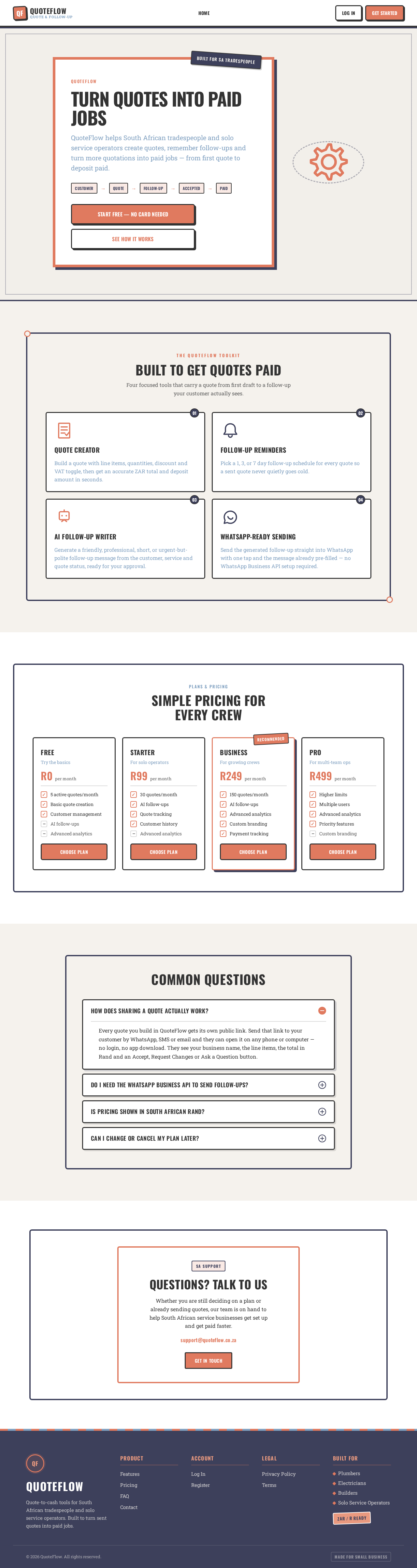
Turn Quotes Into Paid Jobs
QuoteFlow helps South African tradespeople and solo service operators create quotes, remember follow-ups and turn more quotations into paid jobs — from first quote to deposit paid.
- Customer
- Quote
- Follow-Up
- Accepted
- Paid
Built To Get Quotes Paid
Four focused tools that carry a quote from first draft to a follow-up your customer actually sees.
Quote Creator
Build a quote with line items, quantities, discount and VAT toggle, then get an accurate ZAR total and deposit amount in seconds.
Follow-Up Reminders
Pick a 1, 3, or 7 day follow-up schedule for every quote so a sent quote never quietly goes cold.
AI Follow-Up Writer
Generate a friendly, professional, short, or urgent-but-polite follow-up message from the customer, service and quote status, ready for your approval.
WhatsApp-Ready Sending
Send the generated follow-up straight into WhatsApp with one tap and the message already pre-filled — no WhatsApp Business API setup required.
Simple Pricing For Every Crew
Free
Try the basics
- 5 active quotes/month
- Basic quote creation
- Customer management
- AI follow-ups
- Advanced analytics
Starter
For solo operators
- 30 quotes/month
- AI follow-ups
- Quote tracking
- Customer history
- Advanced analytics
Business
For growing crews
- 150 quotes/month
- AI follow-ups
- Advanced analytics
- Custom branding
- Payment tracking
Pro
For multi-team ops
- Higher limits
- Multiple users
- Advanced analytics
- Priority features
- Custom branding
Common Questions
Every quote you build in QuoteFlow gets its own public link. Send that link to your customer by WhatsApp, SMS or email and they can open it on any phone or computer — no login, no app download. They see your business name, the line items, the total in Rand and an Accept, Request Changes or Ask a Question button.
Questions? Talk To Us
Whether you are still deciding on a plan or already sending quotes, our team is on hand to help South African service businesses get set up and get paid faster.
support@quoteflow.co.zaGet In TouchTurn Quotes Into Paid Jobs
QuoteFlow helps South African tradespeople and solo service operators create quotes, remember follow-ups and turn more quotations into paid jobs — from first quote to deposit paid.
- Customer
- Quote
- Follow-Up
- Accepted
- Paid
Built To Get Quotes Paid
Four focused tools that carry a quote from first draft to a follow-up your customer actually sees.
Quote Creator
Build a quote with line items, quantities, discount and VAT toggle, then get an accurate ZAR total and deposit amount in seconds.
Follow-Up Reminders
Pick a 1, 3, or 7 day follow-up schedule for every quote so a sent quote never quietly goes cold.
AI Follow-Up Writer
Generate a friendly, professional, short, or urgent-but-polite follow-up message from the customer, service and quote status, ready for your approval.
WhatsApp-Ready Sending
Send the generated follow-up straight into WhatsApp with one tap and the message already pre-filled — no WhatsApp Business API setup required.
Simple Pricing For Every Crew
Free
Try the basics
- 5 active quotes/month
- Basic quote creation
- Customer management
- AI follow-ups
- Advanced analytics
Starter
For solo operators
- 30 quotes/month
- AI follow-ups
- Quote tracking
- Customer history
- Advanced analytics
Business
For growing crews
- 150 quotes/month
- AI follow-ups
- Advanced analytics
- Custom branding
- Payment tracking
Pro
For multi-team ops
- Higher limits
- Multiple users
- Advanced analytics
- Priority features
- Custom branding
Common Questions
Every quote you build in QuoteFlow gets its own public link. Send that link to your customer by WhatsApp, SMS or email and they can open it on any phone or computer — no login, no app download. They see your business name, the line items, the total in Rand and an Accept, Request Changes or Ask a Question button.
Questions? Talk To Us
Whether you are still deciding on a plan or already sending quotes, our team is on hand to help South African service businesses get set up and get paid faster.
support@quoteflow.co.zaGet In Touch
No comments yet. Be the first!