mmahlatse-ventures
 Mahlatse Shiburi
Build a production-ready micro SaaS called QuoteFlow. TAGLINE: “Turn every quote into a follow-up — and every follow-up into a sale.” TARGET MARKET: South African small service businesses and solo operators such as plumbers, electricians, builders, painters, mechanics, cleaners, photographers, security companies, tutors, landscapers and other businesses that send customer quotations. CORE PROBLEM: Small businesses lose sales because customers receive quotations but nobody remembers to follow up. Existing CRMs are often too complicated. QuoteFlow should be extremely simple and focused on the workflow: CUSTOMER → QUOTE → FOLLOW-UP → ACCEPTED → DEPOSIT/PAID IMPORTANT: Do not build a huge CRM. Build a focused, fast MVP that can be launched and tested immediately. CORE FEATURES: 1. AUTHENTICATION - Email/password signup - Login - Logout - Password reset - Secure user sessions - Each business can only access its own data 2. BUSINESS PROFILE Allow the owner to enter: - Business name - Logo - Owner name - Phone - WhatsApp number - Email - Address - Website - Default currency: South African Rand (ZAR) 3. CUSTOMER MANAGEMENT Users can: - Add customer - Edit customer - Delete customer - Customer name - Phone - WhatsApp number - Email - Notes - Customer history 4. QUOTE CREATOR Create a quote containing: - Quote number - Customer - Project/service description - Line items - Quantity - Unit price - Subtotal - Discount - VAT toggle - Total - Deposit percentage - Deposit amount - Quote expiry date - Notes - Terms and conditions Use ZAR/R automatically. 5. CUSTOMER QUOTE PAGE Generate a public shareable URL for every quote. The customer should see: - Business logo/name - Quote number - Services - Total - Deposit required - Expiry date - Terms - “Accept Quote” button - “Request Changes” button - “Ask a Question” button When the customer accepts the quote, update the quote status to ACCEPTED. 6. FOLLOW-UP ENGINE Quote statuses: - Draft - Sent - Viewed - Follow-up Due - Accepted - Declined - Expired - Deposit Requested - Paid Allow the business owner to select a follow-up schedule: - 1 day after quote - 3 days after quote - 7 days after quote Initially create the follow-up as a reminder and draft message rather than automatically sending messages. 7. AI FOLLOW-UP WRITER Generate concise professional follow-up messages based on: - Customer name - Business type - Service - Quote amount - Days since quote - Quote status Provide message styles: - Friendly - Professional - Short - Urgent but polite The AI must NEVER automatically send a sensitive message without user approval. 8. WHATSAPP-READY FOLLOW-UP Create a “Send via WhatsApp” button that opens WhatsApp with the generated message pre-filled. Do not require the WhatsApp Business API for V1. This makes the MVP usable immediately without complicated API configuration. 9. DASHBOARD Show: Revenue Pipeline: - Draft Quotes - Sent Quotes - Follow-ups Due - Accepted Quotes - Deposits Requested - Paid Metrics: - Total quoted - Total accepted - Total paid - Acceptance rate - Follow-ups due today Include a “Follow Up Today” section at the top. 10. QUOTE LIST Search and filter quotes by: - Customer - Status - Date - Amount 11. CUSTOMER TIMELINE For each customer show: - Quotes - Quote status changes - Follow-up reminders - Accepted quotes - Payments recorded 12. PAYMENT TRACKING V1 should NOT process real payments. Allow the business owner to manually mark: - Deposit requested - Deposit paid - Balance paid - Fully paid Build the database architecture so payment gateways can be added later. 13. NOTIFICATIONS Dashboard notifications: - Follow-up due today - Quote expiring soon - Quote accepted - Deposit pending 14. ADMIN Create a basic admin area where the platform owner can see: - Users - Businesses - Quotes - Active subscriptions - Usage - Basic revenue metrics 15. SUBSCRIPTIONS Create three plans: FREE: - 5 active quotes/month - Basic quote creation - Customer management STARTER: R99/month - 30 quotes/month - AI follow-ups - Quote tracking - Customer history BUSINESS: R249/month - 150 quotes/month - AI follow-ups - Advanced analytics - Custom branding - Payment tracking PRO: R499/month - Higher limits - Multiple users - Advanced analytics - Priority features Make pricing configurable from the admin panel. 16. LANDING PAGE Headline: “Stop Losing Customers After You Send the Quote.” Subheadline: “QuoteFlow helps small businesses create quotes, remember follow-ups and turn more quotations into paid jobs.” CTA: “Start Free” Secondary CTA: “See How It Works” Show a simple 4-step visual: Create Quote → Follow Up → Get Accepted → Get Paid Include: - Features - Pricing - FAQ - Contact - Privacy Policy - Terms 17. DESIGN Design should be: - Modern - Professional - Mobile-first - Fast - Clean - Suitable for South African small businesses - Responsive on Android phones - Desktop compatible Use a premium SaaS dashboard style. 18. DATABASE Use a secure multi-tenant architecture. Tables should include: - users - businesses - business_members - customers - quotes - quote_items - quote_events - followups - messages - payments - subscriptions - plans - notifications - ai_generations - audit_logs Users must never be able to access another business's customers or quotes. 19. SECURITY Implement: - Secure authentication - Authorization - Tenant isolation - Input validation - Server-side API calls - Secure secrets - Rate limiting where appropriate - Audit logging Never expose API keys in frontend code. 20. MVP PRIORITY Build in this order: AUTH → BUSINESS PROFILE → CUSTOMERS → QUOTES → PUBLIC QUOTE PAGE → FOLLOW-UP REMINDERS → AI MESSAGE GENERATOR → WHATSAPP PREFILLED MESSAGE → DASHBOARD → PAYMENT STATUS → SUBSCRIPTIONS → ADMIN DO NOT initially build: - Mobile native application - WhatsApp Business API - SMS API - Accounting integrations - Sage integration - Xero integration - QuickBooks integration - Complex automation builder - Full CRM - Payroll - Inventory - Job scheduling - AI chatbot The goal is to launch the smallest useful product quickly. FINAL PRODUCT TEST: A new user must be able to: 1. Register 2. Create business profile 3. Add customer 4. Create R3,500 quote 5. Generate public quote link 6. Mark quote as sent 7. See follow-up due 8. Generate AI follow-up 9. Open WhatsApp with message pre-filled 10. Customer accepts quote 11. Business marks deposit as paid 12. Dashboard updates revenue pipeline Build the complete working application, not a static mockup. Before deployment, test authentication, database isolation, quote calculations, public quote links, quote status changes, follow-up logic, mobile responsiveness and all major buttons. Ship a working MVP.


Comments (0)
Sign in to leave a comment
System Requirements
System Requirements Document for mmahlatse-ventures
1. Introduction
QuoteFlow is a micro SaaS designed to assist South African small service businesses and solo operators in managing customer quotations and follow-ups efficiently. The primary goal is to convert quotes into sales by simplifying the follow-up process, which is often neglected in existing CRM solutions. QuoteFlow is tailored for businesses like plumbers, electricians, builders, and other service providers who frequently send customer quotations.
2. System Overview
QuoteFlow is a production-ready micro SaaS that focuses on a streamlined workflow: CUSTOMER → QUOTE → FOLLOW-UP → ACCEPTED → DEPOSIT/PAID. It is designed to be simple, fast, and immediately deployable as an MVP. The system includes essential features such as authentication, business profile management, customer management, quote creation, follow-up reminders, AI-generated follow-up messages, and a WhatsApp prefilled message option. The platform avoids complex CRM integrations and focuses on rapid deployment.
2a. Product Interpretation and Delivery Boundary
QuoteFlow is delivered as a web-based application with a focus on simplicity and ease of use. It is accessible to small service businesses in South Africa, providing a secure multi-tenant architecture to ensure data isolation between businesses. The MVP does not include mobile native applications, complex integrations, or advanced CRM features, focusing instead on core functionalities that can be quickly launched and tested.
2b. Source Content Inventory
Not applicable as no content_source directive was provided.
2c. Page Content and Component Coverage
Authentication
- Email/Password Signup: Users can register with an email and password.
- Login/Logout: Secure login and logout functionality.
- Password Reset: Users can reset their password via email.
- Secure Sessions: Ensures user sessions are secure and isolated.
Business Profile
- Profile Management: Enter and update business name, logo, owner name, phone, WhatsApp number, email, address, website, and default currency (ZAR).
Customer Management
- Customer CRUD: Add, edit, delete customers with fields for name, phone, WhatsApp number, email, and notes.
- Customer History: View customer interaction history.
Quote Creator
- Quote Details: Create quotes with fields for quote number, customer, project description, line items, quantity, unit price, subtotal, discount, VAT toggle, total, deposit percentage, deposit amount, expiry date, notes, and terms.
- Currency: Automatically uses ZAR/R.
Customer Quote Page
- Public URL: Generate a shareable URL for each quote.
- Quote View: Displays business logo/name, quote number, services, total, deposit required, expiry date, terms, and action buttons for accepting, requesting changes, or asking questions.
Follow-Up Engine
- Quote Statuses: Manage statuses such as Draft, Sent, Viewed, Follow-up Due, Accepted, Declined, Expired, Deposit Requested, and Paid.
- Follow-Up Schedule: Set reminders for 1, 3, or 7 days after a quote is sent.
AI Follow-Up Writer
- Message Generation: Create follow-up messages based on customer name, business type, service, quote amount, days since quote, and quote status.
- Message Styles: Options for friendly, professional, short, and urgent but polite messages.
WhatsApp-Ready Follow-Up
- WhatsApp Integration: Button to open WhatsApp with a prefilled message, without requiring the WhatsApp Business API.
Dashboard
- Revenue Pipeline: Displays draft quotes, sent quotes, follow-ups due, accepted quotes, deposits requested, and paid.
- Metrics: Shows total quoted, total accepted, total paid, acceptance rate, and follow-ups due today.
- Follow Up Today: Section highlighting follow-ups due.
Quote List
- Search and Filter: Filter quotes by customer, status, date, and amount.
Customer Timeline
- Timeline View: Displays quotes, status changes, follow-up reminders, accepted quotes, and payments for each customer.
Payment Tracking
- Manual Status Updates: Mark deposit requested, deposit paid, balance paid, and fully paid.
Notifications
- Dashboard Alerts: Notifications for follow-up due today, quote expiring soon, quote accepted, and deposit pending.
Admin
- Admin Area: View users, businesses, quotes, active subscriptions, usage, and basic revenue metrics.
Subscriptions
- Plan Management: Manage subscription plans (Free, Starter, Business, Pro) with configurable pricing.
Landing Page
- Marketing Content: Includes headline, subheadline, CTAs, features, pricing, FAQ, contact, privacy policy, and terms.
3. Functional Requirements
- As a user, I should be able to register with an email and password to access the platform. (explicit)
- As a business owner, I should be able to create and manage my business profile with all relevant details. (explicit)
- As a user, I should be able to add, edit, and delete customers to maintain an up-to-date customer list. (explicit)
- As a user, I should be able to create detailed quotes with all necessary fields and share them via a public URL. (explicit)
- As a customer, I should be able to view a quote and take actions such as accepting or requesting changes. (explicit)
- As a business owner, I should be able to set follow-up reminders to ensure timely follow-ups on quotes. (explicit)
- As a user, I should be able to generate AI-powered follow-up messages with various styles. (explicit)
- As a user, I should be able to send follow-up messages via WhatsApp with a prefilled message. (explicit)
- As a user, I should be able to view a dashboard with key metrics and a revenue pipeline. (explicit)
- As a user, I should be able to search and filter quotes to find specific information quickly. (explicit)
- As a user, I should be able to view a timeline of customer interactions for better tracking. (explicit)
- As a business owner, I should be able to manually track payment statuses without processing real payments. (explicit)
- As a user, I should receive notifications for important events such as follow-ups due and quotes expiring. (explicit)
- As an admin, I should be able to view platform usage and metrics to manage the system effectively. (explicit)
- As a user, I should be able to select a subscription plan that fits my business needs. (explicit)
4. User Personas
- Business Owner: Manages the business profile, creates quotes, sets follow-up schedules, and tracks payments.
- Customer: Views quotes, accepts or requests changes, and interacts with the business.
- Admin: Oversees platform usage, manages users and businesses, and configures subscription plans.
5. Core User Flows
Business Owner Registration and Setup
- Register: Enter email and password to create an account.
- Create Business Profile: Fill in business details including name, logo, contact information, and default currency.
- Add Customer: Input customer details such as name, contact information, and notes.
- Create Quote: Enter quote details and generate a public URL.
- Set Follow-Up: Choose a follow-up schedule and generate AI follow-up messages.
- Send Follow-Up via WhatsApp: Use the prefilled message to contact the customer.
- Track Payments: Manually update payment statuses as deposits and balances are paid.
Customer Interaction
- Receive Quote: Access the quote via a public URL.
- View Quote Details: See all relevant information including services, total, and terms.
- Accept or Request Changes: Use the provided buttons to accept the quote or request modifications.
Admin Management
- View Platform Usage: Access metrics on users, businesses, and quotes.
- Manage Subscriptions: Configure pricing and plan details.
6. Visuals Colors and Theme
- Muse: Aaron Draplin
- Palette:
- Background: #F5F2ED
- Surface: #FFFFFF
- Text: #333333
- Primary: #E07A5F
- Accent: #3D405B
- Muted: #81A1C1
- Typography:
- Headings: Oswald — Bold all-caps
- Body: Roboto Slab
- Scale: 1.414 modular
- Shape Language: Chunky borders and badge-like elements
- Layout: Poster-like sections with ruled panels
- Imagery: Thick-line vector icons and halftone photos
7. Signature Design Concept
The landing page features a bold, full-width hero section with a badge-style headline and primary CTA on a kraft paper background. Chunky all-caps headings in Oswald span across sections, complemented by thick-lined vector icons for feature highlights. Snap-in animation effects are used for section transitions, and a sidebar navigation includes stamped effect highlights on active items.
8. Interaction Model & Motion Direction
- Interaction Model: Static
- Motion Tempo: Restrained
- Hero Dimensionality: Flat
- Landing Hero Motion Brief: The hero section features a large badge-style headline with a primary CTA over a textured kraft paper background. The snap-in animation effect is used for transitions, providing a sturdy and minimal motion experience.
9. Non-Functional Requirements
- Security: Implement secure authentication, authorization, tenant isolation, input validation, server-side API calls, secure secrets, rate limiting, and audit logging.
- Performance: Ensure fast load times and responsiveness on both desktop and mobile devices.
- Scalability: Design the system to handle an increasing number of users and quotes without performance degradation.
10. Tech Stack
- Frontend: React
- Backend: Python/FastAPI
- Database: PostgreSQL with a secure multi-tenant architecture
- Deployment: Docker/docker-compose
- Hosting: Kubernetes for scalable deployment
11. Assumptions and Constraints
- Assumption: Users are familiar with basic web applications and can navigate a SaaS platform.
- Constraint: The MVP will not include mobile native applications or complex integrations with accounting software.
12. Glossary
- MVP: Minimum Viable Product
- SaaS: Software as a Service
- CRUD: Create, Read, Update, Delete
- ZAR: South African Rand
- CTA: Call to Action
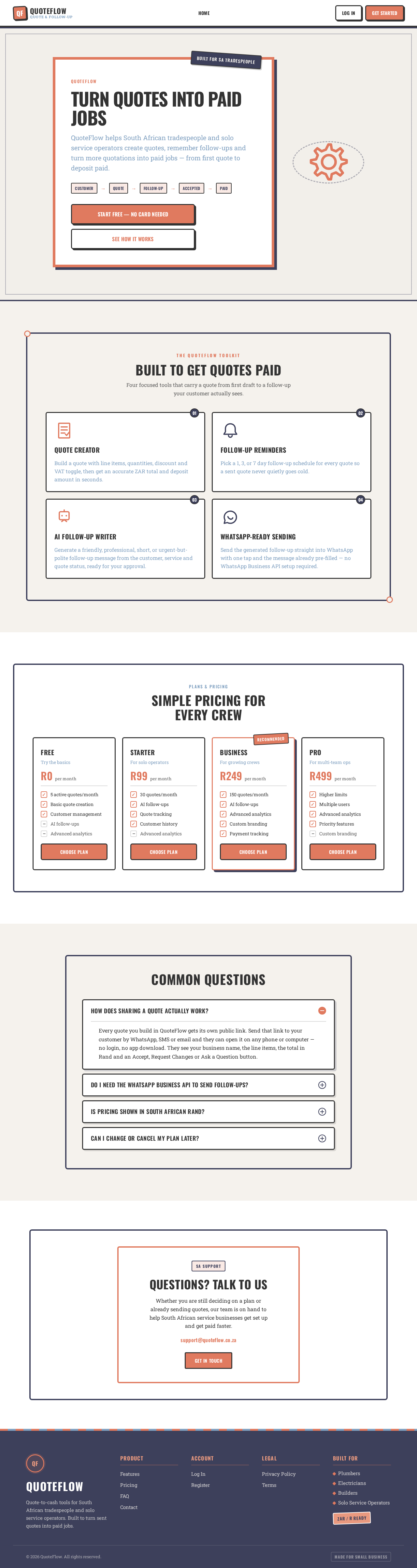
Turn Quotes Into Paid Jobs
QuoteFlow helps South African tradespeople and solo service operators create quotes, remember follow-ups and turn more quotations into paid jobs — from first quote to deposit paid.
- Customer
- Quote
- Follow-Up
- Accepted
- Paid
Built To Get Quotes Paid
Four focused tools that carry a quote from first draft to a follow-up your customer actually sees.
Quote Creator
Build a quote with line items, quantities, discount and VAT toggle, then get an accurate ZAR total and deposit amount in seconds.
Follow-Up Reminders
Pick a 1, 3, or 7 day follow-up schedule for every quote so a sent quote never quietly goes cold.
AI Follow-Up Writer
Generate a friendly, professional, short, or urgent-but-polite follow-up message from the customer, service and quote status, ready for your approval.
WhatsApp-Ready Sending
Send the generated follow-up straight into WhatsApp with one tap and the message already pre-filled — no WhatsApp Business API setup required.
Simple Pricing For Every Crew
Free
Try the basics
- 5 active quotes/month
- Basic quote creation
- Customer management
- AI follow-ups
- Advanced analytics
Starter
For solo operators
- 30 quotes/month
- AI follow-ups
- Quote tracking
- Customer history
- Advanced analytics
Business
For growing crews
- 150 quotes/month
- AI follow-ups
- Advanced analytics
- Custom branding
- Payment tracking
Pro
For multi-team ops
- Higher limits
- Multiple users
- Advanced analytics
- Priority features
- Custom branding
Common Questions
Every quote you build in QuoteFlow gets its own public link. Send that link to your customer by WhatsApp, SMS or email and they can open it on any phone or computer — no login, no app download. They see your business name, the line items, the total in Rand and an Accept, Request Changes or Ask a Question button.
Questions? Talk To Us
Whether you are still deciding on a plan or already sending quotes, our team is on hand to help South African service businesses get set up and get paid faster.
support@quoteflow.co.zaGet In TouchTurn Quotes Into Paid Jobs
QuoteFlow helps South African tradespeople and solo service operators create quotes, remember follow-ups and turn more quotations into paid jobs — from first quote to deposit paid.
- Customer
- Quote
- Follow-Up
- Accepted
- Paid
Built To Get Quotes Paid
Four focused tools that carry a quote from first draft to a follow-up your customer actually sees.
Quote Creator
Build a quote with line items, quantities, discount and VAT toggle, then get an accurate ZAR total and deposit amount in seconds.
Follow-Up Reminders
Pick a 1, 3, or 7 day follow-up schedule for every quote so a sent quote never quietly goes cold.
AI Follow-Up Writer
Generate a friendly, professional, short, or urgent-but-polite follow-up message from the customer, service and quote status, ready for your approval.
WhatsApp-Ready Sending
Send the generated follow-up straight into WhatsApp with one tap and the message already pre-filled — no WhatsApp Business API setup required.
Simple Pricing For Every Crew
Free
Try the basics
- 5 active quotes/month
- Basic quote creation
- Customer management
- AI follow-ups
- Advanced analytics
Starter
For solo operators
- 30 quotes/month
- AI follow-ups
- Quote tracking
- Customer history
- Advanced analytics
Business
For growing crews
- 150 quotes/month
- AI follow-ups
- Advanced analytics
- Custom branding
- Payment tracking
Pro
For multi-team ops
- Higher limits
- Multiple users
- Advanced analytics
- Priority features
- Custom branding
Common Questions
Every quote you build in QuoteFlow gets its own public link. Send that link to your customer by WhatsApp, SMS or email and they can open it on any phone or computer — no login, no app download. They see your business name, the line items, the total in Rand and an Accept, Request Changes or Ask a Question button.
Questions? Talk To Us
Whether you are still deciding on a plan or already sending quotes, our team is on hand to help South African service businesses get set up and get paid faster.
support@quoteflow.co.zaGet In Touch
No comments yet. Be the first!