wild-studies
 Hassen Morad
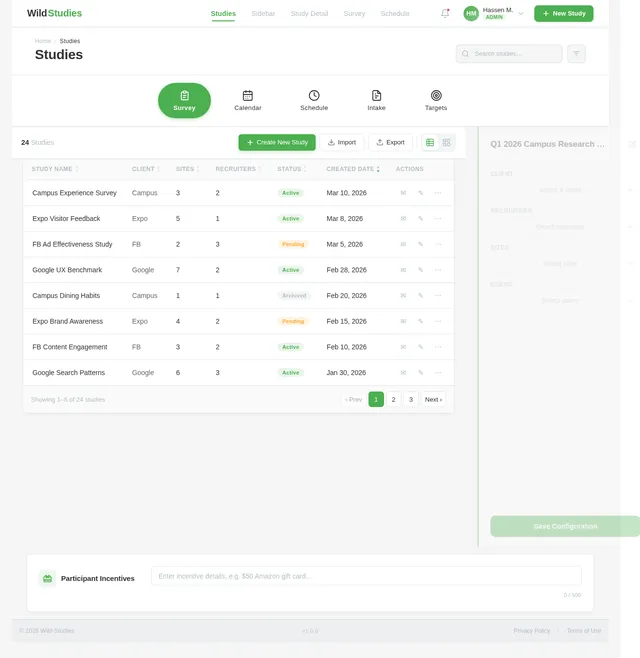
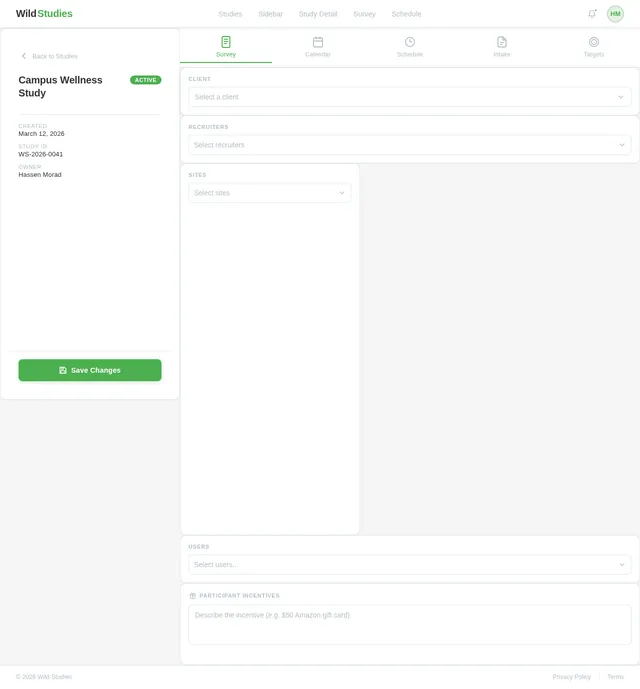
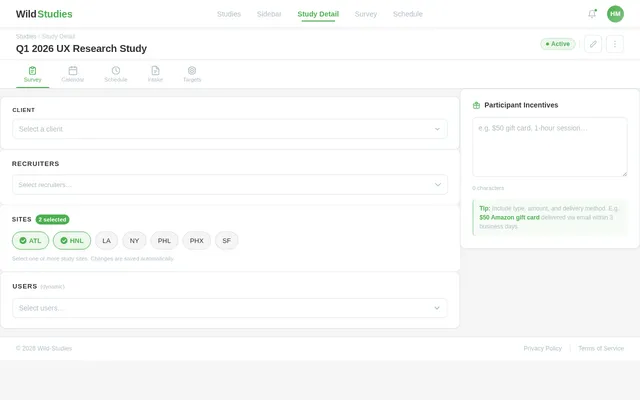
Here's a screenshot of the Studies page in my web app. It lists 4 studies with start and end dates and has a sidebar/drawer open, which displays dropdown options when the user clicks the + icon to create a new study. I want you to create a new screen with the same minimalist styling that displays screen elements when a user selects a specific existing study from this page. The top of the page should contain a horizontal menu with appropriate icons for: Survey, Calendar, Schedule, Intake, Targets. The main content of the page should be minimalist selection options for: Client, Recruiters, Sites, Users. Also add an area to specify participant incentive(s).
Comments (0)
Sign in to leave a comment
Project Tasks10
Implement Theme & Structure
As a user I want to see the Wild-Studies application with a consistent theme and structure that matches the mock-design pages exactly. This task covers: applying the color palette (#F5F5F5 bg, #FFFFFF surface, #333333 text, #4CAF50 accent, #B0BEC5 muted), setting up Inter font family, global CSS variables, shared layout components (NavBar, HorizontalMenu, Footer), and removing any scaffold pages not needed by the SRD (home, login, signup, welcome, dashboard/overview, dashboard/ai-assistant, dashboard/settings). This task must be completed before any other page implementation begins.
Build Studies Page
As a user I want to be able to use the frontend to view all studies in a list, create a new study, and select an existing study to navigate to the Study Detail page. Implement the Studies page based on the existing JSX design (Studies v2). Includes: studies list/table, NavBar, PageHeader, TopHorizontalMenu (Survey, Calendar, Schedule, Intake, Targets tabs), StudiesToolbar (Create New Study, Import, Export, view toggle), StudiesTable (Study Name, Client, Sites, Recruiters, Status, Created Date, Actions columns), StudyConfigPanel (Client single-select: Campus/Expo/FB/Google, Recruiters multi-select: MacConnell/Mavrix/Probe, Sites multi-select: ATL/HNL/LA/NY/PHL/PHX/SF, Users multi-select with random names, Save Configuration button), ParticipantIncentives section, and Footer. Responsive for desktop and mobile. Design is ready (Studies v2) — high AI implementation.
Build Sidebar Page
As a user I want to be able to use the frontend to configure a new study via a Sidebar/drawer panel. Implement the Sidebar page based on the existing JSX design (Sidebar v2). Opens when the user clicks the + icon to create a new study from the Studies page. Includes: minimalist drawer/sidebar layout consistent with Wild-Studies theme, form fields for study creation (study name, basic config), close/dismiss behavior, and navigation back to Studies page. Design is ready (Sidebar v2) — high AI implementation.
Build Study Detail Page
As a user I want to be able to use the frontend to select an existing study and access all detailed management options on the Study Detail page. Implement the Study Detail page based on the existing JSX design (Study Detail v2). Includes: horizontal top menu with icons and ripple hover animations (Survey, Calendar, Schedule, Intake, Targets), Client single-select dropdown (Campus, Expo, FB, Google) with minimalist styling, Recruiters multi-select dropdown (MacConnell, Mavrix, Probe) with real-time chip feedback, Sites multi-select dropdown (ATL, HNL, LA, NY, PHL, PHX, SF) with chip display, Users multi-select with dynamically generated random names, Participant Incentives expandable text input with fade placeholder and auto-save indicator. Dropdowns open with soft bounce animation. Page background subtly shifts on interaction. Responsive for desktop and mobile. Design is ready (Study Detail v2) — high AI implementation.
Implement Studies CRUD API
As a user I want to be able to use the backend API for managing studies — create, read, update, and delete studies. Implement FastAPI endpoints: GET /studies (list all studies), POST /studies (create study), GET /studies/{id} (get study detail), PUT /studies/{id} (update study), DELETE /studies/{id} (delete study). Use MySQL/MariaDB with Alembic migrations for the studies table (id, name, client, status, created_date, etc.). Supports the Studies and Study Detail pages.
Build Survey Page
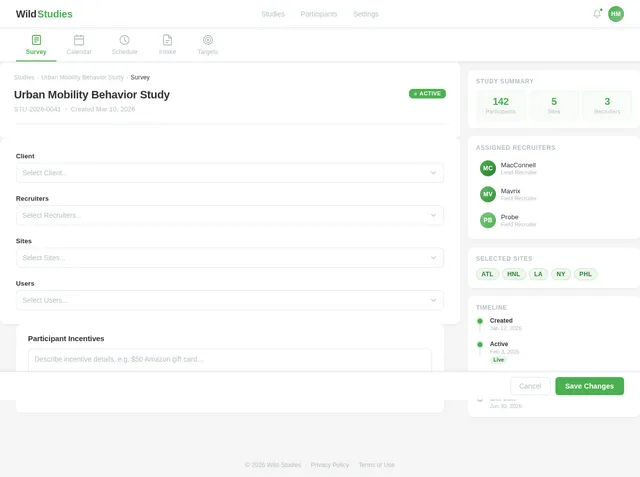
As a user I want to be able to use the frontend to view and interact with the Survey section accessible from the Study Detail horizontal menu. Implement the Survey page based on the existing JSX design (Survey v2). Includes: NavBar, HorizontalMenu (Survey active tab), SurveyHeader with study name/status/breadcrumb, SurveyFormPanel with Client/Recruiters/Sites/Users dropdowns, ParticipantIncentives textarea with auto-save, StudyMetaSidebar (stats, assigned recruiters, selected sites, timeline), ActionBar (Cancel / Save Changes), and Footer. Responsive for desktop and mobile. Design is ready (Survey v2) — high AI implementation.
Build Schedule Page
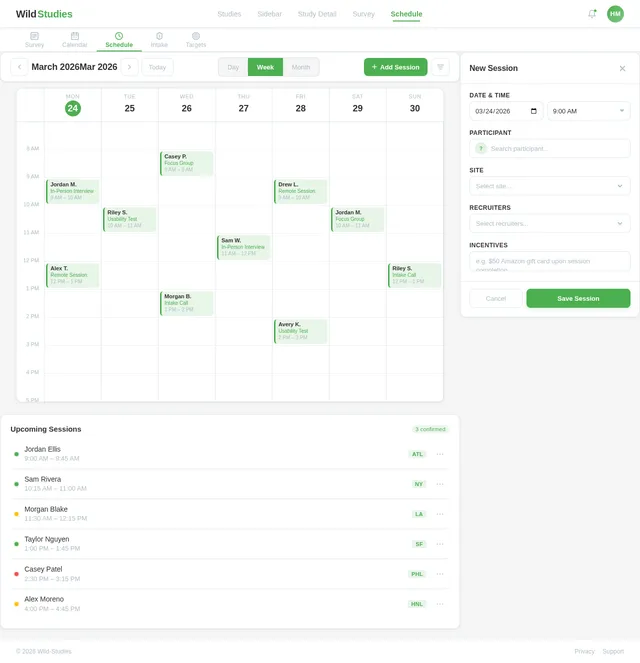
As a user I want to be able to use the frontend to view and manage the schedule for a study, accessible from the Study Detail horizontal menu. Implement the Schedule page based on the existing JSX design (Schedule v2). Includes: NavBar, HorizontalMenu (Schedule active tab), ScheduleToolbar (period label, prev/next chevrons, Today button, Day/Week/Month view toggle segmented control, + Add Session CTA, filter icon), CalendarGrid (7-column weekly or monthly grid with time-slot rows, session blocks, hover popovers), SessionList (upcoming sessions list with status dots, participant names, site tags, overflow actions), ScheduleSidebar (360px, session detail/creation panel with date-time picker, participant search, site/recruiter selects, incentives input, save/cancel), and Footer. Responsive for desktop and mobile. Design is ready (Schedule v2) — high AI implementation.
Implement Study Config API
As a user I want to be able to use the backend API for saving and retrieving study configuration — Client, Recruiters, Sites, Users, and Participant Incentives. Implement FastAPI endpoints: GET /studies/{id}/config (fetch config), PUT /studies/{id}/config (save config). Persist selections for Client (single), Recruiters (multi), Sites (multi), Users (multi), and incentive text. Predefined options for Client (Campus, Expo, FB, Google), Recruiters (MacConnell, Mavrix, Probe), Sites (ATL, HNL, LA, NY, PHL, PHX, SF) served via GET /config/options. Random name generation endpoint GET /users/random for Users dropdown.
Implement Survey & Schedule APIs
As a user I want to be able to use the backend API for accessing survey and schedule data linked to a study. Implement FastAPI endpoints: GET /studies/{id}/survey (fetch survey configuration data — client, recruiters, sites, users, incentives), PUT /studies/{id}/survey (save survey config), GET /studies/{id}/schedule (fetch scheduled sessions list), POST /studies/{id}/schedule (create a new session), PUT /studies/{id}/schedule/{session_id} (update session), DELETE /studies/{id}/schedule/{session_id} (cancel session). Supports the Survey and Schedule pages navigated from Study Detail horizontal menu.
Integrate Studies API Frontend
As a user I want to be able to use the frontend Studies and Study Detail pages connected to the live backend APIs. Wire up the Studies page table to GET /studies, the create study flow to POST /studies, and the StudyConfigPanel to GET and PUT /studies/{id}/config. Load predefined dropdown options from GET /config/options. Fetch random user names from GET /users/random. Implement auto-save for participant incentives with debounce and '✓ Saved' indicator. Wire up Survey page to GET/PUT /studies/{id}/survey and Schedule page to GET/POST/PUT/DELETE /studies/{id}/schedule endpoints.
No comments yet. Be the first!