wild-studies
 Hassen Morad
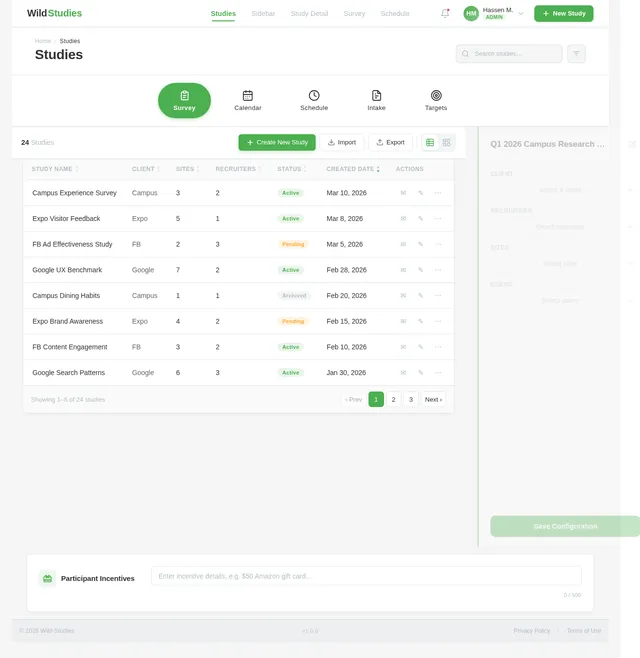
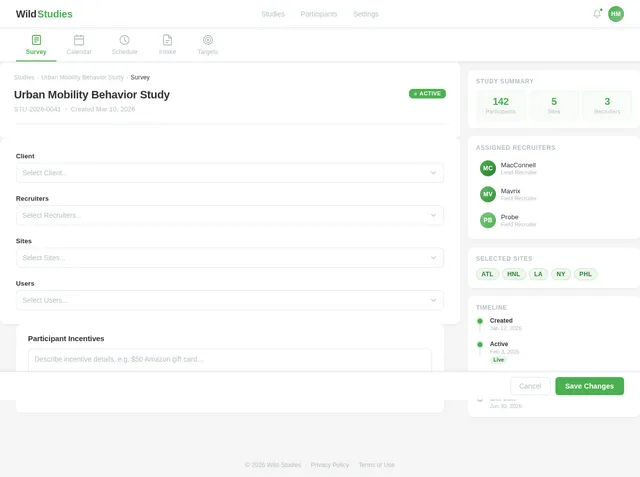
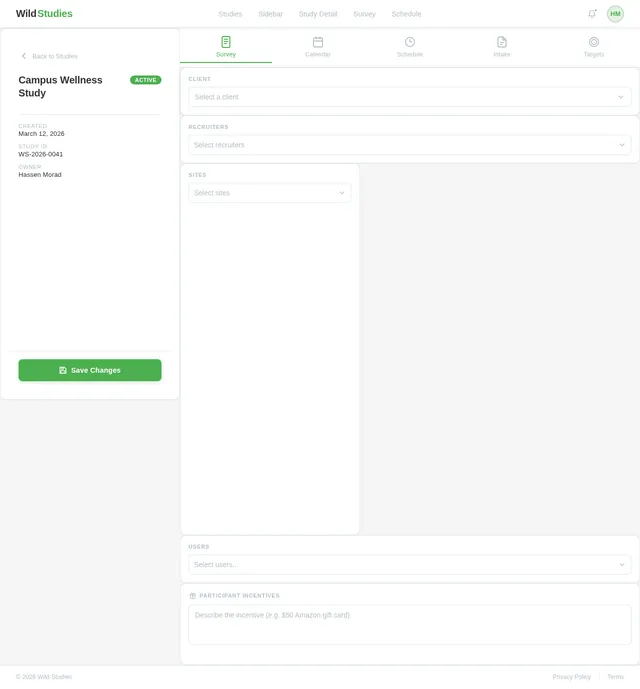
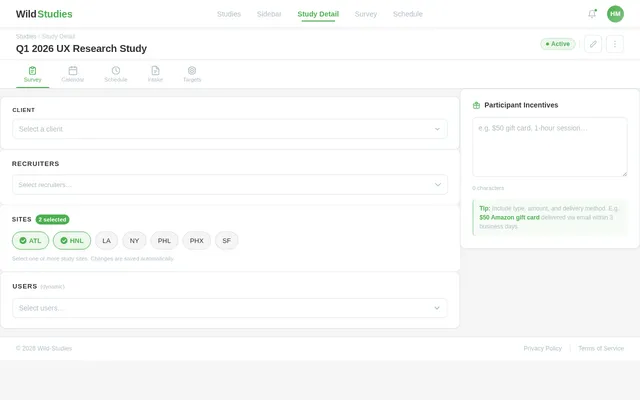
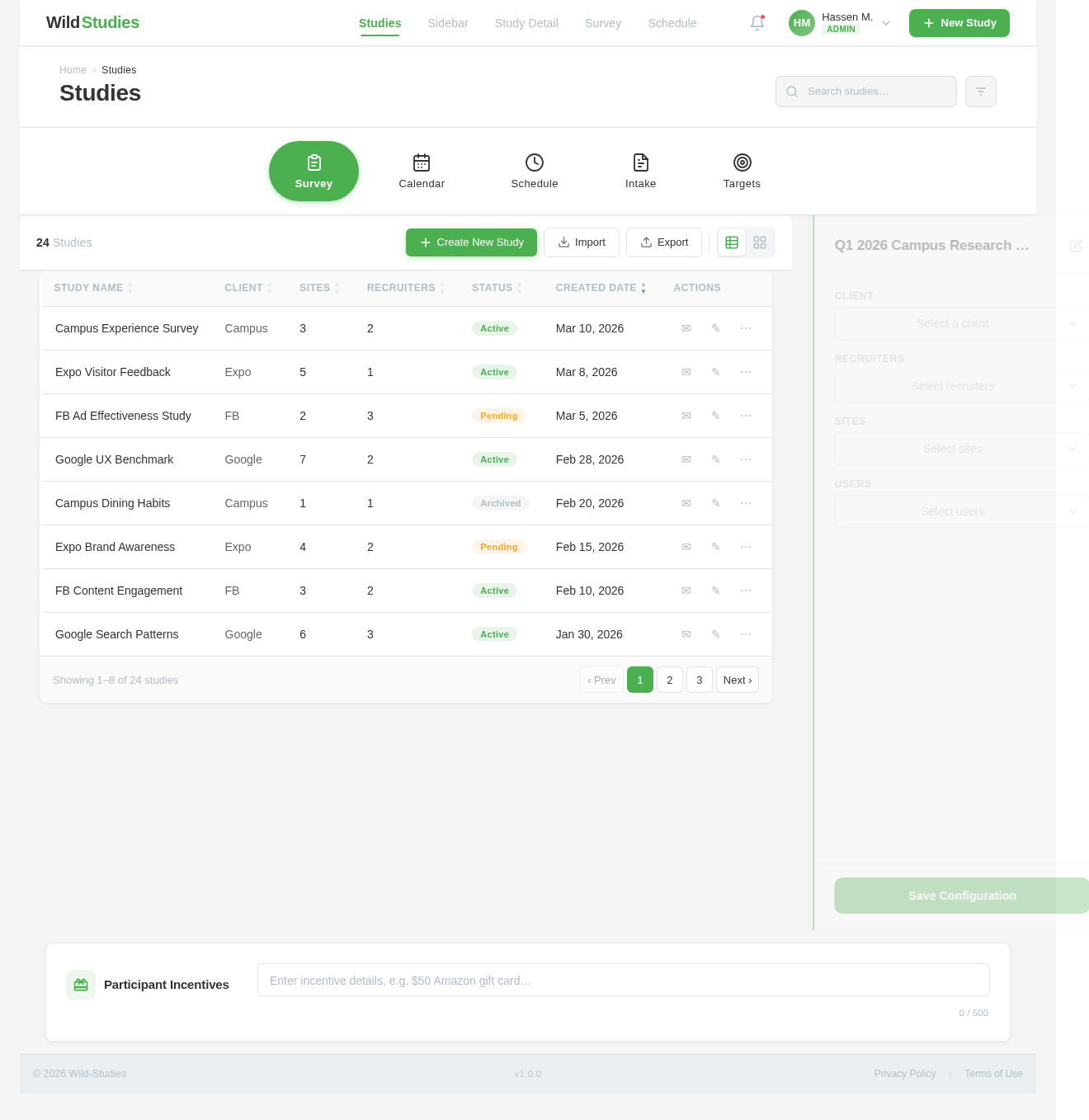
Here's a screenshot of the Studies page in my web app. It lists 4 studies with start and end dates and has a sidebar/drawer open, which displays dropdown options when the user clicks the + icon to create a new study. I want you to create a new screen with the same minimalist styling that displays screen elements when a user selects a specific existing study from this page. The top of the page should contain a horizontal menu with appropriate icons for: Survey, Calendar, Schedule, Intake, Targets. The main content of the page should be minimalist selection options for: Client, Recruiters, Sites, Users. Also add an area to specify participant incentive(s).
Comments (0)
Sign in to leave a comment
System Requirements
System Requirements Document (SRD)
Project Name: Wild-Studies
1. Introduction
The Wild-Studies project is a web application designed to streamline the management of studies, participants, and associated logistics. This document outlines the updated system requirements based on Hassen Morad's request to extend the functionality of the Studies page and introduce a new screen for managing study details. The minimalist design approach ensures usability and consistency across the application.
This SRD is tailored for the U.S. locale, considering timezone defaults (e.g., EST/PST), currency (USD), and user preferences for simplicity and efficiency.
2. System Overview
The Wild-Studies application provides tools for managing studies, participants, and associated logistics. The system enables users to create, view, and manage studies efficiently. The new screen will allow users to select an existing study and access detailed management options, including navigation menus, selection dropdowns, and participant incentives.
Key features include:
- A horizontal menu for intuitive navigation.
- Minimalist dropdowns for selecting Clients, Recruiters, Sites, and Users.
- A customizable text input for specifying participant incentives.
3. Functional Requirements
As User:
- I should be able to select an existing study from the Studies page to access detailed management options.
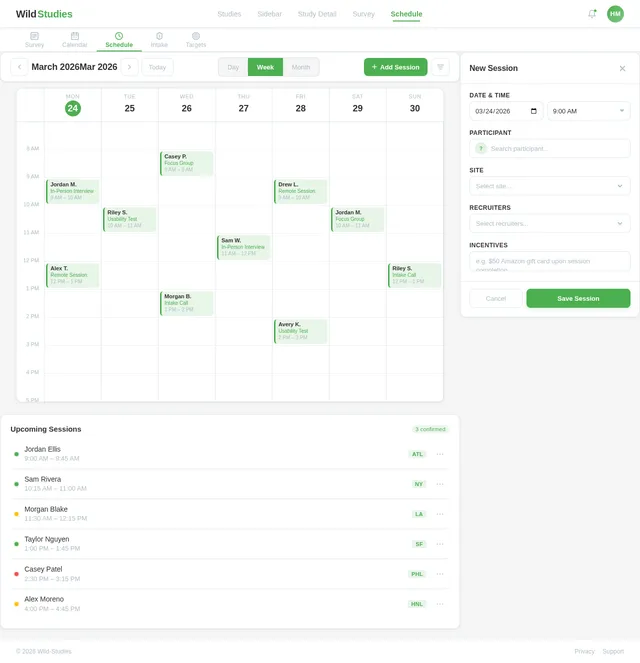
- I should see a horizontal menu at the top of the page with icons for Survey, Calendar, Schedule, Intake, and Targets.
- I should be able to single-select a Client from predefined options: Campus, Expo, FB, Google.
- I should be able to multi-select Recruiters from predefined options: MacConnell, Mavrix, Probe.
- I should be able to multi-select Sites from predefined options: ATL, HNL, LA, NY, PHL, PHX, SF.
- I should be able to multi-select Users from dynamically generated random names.
- I should be able to specify participant incentives using a customizable text input.
4. User Personas
1. Admin
- Responsible for managing studies, participants, and system settings.
- Has access to all features, including creating and editing studies, managing dropdown options, and configuring incentives.
2. User
- Can view and manage studies assigned to them.
- Can select Clients, Recruiters, Sites, and Users, and specify participant incentives.
5. Visuals Colors and Theme
Unique Color Palette for Wild-Studies:
The color palette reflects a minimalist yet professional aesthetic suitable for study management:
- Background:
#F5F5F5(Soft Gray) - Surface:
#FFFFFF(Pure White) - Text:
#333333(Dark Charcoal) - Accent:
#4CAF50(Fresh Green) - Muted Tones:
#B0BEC5(Light Steel Blue)
These colors ensure clarity, focus, and a clean interface for users.
6. Signature Design Concept
Concept: Interactive Study Dashboard with Dynamic Dropdowns
The landing page for managing study details will feature an Interactive Study Dashboard.
Key Features:
-
Horizontal Menu:
- Icons for Survey, Calendar, Schedule, Intake, and Targets will animate subtly when hovered over, with a ripple effect.
- Clicking an icon will smoothly transition the user to the corresponding section.
-
Dynamic Dropdowns:
- Dropdowns for Client, Recruiters, Sites, and Users will feature a minimalist design with a hover effect that highlights the selected option.
- Multi-select dropdowns will allow users to add or remove selections dynamically, with real-time visual feedback (e.g., checkmarks appearing next to selected items).
-
Participant Incentives Section:
- A text input field will expand slightly when clicked, with placeholder text fading out smoothly.
- Users can type or paste incentive details, with auto-save functionality for convenience.
Animations and Transitions:
- Dropdowns will slide open with a soft bounce effect.
- The page background will subtly shift between muted tones (
#F5F5F5to#B0BEC5) based on user interaction, creating a dynamic yet calming experience.
This design ensures the page is visually engaging while maintaining the minimalist aesthetic.
7. Non-Functional Requirements
- The system must support responsive design for desktop and mobile devices.
- Dropdowns must load predefined options dynamically and allow real-time updates.
- The page must maintain a load time of less than 2 seconds.
- All animations and transitions must be smooth and non-distracting.
8. Tech Stack
Frontend:
- React for Web
Backend:
- Python
- FastAPI
Database:
- MySQL (preferred) or MariaDB, using Alembic for migrations
AI Models:
- GPT 5.2 for user-friendly responses
AI Tools:
- LangChain
- LiteLLM for LLM routing
Local Orchestration:
- Docker
- Docker-Compose
Server-Side Orchestration:
- Kubernetes
9. Assumptions and Constraints
- The system assumes the user has access to a modern browser (Chrome, Firefox, Edge).
- Dropdown options for Client, Recruiters, and Sites are predefined and static.
- Random names for Users will be generated dynamically but will not persist unless saved by the user.
- Participant incentives are customizable via text input but do not support rich text formatting.
10. Glossary
- Client: The organization or entity sponsoring the study.
- Recruiters: Individuals or teams responsible for recruiting participants for the study.
- Sites: Physical or virtual locations where the study is conducted.
- Users: Individuals involved in managing or participating in the study.
- Participant Incentives: Rewards or compensation offered to study participants.
This document reflects the updated requirements for the Wild-Studies project, ensuring alignment with Hassen Morad's vision and user needs.
Studies
| Study Name▲▼ | Client▲▼ | Sites▲▼ | Recruiters▲▼ | Status▲▼ | Created Date▲▼ | Actions |
|---|---|---|---|---|---|---|
| Campus Experience Survey | Campus | 3 | 2 | Active | Mar 10, 2026 | |
| Expo Visitor Feedback | Expo | 5 | 1 | Active | Mar 8, 2026 | |
| FB Ad Effectiveness Study | FB | 2 | 3 | Pending | Mar 5, 2026 | |
| Google UX Benchmark | 7 | 2 | Active | Feb 28, 2026 | ||
| Campus Dining Habits | Campus | 1 | 1 | Archived | Feb 20, 2026 | |
| Expo Brand Awareness | Expo | 4 | 2 | Pending | Feb 15, 2026 | |
| FB Content Engagement | FB | 3 | 2 | Active | Feb 10, 2026 | |
| Google Search Patterns | 6 | 3 | Active | Jan 30, 2026 |
No comments yet. Be the first!