video-generation-ai
 satya v
You are a senior Full-Stack Engineer, AI Engineer, and Motion Designer. Build a production-ready web application using: - Next.js 15 - TypeScript - TailwindCSS - Remotion - OpenAI API (or equivalent LLM) - Unsplash/Pexels APIs (for stock visuals) - ElevenLabs/Google TTS (for narration) - FFmpeg - Shadcn UI APPLICATION GOAL Create an AI-powered video generation platform that generates engaging 30-40 second videos from user-provided text. WORKFLOW 1. User enters: - Topic or text prompt - Video style - Language - Voice type - Video format (9:16, 16:9, 1:1) 2. AI analyses the input and creates: - Video title - Story script - Scene breakdown - Voiceover script - Captions - Visual prompts 3. Split content into 6-10 scenes. 4. For each scene: - Generate image prompts - Fetch relevant stock images/videos - Create motion effects - Generate captions 5. Generate narration using TTS. 6. Using Remotion: - Create cinematic animations - Zoom effects - Pan effects - Ken Burns effect - Text animations - Scene transitions - Background music 7. Export final MP4 video. VIDEO REQUIREMENTS Duration: - 30-40 seconds Structure: - Hook (0-5 sec) - Main Content (5-30 sec) - Summary/CTA (30-40 sec) Each scene should contain: { id, duration, narration, caption, visualPrompt, transition, image/videoAsset } REMOTION REQUIREMENTS Create: 1. VideoComposition.tsx 2. SceneRenderer.tsx 3. CaptionRenderer.tsx 4. TransitionManager.tsx 5. ImageAnimator.tsx 6. AudioManager.tsx 7. RenderService.ts Use: - AbsoluteFill - Sequence - spring() - interpolate() - Audio - Img - Video - useCurrentFrame() - useVideoConfig() ANIMATION STYLES - Modern social media style - Instagram Reel style - TikTok style - Dynamic subtitles - Smooth transitions - Attention-grabbing opening CAPTIONS Generate: - Word-level captions - Highlight active words - Auto line breaks - Subtitle synchronization API DESIGN POST /api/generate-video Request: { "prompt": "Benefits of drinking water" } Response: { "title": "...", "script": "...", "scenes": [...], "audioUrl": "...", "videoUrl": "...", "duration": 35 } DATABASE Store: - Projects - Scripts - Generated assets - Render history - User settings PERFORMANCE - Queue-based rendering - Progress tracking - Error handling - Asset caching - Parallel asset downloads UI PAGES 1. Dashboard 2. Create Video 3. Projects 4. Render History 5. Settings CREATE COMPLETE SOURCE CODE INCLUDING: - Folder structure - Components - API routes - Remotion compositions - Database schema - Type definitions - Environment variables - FFmpeg integration - Docker setup - Deployment guide Output clean, scalable, production-ready code following modern software architecture principles. The platform should specialise in creating viral social-media videos for: - Sports - Cricket - Football - Tennis - NBA - Current Events - Finance - Motivation - Technology AI should automatically: 1. Research the topic. 2. Generate an engaging hook. 3. Create a 30-40 second storytelling script. 4. Select matching visuals. 5. Add dynamic subtitles. 6. Add background music. 7. Generate a vertical 1080x1920 video. 8. Optimise for Instagram Reels, YouTube Shorts and TikTok. Video quality should look similar to: - MagnatesMedia - Goalcast - ESPN social clips - Modern AI short-form content creators.


Comments (0)
Sign in to leave a comment
System Requirements
System Requirements Document for video-generation-ai
1. Introduction
video-generation-ai is an AI-powered short-form video generation platform. A user supplies a topic or text prompt together with a video style, language, voice type and video format, and the platform researches the topic, writes a hook and a 30–40 second storytelling script, splits it into 6–10 scenes, fetches matching stock visuals, generates narration with text-to-speech, and renders a finished MP4 with cinematic motion, dynamic word-level captions and background music — optimised for Instagram Reels, YouTube Shorts and TikTok.
The platform specialises in viral social-media videos across Sports, Cricket, Football, Tennis, NBA, Current Events, Finance, Motivation and Technology, and targets the visual quality of MagnatesMedia, Goalcast, ESPN social clips and modern AI short-form creators.
The audience is creators and social teams who need speed, control and a screen that moves like the output they are producing.
2. System Overview
2a. Product Interpretation and Delivery Boundary
The product is a first-party web application. All authoring, project management, render tracking and settings live in the application's own UI; the AI model, stock-media and text-to-speech providers are called by the application's backend and are never the user's working surface.
Because projects, scripts, generated assets, render history and user settings are durable, user-owned records, the application owns identity: a new user enrolls through Sign Up, a returning user verifies through Login, and both entry surfaces are reachable anonymously. Every other destination requires a signed-in session. There is no differentiated permission model — every signed-in user sees and manages their own projects, renders and settings.
Rendering is asynchronous. Submitting a generation request enqueues a render job; the user watches progress on Create Video, and the finished MP4 becomes available on Project Details for playback and download. Background automation (research, script generation, asset fetching, TTS, Remotion render, FFmpeg export) is system work, but every human-facing step — entering inputs, watching progress, recovering from an error, reviewing the result, downloading — has a first-party owner.
Current scope is the full generation lifecycle described above. Nothing in the accepted requirements is deferred to a future horizon.
2b. Source Content Inventory
Not applicable — no reference directive declares content_source.
2c. Page Content and Component Coverage
Landing
- Information/state: anonymous public entry. Explains the platform, its specialisation topics (Sports, Cricket, Football, Tennis, NBA, Current Events, Finance, Motivation, Technology), the 30–40 second output, the 9:16 / 16:9 / 1:1 formats, and the Reels/Shorts/TikTok optimisation. No user data.
- Primary actions: go to Sign Up; go to Login.
- Supporting actions: none beyond navigation into the two identity surfaces.
- Domain entities: none persisted.
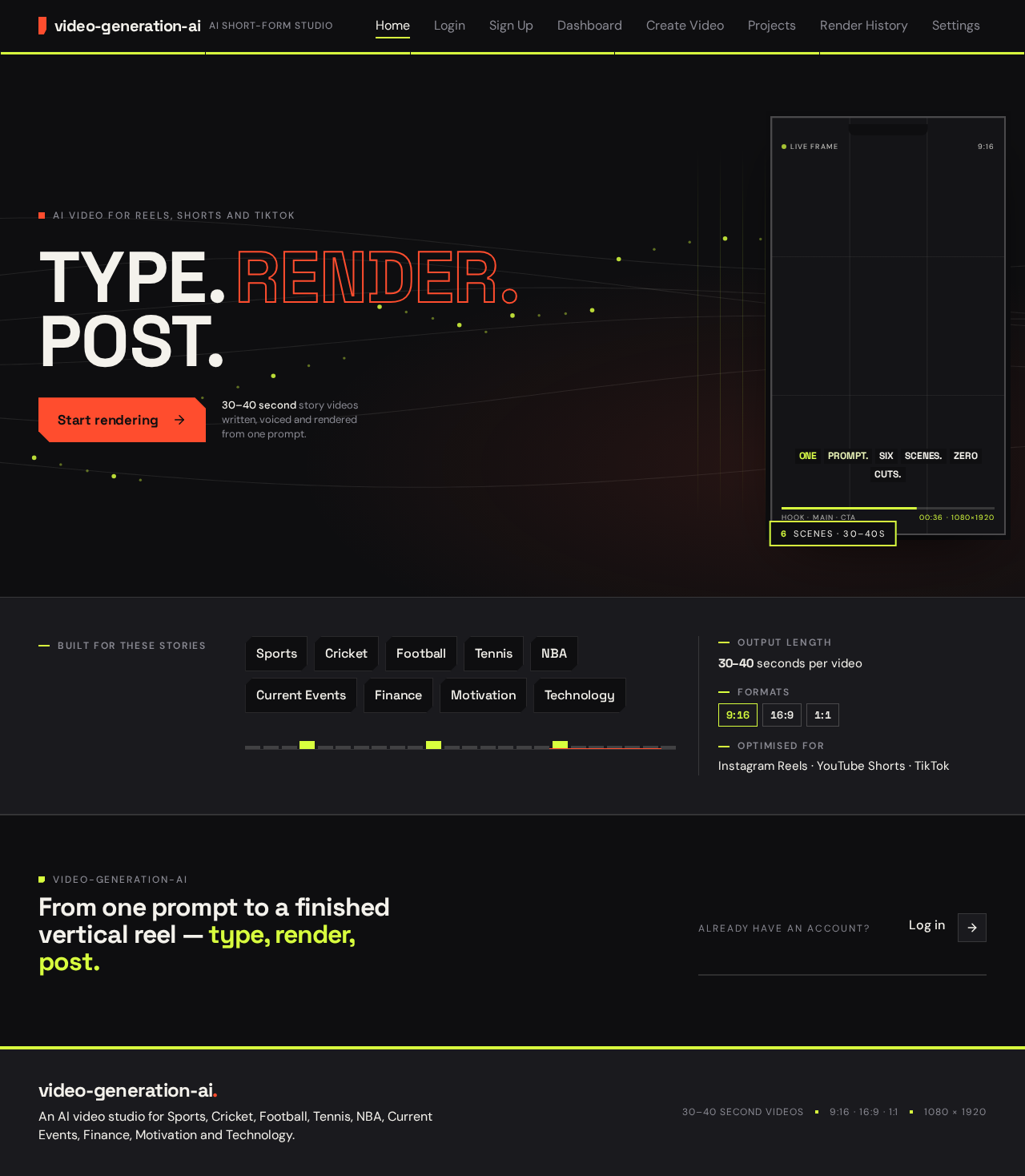
- Component responsibilities: full-bleed charcoal stage with the oversized kinetic headline "TYPE. RENDER. POST."; floating 9:16 phone frame with a live motion clip; pinned orange render call-to-action that routes to Sign Up; topic strip listing the nine specialisations.
- States: loading — static shell, no data fetch; empty — not applicable; success — static render; error — not applicable; recovery — not applicable.
Login
- Information/state: anonymous. Email and password fields; inline validation and authentication error message.
- Primary actions: submit credentials to establish a session and continue to Dashboard.
- Supporting actions: link to Sign Up for a user without an account.
- Domain entities: user identity.
- Component responsibilities: credential form, submit control, error region, cross-link.
- States: loading — submit disabled with pending indicator; empty — blank fields; success — redirect to Dashboard; error — invalid credentials shown inline with fields preserved; recovery — retry submission.
Sign Up
- Information/state: anonymous. Enrollment fields for a new account; inline validation.
- Primary actions: create the account and continue to Dashboard.
- Supporting actions: link to Login for an existing user.
- Domain entities: user identity.
- Component responsibilities: enrollment form, submit control, validation and error region, cross-link.
- States: loading — submit disabled with pending indicator; empty — blank fields; success — session established, redirect to Dashboard; error — validation or provider failure shown inline with entered values preserved; recovery — correct and resubmit.
Dashboard
- Information/state: signed-in. Summary of the user's projects and current render status; entry point to the main work.
- Primary actions: start a new video via Create Video; open a project via Project Details.
- Supporting actions: jump to Projects, Render History, Settings.
- Domain entities: projects, render jobs and their status.
- Component responsibilities: project summary list with status chips, render-status strip, primary "Create Video" control, navigation.
- States: loading — skeleton rows; empty — prompt to create the first video; success — populated summaries; error — inline retry for the summary fetch; recovery — retry.
Create Video
- Information/state: signed-in. Input form for topic or text prompt, video style, language, voice type and video format (9:16, 16:9, 1:1); live render progress for the submitted job; error state for failed renders.
- Primary actions: submit the generation request; watch queue and render progress; retry a failed render.
- Supporting actions: open the resulting Project Details once the MP4 is ready.
- Domain entities: generation request, project, script, scenes, generated assets, render job and progress.
- Component responsibilities: prompt field, style selector, language selector, voice-type selector, format selector, submit control, scene-chip timeline that snaps in when the AI returns the script, lime progress rule across the stage, 9:16 preview frame, error panel with retry.
- States: loading — submit disabled while the request is in flight; empty — form defaults, no job; success — progress advances through queue, asset fetch, narration and render, then a link to Project Details; error — failure reason shown with retry; recovery — resubmit or retry the failed job.
Projects
- Information/state: signed-in. The user's saved projects with their scripts and generated assets.
- Primary actions: open a project in Project Details.
- Supporting actions: filter or scan the project list.
- Domain entities: projects, scripts, generated assets.
- Component responsibilities: project list with title, topic, format and status; per-project asset summary; navigation to detail.
- States: loading — skeleton rows; empty — prompt to create the first video; success — populated list; error — inline retry; recovery — retry.
Project Details
- Information/state: signed-in. One project's title, story script, scene breakdown (each scene's id, duration, narration, caption, visualPrompt, transition and image/video asset), narration audio and final video.
- Primary actions: play the final video; download the MP4.
- Supporting actions: play the narration audio; inspect individual scenes and their assets.
- Domain entities: project, script, scenes, generated assets, render output.
- Component responsibilities: title and script panel, scene list with per-scene fields and thumbnails of the real fetched assets, audio player, video player, download control.
- States: loading — skeleton panels; empty — not applicable for an existing project; success — full detail with playable video; error — missing or failed render shown with a link back to Create Video to retry; recovery — retry from Create Video.
Render History
- Information/state: signed-in. The user's render history: each render's project, status, timing and outcome.
- Primary actions: review past renders and their outcomes.
- Supporting actions: open the related Project Details.
- Domain entities: render jobs, render history records, projects.
- Component responsibilities: chronological render table with tabular numbers, status chips, links to project detail.
- States: loading — skeleton rows; empty — no renders yet; success — populated history; error — inline retry; recovery — retry.
Settings
- Information/state: signed-in. The user's saved settings for repeated output.
- Primary actions: edit and save user settings.
- Supporting actions: none beyond saving.
- Domain entities: user settings.
- Component responsibilities: settings form, save control, saved confirmation.
- States: loading — skeleton form; empty — defaults; success — saved confirmation; error — save failure shown inline with values preserved; recovery — correct and resave.
3. Functional Requirements
FR-1 — Enter generation inputs (explicit) As a Video Creator I should enter a topic or text prompt, a video style, a language, a voice type and a video format (9:16, 16:9 or 1:1) on Create Video, so that the platform knows what to make.
- Trigger/input: the five input fields.
- Observable result: the form holds the values and the submit control becomes available.
- Access: signed-in.
- Failure/recovery: missing required input blocks submission with inline validation.
- Continuation: submission starts the generation request.
FR-2 — AI analyses the input (explicit) As a Video Creator I should have the AI analyse my input and produce a video title, story script, scene breakdown, voiceover script, captions and visual prompts, so that the video has authored content.
- Trigger/input: a submitted generation request.
- Observable result: the project is created with title, script, scene breakdown, voiceover script, captions and visual prompts.
- Access: signed-in; executed by the backend against the LLM provider.
- Failure/recovery: a provider failure surfaces on Create Video with a retry.
- Continuation: the scene breakdown feeds scene processing.
FR-3 — Split into 6–10 scenes (explicit) As a Video Creator I should have the content split into 6–10 scenes, so that the video has the required scene structure.
- Trigger/input: the generated script.
- Observable result: the project holds between 6 and 10 scenes.
- Access: signed-in; backend execution.
- Failure/recovery: a breakdown outside 6–10 is rejected and regenerated or surfaced as an error.
- Continuation: each scene is processed.
FR-4 — Per-scene asset and caption work (explicit) As a Video Creator I should have each scene's image prompt generated, relevant stock images or videos fetched, motion effects created and captions generated, so that every scene is visually and textually complete.
- Trigger/input: each scene in the breakdown.
- Observable result: each scene carries its image prompt, fetched asset, motion effect and caption.
- Access: signed-in; backend execution against Unsplash/Pexels.
- Failure/recovery: a failed asset fetch is retried; a persistent failure surfaces on Create Video.
- Continuation: scenes feed narration and rendering.
FR-5 — Scene record shape (explicit)
As a Video Creator I should have each scene contain id, duration, narration, caption, visualPrompt, transition and image/videoAsset, so that the scene data is complete and renderable.
- Trigger/input: scene generation.
- Observable result: every scene record carries all seven fields.
- Access: signed-in; backend execution.
- Failure/recovery: a scene missing a field is treated as a generation error and surfaced.
- Continuation: the records are consumed by the Remotion composition.
FR-6 — TTS narration (explicit) As a Video Creator I should have narration generated with text-to-speech in my chosen voice type and language, so that the video is voiced.
- Trigger/input: the voiceover script, voice type and language.
- Observable result: a narration audio asset is attached to the project and exposed as
audioUrl. - Access: signed-in; backend execution against ElevenLabs/Google TTS.
- Failure/recovery: a TTS failure surfaces on Create Video with a retry.
- Continuation: the audio is mixed into the render.
FR-7 — Remotion cinematic render (explicit) As a Video Creator I should have Remotion render cinematic animations — zoom, pan, Ken Burns, text animations, scene transitions and background music — so that the output looks like modern social video.
- Trigger/input: the project's scenes, assets and narration.
- Observable result: a composed video with the specified motion and music.
- Access: signed-in; backend execution.
- Failure/recovery: a render failure is recorded and surfaced with a retry.
- Continuation: the composition is exported.
FR-8 — MP4 export (explicit) As a Video Creator I should have the final video exported as an MP4 file, so that I can publish it.
- Trigger/input: the completed composition.
- Observable result: an MP4 asset attached to the project and exposed as
videoUrl. - Access: signed-in.
- Failure/recovery: an FFmpeg failure is recorded and surfaced with a retry.
- Continuation: the file is available on Project Details for playback and download.
FR-9 — Duration and structure (explicit) As a Video Creator I should get a 30–40 second video structured as Hook (0–5 sec), Main Content (5–30 sec) and Summary/CTA (30–40 sec), so that the pacing matches short-form expectations.
- Trigger/input: the generated script and scene durations.
- Observable result: the exported video's duration falls in 30–40 seconds and its structure follows the three segments.
- Access: signed-in.
- Failure/recovery: an out-of-range duration is treated as a generation error and surfaced.
- Continuation: the video is exported.
FR-10 — Word-level captions (explicit) As a Video Creator I should get word-level captions that highlight the active word, break lines automatically and stay synchronised with the subtitle, so that viewers can follow along.
- Trigger/input: the narration and caption text.
- Observable result: captions render word by word with the active word highlighted, auto line breaks and synchronisation.
- Access: signed-in.
- Failure/recovery: a caption timing failure is surfaced as a render error.
- Continuation: captions are burned into the export.
FR-11 — Generation API (explicit)
As a Video Creator I should have POST /api/generate-video accept { "prompt": "..." } and return { title, script, scenes, audioUrl, videoUrl, duration }, so that generation is available through a defined contract.
- Trigger/input: the request body.
- Observable result: the documented response shape.
- Access: signed-in.
- Failure/recovery: an error response carries the failure reason.
- Continuation: the client uses the response to show progress and results.
FR-12 — Durable storage (explicit) As a Content Producer I should have projects, scripts, generated assets, render history and user settings stored durably, so that work survives across sessions.
- Trigger/input: any generation, edit or render.
- Observable result: records persist and reappear on Projects, Render History and Settings.
- Access: signed-in.
- Failure/recovery: a storage failure surfaces inline with a retry.
- Continuation: the user resumes from the persisted state.
FR-13 — Queue, progress, errors, caching, parallel downloads (explicit) As a Video Creator I should have rendering run through a queue with progress tracking, error handling, asset caching and parallel asset downloads, so that renders are reliable and fast.
- Trigger/input: a submitted generation request.
- Observable result: progress advances on Create Video; cached assets are reused; downloads run in parallel.
- Access: signed-in; backend execution.
- Failure/recovery: errors are recorded and surfaced with a retry.
- Continuation: the render completes and the MP4 becomes available.
FR-14 — Topic specialisation (explicit) As a Video Creator I should be able to make videos on Sports, Cricket, Football, Tennis, NBA, Current Events, Finance, Motivation and Technology, so that the platform fits my niche.
- Trigger/input: a prompt in one of these topics.
- Observable result: the generated content is tailored to the topic.
- Access: signed-in.
- Failure/recovery: an unsupported topic is still accepted as a general prompt.
- Continuation: normal generation.
FR-15 — Research, hook and storytelling script (explicit) As a Video Creator I should have the AI research the topic, write an engaging hook and create a 30–40 second storytelling script, so that the video opens strong and holds attention.
- Trigger/input: the submitted prompt.
- Observable result: the project holds research-informed content, a hook and a script within the duration target.
- Access: signed-in; backend execution.
- Failure/recovery: a research or generation failure surfaces with a retry.
- Continuation: the script feeds scene splitting.
FR-16 — Visual selection, dynamic subtitles, background music (explicit) As a Video Creator I should have the AI select matching visuals, add dynamic subtitles and add background music, so that the video is complete without manual editing.
- Trigger/input: the script and scenes.
- Observable result: matched visuals, dynamic subtitles and a music track are part of the render.
- Access: signed-in; backend execution.
- Failure/recovery: a missing visual or music asset is surfaced as a render error with a retry.
- Continuation: the render proceeds.
FR-17 — Vertical 1080x1920 and social optimisation (explicit) As a Video Creator I should get a vertical 1080x1920 video optimised for Instagram Reels, YouTube Shorts and TikTok, so that it publishes cleanly on those platforms.
- Trigger/input: the 9:16 format selection.
- Observable result: the exported video is 1080x1920 and framed for the three platforms.
- Access: signed-in.
- Failure/recovery: a dimension mismatch is treated as a render error.
- Continuation: the file is available for download.
FR-18 — Social animation style (explicit) As a Video Creator I should get a modern social-media, Instagram Reel and TikTok style with dynamic subtitles, smooth transitions and an attention-grabbing opening, so that the video feels native to short-form feeds.
- Trigger/input: the render.
- Observable result: the composition uses the specified style and motion.
- Access: signed-in.
- Failure/recovery: a style failure is surfaced as a render error.
- Continuation: the export carries the style.
FR-19 — Self-service enrollment and returning verification (required_inference) As a Video Creator I should be able to enroll on Sign Up or verify on Login before reaching protected work, so that my projects, renders and settings stay mine.
- Trigger/input: first visit or return visit.
- Observable result: a session is established and the user reaches Dashboard.
- Access: anonymous entry on both surfaces.
- Failure/recovery: invalid credentials or validation errors are shown inline with values preserved.
- Continuation: the user proceeds to protected destinations.
FR-20 — Submit inputs to start a render (required_inference) As a Video Creator I should submit my prompt, style, language, voice type and format on Create Video to start a render, so that the job enters the queue.
- Trigger/input: the five inputs and the submit control.
- Observable result: a render job is enqueued and progress appears.
- Access: signed-in.
- Failure/recovery: submission errors are shown inline with a retry.
- Continuation: progress tracking.
FR-21 — Queue completion before download (required_inference) As a Video Creator I should see the render queue complete before the MP4 download becomes available, so that I never download an incomplete file.
- Trigger/input: the enqueued job.
- Observable result: the download control on Project Details enables only after the MP4 exists.
- Access: signed-in.
- Failure/recovery: a failed job leaves the download disabled and offers a retry.
- Continuation: download and publish.
4. User Personas
Video Creator
- Product context: a creator making short vertical videos for sports, finance, motivation and current-events audiences. They arrive with a topic in mind and want a finished, publishable clip without editing software.
- Primary goal: turn a prompt into a 30–40 second MP4 that looks like MagnatesMedia, Goalcast or ESPN social clips.
- Distinct accepted responsibilities: enters the topic or text prompt, video style, language, voice type and format; submits the generation request; watches queue and render progress; recovers from a failed render; opens the finished project and downloads the MP4.
- Relevant inputs or decisions: the five generation inputs; whether to retry after an error; which format (9:16, 16:9, 1:1) fits the target platform.
- Interactions with other accepted participants: none directly — the Video Creator's work is solo; the Content Producer later reviews the same projects.
- Observable success: a playable, downloadable MP4 of 30–40 seconds with word-level captions, narration and music, in the chosen format.
Content Producer
- Product context: a producer overseeing many videos across the nine specialisation topics. They care about consistency, throughput and what has already been rendered.
- Primary goal: review saved projects, scripts and generated assets across many videos, check render history and tune settings for repeated output.
- Distinct accepted responsibilities: browses Projects and opens Project Details to inspect scripts, scenes and assets; reviews Render History for outcomes; edits Settings for repeated output.
- Relevant inputs or decisions: which project to inspect; whether a render outcome needs a retry; which settings to adjust.
- Interactions with other accepted participants: reviews projects the Video Creator produced; may send a failed render back to Create Video for retry.
- Observable success: a clear view of every project and render outcome, and settings that persist across sessions.
5. Core User Flows
Flow A — First-time Video Creator enrolls and makes a video
- The Video Creator opens Landing anonymously and reads the platform's topics, formats and 30–40 second output.
- They choose the render call-to-action and arrive at Sign Up.
- They complete enrollment; on success a session is established and they land on Dashboard.
- Dashboard shows an empty state prompting the first video; they choose Create Video.
- On Create Video they enter a topic or text prompt, pick a video style, language, voice type and format (9:16, 16:9 or 1:1), and submit.
- The backend enqueues the render job; the lime progress rule advances across the stage as the queue, asset fetch, narration and render steps complete, and scene chips snap into the timeline as the AI returns the script.
- On success the page links to Project Details; the Video Creator opens it, plays the MP4, and downloads it.
- Failure/recovery: if any step fails, Create Video shows the reason with a retry; the user retries and progress resumes.
- Continuation: the project appears on Projects and the render on Render History.
Flow B — Returning Video Creator verifies and renders again
- The Video Creator opens Login anonymously and submits credentials.
- On success they land on Dashboard, which shows their existing projects and current render status.
- They choose Create Video, enter new inputs and submit.
- Progress advances; on completion they open Project Details and download the MP4.
- Failure/recovery: invalid credentials are shown inline with fields preserved; a failed render offers a retry.
Flow C — Content Producer reviews projects and render history
- The Content Producer signs in via Login and lands on Dashboard.
- They open Projects and scan saved projects with their scripts and generated assets.
- They open a project in Project Details to inspect the title, script, scene breakdown, narration audio and final video.
- They open Render History to review past renders and their outcomes.
- Failure/recovery: if a project's render failed, Project Details shows the failure with a link back to Create Video to retry.
- Continuation: they return to Projects or Dashboard.
Flow D — Content Producer adjusts settings
- The Content Producer opens Settings from the signed-in navigation.
- They edit their user settings and save.
- A saved confirmation appears; the settings persist and apply to future output.
- Failure/recovery: a save failure is shown inline with values preserved; they correct and resave.
Flow E — System generation and render (background)
- On submission, the backend calls the LLM to research the topic, write the hook and a 30–40 second storytelling script, and produce the title, scene breakdown, voiceover script, captions and visual prompts.
- The content is split into 6–10 scenes, each carrying
id,duration,narration,caption,visualPrompt,transitionandimage/videoAsset. - For each scene the backend generates an image prompt, fetches stock images or videos from Unsplash/Pexels in parallel, caches assets, and creates motion effects and captions.
- TTS generates narration in the chosen voice and language.
- Remotion composes the video with zoom, pan, Ken Burns, text animations, scene transitions and background music, using
AbsoluteFill,Sequence,spring(),interpolate(),Audio,Img,Video,useCurrentFrame()anduseVideoConfig()acrossVideoComposition.tsx,SceneRenderer.tsx,CaptionRenderer.tsx,TransitionManager.tsx,ImageAnimator.tsx,AudioManager.tsxandRenderService.ts. - FFmpeg exports the MP4; the result is stored and exposed as
videoUrlwithaudioUrlandduration. - Progress is tracked throughout; errors are recorded and surfaced to the user's Create Video view.
6. Visuals Colors and Theme
Following the Yugo Nakamura kinetic-frames direction.
- Mode: dark.
- Colours: background
#0E0E10; surface#1A1A1E; text#F4F2EC; primary#FF4D2E; accent#D8FF3E; muted#8A8A93. Charcoal ground holds roughly 80% of each screen; signal orange marks the render action and active states; acid lime marks progress and live frames; text stays#F4F2ECon both grounds. - Typography: headings Space Grotesk at 700 with tracking
-0.03em, sentence case; body DM Sans; scale ratio 1.25; displayclamp(40px, 7vw, 96px); H1 48px; H2 32px; body 16px; label 12px uppercase. - Shape language: flat rectangles and hard edges; a 2px lime outline marks active panels; frame chips are square with clipped corner cuts.
- Layout: full-width stage at the top, then a two-column control grid; the 9:16 preview sits in a fixed frame at the right; data rows use tabular numbers.
- Imagery: generative line and dot fields from scene timing data; no stock photos in the UI chrome; scene thumbnails show the real fetched assets.
- Readability: headlines, wordmarks, labels, numbers, card text and controls stay whole inside the viewport and their container at 375px, 768px and 1280px, wrapping or scaling with
clamp(...); imagery and decoration may crop, bleed, rotate or overlap but never cover readable text or controls.
7. Signature Design Concept
The public entry is a full-bleed charcoal stage holding one oversized line — "TYPE. RENDER. POST." — set in Space Grotesk at 96px. Each word reacts to the cursor and shifts on its own axis, splitting and sliding apart as the pointer moves near it. A 9:16 phone frame floats at the right edge, tilting with the pointer, showing a live motion clip. The orange render button pins under the headline and routes to Sign Up. A lime progress rule can sweep across the top of the stage as a preview of the render experience. The concept recomposes only accepted content — the headline, the format preview, the render call-to-action and the topic strip — and introduces no new behaviour.
8. Interaction Model & Motion Direction
Interaction Model: Animated Motion Tempo: cinematic Hero Dimensionality: layered_2d
Landing Hero Motion Brief
- Focal subject: the oversized kinetic headline "TYPE. RENDER. POST." on the charcoal stage, with the floating 9:16 phone frame at the right edge.
- Input → transformation → outcome thesis: cursor proximity to a word → that word splits and shifts on its own axis while the phone frame tilts with the pointer → the headline settles and the orange render call-to-action remains pinned and legible.
- Motion vocabulary: cursor-reactive type, elastic panel shifts, spring-physics scene chips, a lime progress rule, active caption words flipping to lime on a charcoal tile.
- Composed first frame: charcoal ground, headline at 96px, phone frame at the right edge with a live clip, orange button pinned under the headline, topic strip below.
- Reduced-motion state: all motion stops; the headline, phone frame, button and topic strip render in a static, fully readable arrangement.
9. Non-Functional Requirements
- Duration: every video is 30–40 seconds (explicit).
- Structure: Hook (0–5 sec), Main Content (5–30 sec), Summary/CTA (30–40 sec) (explicit).
- Scene count: 6–10 scenes per video (explicit).
- Formats: 9:16, 16:9 and 1:1; the vertical output is 1080x1920 (explicit).
- Performance: queue-based rendering, progress tracking, error handling, asset caching and parallel asset downloads (explicit).
- Accessibility: all motion stops under
prefers-reduced-motion; readable text and controls stay whole at 375px, 768px and 1280px (explicit, from the creative direction). - Identity: application-owned; anonymous entry on Landing, Login and Sign Up; all other destinations require a session (required_inference).
- Durability: projects, scripts, generated assets, render history and user settings persist (explicit).
10. Tech Stack
- Frontend: Next.js 15, TypeScript, TailwindCSS, Shadcn UI (explicit).
- Video: Remotion with
VideoComposition.tsx,SceneRenderer.tsx,CaptionRenderer.tsx,TransitionManager.tsx,ImageAnimator.tsx,AudioManager.tsxandRenderService.ts, usingAbsoluteFill,Sequence,spring(),interpolate(),Audio,Img,Video,useCurrentFrame()anduseVideoConfig()(explicit). - Export: FFmpeg (explicit).
- AI: OpenAI API or equivalent LLM, routed through the provisioned LiteLLM gateway (explicit; gateway from the scaffold inventory).
- Stock media: Unsplash/Pexels APIs (explicit).
- TTS: ElevenLabs/Google TTS (explicit).
- Backend: shared FastAPI process for application APIs and domain modules (scaffold inventory).
- Storage: MariaDB for application-owned persistent data; PostgreSQL supporting LiteLLM, separate from application-owned storage (scaffold inventory).
- Queue and cache: Redis for the accepted queue, caching and coordination need (scaffold inventory; matches the explicit queue, caching and progress requirements).
- Deployment: Docker setup and deployment guide (explicit).
11. Assumptions and Constraints
- The five generation inputs are required before submission; the exact validation rules are not specified and are treated as basic defaults.
- The
POST /api/generate-videocontract accepts{ "prompt": "..." }; the additional inputs are carried alongside it as the accepted workflow requires. - Every signed-in user sees only their own projects, renders and settings; no differentiated permission model is established by the source.
- Background music is selected by the system; the source does not specify a music library.
- The nine specialisation topics guide generation but do not restrict prompts.
- The creative direction's palette, fonts and motion are authoritative for the UI; explicit user technology choices take precedence over any catalogue default.
12. Glossary
- Scene: one segment of the video carrying
id,duration,narration,caption,visualPrompt,transitionandimage/videoAsset. - Hook: the opening 0–5 second segment.
- Summary/CTA: the closing 30–40 second segment.
- Ken Burns effect: slow zoom and pan applied to a still image.
- Word-level caption: a caption rendered word by word with the active word highlighted.
- Render job: the queued unit of work that produces an MP4.
- Render history: the durable record of past render jobs and their outcomes.
- LiteLLM gateway: the provisioned service that routes the backend's model-provider calls.
AI video for Reels, Shorts and TikTok
30–40 second story videos written, voiced and rendered from one prompt.
Built for these stories
From one prompt to a finished vertical reel — type, render, post.
AI video for Reels, Shorts and TikTok
30–40 second story videos written, voiced and rendered from one prompt.
Built for these stories
From one prompt to a finished vertical reel — type, render, post.
No comments yet. Be the first!