video-download
 Raj Sam
create chrome extention which can download any video playing with download button


Comments (0)
Sign in to leave a comment
Project Tasks
87 tasksGenerate system requirement document
Generate personas & user flows
Architecture
Workspace task plan
Create flow for Viewer
Landing
Popup
Landing / Kinetic Hero
Landing / Button Schematic
Landing / Popup Preview
Landing / Install
Landing / Navigation
Landing / Footer
Navigation
Footer
Fix Landing: Hero CTA placement does not match the explicit direction: it is below the full headline…
Fix Landing: The primary “Get the extension” action links to () instead of leading to the extension…
Fix Landing review findings: Hero CTA placement does not match the explicit direction… (+1 more)
Fix Landing review findings: Hero CTA placement does not match the explicit direction… (+1 more)
Popup / Navigation Slot
Popup / Download Panel
Popup / Footer Slot
Popup / State Guide
Fix Popup: The state-guide description breaks a word mid-word on mobile in (, , ).
Fix Popup review finding: The state-guide description breaks a word mid-word on…
Create frontend_modules diagram
Create sequence diagram
Generate system requirement document
Update Viewer flow
Update Landing
Update Popup
Update Video Download — Download Request Flow
Update Video Download — Frontend Modules
Update Implementation task plan
Generate system requirement document
Update Viewer flow
Update Landing
Update Popup
Update Video Download — Download Request Flow
Update Video Download — Frontend Modules
Update Implementation task plan
Generate system requirement document
Update Viewer flow
Update Landing
Update Popup
Update Video Download — Download Request Flow
Update Video Download — Frontend Modules
Update Implementation task plan
Generate system requirement document
Update Viewer flow
Update Landing
Update Popup
Update Video Download — Download Request Flow
Update Video Download — Frontend Modules
Update Implementation task plan
Generate system requirement document
Update Viewer flow
Update Landing
Update Popup
Update Video Download — Download Request Flow
Update Video Download — Frontend Modules
Update Implementation task plan
Generate system requirement document
Update Viewer flow
Update Landing
Update Popup
Update Video Download — Download Request Flow
Update Video Download — Frontend Modules
Update Implementation task plan
Resolve pasted page URLs to a media stream URL via the backend
Install the Chrome extension and retry install when unavailable
Download a playing video or pasted direct media file URL through Chrome
Popup resolves the playing video and shows specific failure states
Injected on-page button downloads the playing video via Chrome
Download button appears on playing videos and saves through Chrome
Popup detects the active tab's playing video and shows the empty state
Detect videos dynamically and surface specific resolution failures
Pasted page URLs resolve through the backend and download via Chrome
Download button on playing videos saves through Chrome's save dialog
Ordered source resolution and URL classification across extension surfaces
Load the unpacked extension in Chrome with Developer mode
Pasted page URL answered with the no-resolver reason and alternatives
Install the unpacked extension in Chrome
Background service worker turns download requests into Chrome downloads
Backend resolver returns a media URL or a specific failure reason
Wire Landing page URL field, install CTA, and status line to live behavior
Wire Popup to live video detection, download, and fallback states
video-download
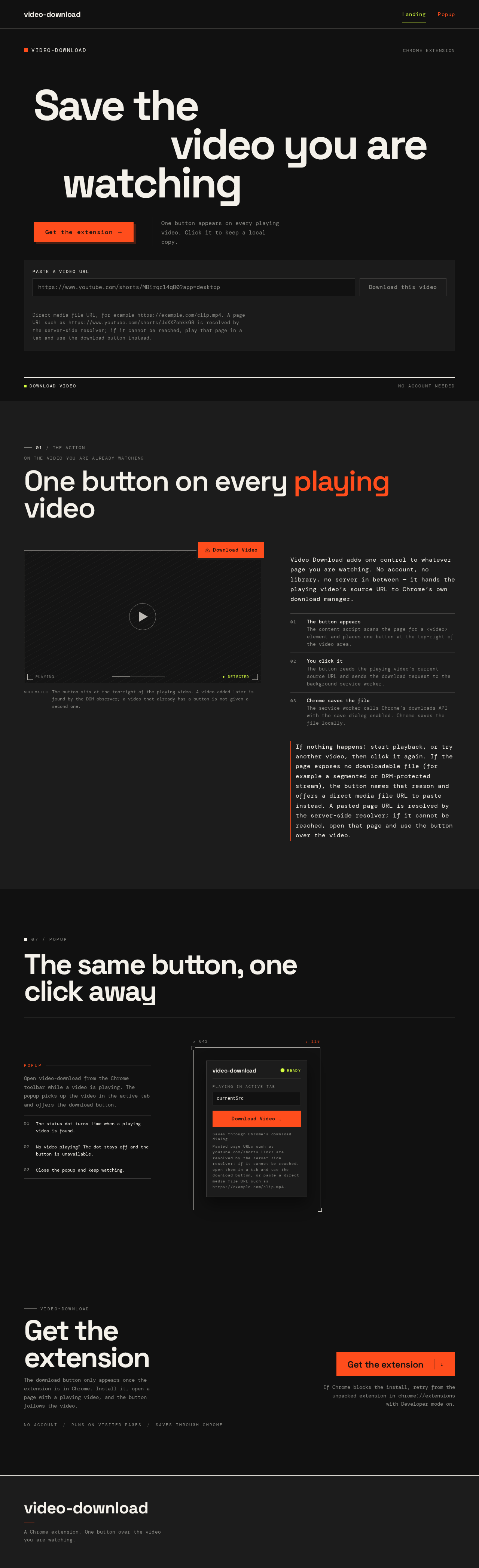
Save thevideo you arewatching
One button appears on every playing video. Click it to keep a local copy.
Direct media file URL, for example https://example.com/clip.mp4. A page URL such as https://www.youtube.com/shorts/JxXXZohkkG8 is resolved by the server-side resolver; if it cannot be reached, play that page in a tab and use the download button instead.
The same button, one click away
currentSrcSaves through Chrome's download dialog.
Pasted page URLs such as youtube.com/shorts links are resolved by the server-side resolver; if it cannot be reached, open them in a tab and use the download button, or paste a direct media file URL such as https://example.com/clip.mp4.
Open video-download from the Chrome toolbar while a video is playing. The popup picks up the video in the active tab and offers the download button.
- 01The status dot turns lime when a playing video is found.
- 02No video playing? The dot stays off and the button is unavailable.
- 03Close the popup and keep watching.
video-download
Get theextension
The download button only appears once the extension is in Chrome. Install it, open a page with a playing video, and the button follows the video.
If Chrome blocks the install, retry from the unpacked extension in chrome://extensions with Developer mode on.
video-download
Save thevideo you arewatching
One button appears on every playing video. Click it to keep a local copy.
Direct media file URL, for example https://example.com/clip.mp4. A page URL such as https://www.youtube.com/shorts/JxXXZohkkG8 is resolved by the server-side resolver; if it cannot be reached, play that page in a tab and use the download button instead.
The same button, one click away
currentSrcSaves through Chrome's download dialog.
Pasted page URLs such as youtube.com/shorts links are resolved by the server-side resolver; if it cannot be reached, open them in a tab and use the download button, or paste a direct media file URL such as https://example.com/clip.mp4.
Open video-download from the Chrome toolbar while a video is playing. The popup picks up the video in the active tab and offers the download button.
- 01The status dot turns lime when a playing video is found.
- 02No video playing? The dot stays off and the button is unavailable.
- 03Close the popup and keep watching.
video-download
Get theextension
The download button only appears once the extension is in Chrome. Install it, open a page with a playing video, and the button follows the video.
If Chrome blocks the install, retry from the unpacked extension in chrome://extensions with Developer mode on.
No comments yet. Be the first!