video-download
 Raj Sam
create chrome extention which can download any video playing with download button


Comments (0)
Sign in to leave a comment
Architecture
No Services Diagrams Yet
video-download
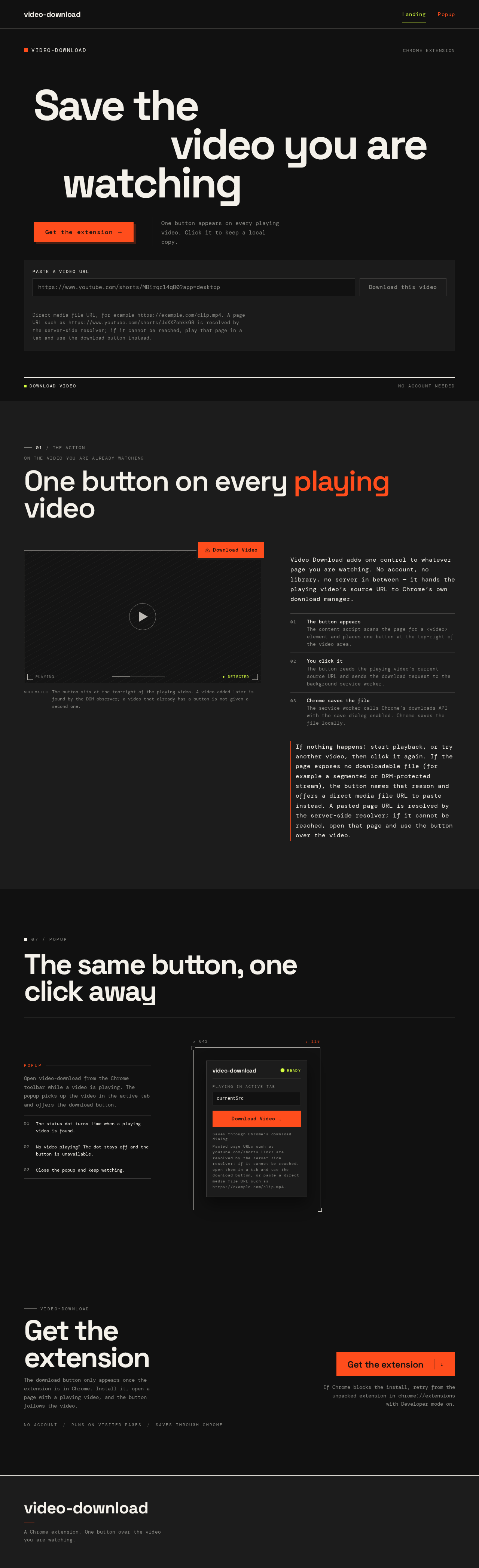
Save thevideo you arewatching
One button appears on every playing video. Click it to keep a local copy.
Direct media file URL, for example https://example.com/clip.mp4. A page URL such as https://www.youtube.com/shorts/JxXXZohkkG8 is resolved by the server-side resolver; if it cannot be reached, play that page in a tab and use the download button instead.
The same button, one click away
currentSrcSaves through Chrome's download dialog.
Pasted page URLs such as youtube.com/shorts links are resolved by the server-side resolver; if it cannot be reached, open them in a tab and use the download button, or paste a direct media file URL such as https://example.com/clip.mp4.
Open video-download from the Chrome toolbar while a video is playing. The popup picks up the video in the active tab and offers the download button.
- 01The status dot turns lime when a playing video is found.
- 02No video playing? The dot stays off and the button is unavailable.
- 03Close the popup and keep watching.
video-download
Get theextension
The download button only appears once the extension is in Chrome. Install it, open a page with a playing video, and the button follows the video.
If Chrome blocks the install, retry from the unpacked extension in chrome://extensions with Developer mode on.
video-download
Save thevideo you arewatching
One button appears on every playing video. Click it to keep a local copy.
Direct media file URL, for example https://example.com/clip.mp4. A page URL such as https://www.youtube.com/shorts/JxXXZohkkG8 is resolved by the server-side resolver; if it cannot be reached, play that page in a tab and use the download button instead.
The same button, one click away
currentSrcSaves through Chrome's download dialog.
Pasted page URLs such as youtube.com/shorts links are resolved by the server-side resolver; if it cannot be reached, open them in a tab and use the download button, or paste a direct media file URL such as https://example.com/clip.mp4.
Open video-download from the Chrome toolbar while a video is playing. The popup picks up the video in the active tab and offers the download button.
- 01The status dot turns lime when a playing video is found.
- 02No video playing? The dot stays off and the button is unavailable.
- 03Close the popup and keep watching.
video-download
Get theextension
The download button only appears once the extension is in Chrome. Install it, open a page with a playing video, and the button follows the video.
If Chrome blocks the install, retry from the unpacked extension in chrome://extensions with Developer mode on.
No comments yet. Be the first!