venus-loading
 Gmail For adobe
Designing Load Management for Upper Helping delivery drivers load 100+ stops without confusion Overview Product: Upper Route Planner Company: Space-O Technologies Role: UX/UI Designer (end-to-end) Platform: Driver mobile app + Admin dashboard Status: Live What is Upper? Upper is a route planning tool used by delivery businesses. Admins plan and assign routes Drivers receive routes on their phone The app guides navigation and captures proof of delivery This part worked well. But one critical step was missing: What happens before the driver starts driving — loading the vehicle. The Problem Drivers often handle 100+ deliveries per route. But loading those items into the vehicle was slow, confusing, and unstructured. What was going wrong? 1. Too many steps Drivers had to open each stop one by one Add details → go back → find next stop This repeated 100+ times → Created friction and wasted time 2. No guidance for loading order App showed stops in delivery order But loading works in reverse Drivers had to mentally reverse the list while working fast. 3. No tracking of item placement No way to note where items were kept Drivers had to search the entire vehicle during delivery 4. Small delays became big losses Even tiny inefficiencies scaled badly across fleets. Why this mattered Upper helped with: Planning routes Navigation Delivery tracking But loading was left to guesswork. This broke the flow between planning and execution. Goal Make loading: Faster Easier to follow Less dependent on memory Useful during delivery Research & Understanding 1. Looking at other tools I reviewed similar products in this space. What I found: All focused on route planning and delivery None helped with loading 👉 This confirmed a clear gap. 2. Understanding real-world behavior Loading follows a simple rule: Last delivery → loaded first (goes inside) First delivery → loaded last (near the door) This is how drivers naturally work. But the app didn’t support this at all. Key Insight The app was optimized for planning and delivery, but not for the real-world step in between. If we guide loading properly: Drivers save time during loading Drivers save even more time during delivery Design Approach Instead of adding more features, I focused on: Reducing steps Matching real-world behavior Making information useful later (not just during input) What I Designed 1. Loading order that matches real life I reversed the stop list. Top = load first Bottom = load last Now drivers don’t need to think — they just follow the list. 2. One screen instead of many Before: Open each stop separately After: All stops visible in one screen Tap to expand and add details Why this works: No constant back-and-forth Faster interaction Clear sense of progress 3. Quick placement tags Instead of typing notes, drivers select from simple options: Front / Middle / Back Shelf / Floor Left / Right Why: Faster than typing Consistent across users Easy to scan later 4. Built-in scanning Drivers can scan items while loading. Confirms correct item Prevents mistakes early Creates a record 5. Show loading info during delivery At each stop, drivers see: Item count Placement Scan status Example: “2 items — Back, Floor — Scanned ✓” This is where the real value shows. Design Decisions (What I considered) Decision: List structure Option 1: Keep delivery order Familiar But confusing during loading Option 2: Reverse order Matches real-world behavior Easier to follow 👉 Chose reverse order Decision: Input method Option 1: Free text Flexible Slow and inconsistent Option 2: Tags Fast Structured Easy to reuse 👉 Chose tags Decision: Interaction model Option 1: Separate screens per stop Familiar Too slow Option 2: Single scrollable screen Faster Less friction 👉 Chose single screen How it fits into the product Before: Plan route Send to driver Driver starts driving After: Plan route Send to driver Load vehicle (new step) Deliver Capture proof Track everything Impact Loading time reduced Before: ~40–60 min After: ~15–25 min → ~30 minutes saved per driver Faster deliveries Less searching at each stop Even small savings per stop add up Fleet-level impact For 20 drivers: Dozens of hours saved daily Thousands of hours saved yearly What I Learned Real-world workflows matter more than screens If something isn’t faster than the manual way, people won’t use it Small improvements at each step can create huge impact at scale What I’d Improve Next Observe drivers in real conditions Test with real constraints (gloves, lighting, time pressure) Explore visual layouts for smaller routes Final Thought This wasn’t just about designing a feature. It was about removing guesswork from a critical part of the workflow. Why this version works Clear story from start to finish Shows thinking, not just UI Easy to scan quickly Strong product mindset visible
Comments (0)
Sign in to leave a comment
Project Tasks16
Implement Theme & Structure
As a user I want to be able to use a frontend that matches the Venus-Loading design system exactly. Implement the global color palette (#F5F9FF background, #FFFFFF surface, #2C3E50 text, #FF6F61 accent, #B0BEC5 muted), typography (Inter font family), spacing tokens, button styles, card styles, and shared layout components. Remove any scaffold pages not needed by the project (signup, welcome). This task must be completed before all other frontend page tasks.
Implement Routes & Loading API
As an admin I want to be able to use a backend API for managing routes and loading instructions. Implement FastAPI endpoints: GET /routes (list routes), POST /routes (create route with stops in reverse loading order), GET /routes/{id} (route detail with stops and items), PUT /routes/{id} (update loading instructions). Use MySQL for route/stop/item structured data.
Build Home Page
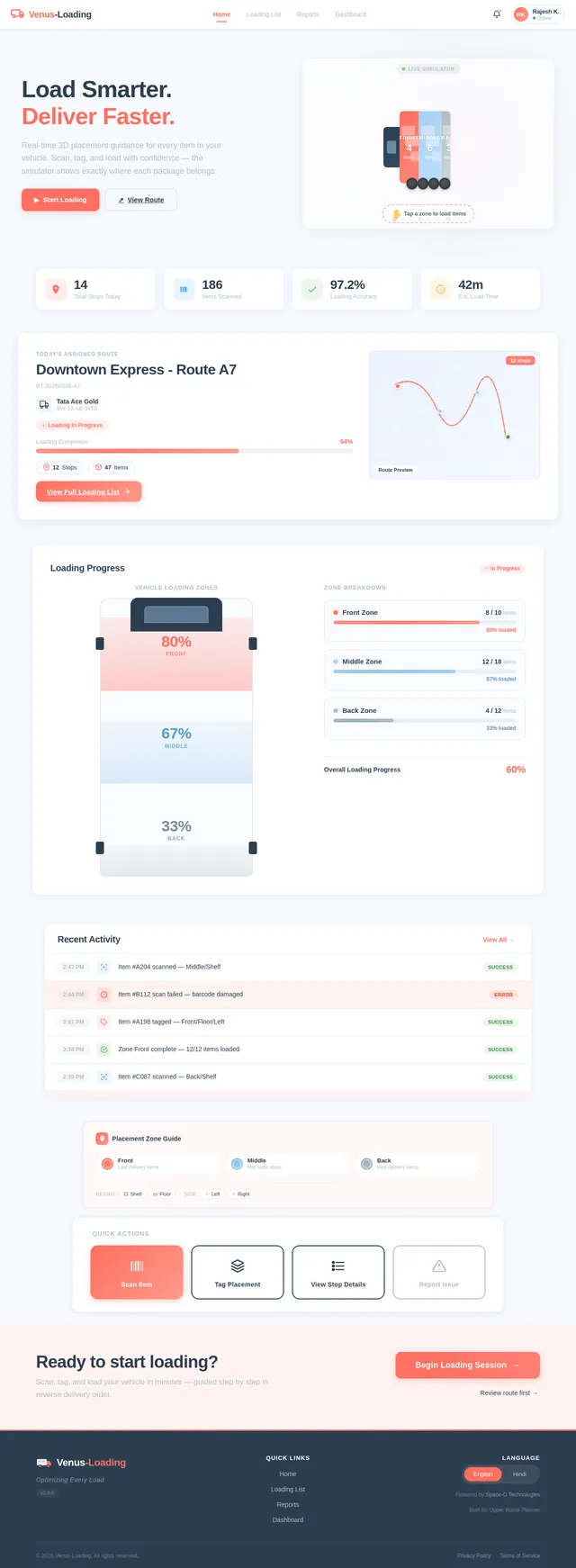
As a driver I want to be able to use the Home page featuring the 3D Interactive Vehicle Loading Simulator. Implement the designed Home page (v2) based on the existing JSX design including: NavBar, HeroSimulator with 3D vehicle model and color-coded zones (Front/Middle/Back), QuickStatsStrip (Total Stops, Items Scanned, Loading Accuracy, Estimated Load Time), TodaysRouteCard, LoadingProgressPanel, RecentActivityFeed, PlacementZoneLegend, QuickActionsBar (Scan Item, Tag Placement, View Stop Details, Report Issue), CTABanner, and Footer. Page links to Loading List and Stop Detail.
Build Login Page
As a driver or admin I want to be able to use the Login page to sign in to Venus-Loading. Implement the Login page with email/password fields, submit button using coral accent (#FF6F61), error state handling, and navigation to Home (driver) or Dashboard (admin) on success. Apply Venus-Loading theme tokens.
Build Dashboard Page
As an admin I want to be able to use the Dashboard page to view an overview of loading operations and monitor real-time loading progress. Implement the Dashboard overview section with route summary cards, a live loading progress monitor panel, key stats (stops assigned, items loaded, accuracy %), and navigation links to Routes and Reports pages. Apply Venus-Loading theme.
Implement Item Scan & Tag API
As a driver I want to be able to use a backend API for scanning items and tagging placement. Implement FastAPI endpoints: POST /stops/{id}/scan (record item scan with barcode, zone validation), POST /stops/{id}/tag (save placement tags Front/Middle/Back, Shelf/Floor, Left/Right), GET /stops/{id}/items (list items with scan and tag status). Store scan logs in MongoDB for unstructured event data.
Integrate AI Loading Instructions
As a driver I want to be able to use AI-generated visual loading instructions for each route. Integrate Google Nano Banana model via LangChain to generate visual loading instruction cards per stop (zone diagram overlays, placement guides). Expose a GET /ai/loading-instructions/{route_id} endpoint returning structured instruction data for the 3D simulator and Loading List page.
Build Routes Page
As an admin I want to be able to use the Routes page to assign routes and configure loading instructions. Implement the Routes page with a route list view, route assignment form, loading instruction configuration (reverse loading order setup, stop sequencing), and status badges. Navigates from Dashboard, links to stop detail configuration.
Build Reports Page
As an admin I want to be able to use the Reports page to generate and view loading efficiency and error reports. Implement the Reports page with filters (date range, route, driver), summary stats cards (average loading time, error rate, scan accuracy), a data table of route reports, and export options. Navigates from Dashboard.
Build Loading List Page
As a driver I want to be able to use the Loading List page to view all stops in reverse delivery sequence on a single scrollable screen. Implement the Loading List page with stops listed in reverse order (last delivery first), expandable stop rows showing item count and placement summary, a progress indicator for overall loading completion, a 'Confirm Load Complete' action, and navigation to Stop Detail. Glove-friendly touch targets (min 56px).
Implement Loading Progress API
As an admin I want to be able to use a backend API to monitor loading progress in real-time. Implement FastAPI endpoints: GET /routes/{id}/progress (overall loading %, per-zone breakdown, items loaded vs total), GET /routes/{id}/activity (recent scan/tag events feed). Support WebSocket or polling for real-time updates on the admin Dashboard.
Integrate AI Error Explanation
As a driver I want to be able to use an AI-powered error explanation when an item is placed in the wrong zone during loading. Integrate GPT 5.2 via LangChain to generate user-friendly error messages and corrective guidance when a scan mismatch is detected. Expose a POST /ai/explain-error endpoint that accepts item ID and wrong zone, and returns a natural language explanation in English or Hindi.
Build Stop Detail Page
As a driver I want to be able to use the Stop Detail page to tag item placement and scan items during loading. Implement the Stop Detail page with item list for the stop, quick placement tag selectors (Front/Middle/Back, Shelf/Floor, Left/Right), barcode scan action with confirmation feedback, scan status indicators (Scanned ✓ / Pending), error alerts for wrong zone placement (visual cue + vibration), and navigation back to Loading List.
Implement Reports API
As an admin I want to be able to use a backend API to generate loading efficiency and error reports. Implement FastAPI endpoints: GET /reports/efficiency (loading time stats, accuracy %, error rates filtered by date/route/driver), GET /reports/errors (scan errors and misplacement log). Aggregate data from MySQL (structured) and MongoDB (scan logs).
Build Delivery View Page
As a driver I want to be able to use the Delivery View page to see per-stop loading details (item count, placement, scan status) during active delivery. Implement the Delivery View page displaying stop info summary cards showing item count, placement tags, and scan status (e.g., '2 items — Back, Floor — Scanned ✓'), navigation order, and a confirm delivery action. Navigates from Loading List after load confirmation.
Connect Frontend to Backend APIs
As a user I want to be able to use a fully integrated frontend that fetches real data from backend APIs. Wire all frontend pages (Home, Loading List, Stop Detail, Delivery View, Dashboard, Routes, Reports) to their respective FastAPI endpoints. Implement API service layer, loading/error states, and real-time progress polling or WebSocket connection for Dashboard. Handle auth token passing on all requests.
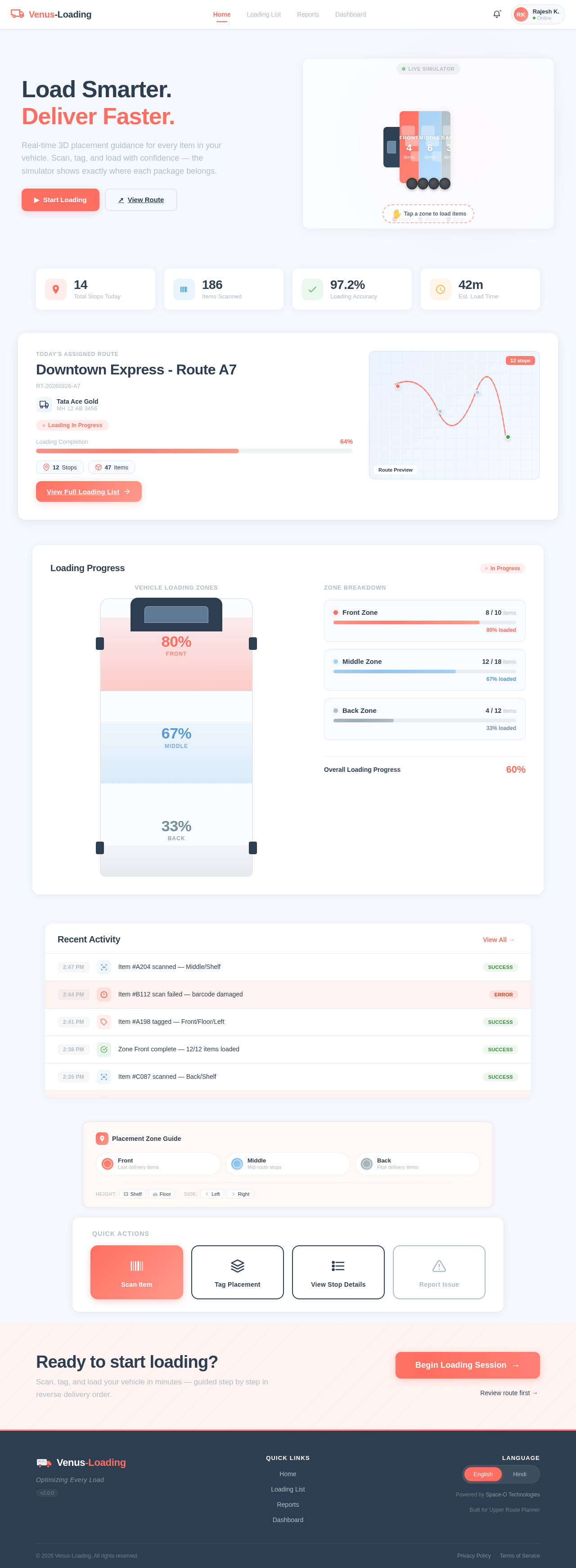
Load Smarter.
Deliver Faster.
Real-time 3D placement guidance for every item in your vehicle. Scan, tag, and load with confidence — the simulator shows exactly where each package belongs.
Downtown Express - Route A7
RT-20260326-A7Loading Progress
In ProgressRecent Activity
View All →Ready to start loading?
Scan, tag, and load your vehicle in minutes — guided step by step in reverse delivery order.
No comments yet. Be the first!