venus-loading
 Gmail For adobe
Designing Load Management for Upper Helping delivery drivers load 100+ stops without confusion Overview Product: Upper Route Planner Company: Space-O Technologies Role: UX/UI Designer (end-to-end) Platform: Driver mobile app + Admin dashboard Status: Live What is Upper? Upper is a route planning tool used by delivery businesses. Admins plan and assign routes Drivers receive routes on their phone The app guides navigation and captures proof of delivery This part worked well. But one critical step was missing: What happens before the driver starts driving — loading the vehicle. The Problem Drivers often handle 100+ deliveries per route. But loading those items into the vehicle was slow, confusing, and unstructured. What was going wrong? 1. Too many steps Drivers had to open each stop one by one Add details → go back → find next stop This repeated 100+ times → Created friction and wasted time 2. No guidance for loading order App showed stops in delivery order But loading works in reverse Drivers had to mentally reverse the list while working fast. 3. No tracking of item placement No way to note where items were kept Drivers had to search the entire vehicle during delivery 4. Small delays became big losses Even tiny inefficiencies scaled badly across fleets. Why this mattered Upper helped with: Planning routes Navigation Delivery tracking But loading was left to guesswork. This broke the flow between planning and execution. Goal Make loading: Faster Easier to follow Less dependent on memory Useful during delivery Research & Understanding 1. Looking at other tools I reviewed similar products in this space. What I found: All focused on route planning and delivery None helped with loading 👉 This confirmed a clear gap. 2. Understanding real-world behavior Loading follows a simple rule: Last delivery → loaded first (goes inside) First delivery → loaded last (near the door) This is how drivers naturally work. But the app didn’t support this at all. Key Insight The app was optimized for planning and delivery, but not for the real-world step in between. If we guide loading properly: Drivers save time during loading Drivers save even more time during delivery Design Approach Instead of adding more features, I focused on: Reducing steps Matching real-world behavior Making information useful later (not just during input) What I Designed 1. Loading order that matches real life I reversed the stop list. Top = load first Bottom = load last Now drivers don’t need to think — they just follow the list. 2. One screen instead of many Before: Open each stop separately After: All stops visible in one screen Tap to expand and add details Why this works: No constant back-and-forth Faster interaction Clear sense of progress 3. Quick placement tags Instead of typing notes, drivers select from simple options: Front / Middle / Back Shelf / Floor Left / Right Why: Faster than typing Consistent across users Easy to scan later 4. Built-in scanning Drivers can scan items while loading. Confirms correct item Prevents mistakes early Creates a record 5. Show loading info during delivery At each stop, drivers see: Item count Placement Scan status Example: “2 items — Back, Floor — Scanned ✓” This is where the real value shows. Design Decisions (What I considered) Decision: List structure Option 1: Keep delivery order Familiar But confusing during loading Option 2: Reverse order Matches real-world behavior Easier to follow 👉 Chose reverse order Decision: Input method Option 1: Free text Flexible Slow and inconsistent Option 2: Tags Fast Structured Easy to reuse 👉 Chose tags Decision: Interaction model Option 1: Separate screens per stop Familiar Too slow Option 2: Single scrollable screen Faster Less friction 👉 Chose single screen How it fits into the product Before: Plan route Send to driver Driver starts driving After: Plan route Send to driver Load vehicle (new step) Deliver Capture proof Track everything Impact Loading time reduced Before: ~40–60 min After: ~15–25 min → ~30 minutes saved per driver Faster deliveries Less searching at each stop Even small savings per stop add up Fleet-level impact For 20 drivers: Dozens of hours saved daily Thousands of hours saved yearly What I Learned Real-world workflows matter more than screens If something isn’t faster than the manual way, people won’t use it Small improvements at each step can create huge impact at scale What I’d Improve Next Observe drivers in real conditions Test with real constraints (gloves, lighting, time pressure) Explore visual layouts for smaller routes Final Thought This wasn’t just about designing a feature. It was about removing guesswork from a critical part of the workflow. Why this version works Clear story from start to finish Shows thinking, not just UI Easy to scan quickly Strong product mindset visible
Comments (0)
Sign in to leave a comment
System Requirements
System Requirements Document (SRD)
Project Name: Venus-Loading
1. Introduction
The Venus-Loading project is a next-generation load management system designed to optimize the vehicle loading process for delivery drivers. Building on the success of the previous version, this new iteration aims to further reduce inefficiencies, improve usability, and enhance the overall workflow for drivers and admins. By addressing real-world constraints such as time pressure, environmental conditions, and user behavior, Venus-Loading will ensure seamless integration between route planning, vehicle loading, and delivery execution.
This document outlines the system requirements for Venus-Loading, tailored for delivery operations in India (IN). The project will focus on creating a mobile app for drivers and an admin dashboard for route planners.
2. System Overview
Venus-Loading is a feature enhancement for the Upper Route Planner platform, developed by Space-O Technologies. It bridges the critical gap between route planning and delivery execution by introducing a structured, intuitive, and efficient vehicle loading process.
Key Features:
- Reverse loading order to match real-world behavior.
- Simplified, tag-based item placement tracking.
- Built-in scanning for error prevention and record creation.
- Real-time loading guidance visible during delivery.
Target Platforms:
- Driver Mobile App: For loading guidance and delivery execution.
- Admin Dashboard: For route planning and monitoring.
3. Functional Requirements
As a Driver:
- I should be able to view the loading order in reverse delivery sequence.
- I should be able to scan items during loading to confirm accuracy.
- I should be able to tag item placement using predefined options (e.g., Front/Middle/Back, Shelf/Floor, Left/Right).
- I should be able to see loading details (item count, placement, scan status) at each delivery stop.
- I should be able to access a single, scrollable screen for all stops with expandable details.
As an Admin:
- I should be able to assign routes with pre-configured loading instructions.
- I should be able to monitor loading progress in real-time.
- I should be able to generate reports on loading efficiency and errors.
4. User Personas
4.1 Driver
- Role: Delivery personnel responsible for loading and delivering items.
- Needs: Quick and clear loading instructions, minimal manual input, and error prevention.
- Pain Points: Time pressure, physical constraints (e.g., gloves, poor lighting), and difficulty in remembering item placement.
4.2 Admin
- Role: Route planner and fleet manager.
- Needs: Tools to assign routes, monitor loading progress, and analyze efficiency.
- Pain Points: Lack of visibility into the loading process and its impact on delivery times.
5. Visuals Colors and Theme
The Venus-Loading project will feature a unique color palette that reflects efficiency, clarity, and professionalism while being visually distinct.
Color Palette:
- Background: #F5F9FF (Soft Sky Blue)
- Surface: #FFFFFF (Pure White)
- Text: #2C3E50 (Deep Navy Blue)
- Accent: #FF6F61 (Coral Red)
- Muted Tones: #B0BEC5 (Cool Gray)
This palette ensures high contrast for readability and a professional yet approachable aesthetic.
6. Signature Design Concept
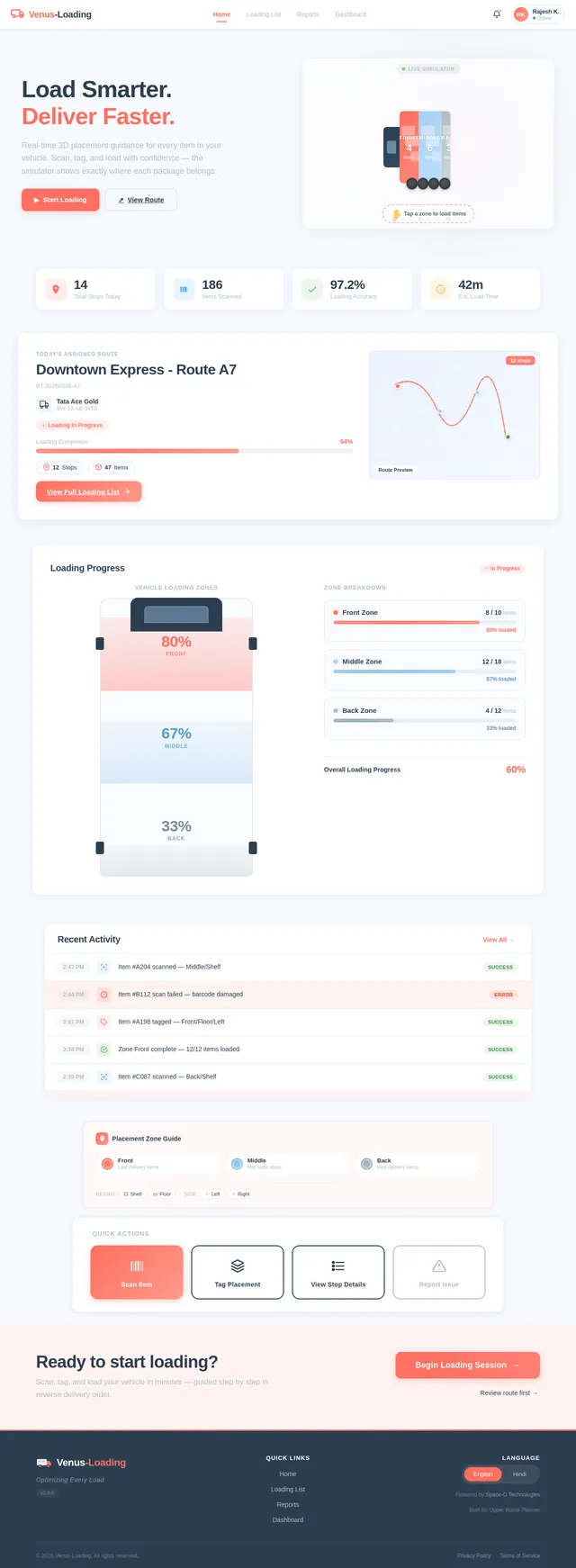
Interactive 3D Vehicle Loading Simulator
The homepage of the driver app will feature a 3D interactive vehicle model that visually represents the loading process.
Key Features:
- Dynamic Loading Visualization: As drivers scan and tag items, the 3D model updates in real-time to show where items are placed (e.g., Front/Middle/Back, Shelf/Floor).
- Drag-and-Drop Interaction: Drivers can drag items into the virtual vehicle to simulate placement before physically loading them.
- Color-Coded Zones: Different sections of the vehicle (e.g., Front, Middle, Back) are color-coded for easy identification.
- Micro-Interactions: Subtle animations (e.g., items sliding into place, zones lighting up) make the experience engaging and intuitive.
- Error Alerts: If an item is scanned but placed in the wrong zone, the app provides a gentle vibration and visual cue to correct the mistake.
This bold and eccentric design concept will make the loading process not only functional but also visually captivating and user-friendly.
7. Non-Functional Requirements
- Performance: The app must load all stops and their details within 2 seconds.
- Scalability: Support up to 500 stops per route without performance degradation.
- Usability: The interface must be operable with gloves and in low-light conditions.
- Reliability: 99.9% uptime for both the mobile app and admin dashboard.
- Security: Ensure secure data transmission and storage, compliant with GDPR and local regulations.
8. Tech Stack
Frontend:
- React for the web-based admin dashboard.
- React Native for the driver mobile app.
Backend:
- Python with FastAPI for API development.
Database:
- MySQL for structured data storage (e.g., routes, stops, item details).
- MongoDB for unstructured data (e.g., scan logs).
AI Models:
- GPT 5.2 for user-friendly responses and error explanations.
- Google Nano Banana for generating visual loading instructions.
AI Tools:
- LangChain for workflow orchestration.
Orchestration:
- Docker and docker-compose for local development.
- Kubernetes for server-side orchestration and scalability.
9. Assumptions and Constraints
- Drivers will have smartphones with internet connectivity.
- The app will be used primarily in delivery vehicles with limited space.
- Admins will access the dashboard from desktop or laptop devices.
- The system must support both English and Hindi languages for usability in India.
10. Glossary
- Loading Order: The sequence in which items are placed in the vehicle, typically reverse of the delivery order.
- Placement Tags: Predefined options (e.g., Front/Middle/Back) for tracking item location in the vehicle.
- Scan Status: Confirmation that an item has been scanned and verified during loading.
- Admin Dashboard: The web-based interface used by route planners to assign and monitor routes.
This updated SRD for Venus-Loading sets the stage for a transformative load management experience, ensuring faster, easier, and more accurate vehicle loading for delivery drivers and admins alike.
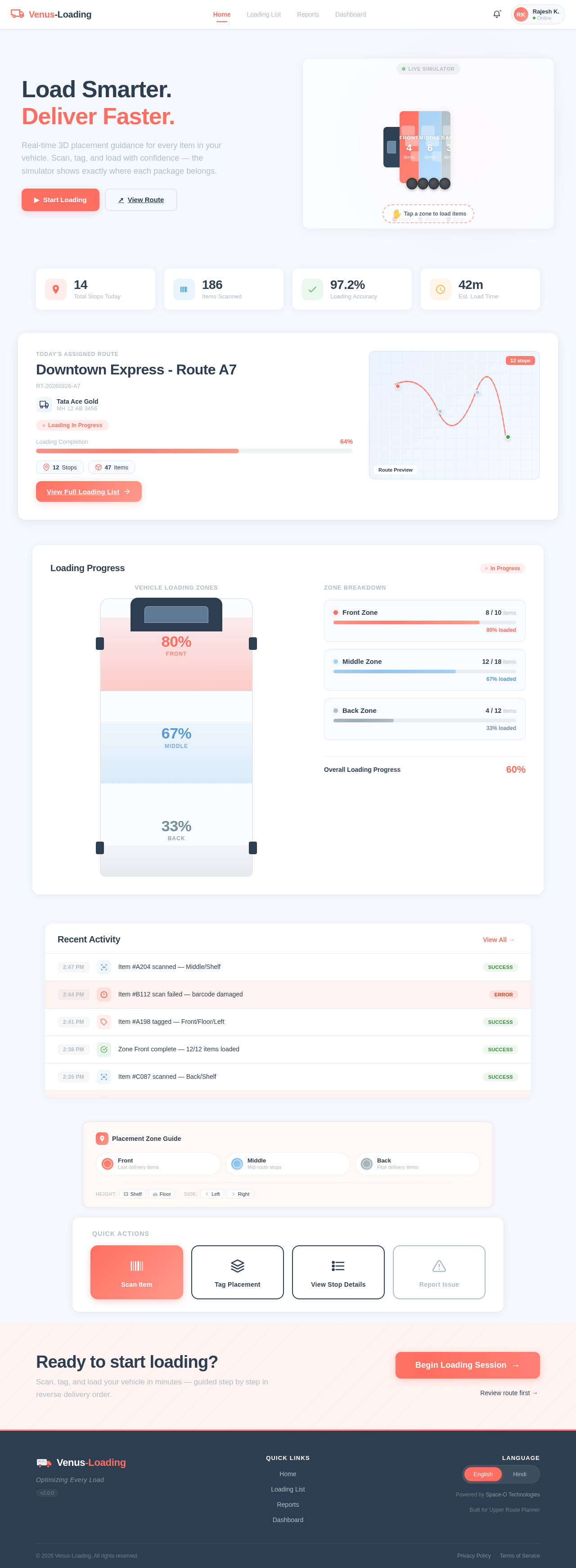
Load Smarter.
Deliver Faster.
Real-time 3D placement guidance for every item in your vehicle. Scan, tag, and load with confidence — the simulator shows exactly where each package belongs.
Downtown Express - Route A7
RT-20260326-A7Loading Progress
In ProgressRecent Activity
View All →Ready to start loading?
Scan, tag, and load your vehicle in minutes — guided step by step in reverse delivery order.
No comments yet. Be the first!