velvet-steel
by Supash R
Comments (0)
Sign in to leave a comment
System Requirements
System Requirements Document for velvet-steel
1. Introduction
Page 1 of 41
1.1 PROJECT: CLASSYPRO — PREMIUM FASHION E-COMMERCE WEBSITE
Act as an expert full-stack developer and premium fashion website designer.
Build a complete, responsive e-commerce website for CLASSYPRO, a fashion store located in Belagavi, Karnataka, India.
Instagram: https://www.instagram.com/classypro_belgaum/
The website must have a premium fashion-brand appearance, a functional shopping experience, WhatsApp checkout and a secure admin dashboard.
==================================================
- BRAND IDENTITY
Brand: CLASSYPRO
Location: Belagavi, Karnataka, India.
Instagram:
https://www.instagram.com/classypro_belgaum/
Brand personality:
-
Premium
-
Modern
-
Minimal
-
Stylish
-
Fashion-forward
-
Professional
Page 2 of 41
FINAL GOAL:
Deliver a polished, professional CLASSYPRO fashion e-commerce website with a reliable Add Product experience, functional admin dashboard, product management, inventory management and WhatsApp ordering.
Prioritise stability, clean code, responsive design and real functionality.
The project name is velvet-steel.
2. System Overview
2.1 PROJECT: CLASSYPRO — PREMIUM FASHION E-COMMERCE WEBSITE
- ADMIN DASHBOARD
Page 3 of 41
Planning notes
Planning resolved these page and owner names itself instead of stopping. Review them before building.
Added during planning
- Home: The homepage route / is required to render with its own hero, categories, new arrivals, featured, brand story, promo banner and footer, and no catalog page owns it. (requirement: /)
- Homepage: The homepage with ordered sections (announcement bar, nav, hero, categories, new arrivals, featured, brand story, promo banner, footer) is page-sized work not owned by any catalog page. (requirement: Create the homepage in this order:)
Named in your document, not planned
- /: The page name has no letters or digits
Name changes
- /: The document does not contain this page name; it was offered only as a suggestion
3. Functional Requirements
Page 4 of 41
3.1 PROJECT: CLASSYPRO — PREMIUM FASHION E-COMMERCE WEBSITE
MOST IMPORTANT:
The Add Product page must render successfully even when:
-
Supabase is not configured.
-
No products exist.
-
No images have been uploaded.
-
No categories exist.
-
No product variants have been created.
Build the Add Product page UI independently of backend connectivity.
If Supabase configuration is missing, show a clear setup message rather than crashing the page.
- WEBSITE ROUTES
PUBLIC PAGES:
/
/shop
/new-arrivals
/categories
/product/:slug
/cart
/checkout
Page 5 of 41
/about
/contact
/privacy
/terms
ADMIN PAGES:
/admin
/admin/dashboard
/admin/orders
/admin/products
/admin/products/new
/admin/products/:id/edit
/admin/inventory
/admin/categories
/admin/settings
- HOMEPAGE
Create the homepage in this order:
A. Announcement bar
Text:
DISCOVER YOUR NEXT FAVOURITE STYLE — EXPLORE CLASSYPRO.
B. Navigation bar
Desktop:
Page 6 of 41
-
CLASSYPRO logo.
-
HOME
-
SHOP
-
NEW ARRIVALS
-
CATEGORIES
-
ABOUT
-
Search.
-
Cart.
Mobile:
-
Logo.
-
Search.
-
Cart.
-
Hamburger menu.
C. Hero section
Heading:
STYLE THAT SPEAKS.
Description:
Discover your style. Explore the latest fashion at ClassyPro.
Buttons:
- EXPLORE COLLECTION
Page 7 of 41
- SHOP NEW ARRIVALS
D. Categories
Heading:
EXPLORE COLLECTIONS.
Display image-based category cards.
Allow the admin to create and manage categories.
E. New Arrivals
Heading:
JUST DROPPED.
Show the eight latest published products.
F. Featured Collection
Heading:
CLASSYPRO PICKS.
Display products marked as featured.
G. Brand Story
Heading:
YOUR STYLE. YOUR STATEMENT.
Use editable brand description text.
Do not invent the business's history or founders.
H. Promotional banner
Heading:
Page 8 of 41
FIND YOUR NEXT FAVOURITE.
Button:
SHOP NOW.
I. Footer
Include:
-
About.
-
Contact.
-
Shop.
-
Instagram.
-
WhatsApp.
-
Privacy Policy.
-
Terms and Conditions.
-
Shipping and Returns.
==================================================
- SHOP AND PRODUCT PAGES
Shop page features:
-
Product grid.
-
Search.
-
Category filters.
-
Price filters.
Page 9 of 41
-
Sorting.
-
Availability filters.
Grid:
Product cards must show:
-
Product image.
-
Product name.
-
Selling price.
-
Original price, if available.
-
Discount, if available.
-
Availability.
-
Quick Add button.
Product details page:
-
Product image gallery.
-
Product name.
-
Price.
-
Description.
-
Available sizes.
-
Colours and variants, if applicable.
-
Stock availability.
-
Quantity selector.
Page 10 of 41
- Add to Cart.
Do not assume all products have sizes or colours.
Only display options configured for that particular product.
- IMPORTANT: ADD PRODUCT PAGE
This page requires special attention because it must not fail during preview generation.
Route:
/admin/products/new
Build a complete, professional Add Product form.
Use a simple, reliable layout with independent form sections.
SECTION A: BASIC INFORMATION
Fields:
-
Product Name.
-
Product Slug.
-
Short Description.
-
Full Description.
-
Category.
-
Brand, optional.
-
Product Tags.
SECTION B: PRODUCT IMAGES
Features:
Page 11 of 41
-
Upload multiple images.
-
Image preview.
-
Remove uploaded image.
-
Select main image.
-
Drag and drop upload area.
IMPORTANT IMAGE HANDLING:
Use standard browser file input and File API.
For previews, use URL.createObjectURL().
Revoke object URLs when previews are removed or the component unmounts.
Do not require uploaded images for the Add Product page to render.
When no image exists, display a neutral image placeholder with an upload icon.
When Supabase Storage is not connected, allow local preview and show a clear message that saving uploaded images requires backend configuration.
SECTION C: PRICING
Fields:
-
Selling Price.
-
Original Price.
-
Discount percentage, calculated automatically.
Validate that prices are valid positive numbers.
SECTION D: PRODUCT OPTIONS
Page 12 of 41
Allow the administrator to configure:
-
Sizes.
-
Colours.
-
Other variants.
Allow adding and removing options dynamically.
Do not force variants when the product does not require them.
SECTION E: INVENTORY
Fields:
-
SKU.
-
Stock Quantity.
-
Low Stock Threshold.
-
Track Inventory toggle.
Display stock status automatically.
SECTION F: PRODUCT CONDITION
Allow the administrator to select:
-
Brand New.
-
Like New.
-
Good.
-
Other.
SECTION G: PRODUCT VISIBILITY
Page 13 of 41
Options:
-
Publish Product.
-
Save as Draft.
-
Mark as Featured.
-
Mark as New Arrival.
SECTION H: ACTION BUTTONS
-
SAVE PRODUCT.
-
SAVE AS DRAFT.
-
CANCEL.
VALIDATION:
-
Product name is required.
-
Selling price is required.
-
Category is required when categories are configured.
-
Stock quantity must be valid.
-
Uploaded images must use supported image formats.
-
Display validation errors next to the relevant fields.
FUNCTIONAL REQUIREMENTS:
-
The form must render with no backend connection.
-
The form must support empty database states.
-
Image previews must work independently of Supabase.
Page 14 of 41
-
Form sections must not depend on each other unnecessarily.
-
Prevent duplicate form submissions.
-
Show loading feedback during saving.
-
Show success and error notifications.
-
Do not show a fake success message if saving fails.
-
After successful saving, navigate to the product management page.
Create a professional admin interface.
Admin username:
supash
Use Supabase Authentication for secure admin access.
Never hardcode the admin password.
Create a professional admin interface.
Dashboard cards:
-
Total Orders.
-
New Orders.
-
Pending Orders.
-
Confirmed Orders.
-
Completed Orders.
-
Total Products.
-
Out-of-Stock Products.
Page 15 of 41
- Paid Revenue.
Also display:
-
Recent orders.
-
Recent products.
-
Low-stock alerts.
-
Order analytics.
Use clean charts and tables.
- PRODUCT MANAGEMENT
Admin should be able to:
-
Add products.
-
Edit products.
-
Delete products.
-
Duplicate products.
-
Upload product images.
-
Manage categories.
-
Manage prices.
-
Manage stock.
-
Manage sizes and variants.
-
Publish and unpublish products.
-
Mark products as featured.
Page 16 of 41
- Mark products as new arrivals.
The product list should include:
-
Product image.
-
Product name.
-
Category.
-
Price.
-
Stock.
-
Visibility.
-
Edit action.
-
Delete action.
Include search and filters.
- ORDER MANAGEMENT
Admin should be able to:
-
View all orders.
-
Search orders.
-
Filter orders.
- ORDER MANAGEMENT
Admin should be able to:
-
View customer details.
-
View purchased products.
Page 17 of 41
- View order totals.
- ORDER MANAGEMENT
Admin should be able to:
- Open customer WhatsApp chat.
- ORDER MANAGEMENT
Admin should be able to:
-
Update order status.
-
Update payment status.
-
Cancel orders.
- ORDER MANAGEMENT
Order statuses:
-
New.
-
Pending Confirmation.
-
Confirmed.
-
Processing.
-
Shipped.
-
Delivered.
-
Cancelled.
Payment statuses:
- Unpaid.
Page 18 of 41
-
Payment Pending.
-
Paid.
-
Refunded.
Show notifications for newly received orders.
- WHATSAPP CHECKOUT
Do not integrate an online payment gateway.
Checkout fields:
-
Full Name.
-
Mobile Number.
-
WhatsApp Number.
-
Full Address.
-
City.
-
PIN Code.
-
Optional Instructions.
-
Customer reviews cart.
-
Customer enters delivery information.
Checkout workflow:
- Open WhatsApp with the prepared order message.
Customer must manually press Send.
- Validate all fields.
Page 19 of 41
-
Verify stock and prices.
-
Save order in Supabase.
-
Generate a unique Order ID.
Do not claim a WhatsApp message has been sent automatically.
Save the order before opening WhatsApp so it is not lost if WhatsApp is closed.
Make the store WhatsApp number configurable in admin settings.
- STORE SETTINGS
Allow administrators to edit:
-
Store name.
-
Logo.
-
Hero image.
-
Announcement bar.
-
Store description.
-
Instagram URL.
-
WhatsApp number.
-
Contact number.
-
Email.
-
Location.
-
Delivery charges.
Page 20 of 41
-
Free delivery threshold.
-
Shipping policy.
-
Return policy.
- GENERATION WORKFLOW
Follow this order:
PHASE 1:
Create the project structure, design system, navigation and homepage.
PHASE 2:
Create Shop, Categories, Product Details, Cart and Checkout pages.
PHASE 3:
Create the admin layout, login and dashboard.
PHASE 4:
Create Product Management and the Add Product page.
PHASE 5:
Create Order Management, Inventory and Store Settings.
PHASE 6:
Connect Supabase, authentication, storage and database operations.
PHASE 7:
Test all pages and fix errors.
- All public routes work.
Page 21 of 41
-
No blank pages.
-
Admin routes work.
-
Add Product page renders independently.
-
Add Product image preview works.
-
Product form validation works.
-
Cart functions correctly.
-
Checkout creates orders.
-
WhatsApp message is generated correctly.
-
Admin authentication is secure.
-
Product management works.
If Supabase is not configured, show a clear setup message instead of crashing.
4. User Personas
CLASSYPRO (project name: velvet-steel) is a premium fashion e-commerce website for a fashion store in Belagavi, Karnataka, India, offering a premium brand appearance, a functional shopping experience, WhatsApp checkout and a secure admin dashboard.
| Role | Responsibilities and goals | Inputs | Decisions | Access |
|---|---|---|---|---|
| Shopper (customer) | Browse the storefront, review products with their sizes, colours and other variants, and complete checkout via WhatsApp. | Product listings, variant and condition information, store settings such as delivery charges and free delivery threshold | Which products and variants to buy; whether to proceed to WhatsApp checkout | Storefront only; cannot access other customers' orders or admin information (enforced by Row Level Security) |
Administrator (supash) | Run the store: manage the catalog, orders and store presentation. | Product data and images, categories, prices, stock, order records, store settings | What to publish, feature or mark as new arrival; order and payment status changes; cancellations; store configuration | Authenticated admin dashboard via Supabase Authentication; only authenticated administrators can manage products |
Page 22 of 41
4.1 Shopper journey
- The shopper lands on the storefront and browses products by category.
- On a product, the shopper reviews available sizes, colours and other variants (variants appear only where the product requires them) and the product condition (Brand New, Like New or Good).
- The shopper checks out through WhatsApp; delivery charges and the free delivery threshold from store settings apply.
- Success is observable as a placed order that the administrator can view, search and filter.
4.2 Administrator journey
- The administrator signs in to the admin dashboard with Supabase Authentication (password never hardcoded).
- The administrator manages the catalog: add, edit, delete, duplicate products; upload images; manage categories, prices, stock, sizes and variants; publish/unpublish; mark products as featured or new arrivals.
- The administrator manages orders: view all, search, filter, open the customer's WhatsApp chat, update order status and payment status, and cancel orders.
- The administrator edits store settings: store name, logo, hero image, announcement bar, store description, Instagram URL, WhatsApp number, contact number, email, location, delivery charges, free delivery threshold and shipping policy.
- Success is observable as a working product management flow, secure admin authentication and accurate storefront content.
Supporting actors (not human personas): Supabase Authentication and Row Level Security, and WhatsApp as the checkout channel.
Page 23 of 41
5. Core User Flows
5.1 Browse and discover products
Actors: Shopper (primary); storefront (supporting).
Trigger: Shopper opens the site at /.
- Homepage presents sections in order: hero with EXPLORE COLLECTION and SHOP NEW ARRIVALS actions, NEW ARRIVALS ("JUST DROPPED.", eight latest published products), CATEGORIES ("EXPLORE COLLECTIONS.", image-based category cards), and ABOUT.
- Shopper moves to
/shop,/new-arrivals,/categoriesor/product/:slug. - On
/shop, shopper narrows the grid with search, category, price and availability filters, and sorting. - Product cards show image, name, selling price, original price and discount where available, availability, and Quick Add.
- On the product page, shopper reviews gallery, name, price, description, stock availability and quantity selector. Size and colour/variant options appear only when configured for that product.
Result: Shopper identifies a product to buy. Failure/recovery: If a product has no sizes or colours configured, no options are shown; the shopper proceeds without selecting them.
Page 24 of 41
5.2 Add items to cart
Actors: Shopper (primary); cart (supporting).
Trigger: Shopper uses Quick Add on a card or Add to Cart on a product page.
- Shopper selects quantity and any configured size/colour variant.
- Shopper adds the item; the cart retains it for review at
/cart.
Result: Cart contains the selected items. Continuation: Shopper proceeds to checkout (Journey 3) or returns to browsing (Journey 1).
5.3 Complete WhatsApp checkout
Actors: Shopper (primary); storefront and Supabase (supporting); store admin (receives message).
Trigger: Shopper opens /checkout from the cart.
- Shopper reviews the cart.
- Shopper enters delivery information: Full Name, Mobile Number, WhatsApp Number, Full Address, City, PIN Code, and optional Instructions.
- System validates all fields and verifies stock and prices.
- System saves the order in Supabase and generates a unique Order ID.
- System opens WhatsApp with the prepared order message; the shopper must manually press Send.
Result: Order is persisted and a WhatsApp message is ready for the shopper to send. Failure/recovery: The order is saved before WhatsApp opens, so it is not lost if WhatsApp is closed. No online payment gateway is used. Continuation: Admin handles the order (Journey 6).
Page 25 of 41
5.4 Admin signs in
Actors: Admin (primary); Supabase Authentication (supporting).
Trigger: Admin opens the admin login.
- Admin authenticates with username
supashvia Supabase Authentication. - Admin reaches the dashboard and admin layout.
Result: Authenticated admin session. Constraint: The admin password is never hardcoded.
5.5 Manage products and categories
Actors: Admin (primary); Supabase (supporting).
Trigger: Admin opens product management.
- Admin searches and filters the product list.
- Admin adds, edits, duplicates or deletes products; uploads images; manages categories, prices, stock, sizes and variants; publishes/unpublishes; marks products as featured or new arrivals.
- On
/admin/products/new, admin completes independent form sections and uses SAVE PRODUCT, SAVE AS DRAFT or CANCEL. - After successful saving, the system navigates to the product management page.
Result: Catalog reflects the change. Failure/recovery: Form validation and image preview must work; the Add Product page must render independently and not fail during preview generation. Continuation: Published products appear in storefront journeys.
Page 26 of 41
5.6 Manage orders
Actors: Admin (primary); Supabase and WhatsApp (supporting).
Trigger: A new order arrives; the admin sees a notification for newly received orders.
- Admin views all orders and searches or filters them.
- Admin opens an order to view customer details, purchased products and order totals.
- Admin opens the customer's WhatsApp chat to coordinate.
- Admin updates order status and payment status, or cancels the order.
Result: Order status reflects the outcome. Continuation: Fulfilment proceeds outside the site.
5.7 Configure store settings
Actors: Admin (primary); Supabase (supporting).
Trigger: Admin opens store settings.
- Admin edits store name, logo, hero image, announcement bar, store description, Instagram URL, WhatsApp number, contact number, email, location, delivery charges, free delivery threshold and shipping policy.
- Admin saves; storefront reflects the updated settings.
Result: Store configuration is current. Continuation: Updated contact and delivery details apply to subsequent browsing and checkout.
6. Visuals Colors and Theme
[Design proposal; unspecified choices are defaults.]
Page 27 of 41
6.1 Palette
CLASSYPRO's palette is pearl-and-charcoal, tuned for a premium fashion house in Belagavi serving a modern Indian audience. Off-white #F7F6F3 is the page ground; white #FFFFFF holds product cards and surfaces. Black #111111 carries type and primary buttons, with #222222 as the accent for secondary emphasis. Secondary grey #777777 handles metadata and captions; borders are #E8E8E8. Mustard #D69E36 is a rare accent — thin rules, badges, the announcement ticker — never a fill for large areas. Status colours: success #21845B, warning #D69E36, error #D94B4B. Light mode only.
6.2 Typography
- Headings: Space Grotesk, Light 300 to Medium 500, tracking
-0.02em; all-caps for section labels. - Body: Inter.
- Editorial accents: Playfair Display italic for pull quotes.
- Scale: 1.25 modular — 32/40/56/88/128. Hero headline uses
clamp(48px, 11vw, 128px).
6.3 Shape and spacing
Wide sweeping curves on section edges and image masks; sharp square buttons and product cards; thin 1px rules. No soft blobs, no pill buttons. Vertical rhythm is 96px between sections; a 12-column asymmetric editorial grid underpins layouts. Category cards sit 4 columns desktop / 3 tablet / 2 mobile.
Page 28 of 41
6.4 Imagery
Large editorial fashion photography with curved masks cutting the image edges; product shots on plain off-white grounds. Until real images are uploaded, use local placeholder images, CSS placeholders or neutral grey containers — including a neutral placeholder with an upload icon wherever a product has no image. The hero uses a premium editorial image or a neutral placeholder until one is uploaded.
6.5 Readability
Headlines, the CLASSYPRO wordmark, labels, numbers, card text and controls stay whole inside the viewport and their container at 375px, 768px and 1280px, wrapping or scaling to fit. Imagery and decoration may bleed, crop or overlap; readable text and controls never do.
Page 29 of 41
6.6 PROJECT: CLASSYPRO — PREMIUM FASHION E-COMMERCE WEBSITE
Design system:
Colours:
-
White: #FFFFFF
-
Off-white: #F7F6F3
-
Black: #111111
-
Secondary grey: #777777
-
Borders: #E8E8E8
-
Accent: #222222
-
Success: #21845B
-
Warning: #D69E36
-
Error: #D94B4B
Typography:
-
Space Grotesk for headings.
-
Inter for body text.
-
Playfair Display for editorial accents.
Use a premium fashion editorial image or a neutral placeholder until an image is uploaded.
-
Four columns on desktop.
-
Three on tablet.
Page 30 of 41
- Two on mobile.
7. Signature Design Concept
[Design proposal; unspecified choices are defaults.]
7.1 Muse and headline
The muse is Zaha Hadid: fluid parametric grandeur read through a fashion house's restraint. The signature line is STYLE THAT SPEAKS. — oversized, stacked, set in Space Grotesk Light at clamp(48px, 11vw, 128px).
7.2 Signature moves
- Split hero. A full-height split: the left 44% is off-white carrying the stacked oversized headline, the subline "Discover your style. Explore the latest fashion at ClassyPro." and two sharp buttons — EXPLORE COLLECTION and SHOP NEW ARRIVALS. The right 56% is a tall fashion image with a curved left edge that bleeds off the top and bottom. A thin mustard rule marks the section.
- Curved boundaries. Sweeping curved section edges flow between the hero, EXPLORE COLLECTIONS. category cards and new arrivals, so the page reads as one continuous surface.
- Sharp buttons with a growing underline. Black square buttons carry a 1px offset mustard underline that grows on hover.
- Mustard ticker. A thin mustard announcement bar scrolls "DISCOVER YOUR NEXT FAVOURITE STYLE — EXPLORE CLASSYPRO." slowly.
Page 31 of 41
7.3 Logo and chrome
A professional typographic CLASSYPRO wordmark in Space Grotesk, all-caps, tight tracking. Minimal Lucide React icons; consistent navigation across every route; every route renders a proper page, and a missing Supabase configuration shows a clear setup message rather than a crash.
7.4 Avoid
Rounded pill buttons, gradient blob heroes, grids of identical hover-lift cards, bright candy colours, bouncy or springy motion.
7.5 PROJECT: CLASSYPRO — PREMIUM FASHION E-COMMERCE WEBSITE
Design characteristics:
-
Premium editorial layouts.
-
Large fashion imagery.
-
Generous whitespace.
Create a professional typographic CLASSYPRO logo.
8. Interaction Model & Motion Direction
[Design proposal; unspecified choices are defaults.]
Interaction Model: Parallax Motion Tempo: restrained Hero Dimensionality: layered_2d
Page 32 of 41
8.1 Landing Hero Motion Brief
Focal subject: the tall editorial fashion image in the right 56% of the split hero, its curved left edge bleeding off the top and bottom.
Thesis: as the visitor scrolls, the hero image drifts 12px against the page while the stacked headline and two sharp buttons hold their ground — input (scroll) → transformation (layered parallax drift) → outcome (the image feels like a window behind the type, and the eye lands on EXPLORE COLLECTION).
Motion vocabulary: 600ms fades with 40px rises on scroll for sections; the 12px hero drift; a soft crossfade on product-image hover; the mustard underline growing on button hover; the announcement ticker scrolling slowly. No bounce, no spring.
Composed first frame: off-white left panel, headline fully visible at its mobile clamp size, subline and both buttons beneath it, mustard rule at the section edge; the curved image already in place on the right.
Reduced motion: with prefers-reduced-motion, the parallax drift and scroll rises are removed and the hero renders as a static split; the ticker wraps or becomes horizontally scrollable so every item can be brought fully into view.
Page 33 of 41
8.2 PROJECT: CLASSYPRO — PREMIUM FASHION E-COMMERCE WEBSITE
-
Minimal icons.
-
Sharp buttons.
-
Subtle animations.
-
Consistent spacing.
-
Mobile-first responsive design.
9. Non-Functional Requirements
Page 34 of 41
9.1 PROJECT: CLASSYPRO — PREMIUM FASHION E-COMMERCE WEBSITE
Do not stop the entire application because one page has a preview or backend error.
Every route must display a proper page.
Use a consistent layout and navigation system.
Implement Row Level Security.
Security requirements:
-
Customers cannot access other customers' orders.
-
Customers cannot access admin information.
-
Only authenticated administrators can manage products.
-
Never expose service-role keys in frontend code.
-
Validate checkout operations securely.
- FINAL QUALITY CHECKS
Before completion, verify:
-
Homepage renders.
-
No missing imports.
-
No undefined variables.
-
No broken image dependencies.
-
Mobile layout works.
-
Backend errors are handled properly.
Page 35 of 41
10. Tech Stack
Page 36 of 41
10.1 PROJECT: CLASSYPRO — PREMIUM FASHION E-COMMERCE WEBSITE
- TECHNOLOGY
Use:
-
React
-
TypeScript
-
Vite
-
Tailwind CSS
-
React Router
-
Supabase
-
Supabase Authentication
-
PostgreSQL
-
Supabase Storage
-
Lucide React
-
Framer Motion
==================================================
- SUPABASE DATABASE
Create these tables:
-
products
-
product_variants
Page 37 of 41
-
categories
-
orders
-
order_items
-
admin_users
-
store_settings
-
admin_activity
-
stock_reservations
Use:
-
Primary keys.
-
Foreign keys.
-
Appropriate indexes.
-
Timestamps.
-
Data validation.
-
Database transactions where necessary.
Use Supabase Storage for product images and website assets.
11. Assumptions and Constraints
Page 38 of 41
11.1 PROJECT: CLASSYPRO — PREMIUM FASHION E-COMMERCE WEBSITE
IMPORTANT: Build a stable application first. Do not sacrifice working functionality for unnecessary complexity.
- CRITICAL GENERATION INSTRUCTIONS
Follow these rules throughout development:
-
Generate the application in small, logical stages.
-
Ensure every page renders before adding advanced functionality.
-
Do not generate all pages as one giant component.
-
Do not create unnecessary dependencies.
-
Do not use image-generation services or external AI image APIs.
-
Do not make the preview depend on Supabase being connected.
==================================================
-
Do not require actual product images to render a page.
-
Use local placeholder images, CSS placeholders or neutral image containers.
-
Never leave an unfinished component or broken import.
-
Do not use undefined variables or missing components.
-
Do not create routes that lead to blank pages.
-
Ensure all buttons have appropriate functionality or clear disabled states.
Page 39 of 41
Do not copy another fashion website.
Use reusable components.
Keep the project structure clean.
Avoid adding unnecessary libraries.
- Location: Belagavi, Karnataka, India.
Do not use external image-generation APIs.
Do not require uploaded images for the Add Product page to render.
MOST IMPORTANT:
Test this page separately before completing the rest of the admin dashboard.
Initial information:
Store name: CLASSYPRO
Location: Belagavi, Karnataka, India.
Instagram:
https://www.instagram.com/classypro_belgaum/
Do not invent missing business details.
Do not skip a phase.
Do not attempt to generate the entire application in one enormous component.
Do not mark a feature complete unless it actually works.
Page 40 of 41
12. Glossary
| Term | Definition |
|---|---|
| velvet-steel | The project name for the CLASSYPRO premium fashion e-commerce website build. |
| CLASSYPRO | Premium fashion brand based in Belagavi, Karnataka, India, whose brand personality is premium, modern, minimal, stylish, fashion-forward and professional. |
| Order status | The lifecycle state of a customer order. Defined values: New, Pending Confirmation, Confirmed, Processing, Shipped, Delivered, Cancelled. |
| New | Initial order status assigned when an order is first created. |
| Pending Confirmation | Order status indicating the order awaits confirmation. |
| Confirmed | Order status indicating the order has been confirmed. |
| Processing | Order status indicating the order is being prepared. |
| Shipped | Order status indicating the order has been dispatched. |
| Delivered | Order status indicating the order has reached the customer. |
| Cancelled | Order status indicating the order will not be fulfilled. |
| Payment status | The state of payment for an order. Defined values: Unpaid, Payment Pending, Paid, Refunded. |
| Unpaid | Payment status indicating no payment has been received. |
| Payment Pending | Payment status indicating payment is awaited or in progress. |
| Paid | Payment status indicating payment has been received. |
| Refunded | Payment status indicating paid funds have been returned to the customer. |
Page 41 of 41
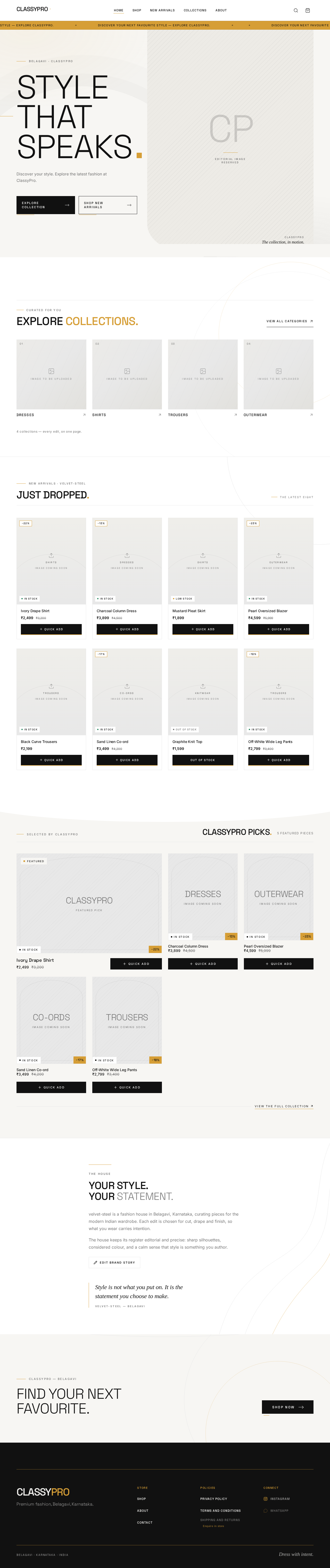
Belagavi · ClassyPro
Style thatSpeaks
Discover your style. Explore the latest fashion at ClassyPro.
Editorial image reserved
ClassyProThe collection, in motion.
Curated for you
Explore collections.
New arrivals · velvet-steel
Just Dropped.
ClassyPro Picks.
5 featured piecesThe House
Your Style.Your Statement.
velvet-steel is a fashion house in Belagavi, Karnataka, curating pieces for the modern Indian wardrobe. Each edit is chosen for cut, drape and finish, so what you wear carries intention.
The house keeps its register editorial and precise: sharp silhouettes, considered colour, and a calm sense that style is something you author.
Style is not what you put on. It is the statement you choose to make.
velvet-steel — Belagavi
No comments yet. Be the first!