todo-application
 Diya Trivedi
create a simple single page project of the todo application

Comments (0)
Sign in to leave a comment
System Requirements
System Requirements Document for todo-application
1. Introduction
Product intent. todo-application is a simple, single-page todo application. It exists so one person can keep a personal task list on a single page: seeing what is still open, adding new tasks, marking tasks complete, and removing tasks they no longer need. The whole product is one page — there is no navigation, no second screen, and no separate settings or account area.
Audience. The product serves a single active human role, the Todo User: a taste-literate individual who opens the page on a laptop in the morning and again late at night, and who treats the list as a short personal statement about the day rather than as an enterprise work queue. The register is editorial and private, not dashboard-utility.
Scope of this document. This SRD specifies the current, single-page product: its one page, its one persona, its four accepted actions (view, add, complete, remove), the visual and interaction direction, and the technology and non-functional constraints that follow from the sources. Anything beyond that — accounts, sharing, multiple lists, reminders, sync, notifications, analytics — is out of scope and is not introduced here.
2. System Overview
todo-application is delivered as a single page with no authentication and no account. The page is anonymously reachable: opening it is the entire entry experience, and the Todo User begins working immediately. There is no sign-in, no sign-up, no invitation, no provisioning step, and no protected destination, because the accepted product has no durable per-actor identity requirement — the list is a personal, single-session artifact on one page.
Actors.
- Todo User (active human persona, closed catalog): the sole human actor. Captures tasks, reviews the open list, marks tasks complete, and removes tasks.
- Application (system actor): owns the page, holds the in-page task list state, renders the live open-task count, and applies the completion and removal state changes.
Accepted behavior. Four actions, all on the one page: view the list of tasks, add a task, mark a task complete, and remove a task. Completion moves a task out of the open list into a ruled "DONE" section; removal deletes it. The open-task count is visible at all times and updates as tasks are added or completed.
Ownership. All accepted human-facing behavior is owned by the single first-party page, Todo. There are no provider surfaces, no external destinations, and no headless-only delivery paths in the current product.
Narrow exclusions. No additional pages, no navigation chrome, no accounts or authentication, no multi-user or shared lists, no due dates, priorities, tags, categories, sub-tasks, attachments, or search/filter controls are part of the current product. No persistence beyond what the page itself holds is specified by the sources.
2a. Product Interpretation and Delivery Boundary
Delivery. The product is a single-page web application. The page is the product: it is anonymously reachable, it renders the hero, the entry sheet, and the task list, and it holds the task state for the session. Because the accepted product has no requirement for a person to privately own or resume durable actor-specific state, and no commitment, entitlement, or value transfer that must remain bound to a specific participant, no application-owned identity is introduced. There is no login page, no registration flow, and no protected area.
Current boundary. Everything described in Sections 3, 5, and 2c is current: the one page, the four actions, the live counter, the DONE section, and the visual and motion direction.
Future boundary. Nothing in the authoritative thread requests future work. No future features are specified, and none are implied by this document. If future work is later requested, it must be added explicitly rather than assumed from the product category.
2c. Page Content and Component Coverage
The page inventory is exactly one page, matching the explicit single-page constraint and the supplied page contract.
Todo
The single page of the application. It is the anonymous entry surface and the complete todo lifecycle: viewing open tasks, adding tasks, completing tasks, and removing tasks. It is one cohesive working context with one authoritative state (the task list) and one completion outcome (an up-to-date personal task list).
Information and state
- The full task list, split into an open section and a "DONE" section.
- The live count of open tasks, displayed as an oversized italic numeral with a small-caps
OPENlabel. - Per-task text, and per-task completion state (open or done).
- Empty state: when there are no tasks at all, the list area shows muted empty-state copy in place of rows, and the open count reads zero.
- All-open-complete state: when every task is done, the open section is empty and the DONE section holds all rows; the open count reads zero.
Primary actions
- Add a task. The Todo User types into the entry sheet's underlined input line and presses Enter. The task is appended to the open list, the open count increments, and the input clears and stays focused for the next entry.
- Complete a task. The Todo User activates a task's checkbox. The checkbox fills with ink, a vermilion strike-through draws across the task text, and the row reflows into the DONE section; the open count decrements.
- Remove a task. The Todo User activates the delete glyph revealed on the row. The task is deleted from the list entirely, and the open count updates if the removed task was open.
Supporting actions
- Reveal the delete affordance. Hovering a task row shifts its text and reveals the vermilion delete glyph; this is a reveal, not a separate capability.
- Review the DONE section. Completed tasks remain visible in the smaller DONE section below the heavy rule, so the Todo User can see what has been finished.
Domain entities
- Task: the single domain entity. It has task text and a completion state (open or done). It has no due date, priority, tag, category, owner, or assignee in the current product.
- Task list: the ordered collection of tasks held by the page, partitioned into open and done.
Component responsibilities
- Hero headline block: renders the two-register sentence headline —
TODAYin roman display type continuing into the italic phrase carrying the live open-task count — and updates the phrase as the count changes. - Open-task counter: renders the oversized italic numeral and the
OPENsmall-caps label; scales up briefly when a task is added or completed. - Photographic strip: renders the single monochrome, tightly cropped photographic band used once as an editorial page break between the hero and the entry sheet.
- Entry sheet: the full-bleed white band holding the underlined input line and the right-aligned
ENTER ↵label; owns task creation on Enter. - Open task list: renders open task rows as ruled ledger lines with a checkbox, task text, and a hover-revealed delete glyph.
- DONE section: renders completed task rows below the heavy rule, at reduced size with vermilion strike-through.
- Empty-state copy: renders muted guidance in place of rows when the list is empty.
States
- Loading: the page renders its static structure immediately; there is no remote data fetch to wait on, so no loading skeleton is required for the list.
- Empty: no tasks — muted empty-state copy, open count of zero, DONE section absent or empty.
- Success: a task is added, completed, or removed, and the list, the DONE section, and the open count all reflect the change immediately.
- Error and recovery: if a task's text is empty or whitespace only, pressing Enter does not create a task; the input retains focus so the Todo User can type a real task. No other error state is specified, because no remote operation is specified.
3. Functional Requirements
Each requirement below is a distinct story point with its provenance, lifecycle facts, and observable acceptance.
FR-1 — View the task list (explicit) As a Todo User, I should see my tasks on the single page so that I know what I have to do.
- Trigger: opening the page.
- Observable result: the page renders the open task list and the DONE section, with the live open-task count visible.
- Access state: anonymous; no sign-in required.
- Failure/recovery: when there are no tasks, muted empty-state copy appears in place of rows and the count reads zero.
- Continuation: the Todo User can immediately add, complete, or remove a task from the same page.
FR-2 — Add a task (explicit) As a Todo User, I should add a task by typing it and pressing Enter so that it is captured on my list.
- Trigger: the Todo User types task text into the entry sheet's input line and presses Enter.
- Observable result: the task appears as a new row in the open list, the open-task count increments, and the input clears and remains focused.
- Access state: anonymous; no sign-in required.
- Failure/recovery: if the input is empty or whitespace only, no task is created and focus stays in the input.
- Continuation: the Todo User can add another task immediately, or complete or remove an existing one.
FR-3 — Complete a task (explicit) As a Todo User, I should mark a task complete so that my list shows what is finished.
- Trigger: the Todo User activates the checkbox on an open task row.
- Observable result: the checkbox fills with ink, a vermilion strike-through draws across the task text, the row reflows into the DONE section, and the open-task count decrements.
- Access state: anonymous; no sign-in required.
- Failure/recovery: no failure state is specified for this in-page state change.
- Continuation: the completed task remains visible in the DONE section, and the Todo User can continue with the remaining open tasks.
FR-4 — Remove a task (explicit) As a Todo User, I should remove a task I no longer need so that my list stays accurate.
- Trigger: the Todo User activates the delete glyph on a task row.
- Observable result: the task is deleted from the list entirely, and the open-task count updates if the removed task was open.
- Access state: anonymous; no sign-in required.
- Failure/recovery: no failure state is specified for this in-page state change.
- Continuation: the remaining tasks stay in place and the Todo User can continue working on the list.
FR-5 — See the live open-task count (explicit) As a Todo User, I should see how many tasks are still open so that I can read the state of my day at a glance.
- Trigger: page load, and any add or complete action.
- Observable result: the oversized italic numeral and its
OPENlabel show the current number of open tasks, and the hero sentence's count phrase stays consistent with it. - Access state: anonymous; no sign-in required.
- Failure/recovery: when no tasks are open, the count reads zero.
- Continuation: the count continues to track every subsequent add and complete action.
FR-6 — Review completed tasks (explicit) As a Todo User, I should still see my completed tasks so that I can confirm what I finished.
- Trigger: completing a task.
- Observable result: the task appears in the DONE section below the heavy rule, set smaller with a vermilion strike-through.
- Access state: anonymous; no sign-in required.
- Failure/recovery: when nothing is complete, the DONE section is empty.
- Continuation: completed tasks remain reviewable while the Todo User continues working on open tasks.
FR-7 — Single-page delivery (explicit) As a Todo User, I should do all of this on one page so that I never have to navigate.
- Trigger: any use of the product.
- Observable result: viewing, adding, completing, and removing all happen on the single Todo page, with no navigation to another page.
- Access state: anonymous; the page is the entry surface.
- Failure/recovery: not applicable.
- Continuation: not applicable.
4. User Personas
Todo User
Product context. The Todo User is the only human actor in todo-application. They open a single page on a laptop — typically early in the morning and again late at night — and use it as a private daily ritual rather than a shared work tool. The list is short, personal, and read as a statement about the day. They are taste-literate and notice typography, spacing, and restraint; a generic dashboard would feel wrong to them.
Primary goal. Keep an accurate, up-to-date personal task list on one page: capture what they need to remember, see what is still open, mark off what is done, and delete what no longer matters.
Distinct accepted responsibilities.
- Capture. Turn a thought into a task by typing it and pressing Enter, without leaving the page or opening a form.
- Triage by completion. Decide a task is finished and mark it complete, moving it out of the open list and into the DONE section.
- Prune. Decide a task is no longer needed and remove it entirely.
- Read state at a glance. Use the open-task count and the split between open and done rows to understand the day's remaining load without scanning every row.
Relevant inputs and decisions. The task text they type; the decision of whether a task is done or still open; the decision of whether a task should be deleted rather than completed. They do not supply due dates, priorities, categories, or assignees, because the product does not accept them.
Interactions with other accepted participants. There are none. The Todo User is the sole human participant; the application is the only other actor, and it responds to their actions by updating the list, the DONE section, and the count. No other person is affected by, awaits, or receives anything from this work.
Observable success. The page shows exactly the tasks the Todo User intends to have on it, with the correct split between open and done, and an open-task count that matches the number of open rows.
5. Core User Flows
Flow 1 — Open the page and read the list
- The Todo User opens
todo-applicationin a browser. The page is anonymously reachable; no sign-in or account step occurs. - The Todo page renders: the hero headline block with
TODAYcontinuing into the italic count phrase, the oversized open-task numeral with itsOPENlabel, the full-bleed photographic strip, the white entry sheet, and the task list. - The Todo User reads the open rows and the DONE section to see what remains and what is finished.
- Result: the Todo User knows the current state of the list. Next step: add, complete, or remove a task, or close the page.
Empty case. If there are no tasks, the list area shows muted empty-state copy and the open count reads zero. The Todo User proceeds to Flow 2.
Flow 2 — Add a task
- Starting from the open Todo page, the Todo User clicks the underlined input line in the white entry sheet.
- The Todo User types the task text.
- The Todo User presses Enter. The
ENTER ↵label indicates that Enter is the way to submit; there is no add button. - Result: the task appears as a new ruled row in the open list, the open-task count increments and the numeral scales up briefly, and the hero sentence's count phrase updates to match. The input clears and stays focused.
- Failure/recovery: if the input is empty or whitespace only, no task is created and focus remains in the input so the Todo User can type a real task.
- Continuation: the Todo User can immediately type the next task, or move on to completing or removing an existing one.
Flow 3 — Complete a task
- Starting from the open Todo page, the Todo User moves to the row of a task they have finished.
- The Todo User activates that row's checkbox.
- Result: the checkbox fills with ink, a vermilion strike-through draws left-to-right across the task text, and the row reflows down into the DONE section below the heavy rule, set smaller. The open-task count decrements and the hero count phrase updates.
- Continuation: the completed task remains visible in the DONE section, and the Todo User continues with the remaining open tasks or closes the page.
Flow 4 — Remove a task
- Starting from the open Todo page, the Todo User hovers the row of a task they no longer need. The row's text shifts and the vermilion delete glyph is revealed.
- The Todo User activates the delete glyph.
- Result: the task is deleted from the list entirely. If it was open, the open-task count decrements and the hero count phrase updates; if it was in the DONE section, the DONE section simply loses that row.
- Continuation: the remaining tasks stay in place and the Todo User continues working on the list.
Flow 5 — Review what is done
- Starting from the open Todo page, the Todo User looks below the heavy rule at the DONE section.
- The Todo User reads the completed tasks, each set smaller with a vermilion strike-through.
- Result: the Todo User can confirm what they finished today. Next step: return to the open list to add, complete, or remove more tasks, or close the page.
6. Visuals, Colors, and Theme
The creative direction is authoritative for this section. The muse is Tobias van Schneider, and the headline read is editorial swagger for a single list — enormous type, one hot accent, zero chrome.
Mode. Light mode only.
Color tokens (exact hex, by role).
| Role | Hex | Usage |
|---|---|---|
| Background (paper ground) | #F4F1EA | Warm off-white paper ground; carries roughly 70% of the page |
| Surface | #FFFFFF | Reserved for the single task-entry sheet, so it reads as a physical card laid on paper |
| Text | #0E0E0E | Ink black; all type |
| Primary | #0E0E0E | Ink black; the primary action and all hairlines |
| Accent | #E4321B | Vermilion red; used only for the live counter, the completed strike-through rule, and the destructive delete affordance — never for the main add action |
| Muted | #8C877C | Warm grey; metadata, timestamps, and empty-state copy |
No gradients, no tints, and no soft shadows beyond a 1px hairline.
Typography.
- Headings: Playfair Display, weight 900, at hero scale with tight
-0.03emtracking and0.92line-height, set in mixed case (never all-caps) so the italic swashes read as a magazine masthead. - Body and UI: Archivo, weights 400 and 600, with
+0.01emtracking; small caps at 11px for labels such asOPENandDONE. - Type scale (1.5 modular): 96 / 64 / 40 / 24 / 16 / 13.
- Applied sizes: hero headline 96px, clamped to 12vw on small screens; section numerals 40px italic Playfair; task text 24px Archivo 500; metadata 13px Archivo 400 small caps.
- The two families are deliberately unequal: one is a serif with a temper, the other a plain grotesque doing quiet work.
Shape language. Sharp corners everywhere — 0px radius on the entry sheet, the task rows, and the buttons. Structure comes from 1px ink hairlines and full-bleed horizontal rules, not from cards or shadows. The only curve on the page is the italic Playfair swash in the hero. Buttons are rectangles with generous 20px/28px padding. The checkbox is a 22px square with a 2px ink border that fills solid ink when checked, with the task text struck through by a 2px vermilion rule.
Layout. Asymmetric editorial grid: a 12-column page where the hero headline occupies columns 1–9 and bleeds past the right margin; the live open-task counter sits alone in columns 10–12 as an oversized italic numeral; the list itself is a single 8-column measure (max 720px) offset left, with the remaining right columns left intentionally empty as margin. The entry sheet is a full-bleed white band that interrupts the paper ground between the hero and the list. Completed tasks collapse into a ruled DONE section below a heavy 4px ink rule, set 40% smaller with vermilion strikethrough.
Spacing rhythm. Generous editorial breathing room: full-bleed rules and bands define the vertical rhythm rather than card padding; the list measure is offset left so the right columns read as deliberate margin.
Imagery style. Almost none — this is a type-and-rule page. The single visual asset is a monochrome, high-contrast, tightly cropped photographic band (a desk edge, a cup, a hand holding a pen — shot at macro, ink-toned) used once as a 200px full-bleed strip between the hero and the entry sheet, half-covered by the white entry band so it reads as an editorial page break rather than a stock hero. No icons except one 20px ink glyph for delete and the 22px square checkbox; no illustration, no 3D, no emoji.
Forbidden. No blue or indigo primary on white — no #2563EB, #4F46E5, or any bootstrap-blue button. No Inter, Roboto, Arial, Helvetica, Open Sans, Lato, Poppins, or system-ui for any type on the page. No rounded cards with soft drop shadows, no hover-lift on list items, no grid of identical tiles. No gradient-blob or abstract-shape hero backgrounds. No centred headline + subhead + primary CTA stack above the fold. No checkbox rows styled as pill-shaped chips with pastel fills. No emoji as task icons and no celebration confetti on completion. No more than one photographic asset, and no stock photo of a smiling person at a laptop. The generic indigo/blue-on-white SaaS template is forbidden for this project.
7. Signature Design Concept
The page as a masthead. The first screen is a warm off-white paper field with no hero image at the top. A 96px Playfair Display 900 headline reading TODAY sits flush-left at columns 1–4, and immediately below it, on the same baseline block, the italic Playfair phrase has 7 things to say continues to column 9 — one sentence broken across two type registers, spanning nearly the full viewport width. In columns 10–12, aligned to the headline's cap height, an oversized italic numeral 07 in vermilion is the live count of open tasks, with an 11px small-caps OPEN label beneath it. Below the headline a 1px ink rule spans the full width, then the white entry sheet begins flush to the viewport edges. There is no centred stack, no subhead paragraph, and no button above the fold — the only interactive element in the first screen is a single ink-outlined input line reading Add a task… with a right-aligned ENTER ↵ label.
Signature moves.
- A two-register sentence headline.
TODAYin 96px Playfair Display 900 roman continues on the same line block intohas 7 things to sayin Playfair italic, so the sentence itself spans columns 1–9 of a 12-column grid and the adjective count updates live as tasks are added. - An oversized vermilion italic numeral in the top-right column showing the open-task count, scaling up in 120ms whenever a task is added or completed — the app's only ornament and its only animation of consequence.
- A full-bleed white entry sheet that interrupts the paper ground, with the input as a naked underlined line and
ENTER ↵as a small-caps right-aligned label instead of a button. Pressing Enter is the only way to add, and the sheet's 1px ink border is the only chrome. - Task rows as ruled ledger lines, not cards. Each row is separated by a 1px ink hairline; hovering shifts the text 6px right and reveals a vermilion delete glyph; completing a task draws a 2px vermilion strike-through left-to-right before the row reflows into the smaller
DONEsection below a 4px rule. - A single 200px full-bleed monochrome photographic strip (desk-edge macro, ink-toned) half-covered by the white entry sheet, acting as an editorial page break between the hero and the list — the page's only image, used once and never repeated.
This concept only recomposes accepted content, states, and controls: the headline, the count, the entry sheet, the open rows, the DONE section, and the delete affordance. It introduces no new behavior, page, or destination.
8. Interaction Model & Motion Direction
Interaction Model: Animated Motion Tempo: restrained Hero Dimensionality: flat
Landing Hero Motion Brief
- Focal subject. The two-register sentence headline —
TODAYin roman Playfair Display 900 continuing into the italic count phrase — with the oversized vermilion open-task numeral in the top-right column. - Input → transformation → outcome thesis. On load, the hero headline reveals line by line with a 60ms stagger and a 12px upward translate, then nothing moves again; thereafter, the only motion of consequence is the vermilion numeral scaling up in 120ms whenever a task is added or completed, so the count phrase and the numeral stay visibly in step with the list.
- Motion vocabulary. Restrained but confident. New tasks slide in from the left over 220ms with
cubic-bezier(0.2, 0.8, 0.2, 1). Checking a task plays a 180ms ink fill of the checkbox followed by the vermilion strike-through drawing left-to-right over 260ms, then the row reflows down to the DONE section. Hover on any task row shifts its text 6px right and reveals the delete glyph in vermilion. No bounce, no spring, no particles. - Composed first frame. The paper field with the headline already set, the vermilion numeral at its resting size, the 1px ink rule, and the white entry sheet with the underlined input and the
ENTER ↵label — a complete, readable page before any motion runs. - Reduced-motion state. With reduced motion requested, the hero appears fully composed with no stagger or translate, the counter changes value without scaling, new rows appear in place without sliding, and completion applies the ink fill and strike-through immediately without the drawn transition. All state changes remain fully visible and the page stays usable.
9. Non-Functional Requirements
NFR-1 — Single-page constraint (explicit) The application must be a single page. All accepted behavior — viewing, adding, completing, and removing tasks — happens on that one page, with no navigation to another page and no additional routes.
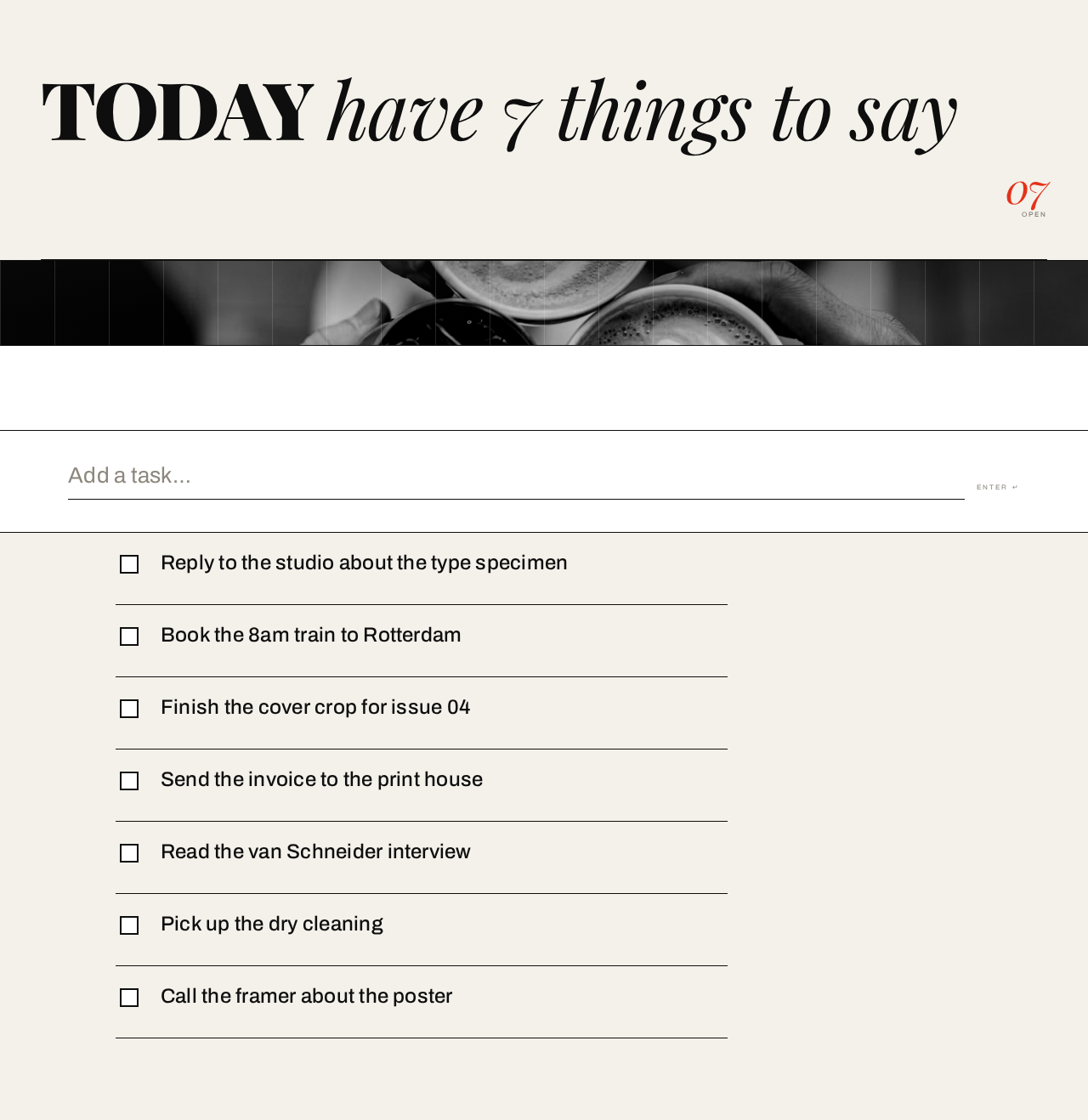
7 open tasks on your list.

- Reply to the studio about the type specimen
- Book the 8am train to Rotterdam
- Finish the cover crop for issue 04
- Send the invoice to the print house
- Read the van Schneider interview
- Pick up the dry cleaning
- Call the framer about the poster
7 open tasks on your list.
- Reply to the studio about the type specimen
- Book the 8am train to Rotterdam
- Finish the cover crop for issue 04
- Send the invoice to the print house
- Read the van Schneider interview
- Pick up the dry cleaning
- Call the framer about the poster
No comments yet. Be the first!