Page 1 of 10
System Requirements Document for student-expense-tracker
1. Introduction
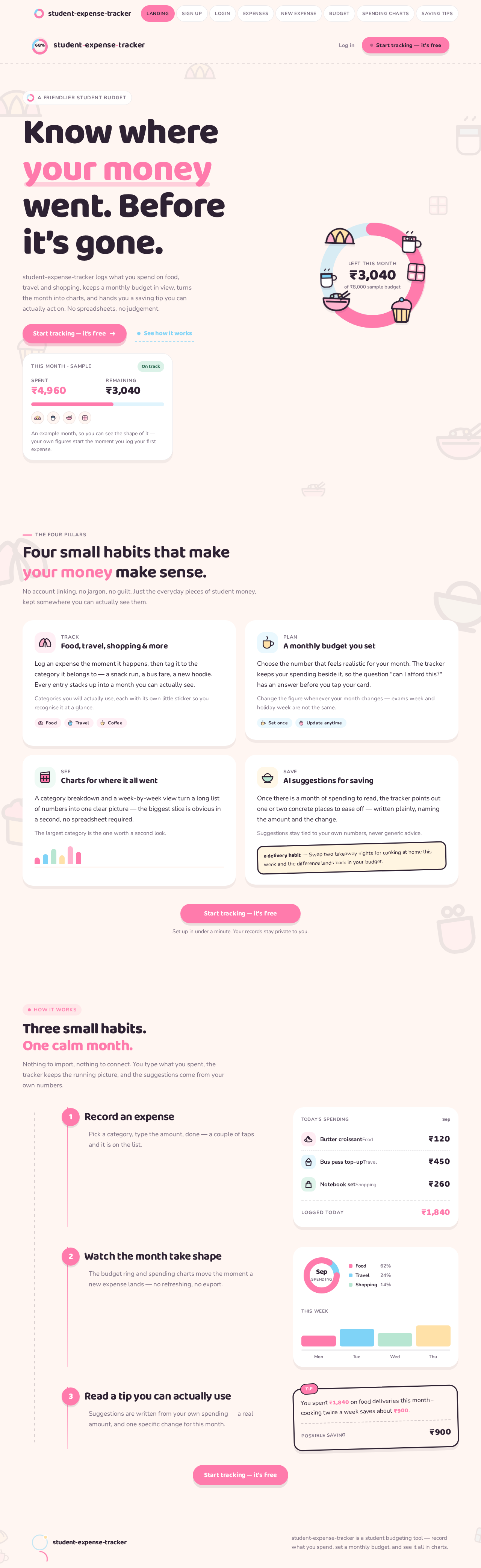
Product intent. student-expense-tracker is a publishable, professional-quality personal finance website for students. It lets a student record what they spend across everyday categories — food, travel, shopping, and similar — set a monthly budget, see their spending visualised in charts, and read AI-generated suggestions for saving money. The product's emotional register is deliberately warm and non-judgemental: it is a friendly roommate who happens to be good with numbers, not a bank dashboard.
Audience. The single active human audience is the Student Budgeter — a student living on a limited, self-managed income who wants to know where their money went before it is gone, and who finds conventional money apps intimidating or slightly shameful.
Design intent. The site must look cute, using pink and baby blue, with cute food illustration in the background (croissants, cupcakes, noodles, coffee, chocolate, hot chocolate), and must be polished enough to publish publicly.
Page 2 of 10
2. System Overview
student-expense-tracker is a first-party web application with application-owned identity. A visitor arrives anonymously at the Landing page, which explains the product and its four pillars: expense tracking by category, a monthly budget, spending charts, and AI saving suggestions. From there a student either creates an account on Sign Up or verifies a returning account on Login.
Once identity is established, the student works across five protected destinations. Expenses is the browsable record of everything already logged, grouped and filterable by category. New Expense is the focused entry surface where a single expense is recorded with its category and amount. Budget is where the monthly budget is set and where current spending is read against it. Spending Charts is the analytics destination where the spending breakdown is visualised. Saving Tips is where AI suggestions for saving money are read.
All durable state — expenses, the monthly budget, chart data, and saving suggestions — is bound to the individual student who created it. A student's records are private to that student; there is no shared or multi-user workspace, and no differentiated roles or permissions exist in the current scope.
Narrow exclusions. The current scope does not include bank or card account linking, automatic transaction import, shared or household budgets, bill splitting between people, investment or credit products, or any financial advice beyond the saving suggestions the product itself generates. The background food imagery is decorative illustration, not content.
Page 3 of 10
2a. Product Interpretation and Delivery Boundary
Delivery ownership. The website is first-party and application-owned. Every page a student interacts with — Landing, Sign Up, Login, Expenses, New Expense, Budget, Spending Charts, Saving Tips — is custom UI built and owned by this product. There is no provider-owned or external-only surface in the current scope.
Access ownership. Identity is application-owned. A student privately owns durable, resumable, personal financial state: their expense history, their monthly budget, their chart data, and their saving suggestions. That state must remain bound to the correct student across sessions, so the product establishes identity at first use through self-service enrollment and verifies it on return. The Landing, Sign Up, and Login surfaces are anonymously reachable; Expenses, New Expense, Budget, Spending Charts, and Saving Tips require a verified session. Sign Up and Login are separate access boundaries because neither can own the interaction that grants access to itself.
Current versus future. Everything described in this document is current. No future-horizon features are accepted; anything not stated here is out of scope rather than deferred.
2b. Source Content Inventory
Not applicable. The only reference directive is an inspiration_only visual reference to cute food background pictures, with no specific images, URLs, or factual content supplied. No content_source directive exists, so no inventory is rendered.
2c. Page Content and Component Coverage
Page 4 of 10
Landing
- Information and state. Anonymous public entry. Explains what student-expense-tracker is, who it is for, and its four pillars: tracking expenses across food, travel, shopping and similar categories; a monthly budget; charts showing spending; and AI suggestions for saving. Presents the product as professional and publishable.
- Primary action. "Start tracking — it's free" pink pill CTA leading to Sign Up.
- Supporting actions. Baby-blue ghost link "See how it works" that scrolls to the in-page explanation of the four pillars; a quiet "Log in" link to Login for returning students.
- Domain entities. None persisted. A live illustrative "this month" mini-card and an illustrated budget-ring scene demonstrate the product's shape without holding real student data.
- Component responsibilities. Oversized Baloo 2 headline block; pink pill CTA; baby-blue ghost link; live mini-card; illustrated budget-ring composition ringed by floating food stickers; background food-sticker field at 8% opacity; footer with product name and a plain-language note that the site is a student budgeting tool.
- States. Loading: static content, no data fetch, no skeleton needed. Empty: not applicable — the page is illustrative. Success: page renders fully; CTA and links are focusable and keyboard-operable. Error: if the illustrative mini-card cannot render, the hero composition falls back to the budget ring alone without breaking layout. Recovery: no recovery path required; the page is fully static and re-renderable by reload.
Sign Up
- Information and state. Anonymous self-service enrollment. Explains that an account keeps the student's expenses, budget, charts and saving suggestions private and available on return.
- Primary action. Submit the enrollment form to create the account.
- Supporting actions. Link to Login for students who already have an account; inline field-level validation messages.
- Domain entities. Student account (identity, credential, creation time).
- Component responsibilities. Enrollment form with email and password fields at 18px radius; inline validation; submit pill button; error banner region; link to Login.
- States. Loading: submit button enters a pending state and is disabled while the account is created. Empty: form renders with empty fields and no error. Success: account created and the student is taken into the protected app. Error: duplicate email, malformed email, or weak password shows a specific inline message and preserves entered values; a network failure shows a retryable banner. Recovery: the student can correct fields and resubmit, or switch to Login if the account already exists.
Login
- Information and state. Anonymous returning verification. Confirms that the student's previously stored expenses, budget, charts and saving suggestions are waiting for them.
- Primary action. Submit credentials to verify the returning account.
- Supporting actions. Link to Sign Up for students without an account; inline validation messages.
- Domain entities. Student account (identity, credential).
- Component responsibilities. Credential form at 18px radius; inline validation; submit pill button; error banner region; link to Sign Up.
- States. Loading: submit button enters a pending state and is disabled while verification runs. Empty: form renders with empty fields and no error. Success: session established and the student lands in the protected app with their own data. Error: incorrect credentials show a single non-enumerating message; a network failure shows a retryable banner. Recovery: the student can retry, or move to Sign Up if they have no account.
Page 5 of 10
Expenses
- Information and state. The student's browsable record of everything already logged, across food, travel, shopping and other categories. Shows each expense's category sticker icon, name, date, and amount, with the running total for the visible set.
- Primary action. Open New Expense to record a new expense.
- Supporting actions. Filter the list by category; filter by month; open a single expense row to review its detail; delete an expense that was recorded in error.
- Domain entities. Expense (name, category, amount, date, optional note); Category (food, travel, shopping, coffee, fun, rent, other).
- Component responsibilities. Receipt-style expense rows with dashed hairline dividers, category food sticker as leading icon, and amount right-aligned in oversized Baloo 2 800; category filter chips; month selector; running total; empty-state illustration; delete confirmation.
- States. Loading: receipt-row skeletons with the same row height as loaded rows. Empty: a friendly illustrated empty state explaining that no expenses have been recorded yet, with a direct action to New Expense. Success: rows render with a 40ms stagger; totals update. Error: if the list cannot load, an inline retry banner appears above the list area. Recovery: retry reloads the list; a failed delete restores the row and shows a non-blocking message.
New Expense
- Information and state. Focused entry surface for a single expense. Shows the fields required to record it and the category options available.
- Primary action. Save the expense.
- Supporting actions. Pick a category via sticker chips; enter an amount; set the date; add an optional note; cancel and return to Expenses.
- Domain entities. Expense (name, category, amount, date, optional note); Category.
- Component responsibilities. Name input; category sticker chip picker; amount input with tabular figures; date picker; optional note field; save pill button; cancel link; inline validation.
- States. Loading: form renders immediately; no blocking fetch. Empty: form renders with today's date pre-filled and no category selected. Success: the expense is saved, a confirmation is shown, and the student is returned to Expenses where the new row appears at the top of the list. Error: missing name, missing category, or a non-positive amount shows a specific inline message and preserves entered values; a save failure shows a retryable banner without clearing the form. Recovery: the student corrects the field and resubmits, or cancels back to Expenses with nothing saved.
Budget
- Information and state. The student's monthly budget workspace. Shows the budget amount set for the current month, the amount spent so far, and the amount remaining, with the remaining figure at the centre of the budget ring.
- Primary action. Set or update the monthly budget amount.
- Supporting actions. Move between months to review a past month's budget position; read the under-budget or over-budget state at a glance.
- Domain entities. Monthly budget (month, amount); Expense (aggregated for the month).
- Component responsibilities. 320px pink donut budget ring with rounded arc caps and the remaining amount in Baloo 2 800 at its centre; budget amount input; month selector; spent / remaining summary figures; under-budget (baby blue) and over-budget (pink) state treatment.
- States. Loading: ring and figures render as a skeleton at final size to avoid layout shift. Empty: when no budget has been set for the month, the ring renders as an empty track with a prompt to set a monthly budget. Success: the ring arc animates on mount and on any budget change; the remaining figure updates. Error: if the budget cannot be saved, the previous value is restored and a retryable banner appears. Recovery: retry re-saves; the student can re-enter the amount at any time.
Page 6 of 10
Spending Charts
- Information and state. The student's spending breakdown for the selected month, shown as a category donut and a weekly bar chart, with a legend that pairs each category's food sticker with its palette colour.
- Primary action. Change the month being analysed.
- Supporting actions. Hover or focus a category to read its exact amount and share of spending; read the legend by illustration alone.
- Domain entities. Expense (aggregated by category and by week); Category.
- Component responsibilities. Category donut with rounded arcs; weekly bar chart with 12px rounded bar caps and a soft cream baseline and no gridlines; sticker-plus-colour legend chips; month selector; per-category value readout.
- States. Loading: chart frames render as skeletons at final size. Empty: when the month has no expenses, an illustrated empty state explains that charts appear once expenses are recorded, with a direct action to New Expense. Success: bars grow from the baseline with the spring motion; donut arcs animate on mount and on month change. Error: if chart data cannot load, an inline retry banner replaces the chart area. Recovery: retry reloads the month's data; switching months re-attempts the fetch.
Saving Tips
- Information and state. AI suggestions for saving money, written in first person and grounded in the student's own recorded spending, each naming a concrete amount and a concrete change.
- Primary action. Read the suggestions for the current month.
- Supporting actions. Refresh the suggestions after new expenses have been recorded; move between months to review earlier suggestions.
- Domain entities. Saving suggestion (text, referenced category, referenced amount, referenced period); Expense (aggregated input to the suggestion).
- Component responsibilities. Hand-note tip cards on a cream surface with a 3px ink outline, a slight -1.5° rotation, and a small pink "tip" sticker in the corner; month selector; refresh control; empty-state illustration.
- States. Loading: tip-card skeletons with the same card dimensions. Empty: when there is not yet enough recorded spending to base a suggestion on, an illustrated empty state explains that tips appear once expenses have been recorded, with a direct action to New Expense. Success: tip cards flip in like a note being handed over. Error: if suggestions cannot be generated, a retryable banner appears and any previously generated suggestions remain readable. Recovery: retry regenerates; recording new expenses and refreshing produces updated suggestions.
Page 7 of 10
3. Functional Requirements
FR-1 — Expense tracking across categories. As a Student Budgeter I should record an expense with its category and amount so that my spending is captured as it happens.
- Provenance:
explicit.
- Actor: Student Budgeter. Trigger: the student opens New Expense and submits the form.
- Input: expense name, category (food, travel, shopping, coffee, fun, rent, other), amount, date, optional note.
- Observable result: the expense is stored against the student's own account and appears at the top of the Expenses list with its category sticker, date, and amount.
- Access state: requires a verified session.
- Failure/recovery: missing name, missing category, or a non-positive amount is rejected with a specific inline message and the entered values are preserved; a save failure shows a retryable banner without clearing the form.
- Continuation: the student returns to Expenses, where the new row is visible and the running total has updated.
FR-2 — Browsable expense record. As a Student Budgeter I should browse, filter, and review my recorded expenses so that I can see where my money has gone.
- Provenance:
explicit.
- Actor: Student Budgeter. Trigger: the student opens Expenses.
- Input: category filter selection, month selection, or a row selection.
- Observable result: the list shows the matching expenses as receipt-style rows with category sticker, name, date, and right-aligned amount, plus the running total for the visible set.
- Access state: requires a verified session; only the student's own expenses are shown.
- Failure/recovery: if the list cannot load, an inline retry banner appears above the list area and retry reloads it.
- Continuation: the student opens a row to review detail, deletes a row recorded in error, or moves to New Expense to add another.
FR-3 — Correcting a recorded expense. As a Student Budgeter I should delete an expense I recorded in error so that my record stays accurate.
- Provenance:
required_inference — necessary so that the accepted expense record remains truthful and the budget and charts derived from it stay correct.
- Actor: Student Budgeter. Trigger: the student selects delete on an expense row.
- Input: the row to delete, confirmed in a confirmation step.
- Observable result: the row is removed from Expenses, and the running total, the Budget position, and the Spending Charts breakdown all reflect the removal.
- Access state: requires a verified session; only the student's own expenses can be deleted.
- Failure/recovery: a failed delete restores the row and shows a non-blocking message.
- Continuation: the student continues browsing or records a corrected expense.
FR-4 — Monthly budget. As a Student Budgeter I should set a monthly budget so that I have a target to spend against.
- Provenance:
explicit.
- Actor: Student Budgeter. Trigger: the student opens Budget and enters or updates an amount for a month.
- Input: month, budget amount.
- Observable result: the budget is stored for that month and the budget ring renders the remaining amount at its centre, with the arc animating on mount and on change.
- Access state: requires a verified session.
- Failure/recovery: if the budget cannot be saved, the previous value is restored and a retryable banner appears; retry re-saves.
- Continuation: the student reads their position against the budget and moves to Spending Charts or Saving Tips.
FR-5 — Spending against budget. As a Student Budgeter I should see how much I have spent and how much remains this month so that I know my position at a glance.
- Provenance:
explicit.
- Actor: Student Budgeter. Trigger: the student opens Budget.
- Input: the month's recorded expenses and the month's budget amount.
- Observable result: the page shows the budget amount, the amount spent so far, and the amount remaining, with an under-budget (baby blue) or over-budget (pink) state treatment.
- Access state: requires a verified session.
- Failure/recovery: if the position cannot be computed, the ring renders as a skeleton and a retryable banner appears.
- Continuation: the student adjusts the budget, reviews a past month, or moves to Spending Charts.
FR-6 — Charts showing spending. As a Student Budgeter I should see charts of my spending so that I can understand where my money goes.
- Provenance:
explicit.
- Actor: Student Budgeter. Trigger: the student opens Spending Charts and selects a month.
- Input: month selection; the month's recorded expenses.
- Observable result: a category donut and a weekly bar chart render the breakdown, with a legend pairing each category's food sticker with its palette colour, and bars growing from the baseline with the spring motion.
- Access state: requires a verified session; only the student's own expenses are charted.
- Failure/recovery: if chart data cannot load, an inline retry banner replaces the chart area and retry reloads it; switching months re-attempts the fetch.
- Continuation: the student reads the legend, inspects a category's exact amount, or moves to Saving Tips.
FR-7 — AI suggestions for saving. As a Student Budgeter I should receive AI suggestions for saving money so that I know where to cut back.
- Provenance:
explicit.
- Actor: Student Budgeter. Trigger: the student opens Saving Tips for a month, or refreshes the suggestions after recording new expenses.
- Input: the student's recorded expenses for the selected month.
- Observable result: hand-note tip cards present first-person suggestions that name a concrete amount and a concrete change, each grounded in the student's own recorded spending.
- Access state: requires a verified session; suggestions are derived only from the student's own expenses.
- Failure/recovery: if suggestions cannot be generated, a retryable banner appears and any previously generated suggestions remain readable; retry regenerates.
- Continuation: the student moves to Budget to act on a suggestion, or records new expenses and refreshes.
FR-8 — Self-service enrollment. As a Student Budgeter I should create my own account so that my expenses, budget, charts and saving suggestions are private to me and available when I return.
- Provenance:
required_inference — necessary because the accepted durable personal financial state must remain bound to the correct student across sessions.
- Actor: Student Budgeter. Trigger: the student submits the enrollment form on Sign Up.
- Input: email and password.
- Observable result: an account is created and the student enters the protected app with their own empty expense record, no budget set, and empty chart and tip states.
- Access state: Sign Up is anonymously reachable; the protected destinations remain unavailable until the account exists.
- Failure/recovery: duplicate email, malformed email, or weak password shows a specific inline message and preserves entered values; a network failure shows a retryable banner; the student can switch to Login if the account already exists.
- Continuation: the student records their first expense on New Expense.
FR-9 — Returning verification. As a Student Budgeter I should verify my returning account so that I can get back to my own stored expenses, budget, charts and saving suggestions.
- Provenance:
required_inference — necessary because the accepted durable state must be reachable again by the same student.
- Actor: Student Budgeter. Trigger: the student submits credentials on Login.
- Input: email and password.
- Observable result: a session is established and the student lands in the protected app with their own previously stored data.
- Access state: Login is anonymously reachable; protected destinations require the verified session.
- Failure/recovery: incorrect credentials show a single non-enumerating message; a network failure shows a retryable banner; the student can retry or move to Sign Up.
- Continuation: the student resumes on Expenses, Budget, Spending Charts, or Saving Tips with their data intact.
FR-10 — Cute pink and baby blue visual identity. As a Student Budgeter I should see a cute pink and baby blue interface so that budgeting feels kind rather than punitive.
- Provenance:
explicit.
- Actor: Student Budgeter. Trigger: any page render.
- Observable result: the interface uses the pink primary and baby blue support palette on a warm cream ground, with oversized rounded numerals for money values and pill-shaped controls.
- Access state: applies to all pages, anonymous and protected.
- Failure/recovery: not applicable — presentation only.
- Continuation: not applicable.
FR-11 — Cute food background imagery. As a Student Budgeter I should see cute food illustration in the background so that the site feels warm and personal.
- Provenance:
explicit.
- Actor: Student Budgeter. Trigger: any page render.
- Observable result: a background field of flat-vector food stickers — croissants, cupcakes, noodles, coffee, chocolate, hot chocolate — sits behind the content at low opacity, clustered in the margins and never behind body copy at more than 8% opacity.
- Access state: applies to all pages, anonymous and protected.
- Failure/recovery: if the illustration assets fail to load, the cream ground renders cleanly and no content is obscured.
- Continuation: not applicable.
FR-12 — Professional, publishable quality. As a Student Budgeter I should experience a polished, publishable website so that I trust it with my money data.
- Provenance:
explicit.
- Actor: Student Budgeter. Trigger: any page render.
- Observable result: consistent typography, spacing, radii, and motion across all pages; no placeholder or broken content; keyboard-operable controls with visible focus; readable contrast throughout.
- Access state: applies to all pages.
- Failure/recovery: not applicable — quality constraint.
- Continuation: not applicable.
Page 8 of 10
4. User Personas
Page 9 of 10
Student Budgeter
Product context. The Student Budgeter is a student living on a limited, self-managed income — an allowance, a part-time job, or a termly disbursement they have to stretch. Their money arrives in a lump and leaves in small, forgettable amounts: a coffee here, a delivery order there, a bus fare, a impulse purchase. They are not financially illiterate; they are simply busy, and their spending is spread across so many small transactions that no single one feels like a decision. Conventional money apps make them feel judged, so they avoid opening them, which is exactly how the spending gets away from them.
Primary goal. To know their monthly spending position — how much has gone out, how much is left, and where it went — before the month ends, and to know concretely where they could cut back.
Distinct accepted responsibilities.
- Recording expenses as they happen, choosing the right category from food, travel, shopping, coffee, fun, rent, and other.
- Browsing and filtering the recorded expense list to review what has already been logged, and removing an expense recorded in error.
- Setting and updating the monthly budget amount, and reading the spent and remaining figures against it.
- Reading the category donut and weekly bar chart to understand the shape of the month's spending.
- Reading the AI saving suggestions and deciding which one to act on.
- Creating their own account and verifying it on return so their records stay private and available.
Relevant inputs and decisions. The student supplies expense names, categories, amounts, dates, and optional notes; the monthly budget amount; the month they want to review; and the category filters they want applied. Their recurring decisions are which category an expense belongs to, what a realistic monthly budget is, and which saving suggestion is worth acting on this month.
Interactions with other accepted participants. The Student Budgeter is the only active human participant in the current scope. Their counterpart in the product is the AI suggestion capability, which reads their own recorded spending and returns first-person saving suggestions naming a concrete amount and a concrete change. There is no shared workspace, no second human reviewer, and no administrator in the current scope.
Observable success. The student can state their remaining budget for the month without opening a spreadsheet; the donut and bar chart show them which category is largest; and at least one saving suggestion names a specific amount they recognise from their own spending and a specific change they could make.
What makes this role distinct. The Student Budgeter is simultaneously the sole data producer and the sole data consumer of the product. Every record in the system exists because they typed it, and every chart, budget position, and suggestion is derived from those same records. There is no reconciliation against an external source, no second party to agree with, and no approval step — which means the product's entire value rests on making the act of recording an expense fast and pleasant enough that the student actually keeps doing it.
Page 10 of 10
5. Core User Flows
Flow 1 — First visit and account creation
- The student arrives anonymously at Landing and reads the headline and the four pillars: track food, travel, shopping and similar categories; set a monthly budget; see charts of spending; get AI suggestions for saving.
- They optionally follow the baby-blue ghost link "See how it works" to read the in-page explanation, then return to the hero.
- They select the pink pill CTA "Start tracking — it's free" and arrive at Sign Up.
- They enter their email and password and submit. The submit button enters a pending state while the account is created.
- Success: the account is created and they enter the protected app with an empty expense record, no budget set, and empty chart and tip states.
- Failure: if



No comments yet. Be the first!