project-a57f8849
 vedant 6760
You are building a single-file HTML landing page for [PRODUCT NAME], a SaaS product: [ONE-LINE VALUE PROP], for [AUDIENCE]. Creative direction — read this before writing any code Ground every visual choice in the actual subject matter: [THE "WORLD" IT LIVES IN]. Don't reach for generic floating spheres/particles/abstract blobs — the 3D scene should be built from forms, materials, and motifs that belong to this specific product's world. Pick ONE concrete metaphor for the whole scene (a physical process, object, or system that mirrors what the product does) and commit to it rather than decorating with unrelated shapes. Avoid the current AI-landing-page defaults unless the brand color explicitly calls for them: warm cream background + serif display + terracotta accent near-black background + single neon/acid accent broadsheet newspaper layout with hairline rules Pick a palette of 4–6 named hex values deliberately tied to the product's world, not a template default. Pair a characterful display typeface with a quieter body face — not the same Inter/Satoshi pairing every SaaS site uses. Spend your one big creative risk on a signature moment: a single scene or transition that this page will be remembered for. Keep everything else disciplined around it. The core mechanic: scroll-driven 3D narrative A WebGL canvas (Three.js) sits as a persistent backdrop. As the user scrolls, map scroll progress (0→1) to a continuous transformation of the 3D scene — camera moving along a path, an object assembling/unfolding/rotating, materials shifting — so the scene reads as one continuous journey, not disconnected scenes. HTML content (headlines, feature copy, stats) is pinned and revealed in sync with the 3D motion using GSAP + ScrollTrigger (scrub: true so it tracks scroll position directly, not just triggers once). "Unfolding" should apply to both: the 3D object literally opening/revealing/assembling AND the copy appearing progressively (word-by-word or line-by-line reveals, You are building a single-file HTML landing page for [PRODUCT NAME], a SaaS product: [ONE-LINE VALUE PROP], for [AUDIENCE]. Creative direction — read this before writing any code Ground every visual choice in the actual subject matter: [THE "WORLD" IT LIVES IN]. Don't reach for generic floating spheres/particles/abstract blobs — the 3D scene should be built from forms, materials, and motifs that belong to this specific product's world. Pick ONE concrete metaphor for the whole scene (a physical process, object, or system that mirrors what the product does) and commit to it rather than decorating with unrelated shapes. Avoid the current AI-landing-page defaults unless the brand color explicitly calls for them: warm cream background + serif display + terracotta accent near-black background + single neon/acid accent broadsheet newspaper layout with hairline rules Pick a palette of 4–6 named hex values deliberately tied to the product's world, not a template default. Pair a characterful display typeface with a quieter body face — not the same Inter/Satoshi pairing every SaaS site uses. Spend your one big creative risk on a signature moment: a single scene or transition that this page will be remembered for. Keep everything else disciplined around it. The core mechanic: scroll-driven 3D narrative A WebGL canvas (Three.js) sits as a persistent backdrop. As the user scrolls, map scroll progress (0→1) to a continuous transformation of the 3D scene — camera moving along a path, an object assembling/unfolding/rotating, materials shifting — so the scene reads as one continuous journey, not disconnected scenes. HTML content (headlines, feature copy, stats) is pinned and revealed in sync with the 3D motion using GSAP + ScrollTrigger (scrub: true so it tracks scroll position directly, not just triggers once). "Unfolding" should apply to both: the 3D object literally opening/revealing/assembling AND the copy appearing progressively (word-by-word or line-by-line reveals, not a wall of text dropped in at once). Each section = one scroll-locked "beat": a 3D state + a piece of information revealed together. Don't let the 3D and the copy feel like two separate layers stacked on top of each other. Section-by-section structure Hero — the signature 3D moment at rest, headline stating the core value prop in plain language, no explaining yet. Problem — the 3D scene shifts to represent the "before" state (friction, chaos, manual work). Feature reveals (x3) — one scroll-locked beat per core feature: [FEATURE 1], [FEATURE 2], [FEATURE 3]. The 3D scene transforms to visually represent each one as it's introduced. Proof — social proof / stats / logos, presented as part of the same visual world (not a generic card grid dropped in). Pricing or CTA setup — scene resolves toward a "complete" or "assembled" state. Final CTA — [CTA GOAL], clear single action, no competing links. Technical constraints Single .html file. No build step, no bundler, no backend, no npm install. Load Three.js and GSAP + ScrollTrigger from a CDN (jsdelivr or cdnjs) via <script> tags. Fully responsive down to mobile. On mobile/low-end devices: reduce geometry complexity/particle counts, or fall back to a lighter CSS-only parallax version of the same narrative — do not just shrink the desktop version. Respect prefers-reduced-motion: provide a static/minimal-motion fallback that still communicates the same content and structure. Visible keyboard focus states; page must be usable with JS/WebGL disabled (semantic HTML underneath, not everything painted to canvas). Write real, specific copy for [PRODUCT NAME] — no lorem ipsum, no "Feature One / Feature Two" placeholders. Before you finalize Check your own plan against the brief: if the palette, type pairing, or 3D metaphor is something you'd produce for any SaaS product regardless of what it does, revise it until it's specific to [PRODUCT NAME]'s actual world

![Landing Page for [PRODUCT NAME]](https://api.8080.ai/api/v1/projects/design-screenshots/design_screenshots/9aaf5995-8445-4dd1-aac3-51c76fe29c83/f2bbba8c-13ea-4fe7-b945-07ecfb5a588b_thumb.webp?v=1784227701678)
Comments (0)
Sign in to leave a comment
Architecture
No Services Diagrams Yet
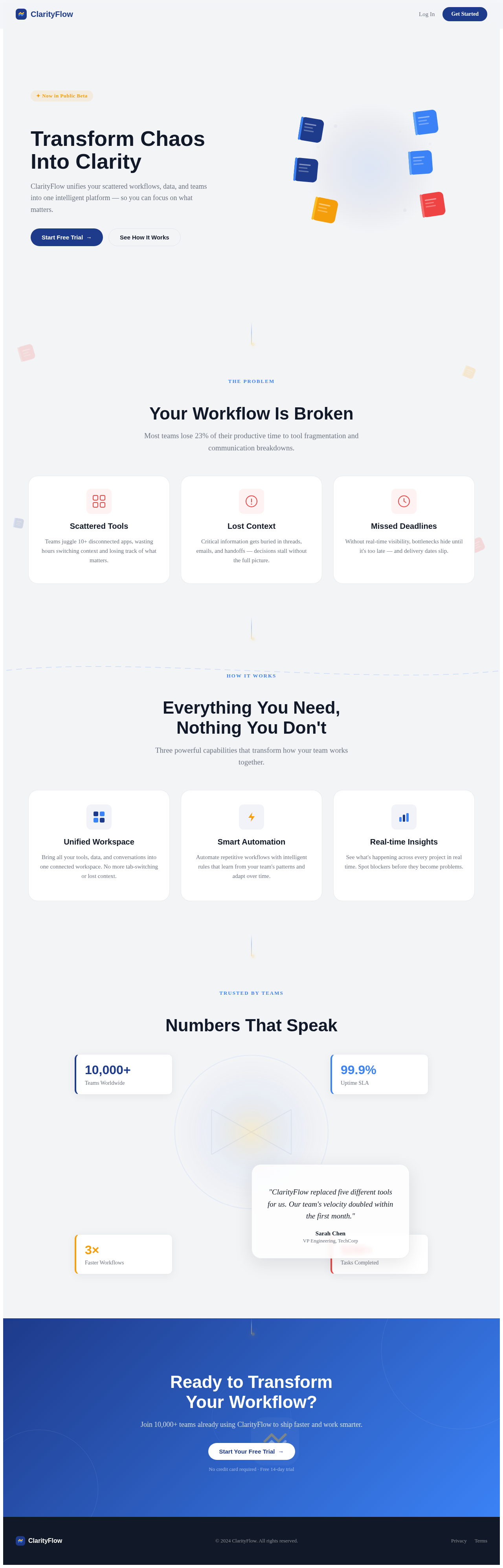
Transform Chaos
Into Clarity
ClarityFlow unifies your scattered workflows, data, and teams into one intelligent platform — so you can focus on what matters.
Your Workflow Is Broken
Most teams lose 23% of their productive time to tool fragmentation and communication breakdowns.
Scattered Tools
Teams juggle 10+ disconnected apps, wasting hours switching context and losing track of what matters.
Lost Context
Critical information gets buried in threads, emails, and handoffs — decisions stall without the full picture.
Missed Deadlines
Without real-time visibility, bottlenecks hide until it's too late — and delivery dates slip.
Everything You Need,
Nothing You Don't
Three powerful capabilities that transform how your team works together.
Unified Workspace
Bring all your tools, data, and conversations into one connected workspace. No more tab-switching or lost context.
Smart Automation
Automate repetitive workflows with intelligent rules that learn from your team's patterns and adapt over time.
Real-time Insights
See what's happening across every project in real time. Spot blockers before they become problems.
Numbers That Speak
"ClarityFlow replaced five different tools for us. Our team's velocity doubled within the first month."
Ready to Transform
Your Workflow?
Join 10,000+ teams already using ClarityFlow to ship faster and work smarter.
No credit card required · Free 14-day trial
Transform Chaos
Into Clarity
ClarityFlow unifies your scattered workflows, data, and teams into one intelligent platform — so you can focus on what matters.
Your Workflow Is Broken
Most teams lose 23% of their productive time to tool fragmentation and communication breakdowns.
Scattered Tools
Teams juggle 10+ disconnected apps, wasting hours switching context and losing track of what matters.
Lost Context
Critical information gets buried in threads, emails, and handoffs — decisions stall without the full picture.
Missed Deadlines
Without real-time visibility, bottlenecks hide until it's too late — and delivery dates slip.
Everything You Need,
Nothing You Don't
Three powerful capabilities that transform how your team works together.
Unified Workspace
Bring all your tools, data, and conversations into one connected workspace. No more tab-switching or lost context.
Smart Automation
Automate repetitive workflows with intelligent rules that learn from your team's patterns and adapt over time.
Real-time Insights
See what's happening across every project in real time. Spot blockers before they become problems.
Numbers That Speak
"ClarityFlow replaced five different tools for us. Our team's velocity doubled within the first month."
Ready to Transform
Your Workflow?
Join 10,000+ teams already using ClarityFlow to ship faster and work smarter.
No credit card required · Free 14-day trial
No comments yet. Be the first!