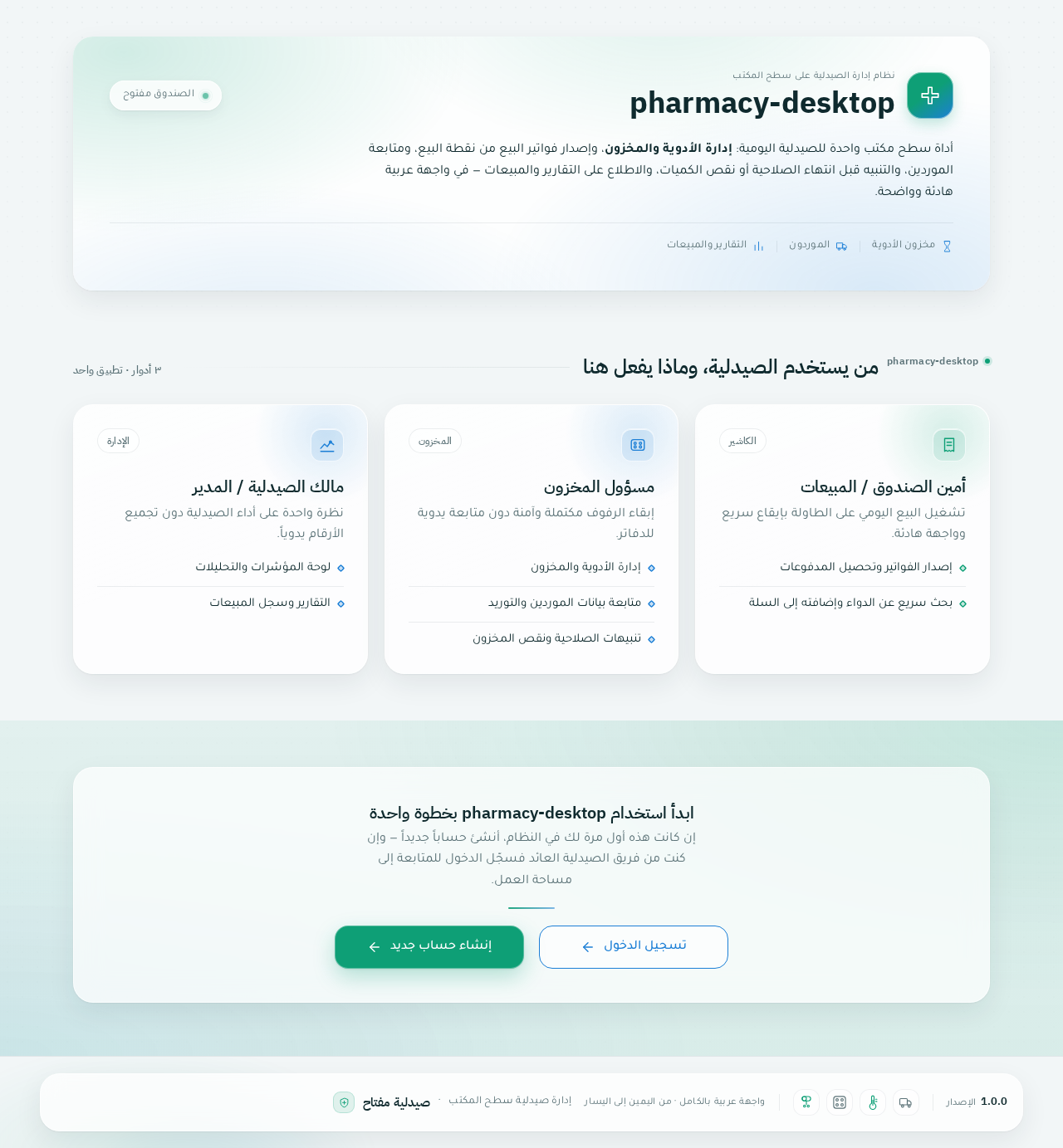
pharmacy-desktop

byIsmail

Role & Task: Act as a Senior UI/UX Designer and Lead Desktop Developer. Create a modern, fully functional Desktop Pharmacy Management Application using Electron.js with HTML, CSS (Tailwind CSS or custom CSS), and JavaScript/React. Language & Typography: Language: Arabic (RTL layout support dir="rtl"). Font: Clean, elegant, and highly legible modern Arabic font (e.g., Cairo, Tajawal, or IBM Plex Sans Arabic). Visual Design & Aesthetics: Color Palette: Professional medical theme featuring soft shades of Emerald Green and Ocean Blue combined with clean white/light-gray backgrounds. UI Style: Apple-inspired design language (macOS/iOS style). Feature rounded corners (squircle shapes, border-radius: 16px to 24px), subtle drop shadows, translucent glassmorphism effects, and smooth micro-interactions/transitions. Core Features & Layout: Sidebar Navigation: Collapsible sidebar with Apple-style rounded icons for quick access to: Dashboard (Overview & Analytics) Inventory / Drug Stock (إدارة الأدوية والمخزون) Point of Sale / POS (مبيعات وفواتير) Supplier Management (إدارة الموردين) Expiry & Low-Stock Alerts (تنبيهات الصلاحية والنقص) Reports & Sales History (التقارير والمبيعات) Dashboard Overview: Stat cards with rounded edges showing daily sales, expiring medicines, low stock counts, and total inventory value. POS Section: Quick search bar for medicines, easy cart addition, discount calculation, and print invoice button. Technical Requirements: Provide the setup for Electron.js (main.js, index.html, and styles.css). Smooth state transitions and fluid UI animations. Fully responsive layout optimized for desktop screen sizes.

LandingDashboard
Landing

Comments (0)

No comments yet. Be the first!

Project Tasks

64 planning tasks
#1

Generate system requirement document

1m 5s0.05 cr used
Done
#2

Generate personas & user flows

0m 10s0.05 cr used
Done
#7

Create flow for Pharmacy Cashier / Sales Staff

0m 9sCredits in parent
Done
#8

Create flow for Pharmacy Inventory Manager

0m 9sCredits in parent
Done
#9

Create flow for Pharmacy Owner / Manager

0m 9sCredits in parent
Done
#10

Landing

2m 33sCredits in subtasks
Done
#25

Fix Landing review finding: The requested first screen is a pharmacy dashboard with a…

0m 23s0.02 cr used
Error
#24

Fix Landing: The requested first screen is a pharmacy dashboard with a pharmacy-name header and four…

0m 25sCredits unavailable
Error
#19

Landing / Hero Band

0m 26s0.85 cr used
Done
#20

Landing / Capability Cards

0m 35s0.85 cr used
Done
#21

Landing / Identity Entry

0m 27s0.85 cr used
Done
#22

Landing / Footer

0m 0s0.85 cr used
Done
#23

Footer

0m 25sCredits in parent
Done
#11

Dashboard

5m 48sCredits in subtasks
Done
#60

Fix Dashboard review findings: Q2 as reviewed now… (+1 more)

0m 16s0.02 cr used
Error
#52

Fix Dashboard review findings: Q1 as reviewed now: Mobile sidebar is still in the content… (+2 more)

0m 15s0.02 cr used
Done
#46

Fix Dashboard review findings: Mobile sidebar remains as a fixed-width rail beside the… (+2 more)

0m 56s0.02 cr used
Done
#44

Fix Dashboard: The panel titled with subtitle is the SRD-required revenue chart, but it plots no…

2m 58sCredits unavailable
Error
#45

Fix Dashboard: The empty state is gated on computed from expiry records, so with no expiring medicines…

2m 57sCredits unavailable
Error
#26

Dashboard / Navigation

0m 0s0.85 cr used
Done
#27

Dashboard / Sidebar

0m 0s0.85 cr used
Done
#28

Dashboard / Header Band

0m 35s0.85 cr used
Done
#29

Dashboard / Stat Cards

0m 40s0.85 cr used
Done
#30

Dashboard / Revenue Expiry Split

0m 57s0.85 cr used
Done
#31

Dashboard / Footer

0m 0s0.85 cr used
Done
#43

Fix Dashboard: Mobile sidebar remains as a fixed-width rail beside the page instead of collapsing or…

2m 41sCredits unavailable
Done
#12

Inventory / Drug Stock

6m 7sCredits in subtasks
Paused
#34

Inventory / Drug Stock / Inventory Sidebar Slot

0.85 cr needed
Paused
#35

Inventory / Drug Stock / Inventory Navigation Slot

0.85 cr needed
Paused
#36

Inventory / Drug Stock / Inventory Register Header

0.85 cr needed
Paused
#37

Inventory / Drug Stock / Inventory Register Table

0.85 cr needed
Paused
#38

Inventory / Drug Stock / Inventory Footer Slot

0.85 cr needed
Paused
#13

Point of Sale / POS

6m 7sCredits in subtasks
Paused
#39

Point of Sale / POS / Pos Navigation

0.85 cr needed
Paused
#40

Point of Sale / POS / Pos Sidebar

0.85 cr needed
Paused
#41

Point of Sale / POS / Pos Content

0.85 cr needed
Paused
#42

Point of Sale / POS / Pos Footer

0.85 cr needed
Paused
#14

Supplier Management

6m 7sCredits in subtasks
Paused
#48

Supplier Management / Sidebar

0.85 cr needed
Paused
#47

Supplier Management / Navigation

0.85 cr needed
Paused
#49

Supplier Management / Header Band

0.85 cr needed
Paused
#50

Supplier Management / Register

0.85 cr needed
Paused
#51

Supplier Management / Footer

0.85 cr needed
Paused
#15

Expiry & Low-Stock Alerts

6m 7sCredits in subtasks
Paused
#58

Expiry & Low-Stock Alerts / Navigation

0.85 cr needed
Paused
#53

Expiry & Low-Stock Alerts / Alerts Sidebar Slot

0.85 cr needed
Paused
#54

Expiry & Low-Stock Alerts / Alerts Content Column

0.85 cr needed
Paused
#55

Expiry & Low-Stock Alerts / Alerts Orientation Band

0.85 cr needed
Paused
#56

Expiry & Low-Stock Alerts / Alerts Expiry Panel

0.85 cr needed
Paused
#57

Expiry & Low-Stock Alerts / Alerts Low Stock Panel

0.85 cr needed
Paused
#59

Expiry & Low-Stock Alerts / Footer

0.85 cr needed
Paused
#16

Reports & Sales History

6m 7sCredits in subtasks
Paused
#61

Reports & Sales History / Reports Navigation Slot

0.85 cr needed
Paused
#62

Reports & Sales History / Reports Sidebar Slot

0.85 cr needed
Paused
#63

Reports & Sales History / Reports Orientation Band

0.85 cr needed
Paused
#64

Reports & Sales History / Reports Performance Panels

0.85 cr needed
Paused
#65

Reports & Sales History / Reports Sales History Table

0.85 cr needed
Paused
#66

Reports & Sales History / Reports Footer Slot

0.85 cr needed
Paused
#17

Login

6m 6sCredits in subtasks
Paused
#18

Sign Up

6m 6sCredits in subtasks
Paused
#32

Dashboard Sidebar

0m 33sCredits in parent
Done
#33

Navigation

0m 32sCredits in parent
Done
#5

Architecture

0.05 cr needed
Paused
#6

Workspace task plan

0.05 cr needed
Paused
Landing design preview
Landing: Read capability summaries
Sign Up: 1. Submit enrollment
Login: 2. Submit credentials
Sign Up: 3. Correct and resubmit
Login: 4. Correct and retry
Dashboard: Open shell overview
Point of Sale / POS: Open POS from sidebar
Point of Sale / POS: 1. Search medicines
Point of Sale / POS: 2. Add medicine to cart
Point of Sale / POS: 3. Adjust or remove line items
Point of Sale / POS: 1. Enter discount
Point of Sale / POS: 2. Correct invalid discount
Point of Sale / POS: 1. Print invoice
Point of Sale / POS: 2. Retry print with cart preserved
Point of Sale / POS: Start next sale
Landing design preview
Landing: Read capability summaries
Sign Up: 1. Submit enrollment
Login: 2. Submit credentials
Sign Up: 3. Correct and resubmit
Login: 4. Correct and retry
Dashboard: Open shell overview
Point of Sale / POS: Open POS from sidebar
Point of Sale / POS: 1. Search medicines
Point of Sale / POS: 2. Add medicine to cart
Point of Sale / POS: 3. Adjust or remove line items
Point of Sale / POS: 1. Enter discount
Point of Sale / POS: 2. Correct invalid discount
Point of Sale / POS: 1. Print invoice
Point of Sale / POS: 2. Retry print with cart preserved
Point of Sale / POS: Start next sale