pharmacy-desktop

byIsmail

Role & Task: Act as a Senior UI/UX Designer and Lead Desktop Developer. Create a modern, fully functional Desktop Pharmacy Management Application using Electron.js with HTML, CSS (Tailwind CSS or custom CSS), and JavaScript/React. Language & Typography: Language: Arabic (RTL layout support dir="rtl"). Font: Clean, elegant, and highly legible modern Arabic font (e.g., Cairo, Tajawal, or IBM Plex Sans Arabic). Visual Design & Aesthetics: Color Palette: Professional medical theme featuring soft shades of Emerald Green and Ocean Blue combined with clean white/light-gray backgrounds. UI Style: Apple-inspired design language (macOS/iOS style). Feature rounded corners (squircle shapes, border-radius: 16px to 24px), subtle drop shadows, translucent glassmorphism effects, and smooth micro-interactions/transitions. Core Features & Layout: Sidebar Navigation: Collapsible sidebar with Apple-style rounded icons for quick access to: Dashboard (Overview & Analytics) Inventory / Drug Stock (إدارة الأدوية والمخزون) Point of Sale / POS (مبيعات وفواتير) Supplier Management (إدارة الموردين) Expiry & Low-Stock Alerts (تنبيهات الصلاحية والنقص) Reports & Sales History (التقارير والمبيعات) Dashboard Overview: Stat cards with rounded edges showing daily sales, expiring medicines, low stock counts, and total inventory value. POS Section: Quick search bar for medicines, easy cart addition, discount calculation, and print invoice button. Technical Requirements: Provide the setup for Electron.js (main.js, index.html, and styles.css). Smooth state transitions and fluid UI animations. Fully responsive layout optimized for desktop screen sizes.

LandingDashboard
Landing

Comments (0)

No comments yet. Be the first!

System Requirements

System Requirements Document for pharmacy-desktop

1. Introduction

pharmacy-desktop is a modern, fully functional desktop pharmacy management application built with Electron.js, HTML, CSS (Tailwind CSS or custom CSS), and JavaScript/React. It is an Arabic-first application with full RTL layout support (dir="rtl"), designed for daily use by pharmacy staff in Arabic-speaking markets.

The product intent is to give a pharmacy a single, calm, trustworthy desktop instrument for the work that happens behind the counter: tracking drug stock, ringing up sales and printing invoices, keeping supplier records, watching expiry and low-stock risk, and reviewing sales performance. The interface is explicitly Apple-inspired — translucent glassmorphism surfaces, squircle corners (16px–24px), soft drop shadows, and smooth micro-interactions — over a professional medical palette of soft emerald green and ocean blue on clean white/light-gray backgrounds.

The audience is the pharmacy team: counter staff who run sales, inventory staff who keep shelves stocked and safe, and the owner/manager who reviews performance. All three share one desktop application and one set of durable pharmacy records.

Page 1 of 32

2. System Overview

pharmacy-desktop is delivered as an Electron.js desktop application. The renderer presents an Arabic RTL shell with a collapsible sidebar and six working destinations — Dashboard, Inventory / Drug Stock, Point of Sale / POS, Supplier Management, Expiry & Low-Stock Alerts, and Reports & Sales History — plus an anonymous Landing entry and application-owned identity surfaces (Login, Sign Up). Durable pharmacy records (drug stock, sales, suppliers, alerts, reports) are owned by the application and persisted in a MariaDB database through a shared FastAPI backend process; the React frontend renders the UI and calls that backend.

Actors are the three accepted human personas — Pharmacy Cashier / Sales Staff, Pharmacy Inventory Manager, and Pharmacy Owner / Manager — each with distinct responsibilities across the shared records. Access to the six working destinations requires login; the Landing, Login, and Sign Up surfaces are anonymously reachable so that identity can be established before protected work begins.

Current delivery covers the six source-named destinations, the dashboard stat cards, the POS search/cart/discount/print workflow, and the Electron setup files (main.js, index.html, styles.css). The application does not include adjacent pharmacy capabilities beyond what the source names.

Removed from scope

  • None.
Page 2 of 32

2a. Product Interpretation and Delivery Boundary

pharmacy-desktop is a first-party desktop application. The application owns its identity: a pharmacy staff member establishes an account on first use through Sign Up, and returning staff verify themselves on Login before reaching any of the six working destinations. The Landing surface is anonymous and explains the application before identity is established; it does not expose protected pharmacy records.

All six working destinations — Dashboard, Inventory / Drug Stock, Point of Sale / POS, Supplier Management, Expiry & Low-Stock Alerts, and Reports & Sales History — are protected and require login. There is no differentiated permission model established by the source: the three personas share the same application and the same durable records, and each persona's distinct work is expressed through which destinations they use and what they do there, not through role-based visibility rules.

The current horizon is the desktop application as described. No future-horizon capabilities are accepted in this document.

2c. Page Content and Component Coverage

Page 3 of 32

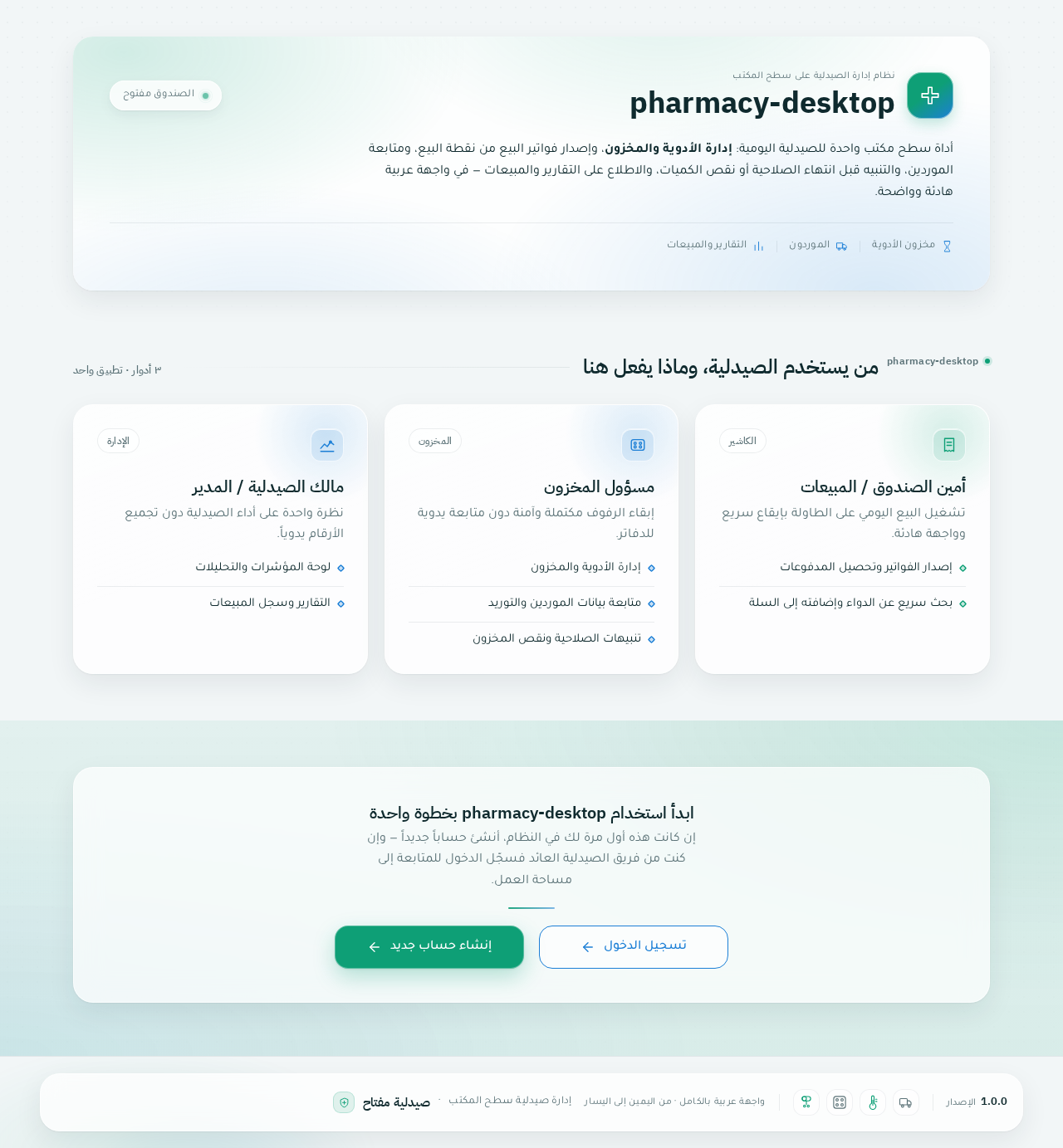
Landing

  • Information/state: Anonymous public entry. Presents the application identity in Arabic RTL, a short statement of what pharmacy-desktop does, and the three accepted staff roles (cashier/sales, inventory, owner/manager) with their core capabilities (sales and invoicing, stock and supplier management, expiry/low-stock alerts, dashboard analytics and reports). No pharmacy records are shown.
  • Primary actions: Navigate to Sign Up (first use) and Login (returning staff).
  • Supporting actions: Read capability summaries; switch between the two identity entry points.
  • Domain entities: None persisted; presentation only.
  • Component responsibilities: Hero band with pharmacy wordmark and emerald/ocean mesh bloom; capability cards; identity CTA pair (Sign Up primary, Login secondary).
  • States: Loading (static content, no data fetch); empty (not applicable); success (navigation to Login or Sign Up); error (not applicable); recovery (if a navigation target fails, remain on Landing and allow retry).
Page 4 of 32

Login

  • Information/state: Anonymous identity verification surface for returning pharmacy staff. Fields for account credentials; inline validation messaging in Arabic.
  • Primary actions: Submit credentials to verify identity and enter the application.
  • Supporting actions: Navigate to Sign Up if the staff member has no account; return to Landing.
  • Domain entities: Staff account (identity only).
  • Component responsibilities: Credential form in a frosted glass panel; submit control in emerald; error banner region; link to Sign Up.
  • States: Loading (submitting, control disabled with progress indication); empty (blank fields); success (redirect into the application shell at Dashboard); error (invalid credentials shown inline in Arabic, fields preserved for correction); recovery (retry submission; navigate to Sign Up).
Page 5 of 32

Sign Up

  • Information/state: Anonymous first-use enrollment surface for pharmacy staff. Fields to establish an account; inline validation in Arabic.
  • Primary actions: Submit enrollment to create the staff account and enter the application.
  • Supporting actions: Navigate to Login if an account already exists; return to Landing.
  • Domain entities: Staff account (identity only).
  • Component responsibilities: Enrollment form in a frosted glass panel; submit control in emerald; validation and error region; link to Login.
  • States: Loading (submitting, control disabled with progress indication); empty (blank fields); success (account established, redirect into the application shell at Dashboard); error (validation or enrollment failure shown inline in Arabic, entered values preserved); recovery (correct and resubmit; navigate to Login).
Page 6 of 32

Dashboard

  • Information/state: Overview and analytics for the pharmacy. Four rounded stat cards: daily sales, expiring medicines, low stock counts, and total inventory value. Frosted header band with pharmacy name, today's date, and a live "الصندوق مفتوح" status pill.
  • Primary actions: Read the four stat cards; use the sidebar to move to any working destination.
  • Supporting actions: Collapse/expand the sidebar; hover stat cards for lift and deepened shadow.
  • Domain entities: Sales totals (daily), medicine expiry records, stock levels, inventory valuation.
  • Component responsibilities: Frosted header band with drifting emerald-to-ocean mesh bloom; four squircle stat cards (24px radius) with 44px tabular numerals, ocean-blue hairline sparkline on daily sales, 40px rounded icon tiles, one-time count-up on mount; 8/4 split of revenue chart and expiry list beneath the stat row.
  • States: Loading (skeleton squircles while figures resolve); empty (zero-value cards rendered truthfully, e.g. no sales today); success (figures and charts populated); error (per-card error state with retry, other cards remain usable); recovery (retry the failed card's data).
Page 7 of 32

Inventory / Drug Stock

  • Information/state: The drug stock register (إدارة الأدوية والمخزون). Lists medicines with their stock records, quantities, and expiry-relevant data.
  • Primary actions: Add a drug/stock record; edit an existing record; review current stock levels.
  • Supporting actions: Search/filter the register; sort columns; navigate to Expiry & Low-Stock Alerts for risk review.
  • Domain entities: Medicine, stock record (quantity, expiry date, price).
  • Component responsibilities: Frosted table panel with hairline row dividers; Latin tabular figures for quantities and prices aligned in RTL columns; add/edit form in a squircle panel; search field.
  • States: Loading (table skeleton); empty (no medicines recorded, with a prompt to add the first record); success (records listed, edits reflected immediately); error (save failure shown inline with entered values preserved); recovery (retry save; discard and re-enter).
Page 8 of 32

Point of Sale / POS

  • Information/state: Sales and invoicing (مبيعات وفواتير). Two-pane split: product search grid on the RTL reading start (right), sticky cart and totals panel on the left. Cart shows line items, quantities, line totals, discount, and grand total.
  • Primary actions: Quick-search medicines; add a medicine to the cart; calculate a discount; print the invoice.
  • Supporting actions: Adjust or remove cart line items; clear the cart; review totals before printing.
  • Domain entities: Medicine (searchable), cart line item, discount, invoice/sale record.
  • Component responsibilities: Quick search bar; product result grid; sticky frosted cart panel with emerald gradient footer holding the discount input and print-invoice button as one continuous 16px-radius control strip; cart line items spring in with a 4px lift.
  • States: Loading (search results resolving); empty (no search term, or no matching medicines, or empty cart with print disabled); success (sale completed and invoice produced); error (print failure or sale-record failure surfaced in the cart panel with the cart preserved); recovery (retry print or retry completing the sale without losing cart contents).
Page 9 of 32

Supplier Management

  • Information/state: Supplier records (إدارة الموردين). Lists suppliers with their contact and supply details.
  • Primary actions: Add a supplier record; edit an existing supplier record.
  • Supporting actions: Search/filter suppliers; review supplier details.
  • Domain entities: Supplier.
  • Component responsibilities: Frosted list/table panel; add/edit form in a squircle panel; search field.
  • States: Loading (list skeleton); empty (no suppliers recorded, with a prompt to add the first); success (records listed, edits reflected); error (save failure inline with values preserved); recovery (retry save).

Expiry & Low-Stock Alerts

  • Information/state: Alerts for expiring medicines and low stock (تنبيهات الصلاحية والنقص). Lists medicines approaching expiry and medicines below their stock threshold.
  • Primary actions: Review expiry alerts; review low-stock alerts.
  • Supporting actions: Move from an alert to the corresponding Inventory / Drug Stock record to act on it.
  • Domain entities: Medicine, expiry date, stock level, stock threshold.
  • Component responsibilities: Two alert groups (expiry, low stock) in frosted panels; amber-adjacent warning badges kept under 10% of surface area; links into Inventory / Drug Stock.
  • States: Loading (alert skeleton); empty (no expiring medicines and no low stock, shown as a calm all-clear state); success (alerts listed); error (alert data unavailable, with retry); recovery (retry).
Page 10 of 32

Reports & Sales History

  • Information/state: Reports and sales history (التقارير والمبيعات). Lists past sales with their totals and provides report views over sales performance.
  • Primary actions: Review sales history; review reports.
  • Supporting actions: Filter or sort the history; read report figures.
  • Domain entities: Sale record, invoice, sales totals.
  • Component responsibilities: Frosted history table with Latin tabular figures aligned in RTL columns; report panels with ocean-blue chart strokes and emerald gradient fills.
  • States: Loading (table and chart skeletons); empty (no sales recorded yet); success (history and reports populated); error (data unavailable, with retry); recovery (retry).
Page 11 of 32

3. Functional Requirements

FR-1 — Desktop application delivery (explicit) As a pharmacy staff member, I should use pharmacy-desktop as a desktop application built with Electron.js using HTML, CSS (Tailwind CSS or custom CSS), and JavaScript/React, so that the pharmacy's daily work runs in a native-feeling desktop window.

  • Trigger: launching the application.
  • Observable result: the Electron application window opens and renders the React UI.
  • Acceptance: the application runs as an Electron desktop app; the setup includes main.js, index.html, and styles.css.

FR-2 — Arabic RTL interface (explicit) As an Arabic-speaking pharmacy staff member, I should see the entire interface in Arabic with full RTL layout support (dir="rtl"), so that reading order, navigation, and tables match my language.

  • Observable result: all labels, navigation, and content render in Arabic with RTL direction; sidebar sits on the right; table columns align RTL.
  • Acceptance: the document root carries dir="rtl"; no LTR-only layout artifacts appear in navigation or tables.

FR-3 — Arabic typography (explicit) As a pharmacy staff member, I should read the interface in a clean, elegant, highly legible modern Arabic font (such as Cairo, Tajawal, or IBM Plex Sans Arabic), so that long shifts remain comfortable to read.

  • Observable result: headings and body text render in the chosen modern Arabic font family.
  • Acceptance: no fallback to Inter, Roboto, Arial, or system-ui for Arabic text; no negative letter-spacing on Arabic script.
Page 12 of 32

FR-4 — Medical emerald/ocean palette (explicit) As a pharmacy staff member, I should see a professional medical theme of soft emerald green and ocean blue on clean white/light-gray backgrounds, so that the application feels trustworthy and clinical without being cold.

  • Observable result: emerald carries primary actions and POS money flow; ocean blue carries data and navigation; white/light-gray grounds the surfaces.

FR-5 — Apple-inspired surface language (explicit) As a pharmacy staff member, I should experience an Apple-inspired design language with rounded corners (16px–24px squircles), subtle drop shadows, translucent glassmorphism effects, and smooth micro-interactions/transitions, so that the tool feels modern and pleasant to touch.

  • Observable result: panels and cards use 16–24px radii, soft two-layer shadows, and translucent frosted fills; hover/focus/panel transitions animate at 180–240ms.

FR-6 — Collapsible sidebar navigation (explicit) As a pharmacy staff member, I should navigate through a collapsible sidebar with Apple-style rounded icons giving quick access to Dashboard, Inventory / Drug Stock, Point of Sale / POS, Supplier Management, Expiry & Low-Stock Alerts, and Reports & Sales History, so that I can reach any working area in one click.

  • Trigger: clicking a sidebar item, or toggling collapse.
  • Observable result: the selected destination opens; the active item is a sliding emerald glass pill with a 40px rounded-square icon tile; collapsing animates the sidebar to an 84px icon rail with labels fading out and icons re-centering.
  • Acceptance: all six destinations are reachable from the sidebar; the sidebar collapses and expands.
Page 13 of 32

FR-7 — Dashboard stat cards (explicit) As a Pharmacy Owner / Manager, I should see rounded stat cards on the Dashboard showing daily sales, expiring medicines, low stock counts, and total inventory value, so that I get an at-a-glance picture of the pharmacy.

  • Trigger: opening Dashboard after login.
  • Observable result: four squircle stat cards render with 44px tabular numerals, a one-time count-up on mount, and an ocean-blue hairline sparkline on daily sales; hovering lifts a card 2px and deepens its shadow.
  • Failure/recovery: a card whose data fails shows an inline error with retry while the other cards remain usable.
  • Continuation: the sidebar remains available to move into the relevant destination.

FR-8 — POS medicine quick search (explicit) As a Pharmacy Cashier / Sales Staff, I should quickly search for medicines in the POS, so that I can find the right product at the counter without delay.

  • Trigger: typing into the POS quick search bar.
  • Observable result: matching medicines appear in the product grid on the RTL reading start.
  • Failure/recovery: no matches shows an empty-result state; the search term remains editable.

FR-9 — POS cart addition (explicit) As a Pharmacy Cashier / Sales Staff, I should add medicines to the cart easily, so that a sale can be assembled quickly.

  • Trigger: selecting a medicine from the search results.
  • Observable result: the line item appears in the sticky cart panel with a 4px spring lift; quantities and line totals update.
  • Continuation: the cashier can adjust or remove line items before completing the sale.
Page 14 of 32

FR-10 — POS discount calculation (explicit) As a Pharmacy Cashier / Sales Staff, I should calculate a discount on the sale, so that the customer is charged the correct discounted total.

  • Trigger: entering a discount in the cart's emerald gradient footer control strip.
  • Observable result: the grand total recalculates and displays in tabular figures.
  • Failure/recovery: an invalid discount entry is rejected inline and the previous total is preserved.

FR-11 — POS invoice printing (explicit) As a Pharmacy Cashier / Sales Staff, I should print the invoice from the POS, so that the customer receives a receipt and the sale is recorded.

  • Trigger: pressing the print-invoice button in the cart footer.
  • Observable result: the invoice is produced and the sale is recorded; the cart reflects completion.
  • Failure/recovery: a print or record failure is surfaced in the cart panel with the cart preserved so the cashier can retry without re-entering the sale.
  • Continuation: the cashier can start the next sale.

FR-12 — Inventory / drug stock management (explicit) As a Pharmacy Inventory Manager, I should manage drug stock records in Inventory / Drug Stock (إدارة الأدوية والمخزون), so that the pharmacy's medicine register stays accurate.

  • Trigger: adding or editing a medicine/stock record.
  • Observable result: the record is saved and reflected in the register with tabular figures aligned in RTL columns.
  • Failure/recovery: a save failure is shown inline with entered values preserved for correction and retry.
Page 15 of 32

FR-13 — Supplier management (explicit) As a Pharmacy Inventory Manager, I should manage supplier records in Supplier Management (إدارة الموردين), so that supplier information stays current.

  • Trigger: adding or editing a supplier record.
  • Observable result: the supplier record is saved and listed.
  • Failure/recovery: a save failure is shown inline with values preserved for retry.

FR-14 — Expiry and low-stock alerts (explicit) As a Pharmacy Inventory Manager, I should view expiry and low-stock alerts in Expiry & Low-Stock Alerts (تنبيهات الصلاحية والنقص), so that I can act before medicines expire or shelves run out.

  • Trigger: opening the alerts destination.
  • Observable result: expiring medicines and low-stock medicines are listed in their respective groups with amber-adjacent warning badges.
  • Failure/recovery: unavailable alert data shows an error with retry; an all-clear state is shown when there are no alerts.
  • Continuation: the manager can move to the corresponding Inventory / Drug Stock record to act.

FR-15 — Reports and sales history (explicit) As a Pharmacy Owner / Manager, I should review reports and sales history in Reports & Sales History (التقارير والمبيعات), so that I can track pharmacy performance.

  • Trigger: opening the reports destination.
  • Observable result: past sales and report figures render with tabular numerals and ocean-blue chart strokes.
  • Failure/recovery: unavailable data shows an error with retry.
Page 16 of 32

FR-16 — Smooth transitions and fluid animations (explicit) As a pharmacy staff member, I should experience smooth state transitions and fluid UI animations, so that the application feels responsive and polished.

  • Observable result: hover, focus, and panel swaps animate at 180–240ms cubic-bezier(0.32, 0.72, 0, 1); route changes cross-fade with a 40ms stagger on cards; all motion collapses to instant state changes under prefers-reduced-motion.

FR-17 — Desktop-responsive layout (explicit) As a pharmacy staff member, I should use a layout that is fully responsive and optimized for desktop screen sizes, so that the application uses the available window well.

  • Observable result: the 12-column dashboard grid reflows (four stat cards in a row, 2×2 at 768px, stacked at 375px); the POS two-pane split holds; Arabic labels, prices, and buttons stay whole at 375, 768, and 1280px.

FR-18 — First-use enrollment (required_inference) As a pharmacy staff member using pharmacy-desktop for the first time, I should establish an account on Sign Up, so that my work is bound to a durable identity.

  • Trigger: choosing Sign Up from Landing or Login.
  • Observable result: the account is established and the staff member enters the application shell at Dashboard.
  • Failure/recovery: validation or enrollment failure is shown inline in Arabic with entered values preserved; the staff member can correct and resubmit or go to Login.
Page 17 of 32

FR-19 — Returning verification (required_inference) As a returning pharmacy staff member, I should verify my identity on Login before reaching protected pharmacy records, so that durable sales, inventory, supplier, and reporting records stay protected.

  • Trigger: choosing Login from Landing or Sign Up.
  • Observable result: on success the application shell opens at Dashboard; on failure an inline Arabic error is shown with fields preserved.
  • Continuation: retry, or navigate to Sign Up.

FR-20 — Anonymous landing entry (required_inference) As a prospective pharmacy staff member, I should see an anonymous Landing that explains the application and its core capabilities, so that I understand what it does before establishing identity.

  • Trigger: launching the application without a verified session.
  • Observable result: Landing renders with Sign Up and Login entry points; no protected pharmacy records are shown.

4. User Personas

Page 18 of 32

Pharmacy Cashier / Sales Staff

  • Product context: Works the counter through long shifts, ringing up customers in the POS. Accuracy and speed matter; the POS must not lose a cart or a sale.
  • Primary goal: Complete a sale and produce an invoice without leaving the POS screen.
  • Distinct responsibilities: Quick-searches medicines, adds them to the cart, applies discounts, and prints invoices. This is the only persona whose primary work is the money flow of a single transaction.
  • Inputs/decisions: Search terms, selected medicines, quantities, discount amount, and the decision to print.
  • Interactions: Works alongside the Inventory Manager (whose stock records determine what is searchable) and the Owner/Manager (whose reports reflect the sales the cashier records).
  • Observable success: A sale is completed and an invoice is produced, with the cart preserved through any print failure so the sale can be retried.
Page 19 of 32

Pharmacy Inventory Manager

  • Product context: Owns the accuracy and safety of the drug register and supplier relationships. Works between the shelves and the application, watching for expiry and stock risk.
  • Primary goal: Keep stock levels and expiry risks visible and actionable from the alerts and inventory views.
  • Distinct responsibilities: Maintains drug stock records in Inventory / Drug Stock, monitors Expiry & Low-Stock Alerts, and keeps supplier information current in Supplier Management. This is the only persona whose primary work is the register and its risk signals rather than transactions or performance review.
  • Inputs/decisions: Medicine details, quantities, expiry dates, stock thresholds, and supplier details; the decision to act on an alert.
  • Interactions: Supplies the searchable stock the Cashier sells from; surfaces risk that the Owner/Manager sees in dashboard counts.
  • Observable success: Stock records are accurate, alerts reflect real expiry and low-stock conditions, and supplier records are current.
Page 20 of 32

Pharmacy Owner / Manager

  • Product context: Reviews the pharmacy's performance rather than operating the counter or the register. Needs a clear picture without digging through transactions.
  • Primary goal: Track daily sales, expiring medicines, low-stock counts, and total inventory value, and review sales history and reports.
  • Distinct responsibilities: Reads the Dashboard stat cards and reviews Reports & Sales History. This is the only persona whose primary work is performance oversight.
  • Inputs/decisions: Which figures and reports to review; interpretation of trends.
  • Interactions: Depends on the Cashier's recorded sales and the Inventory Manager's stock and expiry data being accurate.
  • Observable success: Dashboard figures and reports give a clear picture of pharmacy performance.

5. Core User Flows

Flow A — First use: establish identity and reach the Dashboard (all personas)

  1. The staff member launches pharmacy-desktop. The Electron window opens on Landing (anonymous), showing the Arabic RTL explanation of the application and its capabilities.
  2. The staff member selects Sign Up.
  3. On Sign Up, the staff member enters account details and submits.
  4. On success, the application shell opens at Dashboard. On validation or enrollment failure, an inline Arabic error appears with entered values preserved; the staff member corrects and resubmits, or navigates to Login.
Page 21 of 32

Flow B — Returning staff verification (all personas)

  1. The staff member launches the application and lands on Landing, then selects Login.
  2. On Login, the staff member enters credentials and submits.
  3. On success, the application shell opens at Dashboard. On invalid credentials, an inline Arabic error appears with fields preserved; the staff member retries or navigates to Sign Up.

Flow C — Ring up a sale and print an invoice (Pharmacy Cashier / Sales Staff)

  1. After login, the cashier opens Point of Sale / POS from the sidebar.
  2. The cashier types a medicine name into the quick search bar; matching medicines appear in the product grid on the RTL reading start.
  3. The cashier selects a medicine; the line item springs into the sticky cart panel on the left with a 4px lift, and quantities and line totals update.
  4. The cashier repeats search and selection for each additional medicine, adjusting or removing line items as needed.
  5. The cashier enters a discount in the cart's emerald gradient footer control strip; the grand total recalculates in tabular figures. An invalid discount is rejected inline and the previous total is preserved.
  6. The cashier presses the print-invoice button. On success, the invoice is produced and the sale is recorded.
  7. On print or record failure, the cart panel surfaces the error with the cart preserved; the cashier retries without re-entering the sale.
  8. The cashier starts the next sale.
Page 22 of 32

Flow D — Maintain drug stock (Pharmacy Inventory Manager)

  1. After login, the inventory manager opens Inventory / Drug Stock from the sidebar.
  2. The manager adds a new medicine/stock record or edits an existing one in the squircle form panel.
  3. On save, the record is reflected in the register with tabular figures aligned in RTL columns.
  4. On save failure, an inline error appears with entered values preserved; the manager corrects and retries.

Flow E — Review and act on expiry and low-stock alerts (Pharmacy Inventory Manager)

  1. The inventory manager opens Expiry & Low-Stock Alerts from the sidebar.
  2. The manager reviews the expiring-medicines group and the low-stock group, each marked with amber-adjacent warning badges.
  3. When there are no alerts, a calm all-clear state is shown.
  4. The manager follows an alert into the corresponding Inventory / Drug Stock record to act on it.
  5. If alert data is unavailable, an error with retry is shown; the manager retries.

Flow F — Maintain supplier records (Pharmacy Inventory Manager)

  1. The inventory manager opens Supplier Management from the sidebar.
  2. The manager adds or edits a supplier record in the squircle form panel.
  3. On save, the supplier is listed. On failure, an inline error appears with values preserved for retry.
Page 23 of 32

Flow G — Review pharmacy performance (Pharmacy Owner / Manager)

  1. After login, the owner/manager lands on Dashboard and reads the four stat cards: daily sales (with sparkline and count-up), expiring medicines, low stock counts, and total inventory value.
  2. The owner/manager reviews the revenue chart and expiry list beneath the stat row.
  3. If a card's data fails, that card shows an inline error with retry while the others remain usable.
  4. The owner/manager opens Reports & Sales History from the sidebar to review past sales and report figures.
  5. If report data is unavailable, an error with retry is shown; the owner/manager retries.

Flow H — Navigate the shell (all personas)

  1. From any working destination, the staff member uses the collapsible sidebar to move between destinations.
  2. The active item is a sliding emerald glass pill with a 40px rounded-square icon tile.
  3. Collapsing the sidebar animates it to an 84px icon rail, fading labels out and re-centering icons; expanding restores labels.
  4. Route changes cross-fade content with a 40ms stagger on cards; under prefers-reduced-motion, all transitions become instant.
Page 24 of 32

6. Visuals Colors and Theme

Muse and headline: Michal Malewicz — "Layered emerald-and-ocean glass, laid out in Arabic." The register is explicitly Apple-inspired: translucent frosted surfaces, squircle corners, emerald and ocean blue on white, reading as a trustworthy modern medical instrument rather than austere enterprise.

Palette (light mode):

  • Background: #F2F6F7
  • Surface: #FFFFFF
  • Text (ink): #0F2A2E
  • Primary (emerald, single action colour): #0E9F76
  • Accent (ocean blue, data colour): #1C7FD6
  • Muted: #5C7378
  • Warning/expiry: amber-adjacent tint from the same low-saturation family, kept under 10% of surface area.

Frosted panels sit at 72–85% white opacity over soft emerald-to-ocean gradient fields. Emerald is the only action colour (POS pay button, primary CTA, active sidebar item, positive deltas); ocean blue is the data colour (chart strokes, links, informational badges, secondary icon fills) and is never used for destructive actions. Ink #0F2A2E for body and headings (contrast > 12:1 on white); #5C7378 for labels and metadata. Surface mix: roughly 62% white/light-grey, 20% emerald tints, 12% ocean tints, 6% ink type.

Page 25 of 32

Typography:

  • Headings: IBM Plex Sans Arabic at 600–700 weight, letter-spacing: 0 (never negative on Arabic script).
  • Body: Tajawal.
  • Numerals: Latin tabular figures for prices, quantities, and invoice totals so columns align in RTL tables.
  • Scale (1.25 modular, wide top): display clamp(2.5rem, 4vw, 3.5rem); page title 28→36px; section title 20→24px; card metric 32→44px tabular; body 15→16px; label 12→13px with 0.02em tracking. Line-height 1.6 for Arabic body, 1.25 for headings.

Shape language: Squircle-first — cards and panels at 24px radius, controls and inputs at 16px, pills at 999px for filter chips and status tags. Every glass panel carries a 1px inner light border rgba(255,255,255,0.65) plus a soft two-layer shadow (0 1px 2px rgba(15,42,46,0.06), 0 12px 32px rgba(15,42,46,0.08)). Icons sit in rounded-square 40px tiles with 12px radius. No sharp corners except table row dividers, which are 1px hairlines at rgba(15,42,46,0.08).

Spacing rhythm: Generous panel padding with a consistent 8px base unit; the dashboard uses a 12-column grid with four stat squircles in a row, reflowing to 2×2 at 768px and stacked at 375px, then an 8/4 split of revenue chart and expiry list.

Imagery style: No stock photography of people. Visual interest comes from the interface itself — frosted gradient fields behind panels, soft emerald/ocean mesh blooms at low opacity in the header and sidebar foot, thin-line medical pictograms (capsule, blister pack, thermometer, truck) at 1.5px stroke in rounded tiles, and a fine dotted-grid texture at 4% opacity on the page ground. Charts are the hero imagery: smooth area charts in ocean blue with emerald gradient fills.

Page 26 of 32

7. Signature Design Concept

The first screen after login is the Dashboard, not a marketing hero: a full-width frosted header band (24px radius, 85% white over an emerald-to-ocean mesh bloom drifting slowly) holding the pharmacy name in IBM Plex Sans Arabic 36px on the RTL right, today's date, and a live "الصندوق مفتوح" status pill with a gently pulsing emerald dot. Directly beneath, a single row of four oversized squircle stat cards — daily sales in 44px tabular numerals with a small emerald sparkline, expiring medicines, low stock, total inventory value — each floating on its own soft shadow with a 40px rounded icon tile in the corner. No centred headline, no gradient blob button, no stock photo: the composition is a working instrument panel with one dominant colour field and calm white surfaces.

Page 27 of 32

The signature moves that carry the identity across the app:

  • A collapsible RTL sidebar where the active item is a sliding emerald glass pill with a 40px rounded-square icon tile; collapsing to an 84px icon rail fades labels out while icons re-center, and the pill glides between items on navigation.
  • Four dashboard stat cards as true squircles (24px radius) with a 44px tabular numeral, a hairline sparkline in ocean blue, and a one-time count-up on mount; hovering lifts the card 2px and deepens its shadow without any bounce.
  • POS as a sticky left-hand cart panel with a frosted glass body over an emerald gradient footer where the discount input and the print-invoice button sit as one continuous 16px-radius control strip.
  • Frosted panel treatment everywhere: 1px inner white border plus rgba white fill at 72–85% over low-opacity emerald/ocean mesh blooms, so panels read as translucent layers rather than flat grey boxes.
  • Arabic-first numeric craft: Latin tabular figures aligned in RTL tables and invoices, with currency and quantity columns pinned so prices line up vertically down every list.
Page 28 of 32

8. Interaction Model & Motion Direction

Interaction Model: Animated Motion Tempo: expressive Hero Dimensionality: layered_2d

Landing Hero Motion Brief

  • Focal subject: The frosted header band over a slow-drifting emerald-to-ocean mesh bloom, with the pharmacy wordmark and the live "الصندوق مفتوح" status pill.
  • Input → transformation → outcome thesis: On entry, the mesh bloom drifts slowly behind the frosted band while the status pill's emerald dot pulses gently; stat numerals count up once on mount and cards cross-fade in with a 40ms stagger — the outcome is a calm, working instrument panel that reads as alive but never busy.
  • Motion vocabulary: 180–240ms cubic-bezier(0.32, 0.72, 0, 1) transitions on hover, focus, and panel swaps; sidebar collapse animates width with labels fading and sliding; cart line items spring in with a 4px lift; a slow 12s gradient drift behind the dashboard header; route changes cross-fade content with a 40ms stagger on cards.
  • Composed first frame: Frosted header band at 85% white over the mesh bloom, pharmacy name on the RTL right, date and status pill beside it; four squircle stat cards beneath, each with its icon tile and tabular numeral; revenue chart and expiry list in an 8/4 split below.
  • Reduced-motion state: All motion collapses to instant state changes — no drift, no count-up, no stagger, no spring; the static arrangement remains fully readable and usable.
Page 29 of 32

9. Non-Functional Requirements

  • NFR-1 — Language and direction (explicit): The interface is Arabic with full RTL layout support (dir="rtl"). Rationale: the source names Arabic as the product language and requires RTL.
  • NFR-2 — Desktop platform (explicit): The application is a desktop application built with Electron.js. Rationale: explicit hard constraint.
  • NFR-3 — Desktop responsiveness (explicit): The layout is fully responsive and optimized for desktop screen sizes; readable text and controls stay whole inside the viewport and their container at 375px, 768px, and 1280px. Rationale: explicit hard constraint plus the direction's readability rule.
  • NFR-4 — Collapsible sidebar (explicit): Sidebar navigation must be collapsible. Rationale: explicit hard constraint.
  • NFR-5 — Arabic typography legibility (explicit): Modern Arabic font (Cairo, Tajawal, or IBM Plex Sans Arabic); no negative letter-spacing on Arabic script; no Inter, Roboto, Arial, or system-ui for Arabic text. Rationale: explicit typography requirement and direction's avoid list.
  • NFR-6 — Motion accessibility (explicit + direction): All motion collapses under prefers-reduced-motion to instant state changes with no drift or count-up. Rationale: explicit smooth-animation requirement paired with the direction's accessibility rule.
  • NFR-7 — Durable records (required_inference): Sales, inventory, supplier, alert, and report records persist across sessions in the application-owned MariaDB database through the shared FastAPI backend. Rationale: the accepted workflows create durable sales, stock, and supplier records that must survive restarts and be visible to other personas.
  • NFR-8 — Protected records (required_inference): The six working destinations require login; Landing, Login, and Sign Up are anonymously reachable. Rationale: durable pharmacy records must remain bound to a verified staff identity.
Page 30 of 32

10. Tech Stack

  • Desktop shell: Electron.js with main.js, index.html, and styles.css (explicit).
  • Frontend: React application UI with HTML, CSS (Tailwind CSS or custom CSS), and JavaScript/React (explicit); Arabic RTL, IBM Plex Sans Arabic headings, Tajawal body (explicit/direction).
  • Backend: shared FastAPI process for application APIs and domain modules (provisioned scaffold).
  • Database: MariaDB for application-owned persistent data (provisioned scaffold).
  • Infrastructure: Docker/docker-compose for the backend, database, and frontend services (provisioned scaffold).

11. Assumptions and Constraints

  • Assumption: The three personas share one application and one set of durable records; no differentiated permission model is established by the source, so role-based visibility is not implemented.
  • Assumption: Self-service enrollment (Sign Up) is the identity bootstrap, since no invitation or provisioning boundary is established.
  • Constraint: The interface is Arabic RTL; the application is Electron.js; the sidebar is collapsible; the layout is optimized for desktop screen sizes.
  • Constraint: The palette is soft emerald green and ocean blue on clean white/light-gray; corners are 16px–24px squircles; surfaces are translucent glassmorphism with subtle drop shadows.
  • Constraint: No stock photography of people, cartoon characters, or emoji as icons; no violet-indigo SaaS gradients; no bouncy spring physics in the POS flow.
Page 31 of 32

12. Glossary

  • POS (Point of Sale): The sales and invoicing destination (مبيعات وفواتير) where medicines are searched, added to a cart, discounted, and invoiced.
  • Squircle: A rounded-rectangle shape with continuous curvature, used at 16px–24px radii for cards, panels, and controls.
  • Glassmorphism: A translucent frosted-surface treatment with a 1px inner light border and soft shadow over gradient fields.
  • RTL: Right-to-left layout direction required for Arabic (dir="rtl").
  • Tabular figures: Latin numerals of equal width used for prices, quantities, and invoice totals so columns align in RTL tables.
  • Low stock: A medicine whose quantity has fallen below its stock threshold, surfaced in Expiry & Low-Stock Alerts.
  • Expiring medicine: A medicine approaching its expiry date, surfaced in Expiry & Low-Stock Alerts and counted on the Dashboard.
Page 32 of 32
Landing design preview
Landing: Read capability summaries
Sign Up: 1. Submit enrollment
Login: 2. Submit credentials
Sign Up: 3. Correct and resubmit
Login: 4. Correct and retry
Dashboard: Open shell overview
Point of Sale / POS: Open POS from sidebar
Point of Sale / POS: 1. Search medicines
Point of Sale / POS: 2. Add medicine to cart
Point of Sale / POS: 3. Adjust or remove line items
Point of Sale / POS: 1. Enter discount
Point of Sale / POS: 2. Correct invalid discount
Point of Sale / POS: 1. Print invoice
Point of Sale / POS: 2. Retry print with cart preserved
Point of Sale / POS: Start next sale
Landing design preview
Landing: Read capability summaries
Sign Up: 1. Submit enrollment
Login: 2. Submit credentials
Sign Up: 3. Correct and resubmit
Login: 4. Correct and retry
Dashboard: Open shell overview
Point of Sale / POS: Open POS from sidebar
Point of Sale / POS: 1. Search medicines
Point of Sale / POS: 2. Add medicine to cart
Point of Sale / POS: 3. Adjust or remove line items
Point of Sale / POS: 1. Enter discount
Point of Sale / POS: 2. Correct invalid discount
Point of Sale / POS: 1. Print invoice
Point of Sale / POS: 2. Retry print with cart preserved
Point of Sale / POS: Start next sale