omega-3d
 Abhay kumar Yadav
create a 3d website using javascript dental link

Comments (0)
Sign in to leave a comment
System Requirements
System Requirements Document for omega-3d
1. Introduction
omega-3d is a JavaScript-built 3D website whose subject matter is dental. The product intent derived from the authoritative requirement thread is deliberately narrow: build a website in JavaScript, make it a genuine 3D website, and make its content and theme dental.
The site exists to show, in the browser, a real-time three-dimensional dental subject, and to name and frame that experience so any arrival at the site immediately understands what it is looking at. There is no transactional goal, no booking goal, no commerce goal, and no account goal in the accepted requirements.
The audience is the Site Visitor: any anonymous person arriving at the site's public root on a modern browser, on desktop or mobile, who wants to view the 3D dental content and succeeds when the experience loads and renders as intended.
2. System Overview
omega-3d is a single-surface, anonymous, client-side web experience. It delivers:
- A JavaScript web application served publicly at the site root.
- A real-time 3D scene rendered in the visitor's browser, presenting a dental subject.
- A minimal, honest description of the experience so the visitor can identify the site and its dental subject.
- The lifecycle states needed to make that experience usable: initialization/loading, first successful render, interactive viewing, and clearly communicated failure with recovery when the browser or device cannot initialize the 3D scene.
Actors
- Site Visitor — the only accepted active human persona (anonymous, contract-fixed).
- Browser/WebGL runtime — the non-persona execution environment that renders the scene on the visitor's device.
Ownership
- The one custom page, Landing, is owned by the application and is anonymously reachable with no identity requirement.
- All 3D rendering, camera behavior, and state presentation run in the browser; no server-side product logic is accepted.
Narrow exclusions (binding)
- No appointment booking, patient records, clinical advice, treatment planning, e-commerce, uploads, messaging, contact forms, or account registration/login are accepted by the source.
- No differentiated permissions or role-based visibility exists; there is one anonymous visitor role and no shared protected state.
- No external dental provider destination, patient portal, or partner integration is established by the source.
2a. Product Interpretation and Delivery Boundary
omega-3d is delivered as a public, first-party, client-side web experience. The visitor reaches it anonymously at the site root; nothing about the accepted requirements requires the visitor to identify themselves, and no durable per-visitor state (such as a saved view, a preference, or a commitment) is accepted. Consequently, the application owns no identity lifecycle: there is no first-use registration, no returning verification, no account surface, and no protected destination. Access to the Landing page is anonymous by contract (access_requirement: none), and that access state is preserved exactly as supplied.
Delivery is headless of any backend: the JavaScript application and its 3D assets are static artifacts served to the browser, and all accepted behavior executes on the visitor's device. Because the accepted outcome is the in-browser rendering of 3D dental content, the site has one truthful, current delivery surface — Landing — and no additional destination is justified by any accepted journey.
Current boundary. A JavaScript 3D dental website, anonymously reachable, with a real-time 3D dental subject, loading and first-render states, interactive viewing of that subject, and a clear degraded path when 3D cannot initialize.
Future boundary. Anything not accepted here is out of current scope, including: any specific external "dental link" destination the phrase in the request may later be clarified to mean, appointment or contact workflows, clinician-facing functions, accounts, and multi-page information architecture. The term "dental link" in the source request is read as the dental thematic focus of the linked web experience, not as an accepted outbound destination; see Section 11.
2c. Page Content and Component Coverage
Landing
Information and state presented
- Site identification: the name of the experience and a single short statement of its dental 3D subject.
- The 3D dental scene itself, as the dominant content of the page.
- Current scene state, expressed to the visitor: initializing/loading, ready and interactive, or unavailable-with-fallback.
- Camera framing state: the default hero framing, and the visitor's current viewing angle once they have moved the camera.
- No per-visitor data of any kind is displayed, stored, or resumed.
Primary actions (visitor)
- Arrive at the site root and let the 3D scene initialize and render.
- Change the viewing angle of the dental subject by dragging (orbit) and adjust distance (zoom) to inspect it.
- Reset the view to the default framing.
Supporting actions (visitor)
- Acknowledge/read the site's identification and subject statement.
- Retry initialization when the scene fails to load and a retry affordance is offered.
- Continue using the non-3D fallback content when the device or browser cannot run the 3D scene.
Domain entities
- Dental Subject Model — the real-time 3D geometry representing the dental subject that is rendered on the stage.
- Scene Stage — the environment that frames the Dental Subject Model (lighting, camera, background, ground contact).
- Camera View — the current position/orientation/distance from which the Dental Subject Model is viewed, plus its default framing.
- Scene State — the mutually exclusive conditions of the scene: initializing, ready, failed, degraded (fallback active).
- Delivery Build — the JavaScript application bundle plus its 3D assets served to the browser.
Component responsibilities
- **Hero
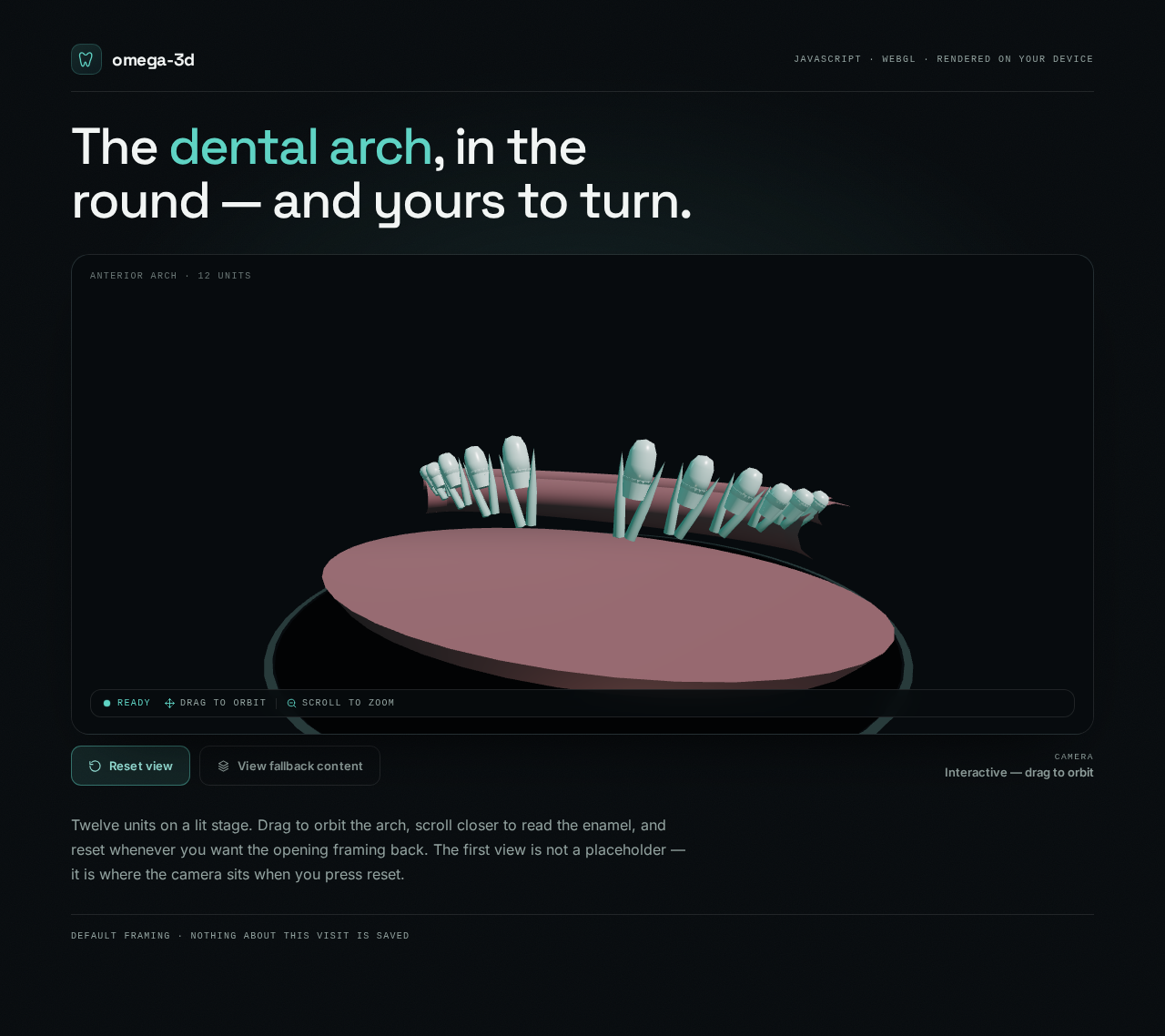
The dental arch, in the round — and yours to turn.
Twelve units on a lit stage. Drag to orbit the arch, scroll closer to read the enamel, and reset whenever you want the opening framing back. The first view is not a placeholder — it is where the camera sits when you press reset.
The dental arch, in the round — and yours to turn.
Twelve units on a lit stage. Drag to orbit the arch, scroll closer to read the enamel, and reset whenever you want the opening framing back. The first view is not a placeholder — it is where the camera sits when you press reset.
No comments yet. Be the first!