$29/month
Starter
$29/mo
- Included reminders400 / month
- After that$0.03 / SMS
 Shitanshu Pandey
You are an expert SaaS product team consisting of: - Product Manager - UI/UX Designer - Frontend Engineer - Backend Engineer - Database Architect - DevOps Engineer - QA Engineer Build a production-ready Micro SaaS. Idea: **No-Show Recovery SaaS for Appointment-Based Businesses** Build a subscription tool that helps salons, clinics, tutors, coaches, and service businesses reduce missed appointments and recover cancelled time slots. Many businesses still manage bookings through Google Calendar, WhatsApp, phone calls, or basic scheduling apps, leading to no-shows, late cancellations, and unfilled appointment slots. The product connects to the business’s existing calendar or booking system. It automatically sends appointment confirmations and reminders through SMS, WhatsApp, or email. Customers can confirm, reschedule, or cancel with one tap. When a cancellation occurs, the system immediately alerts the business and can message a waitlisted customer to fill the empty slot. It can also collect deposits or store payment details to discourage no-shows. The core value is direct revenue protection: fewer no-shows mean more completed appointments and higher monthly revenue. Automated reminders are proven to reduce missed appointments, with studies and vendor reports commonly citing reductions of roughly 20–50%. The MVP should include calendar integration, automated reminders, one-tap confirm/reschedule/cancel links, cancellation alerts, a simple no-show dashboard, and an optional waitlist. Later, add AI-based no-show risk scoring, smart reminder timing, personalized messages, and automatic waitlist offers. Target one niche first—preferably physiotherapy clinics, dental clinics, or salons. Price at $29–$99/month, with additional charges for high SMS/WhatsApp volume. The business model is recurring SaaS, and the product can initially be validated manually using n8n before building full software. [capterra](https://www.capterra.com/p/159212/Appointment-Reminder/) Requirements: Create: - Beautiful landing page - Dashboard - User authentication - Google Login - Email Login - Stripe subscriptions - Pricing page - Admin dashboard - Database - REST APIs - Responsive design - Dark mode - User settings - Billing page - Analytics - SEO - Error handling - Loading states Generate: - Frontend - Backend - Database schema - APIs - Authentication - Deployment configuration - Environment variables - README - Sample data Use a modern design similar to Linear, Notion or Vercel. Everything should be production-ready.

Sign in to leave a comment
No-show recovery for appointment businesses
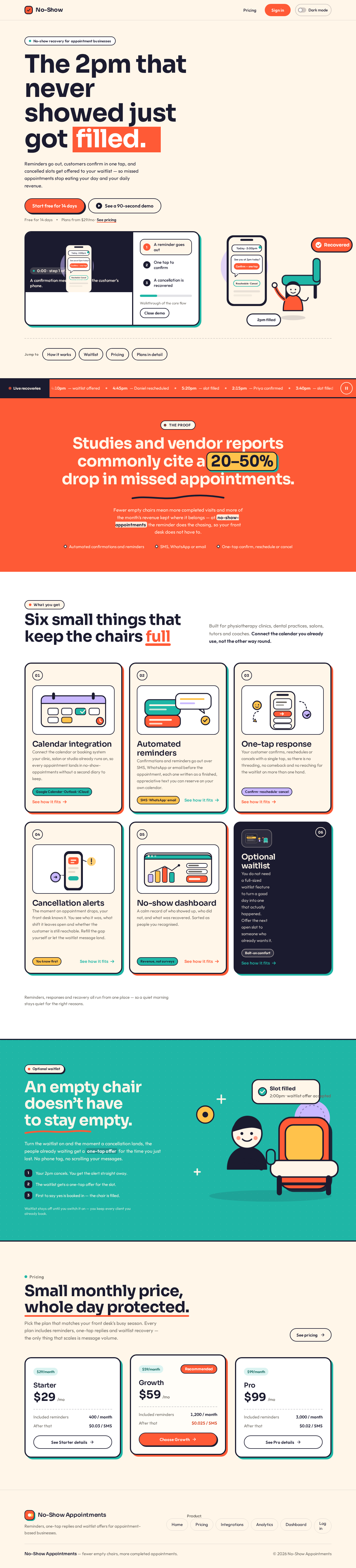
Reminders go out, customers confirm in one tap, and cancelled slots get offered to your waitlist — so missed appointments stop eating your day and your daily revenue.
The proof
Fewer empty chairs mean more completed visits and more of the month’s revenue kept where it belongs — at no-show-appointments the reminder does the chasing, so your front desk does not have to.
Built for physiotherapy clinics, dental practices, salons, tutors and coaches. Connect the calendar you already use, not the other way round.
Connect the calendar or booking system your clinic, salon or studio already runs on, so every appointment lands in no-show-appointments without a second diary to keep.
Confirmations and reminders go out over SMS, WhatsApp or email before the appointment, each one written as a finished, appreciative text you can reserve on your own calendar.
Your customer confirms, reschedules or cancels with a single tap, so there is no threading, no comeback and no reaching for the waitlist on more than one hand.
The moment an appointment drops, your front desk knows it. You see who it was, what shift it leaves open and whether the customer is still reachable. Refill the gap yourself or let the waitlist message land.
A calm record of who showed up, who did not, and what was recovered. Sorted as people you recognised.
You do not need a full-sized waitlist feature to turn a good day into one that actually happened. Offer the next open slot to someone who already wants it.
Reminders, responses and recovery all run from one place — so a quiet morning stays quiet for the right reasons.
Turn the waitlist on and the moment a cancellation lands, the people already waiting get a one-tap offer for the time you just lost. No phone tag, no scrolling your messages.
Waitlist stays off until you switch it on — you keep every client you already book.
No-show recovery for appointment businesses
Reminders go out, customers confirm in one tap, and cancelled slots get offered to your waitlist — so missed appointments stop eating your day and your daily revenue.
The proof
Fewer empty chairs mean more completed visits and more of the month’s revenue kept where it belongs — at no-show-appointments the reminder does the chasing, so your front desk does not have to.
Built for physiotherapy clinics, dental practices, salons, tutors and coaches. Connect the calendar you already use, not the other way round.
Connect the calendar or booking system your clinic, salon or studio already runs on, so every appointment lands in no-show-appointments without a second diary to keep.
Confirmations and reminders go out over SMS, WhatsApp or email before the appointment, each one written as a finished, appreciative text you can reserve on your own calendar.
Your customer confirms, reschedules or cancels with a single tap, so there is no threading, no comeback and no reaching for the waitlist on more than one hand.
The moment an appointment drops, your front desk knows it. You see who it was, what shift it leaves open and whether the customer is still reachable. Refill the gap yourself or let the waitlist message land.
A calm record of who showed up, who did not, and what was recovered. Sorted as people you recognised.
You do not need a full-sized waitlist feature to turn a good day into one that actually happened. Offer the next open slot to someone who already wants it.
Reminders, responses and recovery all run from one place — so a quiet morning stays quiet for the right reasons.
Turn the waitlist on and the moment a cancellation lands, the people already waiting get a one-tap offer for the time you just lost. No phone tag, no scrolling your messages.
Waitlist stays off until you switch it on — you keep every client you already book.
No comments yet. Be the first!