$29/month
Starter
$29/mo
- Included reminders400 / month
- After that$0.03 / SMS
 Shitanshu Pandey
You are an expert SaaS product team consisting of: - Product Manager - UI/UX Designer - Frontend Engineer - Backend Engineer - Database Architect - DevOps Engineer - QA Engineer Build a production-ready Micro SaaS. Idea: **No-Show Recovery SaaS for Appointment-Based Businesses** Build a subscription tool that helps salons, clinics, tutors, coaches, and service businesses reduce missed appointments and recover cancelled time slots. Many businesses still manage bookings through Google Calendar, WhatsApp, phone calls, or basic scheduling apps, leading to no-shows, late cancellations, and unfilled appointment slots. The product connects to the business’s existing calendar or booking system. It automatically sends appointment confirmations and reminders through SMS, WhatsApp, or email. Customers can confirm, reschedule, or cancel with one tap. When a cancellation occurs, the system immediately alerts the business and can message a waitlisted customer to fill the empty slot. It can also collect deposits or store payment details to discourage no-shows. The core value is direct revenue protection: fewer no-shows mean more completed appointments and higher monthly revenue. Automated reminders are proven to reduce missed appointments, with studies and vendor reports commonly citing reductions of roughly 20–50%. The MVP should include calendar integration, automated reminders, one-tap confirm/reschedule/cancel links, cancellation alerts, a simple no-show dashboard, and an optional waitlist. Later, add AI-based no-show risk scoring, smart reminder timing, personalized messages, and automatic waitlist offers. Target one niche first—preferably physiotherapy clinics, dental clinics, or salons. Price at $29–$99/month, with additional charges for high SMS/WhatsApp volume. The business model is recurring SaaS, and the product can initially be validated manually using n8n before building full software. [capterra](https://www.capterra.com/p/159212/Appointment-Reminder/) Requirements: Create: - Beautiful landing page - Dashboard - User authentication - Google Login - Email Login - Stripe subscriptions - Pricing page - Admin dashboard - Database - REST APIs - Responsive design - Dark mode - User settings - Billing page - Analytics - SEO - Error handling - Loading states Generate: - Frontend - Backend - Database schema - APIs - Authentication - Deployment configuration - Environment variables - README - Sample data Use a modern design similar to Linear, Notion or Vercel. Everything should be production-ready.

Sign in to leave a comment
no-show-appointments is a production-ready Micro SaaS that protects revenue for appointment-based businesses — physiotherapy clinics, dental clinics, salons, tutors, coaches and similar service businesses — by reducing missed appointments and recovering cancelled time slots.
The product connects to a business's existing calendar or booking system, automatically sends appointment confirmations and reminders through SMS, WhatsApp or email, and gives each customer a one-tap link to confirm, reschedule or cancel. When a cancellation occurs the business is alerted immediately and can message a waitlisted customer to fill the emptied slot. Businesses may optionally collect deposits or store payment details to discourage no-shows.
The core value is direct revenue protection: fewer no-shows mean more completed appointments and higher monthly revenue. Automated reminders are widely reported to reduce missed appointments by roughly 20–50%.
Audience. Owner-operators and front-desk staff at small appointment-based businesses (targeting one niche first — physiotherapy clinics, dental clinics or salons), the customers those businesses serve, and the platform team that operates the SaaS itself.
Business model. Recurring SaaS subscription priced at $29–$99/month, with additional charges for high SMS/WhatsApp volume.
no-show-appointments is delivered as a first-party web application with a public marketing surface, an application-owned identity surface, a public one-tap appointment response surface, a protected business workspace, and a role-restricted platform administration surface. A backend service provides REST APIs, persistence, calendar synchronization, scheduled reminder dispatch, cancellation alerting, waitlist messaging, Stripe subscription billing, analytics aggregation and platform oversight. Background automation (reminder scheduling, calendar sync, alert dispatch) runs server-side; every human-facing outcome is observable in a first-party page.
Actors.
External systems. Google Calendar (and other connected booking systems), SMS/WhatsApp/email delivery providers, and Stripe.
Current scope (MVP). Calendar integration, automated reminders, one-tap confirm/reschedule/cancel links, cancellation alerts, a simple no-show dashboard, an optional waitlist, optional deposit/payment-detail collection, Stripe subscriptions, authentication with Google Login and Email Login, analytics, admin dashboard, user settings, billing page, responsive design, dark mode, SEO, error handling and loading states.
Explicit exclusions from the current phase. AI-based no-show risk scoring, smart reminder timing, personalized messages and automatic waitlist offers are later-phase features and are not part of the MVP.
The product is a first-party application. Public visitors can read the landing page and pricing page without an account. Business owners and staff establish identity through a shared Login surface (Google Login or Email Login, with self-service enrollment) before reaching any protected business surface. The platform administrator authenticates through the same Login surface and is authorized for the role-restricted Admin dashboard. Appointment customers never create an account: they reach the Appointment Response page through a one-tap link embedded in a confirmation or reminder message.
Calendar connection, reminder configuration, waitlist management, billing and settings are owned by the business workspace. Cancellation alerts and waitlist messaging are owned by the Cancellations working surface. Platform-level oversight is owned exclusively by the Admin dashboard.
The product may initially be validated manually using n8n before the full software is relied upon; the delivered application is the production system of record. Later-phase intelligence features (risk scoring, smart timing, personalized messages, automatic waitlist offers) are documented in Section 11 and are excluded from current pages and acceptance.
The reference directive for https://www.capterra.com/p/159212/Appointment-Reminder/ declares domain_context and feature_reference uses only — it is not a content_source, so no content inventory is reproduced. Its domain and feature expectations are reflected as product context and feature expectations in Sections 2, 3 and 9 (calendar sync with Google Calendar/Outlook/Apple Calendar, SMS and email reminders, customizable message templates, mobile access, integrations, and the $29/month entry tier with 400 reminders). No Capterra listing copy, review text, vendor names or support claims are adopted as product content.
Each requirement is a distinct story point with provenance, lifecycle facts and observable acceptance.
FR-1 — Connect existing calendar or booking system (explicit) As a Business Owner / Practice Manager I should connect my existing calendar or booking system (e.g. Google Calendar) so that appointments flow into the product automatically.
FR-2 — Automated confirmations and reminders via SMS, WhatsApp or email (explicit) As a Business Owner / Practice Manager I should configure automated appointment confirmations and reminders sent through SMS, WhatsApp or email so that customers are reminded without manual chasing.
FR-3 — Customizable message templates (explicit, feature reference) As a Business Owner / Practice Manager I should customize message templates so that reminders match my business voice.
FR-4 — One-tap confirm, reschedule or cancel (explicit) As an Appointment Customer I should confirm, reschedule or cancel my appointment with one tap from the message link so that I can respond without calling.
FR-5 — Immediate cancellation alert to the business (explicit) As a Front-Desk Staff / Appointment Coordinator I should be alerted immediately when a cancellation occurs so that I can refill the slot.
FR-6 — Message a waitlisted customer to fill the slot (optional waitlist) (explicit) As a Front-Desk Staff / Appointment Coordinator I should message a waitlisted customer to fill the emptied slot so that recovered time becomes revenue.
FR-7 — Manage the optional waitlist (explicit) As a Business Owner / Practice Manager I should maintain an optional waitlist of customers available to fill emptied slots so that recovery has candidates.
FR-8 — Optional deposits or stored payment details (explicit) As a Business Owner / Practice Manager I should optionally collect deposits or store payment details so that no-shows are discouraged.
FR-9 — Simple no-show dashboard (explicit) As a Business Owner / Practice Manager I should see a simple no-show dashboard summarizing missed appointments and recovered slots so that I know whether revenue is being protected.
FR-10 — Analytics on no-shows and recovery performance (explicit) As a Business Owner / Practice Manager I should review analytics on no-shows and recovery performance so that I can judge the product's impact.
FR-11 — Stripe subscription at $29–$99/month with volume charges (explicit) As a Business Owner / Practice Manager I should subscribe through Stripe at a $29–$99/month tier with additional charges for high SMS/WhatsApp volume so that billing matches my usage.
FR-12 — Pricing page presenting tiers (explicit) As a prospective Business Owner / Practice Manager I should see subscription tiers on the Pricing page so that I can choose a plan.
FR-13 — User authentication with Google Login and Email Login (explicit) As a Business Owner / Practice Manager, Front-Desk Staff / Appointment Coordinator or Platform Administrator I should sign in with Google Login or Email Login so that I reach my protected surfaces.
FR-14 — User settings (explicit) As a Business Owner / Practice Manager I should manage account settings and authentication method so that my account stays accurate and secure.
FR-15 — Billing page (explicit) As a Business Owner / Practice Manager I should manage my subscription, payment method and usage charges on the Billing page so that billing stays current.
FR-16 — Admin dashboard for platform oversight (explicit) As a Platform Administrator I should oversee subscribing businesses, subscription status, and platform activity and errors so that the service stays healthy.
FR-17 — Responsive design and dark mode (explicit) As any user I should use the product on mobile and desktop with a dark mode so that it fits my working context.
FR-18 — SEO for public pages (explicit) As a prospective customer I should find the product through search so that I can evaluate it.
FR-19 — Error handling and loading states (explicit) As any user I should see clear loading and error states so that I always know what is happening and can recover.
FR-20 — Database, REST APIs, deployment configuration, environment variables, README and sample data (explicit) As the delivery team I should ship a database schema, REST APIs, deployment configuration, environment variables, README and sample data so that the product is production-ready.
.env template, README, and seeded sample data.FR-21 — Self-service enrollment and returning verification (required_inference) As a Business Owner / Practice Manager I should enroll or sign in before reaching protected business surfaces so that my business data stays private.
FR-22 — Platform administrator authorization (required_inference) As a Platform Administrator I should be authorized for the Admin dashboard after signing in through the shared Login surface so that platform oversight is restricted.
FR-23 — Calendar connection prerequisite (required_inference) As a Business Owner / Practice Manager I should connect a calendar before automated reminders can run so that reminders reference real appointments.
FR-24 — Plan selection prerequisite (required_inference) As a Business Owner / Practice Manager I should select a Stripe plan before billing and usage charges apply so that the subscription is valid.
FR-25 — One-tap link entry (required_inference) As an Appointment Customer I should reach Appointment Response through the one-tap link in my message so that I can respond without an account.
Runs a physiotherapy clinic, dental clinic, salon, tutoring or coaching practice and is personally accountable for revenue lost to no-shows. Their context is a small team, an existing calendar or booking system, and customers who book by phone, WhatsApp or a basic scheduling app. Their primary goal is fewer unfilled slots and higher monthly revenue without adding administrative work.
Distinct responsibilities: connecting the existing calendar or booking system (FR-1); configuring automated confirmations and reminders across SMS, WhatsApp or email and customizing templates (FR-2, FR-3); reviewing the no-show dashboard and analytics (FR-9, FR-10); managing the optional waitlist (FR-7); enabling optional deposits or stored payment details (FR-8); owning the Stripe subscription, billing page and user settings (FR-11, FR-14, FR-15); and enrolling or signing in before protected work (FR-13, FR-21, FR-23, FR-24).
Inputs and decisions: which calendar to connect, which channels and timing to use, whether to enable the waitlist and deposits, which plan to buy, and how to interpret recovery performance. Interactions: hands day-to-day cancellation response to Front-Desk Staff, receives cancellation alerts alongside them, and relies on Appointment Customers responding through one-tap links. Observable success: a dashboard showing recovered slots and protected revenue, and analytics showing a lower no-show rate.
Handles day-to-day schedule recovery inside the business. Their context is a busy front desk where cancellations arrive unpredictably and every open slot is lost income. Their primary goal is that every cancelled slot is refilled or rescheduled quickly without manual chasing.
Distinct responsibilities: monitoring immediate cancellation alerts on Cancellations (FR-5); selecting waitlisted customers and sending fill-slot messages (FR-6); observing customer responses recorded through Appointment Response (FR-4); and marking slots filled or closed. Inputs and decisions: which candidate to offer a slot to, which channel to use, and when to close a slot. Interactions: works alongside the Business Owner (who maintains the waitlist and configuration) and depends on Appointment Customers accepting offers. Observable success: alerts acknowledged promptly and slots moved from open to filled.
Operates the SaaS itself rather than a customer business. Their context is platform health across many subscribing businesses. Their primary goal is that the service stays healthy for all tenants.
Distinct responsibilities: signing in through the shared Login surface and being authorized for the Admin dashboard (FR-13, FR-22); overseeing subscribing businesses and their subscription status; monitoring platform activity and errors (FR-16). Inputs and decisions: which business to inspect, which errors to prioritize. Interactions: observes business subscriptions created through Stripe (FR-11) and platform events generated by reminder and alert automation. Observable success: a clear oversight view with no unresolved platform errors.
Flow A — Owner enrolls and connects the calendar (Business Owner / Practice Manager)
Flow B — Owner configures reminders and templates (Business Owner / Practice Manager)
Flow C — Customer responds with one tap (Appointment Customer)
Flow D — Staff recovers a cancelled slot (Front-Desk Staff / Appointment Coordinator)
Flow E — Owner manages the optional waitlist (Business Owner / Practice Manager)
Flow F — Owner reviews the no-show dashboard and analytics (Business Owner / Practice Manager)
Flow G — Owner subscribes and manages billing (Business Owner / Practice Manager)
Flow H — Owner manages settings and deposits (Business Owner / Practice Manager)
Flow I — Administrator oversees the platform (Platform Administrator)
Muse and headline. Haraldur Thorleifsson — big-hearted boldness for the empty chair. The visual language turns revenue protection into something warm, human and glad to open each morning, without abandoning modern SaaS clarity.
Colour tokens (light mode).
#FFF6E9 (cream)#FFFFFF#1B1B2F (ink)#FF5A36 (coral) — primary buttons, recovered-slot highlight, the one number that matters; ≤ ~10% of any view#1FB6A6 (teal) — confirmed appointments, recovered revenue#6E6A63#FFC24B, soft lilac #C9B8FFColour tokens (dark mode). Ground #14131C, surfaces #1F1E2A, text #FFF6E9; coral #FF5A36 and teal #1FB6A6 remain identical so the brand survives the theme switch.
Typography.
clamp(2.5rem, 7vw, 6.5rem) for the hero, clamp(2rem, 4.5vw, 3.5rem) for section openers, 28px card titles, 15px table text.Shape language. Chunky rounded rectangles (20–28px radii); signature 4px ink outline on illustrated cards with a hard 6px offset shadow in coral or teal (no blur); full-bleed colour blocks with straight edges; pill buttons, pill toggles, pill badges; illustration characters built from the same rounded vocabulary.
Layout. Colour-blocked horizontal bands: cream hero → coral full-bleed proof band → white feature band → teal waitlist band → pricing on cream. 12-column grid, 24px gutter, hard 8pt spacing scale. Landing uses asymmetry (7/5 splits, illustrations bleeding off the right edge); the app shell is a strict left rail plus content column. Mobile collapses every band to a single column with illustrations below the copy, never behind it.
Imagery. Custom flat vector characters and spot illustrations in coral, teal, sunflower and lilac on cream: a phone with a one-tap confirm bubble, an empty salon chair with a waitlisted customer sliding into it, a calendar with a slot snapping shut, a smiling physiotherapist. Bold iconography on the same rounded grid; colour-blocked UI mockups of the reminder message and dashboard. No stock photography, no gradient blobs.
Accessibility. Readable text and controls stay whole at 375px, 768px and 1280px; imagery may bleed or overlap but never covers readable text or controls. Contrast meets WCAG AA for body and control text.
"The 2pm that never showed just got filled." The public entry is a warm cream full-bleed hero split 7/5, not centred. On the left, an oversized Sora headline at clamp(2.5rem, 7vw, 6.5rem) stacks over three lines, with the word "filled" sitting on a solid coral colour block that runs to the column edge. Beneath it a 15px ink subline and two pill CTAs — solid coral "Start free for 14 days" and outlined ink "See a 90-second demo". On the right, a large flat-illustration composition: a phone showing a one-tap confirm message, a coral "Recovered" chip, and a waitlisted customer character sliding into an empty chair, bleeding off the right and bottom edges. A thin coral ticker strip pinned to the bottom of the hero scrolls live recovery events ("2:15pm — Priya confirmed · 3:40pm — slot filled · 4:10pm — waitlist offered") as a marquee that pauses on hover and wraps into static rows under reduced motion. The concept recomposes only accepted content — the one-tap response, cancellation recovery and waitlist offer — and introduces no new behaviour.
Interaction Model: Animated Motion Tempo: expressive Hero Dimensionality: layered_2d
Landing Hero Motion Brief
.env template; README covering setup, schema, APIs and sample data.Constraints (explicit).
Future requirements (excluded from current pages and acceptance).
Assumptions (narrow, labeled).
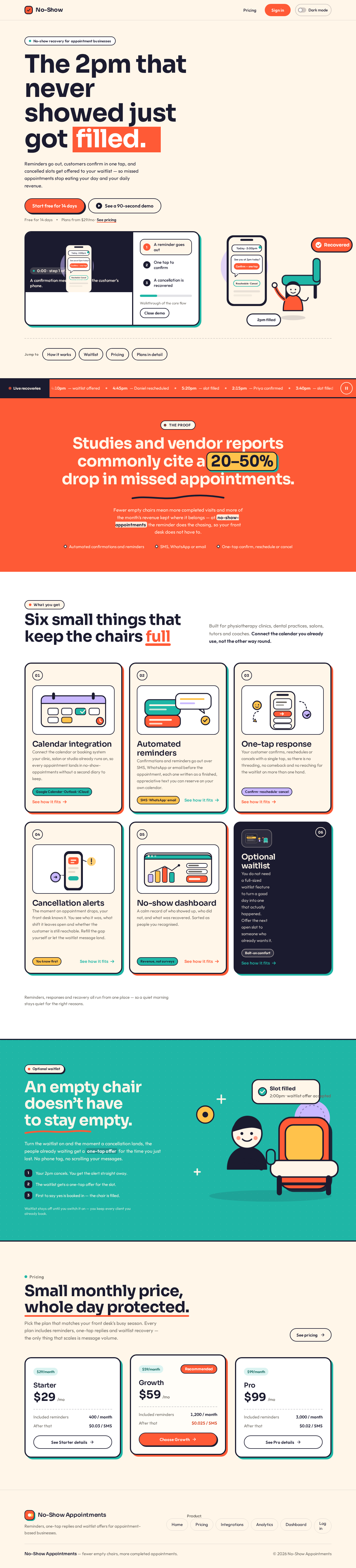
No-show recovery for appointment businesses
Reminders go out, customers confirm in one tap, and cancelled slots get offered to your waitlist — so missed appointments stop eating your day and your daily revenue.
The proof
Fewer empty chairs mean more completed visits and more of the month’s revenue kept where it belongs — at no-show-appointments the reminder does the chasing, so your front desk does not have to.
Built for physiotherapy clinics, dental practices, salons, tutors and coaches. Connect the calendar you already use, not the other way round.
Connect the calendar or booking system your clinic, salon or studio already runs on, so every appointment lands in no-show-appointments without a second diary to keep.
Confirmations and reminders go out over SMS, WhatsApp or email before the appointment, each one written as a finished, appreciative text you can reserve on your own calendar.
Your customer confirms, reschedules or cancels with a single tap, so there is no threading, no comeback and no reaching for the waitlist on more than one hand.
The moment an appointment drops, your front desk knows it. You see who it was, what shift it leaves open and whether the customer is still reachable. Refill the gap yourself or let the waitlist message land.
A calm record of who showed up, who did not, and what was recovered. Sorted as people you recognised.
You do not need a full-sized waitlist feature to turn a good day into one that actually happened. Offer the next open slot to someone who already wants it.
Reminders, responses and recovery all run from one place — so a quiet morning stays quiet for the right reasons.
Turn the waitlist on and the moment a cancellation lands, the people already waiting get a one-tap offer for the time you just lost. No phone tag, no scrolling your messages.
Waitlist stays off until you switch it on — you keep every client you already book.
No-show recovery for appointment businesses
Reminders go out, customers confirm in one tap, and cancelled slots get offered to your waitlist — so missed appointments stop eating your day and your daily revenue.
The proof
Fewer empty chairs mean more completed visits and more of the month’s revenue kept where it belongs — at no-show-appointments the reminder does the chasing, so your front desk does not have to.
Built for physiotherapy clinics, dental practices, salons, tutors and coaches. Connect the calendar you already use, not the other way round.
Connect the calendar or booking system your clinic, salon or studio already runs on, so every appointment lands in no-show-appointments without a second diary to keep.
Confirmations and reminders go out over SMS, WhatsApp or email before the appointment, each one written as a finished, appreciative text you can reserve on your own calendar.
Your customer confirms, reschedules or cancels with a single tap, so there is no threading, no comeback and no reaching for the waitlist on more than one hand.
The moment an appointment drops, your front desk knows it. You see who it was, what shift it leaves open and whether the customer is still reachable. Refill the gap yourself or let the waitlist message land.
A calm record of who showed up, who did not, and what was recovered. Sorted as people you recognised.
You do not need a full-sized waitlist feature to turn a good day into one that actually happened. Offer the next open slot to someone who already wants it.
Reminders, responses and recovery all run from one place — so a quiet morning stays quiet for the right reasons.
Turn the waitlist on and the moment a cancellation lands, the people already waiting get a one-tap offer for the time you just lost. No phone tag, no scrolling your messages.
Waitlist stays off until you switch it on — you keep every client you already book.
No comments yet. Be the first!