As a developer, I want to set up the database schema for storing specs, page objects, and test hooks using Alembic migrations.
As a DevOps engineer, I want to set up a CI/CD pipeline for automated testing and deployment of the mint-prompt application.
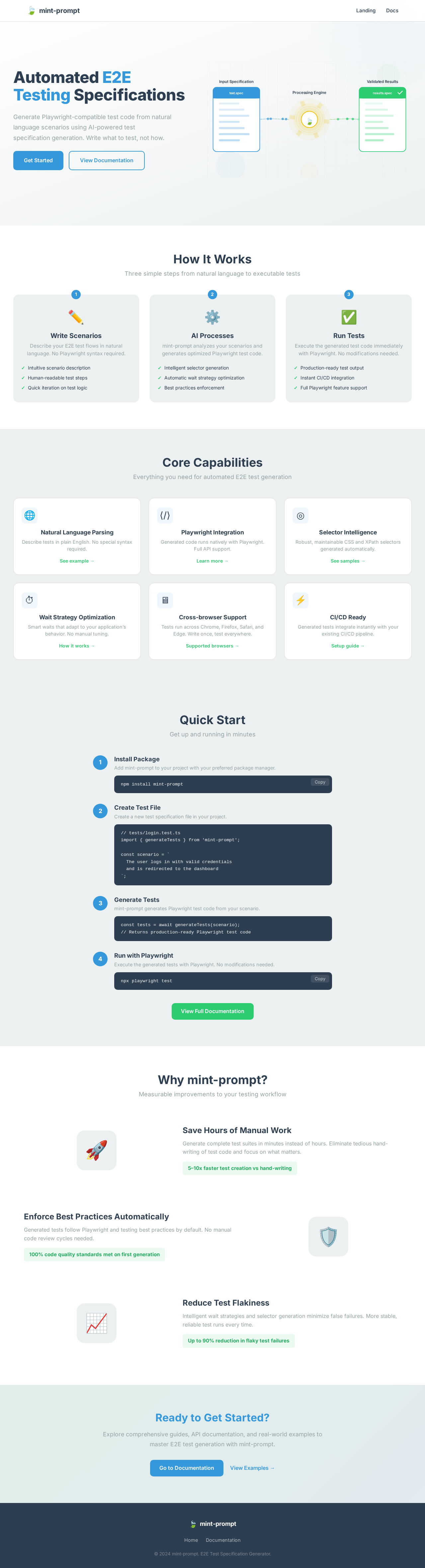
As a frontend developer, implement the LandingHeroVisual section using the provided JSX and CSS. This section includes an animated SVG illustrating a testing pipeline with motion effects. Ensure the animation respects reduced motion settings. Acceptance criteria: The Landing page must render the LandingHeroVisual component exactly once. The SVG must animate as specified, with particles moving along defined paths. The design must match the provided CSS, including responsive behavior. No backend integration is required. Access is shared with all User personas.
Page access: shared by all personas (User). This is verification context and does not request role-specific implementation.
As a frontend developer, implement the LandingHeroCopy section using the provided JSX and CSS. This section includes a title, description, and call-to-action buttons with motion animations. Acceptance criteria: The Landing page must render the LandingHeroCopy component exactly once. The text and buttons must animate as specified, with responsive design matching the provided CSS. The 'Get Started' button must link to the Quick Start section, and the 'View Documentation' button must link to the Docs page. Access is shared with all User personas.
Page access: shared by all personas (User). This is verification context and does not request role-specific implementation.
As a frontend developer, implement the PipelineStageBreakdown section using the provided JSX and CSS. This section displays a three-step process with animated cards. Acceptance criteria: The Landing page must render the PipelineStageBreakdown component exactly once. Each stage card must animate into view as specified, with responsive design matching the provided CSS. No backend integration is required. Access is shared with all User personas.
Page access: shared by all personas (User). This is verification context and does not request role-specific implementation.
As a frontend developer, implement the CapabilityCardsGrid section using the provided JSX and CSS. This section displays a grid of capability cards with animations. Acceptance criteria: The Landing page must render the CapabilityCardsGrid component exactly once. Each card must animate into view as specified, with responsive design matching the provided CSS. No backend integration is required. Access is shared with all User personas.
Page access: shared by all personas (User). This is verification context and does not request role-specific implementation.
As a frontend developer, implement the QuickStartSteps section using the provided JSX and CSS. This section includes interactive steps with copyable code snippets. Acceptance criteria: The Landing page must render the QuickStartSteps component exactly once. Each step must animate into view as specified, with responsive design matching the provided CSS. The copy button must function correctly, copying the code to the clipboard. No backend integration is required. Access is shared with all User personas.
Page access: shared by all personas (User). This is verification context and does not request role-specific implementation.
As a frontend developer, implement the FeatureComparisons section using the provided JSX and CSS. This section displays feature comparison blocks with animations. Acceptance criteria: The Landing page must render the FeatureComparisons component exactly once. Each block must animate into view as specified, with responsive design matching the provided CSS. No backend integration is required. Access is shared with all User personas.
Page access: shared by all personas (User). This is verification context and does not request role-specific implementation.
As a frontend developer, implement the DocsCTA section using the provided JSX and CSS. This section includes a call-to-action card with links to documentation. Acceptance criteria: The Landing page must render the DocsCTA component exactly once. The card must animate into view as specified, with responsive design matching the provided CSS. The 'Go to Documentation' button must link to the Docs page. Access is shared with all User personas.
Page access: shared by all personas (User). This is verification context and does not request role-specific implementation.
As a frontend developer, implement the DocsFAQ section on the Docs page. This section includes a list of frequently asked questions, each with a question and an answer that can be toggled open or closed. The component uses a state hook to manage which FAQ is open. Each FAQ item includes a link to relevant documentation sections. The design must adhere to the provided CSS, ensuring the FAQ items transition smoothly when opened or closed, and the layout is responsive. Acceptance criteria: 1) The DocsFAQ component must render exactly once on the Docs page. 2) Each FAQ item must toggle open and closed when clicked, with the correct aria-expanded state. 3) The design must match the provided CSS, including colors, fonts, and spacing. 4) Links within FAQ answers must navigate to the correct sections on the page. 5) The section must be accessible to all users, as the page is shared by all personas.
Page access: shared by all personas (User). This is verification context and does not request role-specific implementation.
As a developer, I want to implement the API endpoints for spec generation, ensuring they interact correctly with the database and follow business rules.
Depends on:#1
Waiting for dependencies
As a developer, I want to implement the API endpoints for flagging gaps in page objects and test hooks, ensuring they are stored and retrievable.
Depends on:#1
Waiting for dependencies
As a frontend developer, implement the Navbar section for the Docs page. This component includes a toggleable navigation menu that opens and closes when the button is clicked. It should link to the Landing and Docs pages, and the navigation state should be managed using a useState hook. Ensure the Navbar is fixed at the top of the page and styled with a backdrop filter for a modern look. Acceptance criteria: The Navbar must render exactly once on the Docs page, with links to Landing and Docs pages. The toggle button must open and close the menu, updating the aria-expanded attribute. The design must match the provided CSS, including the fixed position and backdrop filter. The Navbar should be accessible to all users. This section depends on the Landing page's Navbar implementation.
Page access: shared by all personas (User). This is verification context and does not request role-specific implementation.
Depends on:#7
Waiting for dependencies
As a developer, I want to create a frontend API client service to interact with the backend spec generation and gap flagging APIs.
Depends on:#3#2
Waiting for dependencies
As a QA engineer, I want to develop integration tests for the spec generation and gap flagging APIs to ensure they function correctly.
Depends on:#3#2
Waiting for dependencies
As a frontend developer, implement the DocsHero section for the Docs page. This component includes a search input that filters quick links based on user input, using useState and useMemo hooks. It should display a title, tagline, and quick links to various documentation sections. Acceptance criteria: The DocsHero must render exactly once on the Docs page, with a functional search input that filters links in real-time. The design must match the provided CSS, including the gradient background and centered text. The component should be accessible to all users.
Page access: shared by all personas (User). This is verification context and does not request role-specific implementation.
Depends on:#14
Waiting for dependencies
As a frontend developer, implement the DocsNav section for the Docs page. This component includes a toggleable drawer navigation that highlights the active section based on scroll position, using useState, useEffect, and useRef hooks. Acceptance criteria: The DocsNav must render exactly once on the Docs page, with a functional toggle button that opens and closes the drawer. The active section should update based on scroll position. The design must match the provided CSS, including the sticky position and drawer animation. The component should be accessible to all users.
Page access: shared by all personas (User). This is verification context and does not request role-specific implementation.
Depends on:#14
Waiting for dependencies
As a frontend developer, implement the SetupInstructions section for the Docs page. This component displays a list of setup steps with expandable details, using useState to manage the open state of each step. Acceptance criteria: The SetupInstructions must render exactly once on the Docs page, with expandable steps that reveal additional information and code snippets. The design must match the provided CSS, including the callout and step styling. The component should be accessible to all users.
Page access: shared by all personas (User). This is verification context and does not request role-specific implementation.
Depends on:#14
Waiting for dependencies
As a frontend developer, implement the PlaywrightMCPGuide section for the Docs page. This component includes expandable best practices and selector examples, using useState to manage the open state of each practice. Acceptance criteria: The PlaywrightMCPGuide must render exactly once on the Docs page, with expandable practices that reveal additional information. The design must match the provided CSS, including the practice styling. The component should be accessible to all users.
Page access: shared by all personas (User). This is verification context and does not request role-specific implementation.
Depends on:#14
Waiting for dependencies
As a frontend developer, implement the PromptTemplate section for the Docs page. This component includes a tabbed interface to switch between a template and an example, using useState to manage the active tab. Acceptance criteria: The PromptTemplate must render exactly once on the Docs page, with a functional tabbed interface that switches between the template and example. The design must match the provided CSS, including the tab styling. The component should be accessible to all users.
Page access: shared by all personas (User). This is verification context and does not request role-specific implementation.
Depends on:#14
Waiting for dependencies
As a frontend developer, implement the AppDetailsWorkflow section for the Docs page. This component includes a checklist and flow steps, using useState to manage the checked state of each item. Acceptance criteria: The AppDetailsWorkflow must render exactly once on the Docs page, with a functional checklist that allows users to mark items as complete. The design must match the provided CSS, including the flow and checklist styling. The component should be accessible to all users.
Page access: shared by all personas (User). This is verification context and does not request role-specific implementation.
Depends on:#14
Waiting for dependencies
As a frontend developer, implement the SpecGeneration section for the Docs page. This component includes a list of steps and troubleshooting tips, using useState to manage the open state of each issue. Acceptance criteria: The SpecGeneration must render exactly once on the Docs page, with expandable troubleshooting tips that reveal additional information. The design must match the provided CSS, including the step and issue styling. The component should be accessible to all users.
Page access: shared by all personas (User). This is verification context and does not request role-specific implementation.
Depends on:#14
Waiting for dependencies
As a frontend developer, implement the ReportingResults section for the Docs page. This component includes a report template and debugging steps, using useState to manage the open state of the debugging steps. Acceptance criteria: The ReportingResults must render exactly once on the Docs page, with a functional report template and expandable debugging steps. The design must match the provided CSS, including the report and checklist styling. The component should be accessible to all users.
Page access: shared by all personas (User). This is verification context and does not request role-specific implementation.
Depends on:#14
Waiting for dependencies
As a Tech Lead, verify the end-to-end integration between the Spec Generation frontend implementation and the Spec Generation backend API. Ensure data flows correctly, API responses are handled properly in the UI, and all interactions work as expected.
Depends on:#2
Waiting for dependencies
As a Tech Lead, verify the end-to-end integration between the Gap Flagging frontend implementation and the Gap Flagging backend API. Ensure data flows correctly, API responses are handled properly in the UI, and all interactions work as expected.
Depends on:#3
Waiting for dependencies
As a QA Engineer, develop end-to-end tests for the mint-prompt application using Playwright MCP. Ensure tests cover all core user flows, including spec generation and gap flagging, and validate both happy paths and error cases.
Depends on:#24#25
Waiting for dependencies



No comments yet. Be the first!