
mint-prompt

byKONDURI VARUN

# Prompt: Generate E2E specs with Playwright MCP Use this in Claude Code (or any MCP client) with the Playwright MCP server connected and your app running locally. Copy everything in the code block below, fill in the bracketed placeholders, and send it as-is. ## One-time setup (before using the prompt) ```bash claude mcp add playwright npx @playwright/mcp@latest ``` Make sure your app is running locally (e.g. `npm run dev`) and that this repo's `e2e-suite/` (or wherever you placed it) is open in the working directory, so the agent can see `tests/pages/`, `tests/utils/test-data.ts`, and the existing spec conventions. --- ## The prompt ``` You are extending an existing Playwright E2E suite. Before writing anything, read tests/pages/BasePage.ts, tests/pages/LoginPage.ts, tests/pages/DashboardPage.ts, tests/utils/test-data.ts, and one existing spec in tests/e2e/ so you match this repo's conventions exactly (Page Object Model, @smoke/@regression tags, getByRole/getByLabel/getByTestId selector preference, storageState auth reuse). Do not invent a different structure or style. App under test: [BASE_URL, e.g. http://localhost:3000] Login credentials for exploration: [email] / [password] Flow(s) to cover: [describe the flow in plain language, e.g. "the invoice creation flow: create a draft invoice, add line items, apply a discount, send it, and confirm it moves to the Sent tab"] Do this in order: 1. EXPLORE. Use Playwright MCP to actually navigate the running app and walk through the flow(s) above yourself, step by step, as a real user would. Note the actual routes, the actual accessible names/roles/labels/testids on every interactive element you touch, and the actual UI feedback after each action (toast text, URL changes, new elements appearing). Do not guess or reuse selector names from the existing demo pages if the real app differs -- read what's actually there. 2. IDENTIFY GAPS. Compare what you found against tests/pages/*.ts. If a page object for a screen you visited doesn't exist yet, or is missing methods for elements you interacted with, tell me before writing specs, then create or extend that page object following the same class shape and naming conventions as the existing ones. 3. FLAG MISSING TEST HOOKS. If you find interactive elements with no accessible name, no label, and no data-testid -- meaning there is no reasonably stable way to select them -- list those elements and the file/line where the underlying component is defined, so I can add a data-testid. Do not write a selector based on CSS classes or text content that looks likely to change; flag it instead and move on. 4. WRITE THE SPEC(S). Add one new file under tests/e2e/ (or extend an existing one if the flow clearly belongs there) covering: - The happy path, tagged @smoke - At least one validation/error case (e.g. required field, invalid input), tagged @regression - Any state-dependent branch you observed during exploration (e.g. an item that behaves differently once a limit is reached), tagged @regression Use uniqueTaskTitle-style helpers from test-data.ts (or add an equivalent generator) for anything that creates data, so parallel runs and repeat CI runs never collide on the same record. Wait on real signals you observed while exploring (a toast appearing, a network response settling, a specific element becoming visible) -- never a fixed page.waitForTimeout(). 5. RUN IT. Execute the new spec(s) with `npx playwright test <path> --project=chromium`. If anything fails, use Playwright MCP to re-inspect the live page at the point of failure, determine whether the spec or the selector is wrong, fix it, and re-run until it passes. Do not hand me a spec you haven't actually run. 6. REPORT BACK. Summarize: which files you created/changed, which page objects you extended, any data-testid gaps you're flagging for me to add, and the final passing test output. ``` --- ## Notes on using this well - **Run it flow by flow, not "test my whole app" in one shot.** A focused flow description gets you an agent that explores carefully and writes specs that match what's actually there. A vague, broad ask gets you specs that guess at selectors and fail on the first real run. - **The exploration step is the point.** Skipping straight to "write a spec for X" without letting the agent drive the real app first is what produces brittle, hallucinated selectors. Always let it look before it writes. - **Feed back the data-testid gaps.** Step 3 is designed to surface the actual product-code changes needed for stable tests. Treat that list as a small follow-up PR, not something to work around with fragile selectors. - **Reuse this prompt as your suite grows.** Swap the "Flow(s) to cover" line for each new feature and rerun -- the first three steps (read conventions, explore, identify gaps) are what keep the suite consistent as different people/agents add to it over time.

LandingDocs
Landing

Comments (0)

No comments yet. Be the first!

System Requirements

System Requirement Document
Page 1 of 4

mint-prompt System Requirements Document

Introduction

This document outlines the system requirements for the project "mint-prompt," which is designed to facilitate the generation of end-to-end (E2E) specifications using Playwright MCP. The project aims to streamline the testing process by allowing users to generate specs without requiring login credentials.

System Overview

The mint-prompt project is a tool for generating E2E test specifications using Playwright MCP. It is designed to work with a local instance of the application under test, allowing users to explore, identify gaps, and write specifications that match the application's current state. The project emphasizes the importance of exploration and accurate selector usage to ensure robust and reliable test scripts.

Functional Requirements as Story Points

  • As a User, I should be able to generate E2E specs using Playwright MCP without requiring login credentials.
  • As a User, I should be able to explore the application under test and note actual routes, accessible names, roles, labels, and test IDs.
  • As a User, I should be able to identify gaps in existing page objects and flag missing test hooks for interactive elements.
  • As a User, I should be able to write new specs covering happy paths, validation/error cases, and state-dependent branches.
  • As a User, I should be able to run the new specs and ensure they pass by fixing any issues with selectors or specs.
  • As a User, I should be able to report back on the files created/changed, page objects extended, data-testid gaps flagged, and final test output.
Page 2 of 4

User Personas

  • User: A developer or tester who uses the mint-prompt tool to generate and run E2E test specifications for their application.

Core User Flows

  1. User sets up Playwright MCP with the command claude mcp add playwright npx @playwright/mcp@latest.
  2. User ensures the application is running locally and the working directory is set up.
  3. User explores the application using Playwright MCP, noting routes and selectors.
  4. User identifies gaps in page objects and flags missing test hooks.
  5. User writes new specs covering various test scenarios.
  6. User runs the specs and fixes any issues until they pass.
  7. User reports back on the testing process and outcomes.

Visuals Colors and Theme

[Default — not specified by user]

  • primary: #3498db (a calming blue for a professional look)
  • primary_light: #85c1e9 (a lighter tint of blue for hover states)
  • secondary: #2ecc71 (a green for success messages and confirmations)
  • accent: #e74c3c (a red for error messages and alerts)
  • highlight: #f1c40f (a yellow for notifications and active indicators)
  • bg: #ecf0f1 (a light grey for the background)
  • surface: #ffffff (white for cards and panels)
  • text: #2c3e50 (a dark grey for primary text)
  • text_muted: #95a5a6 (a softer grey for secondary text and labels)
  • border: #dcdcdc (a subtle grey for borders)
Page 3 of 4

Signature Design Concept

The mint-prompt landing page will feature an interactive "Test Journey Map" where users can visually explore the testing process. This map will animate as users hover over different stages, showing a flow of data from exploration to reporting. Each stage will have clickable elements that expand to provide more details about the process. The map will use motion/react for smooth animations and transitions, creating an engaging and informative experience.

Landing Hero Motion Brief

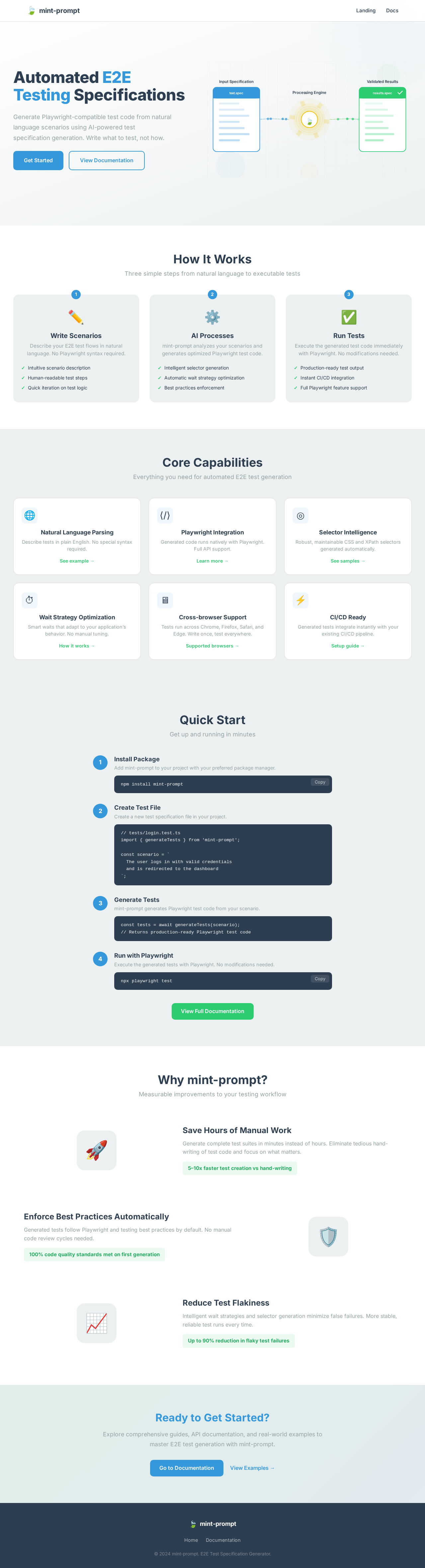
The landing hero will depict a dynamic illustration of a testing pipeline. Inputs (e.g., user actions) will flow into a central testing engine, visibly transforming as they pass through. The outcome will be a set of validated test results. This animation will loop every 10 seconds, using motion/react for seamless transitions. The first frame will show a clear, paused state with unobstructed copy and CTAs.

Interaction Model & Motion Direction

  • Intended Interaction Model: Animated
  • The landing page will feature moderate scroll-triggered reveals and hover transitions. Interactive elements will have spring physics for a polished feel. This model is suitable for showcasing the feature-rich capabilities of mint-prompt.

Non-Functional Requirements

  • The system must operate without requiring user login.
  • The tool should be compatible with the latest version of Playwright MCP.
  • The system should provide clear feedback and error messages to guide users.
Page 4 of 4

Tech Stack

  • Frontend: React for Web
  • Backend: Python with FastAPI
  • Database: MySQL or MariaDB, using Alembic for migrations
  • AI Models: Not applicable
  • AI Tools: Not applicable
  • Local Orchestration: Docker, docker-compose
  • Server-side Orchestration: Kubernetes

Assumptions and Constraints

  • The application under test must be running locally for the tool to function.
  • Users are expected to have basic knowledge of Playwright and E2E testing.
  • The system assumes the presence of a working directory with specific test files and conventions.

Glossary

  • E2E Testing: End-to-end testing, a methodology to test the flow of an application from start to finish.
  • Playwright MCP: A tool for managing Playwright test scripts and execution.
  • Page Object Model: A design pattern in test automation that encourages the creation of an object repository for web UI elements.

This document provides a comprehensive overview of the mint-prompt project requirements, ensuring a clear understanding of the system's capabilities and design.

Landing design preview
Landing: View Test Journey Map
Landing: Explore Testing Stages
Landing: Copy Setup Command
Docs: Read Playwright MCP Instructions
Docs: Copy Prompt Template
Docs: Fill In App Details and Flow
Docs: Run Prompt in Claude Code
Docs: Review Generated Spec Report
Landing design preview
Landing: View Test Journey Map
Landing: Explore Testing Stages
Landing: Copy Setup Command
Docs: Read Playwright MCP Instructions
Docs: Copy Prompt Template
Docs: Fill In App Details and Flow
Docs: Run Prompt in Claude Code
Docs: Review Generated Spec Report