mammoth-chat
 Kiran Kumar P S
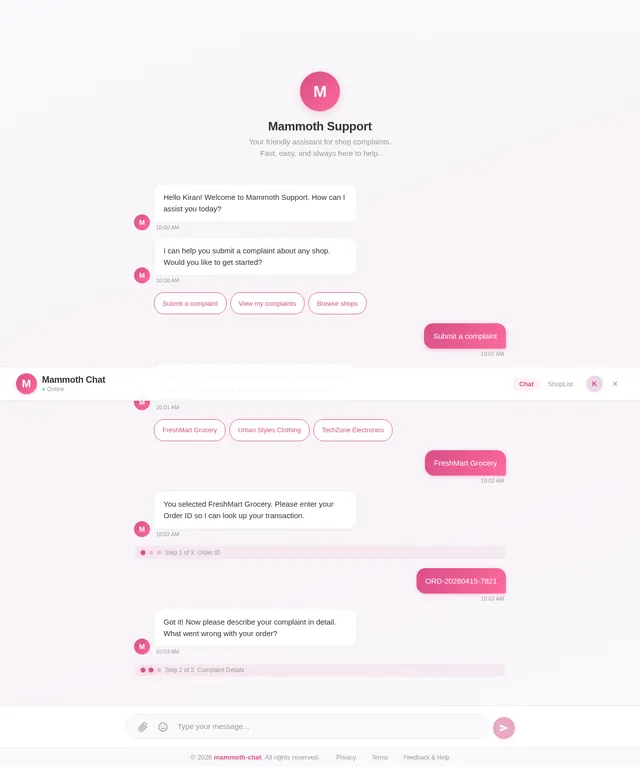
I need chat bot ui same the picture and chat bot
Comments (0)
Sign in to leave a comment
System Requirements
System Requirements Document (SRD)
Project Name: mammoth-chat
1. Introduction
The mammoth-chat project aims to create a chatbot interface for handling shop complaints from customers. The chatbot will provide a seamless user experience, integrating APIs for fetching shop lists, submitting complaints, and greeting users based on their profile information. The design will replicate the clean and user-friendly UI provided by Kiran, ensuring rounded edges, gradient backgrounds, and intuitive conversation flow.
2. System Overview
The mammoth-chat system is designed to:
- Greet customers using their profile information fetched from the
profileapi. - Allow users to submit shop complaints via a chatbot interface.
- Dynamically fetch shop lists from
$startPoint/api/shops. - Validate user inputs and provide feedback on complaint submission status.
The chatbot will be accessible via web and mobile platforms, ensuring responsiveness and ease of use.
3. Functional Requirements
- As a User, I should be greeted by name when entering the chat, based on my profile fetched from the
profileapi. - As a User, I should be able to select a shop from a dynamically fetched list using
$startPoint/api/shops. - As a User, I should be able to enter my Order ID and Complaint Description.
- As a User, I should be able to submit my complaint using the
postComplaintAPI. - As a User, I should receive feedback on the success or failure of my complaint submission.
4. User Personas
4.1 Customer
- Description: A user submitting complaints about shops.
- Goals:
- Submit complaints quickly and easily.
- Receive personalized greetings and feedback.
- Pain Points:
- Complicated complaint submission processes.
- Lack of feedback on submission status.
5. Visuals Colors and Theme
Color Palette
The color palette is inspired by the reference image provided by Kiran.
| Element | Hex Code | Description |
|---|---|---|
| Background | #F9F9FB | Light gray for a clean look. |
| Surface | #FFFFFF | Pure white for message bubbles. |
| Text | #333333 | Dark gray for readability. |
| Accent | #D84E88 | Vibrant pink for buttons and highlights. |
| Muted Tones | #E5E5E5 | Soft gray for borders and dividers. |
6. Signature Design Concept
Interactive Chat Flow with Dynamic Greeting
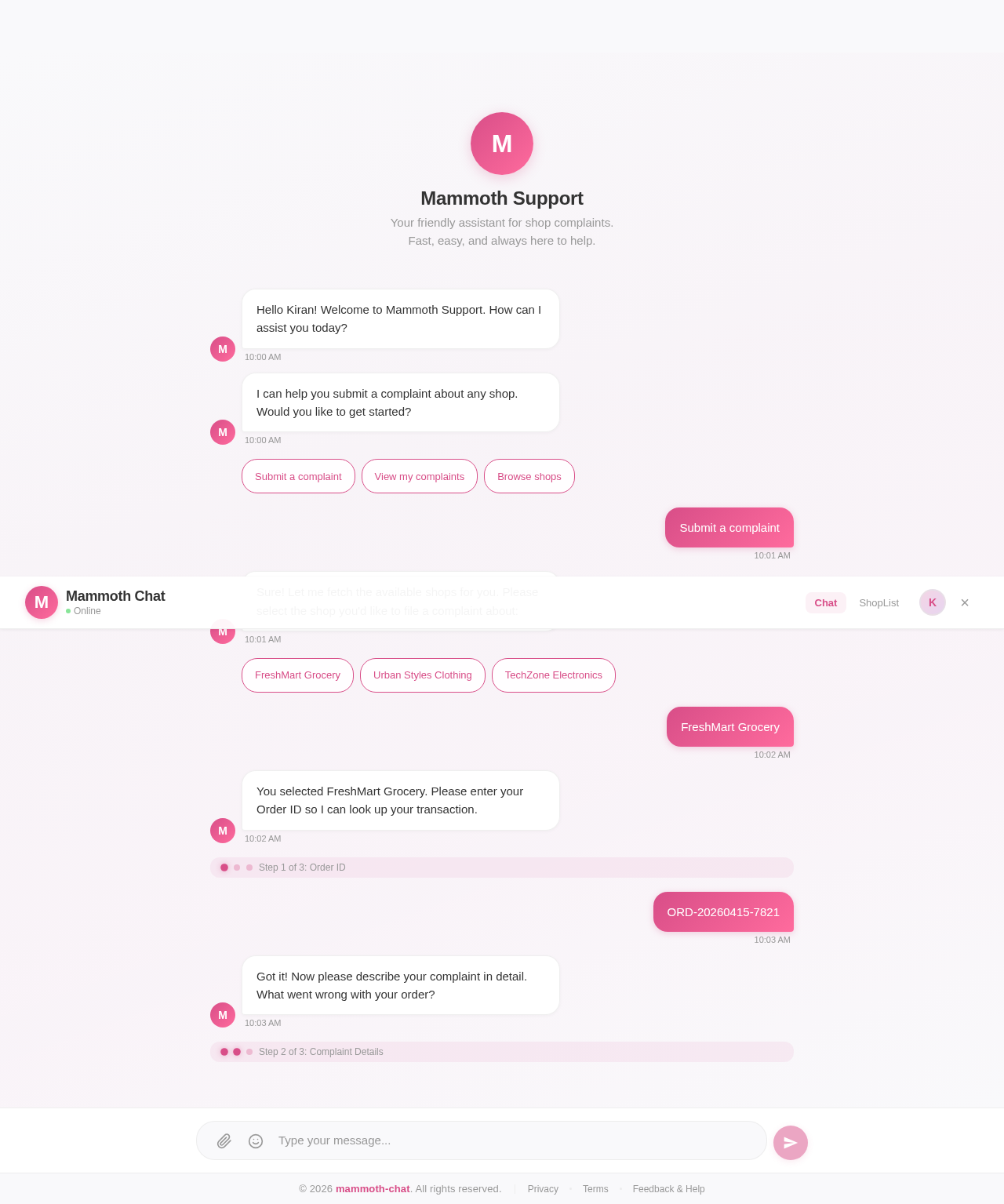
The homepage will feature a chatbot interface that replicates the reference design provided by Kiran. Key features include:
- Dynamic Greeting: When a user enters the chat, the chatbot fetches their profile and greets them by name (e.g., "Hello [First Name], how can I assist you today?").
- Gradient Background: A subtle gradient background that transitions smoothly between light pink and white, creating a calming visual effect.
- Rounded Components: Message bubbles, input fields, and buttons will have rounded edges for a modern and friendly appearance.
- Quick Replies: Users can tap on suggested replies or shop names for faster interaction.
- Micro-Interactions: Buttons and message bubbles will have hover effects and smooth animations to enhance user engagement.
7. Non-Functional Requirements
- Performance:
- The chatbot must respond to user inputs within 2 seconds.
- Scalability:
- The system should handle up to 10,000 concurrent users.
- Security:
- API calls must be secured using bearer tokens.
- Accessibility:
- The chatbot UI must be accessible to users with disabilities, adhering to WCAG 2.1 standards.
8. Tech Stack
Frontend
- React for Web
- React Native for Mobile
Backend
- Python
- FastAPI
Database
- MySQL (preferred for relational data)
- Alembic for migrations
AI Models
- GPT 5.4 for user-friendly responses
AI Tools
- Langchain
- Litellm for LLM routing
Orchestration
- Docker for local orchestration
- Kubernetes for server-side orchestration
9. Assumptions and Constraints
Assumptions
- Users will have valid profiles in the system.
- The APIs (
profileapi,$startPoint/api/shops, andpostComplaint) will be functional and accessible.
Constraints
- The chatbot UI must strictly adhere to the reference design provided.
- The system must support both web and mobile platforms.
10. Glossary
- API: Application Programming Interface, used for communication between systems.
- Bearer Token: A security token used for API authentication.
- WCAG: Web Content Accessibility Guidelines, standards for accessible web design.
This document outlines the requirements for the mammoth-chat project. Let me know if further refinements are needed, Kiran!
Mammoth Support
Your friendly assistant for shop complaints. Fast, easy, and always here to help.
No comments yet. Be the first!