jade-d
 Chiedozie Tansley
Create d best calculator app in d world

Comments (0)
Sign in to leave a comment
System Requirements
System Requirements Document for jade-d
1. Introduction
jade-d is a calculator application built to be the best calculator in the world, and to be advanced in every respect — a scientific/engineering-grade computation tool rather than a basic everyday arithmetic app. Its audience is engineers, scientists, students and math-heavy professionals who judge a calculator by accuracy, legibility and speed. The product intent is disciplined confidence and instrumental trust: a precision instrument that handles demanding mathematics reliably, presented with the visual rigour of technical information design rather than consumer-app friendliness.
The current delivery is a two-surface, first-party web application: a public Landing page that states what the calculator is and who it is for, and a focused Calculator workspace where expressions are entered and evaluated. Computation state is transient and local to the session; there is no account, no stored history, and no server-side persistence in the current scope.
2. System Overview
jade-d currently delivers:
- A public entry surface (Landing) — an anonymous first impression that explains that this is an advanced scientific/engineering calculator and who it is for, and introduces the accepted outcome (accurate advanced computation) before any identity establishment.
- A focused computation workspace (Calculator) — where the user enters and evaluates advanced mathematical expressions and sees computed results, with computation state transient and local to the session.
Actors. The single accepted active human persona is the Advanced Calculator User. There are no other human personas, no administrators, no reviewers, and no counterparties. No system, provider, or external service is an accepted actor in the current scope; all computation is performed by the application itself.
Accepted behavior. Advanced scientific/engineering-grade expression entry and evaluation, with the results presented legibly and immediately. Everything else in this document elaborates that behavior — the expression tape, the keypad, the function drawer, the angle-mode dial, memory/register indicators, and the readout — without adding a separate product outcome.
Narrow exclusions. No user accounts, sign-in, profiles, or identity establishment; no saved or shared calculation history; no collaboration, sharing, or export destinations; no payments; no third-party computation provider. These are not current capabilities and are not implied by the advanced positioning.
2a. Product Interpretation and Delivery Boundary
jade-d is delivered as a first-party web application with custom UI. Both surfaces are owned by the application and are reachable anonymously — there is no access requirement on either page, and no identity establishment exists anywhere in the product. This is deliberate and consistent: the accepted computation lifecycle is transient and local to the session, so there is no durable actor-specific state, commitment, entitlement, or value transfer that would require application-owned identity. A user can open the Landing page, move to the Calculator, and compute immediately.
The current horizon contains exactly the two accepted surfaces and the advanced computation behavior described in Section 3. Anything resembling accounts, history, sharing, or integrations is outside the current horizon; Section 11 records the boundary explicitly so it is not silently reintroduced.
2b. Source Content Inventory
Not applicable — no reference directive in this project declares a content_source.
2c. Page Content and Component Coverage
Landing
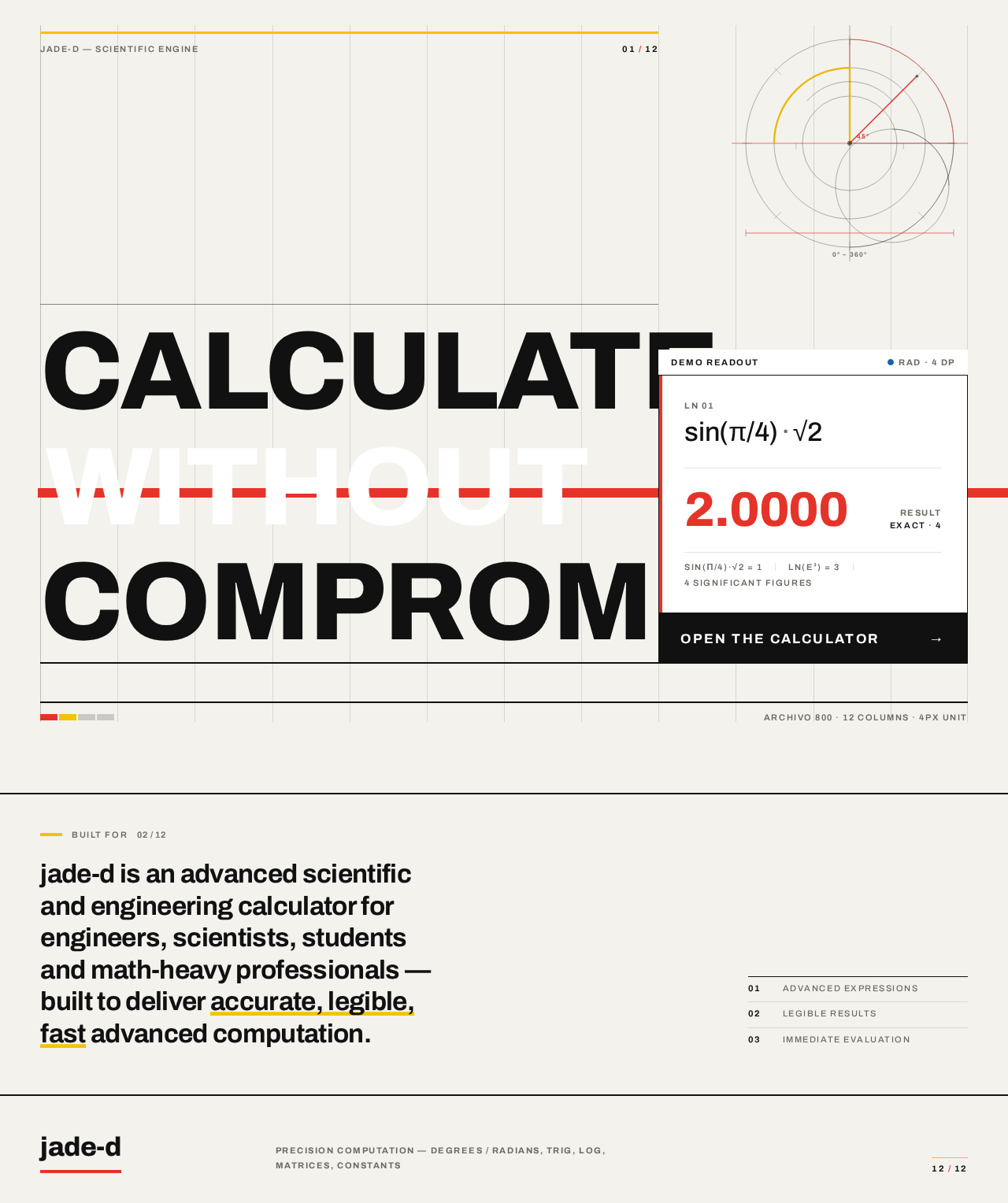
Purpose and information. An anonymous public entry surface that states, in the product's own voice, that jade-d is an advanced scientific/engineering calculator built to be the best in the world, and who it is for (engineers, scientists, students, math-heavy professionals). It introduces the accepted outcome — accurate, legible, fast advanced computation — and offers the single path into the workspace.
Information and state
- Oversized flush-left headline
CALCULATE / WITHOUT / COMPROMISE, set in Archivo 800 atclamp(64px, 11vw, 148px), locked to columns 1–8 of a visible 12-column hairline grid, with a solid signal-red#E63329rectangle behind the middle line cropped by the right viewport edge. - A short audience/positioning statement identifying the tool as an advanced scientific/engineering calculator for engineers, scientists, students and math-heavy professionals.
- A live demo readout panel on columns 9–12: a white plate with a black hairline frame showing a real expression such as
sin(π/4)·√2 + ln(e³)in tabular numerals with the result2.0000in signal red. - Top-corner page coordinates
01 / 12and a thin yellow#F2C300rule. - Diagrammatic geometry motif: overlapping circles and quarter-arcs derived from a protractor, thin measured lines — decoration only, never covering readable text or controls.
Primary action
Open the calculator— a black rectangular key pinned directly beneath the demo readout, aligned to the same baseline, navigating to the Calculator page.
Supporting actions
- None beyond the primary CTA. No secondary navigation, no sign-in, no marketing forms.
Domain entities
- None persisted. The demo expression and its result are illustrative content of the entry surface.
Component responsibilities
GridFrame— draws the 12-column hairline grid and outer margins.HeroHeadline— renders the three-line headline with the cropped red block behind line two.DemoReadout— renders the sample expression and result in tabular numerals; performs one count-up on load.PrimaryCTA— the black key that routes to Calculator.GeometryMotif— the protractor-derived circle/arc composition.
States
- Loading: static content renders immediately; the demo readout counts up once from zero to
2.0000over the page-load gesture. - Empty: not applicable — the page has no user-owned data.
- Success: headline rules drawn, demo readout settled at
2.0000, CTA focusable and activatable. - Error: not applicable — no network or user-input dependency on this surface.
- Recovery: with
prefers-reduced-motion, the final state renders immediately with no draw or count-up.
Calculator
Purpose and information. The focused workspace where the Advanced Calculator User enters and evaluates advanced mathematical expressions and reads computed results. Computation state is transient and local to the session.
Information and state
- Expression tape across the top full width: every keystroke rendered as a ruled, numbered line of typeset mathematics, scrollable, in tabular numerals.
- Readout: the current expression and its result, set at
clamp(40px, 6vw, 72px)tabular, result in signal red#E63329. - Angle-mode dial: a thin-stroke circle with a red needle marker indicating DEG or RAD, rotating instantly on toggle.
- Memory/register indicators: the only permitted use of
#1D5FA8, shown as small circular indicators. - Keypad: a strict 6-column modular plate of flat rectangular keys separated by 1px black hairlines with no gaps and no radii; the equals key is the only solid red cell; secondary/function keys carry signal yellow
#F2C300; key legends 14–18px, micro-labels 11px uppercase with +0.14em tracking. - Function drawer: a collapsible ruled side column with colour-coded category bars (4px red/yellow/blue/green) and uppercase tracked labels, grouping trig, log, matrices and constants.
Primary actions
- Enter digits, operators, brackets, functions and constants via the keypad and function drawer.
- Evaluate the current expression with the equals key.
- Toggle DEG/RAD on the angle-mode dial.
- Use memory/register controls, with state reflected in the register indicators.
Supporting actions
- Clear the current entry; clear the whole tape.
- Scroll the expression tape to review earlier lines.
- Collapse or expand the function drawer.
Domain entities
- Expression — the ordered sequence of entered tokens, rendered as numbered tape lines.
- Result — the evaluated value of the current expression, or an error state.
- AngleMode — DEG or RAD, session-local.
- MemoryRegister — a session-local stored value with an occupied/empty indicator.
Component responsibilities
ExpressionTape— appends and renders numbered ruled lines; scrolls independently.Readout— displays the live expression and result in tabular numerals.KeypadPlate— the single engineered key grid, including the red equals cell and yellow function cells.FunctionDrawer— collapsible ruled column with colour-coded category sections.AngleDial— circular DEG/RAD control with red needle.RegisterIndicators— blue memory/register state markers.
States
- Loading: the workspace renders its empty tape and zeroed readout immediately; no network fetch.
- Empty: blank tape, readout showing
0, all register indicators empty, angle mode at its default. - Success: the expression evaluates and the result appears in the readout in signal red; the evaluated line is appended to the tape.
- Error: an invalid or non-evaluable expression produces an explicit error state in the readout (for example a domain or syntax error message) rather than a silent wrong number; the entered expression remains visible and editable.
- Recovery: the user edits or clears the offending entry and re-evaluates; the tape retains prior successful lines so the session can continue.
3. Functional Requirements
Each requirement is a distinct story point with provenance, lifecycle facts, and observable acceptance.
FR-1 — Open the product from a public entry surface (explicit; delivery of the accepted outcome) As an Advanced Calculator User, I should land on a public page that tells me this is an advanced scientific/engineering calculator and who it is for, so that I understand the product before I start computing.
- Trigger/input: anonymous visit to the Landing page.
- Observable result: the positioning statement, the oversized headline, and the live demo readout are visible; the
Open the calculatorkey is present and activatable. - Access state: anonymous; no identity required.
- Failure/recovery: not applicable — static content with no external dependency.
- Continuation: activating the CTA moves the user to the Calculator.
FR-2 — Enter an advanced mathematical expression (explicit — "advanced everything", scientific/engineering-grade) As an Advanced Calculator User, I should enter scientific and engineering-grade expressions — digits, operators, brackets, trigonometric, logarithmic, matrix and constant functions — so that I can compute demanding mathematics rather than only basic arithmetic.
- Trigger/input: keypad presses and function-drawer selections.
- Observable result: each keystroke appears as a ruled, numbered line in the expression tape and in the readout, in tabular numerals.
- Access state: anonymous; session-local.
- Failure/recovery: an incomplete or malformed entry is not evaluated until it is well-formed; the user can clear or edit it.
- Continuation: the user proceeds to evaluate.
FR-3 — Evaluate the expression and read the result (explicit) As an Advanced Calculator User, I should evaluate my expression and see the computed result, so that I get the accurate answer I came for.
- Trigger/input: activation of the equals key.
- Observable result: the result appears in the readout in signal red
#E63329; the evaluated line is appended to the tape. - Access state: anonymous; session-local.
- Failure/recovery: if the expression cannot be evaluated, an explicit error state is shown in the readout and the expression remains editable.
- Continuation: the user continues with a new expression or edits the current one.
FR-4 — Switch angle mode (explicit — scientific/engineering-grade functionality) As an Advanced Calculator User, I should toggle between degrees and radians, so that trigonometric results match the convention my work uses.
- Trigger/input: activation of the degree/radian dial.
- Observable result: the red needle rotates instantly to the selected mode and subsequent trigonometric evaluation uses that mode.
- Access state: anonymous; session-local.
- Failure/recovery: not applicable — a binary toggle with no failure mode.
- Continuation: the user evaluates again under the new mode.
FR-5 — Use memory/register state (explicit — advanced functionality) As an Advanced Calculator User, I should store and recall values in memory registers, so that I can carry intermediate results across steps of a calculation.
- Trigger/input: memory/register controls on the keypad.
- Observable result: the register indicator (the only
#1D5FA8element) shows occupied or empty, and recall inserts the stored value into the current expression. - Access state: anonymous; session-local.
- Failure/recovery: recalling an empty register is a no-op with the indicator remaining empty.
- Continuation: the user continues the expression with the recalled value.
FR-6 — Review the expression tape (explicit — signature behavior) As an Advanced Calculator User, I should see every keystroke rendered as a ruled, numbered line of typeset mathematics and scroll back through it, so that I can verify what I entered.
- Trigger/input: entry of tokens; scrolling the tape.
- Observable result: numbered ruled lines accumulate and remain scrollable within the session.
- Access state: anonymous; session-local.
- Failure/recovery: not applicable — the tape is a rendering of session input.
- Continuation: the user returns to the readout to continue computing.
FR-7 — Reach advanced functions through a categorised drawer (explicit — advanced everything) As an Advanced Calculator User, I should open a collapsible function drawer whose sections are colour-coded by category (trig, log, matrices, constants), so that I can find advanced functions quickly without cluttering the keypad.
- Trigger/input: expanding or collapsing the drawer.
- Observable result: the ruled side column slides in with 4px colour-coded category bars and uppercase tracked labels.
- Access state: anonymous; session-local.
- Failure/recovery: not applicable — a local UI toggle.
- Continuation: the user selects a function, which enters the expression.
FR-8 — Clear and recover from an entry (required_inference — indispensable for a usable computation lifecycle) As an Advanced Calculator User, I should clear the current entry or the whole tape, so that I can recover from a mistake and continue computing.
- Trigger/input: clear-entry and clear-tape controls.
- Observable result: the readout returns to
0for clear-entry, or the tape empties for clear-tape; register indicators are unaffected by clear-entry. - Access state: anonymous; session-local.
- Failure/recovery: this requirement is the recovery path for FR-2, FR-3 and FR-5.
- Continuation: the user begins a new expression.
4. User Personas
Advanced Calculator User
Product context. This is the sole accepted active human persona. They want a calculator app that is the best in the world with advanced everything — scientific/engineering-grade computation rather than only basic arithmetic. Their recurring work is entering expressions and getting accurate advanced results. They judge the tool by accuracy, legibility and speed, and their emotional register toward it is disciplined confidence and instrumental trust, not friendliness or hype.
Primary goal. Enter a demanding mathematical expression and receive a correct, legible result quickly, repeatedly, without friction.
Distinct accepted responsibilities.
- Entering advanced expressions (FR-2) using the keypad and the categorised function drawer (FR-7).
- Evaluating expressions and reading results (FR-3).
- Setting the angle convention that their work requires (FR-4).
- Carrying intermediate values through memory registers (FR-5).
- Verifying their own input by reading the expression tape (FR-6).
- Recovering from mistakes via clear controls (FR-8).
- Arriving through the public entry surface and choosing to start (FR-1).
Relevant inputs and decisions. Which functions and constants to use; whether the current work is in degrees or radians; whether an intermediate value should be stored; whether an entry should be corrected or cleared.
Interactions with other accepted participants. None. There is no counterparty, recipient, reviewer, or administrator in the accepted scope; the persona's work is entirely self-directed and session-local. This is what makes the role's work different from a collaborative or record-keeping tool: there is no handoff, no shared state, and no durable record to manage.
Observable success. The result appears in the readout in signal red, correct and legible; the tape shows exactly what was entered; the angle mode and register indicators reflect the chosen state; and the user can immediately begin the next expression.
5. Core User Flows
Flow A — First visit and entry into the workspace
- The Advanced Calculator User opens jade-d anonymously and lands on Landing.
- The page-load gesture draws the headline rules left-to-right and the demo readout counts up once to
2.0000; withprefers-reduced-motion, the final state renders immediately. - The user reads the headline
CALCULATE / WITHOUT / COMPROMISE, the positioning statement identifying the tool as an advanced scientific/engineering calculator for engineers, scientists, students and math-heavy professionals, and the live demo readout showingsin(π/4)·√2 + ln(e³) = 2.0000. - The user activates the black
Open the calculatorkey beneath the demo readout. - Calculator opens with an empty tape, a readout of
0, empty register indicators, and the angle dial at its default. The user is ready to compute.
Flow B — Evaluate an advanced expression
- On Calculator, the user presses digits, operators and brackets on the keypad plate; each keystroke appears as a ruled, numbered line in the expression tape and in the readout, in tabular numerals.
- The user opens the function drawer, finds the needed function under its colour-coded category bar (trig, log, matrices, constants), and selects it; the function enters the expression.
- The user presses the red equals key.
- The result appears in the readout in signal red
#E63329, and the evaluated line is appended to the tape. - Continuation: the user begins the next expression, or scrolls the tape to verify what was entered.
Flow C — Set the angle convention
- On Calculator, the user checks the degree/radian dial and sees the red needle pointing at the current mode.
- The user activates the dial; the needle rotates instantly to the other mode.
- The user evaluates a trigonometric expression; the result reflects the newly selected mode.
- Continuation: the user continues computing under that convention.
Flow D — Carry a value through memory
- On Calculator, the user evaluates an intermediate expression and reads the result.
- The user activates a memory control; the corresponding register indicator (the blue
#1D5FA8marker) shows occupied. - Later in the session, the user recalls the register; the stored value is inserted into the current expression.
- The user completes and evaluates the expression.
- Failure/recovery: if the user recalls an empty register, nothing is inserted and the indicator remains empty; the user continues without interruption.
Flow E — Recover from a mistake
- On Calculator, the user notices an incorrect entry in the readout, or presses equals on an expression that cannot be evaluated.
- In the error case, an explicit error state appears in the readout rather than a silent wrong number, and the entered expression remains visible and editable.
- The user either edits the offending entry or activates clear-entry, returning the readout to
0; prior successful tape lines remain. - If the whole session should be reset, the user activates clear-tape and the tape empties.
- Continuation: the user enters a fresh expression and evaluates it.
6. Visuals, Colors and Theme
Muse and headline. Josef Müller-Brockmann — Swiss geometric rigour for the world's most demanding calculator. The visual system is the visual system of technical information: a strict modular grid, flush-left grotesque type, mathematical geometry as content, and pure primary colour used as a code.
Mode. Light mode only.
Colour tokens (exact)
| Role | Hex | Use |
|---|---|---|
| Background | #F4F2ED | Warm paper-white ground |
| Surface | #FFFFFF | Key surfaces, readout plate |
| Text | #111111 | Body and display type |
| Primary | #E63329 | Equals key, active operator, focus rings, rule accents, result numerals |
| Accent | #F2C300 | Secondary/function keys, highlight bands, top-corner rule |
| Muted | #6E6A63 | Secondary labels, inactive micro-copy |
| Register code | #1D5FA8 | Memory/register indicators only |
Colour never fills large decorative areas; it codes function, like subway lines on a map. Body text stays #111111 on #F4F2ED for high contrast. No more than three signal colours are used simultaneously.
Typography. Headings and body: Archivo. Headings in Archivo 700/800, flush-left, ragged-right, tight -0.02em tracking at display sizes; sentence case for headlines, uppercase for micro-labels and key legends. Numerals set in Archivo with tabular figures at every size so the display readout never shifts.
Type scale (1.333 modular). 20 / 26 / 34 / 46 / 62 / 82 / clamp(64px, 11vw, 148px) for the hero headline; calculator readout clamp(40px, 6vw, 72px) tabular; key legends 14–18px; micro-labels 11px uppercase with +0.14em tracking.
Shape language. Hard edges and perfect geometry: zero border radius on keys and panels; 1px hairline rules at #111111 12% opacity; solid rectangles; circles reserved for the degree/radian dial and memory indicators. Keys are flat rectangles separated by 1px grid lines rather than gaps, so the keypad reads as one engineered plate.
Layout. A visible 12-column modular grid with generous outer margins. Landing uses an asymmetric poster composition — oversized headline locked to columns 1–8, live demo readout block on columns 9–12. Calculator uses a two-zone layout — expression tape and readout across the top full width, keypad as a strict 6-column modular plate beneath, and a collapsible function drawer that slides in as a ruled side column. Section transitions are marked by full-width 2px black rules and colour-coded category bars, never by whitespace alone.
Spacing rhythm. A 4px base unit; grid gutters and outer margins in multiples of 8; hairline rules always 1px, section rules always 2px.
Imagery style. No photography and no illustration. The imagery is the interface itself plus diagrammatic geometry: a constructed poster motif of overlapping circles and quarter-arcs derived from a protractor, thin measured lines, and the calculator's own expression tape rendered as a typographic artefact. Pictograms for functions (√, Σ, π, brackets) drawn on a 24px grid with 2px strokes.
Accessibility of type and controls. Headlines, wordmarks, labels, numbers and controls stay entirely inside the viewport and their container at 375px, 768px and 1280px, wrapping or scaling to fit, with no element covering any part of them. Where the direction asks for a cropped or bled gesture, the gesture is carried by imagery and decoration, never by readable text or a control.
7. Signature Design Concept
The Engineered Plate. The public entry is a Swiss poster, not a SaaS hero. On the warm paper-white ground #F4F2ED, a full-viewport 12-column grid is drawn in hairlines. The headline CALCULATE / WITHOUT / COMPROMISE is set flush-left in Archivo 800 at clamp(64px, 11vw, 148px), each line locked to the grid so it spans columns 1–8 and runs close to the viewport edge, with a solid signal-red #E63329 rectangle sitting behind the middle line and cropped by the right edge. Columns 9–12 hold a real, working readout panel — a white plate with a black hairline frame showing a live expression like sin(π/4)·√2 + ln(e³) in tabular numerals with the result 2.0000 in signal red — and the primary CTA Open the calculator as a black rectangular key pinned directly beneath it, aligned to the same baseline. A thin yellow rule and the page's grid coordinates 01 / 12 sit in the top corner. No centred stack, no gradient, no floating cards.
The concept carries into the Calculator as the same plate logic: the keypad is one engineered plate of flat rectangles divided by 1px black hairlines with no gaps or radii, the equals key the only solid red cell; the expression tape above it renders every keystroke as a ruled, numbered line of typeset mathematics; function categories are colour-coded like transit lines with 4px bars and uppercase tracked labels; and the degree/radian dial is a thin-stroke circle with a red needle that rotates instantly on toggle. The concept recomposes only accepted content, states and controls.
8. Interaction Model & Motion Direction
Interaction Model: Animated Motion Tempo: restrained Hero Dimensionality: flat
Landing Hero Motion Brief
- Focal subject. The live demo readout panel on columns 9–12 — a white plate with a black hairline frame showing
sin(π/4)·√2 + ln(e³)and the result2.0000in signal red — paired with the oversized flush-left headline and its cropped red block. - Input → transformation → outcome thesis. On load, the headline's hairline rules draw left-to-right and the demo readout counts up once from zero to
2.0000; the outcome is a settled, precise poster in which the product's defining state — an advanced expression resolving to a legible result — is already visible. The user's only input on this surface is activatingOpen the calculator, which carries them into the workspace. - Motion vocabulary. Restrained and mechanical: instantaneous key-state feedback (80ms fill flip, no bounce), digits that flip in place with a 120ms vertical wipe, and one purposeful page-load gesture. No springy easing, no hover-lift, no parallax.
- Composed first frame. Grid hairlines drawn, headline rules partially drawn from the left, red block in place behind line two, demo readout at
0.0000beginning its single count-up, yellow top rule and01 / 12coordinates visible, black CTA key at rest beneath the readout. - Reduced-motion state. With
prefers-reduced-motion, the final state renders immediately: rules fully drawn, readout settled at2.0000, no count-up, no wipe. All content remains fully readable and every control remains operable.
9. Non-Functional Requirements
- NFR-1 — Numerical accuracy and legibility. Results must be correct for scientific/engineering-grade expressions and presented in tabular numerals so the readout never shifts. Provenance: explicit ("best calculator in the world", "advanced everything"); rationale: the persona judges quality by accuracy and legibility.
- NFR-2 — Speed of feedback. Key-state feedback is instantaneous (80ms fill flip) and digit changes complete in 120ms, so entry never feels laggy. Provenance: explicit (creative direction motion); rationale: instrumental trust depends on immediate response.
- NFR-3 — Session-local computation. Computation state is transient and local to the session; no calculation data is persisted or transmitted. Provenance: explicit (Planning Scope page rationale); rationale: defines the delivery boundary and privacy posture.
- NFR-4 — Anonymous access. Both surfaces are reachable without identity establishment. Provenance: explicit (Planning Scope access requirements); rationale: no durable actor-specific state exists to protect.
- NFR-5 — Responsive integrity. Readable text and controls stay whole and inside the viewport and their container at 375px, 768px and 1280px. Provenance: explicit (creative direction); rationale: legibility at every viewport is part of the product's quality claim.
- NFR-6 — Reduced-motion support. All motion respects
prefers-reduced-motionby rendering the final state immediately, with a usable static arrangement. Provenance: explicit (creative direction); rationale: accessibility without loss of content. - NFR-7 — Contrast. Body text
#111111on#F4F2EDand result numerals#E63329on#FFFFFFmust meet accessible contrast for their sizes. Provenance: required_inference; rationale: the direction mandates high-contrast body text and the readout is the primary output. - NFR-8 — No decorative colour wash. Colour codes function only; no gradients, blobs, or large decorative fills. Provenance: explicit (creative direction "Avoid").
10. Tech Stack
- Frontend: React (web), custom UI, single-page application with two routes — Landing and Calculator. [Default — not specified by user]
- Styling: CSS with the Archivo typeface and the token set in Section 6; no component library that would impose rounded or glassy defaults. [Default — not specified by user]
- Expression evaluation: a client-side mathematical expression parser/evaluator running in the browser, consistent with session-local computation (NFR-3). [Default — not specified by user]
- Backend: none required for the current scope; no server-side persistence, accounts, or computation provider is accepted. [Default — not specified by user]
- Deployment: static hosting of the built frontend. [Default — not specified by user]
11. Assumptions and Constraints
Assumptions
- A1 — The single accepted persona, Advanced Calculator User, covers all current users; no differentiated roles or permissions exist. (required_inference from the closed persona catalog)
- A2 — "Advanced everything" is satisfied by scientific/engineering-grade expression entry and evaluation with trig, log, matrix and constant functions, angle modes, and memory registers, as elaborated in Section 3. (required_inference; the source does not enumerate a function list)
- A3 — Computation is performed by the application itself in the browser; no external computation provider is used. (required_inference from the session-local, no-provider boundary)
- A4 — The Landing demo expression
sin(π/4)·√2 + ln(e³) = 2.0000is illustrative content of the entry surface, not a stored user calculation. (explicit from the creative direction)
Constraints
- C1 — Both pages are anonymous; no identity establishment, accounts, or sign-in may be introduced. (explicit)
- C2 — Computation state is transient and local to the session; no saved history, sharing, or export. (explicit)
- C3 — The palette, typefaces, shape language, layout and motion in Sections 6–8 are binding; the generic indigo/blue-on-white SaaS template is forbidden. (explicit)
- C4 — No more than three signal colours are used simultaneously;
#1D5FA8is reserved for memory/register indicators. (explicit) - C5 — Readable text and controls are never cropped, clipped, or covered; the cropped-red-block gesture is carried by decoration only. (explicit)
Future (not current scope, not acceptance criteria)
- F1 — Persisted calculation history, accounts, or sharing, if ever requested, would require a new identity and storage decision and are explicitly outside the current horizon.
12. Glossary
- Advanced Calculator User — the sole accepted active human persona; an engineer, scientist, student or math-heavy professional who needs scientific/engineering-grade computation.
- Expression tape — the scrollable, numbered, ruled rendering of every keystroke in the Calculator, set in tabular numerals.
- Readout — the primary display of the current expression and its result, at
clamp(40px, 6vw, 72px)tabular. - Keypad plate — the 6-column grid of flat rectangular keys divided by 1px hairlines, with the equals key as the only solid red cell.
- Function drawer — the collapsible ruled side column grouping trig, log, matrices and constants under colour-coded category bars.
- Angle-mode dial — the thin-stroke circle with a red needle indicating DEG or RAD.
- Register indicator — the
#1D5FA8circular marker showing whether a memory register is occupied. - Tabular figures — numerals of uniform width so the readout never shifts as digits change.
- Session-local — state that exists only for the current browser session and is neither persisted nor transmitted.
Calculate without compromise
Calculate without compromise
Built for
jade-d is an advanced scientific and engineering calculator for engineers, scientists, students and math-heavy professionals — built to deliver accurate, legible, fast advanced computation.
Calculate without compromise
Calculate without compromise
Built for
jade-d is an advanced scientific and engineering calculator for engineers, scientists, students and math-heavy professionals — built to deliver accurate, legible, fast advanced computation.
No comments yet. Be the first!