indigo-blog
 Hemen Ashodia
build an Ai blog website


Comments (0)
Sign in to leave a comment
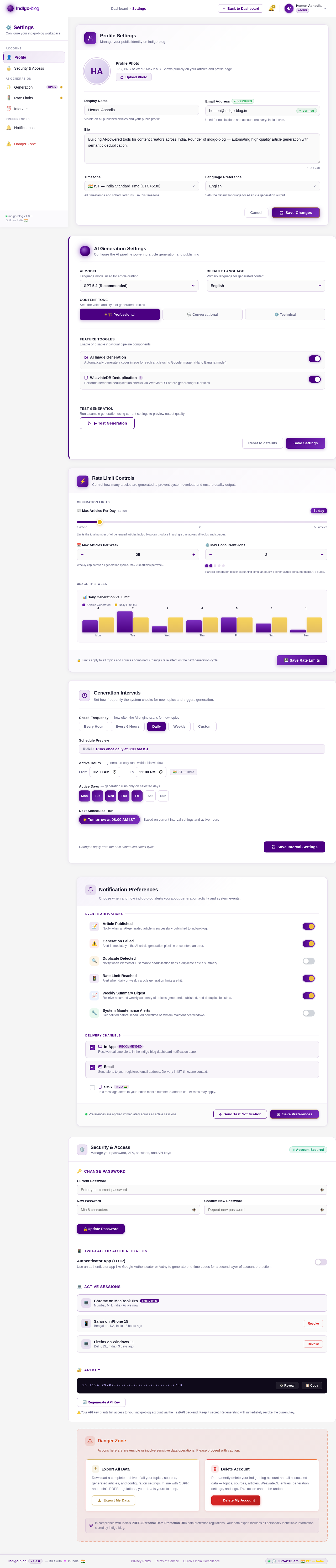
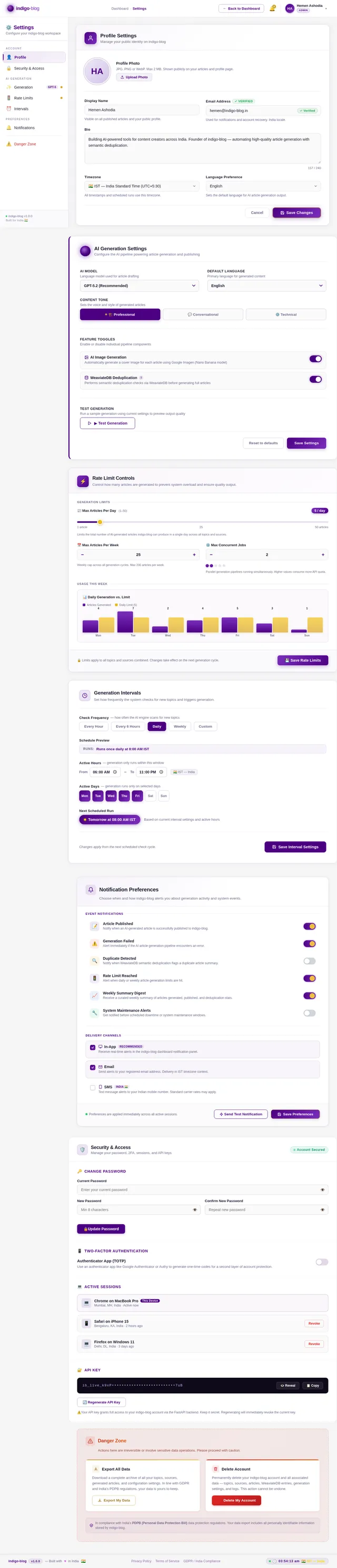
AI Generation Settings
Configure the AI pipeline powering article generation and publishing
Language model used for article drafting
Primary language for generated content
Sets the voice and style of generated articles
Enable or disable individual pipeline components
AI Image Generation
Automatically generate a cover image for each article using Google Imagen (Nano Banana model)
WeaviateDB DeduplicationBefore writing a full article, indigo-blog generates a summary and performs a semantic similarity search in WeaviateDB. If a match above 92% cosine similarity is found, the article is skipped to prevent duplicate content.
Performs semantic deduplication checks via WeaviateDB before generating full articles
Run a sample generation using current settings to preview output quality
Rate Limit Controls
Control how many articles are generated to prevent system overload and ensure quality output.
Generation Intervals
Set how frequently the system checks for new topics and triggers generation.
Notification Preferences
Choose when and how indigo-blog alerts you about generation activity and system events.
Security & Access
Manage your password, 2FA, sessions, and API keys
Authenticator App (TOTP)
Use an authenticator app like Google Authenticator or Authy to generate one-time codes for a second layer of account protection.
Chrome on MacBook ProThis Device
Safari on iPhone 15
Firefox on Windows 11
⚠️Your API key grants full access to your indigo-blog account via the FastAPI backend. Keep it secret. Regenerating will immediately revoke the current key.
Danger Zone
Actions here are irreversible or involve sensitive data operations. Please proceed with caution.
Download a complete archive of all your topics, sources, generated articles, and configuration settings. In line with GDPR and India’s PDPB regulations, your data is yours to keep.
Permanently delete your indigo-blog account and all associated data — topics, sources, articles, WeaviateDB entries, generation settings, and logs. This action cannot be undone.
No comments yet. Be the first!