grand-todo
 Diya Trivedi
start a projetc to build a simple single page design of todo

Comments (0)
Sign in to leave a comment
System Requirements
System Requirements Document for grand-todo
1. Introduction
grand-todo is a simple single-page todo design: one quiet sheet of paper where a single person writes down tasks, sees them listed, crosses them off, and removes the ones no longer needed. The product intent is deliberately narrow — a single page that owns adding, viewing, completing, and deleting todo items, with no navigation, no accounts, and no surrounding application shell.
The audience is one self-organising individual (the Todo User) who wants the list to feel lighter after using it. The design register is calm and private rather than productivity-hyped: the page gives air, not adrenaline, and the act of crossing things out is treated as the real content.
2. System Overview
grand-todo is delivered as a single custom page, Todo, which is the anonymous public entry surface and the only destination in the product. The page owns the complete todo lifecycle for the Todo User:
- adding a new todo item through a written-line add field,
- viewing the current list of todo items,
- marking an item complete (the item stays in place, struck through),
- deleting an item.
There is no authentication, no account, no cross-device sync, and no second page. The Todo User is the only active human actor; there are no other personas, no administrative roles, and no differentiated permissions over shared state. All work happens on the one page, in the browser, for the one person using it.
Removed from scope
- Multi-page navigation or application shell (also: sidebar, menu, routes)
- User accounts, sign-in, and authentication (also: login, sign-up, sessions)
- Cross-device sync and server-side task storage (also: cloud sync, remote persistence)
- Task categories, projects, tags, priorities, and due dates
- Editing an existing todo item's text
- Gamification such as streaks, progress rings, and celebratory animation
2a. Product Interpretation and Delivery Boundary
The product is a single-page, first-party, browser-delivered todo design. The Todo page is publicly reachable with no identity step: the Todo User opens the page and immediately sees the wordmark, the add field, and their list. Because the accepted scope contains no account, no provider-owned work, and no external destination, there is no anonymous-to-protected access boundary to reconcile — the entire product lives inside one anonymous page.
Task persistence is local to the browser: the list is saved automatically on every change and rehydrated on load, so the Todo User's items remain after a page reload or reopening the application. There is no authentication and no cross-device sync; the list belongs to the browser it was written in.
Everything described in this document is current. No future-horizon capabilities are accepted, and none are planned here.
2c. Page Content and Component Coverage
Todo
The single page of the product. A centred column of max-width 560px on an unbleached paper ground, with vast top space; the wordmark sits at roughly 22vh rather than at the very top. Order down the column: wordmark line, one-line quiet subtitle, hairline rule, add field with a small square submit, hairline, the list, and a whisper-thin footer line with the remaining count.
Information and state
- The current list of todo items, each with its text and a complete/incomplete state.
- The remaining count of incomplete items.
- Completed items remain in the list, in their original position, struck through — the page records rather than erases.
- The list is hydrated from local web storage on load and written back on every change.
Primary actions
- Type a new todo item into the add field and submit it with the small square submit control.
- Toggle an item's complete state by activating its 20px square checkbox.
- Delete an item.
Supporting elements
- Wordmark line: the single display gesture, set in light weight at
clamp(44px, 11vw, 96px), left-aligned to the column. - A single 8px ink-drawn circle sitting to the left of the subtitle like a hanko seal.
- One-line quiet subtitle beneath the wordmark.
- Hairline rules (
#DED8CC) separating wordmark block, add field, and list. - Footer whisper line: 12px uppercase, 0.12em tracking, reading the remaining count, aligned to the right edge of the column.
Domain entities
- Todo item: text, complete flag, position in the list.
Component responsibilities
- Add field: a full-width 1px ink underline with placeholder text and a 20px square submit at the right end; no box, border-radius, or shadow. Accepts the item text and appends a new incomplete item to the list.
- List: plain rectangle divided by 1px hairlines, rows with 20px vertical padding, no card container, so the list reads as ruled paper.
- Checkbox: 20px ink-outlined square with 2px radius that fills with clay
#8C5B3Fon completion while a 1.5px clay line draws left-to-right through the item text. - Delete control: removes the item from the list.
- Remaining count: derived from the list, rendered in the footer whisper line.
States
- Loading: the page reads local storage and hydrates the list before presenting items; no spinner or skeleton is required by the direction.
- Empty: with no items, the page shows the wordmark, subtitle, add field, and an empty ruled area — the blank space is the content, and the footer count reads zero.
- Success: a submitted item appears at the end of the list with a 400ms opacity fade; a completed item fills its checkbox in clay and draws the strike-through; a deleted item fades out over 200ms.
- Error and recovery: if local storage is unavailable or a write fails, the list continues to work in the current session and the failure does not block adding, completing, or deleting; the Todo User can continue and the next successful write restores persistence.
- Reduced motion: with
prefers-reduced-motion, the add fade, strike-through draw, and removal fade all become instant state changes.
3. Functional Requirements
FR-1 — Single-page todo design (explicit) As a Todo User I should get the whole todo experience on one simple single page, so that I never navigate away from my list.
- Trigger: opening the product.
- Observable result: the Todo page renders with wordmark, subtitle, add field, list, and remaining count; there are no other destinations.
- Access: anonymous public entry; no identity step.
- Failure/recovery: not applicable — the page is the only surface.
- Continuation: the Todo User works entirely within this page.
FR-2 — Add a new todo item (explicit) As a Todo User I should add new todo items, so that what I need to do is written down.
- Trigger: the Todo User types text into the add field and activates the small square submit.
- Observable result: a new incomplete item is appended to the list and appears with a 400ms opacity fade (instant under reduced motion); the remaining count increases by one; the add field clears for the next entry.
- Access: anonymous public entry.
- Failure/recovery: an empty or whitespace-only submission adds nothing and leaves the list unchanged; the Todo User can retype and submit again.
- Continuation: the Todo User can add further items or move on to viewing, completing, or deleting.
FR-3 — View the list of todo items (explicit) As a Todo User I should view my list of todo items, so that I can see what is done and what remains.
- Trigger: opening the page or any change to the list.
- Observable result: every item is shown in order with its complete/incomplete state; completed items remain in place, struck through; the footer whisper line shows the remaining count of incomplete items.
- Access: anonymous public entry.
- Failure/recovery: if stored items cannot be read, the page presents an empty list rather than failing, and the Todo User can continue adding items.
- Continuation: the Todo User acts on any item in the list.
FR-4 — Mark a todo item complete (explicit) As a Todo User I should mark todo items as complete, so that the page records what I have finished.
- Trigger: the Todo User activates an item's 20px square checkbox.
- Observable result: the checkbox fills with clay
#8C5B3Fand a 1.5px clay line draws left-to-right through the item text over 300ms (instant under reduced motion); the item stays in its place; the remaining count decreases by one. - Access: anonymous public entry.
- Failure/recovery: activating the checkbox again returns the item to incomplete, clearing the fill and strike-through and restoring the count; the Todo User can toggle freely.
- Continuation: the Todo User continues with other items or leaves the page.
FR-5 — Delete a todo item (explicit) As a Todo User I should delete todo items, so that the list only holds what still matters.
- Trigger: the Todo User activates an item's delete control.
- Observable result: the item fades out over 200ms (instant under reduced motion) and is removed from the list; the remaining count updates if the item was incomplete.
- Access: anonymous public entry.
- Failure/recovery: if the removal cannot be persisted, the item is still removed from the current view and the Todo User can continue; the next successful write restores persistence.
- Continuation: the Todo User continues with the remaining list.
FR-6 — Local task persistence (required_inference) As a Todo User I should have my tasks saved automatically and remain available after a page reload and after reopening the application, so that my list survives between visits.
- Trigger: any change to the task list (add, complete toggle, delete), and page load.
- Observable result: on every list change the current list is written to local web storage; on load the list is read from local storage and hydrates the page state.
- Access: anonymous public entry; no authentication and no cross-device sync.
- Failure/recovery: if storage is unavailable or a write fails, the page continues to operate in the current session without blocking any todo action.
- Continuation: the Todo User returns later and finds the list as last written in that browser.
4. User Personas
Todo User
Product context. One self-organising person using a single quiet page to order their day. They arrive with a handful of things on their mind and want them written down, seen, crossed off, and cleared away — nothing more. The emotional register is calm and private: not productivity hype, not a dashboard, but a sheet of paper where a day gets ordered.
Primary goal. A clean, up-to-date single-page list of tasks reflecting what is done and what remains, with the list feeling lighter after use.
Distinct accepted responsibilities.
- Writing new todo items into the add field and submitting them.
- Reading the list to see what is done and what remains, including the remaining count.
- Deciding an item is finished and marking it complete, leaving it in place as a record.
- Deciding an item no longer matters and deleting it.
- Returning later to the same list, which persists in their browser.
Relevant inputs and decisions. The text of each task; the judgement of whether a task is done (toggle complete) or should be removed (delete); whether to add another item now or stop.
Interactions with other accepted participants. None. The Todo User is the only active human actor; there is no counterparty, recipient, or administrator. The only other actor is the browser's local storage, which holds the list between visits.
Observable success. The list on the page matches what the Todo User intends: new items appear, completed items are struck through in clay and stay in place, deleted items are gone, the remaining count is accurate, and the same list is there after a reload.
5. Core User Flows
Flow 1 — First visit and writing the first items
- The Todo User opens grand-todo. The Todo page loads anonymously — no sign-in, no gate.
- The page reads local web storage and hydrates the list. On a first visit there is nothing stored, so the page shows the wordmark, the one-line subtitle, the hairline rule, the add field, and an empty ruled area; the footer whisper line reads a remaining count of zero.
- The Todo User clicks the add field, which reads as a written line with a 1px ink underline and placeholder text, and types a task.
- The Todo User activates the small 20px square submit at the right end of the line.
- The new item is appended to the list and fades in over 400ms; the add field clears; the remaining count increases by one; the list is written to local storage.
- The Todo User repeats steps 3–5 for further tasks. If they submit an empty line, nothing is added and the list is unchanged.
- Continuation: the Todo User leaves the page. On return, the page hydrates the same list from local storage.
Flow 2 — Reviewing the list
- The Todo User opens the Todo page, which hydrates the stored list.
- Each item is shown in order on ruled rows separated by hairlines, with its 20px square checkbox; completed items are struck through in clay and remain in their original positions.
- The footer whisper line, aligned to the right edge of the column, shows the remaining count of incomplete items.
- Continuation: the Todo User picks an item to complete or delete, or adds a new one.
Flow 3 — Marking an item complete
- On the Todo page, the Todo User locates an incomplete item in the list.
- The Todo User activates its 20px ink-outlined checkbox.
- The checkbox fills with clay
#8C5B3Fand a 1.5px clay line draws left-to-right through the item text over 300ms; the item stays in place; the remaining count decreases by one; the change is written to local storage. - Recovery: if the Todo User changes their mind, activating the checkbox again returns the item to incomplete, clearing the fill and strike-through and restoring the count.
- Continuation: the Todo User moves to another item or leaves the page; the completed state persists on return.
Flow 4 — Deleting an item
- On the Todo page, the Todo User identifies an item they no longer need.
- The Todo User activates that item's delete control.
- The item fades out over 200ms and is removed from the list; the remaining count updates if the item was incomplete; the change is written to local storage.
- Recovery: if the write to local storage fails, the item is still removed from the current view and the Todo User can continue; the next successful write restores persistence.
- Continuation: the Todo User continues with the remaining list or leaves the page.
Flow 5 — Returning to the list
- The Todo User reopens grand-todo or reloads the page.
- The Todo page reads local web storage and hydrates the list exactly as last written in that browser — completed items still struck through, deleted items absent.
- Recovery: if local storage cannot be read, the page presents an empty list rather than failing, and the Todo User can begin adding items again.
- Continuation: the Todo User resumes adding, completing, and deleting.
6. Visuals Colors and Theme
The visual direction is Emptiness as content, after Kenya Hara: a quiet sheet of unbleached paper where the blank space and the remaining space are the real content.
Palette (light mode)
- Background:
#F4F1EA— unbleached paper ground, filling roughly 80% of the page. - Surface:
#FBF9F4— barely-lifted paper surface for the list. - Text:
#2B2825— charcoal ink for all type and the single add control. - Primary:
#2B2825— charcoal ink. - Accent:
#8C5B3F— warm clay, appearing only three times on the whole page: the active checkbox fill, the strikethrough draw-through on completed items, and the thin rule under the wordmark. - Muted:
#8F887C— counts and secondary labels. - Hairline rule:
#DED8CC. - No pure white, no pure black, no second accent.
Typography
- Headings: Zen Kaku Gothic New — Light 300 at very large size with wide 0.04em tracking and sentence case for the single wordmark line.
- Body: Zen Kaku Gothic New — 400/500 at small sizes, with 0.12em uppercase tracking for micro-labels (TODAY, REMAINING).
- Scale: 1.25 modular on a small body — 12 / 14 / 16 / 20 / 28 / 44, with the wordmark as the one display gesture at
clamp(44px, 11vw, 96px), weight 300, tracking 0.02em. - The contrast is scale and air, never weight or colour.
Shape language
- Square and near-square only: the list is a plain rectangle divided by 1px hairlines; checkboxes are 20px squares with a 1px ink border and 2px radius; the add field is an underlined line rather than a box; buttons are rectangular with 2px radius.
- No pills, no shadows, no rounded cards. Generous 96–160px vertical margins do the shaping work.
Layout
- A single centred column of max-width 560px on the paper ground, with vast top space — the wordmark sits at roughly 22vh, not at the very top.
- Order: wordmark line, one-line quiet subtitle, hairline rule, add field with a small square submit, hairline, the list, and a whisper-thin footer line with the remaining count.
- Completed items stay in place, struck through in clay, rather than disappearing — the page records rather than erases.
- At 375px the column keeps 24px side margins and everything stacks; at 768px the column is 520px; at 1280px it is 560px with the extra space given to top and bottom air.
Imagery and texture
- No photography and no illustration. The only visual object is a single small ink-drawn circle, 8px, sitting to the left of the subtitle like a hanko seal.
- Texture is limited to a faint 2% paper grain overlay on the ground. The list itself is the imagery.
Avoid
- Rounded pill buttons, floating action buttons, or card containers with shadows.
- Blue, indigo, or violet anywhere, including focus rings and link colours.
- Gradient blobs, glass panels, or any frosted surface.
- Streak counters, progress rings, or gamified celebratory animation.
- Pure white
#FFFFFFor pure black#000000grounds and type. - Bold 700+ headings or heavy weight contrast as the hierarchy device.
- Illustrated characters, emoji checkmarks, or icon sets.
- Centred headline plus subtext plus coloured CTA hero composition.
Readability at every viewport. Headlines, wordmarks, labels, numbers, and controls stay entirely inside the viewport and their container at 375px, 768px, and 1280px, wrapping or scaling (for example font-size: clamp(...) with its mobile size) to fit, with no other element covering any part of them. Decoration and texture may be cropped or bled as the direction asks, as long as they cover no readable text or control.
7. Signature Design Concept
The first screen is a sheet of unbleached paper with almost nothing on it. The word Todos is set in light 96px Zen Kaku Gothic New at roughly 22vh from the top, left-aligned to a 560px column rather than centred, with a single 8px ink circle above it and a one-line quiet subtitle below. Under a hairline rule the add field reads as a written line — a full-width 1px ink underline with placeholder text and a small 20px square submit at the right end, with no box, border-radius, or shadow. Beneath it the first two or three list items sit in 16px charcoal on ruled rows separated only by 1px #DED8CC hairlines.
The dominant element is empty space, then the oversized light wordmark. The only colour on the screen is the clay accent on the first completed item, if any. It could not be mistaken for a generic app hero because there is no card, no gradient, no button, and no centred stack.
Signature moves carried through the page:
- The oversized light-weight wordmark at
clamp(44px, 11vw, 96px)floating in the upper third of the paper ground, left-aligned to the list column, with the top 22vh left completely empty. - The add field as a written line.
- Checkboxes as 20px ink-outlined squares that fill with clay
#8C5B3Fon completion while a 1.5px clay line draws left-to-right through the item text over 300ms, the item staying in place. - List rows separated only by 1px
#DED8CChairlines with 20px vertical padding and no card container, so the list reads as ruled paper. - A footer whisper line in 12px uppercase 0.12em tracking reading the remaining count, aligned to the right edge of the column as the only numeric element on the page.
8. Interaction Model & Motion Direction
Interaction Model: Static (direction) Motion Tempo: still Hero Dimensionality: flat
Landing Hero Motion Brief
- Focal subject: the oversized light wordmark Todos floating in the upper third of the unbleached paper ground, with the 8px ink circle and one-line subtitle above and below it, and the written-line add field beneath a hairline rule.
- Input → transformation → outcome thesis: the Todo User writes a task into the written line and submits it → the new item appears at the end of the ruled list with a 400ms opacity fade → the page gains one more line of content while the remaining space stays the dominant element. Completing an item fills its 20px square in clay and draws a 1.5px clay line left-to-right through the text over 300ms, leaving the item in place as a record; deleting an item fades it out over 200ms.
- Motion vocabulary: almost none, per Hara — a 400ms opacity fade on add, a 300ms clay line drawing left-to-right through a completed item's text, and a 200ms fade on removal. No bounce, no slide, no hover lift.
- Composed first frame: paper ground
#F4F1EA; the 8px ink circle and the word Todos at roughly 22vh, left-aligned to the 560px column; the quiet subtitle; a hairline rule; the written-line add field with its small square submit; a second hairline; two or three 16px charcoal list items on ruled rows; the footer whisper line at the right edge reading the remaining count. The top 22vh is empty. - Reduced-motion state: with
prefers-reduced-motion, the add fade, the strike-through draw, and the removal fade all become instant state changes; the composed first frame is unchanged.
9. Non-Functional Requirements
- Single-page constraint (explicit): the design must be a single page. There is exactly one destination, the Todo page; no navigation, routes, or additional screens.
- Simplicity (explicit): the product is a simple single-page todo design; no adjacent capabilities beyond adding, viewing, completing, and deleting items and their local persistence.
- Local persistence boundary (required_inference): tasks are saved automatically to local web storage on every list change and hydrated on load, so they remain available after page reload and application reopening. No authentication and no cross-device sync.
- Accessibility of motion (explicit, from the creative direction): all three motion effects become instant state changes under
prefers-reduced-motion. - Readability across viewports (explicit, from the creative direction): readable text and controls stay whole and inside the viewport and their container at 375px, 768px, and 1280px.
- Visual prohibitions (explicit, from the creative direction): no pure white or pure black, no blue/indigo/violet, no shadows, pills, gradients, glass, or gamified animation; the generic indigo/blue-on-white SaaS template is forbidden for this project.
10. Tech Stack
- Frontend: React, delivering the single Todo page as a client-rendered application.
- Storage: browser local web storage for task persistence (no server-side task storage, no authentication, no cross-device sync).
- Backend: none required for the accepted scope; all accepted behavior is client-side.
- Deployment: static hosting of the built frontend; no container orchestration is required for the current product.
11. Assumptions and Constraints
- A-1 (assumption): The Todo User is the only active human actor; there are no other personas, administrators, or shared-state roles.
- A-2 (assumption): The list belongs to the browser it was written in; persistence is local and per-browser, with no account and no sync.
- A-3 (assumption): The wordmark text is Todos, as given in the creative direction's hero direction.
- A-4 (assumption): The add field clears after a successful submission; an empty or whitespace-only submission adds nothing.
- A-5 (assumption): The delete control's exact visual form is unspecified beyond the direction's prohibition on icon sets and shadows; it is a small rectangular control within the item row, consistent with the square, near-square shape language.
- C-1 (constraint): The design must be a single page — exactly one destination.
- C-2 (constraint): No authentication, no accounts, no cross-device sync.
- C-3 (constraint): The palette, typography, shape language, layout, motion, and prohibitions of the creative direction are binding.
12. Glossary
- Todo item — a single task in the list, with text, a complete flag, and a position.
- Todo page — the single, anonymous, publicly reachable page that is the entire product.
- Todo User — the single active human persona who adds, views, completes, and deletes todo items.
- Remaining count — the number of incomplete todo items, shown in the footer whisper line.
- Written line — the add field rendered as a full-width 1px ink underline with placeholder text and a small square submit, with no box or shadow.
- Clay accent — the warm
#8C5B3Fcolour used only for the active checkbox fill, the strikethrough draw-through, and the rule under the wordmark. - Local web storage — the browser storage where the task list is saved automatically and from which it is hydrated on load.
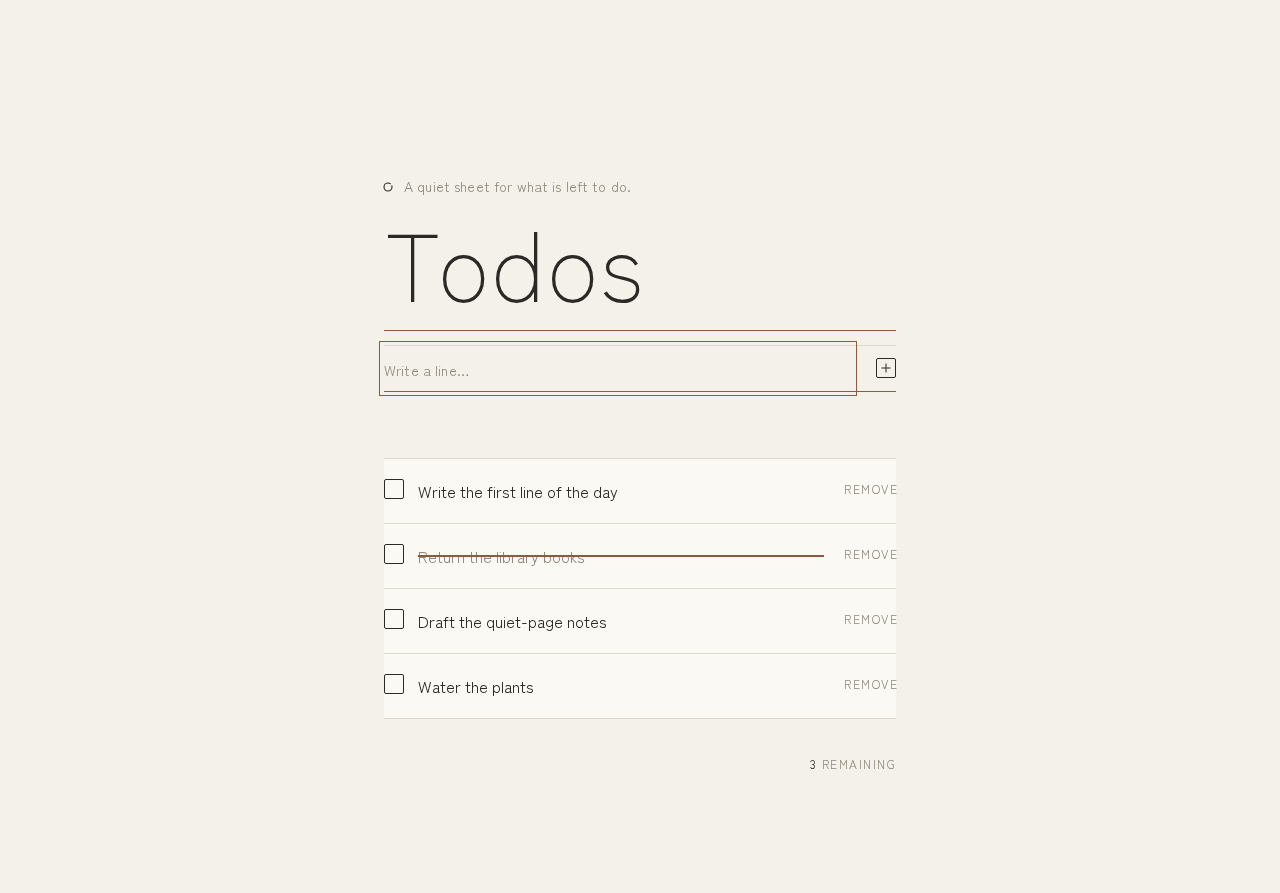
A quiet sheet for what is left to do.
Todos — grand-todo
- Write the first line of the day
- Return the library books
- Draft the quiet-page notes
- Water the plants
3 remaining
A quiet sheet for what is left to do.
Todos — grand-todo
- Write the first line of the day
- Return the library books
- Draft the quiet-page notes
- Water the plants
3 remaining
No comments yet. Be the first!