agile-translation
 shreyas chaudhary
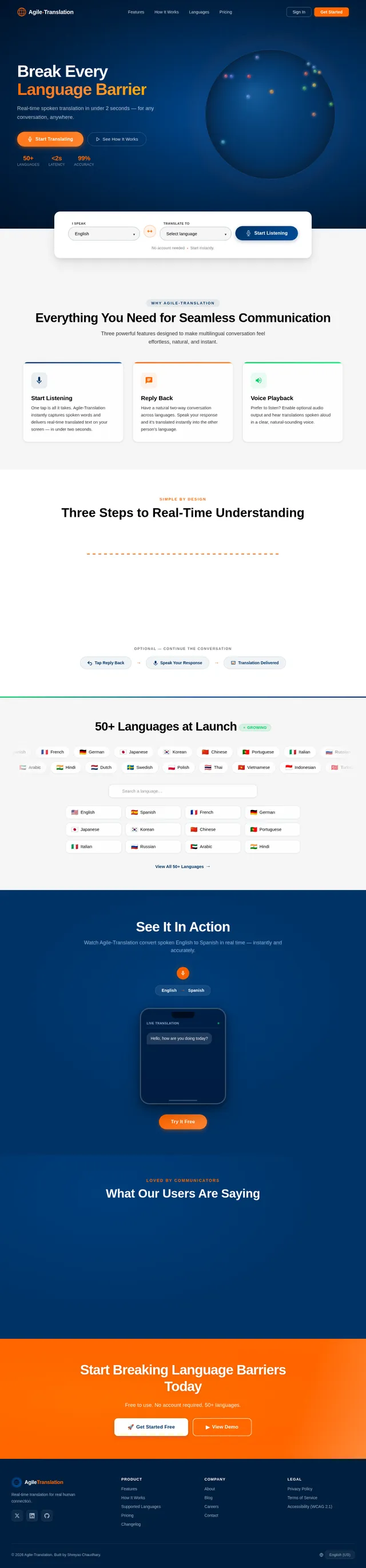
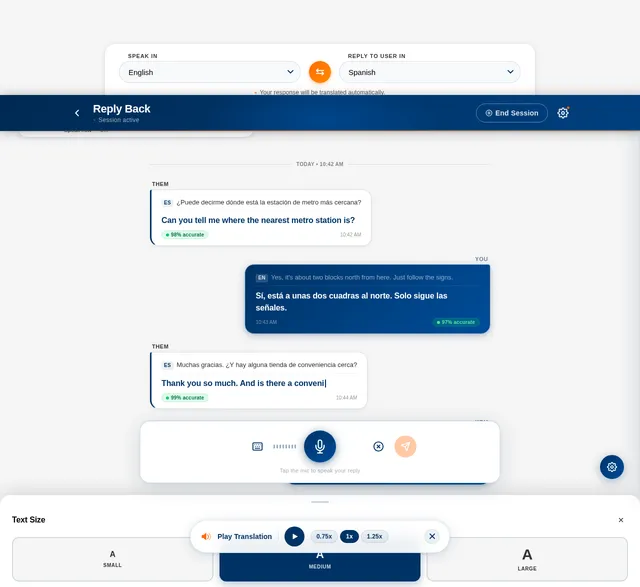
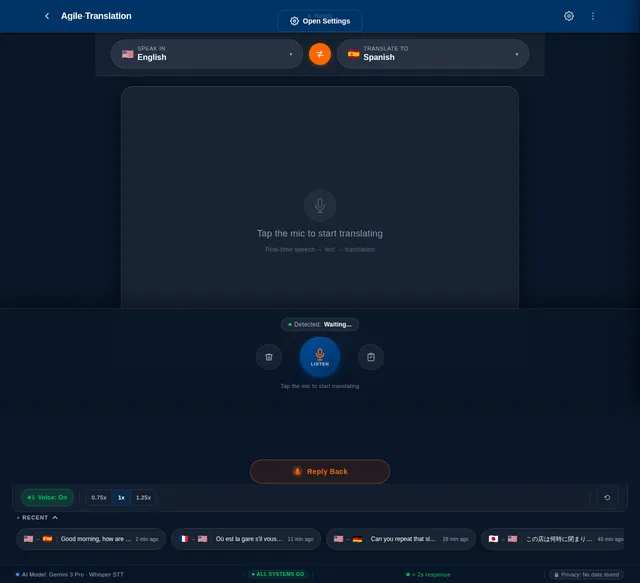
**convertUp** is a real-time language translation app that helps two people who speak different languages communicate easily. The user taps **Start Listening**, and the app listens through the microphone, converts speech to text using a real-time speech-to-text model (such as **Whisper**), automatically detects the spoken language, and instantly translates it into the user’s chosen language using a multilingual translation model. The translated text appears live on the screen as the person speaks, similar to live captions but translated. The app features a **sleek, modern, user-friendly interface that is simple yet visually polished**, with large readable text and minimal controls for quick conversations. It also includes a **Reply Back** feature: after seeing a translation, the user can tap **Reply Back**, choose **“Speak In”** (the language they will speak) and **“Reply To User In”** (the language their reply should be translated into), then speak their response. The app transcribes their speech, translates it into the selected language, and displays the translated reply on the screen (optionally with voice playback), enabling smooth back-and-forth conversations between people speaking different languages.
Comments (0)
Sign in to leave a comment
Project Tasks21
Implement Translation API
As a user, I want to use the backend API for translation so that transcribed text is instantly translated into my chosen language. Implement a FastAPI endpoint using Gemini 3 Pro via Litellm routing and Langchain orchestration. Accept source text, source language, and target language. Return translated text with confidence score. Support all 50 launch languages. Optimize for < 2s end-to-end latency.
Implement User Settings API
As a user, I want to use the backend API for saving my settings so that my language preferences, accessibility options, and notification preferences persist across sessions. Implement FastAPI endpoints: GET /users/me/settings and PATCH /users/me/settings covering default language pair, voice playback, auto-detect, typewriter animation, font size, high contrast, reduce motion, and notification preferences. Store in MySQL.
Implement Model Management API
As an admin, I want to use the backend API for model management so that I can view current AI model versions and trigger controlled updates. Implement FastAPI endpoints: GET /models (list current models with version, status, last_updated), POST /models/{id}/update (trigger update job), GET /models/{id}/history (update log), POST /models/{id}/rollback. Integrate with Langchain model registry.
Implement Languages Catalogue API
As a user, I want to use the backend API for the supported languages list so that I can browse and search all 50+ available languages in the app. Implement GET /languages endpoint returning language code, name, native name, flag emoji, and availability status. Support search query param. Seed with all 50 launch languages in MySQL.
Implement Admin Analytics API
As an admin, I want to use the backend API for analytics so that I can retrieve usage statistics, translation accuracy metrics, latency percentiles, and concurrent user counts. Implement FastAPI endpoints returning aggregated metrics from MySQL: total translations by period, accuracy distribution, p50/p95 latency, active user counts, top language pairs, and error rates. Include date range filtering.
Implement Speech-to-Text API
As a user, I want to use the backend API for real-time speech-to-text conversion so that my spoken input is transcribed accurately and quickly. Implement a FastAPI WebSocket endpoint that accepts audio stream chunks, pipes them to the Whisper model via Langchain, and returns incremental transcription results in real-time. Support language auto-detection. Target latency < 2 seconds per utterance.
Implement Theme & Design System
As a frontend developer, I want to implement the global theme, color tokens, and typography system so that all pages reflect the Agile-Translation design spec. Apply primary (#003366), secondary (#FF6600), background (#F5F5F5), text (#000000/#333333), and accent (#00CC66) tokens as CSS custom properties. Set up Inter/sans-serif font family, global resets, and shared component primitives (buttons, inputs, cards). This task is independent and must be completed before all other frontend page tasks.
Build Settings Page
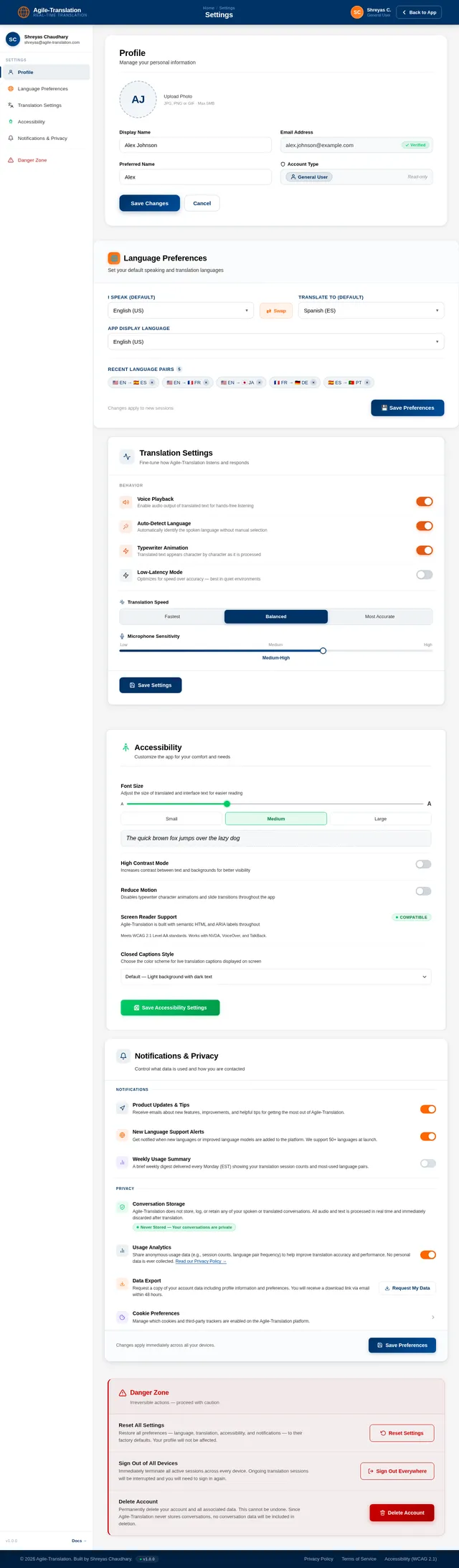
As a user, I want to use the Settings page so that I can adjust my language preferences, translation settings, font size, notifications, and privacy options. Implement the Settings page based on the existing JSX design (v2) including: TopBar with breadcrumb and Back to App button; SettingsNav sidebar with active category highlighting; ProfileSection with avatar upload and form; LanguagePreferences with default language dropdowns and recent pairs; TranslationSettings toggle rows (Voice Playback, Auto-Detect, Typewriter Animation, Low-Latency Mode) and mic sensitivity slider; AccessibilitySettings with font size slider and high contrast/reduce motion toggles; NotificationPrivacy toggles and data export; DangerZone with confirmation modals; Footer. Flows from: Reply page and Translator page.
Build Translator Page
As a user, I want to use the Translator page so that I can tap Start Listening and see live translated text appear on screen as someone speaks. Implement the Translator page based on the existing JSX design (v2) including: language pair selector header, large mic Start Listening button with pulsing animation, live caption area with typewriter animation for translated text, voice playback toggle, and a Reply Back CTA that navigates to the Reply page. Flows from: Home page CTA or globe interaction. Flows to: Reply page.
Build Home Page
As a user, I want to use a visually stunning Home page so that I can explore supported languages via the 3D interactive globe and initiate a translation session. Implement the Home page based on the existing JSX design (v2) including: NavBar with logo, nav links, and CTA buttons; HeroGlobe section with WebGL/Three.js rotating globe where hovering shows country/language tooltip and clicking initiates a session; LanguageQuickSelect strip with 'I Speak' and 'Translate To' dropdowns and mic CTA; FeaturesOverview card grid; HowItWorks stepper; SupportedLanguages marquee with search and chips; LiveDemoTeaser; Testimonials; CTABanner; Footer. Flows to: Translator page on CTA click.
Build Login Page
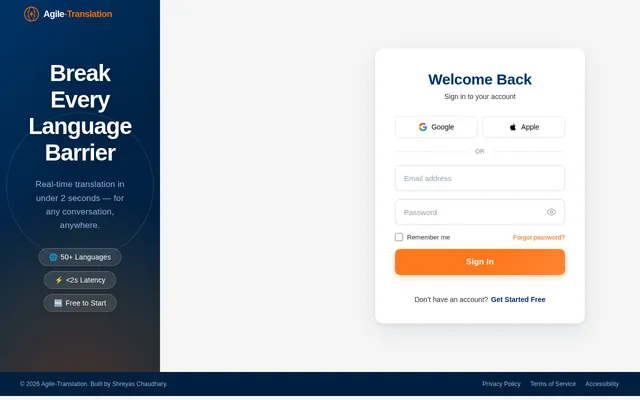
As a user, I want to use a Login page so that I can sign in to my Agile-Translation account securely. Implement the Login page based on the existing JSX design (v2) including: branded split-layout with deep blue left panel featuring globe motif and right panel with email/password form, 'Sign In' CTA, 'Forgot Password' link, social sign-in options, and link to Sign Up. On success, admin users flow to Dashboard and general users flow to the Translator page.
Integrate STT + Translation Frontend
As a user, I want the Translator page to stream my speech to the backend and display translated text live so that I can have real-time translated conversations. Integrate the Translator page with the Speech-to-Text WebSocket API and Translation REST API. Handle microphone permissions, audio capture, WebSocket streaming, and render incoming transcription + translation tokens using the typewriter animation. Wire voice playback using Web Speech API or audio buffer playback.
Build Reply Page
As a user, I want to use the Reply page so that I can choose my language, speak a response, and see my reply translated into the recipient's language. Implement the Reply page based on the existing JSX design (v2) including: ReplyHeader with back button, session active indicator, and End Session button; LanguageSelector with 'Speak In' and 'Reply To User In' dropdowns with swap button; StatusIndicator showing Listening/Translating/Ready states; ConversationPane with two-way chat bubbles and typewriter animation; VoicePlaybackControls pill; ReplyInputBar with mic button, waveform visualizer, and text mode toggle; FontSizeAccessibility chips; SettingsDrawer. Flows from: Translator page Reply Back button.
Build Dashboard Page
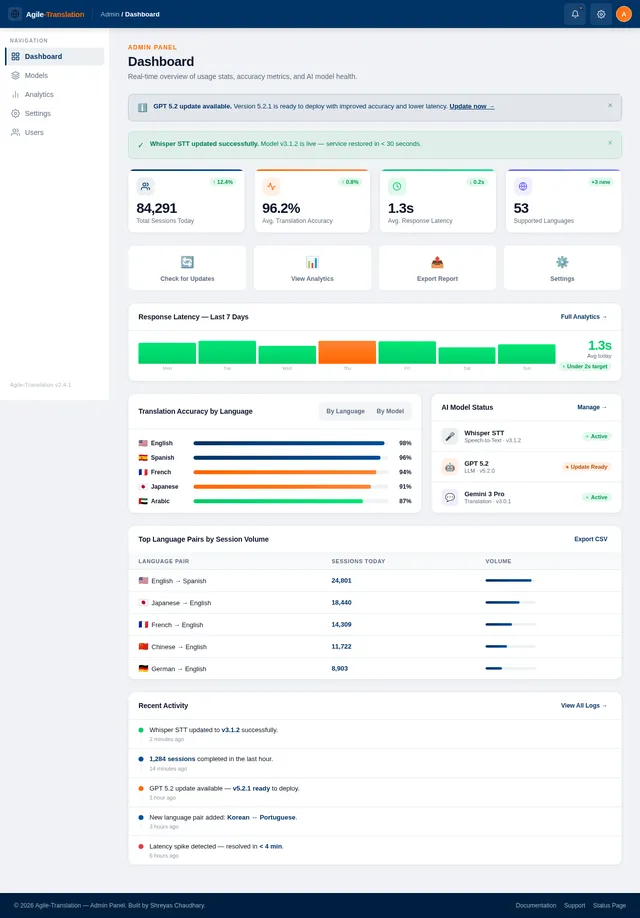
As an admin, I want to use the Dashboard page so that I can view usage statistics and translation accuracy metrics at a glance. Implement the Dashboard page based on the existing JSX design (v2) including: TopBar with admin user info; Sidebar navigation with links to Overview, Analytics, Models, Settings; StatsCards showing total translations, active users, average latency, and accuracy rate; UsageChart with time-series graph; RecentActivity feed; QuickActions panel. Flows from: Login page (admin). Flows to: Analytics page and Models page.
Integrate Settings Page API
As a user, I want the Settings page to load my saved preferences and persist any changes I make so that my customizations are remembered across sessions. Wire all Settings page sections to the User Settings API: pre-populate all form fields and toggles on load, debounced save on change, and show success toast on save. Handle profile avatar upload via multipart POST /users/me/avatar.
Integrate Reply Back Feature
As a user, I want the Reply page to capture my spoken response and display it translated so that I can have seamless back-and-forth conversations in different languages. Wire the Reply page to the STT WebSocket and Translation APIs. Handle 'Speak In' and 'Reply To User In' language selection, mic recording, real-time transcription display in ConversationPane, translation of the reply, and optional voice playback of the translated response.
Integrate Language Dropdowns API
As a user, I want all language selector dropdowns across the app to load from the live languages catalogue so that the language list is always up to date. Replace all hardcoded language arrays in Home LanguageQuickSelect, Translator language picker, Reply LanguageSelector, and Settings LanguagePreferences dropdowns with data fetched from GET /languages. Add search/filter support in each dropdown.
Build Models Page
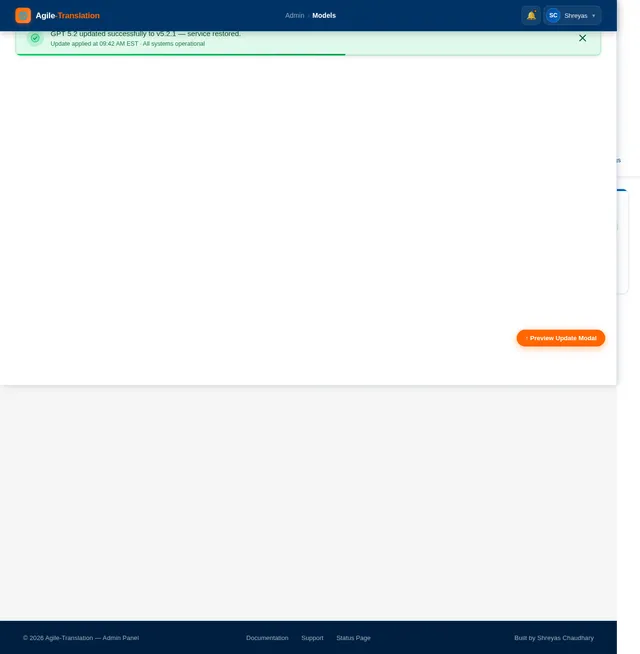
As an admin, I want to use the Models page so that I can view current AI language models in use, trigger updates, and confirm model deployments. Implement the Models page based on the existing JSX design (v2) including: TopBar; Sidebar; model cards for Whisper (STT), Gemini 3 Pro (translation), and GPT 5.2 (responses) showing version, status, and last updated; Update Model button per card that triggers a confirmation modal; update history log table; rollback option. Flows from: Dashboard page. Flows to: Confirm Update modal.
Build Analytics Page
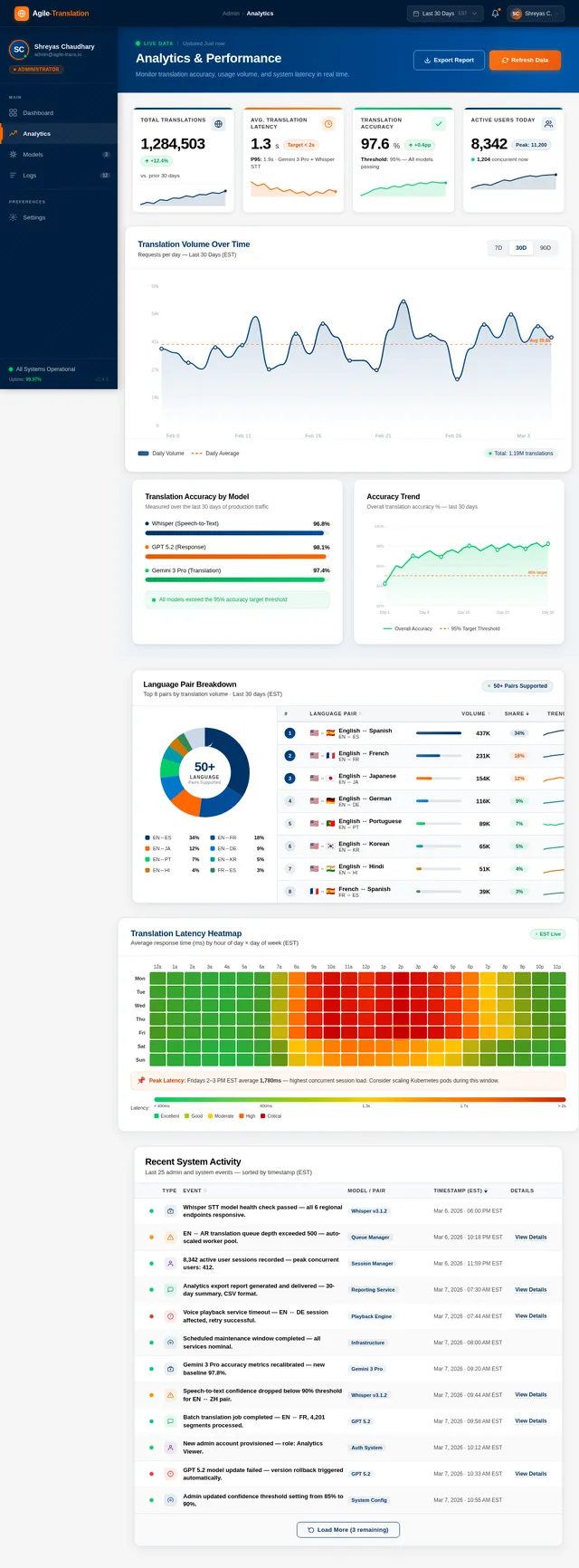
As an admin, I want to use the Analytics page so that I can monitor app performance, translation accuracy trends, and language usage distributions. Implement the Analytics page based on the existing JSX design (v2) including: TopBar; Sidebar; date range filter; performance KPI cards (latency p50/p95, error rate, uptime); accuracy trend line chart; top languages bar chart; concurrent user graph; export data button. Flows from: Dashboard page.
Integrate Models Page API
As an admin, I want the Models page to show real model data and allow me to trigger updates so that I can manage AI model deployments without code changes. Wire the Models page to the Model Management API: fetch and display model cards with live status, handle Update button to call POST /models/{id}/update with confirmation modal, display update history log, and handle rollback action.
Integrate Dashboard & Analytics APIs
As an admin, I want the Dashboard and Analytics pages to display live data from the backend so that I can monitor app health in real time. Connect the Dashboard StatsCards, UsageChart, and RecentActivity feed to the Admin Analytics API. Connect the Analytics page charts and KPI cards to the same API with date range filter support.
No comments yet. Be the first!