deep-medicine
 Aynishet Alemu
scan a lable and detail information from medicine box, bottle, paper, and fill the filled to register the medicine

Comments (0)
Sign in to leave a comment
System Requirements
System Requirements Document for deep-medicine
1. Introduction
deep-medicine is a personal medicine register built around a single, repetitive act: a person stands in a kitchen with a pill bottle, a blister box, or a folded paper insert in hand, and needs that medicine recorded without typing every line of the label. The product lets the Medicine registrant scan the label on the medicine box, bottle, or paper insert, extracts the detail information from that scan, fills the extracted details into a registration form, and lets the registrant complete and submit the form to register the medicine. Registered medicines persist in the registrant's own list so they can be revisited later.
The audience is ordinary people — not clinicians — who keep medicines at home and want certainty rather than cheer. The interface is treated as a precision instrument: dark, steady, unhurried, with one amber signal that tells the registrant the scan is locked and one teal signal that tells the registrant an extracted field is verified.
This document is the System Requirements Document for deep-medicine, written for the requester, Aynishet Alemu.
2. System Overview
2a. Product Interpretation and Delivery Boundary
deep-medicine is delivered as a first-party web application with a custom React interface, a shared FastAPI backend, and application-owned persistent storage in MariaDB. Label extraction is performed by the backend through the provisioned LiteLLM gateway, which in turn reaches the model provider; PostgreSQL exists only to support LiteLLM and holds no application-owned medicine data.
The product owns its identity. Because a registrant must privately own and resume a durable list of registered medicines, and because each registration must remain bound to the correct registrant, the application establishes identity on first use through self-service enrollment and verifies returning registrants before any protected medicine record is reachable. The Landing page, Sign Up, and Login are anonymously reachable; Scan Label, Register Medicine, and My Medicines require a verified session. No differentiated roles, permissions, or shared-state visibility controls exist: every registrant sees only their own medicines.
The current delivery horizon covers the complete scan → extract → fill → complete → register → revisit lifecycle. Nothing beyond that lifecycle is committed. There is no clinician workflow, no prescription handling, no pharmacy or inventory integration, no sharing of records between people, and no dosing advice or interaction checking.
Removed from scope
- None. No concept was removed by the authoritative requirement thread.
2c. Page Content and Component Coverage
Landing
- Information and state: Anonymous public entry. States the product's purpose — scan a medicine label from a box, bottle, or paper insert, extract its details, and register the medicine. Presents the three supported label sources (box, bottle, paper insert) as instrument readouts. No medicine data is shown; no session is required.
- Primary action: Begin enrollment (to Sign Up) or proceed to Login for a returning registrant.
- Supporting actions: Navigate to Sign Up; navigate to Login.
- Domain entities: None persisted. References the medicine-form categories box, bottle, and paper insert as descriptive content only.
- Component responsibilities: Full-bleed graphite stage; stacked uppercase headline with the second line in champagne; a ruled row of three instrument readouts (BOX · BOTTLE · PAPER INSERT) with tick marks; a large circular bezel holding a macro label photograph with a teal scan line sweeping on a 2.4s loop and four corner brackets; a champagne-filled bezel CTA aligned flush-left under the headline; fixed 72px left instrument rail on desktop collapsing to a bottom tab bar at 375px; page header closing with a full-width hairline rule and a right-aligned micro-label.
- States: Loading — static shell, no data fetch required. Empty — not applicable. Success — page renders fully. Error — not applicable. Recovery — if a signed-in registrant arrives here, offer a direct path to My Medicines.
Sign Up
- Information and state: Anonymous first-use enrollment for a registrant who independently begins using the product. Collects the minimum credentials needed to establish an application-owned identity. Shows inline validation state per field.
- Primary action: Create the registrant's account and establish a verified session.
- Supporting actions: Navigate to Login if already enrolled; return to Landing.
- Domain entities: Registrant identity (credentials and the account record that owns registered medicines).
- Component responsibilities: Ruled label/value form rows with Barlow Semi Condensed uppercase 12px labels; 2px-radius instrument-bezel inputs; champagne focus rings; a champagne-filled submit bezel; inline field-level error text in muted off-white; a link to Login.
- States: Loading — submit button shows a mechanical 180ms ease-out busy state and is disabled. Empty — pristine form with no errors. Success — session established and the registrant is taken to Scan Label. Error — duplicate identity or invalid input shown inline against the offending field with the form preserved. Recovery — the registrant corrects the field and resubmits, or switches to Login.
Login
- Information and state: Anonymous returning verification for a registrant who already owns registered medicines. Collects credentials and reports verification outcome.
- Primary action: Verify the registrant and open a session.
- Supporting actions: Navigate to Sign Up; return to Landing.
- Domain entities: Registrant identity.
- Component responsibilities: Ruled credential rows; 2px-radius inputs; champagne focus rings; champagne submit bezel; a single non-enumerating error message for failed verification; a link to Sign Up.
- States: Loading — submit disabled with a mechanical busy state. Empty — pristine form. Success — session established and the registrant is taken to My Medicines. Error — verification failure shown without revealing whether the identity exists. Recovery — retry, or switch to Sign Up.
Scan Label
- Information and state: Protected. Owns capturing a scan of a medicine label from a medicine box, bottle, or paper insert. Shows the live capture viewport, the selected label source, and the captured image once taken. The captured scan is held as state so it is available before extraction populates the registration form.
- Primary action: Capture the label image.
- Supporting actions: Choose or change the label source (box, bottle, paper insert); retake the capture; continue to Register Medicine with the captured scan.
- Domain entities: Label scan (captured image plus its source category), bound to the registrant.
- Component responsibilities: Camera reticle viewport framed by four chamfered corner brackets on graphite with faint topographic texture at 6%; a 64px champagne circular shutter with a 2px inner ring; a champagne scan line sweeping the frame every 2.4s while capturing; a ruled source selector for BOX · BOTTLE · PAPER INSERT; a captured-image preview with corner brackets and a zoom loupe; a continue control that carries the scan forward.
- States: Loading — viewport initializing. Empty — no capture yet, reticle idle. Success — capture locked, preview shown, continue enabled. Error — camera unavailable or capture failed, with a retake path and a clear message. Recovery — retake replaces the held scan; the registrant may also return to My Medicines and start again later.
Register Medicine
- Information and state: Protected. Owns extraction of detail information from the captured scan into the registration form, and review, completion, and submission to register the medicine. Two-pane split: the captured label image pinned at left with corner brackets and a zoom loupe; extracted fields as ruled rows at right, each marked with a teal check when extraction locked the value and a champagne "needs you" tick when it did not. A half-dial gauge at the top reports how many fields the scan locked.
- Primary action: Submit the completed form to register the medicine.
- Supporting actions: Edit any extracted field; correct a field flagged "needs you"; re-run extraction from the held scan; return to Scan Label to retake; abandon the draft.
- Domain entities: Medicine registration draft (extracted detail fields plus the source scan), and the registered medicine record created on submission.
- Component responsibilities: Half-dial extraction gauge filling from 0 to the locked-field count with an oversized tabular Saira Condensed numeral and a tracked-caps caption beneath; ruled label/value rows with Barlow Semi Condensed uppercase 12px muted labels, 17px off-white values, and a teal check or champagne tick at the right edge; 2px-radius inputs with champagne focus rings; a champagne-filled submit bezel; a full-width hairline rule closing the header with a right-aligned micro-label.
- States: Loading — extraction in progress, gauge at 0, rows in a pending state, submit disabled. Empty — no scan carried in, with a direct path back to Scan Label. Success — extraction complete, gauge drawn to the locked count, numbers counted up once over 600ms, submit enabled. Error — extraction failed or returned no usable fields, with a re-run path and manual entry still available. Recovery — the registrant edits or supplies missing values, re-runs extraction, or retakes the scan; a failed submission preserves all entered values.
My Medicines
- Information and state: Protected. Owns the durable list of medicines the registrant has registered and can revisit. Shows each registered medicine with its recorded detail information in ruled rows, and a register total.
- Primary action: Open a registered medicine to review its recorded details.
- Supporting actions: Start a new scan to register another medicine; return to a previously registered medicine.
- Domain entities: Registered medicine records owned by the registrant.
- Component responsibilities: Ruled data rows with no card shadows and no hover-lift; a circular or half-dial register total in tabular Saira Condensed; a right-aligned micro-label in the page header (for example, the registry entry count); a champagne-filled bezel action to start a new scan; the fixed instrument rail with a champagne 2px active tick.
- States: Loading — rows in a pending state. Empty — no medicines registered yet, with a direct path to Scan Label. Success — rows listed with the register total drawn on first reveal. Error — list could not be loaded, with a retry. Recovery — retry reloads the list; the registrant can still start a new scan.
3. Functional Requirements
FR-1 — Scan a medicine label As a Medicine registrant, I should scan a label from a medicine box, bottle, or paper insert so that I do not have to type the label myself. (explicit)
- Trigger/input: the registrant, signed in, opens Scan Label and captures the label with the camera reticle.
- Observable result: the captured scan is held and previewed with corner brackets and a zoom loupe, and a continue control becomes available.
- Access state: requires a verified session.
- Failure/recovery: if the camera is unavailable or the capture fails, a clear message and a retake path are shown; the registrant may retake or leave and return later.
- Continuation: the registrant continues to Register Medicine with the held scan.
FR-2 — Extract detail information from the scanned label As a Medicine registrant, I should have the detail information extracted from my scanned label so that the registration form is populated for me. (explicit)
- Trigger/input: a held label scan carried into Register Medicine.
- Observable result: extracted fields appear as ruled label/value rows, each marked teal when the extraction locked the value or champagne when it needs the registrant; the half-dial gauge reports the locked-field count.
- Access state: requires a verified session.
- Failure/recovery: if extraction fails or yields no usable fields, the registrant is told, may re-run extraction from the held scan, and may still enter values manually.
- Continuation: the registrant reviews and corrects the extracted fields.
FR-3 — Fill the extracted details into the registration form As a Medicine registrant, I should see the extracted details filled into the registration form so that I can confirm or correct them before registering. (explicit)
- Trigger/input: completed extraction on Register Medicine.
- Observable result: every extracted value is present in its editable field, with locked values marked teal and values needing attention marked champagne.
- Access state: requires a verified session.
- Failure/recovery: any field the registrant edits becomes registrant-supplied and is no longer marked as extraction-locked; a field left empty is visibly flagged before submission.
- Continuation: the registrant completes the form and submits.
FR-4 — Complete the form to register the medicine As a Medicine registrant, I should complete the form and submit it so that the medicine is registered. (explicit)
- Trigger/input: the registrant submits the completed registration form.
- Observable result: the medicine is saved as a registered medicine owned by that registrant and appears in My Medicines.
- Access state: requires a verified session.
- Failure/recovery: a failed submission preserves every entered value and reports the failure; the registrant retries without re-scanning.
- Continuation: the registrant lands on My Medicines with the new entry visible, or starts another scan.
FR-5 — Self-service enrollment As a Medicine registrant, I should be able to enroll myself on first use so that I can begin scanning and registering medicines. (required_inference)
- Trigger/input: an anonymous visitor chooses to begin from Landing and submits the Sign Up form.
- Observable result: an application-owned identity is created and a verified session is established.
- Access state: anonymous; Sign Up is reachable without a session.
- Failure/recovery: invalid or duplicate input is reported inline with the form preserved; the registrant corrects it or switches to Login.
- Continuation: the registrant is taken to Scan Label.
FR-6 — Returning verification As a returning Medicine registrant, I should verify myself before reaching my medicine records so that my registered medicines stay private to me. (required_inference)
- Trigger/input: a returning registrant submits credentials on Login.
- Observable result: a verified session is established and the registrant's own medicines are reachable.
- Access state: anonymous entry; protected destinations remain unavailable until verification succeeds.
- Failure/recovery: failed verification returns a single non-enumerating error and the registrant may retry or switch to Sign Up.
- Continuation: the registrant is taken to My Medicines.
FR-7 — Captured scan available before extraction As a Medicine registrant, I should have my captured label scan held before extraction runs so that extraction has a source and I can retake it if the capture is poor. (required_inference)
- Trigger/input: a successful capture on Scan Label.
- Observable result: the scan is held and previewed, and is the input to extraction on Register Medicine.
- Access state: requires a verified session.
- Failure/recovery: a retake replaces the held scan; leaving without continuing discards the unregistered capture.
- Continuation: the registrant continues to Register Medicine, or retakes.
FR-8 — Revisit registered medicines As a Medicine registrant, I should see my registered medicines in a durable list so that I can revisit what I have recorded. (required_inference)
- Trigger/input: the registrant opens My Medicines.
- Observable result: the registrant's own registered medicines are listed in ruled rows with their recorded details and a register total.
- Access state: requires a verified session; only the registrant's own records are shown.
- Failure/recovery: a load failure shows a retry; the registrant can still start a new scan.
- Continuation: the registrant opens an entry to review it, or starts a new scan.
4. User Personas
Medicine registrant
Product context. The Medicine registrant is an ordinary person at home with medicine boxes, bottles, and folded paper inserts on hand. They are not a clinician. The task is repetitive and slightly anxious: read a label correctly and get it recorded. They want certainty, not cheer, and they want to stop retyping small print.
Primary goal. Turn a physical medicine label into a saved, correct registration with as little manual typing as possible.
Distinct accepted responsibilities.
- Capturing a scan of a label from a medicine box, bottle, or paper insert on Scan Label, choosing the correct source category and retaking a poor capture.
- Reviewing the extracted detail information on Register Medicine, resolving every field marked "needs you," and correcting any value the extraction got wrong.
- Completing and submitting the registration form so the medicine is registered.
- Revisiting the durable list of their own registered medicines on My Medicines.
- Establishing their own access on first use through Sign Up and verifying on return through Login, because their medicine records are private to them.
Relevant inputs and decisions. Which label source they are scanning (box, bottle, or paper insert); whether a capture is legible enough to keep or must be retaken; whether each extracted value is correct; whether the form is complete enough to submit.
Interactions with other accepted participants. The registrant is the only active human persona. The backend performs extraction on their behalf through the LiteLLM gateway and the model provider, and the registrant sees and acts on the result — the teal locked marks, the champagne "needs you" ticks, and the gauge count. No other person participates in or is affected by a registration.
Observable success. The gauge reads the locked-field count, every "needs you" tick is resolved, submission succeeds, and the medicine appears in My Medicines where the registrant can open it again later.
5. Core User Flows
Flow A — First use: enroll, scan, extract, register
- The Medicine registrant, with a medicine box in hand, opens deep-medicine anonymously and lands on Landing. The page states that labels from a box, bottle, or paper insert can be scanned and the medicine registered; the bezel dial sweeps its teal scan line.
- The registrant selects the champagne CTA and arrives at Sign Up.
- On Sign Up, the registrant supplies the credentials required for enrollment and submits. The submit bezel shows a mechanical busy state.
- On success, an application-owned identity is created and a verified session is established; the registrant is taken to Scan Label. On invalid or duplicate input, an inline error appears against the offending field, the form is preserved, and the registrant corrects it or switches to Login.
- On Scan Label, the registrant selects the label source — BOX, BOTTLE, or PAPER INSERT — and frames the label inside the four chamfered corner brackets. The champagne scan line sweeps the frame every 2.4s while capturing.
- The registrant presses the 64px champagne shutter. The capture locks and is previewed with corner brackets and a zoom loupe. If the camera is unavailable or the capture fails, a clear message and a retake path appear; the registrant retakes or leaves and returns later.
- The registrant continues to Register Medicine with the held scan.
- On Register Medicine, extraction runs. The half-dial gauge sits at 0 with rows pending and submit disabled. When extraction completes, the gauge draws to the number of fields the scan locked, the count is shown in oversized tabular numerals with a tracked-caps caption beneath, and dose, strength, and count numerals count up once over 600ms.
- The registrant reviews the ruled rows. Teal checks mark values the extraction locked; champagne ticks mark fields that need the registrant. The registrant edits any incorrect value — an edited field becomes registrant-supplied — and fills every field marked "needs you."
- If extraction failed or returned no usable fields, the registrant is told, may re-run extraction from the held scan, and may still enter values manually.
- The registrant submits the completed form. On success the medicine is saved as a registered medicine owned by that registrant and the registrant lands on My Medicines with the new entry visible. On failure, every entered value is preserved, the failure is reported, and the registrant retries without re-scanning.
- On My Medicines, the registrant sees the new entry in ruled rows alongside the register total, and may open it to review the recorded details or start another scan.
Flow B — Returning registrant reviews their medicines
- The Medicine registrant opens deep-medicine anonymously and arrives at Landing, then selects Login.
- On Login, the registrant submits credentials. On failure, a single non-enumerating error is shown and the registrant retries or switches to Sign Up.
- On success, a verified session is established and the registrant is taken to My Medicines.
- On My Medicines, the registrant's own registered medicines are listed in ruled rows with their recorded detail information and the register total. If the list cannot be loaded, a retry is offered and the registrant can still start a new scan.
- The registrant opens a registered medicine to review its recorded details, then either returns to the list or starts a new scan, which begins Flow A at step 5.
Flow C — Retake a poor capture
- On Scan Label, the registrant reviews the captured preview and finds the label unreadable.
- The registrant retakes the capture; the new scan replaces the held one.
- The registrant continues to Register Medicine, where extraction runs against the replacement scan. If the registrant instead leaves without continuing, the unregistered capture is discarded and no medicine is registered.
Flow D — Extraction needs the registrant
- On Register Medicine, extraction completes but several fields carry champagne "needs you" ticks and the gauge reads fewer locked fields than the form contains.
- The registrant uses the pinned label image and its zoom loupe to read the corresponding part of the label.
- The registrant types the missing values into the flagged rows. Each resolved row loses its champagne tick.
- The registrant submits; the medicine is registered and appears in My Medicines. If the registrant cannot resolve a field, the form is not submitted and the registrant may re-run extraction or retake the scan.
6. Visuals Colors and Theme
The muse is MARQ by Garmin — a precision instrument for the medicine shelf. The headline register is calm authority: machined titanium, dark and steady, with one amber signal for a locked scan and one teal signal for a verified field.
Colour tokens (dark mode, authoritative):
| Role | Hex | Use |
|---|---|---|
| Background | #14171A | Graphite-titanium ground, ~70% of every screen |
| Surface | #1E2226 | Panels one step up from the ground |
| Text | #EDEAE3 | Warm off-white body and values |
| Primary | #C8A263 | Champagne instrument metal: rules, gauge ticks, primary action fill (dark text on champagne), focus rings |
| Accent | #3FA8A0 | Teal signal only: extraction locked / field verified, live scan reticle — never body text or large fills |
| Muted | #8A8F94 | Labels and metadata at 12–13px uppercase with 0.14em tracking |
| Hairline | #C8A263 at 25% opacity | 1px borders on panels |
No blue, indigo, or violet anywhere — including links, focus rings, and chart fills.
Typography:
- Headings: Saira Condensed 600/700, uppercase, leading 0.94, 0.02em tracking on display sizes and 0.16em tracking on micro-labels; numerals tabular and oversized like a gauge readout.
- Body: Barlow 400/500 at 16–17px with 1.6 line-height.
- Field labels and data rows: Barlow Semi Condensed 500 uppercase.
- Scale (1.333 modular): display
clamp(44px, 9vw, 128px); h2clamp(30px, 4.6vw, 56px); h3 28px; body 17px; label 12px; micro 11px; gauge numeralsclamp(40px, 7vw, 88px). - Inter, Roboto, Poppins, Manrope, and system-ui are excluded for all text.
Shape language: machined, not soft — 2px radii on inputs and buttons (instrument bezels), 8px on large panels, 0px on data rows and rules. Circular gauges and half-dial arcs recur for scan confidence, dose counts, and register totals. 1px hairline rules everywhere; tick marks at 8px intervals along section edges; chamfered corners on the scan viewport frame with four corner brackets like a camera reticle.
Layout: a dark instrument console. Fixed 72px left rail on desktop (icon + condensed label, champagne active tick), collapsing to a bottom tab bar at 375px. Strict 12-column grid, 24px gutters, max 1240px. Data is always tabular — label/value pairs in ruled rows, never free-floating cards. Register Medicine is a two-pane split: left 5 columns pin the captured label image with corner brackets and a zoom loupe; right 7 columns hold the extracted fields as ruled rows.
Imagery: macro photography on graphite — a pill bottle cap at 45°, blister foil in raking light, the edge of a folded paper insert — all in the same warm single-source studio light with deep shadow. Topographic hairline contour patterns as faint background texture at 6% opacity. Medicine-form pictograms (box, bottle, insert) drawn as 1.5px line icons. No stock people, no illustration for its own sake.
Avoid: white or near-white grounds; blue, indigo, or violet anywhere; rounded 16–24px cards in a grid with hover-lift shadows; centred headline + subtext + gradient blob heroes; Inter, Roboto, Poppins, Manrope, or system-ui; springy or bouncy easing; friendly illustrated characters or pastel sticker shapes; glassmorphism blur panels over gradients.
7. Signature Design Concept
The public entry is a full-bleed graphite stage, not a centred SaaS hero. The left 7 columns carry a stacked uppercase Saira Condensed headline — "SCAN THE LABEL. / KEEP THE RECORD." — with the second line set in champagne and bleeding to the right edge of its column. Beneath it, a single ruled row of three instrument readouts (BOX · BOTTLE · PAPER INSERT) with tick marks at 8px intervals. The right 5 columns hold the dominant element: a large circular instrument bezel, champagne-ringed with tick marks around the rim, containing a macro photograph of a pill bottle label, with a teal scan line sweeping across it on a 2.4s loop and four corner brackets framing the crop. The CTA sits pinned under the headline as a champagne-filled bezel button with a dark label, aligned flush-left, never centred.
The concept recomposes only accepted content and controls: the three label sources the registrant can scan, the scan act itself, and the single entry action into enrollment. Every readable headline, label, numeral, and control stays whole inside the viewport and its container at 375px, 768px, and 1280px; the macro photograph and topographic texture may bleed and crop freely.
8. Interaction Model & Motion Direction
Interaction Model: Animated Motion Tempo: restrained Hero Dimensionality: dimensional_css
Landing Hero Motion Brief
- Focal subject: the circular champagne-ringed instrument bezel holding a macro photograph of a pill bottle label, framed by four corner brackets.
- Input → transformation → outcome thesis: the registrant's attention arrives on the headline and the ruled source readouts; the teal scan line sweeps the bezel crop on a 2.4s loop, reading the label the way an instrument reads a dial; the sweep resolves into the champagne CTA, which is the registrant's entry into enrollment. Only accepted behavior is shown — scanning a label and beginning registration.
- Motion vocabulary: mechanical and restrained — 180ms ease-out state changes, no bounce; one purposeful 2.4s sweep loop; gauge arcs drawing from 0 to value on first reveal; numbers counting up once over 600ms when extraction completes.
- Composed first frame: graphite ground; stacked uppercase headline with the champagne second line; the ruled BOX · BOTTLE · PAPER INSERT readout row; the bezel at right with its tick-marked rim, macro label crop, corner brackets, and the scan line mid-sweep; the champagne CTA flush-left beneath the headline.
- Reduced-motion state: under
prefers-reduced-motionthe sweep line becomes a static bracket glow, gauge arcs appear at their final value, and numbers appear final. The layout remains fully usable and every readable element stays whole.
9. Non-Functional Requirements
- Private records. Registered medicines are owned by the registrant who created them and are reachable only within that registrant's verified session. (required_inference — the accepted lifecycle binds each registration to its registrant.)
- Durable state. Registered medicines and their recorded detail information persist across sessions in application-owned storage. (required_inference — the accepted list must be revisitable.)
- Extraction dependency. Label extraction is performed by the backend through the provisioned LiteLLM gateway; when the gateway or model provider is unavailable, extraction fails visibly and the registrant retains manual entry and re-run paths. (required_inference — extraction is an accepted capability with an external dependency.)
- Scan input. Label capture uses the device camera; when no camera is available the registrant is told clearly and offered a retake path. (required_inference)
- Readable at every viewport. Headlines, wordmarks, labels, numbers, and controls stay entirely inside the viewport and their container at 375px, 768px, and 1280px, wrapping or scaling to fit, with no element covering any part of them. (explicit — user design constraint)
- Reduced motion. A usable static arrangement is provided under
prefers-reduced-motion. (explicit — creative direction) - No blue. No blue, indigo, or violet appears anywhere in the interface. (explicit — creative direction)
- Accessibility of contrast. Warm off-white
#EDEAE3on#14171Aand#1E2226meets body-text contrast; champagne#C8A263is used for rules, ticks, focus rings, and filled primary actions with dark labels. (basic_default)
10. Tech Stack
- Frontend: React application UI, implementing the dark instrument console, the fixed 72px rail, the two-pane Register Medicine split, and the motion direction above.
- Backend: a shared FastAPI process hosting the application APIs and domain modules for identity, label scans, extraction orchestration, medicine registration, and the registrant's medicine list. Feature APIs extend this existing process rather than adding new services.
- Database: MariaDB for application-owned persistent data — registrant identities, held label scans, registration drafts, and registered medicines.
- Model gateway: LiteLLM, reached by the backend for label extraction.
- Gateway storage: PostgreSQL, supporting LiteLLM only; it holds no application-owned medicine data.
- Packaging: docker-compose with the backend, database, frontend, litellm, and postgres services. Kubernetes is not required by the current delivery.
11. Assumptions and Constraints
- A-1. The registrant has a device with a camera and uses deep-medicine in a browser. (required_inference)
- A-2. A label scan is a single captured image of one medicine's label; multi-medicine capture in one scan is not accepted. (basic_default)
- A-3. The set of detail fields extracted from a label is determined by what the label actually contains; the product does not mandate a fixed field list beyond what extraction returns and the registrant can edit. (basic_default)
- A-4. Identity is application-owned and self-service; no invitation, provisioning, or deployment bootstrap path is accepted. (required_inference)
- A-5. There are no differentiated roles or permissions; every registrant sees only their own medicines. (required_inference)
- A-6. The product provides no dosing advice, interaction checking, prescription handling, pharmacy integration, or record sharing. (explicit exclusion by omission from the authoritative thread)
- A-7. LiteLLM and PostgreSQL are provisioned infrastructure for model access and hold no application-owned medicine data. (explicit — scaffold inventory)
12. Glossary
- Medicine registrant — the sole active human persona; the person who scans labels and registers their own medicines.
- Label scan — the captured image of a medicine label from a box, bottle, or paper insert, held before extraction runs.
- Extraction — the backend process, performed through the LiteLLM gateway, that reads detail information from a label scan.
- Detail information — the fields read from a medicine label and filled into the registration form.
- Registration form — the editable form on Register Medicine holding the extracted details plus registrant corrections.
- Registered medicine — a medicine record created when the registrant submits a completed registration form; owned by that registrant and listed in My Medicines.
- Locked field — an extracted value the extraction marked as verified, shown with a teal check.
- "Needs you" field — an extracted field the extraction could not lock, shown with a champagne tick and requiring the registrant's input.
- Extraction gauge — the half-dial on Register Medicine reporting how many fields the scan locked.
- Instrument rail — the fixed 72px left navigation rail with a champagne active tick, collapsing to a bottom tab bar at 375px.
- LiteLLM gateway — the provisioned model gateway the backend calls for extraction.
- Verified session — the state established by Sign Up or Login that makes Scan Label, Register Medicine, and My Medicines reachable.
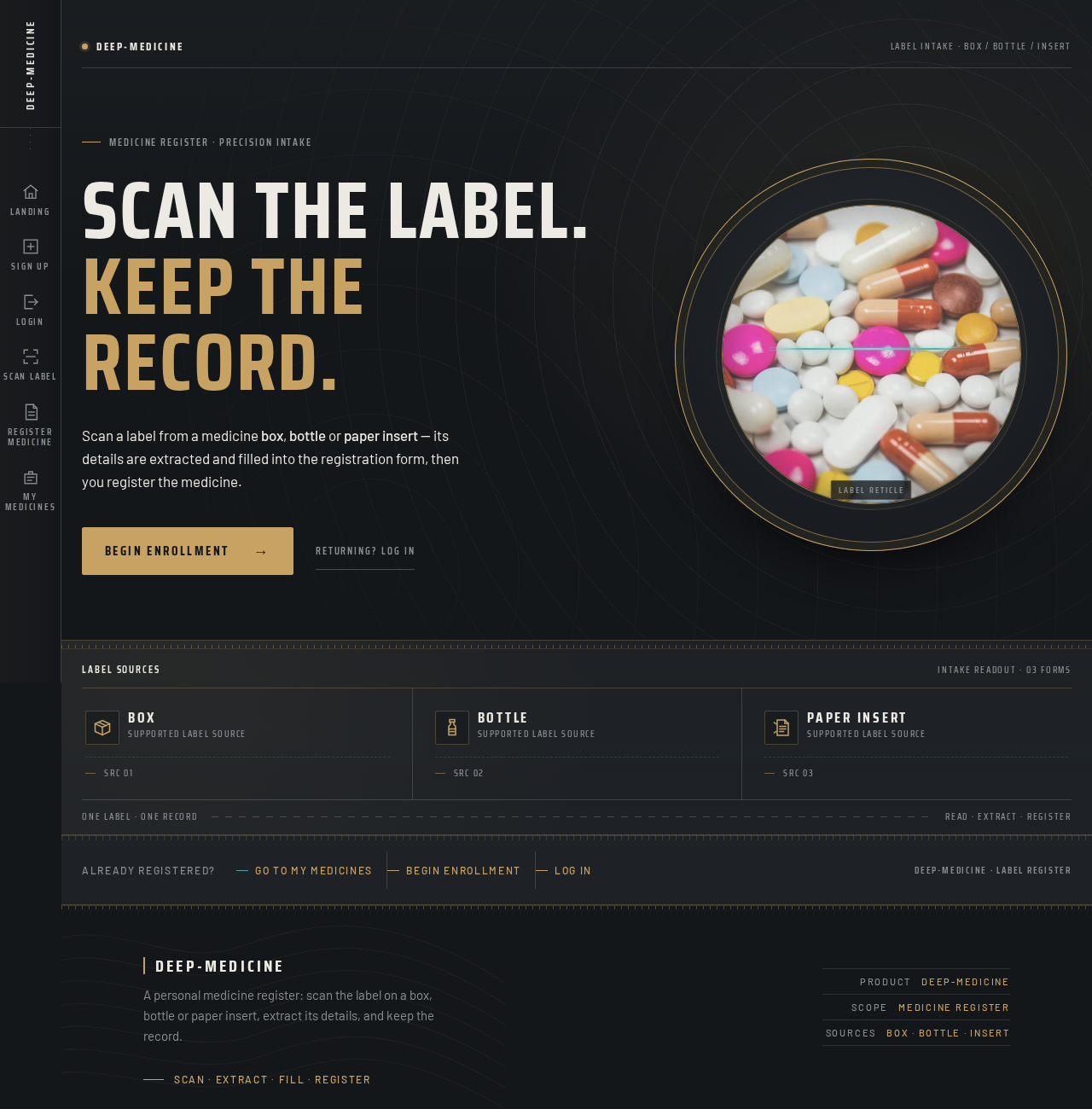
Scan the label.Keep the record.
Scan a label from a medicine box, bottle or paper insert — its details are extracted and filled into the registration form, then you register the medicine.

Label sources
Scan the label.Keep the record.
Scan a label from a medicine box, bottle or paper insert — its details are extracted and filled into the registration form, then you register the medicine.
No comments yet. Be the first!