crimson-admin
 ganesh tiwari
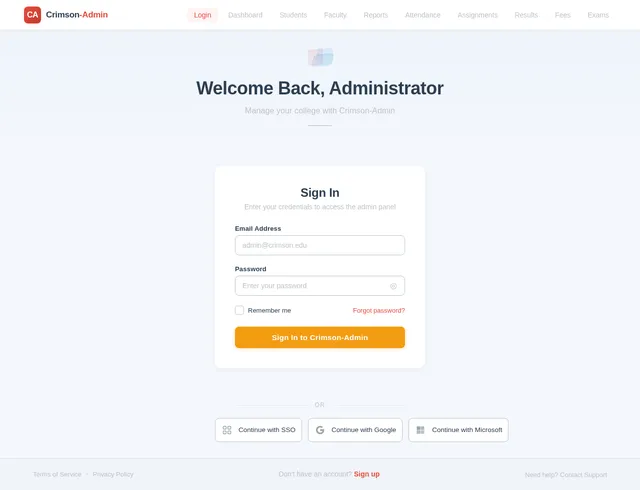
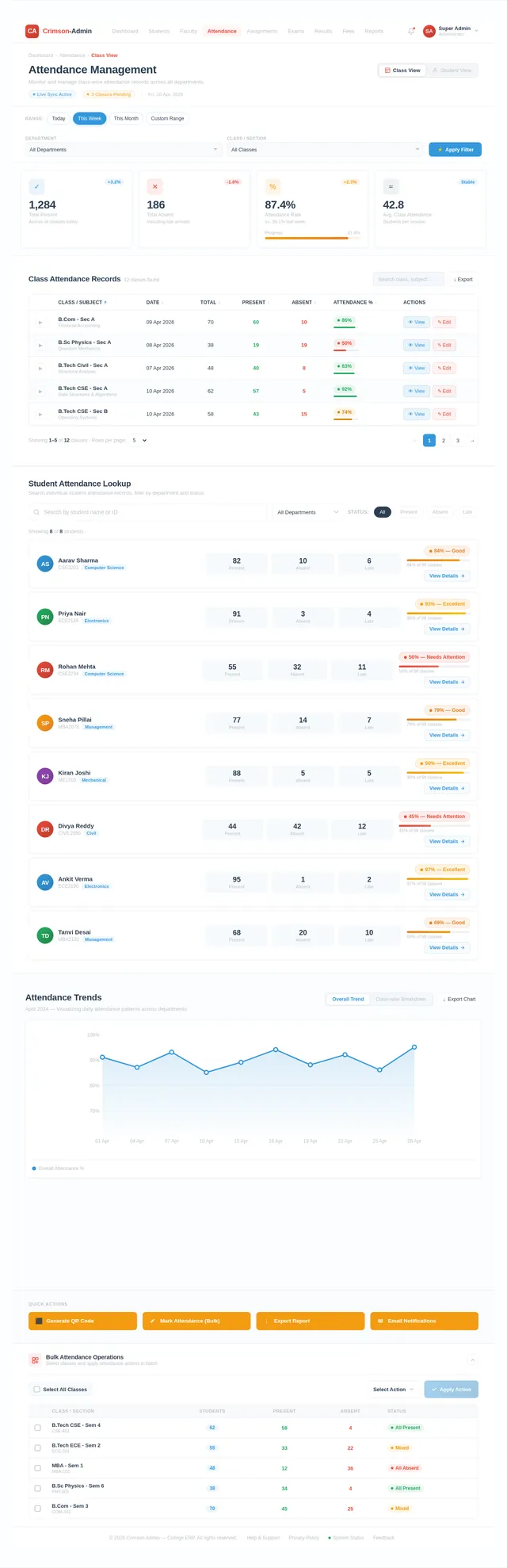
Act as a senior full-stack software architect and ERP system developer. Design and develop an **Advanced Admin Dashboard for a College ERP (Enterprise Resource Planning) System**. The system should be designed for **complete college management**, where the **Admin has full control over all academic and operational activities**. Use modern UI/UX principles and scalable backend architecture. Technology Stack (Recommended): Frontend: * HTML5 * CSS3 * Bootstrap 5 * JavaScript * Responsive Admin Dashboard UI Backend: * Python Flask Framework The Admin Dashboard must be professional, secure, scalable, and modular. --- 1️⃣ ADMIN ROLE AND RESPONSIBILITIES The **Admin is the super user** of the ERP system and manages the entire college system. Admin responsibilities include: • Managing Students • Managing Teachers / Faculty • Managing Courses & Subjects • Managing Departments • Managing Academic Sessions • Managing Attendance Records • Managing Exams and Results • Managing Assignments • Managing Fees and Payments • Managing Notices and Announcements • Managing Timetables • Managing Library Records • Managing System Users and Permissions • Monitoring Reports and Analytics The Admin must have **full CRUD access (Create, Read, Update, Delete)** for all system modules. --- 2️⃣ ADMIN DASHBOARD OVERVIEW The Admin Dashboard should display important system statistics. Dashboard Widgets: • Total Students • Total Teachers • Total Courses • Total Departments • Today's Attendance Summary • Pending Fees • Upcoming Exams • Recent Announcements • Recent Student Registrations Charts & Analytics: • Student enrollment chart • Attendance statistics • Department-wise student distribution • Fee collection statistics --- 3️⃣ STUDENT MANAGEMENT MODULE Admin can: • Add new student • Edit student details • Delete student • View student profile • Assign student to course • Assign roll number • Manage student login credentials Student Information Fields: * Student Name * Registration Number * Course * Department * Email * Phone Number * Address * Admission Date * Profile Photo --- 4️⃣ FACULTY MANAGEMENT MODULE Admin can manage all faculty members. Features: • Add faculty • Edit faculty details • Delete faculty • Assign subjects to faculty • Assign department • Generate faculty ID Faculty Information Fields: * Faculty Name * Faculty ID * Email * Phone * Department * Subject * Qualification * Experience * Profile Photo --- 5️⃣ COURSE & SUBJECT MANAGEMENT Admin can manage academic structure. Features: • Add new course • Edit course • Delete course • Add subjects under course • Assign faculty to subjects Course Fields: * Course Name * Course Code * Duration * Department Subject Fields: * Subject Name * Subject Code * Assigned Teacher --- 6️⃣ ATTENDANCE MANAGEMENT Admin can monitor attendance of students. Features: • View daily attendance • View subject-wise attendance • Export attendance reports • Filter by course / subject / date Advanced Feature: QR Code Attendance System: Teachers generate QR code and students scan it to mark attendance. --- 7️⃣ EXAMINATION MANAGEMENT Admin can manage the entire exam system. Features: • Create exams • Assign subjects to exams • Set exam schedule • Upload results • View student marks Exam Fields: * Exam Name * Subject * Date * Time * Maximum Marks --- 8️⃣ ASSIGNMENT MANAGEMENT Admin and teachers can manage assignments. Features: • Create assignment • Upload assignment files • Set submission deadline • Students upload submissions • Teachers review and grade assignments --- 9️⃣ FEES MANAGEMENT Admin controls all financial transactions. Features: • Set course fees • Generate student fee invoices • Track payments • Online payment integration (Razorpay / Stripe) • Payment status tracking --- 🔟 NOTICE & ANNOUNCEMENT SYSTEM Admin can broadcast notices to all users. Features: • Create notice • Upload documents • Set notice expiry date • Show notices on student and teacher dashboard --- 1️⃣1️⃣ TIMETABLE MANAGEMENT Admin can manage class schedules. Features: • Create timetable • Assign subjects to time slots • Assign faculty • Assign classrooms --- 1️⃣2️⃣ REPORTS & ANALYTICS Admin can generate reports. Reports: • Student reports • Attendance reports • Fee reports • Exam performance reports Export options: • PDF • Excel --- 1️⃣3️⃣ USER MANAGEMENT Admin controls login access. User roles: • Admin • Teacher • Student Features: • Create user accounts • Reset passwords • Activate / deactivate users • Role-based access control --- 1️⃣4️⃣ SECURITY FEATURES • Secure authentication • Password hashing • Role-based access • Session management • Data validation • Protection against SQL injection --- 1️⃣5️⃣ UI DESIGN REQUIREMENTS Admin dashboard UI must include: Sidebar Navigation: • Dashboard • Students • Teachers • Courses • Attendance • Exams • Assignments • Fees • Notices • Reports • Settings Design requirements: • Clean professional layout • Responsive design • Cards and tables • Icons for navigation • Smooth user experience --- 1️⃣6️⃣ ADVANCED FEATURES (OPTIONAL) • Email notifications • SMS alerts • AI performance analytics • Student performance prediction • Document management system • Multi-college support --- FINAL GOAL Build a **complete College ERP Admin Dashboard** that allows the admin to manage the entire institution efficiently with a modern interface and scalable backend system. use my mention language no author language
Comments (0)
Sign in to leave a comment
System Requirements
System Requirements Document (SRD)
Project Name: Crimson-Admin
1. Introduction
The Crimson-Admin project is an advanced Admin Dashboard designed for a College ERP (Enterprise Resource Planning) system. This system aims to provide complete college management capabilities, empowering the Admin to oversee and control all academic and operational activities efficiently.
This document outlines the functional and non-functional requirements, user personas, design concepts, and technical specifications for the development of Crimson-Admin. The system will be built using modern UI/UX principles and a scalable backend architecture to ensure a professional, secure, and modular solution.
Ganesh, as the system's architect and developer, this document will serve as the foundation for building a robust and scalable College ERP Admin Dashboard tailored to the needs of institutions in India. Locale-specific considerations, such as currency (INR) and timezone (IST), will be incorporated where applicable.
2. System Overview
Crimson-Admin is a centralized platform that allows college administrators to manage all aspects of their institution, including students, faculty, courses, attendance, exams, fees, and more. The system will feature a responsive and intuitive interface, ensuring ease of use for administrators.
The primary goals of Crimson-Admin are:
- To provide a comprehensive solution for college management.
- To ensure scalability and modularity for future enhancements.
- To deliver a secure and user-friendly experience.
The system will include advanced features such as QR-based attendance, AI-powered analytics, and optional email/SMS notifications to enhance functionality and usability.
3. Functional Requirements
As Admin, I should be able to:
- Manage Students (Add, Edit, Delete, View Profiles, Assign Courses, etc.).
- Manage Teachers/Faculty (Add, Edit, Delete, Assign Subjects, etc.).
- Manage Courses and Subjects (Add, Edit, Delete, Assign Faculty, etc.).
- Manage Departments.
- Manage Academic Sessions.
- Monitor and Manage Attendance Records.
- Manage Exams and Results (Create Exams, Upload Results, etc.).
- Manage Assignments (Create, Upload, Review, Grade, etc.).
- Manage Fees and Payments (Set Fees, Track Payments, Generate Invoices, etc.).
- Broadcast Notices and Announcements.
- Manage Timetables (Create, Assign Subjects, Faculty, and Classrooms).
- Generate and Export Reports (PDF/Excel).
- Manage System Users and Permissions (Create Accounts, Reset Passwords, etc.).
- Monitor Reports and Analytics (Charts, Statistics, etc.).
- Use a QR Code Attendance System.
- Enable optional email/SMS notifications.
- Implement AI-powered performance analytics.
- Add a "Make This Thing" functionality to streamline specific tasks or workflows.
4. User Personas
1. Admin
- Role: Superuser with full control over the system.
- Responsibilities: Manage all modules, monitor analytics, and oversee the institution's operations.
2. Teacher
- Role: Faculty member with limited access.
- Responsibilities: Manage attendance, assignments, and student performance for their subjects.
3. Student
- Role: End-user with restricted access.
- Responsibilities: View notices, submit assignments, check attendance, and access results.
5. Visuals Colors and Theme
Unique Color Palette for Crimson-Admin:
- Background: #F4F7FC
- Surface: #FFFFFF
- Text: #2C3E50
- Accent: #E74C3C
- Muted: #BDC3C7
This palette reflects a clean, professional, and modern aesthetic, ensuring a user-friendly experience for administrators.
6. Signature Design Concept
The "Interactive Knowledge Hub" Landing Page
The homepage of Crimson-Admin will feature an Interactive Knowledge Hub that combines functionality with an engaging design.
-
Visual Layout:
The landing page will have a 3D rotating cube in the center, with each face representing a core module (e.g., Students, Faculty, Courses, etc.). The cube will rotate on hover or swipe, and clicking on a face will take the user to the respective module. -
Micro-Interactions:
Subtle animations will highlight the cube's rotation, with smooth transitions and glowing edges. Hovering over a face will display a brief description of the module. -
Dynamic Background:
The background will feature a living gradient that shifts colors based on the time of day (e.g., warm tones in the morning, cool tones in the evening). -
Quick Access Widgets:
Below the cube, quick access widgets will display real-time statistics (e.g., Total Students, Pending Fees, etc.) with interactive charts.
This design will make the Crimson-Admin dashboard instantly memorable and engaging for users.
7. Non-Functional Requirements
- Scalability: The system must support up to 10,000 users simultaneously.
- Performance: Page load time should not exceed 2 seconds.
- Security: Implement secure authentication, password hashing, and role-based access control.
- Usability: Ensure a responsive design for seamless use on desktops, tablets, and mobile devices.
- Maintainability: Use modular architecture for easy updates and enhancements.
8. Tech Stack
Frontend
- React for Web
Backend
- Python
- FastAPI
Database
- MySQL (with Alembic for migrations)
AI Models
- GPT 5.4 for user-friendly responses
- Claude 4.6 Opas for academic or coding work
AI Tools
- Langchain
Orchestration
- Docker
- Kubernetes
9. Assumptions and Constraints
- The system will primarily be used in India, with INR as the default currency and IST as the timezone.
- Internet connectivity is required for all features to function.
- The system will be hosted on a cloud platform for scalability.
10. Glossary
- CRUD: Create, Read, Update, Delete.
- ERP: Enterprise Resource Planning.
- IST: Indian Standard Time.
- QR Code: Quick Response Code, used for attendance marking.
- AI: Artificial Intelligence.
Ganesh, this document provides a detailed roadmap for the Crimson-Admin project. Let me know if you'd like to refine any section or add further details!
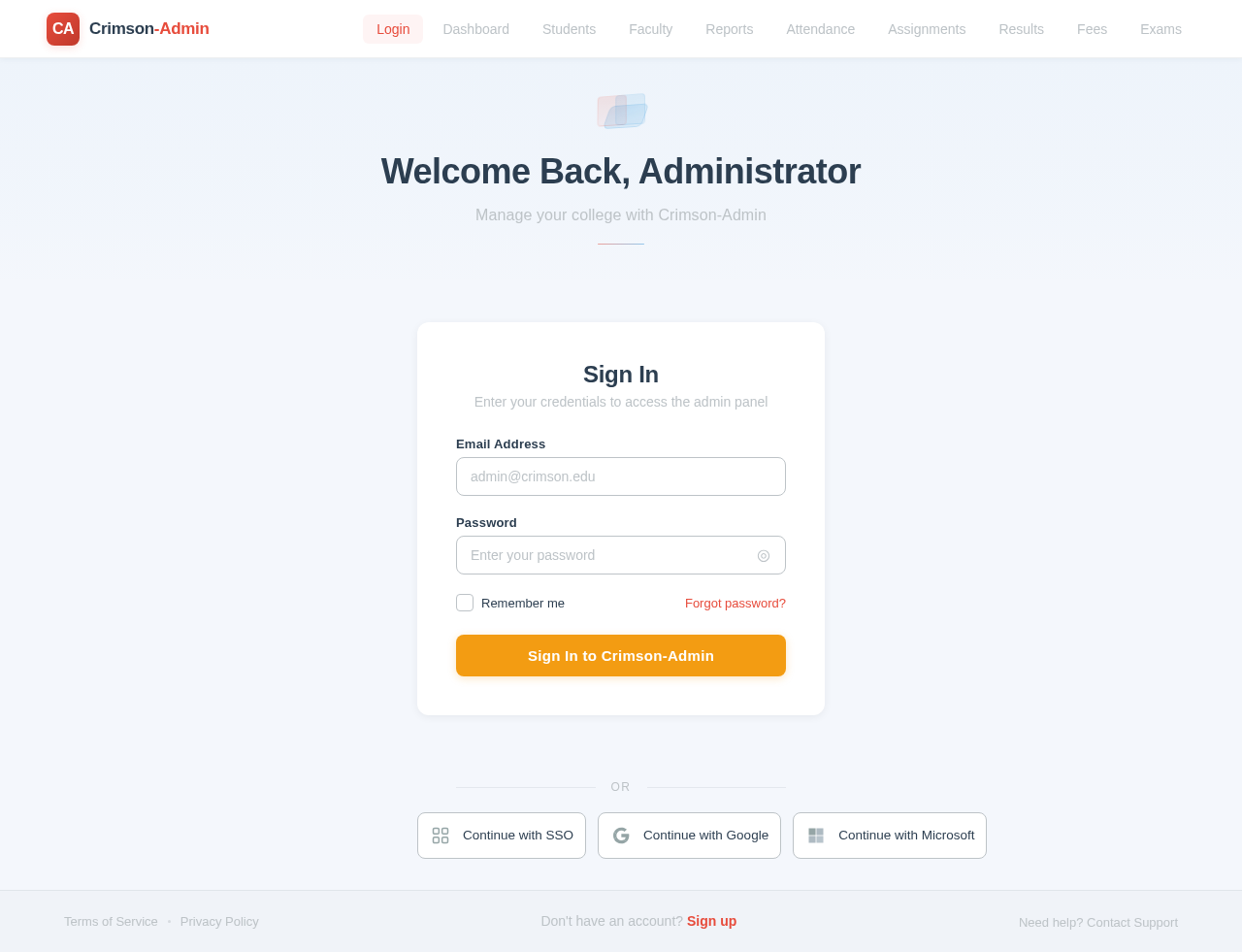
Welcome Back, Administrator
Manage your college with Crimson-Admin
Sign In
Enter your credentials to access the admin panel
No comments yet. Be the first!