beauty-salon
 Drashti Solanki
Create a modern appointment booking website for a beauty salon Customers should be able to : -- View the salon's services and prices -- View available appointment dates and times slots. -- Select a service and book an appointment - Enter their name , phone number , and email while booking. -- view a booking confirmation after successfully booking an appointment The salon staff should be able to: -- View customer appointments -- See appointment details such as customer name , selected service , date and time The Website should be simple , modern mobile friendly and easy to use. make sure this website Ui design moder and more attractive , innovative design


Comments (0)
Sign in to leave a comment
Project Tasks
100 tasksGenerate system requirement document
Generate personas & user flows
Create flow for Customer
Create flow for Salon Staff
Landing
Fix Landing review findings: Mobile navigation items overlap the wordmark and each… (+2 more)
Landing / Navigation
Landing / Hero
Landing / Services Teaser
Landing / Staff Access
Landing / Footer
Navigation
Footer
Services
Fix Services review finding: Q1 as reviewed now: Measured horizontal overflow at…
Services / Masthead
Services / Price Sheet
Services / Route Band
Services / Footer
Availability
Availability / Navigation Slot
Availability / Slot Grid
Availability / Footer Slot
Booking
Fix Booking review finding: Q1 as reviewed now: The selection summary’s Price row is…
Fix Booking review finding: Q1 as reviewed now: In the current mobile screenshot, the…
Fix Booking review findings: Q1 as reviewed now: In the current mobile screenshot, the… (+4 more)
Fix Booking review findings: The booking panel clips the price value in its selection… (+2 more)
Booking / Header
Booking / Form Panel
Booking / Footer
Confirmation
Confirmation / Navigation
Confirmation / Receipt
Confirmation / Route Band
Confirmation / Footer
Login
Login / Navigation Slot
Login / Credential Panel
Login / Staff Band
Login / Footer Slot
Appointments
Fix Appointments review findings: Appointment metadata is detached from its row on mobile… (+3 more)
Appointments / Navigation Slot
Appointments / Ruled List
Appointments / Staff Session Band
Appointments / Footer Slot
Appointment Details
Fix Appointment Details review finding: frontend/src/pages/Appointment Details.jsx: the page…
Fix Appointment Details review finding: Q3 as reviewed now…
Fix Appointment Details review findings: The appointment details page renders a not-found state… (+2 more)
Appointment Details / Header
Appointment Details / Panel
Appointment Details / Staff Band
Appointment Details / Footer
Architecture
Create backend_modules diagram
Create er_diagram diagram
Create frontend_modules diagram
Create sequence diagram
Create service_network diagram
Workspace task plan
Update Implementation task plan
Update Implementation task plan
Update Implementation task plan
Update Implementation task plan
Update Implementation task plan
Staff can review the salon's booked appointments
Customers can browse the salon's services and prices
Customers receive a booking confirmation with a reference
Customers can secure an appointment with their contact details
Appointments stay protected until staff identity is established
Customers can see available appointment dates and time slots
Staff can scan appointments by time and open one
Customers can book anonymously through the public booking surface
Staff sign-in and protected session for appointment access
Staff appointment detail retrieval with retry and access gating
Staff re-fetch of a single appointment after a failed load
Staff appointment list with empty state and load retry
Anonymous availability lookup and slot selection
Protected appointment detail read with not-found handling
Protected appointment list access and record serving
Public service catalogue with prices and load retry
Landing ticker shows today's hours and next free slot
Customers book a slot anonymously and the booking is stored
Salon staff are provisioned before first access
Customers browse available dates and time slots
Staff sign in to reach the protected appointment surfaces
Shared backend stores services, availability, and appointments
Only authenticated staff can read shared appointment records
Service and price data is served to the customer surfaces
Serve available appointment dates and time slots
Landing hero, ticker, and navigation go live
Staff appointment list goes live behind staff sign-in
Availability slot grid and booking rail go live
Services price sheet goes live and starts a booking
Appointment details go live for signed-in staff
Booking confirmation receipt goes live
Staff sign-in establishes the protected session
Wire the Booking page to live booking submission
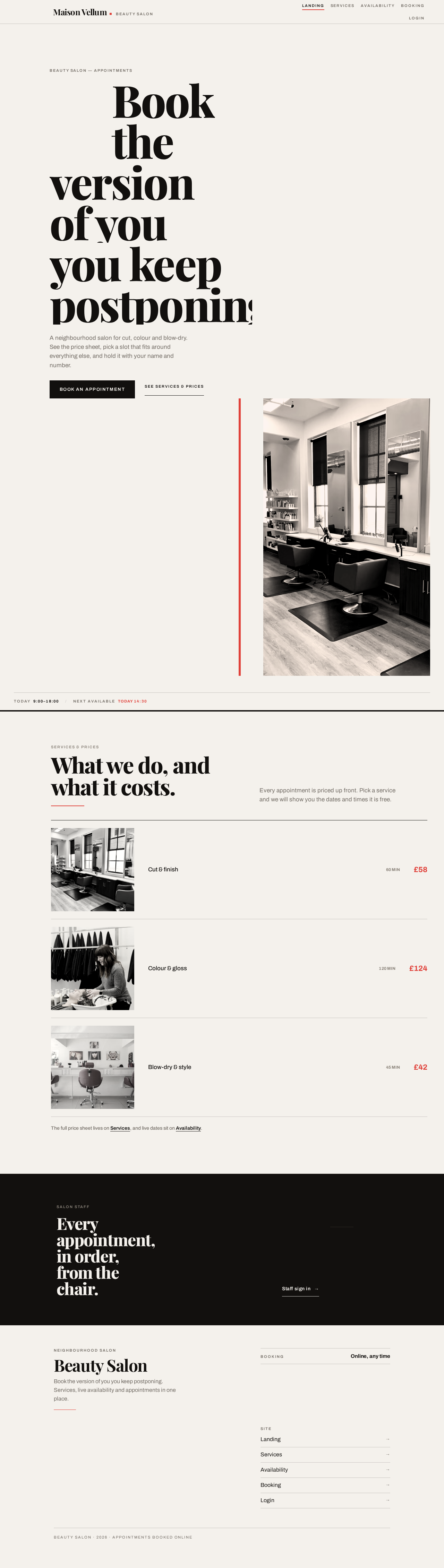
Book theversion of youyou keep postponing.
A neighbourhood salon for cut, colour and blow-dry. See the price sheet, pick a slot that fits around everything else, and hold it with your name and number.


Every appointment, in order, from the chair.
Book theversion of youyou keep postponing.
A neighbourhood salon for cut, colour and blow-dry. See the price sheet, pick a slot that fits around everything else, and hold it with your name and number.
No comments yet. Be the first!