beauty-salon
 Drashti Solanki
Create a modern appointment booking website for a beauty salon Customers should be able to : -- View the salon's services and prices -- View available appointment dates and times slots. -- Select a service and book an appointment - Enter their name , phone number , and email while booking. -- view a booking confirmation after successfully booking an appointment The salon staff should be able to: -- View customer appointments -- See appointment details such as customer name , selected service , date and time The Website should be simple , modern mobile friendly and easy to use. make sure this website Ui design moder and more attractive , innovative design


Comments (0)
Sign in to leave a comment
System Requirements
System Requirements Document for beauty-salon
1. Introduction
beauty-salon is a modern appointment booking website for a neighbourhood beauty salon. Its product intent is to let salon customers browse the salon's services and prices, check available appointment dates and time slots, select a service, and book an appointment by entering their name, phone number, and email — then see a booking confirmation. In parallel, salon staff must be able to review customer appointments and inspect each appointment's details (customer name, selected service, date, and time).
The audience is twofold:
- Customers — mostly women aged 20–45 booking on their phones between other tasks, who want a fast, confident, mobile-friendly booking experience that feels like a fashion magazine spread rather than a clinical scheduling tool.
- Salon Staff — who need a disciplined, legible, data-dense view of the salon's booked appointments.
The website must be simple, modern, mobile friendly, and easy to use, with a UI design that is modern, attractive, and innovative.
2. System Overview
The current delivery is a first-party web application with a public customer-facing booking surface and a protected staff-facing appointment review surface, backed by a shared backend that persists services, availability, and appointment records.
Actors:
- Customer (human persona) — browses services and prices, views available dates and time slots, selects a service, submits a booking with name, phone number, and email, and views a booking confirmation.
- Salon Staff (human persona) — authenticates, views the list of customer appointments, and inspects appointment details.
- Application backend (system actor) — serves service/price data, computes and serves availability, validates and persists bookings, and serves appointment records to authenticated staff.
Accepted behavior: service and price browsing; availability browsing; service selection and booking with name/phone/email capture; booking confirmation; staff appointment list; staff appointment detail review.
Ownership: all customer and staff surfaces are first-party application pages. The application owns identity for staff access to shared durable appointment records; customers book anonymously without an account.
Narrow exclusions: no payment processing, no customer account creation or login, no appointment rescheduling or cancellation, no notifications/reminders, no staff editing of appointments, and no analytics or reporting beyond the appointment list and detail views. These are not part of the accepted current scope.
2a. Product Interpretation and Delivery Boundary
The product is a booking website, not a salon management system. Its delivery boundary is deliberately narrow: a customer can discover what the salon offers, see when it is free, commit to a slot with contact details, and receive a confirmation; staff can see what has been booked and read the details of each booking.
Access ownership follows the accepted journeys. The customer journey is anonymous and public — browsing services, availability, booking, and confirmation require no account, because the customer's commitment is captured through the name, phone number, and email they enter at booking time. The staff journey requires application-owned identity: staff must be provisioned or invited before first access and must authenticate when returning, because the appointment records are shared, durable, and must remain bound to the correct salon. The Login surface is the anonymous entry boundary that establishes staff access; the Appointments and Appointment Details surfaces are protected and are only reachable once staff identity is established.
Everything else in the current scope is first-party application UI. There are no provider-owned or external destinations in the accepted current scope, and no headless-only delivery. Future ideas (payments, reminders, rescheduling) are explicitly out of current scope and are not represented in any current page or acceptance criterion.
2b. Source Content Inventory
Not applicable — no reference directive in this project declares content_source, so no source content inventory is produced.
2c. Page Content and Component Coverage
Landing
- Information/state: anonymous public entry. Presents the salon's identity and the promise of booking an appointment; surfaces today's opening hours and the next available slot as real information; directs visitors to services and booking.
- Primary actions: "Book an appointment" (primary black CTA) and "See services & prices" (hairline-underlined secondary link).
- Supporting actions: navigate to Services, Availability, and Booking; navigate to Login for staff.
- Domain entities: salon identity, opening hours, next available slot, service teaser.
- Component responsibilities: asymmetric hero split (7-column type block / 5-column full-bleed monochrome photograph with a 6px vermilion gutter rule); oversized Playfair Display headline stacked over three lines with the first line indented one column; 40ch intro paragraph; CTA row; bottom ticker line listing today's opening hours and the next available slot in 11px all-caps; staff access link to Login.
- States: loading (hero type reveal, ticker data pending); empty (no next available slot today — ticker shows opening hours only); success (hero and ticker render with live hours and next slot); error (availability data unavailable — ticker falls back to opening hours and the CTA remains functional); recovery (retry availability fetch on next navigation or reload).
Services
- Information/state: the salon's full service list with name, duration, and price; each row carries a square 1:1 thumbnail.
- Primary actions: select a service to begin booking.
- Supporting actions: navigate to Availability; return to Landing.
- Domain entities: service (name, duration, price, thumbnail image).
- Component responsibilities: ruled editorial price sheet — hairline-separated rows with service name left, duration centre, price right in vermilion tabular numerals; fixed left slot holding a 240px square sharp-cornered thumbnail that crossfades on row hover; section headline with a vermilion hairline rule beneath it.
- States: loading (skeleton ruled rows); empty (no services published — a plain ruled message with a route back to Landing); success (full ruled list with prices); error (service list failed to load — inline message with retry); recovery (retry reloads the list without losing scroll position).
Availability
- Information/state: available appointment dates and time slots for the salon.
- Primary actions: select a date and a time slot to continue to booking.
- Supporting actions: change the selected service; return to Services.
- Domain entities: date, time slot (available / unavailable), selected service context.
- Component responsibilities: hard-edged typographic slot grid of 0-radius rectangles in tabular numerals; unavailable slots struck through in warm grey; selected slot fills solid black; sticky booking rail showing the currently selected service, its price in vermilion, and the primary black CTA.
- States: loading (slot grid placeholder); empty (no slots available for the chosen date — plain ruled message with the next available date offered); success (slot grid renders with available and unavailable slots); error (availability fetch failed — inline message with retry); recovery (retry re-fetches the selected date's slots; the sticky rail preserves the selected service).
Booking
- Information/state: the selected service, the selected date and time, and the customer's contact details form.
- Primary actions: submit the booking.
- Supporting actions: edit the selected service, date, or time; return to Availability.
- Domain entities: booking (service, date, time, customer name, customer phone number, customer email).
- Component responsibilities: white sharp-cornered booking form panel on bone ground; underline-only inputs for name, phone number, and email with a 1px base rule that thickens to 2px black on focus and turns vermilion on a completed required field; sticky booking rail holding the selected service, its vermilion price, and the primary black CTA.
- States: loading (submission in progress — CTA disabled with a plain ruled progress indication); empty (no service or slot selected — the form is not submittable and the rail prompts a return to Services/Availability); success (booking accepted, navigate to Confirmation); error (validation failure on name, phone number, or email — inline field-level messages; server failure — inline message with retry that preserves entered values); recovery (retry resubmits the same values; the selected service, date, and time are retained).
Confirmation
- Information/state: the booking reference and the confirmed booking summary — customer name, service, date, and time.
- Primary actions: none required; the confirmation is the terminal state of the customer journey.
- Supporting actions: return to Landing; start another booking.
- Domain entities: booking reference, booking summary (customer name, service, date, time).
- Component responsibilities: receipt panel — white sharp-cornered panel on bone ground with a perforated hairline top edge; booking reference set in large Playfair Display; customer name, service, date, and time stacked as ruled label/value pairs; single 600ms receipt-style slide-down of the summary on entry.
- States: loading (receipt slide-down in progress); empty (no booking reference in context — plain ruled message with a route back to Services); success (receipt renders with the full booking summary); error (booking reference not found — plain ruled message with a route back to Services); recovery (returning to Services restarts the booking flow).
Login
- Information/state: anonymous staff entry boundary that establishes access to the protected appointment surfaces.
- Primary actions: authenticate as salon staff.
- Supporting actions: return to Landing.
- Domain entities: staff identity, staff session.
- Component responsibilities: underline-only credential fields consistent with the booking form; solid black primary action; hairline rules; no customer-facing booking controls.
- States: loading (submission in progress); empty (no credentials entered — action disabled); success (session established, navigate to Appointments); error (invalid credentials — inline message, values cleared for the credential field only); recovery (retry with corrected credentials; repeated failure keeps the user on Login).
Appointments
- Information/state: the list of customer appointments for the salon, presented as a dense ruled list with a fixed left column of times.
- Primary actions: open an appointment to view its details.
- Supporting actions: scan the list by time; sign out.
- Domain entities: appointment (customer name, selected service, date, time).
- Component responsibilities: dark staff view — #12100E ground, #F4F1EC text, vermilion unchanged, panels demoted to #1C1917 with hairline #2E2A26 borders; fixed left time column; ruled rows; right detail panel that slides in at ≥1024px and becomes a separate route below that breakpoint.
- States: loading (ruled list placeholder); empty (no appointments booked — plain ruled message); success (ruled appointment list renders); error (appointment list failed to load — inline message with retry); recovery (retry reloads the list; session remains valid).
Appointment Details
- Information/state: the full details of a single appointment — customer name, selected service, date, and time.
- Primary actions: none required; the detail view is a read surface.
- Supporting actions: return to Appointments.
- Domain entities: appointment (customer name, selected service, date, time).
- Component responsibilities: dark staff view consistent with Appointments; ruled label/value pairs; on ≥1024px rendered as the sliding right detail panel within Appointments, and below that breakpoint as its own route.
- States: loading (detail placeholder); empty (appointment not found — plain ruled message with a route back to Appointments); success (all four detail fields render); error (detail fetch failed — inline message with retry); recovery (retry re-fetches the appointment; returning to Appointments restores the list).
3. Functional Requirements
FR-1 — Browse services and prices (explicit) As a Customer, I should view the salon's services and prices so that I can decide what to book.
- Trigger/input: the Customer opens the Services page.
- Observable result: a ruled editorial price sheet listing each service with its name, duration, and price in vermilion tabular numerals, each row carrying a square thumbnail.
- Access state: anonymous, no account required.
- Failure/recovery: if the service list fails to load, an inline message with retry is shown; retry reloads the list.
- Continuation: the Customer selects a service to begin booking.
FR-2 — View available appointment dates and time slots (explicit) As a Customer, I should view available appointment dates and time slots so that I can pick a time that suits me.
- Trigger/input: the Customer opens the Availability page, optionally with a selected service.
- Observable result: a hard-edged typographic slot grid showing available slots as 0-radius rectangles in tabular numerals and unavailable slots struck through in warm grey.
- Access state: anonymous, no account required.
- Failure/recovery: if availability fails to load, an inline message with retry is shown; retry re-fetches the selected date's slots.
- Continuation: the Customer selects a date and time slot to continue to booking.
FR-3 — Select a service and book an appointment (explicit) As a Customer, I should select a service and book an appointment so that I secure a slot at the salon.
- Trigger/input: the Customer selects a service and a date/time slot, then submits the booking form.
- Observable result: the booking is accepted and the Customer is taken to the Confirmation page.
- Access state: anonymous, no account required.
- Failure/recovery: validation failures on name, phone number, or email show inline field-level messages; a server failure shows an inline message with retry that preserves entered values and the selected service, date, and time.
- Continuation: the Customer views the booking confirmation.
FR-4 — Enter name, phone number, and email while booking (explicit) As a Customer, I should enter my name, phone number, and email while booking so that the salon can identify and contact me about my appointment.
- Trigger/input: the Customer fills the underline-only name, phone number, and email fields on the Booking page.
- Observable result: each completed required field's base rule turns vermilion; the form becomes submittable once all three are valid.
- Access state: anonymous, no account required.
- Failure/recovery: invalid values show inline field-level messages and the form is not submitted.
- Continuation: the Customer submits the booking.
FR-5 — View a booking confirmation after successfully booking (explicit) As a Customer, I should view a booking confirmation after successfully booking an appointment so that I have a record of what I booked.
- Trigger/input: the Customer completes a successful booking.
- Observable result: a receipt panel renders with the booking reference in large Playfair Display and the customer name, service, date, and time stacked as ruled label/value pairs, with a single 600ms receipt-style slide-down on entry.
- Access state: anonymous, no account required.
- Failure/recovery: if the booking reference is not found, a plain ruled message with a route back to Services is shown.
- Continuation: the Customer returns to Landing or starts another booking.
FR-6 — View customer appointments (explicit) As Salon Staff, I should view customer appointments so that I know what the salon has booked.
- Trigger/input: authenticated Salon Staff opens the Appointments page.
- Observable result: a dense ruled list of customer appointments with a fixed left column of times.
- Access state: protected — requires an established staff session.
- Failure/recovery: if the list fails to load, an inline message with retry is shown; retry reloads the list.
- Continuation: Salon Staff opens an appointment to view its details.
FR-7 — See appointment details (explicit) As Salon Staff, I should see appointment details such as customer name, selected service, date, and time so that I can prepare for and run the appointment.
- Trigger/input: Salon Staff selects an appointment from the list.
- Observable result: the appointment's customer name, selected service, date, and time render as ruled label/value pairs — as a sliding right detail panel at ≥1024px and as its own route below that breakpoint.
- Access state: protected — requires an established staff session.
- Failure/recovery: if the detail fetch fails, an inline message with retry is shown; returning to Appointments restores the list.
- Continuation: Salon Staff returns to the appointment list.
FR-8 — Staff provisioning and first access (required_inference) As Salon Staff, I should receive an invitation or provisioning before my first access so that I can reach the shared appointment records.
- Trigger/input: the salon provisions or invites the staff member.
- Observable result: the staff member holds credentials that the Login page accepts.
- Access state: anonymous entry at Login; protected state remains unavailable until identity is established.
- Failure/recovery: invalid credentials show an inline message and keep the user on Login.
- Continuation: the staff member authenticates and reaches Appointments.
FR-9 — Staff returning authentication (required_inference) As Salon Staff, I should authenticate when returning to review appointments so that the shared appointment records remain bound to the correct salon.
- Trigger/input: returning Salon Staff opens the Login page and submits credentials.
- Observable result: a session is established and the staff member is taken to Appointments.
- Access state: Login is anonymously reachable; Appointments and Appointment Details are protected.
- Failure/recovery: invalid credentials show an inline message with the credential field cleared; repeated failure keeps the user on Login.
- Continuation: the staff member reviews appointments.
FR-10 — Persisted booking and appointment records (required_inference) As a Customer and as Salon Staff, I should have booking data and appointment records persisted so that confirmation and staff review remain available.
- Trigger/input: a Customer submits a booking; Salon Staff later opens Appointments.
- Observable result: the booking is stored with its service, date, time, customer name, phone number, and email, and is retrievable by staff.
- Access state: written anonymously by the Customer; read only through an authenticated staff session.
- Failure/recovery: a persistence failure surfaces as a booking submission error with retry that preserves entered values.
- Continuation: the Customer sees the confirmation; Salon Staff sees the appointment in the list.
FR-11 — Simple, modern, mobile-friendly, easy-to-use website (explicit) As a Customer and as Salon Staff, I should use a website that is simple, modern, mobile friendly, and easy to use so that booking and review are fast on any device.
- Trigger/input: any visit at 375px, 768px, or 1280px.
- Observable result: readable text and controls stay whole inside the viewport and their containers at every breakpoint; the booking flow becomes a full-height vertical stack with a sticky bottom bar on mobile.
- Access state: applies to all surfaces.
- Failure/recovery: not applicable — this is a presentation constraint.
- Continuation: not applicable.
FR-12 — Modern, attractive, innovative UI design (explicit) As a Customer and as Salon Staff, I should experience a modern, attractive, and innovative UI design so that the salon feels premium and current.
- Trigger/input: any visit.
- Observable result: the editorial direction is applied — oversized Playfair Display headlines, a single vermilion accent, sharp 0-radius corners, hairline structure, and editorial photography.
- Access state: applies to all surfaces.
- Failure/recovery: not applicable — this is a presentation constraint.
- Continuation: not applicable.
4. User Personas
Customer
Product context. A salon client booking on her phone between other tasks. She arrives at the site without an account and expects to move from curiosity to a confirmed appointment quickly, without a signup wall.
Primary goal. To secure a salon appointment at a time that suits her, for a service she has chosen with full knowledge of its price.
Distinct accepted responsibilities. She browses the salon's services and prices; she views available appointment dates and time slots; she selects a service and books an appointment; she enters her name, phone number, and email while booking; and she views a booking confirmation after a successful booking. She is the sole initiator of the booking lifecycle and the sole recipient of its confirmation.
Relevant inputs or decisions. Which service to book; which date and time slot to take; her name, phone number, and email. Her key decision is the commitment to a specific slot, made against the visible price and availability.
Interactions with other accepted participants. She does not interact with Salon Staff directly. Her booking creates the durable appointment record that Salon Staff later review, so her submitted name, service, date, and time are the exact facts staff see.
Observable success. A receipt-style confirmation panel showing her booking reference and her name, service, date, and time.
Salon Staff
Product context. A member of the salon team who needs to know what the salon has booked and to read the details of each appointment. Their working context is a dense, scannable list on a dark ground, not a marketing surface.
Primary goal. To see the salon's booked appointments and the details of each one clearly enough to prepare for and run the day.
Distinct accepted responsibilities. They view customer appointments as a list, and they see appointment details — customer name, selected service, date, and time. They are provisioned or invited before first access and authenticate when returning, because the appointment records are shared and durable.
Relevant inputs or decisions. Which appointment to open from the list. Their decision is which appointment to inspect next; they do not create, edit, or cancel appointments in the current scope.
Interactions with other accepted participants. They never interact with the Customer directly. They consume the record the Customer created, and the accuracy of that record depends entirely on the Customer's submitted name, phone number, email, service, date, and time.
Observable success. A ruled appointment list with a fixed left time column, and a detail view showing the customer name, selected service, date, and time as ruled label/value pairs.
5. Core User Flows
Flow 1 — Customer browses services and prices
- The Customer lands on Landing anonymously. The hero renders with the oversized Playfair Display headline, the monochrome salon photograph, and the bottom ticker showing today's opening hours and the next available slot.
- The Customer selects the hairline-underlined "See services & prices" link.
- Services renders the ruled editorial price sheet: service name left, duration centre, price right in vermilion tabular numerals, hairline between rows, each row carrying a square 240px thumbnail that crossfades on hover.
- If the service list fails to load, an inline message with retry appears; the Customer retries and the list reloads.
- The Customer has the price and duration information needed to choose a service, and continues to availability.
Flow 2 — Customer views available dates and time slots
- From Services, the Customer selects a service, which sets the selected service context.
- Availability renders the hard-edged typographic slot grid: available slots as 0-radius rectangles in tabular numerals, unavailable slots struck through in warm grey. The sticky booking rail shows the selected service and its vermilion price.
- The Customer selects a date. The grid re-renders for that date.
- If no slots are available for the chosen date, a plain ruled message appears and the next available date is offered; the Customer takes it.
- If availability fails to load, an inline message with retry appears; the Customer retries and the grid re-fetches.
- The Customer selects a time slot; it fills solid black instantly with a 120ms colour fill.
Flow 3 — Customer books an appointment and enters contact details
- With a service and a time slot selected, the Customer activates the primary black CTA in the sticky booking rail.
- Booking renders the white sharp-cornered form panel on bone ground, with the selected service, date, and time shown and the underline-only name, phone number, and email fields.
- The Customer enters her name, phone number, and email. Each completed required field's base rule turns vermilion.
- The Customer submits the booking.
- If a field is invalid, an inline field-level message appears and the form is not submitted; the Customer corrects it.
- If the server fails, an inline message with retry appears and the entered values plus the selected service, date, and time are preserved; the Customer retries.
- On success, the booking is persisted with the service, date, time, customer name, phone number, and email, and the Customer is taken to Confirmation.
Flow 4 — Customer views the booking confirmation
- Confirmation renders the receipt panel: white, sharp-cornered, on bone ground, with a perforated hairline top edge.
- The booking summary slides down once over 600ms. The booking reference is set in large Playfair Display, and the customer name, service, date, and time are stacked as ruled label/value pairs.
- If the booking reference is not found, a plain ruled message with a route back to Services appears; the Customer returns to Services and restarts the booking flow.
- The Customer has her record of the appointment and either returns to Landing or starts another booking.
Flow 5 — Salon Staff authenticates and reviews appointments
- Salon Staff is provisioned or invited by the salon and holds credentials.
- The staff member opens Login anonymously and enters credentials in the underline-only fields.
- If credentials are invalid, an inline message appears with the credential field cleared; the staff member retries and remains on Login.
- On success, a session is established and the staff member is taken to Appointments.
- Appointments renders the dark staff view — #12100E ground, #F4F1EC text, vermilion unchanged — as a dense ruled list with a fixed left column of times.
- If the list fails to load, an inline message with retry appears; the staff member retries and the list reloads.
- If no appointments are booked, a plain ruled message appears.
- The staff member scans the list by time and selects an appointment.
Flow 6 — Salon Staff inspects appointment details
- From Appointments, the staff member selects an appointment.
- At ≥1024px, the detail panel slides in from the right within Appointments. Below that breakpoint, Appointment Details opens as its own route.
- The detail view renders the customer name, selected service, date, and time as ruled label/value pairs.
- If the detail fetch fails, an inline message with retry appears; the staff member retries and the detail re-fetches.
- If the appointment is not found, a plain ruled message with a route back to Appointments appears.
- The staff member returns to Appointments and continues reviewing the list.
6. Visuals Colors and Theme
Muse and headline. Tobias van Schneider — Editorial swagger for a beauty salon: oversized type, one hot accent, zero pastel clichés.
Mode. Light mode is the default for all customer surfaces. The staff surfaces (Appointments, Appointment Details) use the inverted dark treatment.
Colour tokens (light mode):
| Role | Hex | Usage |
|---|---|---|
| Background | #F4F1EC | Warm bone paper; carries roughly 60% of every screen |
| Surface | #FFFFFF | Cards, the booking form panel, the confirmation receipt — "paper on paper" |
| Text | #12100E | Body text |
| Primary | #12100E | Solid black buttons — never blue |
| Accent | #E0413A | Vermilion; at most twice per screen — active date/time slot, price figure, one hairline rule under a section title |
| Muted | #8A837A | Labels, captions, disabled slots |
Colour tokens (dark staff view):
| Role | Hex | Usage |
|---|---|---|
| Ground | #12100E | Staff view background |
| Text | #F4F1EC | Staff view text |
| Accent | #E0413A | Vermilion, unchanged |
| Panel | #1C1917 | Demoted white cards |
| Border | #2E2A26 | Hairline borders |
Typography:
- Headings: Playfair Display, 700–800 weight, tight
-0.03emtracking,0.92line-height, always sentence case — never all-caps. - Labels/eyebrows: Archivo 600, 11px, all-caps,
+0.18emtracking. - Numerals (prices, times): Archivo 700 with tabular figures so the service list and slot grid align like a price sheet.
- Body: Archivo.
- Scale: 1.333 modular on a 16px base — display 56px mobile / 96px tablet / 128px desktop; section headline 34/48/64; card title 22/24/28; body 16/17/17; label 11 all-caps.
- Line-height:
0.92for display,1.55for body. - Measure: max 62ch for prose, 40ch for intro paragraphs.
Shape language. Sharp corners everywhere: 0px radius on buttons, cards, inputs, and images. Structure comes from 1px hairlines in #12100E at 20% opacity and from solid black rules running the full width of a section. The only softness is photographic. Buttons are rectangles with generous 18px/28px padding, no shadow, inverting to vermilion on hover/active. Inputs are underline-only fields with a 1px base rule that thickens to 2px black on focus and turns vermilion on a completed required field.
Spacing rhythm. Asymmetric 12-column editorial grid with a deliberately empty left margin: content starts at column 2 on desktop and column 1 on mobile, so headlines feel off-centre and intentional. Sections alternate full-bleed image band / narrow text column / full-bleed image band. Mobile collapses to a single column with display type scaling down but never centring.
Imagery style. Large-scale editorial photography, cropped hard and bled off the viewport edge — a close crop of a finished blow-dry, a hand holding scissors mid-cut, a nape and shoulder line. Images are desaturated to near-monochrome with a warm lift so vermilion is the only saturated colour on the page. Service thumbnails are square 1:1 crops at 240px, sharp-cornered, sitting flush against the ruled list. No stock-smiling-receptionist photos, no pink gradient blobs, no illustrated avatars.
Avoid. Pink, blush, lavender, or pastel gradient backgrounds; rose-gold metallic treatments; frosted-glass panels; soft drop shadows; 16–24px rounded cards; centred headline + subtext + blue button hero compositions; Inter, Roboto, Poppins, or Montserrat for headings; grids of identical hover-lift service cards with icon-in-a-circle; full-colour lifestyle photography with smiling models facing camera; blue or indigo anywhere in the interface, including focus rings and links; bouncy or springy micro-interactions on slot selection and form steps.
7. Signature Design Concept
The editorial price sheet that becomes a booking.
The public entry is a full-height asymmetric split, not a centred SaaS hero. On desktop, the left 7 columns carry a 128px Playfair Display headline stacked over three lines — "Book the / version of you / you keep postponing." — with the first line indented one column for deliberate asymmetry, a 40ch intro paragraph beneath it, and a row holding a solid black "Book an appointment" button plus a hairline-underlined "See services & prices" link. The right 5 columns carry a single full-bleed monochrome salon photograph running edge-to-edge and off the top and right of the viewport, with a vermilion 6px vertical rule sitting in the gutter between type and image. A thin ticker line at the very bottom of the hero lists today's opening hours and the next available slot in 11px all-caps — real information, not decoration.
The signature move carries through the whole booking lifecycle: the services list is a ruled editorial price sheet rather than a grid of cards, with hairline-separated rows where hovering crossfades a square thumbnail in a fixed left slot instead of lifting the row. A sticky booking rail — a 1px-ruled bar docking to the bottom on mobile and the right edge on desktop — always shows the currently selected service, its price in vermilion, and the primary black CTA, so the choice is never lost while scrolling dates and times. Time slots are a hard-edged typographic grid of 0-radius rectangles in tabular numerals that fill solid black on select and vermilion on confirm, with unavailable slots struck through in warm grey rather than greyed out. The confirmation is a receipt: a white sharp-cornered panel on bone ground with a perforated hairline top edge, the booking reference in large Playfair Display, and the customer's name, service, date, and time stacked as ruled label/value pairs.
On mobile the image becomes a 40vh band beneath the headline, the headline drops to 56px and wraps to four lines, and the CTA row stacks full-width.
8. Interaction Model & Motion Direction
Interaction Model: Static Motion Tempo: restrained Hero Dimensionality: flat
Landing Hero Motion Brief
- Focal subject: the full-bleed monochrome salon photograph in the right 5 columns, cropped hard and bled off the top and right of the viewport, with the vermilion 6px gutter rule between it and the headline.
- Input → transformation → outcome thesis: on load, the display headline clips up from a baseline mask over 500ms with
cubic-bezier(0.16,1,0.3,1), staggered 60ms per line; the photograph and the vermilion rule are already composed in the first frame. The outcome is a poster-like first frame that resolves into readable type without any element moving the layout. - Motion vocabulary: one purposeful gesture per view and nothing bouncy — the type reveal on load; a 300ms crossfade of the service row thumbnail with a 4px left slide of the price on hover; an instant 120ms colour fill from black to vermilion on time-slot selection; a single 600ms receipt-style slide-down of the booking summary on Confirmation.
- Composed first frame: headline lines masked at the baseline, photograph fully composed and bled, vermilion rule in the gutter, ticker line at the bottom of the hero showing today's opening hours and the next available slot.
- Reduced-motion state: under
prefers-reduced-motion, all reveals become plain opacity fades at 0ms delay and the slot fill is instant.
9. Non-Functional Requirements
NFR-1 — Mobile-friendly and easy to use (explicit)
The website must be simple, modern, mobile friendly, and easy to use. Readable text and controls stay whole at every viewport — headlines, wordmarks, labels, numbers, card text, and controls stay entirely inside the viewport and their container at 375px, 768px, and 1280px, wrapping or scaling (for example font-size: clamp(...) with its mobile size) to fit, with no other element covering any part of them. Imagery, decoration, and motion may be cropped, bled off an edge, rotated, overlapped, or cut as the creative direction asks, as long as they cover no readable text or control. Rationale: explicit hard constraint in the authoritative user evidence.
NFR-2 — Modern, attractive, innovative UI design (explicit) The UI design must be modern, attractive, and innovative, expressed through the editorial direction in Section 6. Rationale: explicit hard constraint in the authoritative user evidence.
NFR-3 — Durable persistence (required_inference) Booking data and appointment records must be persisted so that confirmation and staff review remain available after the booking session ends. Rationale: required to make the accepted confirmation and staff review journeys executable.
NFR-4 — Protected staff access (required_inference) The Appointments and Appointment Details surfaces must only be reachable through an established staff session; the Login surface is anonymously reachable and protected state remains unavailable until identity is established. Rationale: required to keep shared durable appointment records bound to the correct salon.
NFR-5 — Reduced-motion support (explicit, from creative direction)
Under prefers-reduced-motion, all reveals become plain opacity fades at 0ms delay and the slot fill is instant. Rationale: accessibility requirement carried by the authoritative creative direction.
NFR-6 — No blue or indigo (explicit, from creative direction) Blue or indigo must not appear anywhere in the interface, including focus rings and links. Rationale: explicit constraint in the authoritative creative direction.
10. Tech Stack
- Frontend: React — a single-page application serving the Landing, Services, Availability, Booking, Confirmation, Login, Appointments, and Appointment Details surfaces. (Default — not specified by user)
- Backend: Python / FastAPI — one shared backend process serving service and price data, availability computation, booking submission and persistence, and authenticated appointment retrieval for staff. (Default — not specified by user)
- Storage: a relational database for services, availability, and appointment records, including the customer name, phone number, email, selected service, date, and time. (Default — not specified by user)
- Packaging: Docker with docker-compose for the frontend, backend, and database services. (Default — not specified by user)
- Kubernetes: not required — the deployment does not call for it. (Default — not specified by user)
11. Assumptions and Constraints
Assumptions
- A1: The salon's service catalogue, prices, durations, and availability are maintained by the salon outside the customer-facing booking flow; the website reads and presents them. (Assumption — not specified by user)
- A2: Salon staff are provisioned or invited by the salon before first access, and hold credentials that the Login page accepts. (required_inference)
- A3: Customers book anonymously; no customer account, login, or profile exists in the current scope. (Assumption — consistent with the accepted customer journey)
- A4: The booking reference shown on the confirmation is generated by the application at booking time. (required_inference)
Constraints
- C1: The website must be simple, modern, mobile friendly, and easy to use. (explicit)
- C2: The UI design must be modern, attractive, and innovative. (explicit)
- C3: The palette, typography, shape language, layout, motion, and imagery follow the authoritative creative direction in Sections 6–8. (explicit)
- C4: Blue or indigo must not appear anywhere in the interface, including focus rings and links. (explicit)
- C5: Readable text and controls stay whole at 375px, 768px, and 1280px. (explicit)
Out of current scope: payment processing, customer accounts, appointment rescheduling or cancellation, notifications and reminders, staff editing of appointments, and analytics or reporting beyond the appointment list and detail views.
12. Glossary
- Appointment — a booked slot at the salon, defined by a customer name, selected service, date, and time.
- Availability — the set of dates and time slots at which the salon can accept an appointment.
- Booking — the act and record of a Customer committing to a service at a specific date and time by submitting their name, phone number, and email.
- Booking reference — the identifier shown on the confirmation receipt that identifies a specific booking.
- Booking rail — the sticky 1px-ruled bar that docks to the bottom on mobile and the right edge on desktop, always showing the currently selected service, its price in vermilion, and the primary black CTA.
- Customer — the accepted human persona who browses services and prices, views availability, books an appointment, and views the confirmation.
- Salon Staff — the accepted human persona who authenticates and reviews customer appointments and their details.
- Service — a treatment offered by the salon, with a name, duration, price, and thumbnail image.
- Slot — a single bookable time on a given date; available slots render as 0-radius rectangles in tabular numerals, unavailable slots are struck through in warm grey.
- Vermilion — the single hot accent colour
#E0413A, used at most twice per screen.
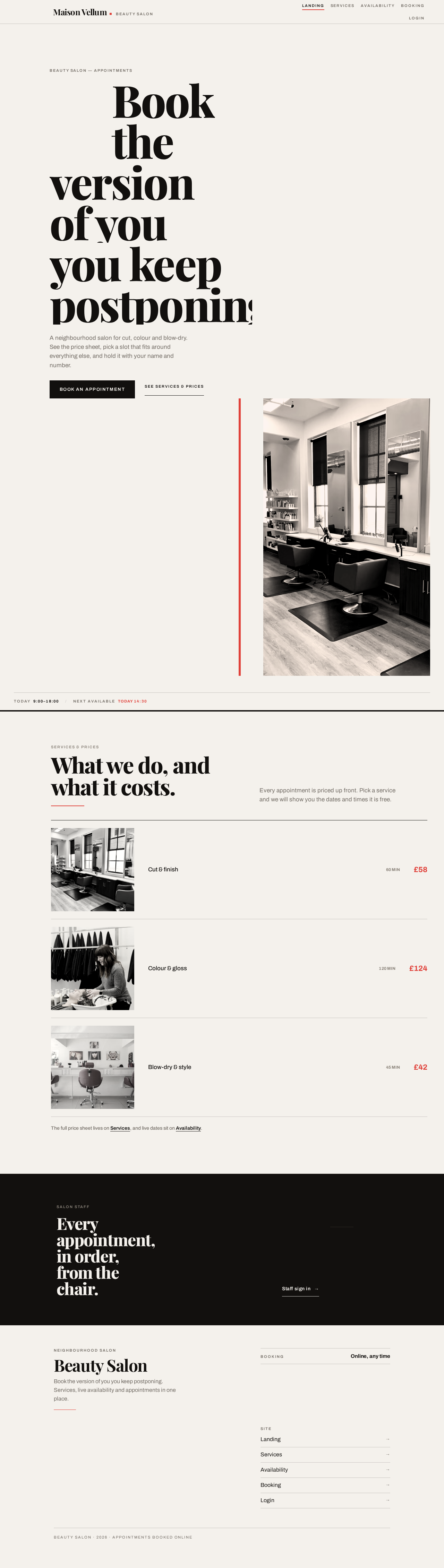
Book theversion of youyou keep postponing.
A neighbourhood salon for cut, colour and blow-dry. See the price sheet, pick a slot that fits around everything else, and hold it with your name and number.


Every appointment, in order, from the chair.
Book theversion of youyou keep postponing.
A neighbourhood salon for cut, colour and blow-dry. See the price sheet, pick a slot that fits around everything else, and hold it with your name and number.
No comments yet. Be the first!