android-4g
 Ricard
Buatkan aplikasi Android buat mengubah jaringan ke 4g

Comments (0)
Sign in to leave a comment
System Requirements
System Requirements Document for android-4g
1. Introduction
android-4g is an Android application that lets an ordinary device owner switch the phone's cellular network mode to 4G. The product intent is narrow and confident: the user opens the app, sees the device's current network state as a precise instrument readout, selects or activates 4G mode, and the app applies the change to the device radio and reports the resulting state.
The audience is ordinary Android owners in Indonesia (project owner: Ricard) — people who are not engineers, who feel a small panic when the signal drops, and who want a one-tap, trustworthy answer rather than a buried settings menu. The app is designed as a precision instrument for the network in your pocket: dark, exact, calm authority, with measured numbers and a single machined control for the 4G switch.
2. System Overview
android-4g is delivered as a custom Android application with three first-party screens — Landing, Status Jaringan, and Mode Jaringan — all reachable without any account or sign-in. The app reads the device's current network mode (2G/3G/4G) and signal information, lets the user select or activate 4G mode, applies the change to the device network settings, and shows the resulting status.
The single active human actor is the Pengguna Android (Android device owner). The device's Android platform and radio subsystem are the non-persona system actors that hold the authoritative network state and execute the mode change; the app requests the required system permission and reflects the platform's result.
The provisioned infrastructure inventory includes a shared FastAPI backend, a MariaDB database, and a React frontend. These services are provisioned scaffolding and do not add product requirements: the accepted product behavior is device-local (reading and changing the Android radio state), and no accepted journey requires application-owned server-side persistence, accounts, or remote data. The backend, database, and frontend remain available as provisioned infrastructure but carry no accepted domain behavior in this release.
Removed from scope
- None — no concepts were explicitly removed by the user.
2a. Product Interpretation and Delivery Boundary
The product is a device-local Android utility. Its authoritative state — the current network mode, operator, band, and signal strength — lives on the user's device and is read and changed through the Android platform. The app is the instrument panel over that state: it presents the reading, offers the 4G control, requests the system permission needed to change network settings, and reports the outcome.
Access is open: every screen is anonymously reachable with no account, no sign-in, and no application-owned identity. There is no durable user-specific state that must be privately owned or resumed across sessions, so no identity establishment or verification journey is required.
Current horizon: reading network status, selecting/activating 4G, applying the change, and displaying the result. Future ideas are not part of this release and are not represented in any current page.
2c. Page Content and Component Coverage
Landing
- Information/state: Product identity (wordmark "android-4g"), a one-line statement of what the app does (mengubah jaringan perangkat ke 4G), who it is for (pemilik perangkat Android), and the current network mode as a live instrument readout. Anonymous, no account state.
- Primary action: Enter the app's network work — proceed to Status Jaringan / Mode Jaringan.
- Supporting actions: Navigate to Status Jaringan; navigate to Mode Jaringan.
- Domain entities: Device network state (current mode: 2G/3G/4G; operator; band; signal dBm).
- Component responsibilities:
- Hero signal dial: circular machined bezel with 60 tick marks, teal live arc, current network mode set large in Saira Condensed inside the dial face.
- Ruled data rows: Operator, Band, Signal, Mode as aligned label/value pairs with 1px hairlines.
- Primary CTA pill "Aktifkan 4G" beneath the data rows.
- Full-width champagne rule with uppercase caption "STATUS JARINGAN PERANGKAT".
- Navigation rail (desktop) / top bar with segmented tick nav (tablet) / stacked single column (mobile).
- States:
- Loading: dial renders with arc at zero and a "Membaca status…" label while the device state is read.
- Empty: if the device state cannot yet be read, dial shows a neutral placeholder and data rows show "—".
- Success: dial arc at live value, mode word rendered, data rows populated.
- Error: if the device state cannot be read, an inline message states the reading failed with a retry control.
- Recovery: retry re-reads device state.
Status Jaringan
- Information/state: The device's current network mode (2G/3G/4G) as the dominant readout, plus operator, band, and signal strength (dBm) as ruled data rows. Reviewable at any time.
- Primary action: Refresh the current network status reading.
- Supporting actions: Navigate to Mode Jaringan to change the mode; return to Landing.
- Domain entities: Device network state (mode, operator, band, signal dBm), last-read timestamp.
- Component responsibilities:
- Large network-mode readout (Saira Condensed 700, dial-legend scale).
- Signal-strength dial with teal arc reflecting current signal.
- Ruled label/value rows for Operator, Band, Signal, Mode.
- Refresh control.
- States:
- Loading: arc at zero, numerals counting up, "Membaca…" caption.
- Empty: no reading available — rows show "—" with an explanatory caption.
- Success: live values displayed; teal arc at live signal.
- Error: reading failed — inline error message with retry.
- Recovery: retry re-reads; on success the arc sweeps once to the new value.
Mode Jaringan
- Information/state: The currently selected network mode and the device's applied mode, shown side by side so the user can see pending vs. applied state. Permission state for changing network settings.
- Primary action: Select 4G (or 2G/3G) via the knurled ring selector and apply the change to the device.
- Supporting actions: Request the required system permission when not yet granted; navigate to Status Jaringan to verify the result.
- Domain entities: Selected mode, applied mode, permission grant state, apply result (success/failure reason).
- Component responsibilities:
- Knurled ring mode selector rotating/clicking through 2G → 3G → 4G with needle-snap confirmation and one amber pulse on the 4G ring.
- Apply control (machined pill toggle) that commits the selected mode to the device.
- Permission prompt surface explaining why the system permission is needed, with a control to request it.
- Result feedback area showing applied mode or failure reason.
- States:
- Loading: selector disabled with a "Menyiapkan…" caption while permission/device state is checked.
- Empty: no mode selected yet — selector at current applied mode.
- Success: applied mode equals selected mode; teal "4G aktif" indicator; single amber pulse on the ring.
- Error — permission denied: message explaining the change cannot be applied without the system permission, with a control to request it again or open system settings.
- Error — device unsupported: message stating the device does not support 4G mode.
- Error — apply failed: message with the platform-reported reason and a retry control.
- Recovery: retry re-applies; re-request permission; return to Status Jaringan to confirm.
3. Functional Requirements
FR-1 — Android platform delivery (explicit) As a Pengguna Android, I should run the app on an Android device, so that I can change my device's network to 4G.
- Trigger: user launches the app on an Android device.
- Observable result: the app opens and presents its network instrument screens.
- Access: anonymous, no account.
- Failure/recovery: if the device does not meet the platform requirement, the app does not present the network work.
- Continuation: proceed to Landing → Status Jaringan / Mode Jaringan.
FR-2 — View current network status (explicit) As a Pengguna Android, I should see the device's current network status, so that I know what mode my device is on before changing it.
- Trigger: user opens Status Jaringan (or Landing, which shows the live readout).
- Input: device network state read from the Android platform.
- Observable result: current mode (2G/3G/4G), operator, band, and signal strength displayed as ruled label/value rows with the mode as the dominant readout.
- Access: anonymous.
- Failure/recovery: if the reading fails, an inline error with a retry control is shown; retry re-reads.
- Continuation: navigate to Mode Jaringan to change the mode.
FR-3 — Select or activate 4G mode (explicit) As a Pengguna Android, I should select or activate 4G mode from the app, so that I can choose the network mode I want.
- Trigger: user rotates/clicks the knurled ring selector on Mode Jaringan to 4G (or 2G/3G).
- Observable result: the selected mode is shown distinctly from the applied mode; the 4G ring gives a needle-snap confirmation and one amber pulse.
- Access: anonymous.
- Failure/recovery: if the device does not support 4G, the 4G option is shown as unavailable with an explanatory caption.
- Continuation: apply the selection (FR-4).
FR-4 — Apply the network change to the device (explicit) As a Pengguna Android, I should have the app apply the selected network mode to my device, so that my device actually switches to 4G.
- Trigger: user activates the apply control on Mode Jaringan with 4G selected.
- Precondition: the required system permission to change network settings has been granted (FR-6).
- Observable result: the device's applied mode becomes 4G; the app shows the applied mode and a teal "4G aktif" indicator.
- Access: anonymous.
- Failure/recovery: if the platform rejects the change, the app shows the failure reason with a retry control; if permission is missing, the app routes to the permission request (FR-6).
- Continuation: user verifies on Status Jaringan.
FR-5 — Display resulting network status after change (explicit) As a Pengguna Android, I should see the resulting network status after the change, so that I can confirm my device is now on 4G.
- Trigger: user opens Status Jaringan after applying a change, or the app refreshes after a successful apply.
- Observable result: the readout reflects the device's current mode (expected 4G) with the signal arc at the live value.
- Access: anonymous.
- Failure/recovery: if the device has not actually switched, the readout shows the actual mode and the user can return to Mode Jaringan to retry.
- Continuation: done, or retry the change.
FR-6 — Grant required system permission (required_inference) As a Pengguna Android, I should grant the system permission the app needs to change network settings, so that the app can apply the 4G change.
- Trigger: user attempts to apply a mode change without the required permission, or the app detects the permission is not granted.
- Observable result: a permission surface explains why the permission is needed and offers a control to request it; on grant, the apply flow continues.
- Access: anonymous.
- Failure/recovery: if the user denies, the app explains the change cannot be applied and offers to request again or open system settings.
- Continuation: return to the apply flow (FR-4).
FR-7 — Device supports 4G mode (required_inference) As a Pengguna Android, I should be told when my device does not support 4G mode, so that I understand why the change cannot be made.
- Trigger: app reads device capabilities and finds 4G unsupported.
- Observable result: the 4G option is shown as unavailable with an explanatory caption; apply is disabled for 4G.
- Access: anonymous.
- Failure/recovery: not applicable — this is the terminal state for unsupported devices.
- Continuation: user may still view status and select supported modes.
4. User Personas
Pengguna Android
- Product context: An ordinary Android device owner in Indonesia who wants their phone on 4G. They are not an engineer; they open the app when the signal feels wrong and want a confident, one-tap answer.
- Primary goal: Get the device onto 4G and see that it worked.
- Distinct accepted responsibilities:
- Read the current network status (mode, operator, band, signal) on Status Jaringan / Landing.
- Select or activate 4G on Mode Jaringan via the knurled ring selector.
- Grant the required system permission when prompted (FR-6).
- Apply the change and confirm the resulting status.
- Relevant inputs or decisions: Which mode to select (2G/3G/4G); whether to grant the system permission; whether to retry after a failure.
- Interactions with other accepted participants: None — the only human actor. The Android platform/radio is the system actor that holds and executes the network state.
- Observable success: The applied mode reads 4G, the teal "4G aktif" indicator is shown, and Status Jaringan confirms 4G with a live signal arc.
- What makes this role distinct: The user is the sole human actor and the device owner; their work is a single read-decide-apply-confirm loop on their own device, with no shared state, no other users, and no account.
5. Core User Flows
Flow A — Check current network status
- Pengguna Android launches the app; Landing opens anonymously.
- The hero dial renders with the arc at zero and "Membaca status…" while the app reads device state.
- The app reads the device network state from the Android platform and the dial sweeps once to the live signal value; the mode word (e.g., "3G") renders in the dial face and the ruled rows populate (Operator, Band, Signal, Mode).
- The user taps the tick nav to Status Jaringan to review the full readout.
- Status Jaringan shows the dominant mode readout, signal dial, and ruled rows with a last-read timestamp.
- If the read fails, an inline error with a retry control appears; the user taps retry and the read repeats.
- Next step: the user proceeds to Mode Jaringan to change the mode.
Flow B — Switch the device to 4G
- From Status Jaringan, the user navigates to Mode Jaringan.
- Mode Jaringan shows the currently applied mode on the knurled ring selector.
- The user rotates/clicks the ring from the current mode through 2G → 3G → 4G; the ring gives a needle-snap confirmation and one amber pulse on the 4G ring.
- The user activates the apply control.
- If the required system permission is not granted, the permission surface explains why it is needed; the user grants it (or denies — see Flow C).
- The app applies the selected mode to the device through the Android platform.
- On success, the applied mode reads 4G and the teal "4G aktif" indicator is shown.
- The user navigates to Status Jaringan; the readout confirms 4G with the signal arc at the live value.
- If the platform rejects the change, the app shows the failure reason with a retry control; the user retries or returns to Status Jaringan to re-check.
Flow C — Recover from a denied permission or failed apply
- On Mode Jaringan, the user attempts to apply 4G but the system permission is denied, or the platform rejects the change.
- The app shows an explanatory message: the change cannot be applied without the permission, or the platform-reported failure reason.
- The user chooses to request the permission again, open system settings, or retry the apply.
- On grant/success, the flow continues at Flow B step 6.
- If the user declines to continue, they return to Status Jaringan, which still shows the actual (unchanged) mode.
Flow D — Unsupported device
- The user opens Mode Jaringan on a device that does not support 4G.
- The app shows the 4G option as unavailable with an explanatory caption and disables apply for 4G.
- The user can still view status on Status Jaringan and select supported modes.
6. Visuals Colors and Theme
Muse: MARQ by Garmin — luxury instrument aesthetic. Headline: Precision instrument for the network in your pocket.
Mode: Dark only.
Colour tokens (exact hex, by role):
- Background (graphite-black ground, ~70% of every screen):
#0E1113 - Surface (titanium-grey raised panels):
#181D21 - Hairline (1px rules, panel borders):
#2A3136 - Text (body copy, values):
#EDEAE4 - Primary (champagne instrument metal — active 4G state, gauge ticks, main CTA fill):
#C8A96A - Accent (teal live-signal — connected/4G-active indicators, signal-strength arc):
#2FBFA8 - Muted (steel — labels, secondary data):
#7C868C
Rules: Never place champagne text on titanium panels below 16px; body copy stays #EDEAE4. Only champagne and teal are accents — no third accent.
Typography:
- Headings: Saira Condensed 600–700, uppercase for instrument labels and readouts, tracking +0.06em.
- Giant network-status word (4G / 3G / 2G): Saira Condensed 700 at enormous scale, reading like a dial legend machined into the bezel.
- Body: Saira 400/500, normal tracking, never condensed.
- Scale (1.25 modular): display 72px mobile → 176px desktop (clamp); h1 36→64; h2 24→36; label 11→12 uppercase; body 15→17; data numerals 28→48 tabular.
Shape language: Circular gauges and bezels dominant — signal-strength dial, 4G mode selector as a knurled ring, pill-shaped machined toggles with a 2px inner bevel. Panel corners 4px (instrument housings, not soft cards). Hairline 1px rules separate ruled data rows. Topographic contour lines as faint background texture at 6% opacity.
Layout: Dark cockpit grid. Desktop (1280px): fixed left rail with vertical wordmark and three nav items as ticks on a ruler; main column asymmetric 8/4 split — oversized dial and status word left, ruled data rows (operator, band, signal dBm, mode) right in aligned label/value pairs. Tablet (768px): rail collapses to a top bar with wordmark and segmented tick nav. Mobile (375px): single column, dial scaled to 88vw, data rows full-width. Section transitions marked by a full-width 1px champagne rule with a small uppercase caption sitting on it.
Imagery: No stock people, no gradient blobs. Macro textures of brushed titanium and sapphire glass as panel fills; topographic contour field behind the hero; custom SVG signal dial with concentric bezel ticks and a needle. Icons are 1.5px stroke technical pictograms (antenna, SIM, band).
Avoid: Blue/indigo primary on white; rounded 20px+ soft cards, glassmorphism, gradient blobs; playful bounce/springy hovers/confetti; stock photography of people holding phones; body text below 15px or champagne text on titanium at small sizes; more than one accent competing with champagne and teal; centred hero with headline + subtext + button stacked; emoji or cartoon icons.
Readability: Headlines, wordmarks, labels, numbers, and controls stay entirely inside the viewport and their container at 375px, 768px, and 1280px, wrapping or scaling (e.g., clamp(...)) to fit; no other element covers them. Decoration and motion may bleed/crop as the direction asks, but never over readable text or controls. With prefers-reduced-motion, provide a usable static arrangement.
7. Signature Design Concept
The public entry (Landing) is a dark full-bleed cockpit. The left 60% is dominated by a 420px (desktop) circular signal dial — a machined champagne bezel with 60 tick marks, a teal live arc, and the current network mode set in Saira Condensed 700 at 176px inside the dial face, reading "4G" in warm champagne. It sits over a faint topographic contour field. To its right, a vertical stack of ruled label/value rows (Operator, Band, Signal, Mode) in muted-steel labels and off-white values, closed by a solid champagne pill CTA "Aktifkan 4G" pinned beneath the rows. A thin horizontal champagne rule with the uppercase caption "STATUS JARINGAN PERANGKAT" anchors the bottom of the hero. No centred headline, no subtext paragraph, no blue button.
The concept recomposes only accepted content and controls: the live network readout, the ruled data rows, and the 4G activation control. It introduces no new behaviour or destination.
8. Interaction Model & Motion Direction
Interaction Model: Animated Motion Tempo: restrained Hero Dimensionality: layered_2d
Landing Hero Motion Brief
- Focal subject: the machined circular signal dial with 60 bezel ticks, teal live arc, and the network-mode word in its face.
- Input → transformation → outcome thesis: on load, the app reads the device network state (input); the signal arc sweeps once from zero to the live value over 900ms with ease-out cubic, numerals count up in tabular figures, and bezel ticks illuminate in sequence (transformation); the dial settles at the live reading with the mode word and ruled rows populated (outcome).
- Motion vocabulary: restrained and mechanical — single arc sweep, tabular numeral count-up, sequential tick illumination, 120ms needle snap and one amber pulse on mode change. No bounce, no particles.
- Composed first frame: dark ground, dial at zero with ticks dim, data rows showing "—", CTA pill in champagne.
- Reduced-motion state: arc and numerals render at final value immediately, with no sweep; ticks are shown lit; all content and controls remain usable and static.
9. Non-Functional Requirements
- Platform: The application targets the Android platform (explicit). It must run on Android devices and use the Android platform APIs to read and change network mode.
- Permission handling: The app must request and respect the Android system permission required to change network settings; without it, the change must not be attempted and the user must be told why (required_inference).
- Device capability awareness: The app must detect whether the device supports 4G and communicate unsupported state rather than failing silently (required_inference).
- Readability and accessibility: Readable text and controls must remain whole and inside the viewport/container at 375px, 768px, and 1280px; body text ≥15px; champagne text never on titanium below 16px;
prefers-reduced-motionhonored with a usable static arrangement (explicit, from creative direction). - Visual identity: Dark-only instrument aesthetic per Section 6; the generic indigo/blue-on-white SaaS template is forbidden (explicit).
- Privacy: No account, no application-owned identity, no server-side persistence of network state is required by any accepted journey (required_inference from access contract).
10. Tech Stack
- Client: Android application (custom UI) implementing the Landing, Status Jaringan, and Mode Jaringan screens; uses Android platform APIs for network state read and mode change, and the Android permission model for the required system permission.
- Provisioned infrastructure (scaffold, no accepted domain behavior in this release):
backend: shared FastAPI process for application APIs and domain modules.database: MariaDB for application-owned persistent data.frontend: React application UI.
- No additional infrastructure is required for the accepted device-local workflows.
11. Assumptions and Constraints
- A-1: The user's Android device exposes the network mode (2G/3G/4G) and signal information through standard Android platform APIs (required_inference).
- A-2: Changing the network mode requires a system permission that the user can grant at runtime; the exact permission name is platform-dependent and resolved at implementation (required_inference).
- A-3: Some devices do not support 4G; the app must handle this gracefully (FR-7) (required_inference).
- A-4: No account, sign-in, or server-side persistence is part of the accepted product; all three pages are anonymously reachable (from page contract).
- A-5: The provisioned backend, database, and frontend services do not add product requirements and carry no accepted domain behavior in this release.
- C-1: The application is for the Android platform (explicit).
- C-2: The visual identity follows the MARQ-inspired dark instrument direction; the indigo/blue-on-white template is forbidden (explicit).
12. Glossary
- 4G: Fourth-generation cellular network mode; the target mode the user wants the device on.
- 2G / 3G: Lower-generation cellular network modes the user can also select.
- Mode Jaringan: The screen where the user selects and applies a network mode.
- Status Jaringan: The screen showing the device's current network status.
- Landing: The anonymous public entry screen.
- Pengguna Android: The sole active human persona — the Android device owner.
- Knurled ring selector: The circular mode selector control (2G → 3G → 4G) with needle-snap confirmation.
- Signal dial: The circular gauge showing signal strength with a teal live arc and 60 bezel ticks.
- dBm: Signal strength unit shown in the ruled data rows.
- Applied mode: The network mode currently active on the device.
- Selected mode: The mode the user has chosen in the selector but not yet applied.
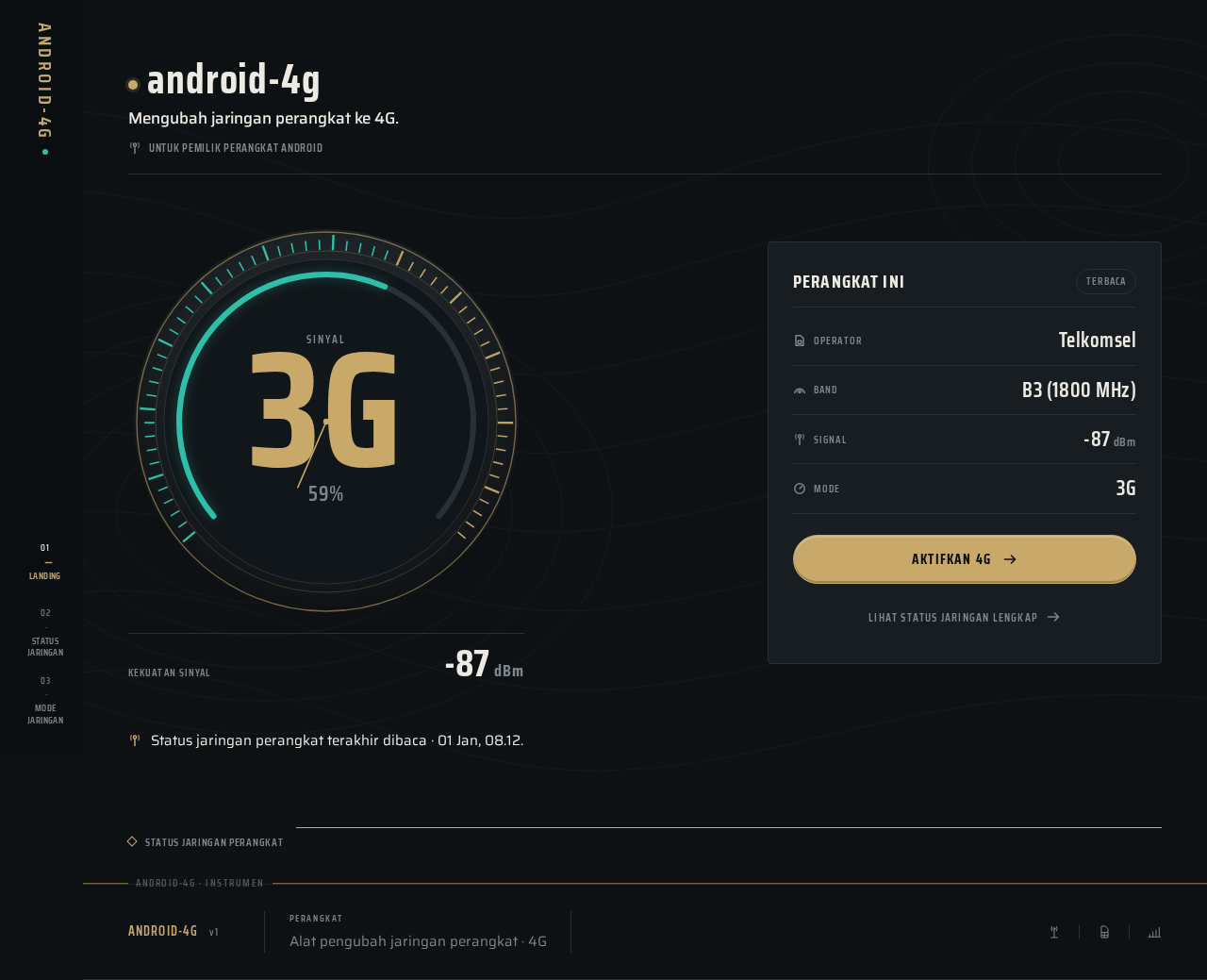
android-4g
Mengubah jaringan perangkat ke 4G.
Untuk pemilik perangkat Android- OperatorTelkomsel
- BandB3 (1800 MHz)
- Signal-87dBm
- Mode3G
android-4g
Mengubah jaringan perangkat ke 4G.
Untuk pemilik perangkat Android- OperatorTelkomsel
- BandB3 (1800 MHz)
- Signal-87dBm
- Mode3G
No comments yet. Be the first!