amber-scanner
 Keval
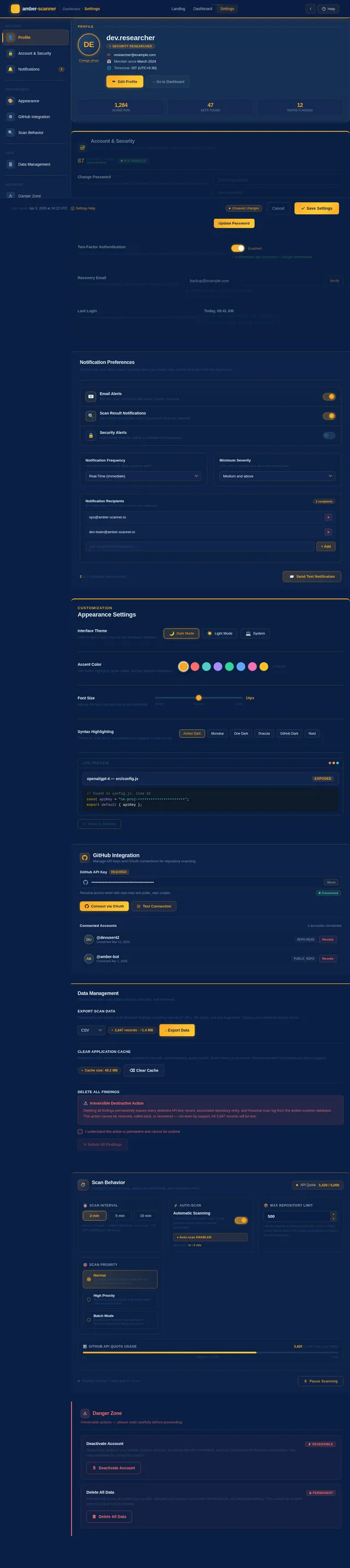
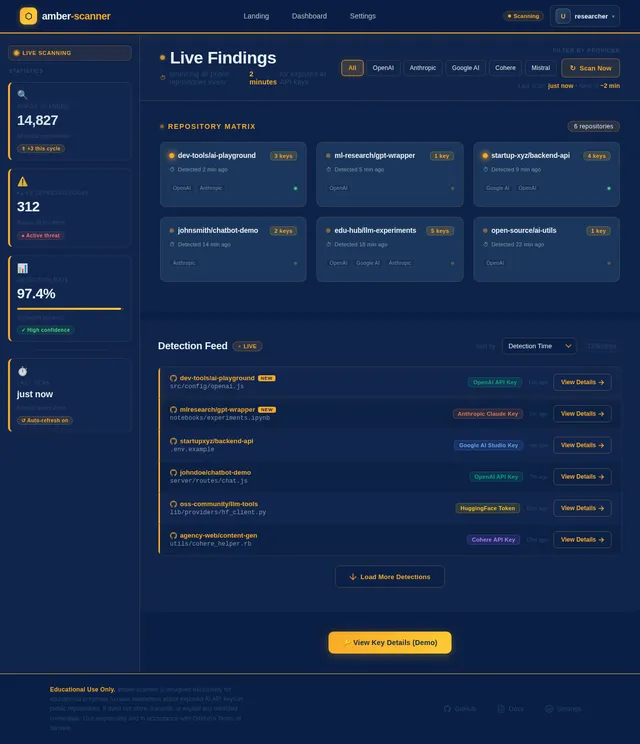
KevalGitHub API Key Scanner Website, Project Overview Create a comprehensive web-based system that scans all public GitHub repositories for exposed AI API keys (OpenAI, Anthropic, Google AI, etc.) in every 2 min and displays the findings on a live dashboard. The system should automatically detect, validate, and display the GitHub repository URL The exact file path and location where the exposed key is detected. (add option to put api key of github to connect)

Comments (0)
Sign in to leave a comment
System Requirements
System Requirements Document (SRD)
amber-scanner
1. Introduction
The amber-scanner project is a web-based system designed to scan all public GitHub repositories for exposed AI API keys (e.g., OpenAI, Anthropic, Google AI, etc.) every two minutes. The system detects, validates, and displays findings on a live dashboard, including the GitHub repository URL, the exact file path, and the location where the exposed key is detected.
This system is intended strictly for educational purposes, aiming to raise awareness about the risks of exposed API keys and to demonstrate practical methods for detecting and mitigating such risks. It is not intended for malicious use or unauthorized access to sensitive data.
This document outlines the system's requirements, features, and design considerations to ensure clarity and alignment with the project's goals.
2. System Overview
The amber-scanner system operates as an educational tool to demonstrate the importance of securing API keys in public repositories. It autonomously scans public GitHub repositories at regular intervals (every two minutes) and provides a live dashboard for users to view the results.
Key features include:
- Automated scanning of public GitHub repositories.
- Validation of detected API keys to confirm their authenticity.
- Display of findings, including repository URL, file path, and key location, on a live dashboard.
- Option for users to input their GitHub API key to connect and customize scanning.
The system is designed for educational purposes and is not intended for commercial use or to infringe on the privacy of GitHub users.
3. Functional Requirements
As User:
- I should be able to view a live dashboard displaying exposed API keys detected in public GitHub repositories.
- I should be able to see details such as the repository URL, file path, and location of the exposed key.
- I should be able to input my GitHub API key to connect and customize scanning.
As System:
- The system should scan all public GitHub repositories every two minutes for exposed AI API keys.
- The system should validate detected API keys to confirm their authenticity.
- The system should display findings in real-time on the dashboard.
4. User Personas
-
Student/Developer
- Description: Individuals learning about secure coding practices and API key management.
- Goals: Understand the risks of exposed API keys and learn how to detect and mitigate such risks.
- Interactions: View the live dashboard, input GitHub API keys for customized scanning.
-
Educator/Trainer
- Description: Professionals teaching secure coding practices and cybersecurity awareness.
- Goals: Use the system as a teaching tool to demonstrate real-world consequences of exposed API keys.
- Interactions: Monitor the dashboard, guide students through the scanning process.
5. Visuals Colors and Theme
Unique Color Palette for amber-scanner:
- Background:
#0A1F44(Deep Navy Blue) - Surface:
#142850(Dark Blue) - Text:
#E8F1F2(Soft White) - Accent:
#F9A826(Vibrant Amber) - Muted Tones:
#27496D(Muted Blue-Grey)
This palette reflects a professional yet engaging aesthetic, with amber accents symbolizing the project's name and purpose.
6. Signature Design Concept
Interactive "Code Matrix" Dashboard
The homepage/landing page will feature an animated "code matrix" background that mimics the look of scrolling code snippets. These snippets will dynamically update to show real-time scanning activity, such as repository names and detected API keys (obfuscated for privacy).
Key features of the design:
- Interactive Repository Map: A central, interactive map of the GitHub ecosystem, where users can hover over nodes (representing repositories) to see scanning activity and results.
- Key Detection Animation: When an exposed key is detected, a glowing amber highlight will pulse on the map, drawing attention to the affected repository.
- Dynamic Stats Panel: A sidebar will display real-time statistics, such as the number of repositories scanned, keys detected, and common file types where keys are exposed.
- Micro-interactions: Hover effects on buttons and links will create a ripple effect in the amber accent color.
This design will create an immersive and visually striking experience, making the educational purpose of the system both engaging and memorable.
7. Non-Functional Requirements
- Performance: The system should scan all public GitHub repositories within a two-minute interval without significant delays.
- Scalability: The system should handle increased scanning loads as the number of public repositories grows.
- Security: User-provided GitHub API keys should be securely stored and encrypted.
- Reliability: The system should maintain 99.9% uptime to ensure consistent scanning and dashboard availability.
- Localization: The system should support the Indian timezone (IST) for scheduling and timestamps.
8. Tech Stack
Frontend:
- React for Web
Backend:
- Python
- FastAPI
Database:
- MySQL (with Alembic for migrations)
AI Models:
- GPT 5.4 for user-friendly responses
AI Tools:
- Langchain
- Litellm for LLM Routing
Orchestration:
- Docker
- Kubernetes
9. Assumptions and Constraints
- The system will only scan public GitHub repositories and will not access private repositories.
- The system is intended for educational purposes only and should not be used for malicious activities.
- Users must provide their own GitHub API key for customized scanning.
- The system will operate in the Indian timezone (IST) by default.
10. Glossary
- API Key: A unique identifier used to authenticate requests associated with a specific application or user.
- GitHub Repository: A storage space on GitHub where project files are stored and managed.
- Dashboard: A user interface that provides real-time data and insights.
- IST: Indian Standard Time, the time zone used in India (UTC+5:30).
- Educational Purpose: The use of the system solely for learning and awareness, without any commercial or malicious intent.

Detect Exposed API Keys Across Every Public Repository
amber-scanner continuously monitors public GitHub repositories every two minutes, detecting and validating exposed AI API keys in real time. Built for education, designed for awareness.
Core Capabilities
Three powerful pillars working together to detect, validate, and educate about exposed API keys across the GitHub ecosystem.
- Automated 2-minute scan intervals
- Multi-provider key pattern detection
- Live repository monitoring
- Authentic key verification
- False positive elimination
- Precise file path location
- Interactive findings explorer
- Real-time statistics & trends
- Guided learning experience
Repository Scan Map
Interactive visualization of the GitHub ecosystem. Hover over nodes to explore scanning activity and detection results in real time.
Real-Time Statistics
Live14,832
Repositories Scanned
2,461
Keys Detected
98.6%
Detection Rate
< 2 min
Last Scan Time
Auto-updates every 2 minutes · Last refreshed just now
Real-Time Findings
Recently detected exposed API keys across public GitHub repositories. Updated every 2 minutes.
| Repository | File Path | Key Type | Detected | Status |
|---|---|---|---|---|
| acme-corp/ml-pipeline | src/config/api_keys.py | OpenAI | 12 sec ago | Active Exposure |
| devteam/chatbot-v2 | .env.production | Anthropic | 34 sec ago | Active Exposure |
| janedoe/research-assistant | config/settings.json | 1 min ago | Validating... | |
| startup-io/backend-api | deploy/docker-compose.yml | AWS | 2 min ago | Active Exposure |
| open-labs/data-toolkit | notebooks/train_model.ipynb | OpenAI | 3 min ago | Revoked |
| cloud9/payment-service | src/stripe_handler.js | Stripe | 4 min ago | Active Exposure |
| uni-project/nlp-demo | app/utils/constants.py | HuggingFace | 5 min ago | Validating... |
| techbro/saas-boilerplate | server/config.ts | Anthropic | 6 min ago | Active Exposure |
Showing 1–8 of 20 findings
Who Is amber-scanner For?
Designed for learners and educators who want to understand API key security through real-world scanning and detection.
Individuals learning about secure coding practices and API key management. Explore real-world examples of exposed keys and understand how to protect your own projects.
- Understand the risks of exposed API keys in public repositories
- Learn practical detection techniques for key leakage
- Master mitigation strategies like environment variables and secret managers
Professionals teaching secure coding practices and cybersecurity awareness. Use amber-scanner as a live teaching tool to demonstrate real-world consequences of exposed API keys.
- Demonstrate real-world consequences of API key exposure
- Provide hands-on learning experiences for students
- Build curriculum around practical security scanning workflows
Built for Learning, Not Exploitation
amber-scanner exists to educate developers and security professionals about the risks of exposed API keys. Our three-pillar approach transforms awareness into actionable knowledge.
Security Awareness
Understand the real-world risks of exposed API keys in public repositories and why securing credentials is critical for every developer.
- Learn how API keys get accidentally committed to public repos
- Explore the consequences of exposed credentials in production
- Understand attack vectors targeting leaked keys
Hands-On Learning
Experience live scanning of public GitHub repositories in real-time, observing how amber-scanner detects and validates exposed AI API keys.
- Watch real-time scanning across public repositories every 2 minutes
- See detection of OpenAI, Anthropic, and Google AI keys in action
- Interact with the live dashboard to explore findings and file paths
Practical Mitigation
Go beyond detection — learn actionable strategies to prevent API key exposure and secure your projects using industry best practices.
- Implement environment variable management and .gitignore patterns
- Set up pre-commit hooks to catch secrets before they ship
- Adopt key rotation policies and secret management tools
Strictly for educational purposes. amber-scanner is designed to raise awareness about API key security, not to facilitate unauthorized access. All detected keys are displayed responsibly, and the system is intended as a teaching tool for students, developers, and educators.
Start Discovering Exposed API Keys in Real Time
Connect your GitHub account and explore how AI API keys are inadvertently exposed across public repositories. Learn to identify, validate, and mitigate security risks through hands-on scanning.
Strictly for educational purposes. No private repositories are accessed.
Frequently Asked Questions
Everything you need to know about amber-scanner, its purpose, and how to get started.
amber-scanner is an educational tool that scans public GitHub repositories every two minutes for exposed AI API keys from providers like OpenAI, Anthropic, and Google AI. It detects, validates, and displays findings on a live dashboard, including repository URLs, file paths, and key locations. The project exists to raise awareness about the risks of accidentally committing secrets to public repositories.
Absolutely not. amber-scanner is designed strictly for educational purposes — to help developers and educators understand the real-world consequences of exposed API keys. All detected keys are partially obfuscated on the dashboard, and the system does not attempt to use or exploit any discovered credentials. Our goal is awareness and prevention, not exploitation.
The system performs automated scans of public GitHub repositories every two minutes. Each scan cycle searches for patterns matching common AI API key formats, validates detected keys to confirm authenticity, and pushes results to the real-time dashboard. All timestamps are displayed in IST (Indian Standard Time) by default.
Navigate to the Settings page and enter your personal GitHub API token. This allows amber-scanner to perform customized scans with higher rate limits and access to your preferred repositories. Your key is encrypted and stored securely — it is never exposed or logged.
- Go to Settings → API Configuration
- Paste your GitHub personal access token
- Click "Validate & Connect" to verify access
- Your custom scan results appear on the Dashboard
amber-scanner currently detects exposed keys from major AI service providers, including:
sk-...— OpenAI API keyssk-ant-...— Anthropic API keysAIza...— Google AI / Gemini keys- Cohere, Hugging Face, Stability AI, and other providers
Each detected key is validated against the respective provider’s endpoint to confirm whether it is active or expired.
No. amber-scanner only scans publicly accessible GitHub repositories. It operates entirely within the scope of GitHub’s public API and does not attempt to access, index, or scan private repositories, organizations, or gists. When you provide your own GitHub API key, it is used solely to increase rate limits for public repo scanning.
The primary users are:
- Students & Developers — Learning about secure coding practices, API key management, and how to detect and mitigate key exposure.
- Educators & Trainers — Using the live dashboard as a teaching tool to demonstrate real-world consequences of exposed secrets in public code.
If you discover that one of your API keys has been exposed, take these steps immediately:
- Revoke the exposed key from your provider’s dashboard
- Generate a new key and update your applications
- Remove the key from your Git history using tools like BFG Repo-Cleaner
- Use environment variables or secret managers (e.g., .env files with .gitignore) going forward
amber-scanner is here to help you catch these mistakes early and learn from them.
No comments yet. Be the first!