amber-scanner
 Keval
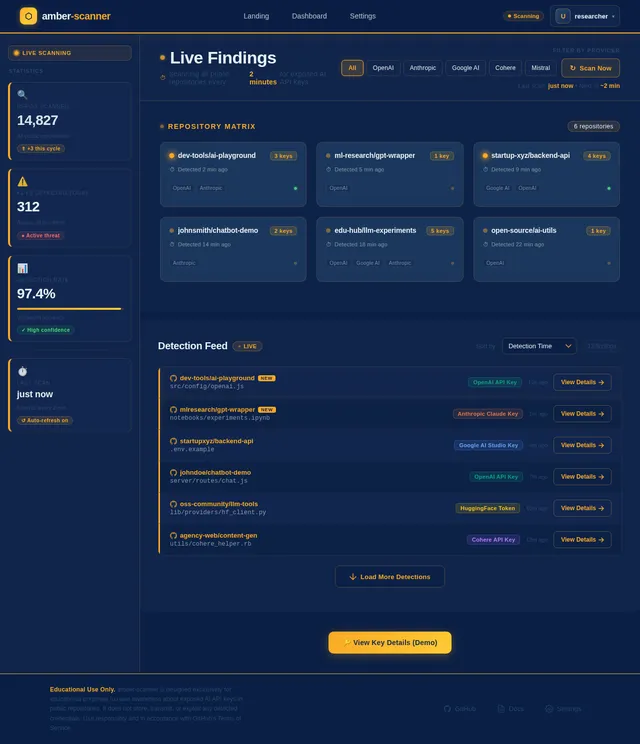
GitHub API Key Scanner Website, Project Overview Create a comprehensive web-based system that scans all public GitHub repositories for exposed AI API keys (OpenAI, Anthropic, Google AI, etc.) in every 2 min and displays the findings on a live dashboard. The system should automatically detect, validate, and display the GitHub repository URL The exact file path and location where the exposed key is detected. (add option to put api key of github to connect)

Comments (0)
Sign in to leave a comment
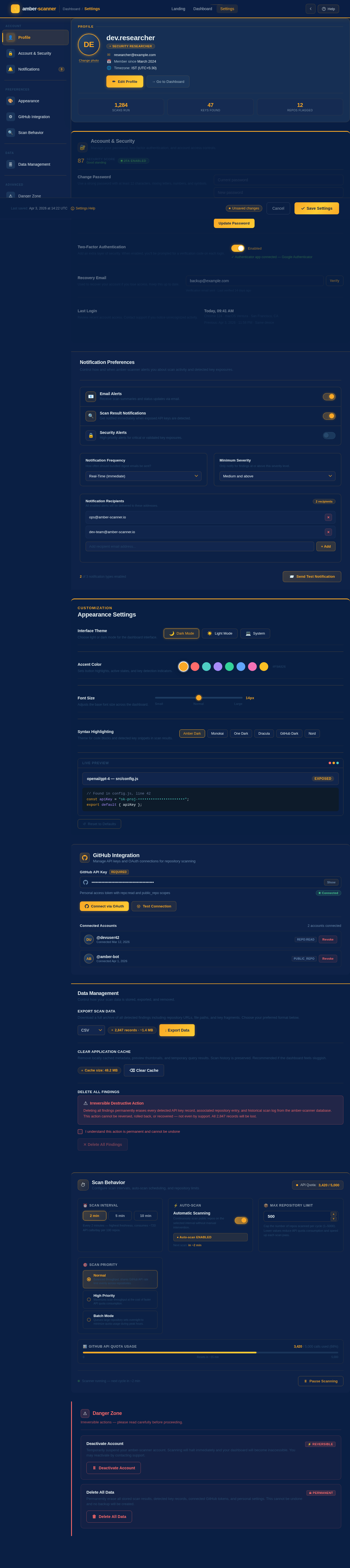
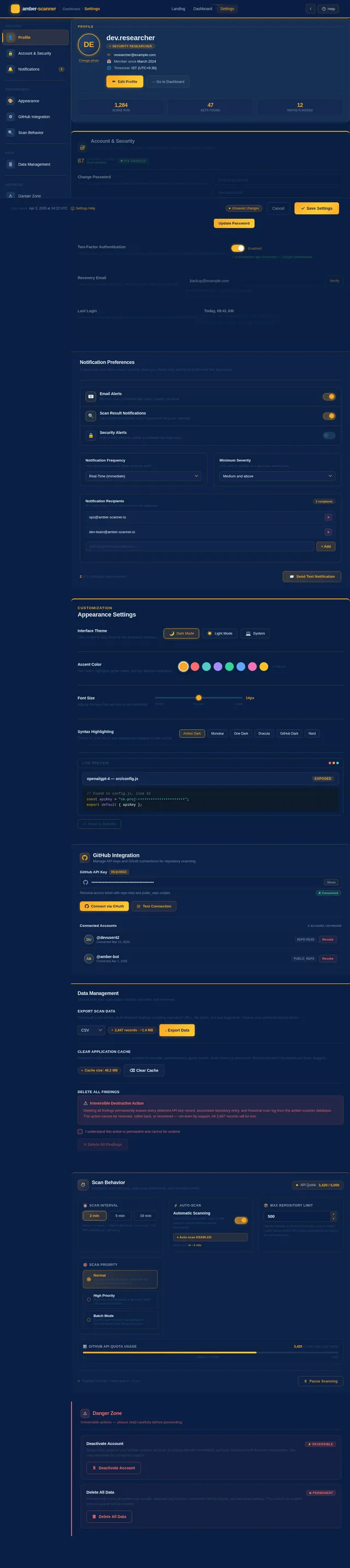
Profile
Account & Security
Manage your password, two-factor authentication, and account access controls.
Change Password
Use a strong password with at least 12 characters, mixing letters, numbers, and symbols.
Two-Factor Authentication
Add an extra layer of security. When enabled, you'll be prompted for a verification code on each login.
✓ Authenticator app connected — Google Authenticator
Recovery Email
Used to recover your account if you lose access. Keep this up to date.
Verification email sent · Last verified 14 days ago
Last Login
Review recent account access. Contact support if you notice unrecognized activity.
Notification Preferences
Control how and when amber-scanner alerts you about scan activity and detected key exposures.
Email Alerts
Receive scan summaries and status updates via email.
Scan Result Notifications
Get notified immediately when exposed API keys are detected.
Security Alerts
High-priority alerts for critical or validated key exposures.
Notification Frequency
How often should bundled digest emails be sent?
Minimum Severity
Only notify for findings at or above this severity level.
Notification Recipients
All enabled alerts will be delivered to these addresses.
Customization
Appearance Settings
Interface Theme
Choose light or dark mode for the dashboard interface.
Accent Color
Sets button highlights, active states, and key detection indicators.
Font Size
Adjusts the base font size across the dashboard.
Syntax Highlighting
Theme for code blocks and detected key snippets in scan results.
GitHub Integration
Manage API keys and OAuth connections for repository scanning
@devuser42
@amber-bot
Data Management
Control how your scan data is stored, exported, and removed.
Deleting all findings permanently erases every detected API key record, associated repository entry, and historical scan log from the amber-scanner database. This action cannot be reversed, rolled back, or recovered — not even by support. All 2,847 records will be lost.
Scan Behavior
Configure scan intervals, auto-scan scheduling, and repository limits
Every 2 minutes — highest freshness, consumes ~720 API calls/day per 100 repos.
Cap the number of repos scanned per cycle (1–5000). Lower values reduce API quota consumption and speed up each scan pass.
Danger Zone
Irreversible actions — please read carefully before proceeding.
Deactivate Account
Temporarily suspend your amber-scanner account. Scanning will halt immediately and your dashboard will become inaccessible. You may reactivate by contacting support.
Delete All Data
Permanently erase all stored scan results, detected key records, connected GitHub tokens, and personal settings. This cannot be undone and no backup will be created.

Detect Exposed API Keys Across Every Public Repository
amber-scanner continuously monitors public GitHub repositories every two minutes, detecting and validating exposed AI API keys in real time. Built for education, designed for awareness.
Core Capabilities
Three powerful pillars working together to detect, validate, and educate about exposed API keys across the GitHub ecosystem.
- Automated 2-minute scan intervals
- Multi-provider key pattern detection
- Live repository monitoring
- Authentic key verification
- False positive elimination
- Precise file path location
- Interactive findings explorer
- Real-time statistics & trends
- Guided learning experience
Repository Scan Map
Interactive visualization of the GitHub ecosystem. Hover over nodes to explore scanning activity and detection results in real time.
Real-Time Statistics
Live14,832
Repositories Scanned
2,461
Keys Detected
98.6%
Detection Rate
< 2 min
Last Scan Time
Auto-updates every 2 minutes · Last refreshed just now
Real-Time Findings
Recently detected exposed API keys across public GitHub repositories. Updated every 2 minutes.
| Repository | File Path | Key Type | Detected | Status |
|---|---|---|---|---|
| acme-corp/ml-pipeline | src/config/api_keys.py | OpenAI | 12 sec ago | Active Exposure |
| devteam/chatbot-v2 | .env.production | Anthropic | 34 sec ago | Active Exposure |
| janedoe/research-assistant | config/settings.json | 1 min ago | Validating... | |
| startup-io/backend-api | deploy/docker-compose.yml | AWS | 2 min ago | Active Exposure |
| open-labs/data-toolkit | notebooks/train_model.ipynb | OpenAI | 3 min ago | Revoked |
| cloud9/payment-service | src/stripe_handler.js | Stripe | 4 min ago | Active Exposure |
| uni-project/nlp-demo | app/utils/constants.py | HuggingFace | 5 min ago | Validating... |
| techbro/saas-boilerplate | server/config.ts | Anthropic | 6 min ago | Active Exposure |
Showing 1–8 of 20 findings
Who Is amber-scanner For?
Designed for learners and educators who want to understand API key security through real-world scanning and detection.
Individuals learning about secure coding practices and API key management. Explore real-world examples of exposed keys and understand how to protect your own projects.
- Understand the risks of exposed API keys in public repositories
- Learn practical detection techniques for key leakage
- Master mitigation strategies like environment variables and secret managers
Professionals teaching secure coding practices and cybersecurity awareness. Use amber-scanner as a live teaching tool to demonstrate real-world consequences of exposed API keys.
- Demonstrate real-world consequences of API key exposure
- Provide hands-on learning experiences for students
- Build curriculum around practical security scanning workflows
Built for Learning, Not Exploitation
amber-scanner exists to educate developers and security professionals about the risks of exposed API keys. Our three-pillar approach transforms awareness into actionable knowledge.
Security Awareness
Understand the real-world risks of exposed API keys in public repositories and why securing credentials is critical for every developer.
- Learn how API keys get accidentally committed to public repos
- Explore the consequences of exposed credentials in production
- Understand attack vectors targeting leaked keys
Hands-On Learning
Experience live scanning of public GitHub repositories in real-time, observing how amber-scanner detects and validates exposed AI API keys.
- Watch real-time scanning across public repositories every 2 minutes
- See detection of OpenAI, Anthropic, and Google AI keys in action
- Interact with the live dashboard to explore findings and file paths
Practical Mitigation
Go beyond detection — learn actionable strategies to prevent API key exposure and secure your projects using industry best practices.
- Implement environment variable management and .gitignore patterns
- Set up pre-commit hooks to catch secrets before they ship
- Adopt key rotation policies and secret management tools
Strictly for educational purposes. amber-scanner is designed to raise awareness about API key security, not to facilitate unauthorized access. All detected keys are displayed responsibly, and the system is intended as a teaching tool for students, developers, and educators.
Start Discovering Exposed API Keys in Real Time
Connect your GitHub account and explore how AI API keys are inadvertently exposed across public repositories. Learn to identify, validate, and mitigate security risks through hands-on scanning.
Strictly for educational purposes. No private repositories are accessed.
Frequently Asked Questions
Everything you need to know about amber-scanner, its purpose, and how to get started.
amber-scanner is an educational tool that scans public GitHub repositories every two minutes for exposed AI API keys from providers like OpenAI, Anthropic, and Google AI. It detects, validates, and displays findings on a live dashboard, including repository URLs, file paths, and key locations. The project exists to raise awareness about the risks of accidentally committing secrets to public repositories.
Absolutely not. amber-scanner is designed strictly for educational purposes — to help developers and educators understand the real-world consequences of exposed API keys. All detected keys are partially obfuscated on the dashboard, and the system does not attempt to use or exploit any discovered credentials. Our goal is awareness and prevention, not exploitation.
The system performs automated scans of public GitHub repositories every two minutes. Each scan cycle searches for patterns matching common AI API key formats, validates detected keys to confirm authenticity, and pushes results to the real-time dashboard. All timestamps are displayed in IST (Indian Standard Time) by default.
Navigate to the Settings page and enter your personal GitHub API token. This allows amber-scanner to perform customized scans with higher rate limits and access to your preferred repositories. Your key is encrypted and stored securely — it is never exposed or logged.
- Go to Settings → API Configuration
- Paste your GitHub personal access token
- Click "Validate & Connect" to verify access
- Your custom scan results appear on the Dashboard
amber-scanner currently detects exposed keys from major AI service providers, including:
sk-...— OpenAI API keyssk-ant-...— Anthropic API keysAIza...— Google AI / Gemini keys- Cohere, Hugging Face, Stability AI, and other providers
Each detected key is validated against the respective provider’s endpoint to confirm whether it is active or expired.
No. amber-scanner only scans publicly accessible GitHub repositories. It operates entirely within the scope of GitHub’s public API and does not attempt to access, index, or scan private repositories, organizations, or gists. When you provide your own GitHub API key, it is used solely to increase rate limits for public repo scanning.
The primary users are:
- Students & Developers — Learning about secure coding practices, API key management, and how to detect and mitigate key exposure.
- Educators & Trainers — Using the live dashboard as a teaching tool to demonstrate real-world consequences of exposed secrets in public code.
If you discover that one of your API keys has been exposed, take these steps immediately:
- Revoke the exposed key from your provider’s dashboard
- Generate a new key and update your applications
- Remove the key from your Git history using tools like BFG Repo-Cleaner
- Use environment variables or secret managers (e.g., .env files with .gitignore) going forward
amber-scanner is here to help you catch these mistakes early and learn from them.
No comments yet. Be the first!