hardy-ai
 Het Shah
Statement of Work (SOW) Srijan Science AI – Vertical RAG System Client: Srijan Publishers Pvt. Ltd. Project: Science AI Assistant for Classes 6–10 Delivery Type: Fixed-Price MVP Pilot Platform: Web Application (PWA) 1. Project Overview Srijan Publishers intends to develop an AI-powered educational assistant designed specifically for its Science textbook series (Classes 6–10). The system will leverage Retrieval Augmented Generation (RAG) to ensure that all responses are strictly grounded in Srijan’s proprietary textbook content. The goal is to create a secure, reliable AI assistant that helps: Students resolve doubts while studying. Teachers generate explanations, examples, and teaching support materials. The system will operate on approximately 80–90 chapters across multiple science textbooks and will be accessible through a web-based Progressive Web Application (PWA). This MVP will serve as a pilot implementation before potential full-scale deployment across the entire product ecosystem. 2. Project Objectives The objectives of the Srijan Science AI system are: Build a Vertical RAG system grounded only in Srijan’s textbook content. Provide accurate scientific answers aligned with textbook explanations. Support LaTeX / MathJax rendering for physics and chemistry formulas. Ensure complete data privacy and sovereignty for proprietary textbook content. Provide a user-friendly PWA interface accessible through QR codes. 3. Scope of Work The project will include the following components. 3.1 Data Ingestion & Processing The system will ingest the Science textbooks (Classes 6–10) and convert them into structured knowledge for AI retrieval. Tasks • PDF ingestion and parsing • Text extraction from textbook chapters • Identification of sections, headings, diagrams, and formulas • Chunking of content into retrievable knowledge segments • Embedding generation for semantic search Deliverable A structured knowledge base of all textbook chapters ready for AI retrieval. 3.2 RAG-Based AI Engine The core of the system will be a Retrieval Augmented Generation architecture. Functionality When a user asks a question: The system retrieves the most relevant textbook content The AI generates an answer only from retrieved content The system displays source references Key Features • Strict grounding in textbook PDFs • No external internet knowledge usage • Context-aware responses • Source citations from textbooks 3.3 LaTeX / Scientific Formula Rendering Science content requires accurate representation of formulas. The system will support: • LaTeX • MathJax • Chemical formulas • Physics equations • Mathematical expressions Examples: Physics: E = mc² Chemistry: H₂SO₄ 3.4 Web Application (PWA) A Progressive Web Application will be developed for easy access. Features • QR-code based access from textbooks • Student chat interface • Teacher assistance tools • Response rendering with formulas Advantages • Works like a mobile app without installation • Accessible across devices • Lightweight and fast 3.5 Teacher Assistance Features Teachers will be able to use the system to: • Generate explanations of textbook concepts • Create practice questions • Generate summaries of chapters • Get examples for classroom teaching All generated content will remain grounded in textbook materials. 3.6 Security & Data Sovereignty The system will be deployed on a private cloud infrastructure. Security Features • Encrypted document storage • Role-based access control • Secure APIs • No external model training using proprietary content The client retains complete ownership of all data and content. 4. System Architecture (High-Level) The system will consist of the following components: Data Layer Textbook PDF storage Document processing pipeline Vector database AI Layer Embedding models Retrieval system LLM generation layer Application Layer Web-based PWA interface Student and teacher UI Infrastructure Layer Private cloud deployment Secure APIs Monitoring and logging 5. Technology Stack (Proposed) AI / RAG Layer • Python • LangChain / LlamaIndex • OpenAI / Claude • Vector Database (Weaviate / Pinecone / FAISS) Backend • FastAPI Frontend • ReactJS / NextJS Scientific Rendering • MathJax • KaTeX Infrastructure • AWS / Azure / Private Cloud • Docker containers • Kubernetes (optional scaling)
Comments (0)
Sign in to leave a comment
Project Tasks20
Implement Data Ingestion Pipeline
As a data engineer, I want to build a data ingestion pipeline that processes Srijan textbook PDFs into a structured vector knowledge base. Implement: PDF ingestion and parsing for Classes 6-10 science textbooks, text extraction with section/heading/formula identification, content chunking strategy for optimal retrieval segments, embedding generation using sentence transformers, and indexing into WeaviateDB vector store with metadata (class, chapter, section, page). Deliverable: fully indexed knowledge base of ~80-90 chapters ready for semantic retrieval.
Implement Theme & Design System
As a frontend developer, I want to implement the global color palette, typography, design tokens, and component primitives (buttons, cards, inputs, badges) based on the hardy-ai design system. Primary: Deep Blue (#003366), Secondary: Bright Orange (#FF6600), Accent: Light Gray (#F2F2F2). Set up CSS custom properties, Inter font, glassmorphism utilities, and animated background canvas (navy-to-midnight gradient with drifting LaTeX fragments). Remove scaffold pages not needed in the final product. This task must be completed before all page implementation tasks.
Implement Analytics API Backend
As an admin, I want to use the backend API to monitor system performance and usage analytics. Implement FastAPI endpoints: GET /api/admin/analytics/overview (concurrent users, total queries, uptime), GET /api/admin/analytics/usage (per-day/week query volume, top topics, formula render counts), GET /api/admin/analytics/performance (avg response time, error rates). Integrate with application logging and metrics collection.
Implement User Management API
As an admin, I want to use the backend API to manage user roles and access control. Implement FastAPI endpoints: GET /api/admin/users (list all users with roles/status), PUT /api/admin/users/{id}/role (assign Student/Teacher/Admin role), PUT /api/admin/users/{id}/access (enable/disable access), DELETE /api/admin/users/{id}. Implement role-based access control (RBAC) middleware ensuring only Admin role can access these endpoints. Include pagination and search/filter support.
Implement RAG Pipeline & AI Engine
As a user, I want the AI engine to retrieve relevant textbook content and generate strictly grounded answers using RAG architecture. Implement: LangChain RAG pipeline with LiteLLM router (GPT/Claude), WeaviateDB vector store integration for semantic retrieval, context-aware response generation with source citation injection, strict grounding enforcement (no external knowledge), LaTeX formula detection and passthrough in responses. Support chunked retrieval across all Classes 6-10 science chapters (80-90 chapters).
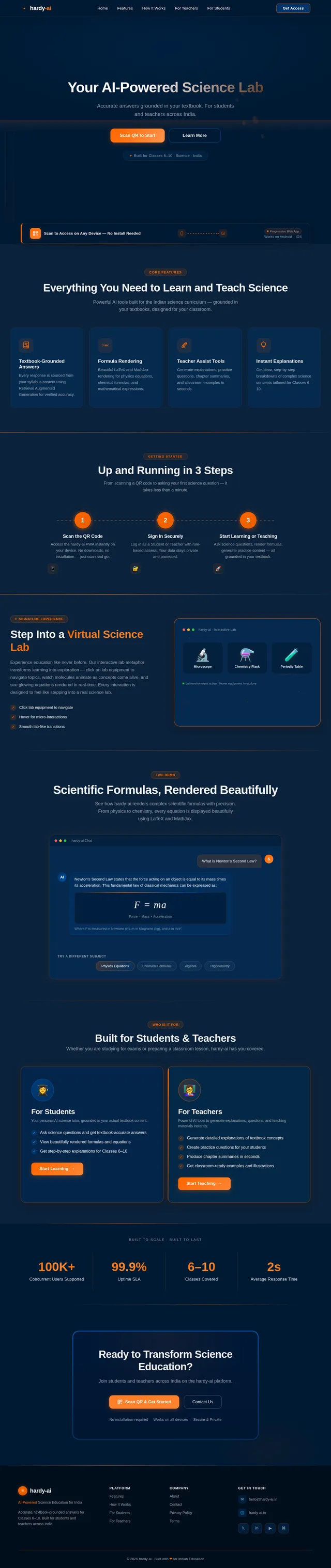
Build Landing Page
As a user, I want to experience the Interactive Science Lab landing page so I can scan a QR code to access the PWA. Implement the full Landing (v2) design including: animated 3D science lab background with floating molecules and LaTeX equations, NavBar with frosted glass, HeroLab full-viewport section, QRAccessBanner, FeatureHighlights (4 cards), HowItWorks (3-step stepper), InteractiveLabShowcase (two-column with lab mockup), FormulaRenderingDemo (live LaTeX demo), UserPersonaCards (Student/Teacher), TrustAndStats, CallToAction, and Footer. All sections based on existing JSX designs.
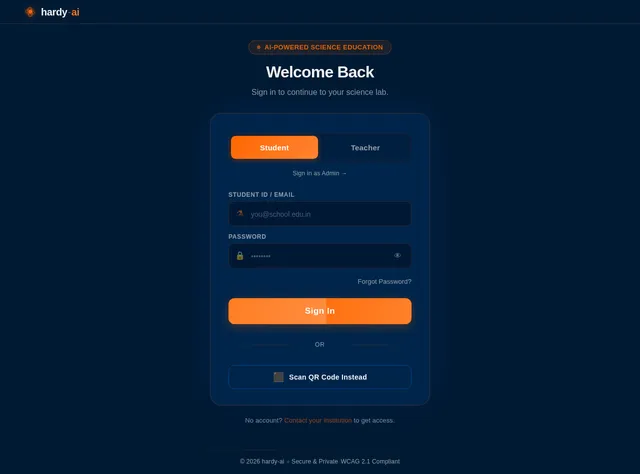
Build Login Page
As a user, I want to sign in to hardy-ai so I can access the Student or Teacher dashboard. Implement the Login (v2) design including: LoginTopBar with glowing atom logotype, LoginHero with welcome badge and headline, LoginCard with role selector pill toggle (Student/Teacher), email/password inputs with icons, forgot password link, Sign In CTA button with orange gradient, QR code alternative login option, and LoginFooterStrip. Connects to: Landing (entry) → Home (on success). Integrate with existing authentication backend.
Implement Teacher Assist API
As a teacher, I want to use the backend API to generate explanations, practice questions, chapter summaries, and classroom examples grounded in textbook content. Implement FastAPI endpoints: POST /api/assist/explanation, POST /api/assist/questions (with difficulty param: easy/medium/hard), POST /api/assist/summary (with length param: brief/detailed), POST /api/assist/examples. GET /api/assist/history (retrieve session generation history). All endpoints must use RAG pipeline strictly grounded in Srijan textbook content. Support LaTeX output in generated content.
Implement Chat API Backend
As a user, I want to use the backend API to ask science questions and receive RAG-grounded answers from textbook content. Implement FastAPI endpoints: POST /api/chat/message (accepts question + session context, returns AI-generated answer with source citations), GET /api/chat/sessions (list user's chat sessions), POST /api/chat/sessions (create new session), GET /api/chat/sessions/{id}/messages (retrieve message history). Integrate with LiteLLM router and LangChain RAG pipeline. Responses must include LaTeX-formatted formulas where applicable.
Build Admin Dashboard Page
As an admin, I want to view system analytics and monitor platform usage from a centralized dashboard. Implement the Dashboard (v1) design including: usage analytics charts, concurrent user metrics, system performance indicators, and activity summaries. Admin flow: Login → Dashboard → View Analytics → Monitor Usage. Connects to Users page for role management.
Implement PWA & QR Code Access
As a user, I want to access hardy-ai as a PWA via QR code scan so I can use it on any device without installation. Implement: Web App Manifest with hardy-ai branding, Service Worker for offline caching of static assets, QR code generation linked to the PWA landing URL, install prompt handling, and mobile viewport optimization. Ensure WCAG 2.1 compliance. Test on Android and iOS browsers.
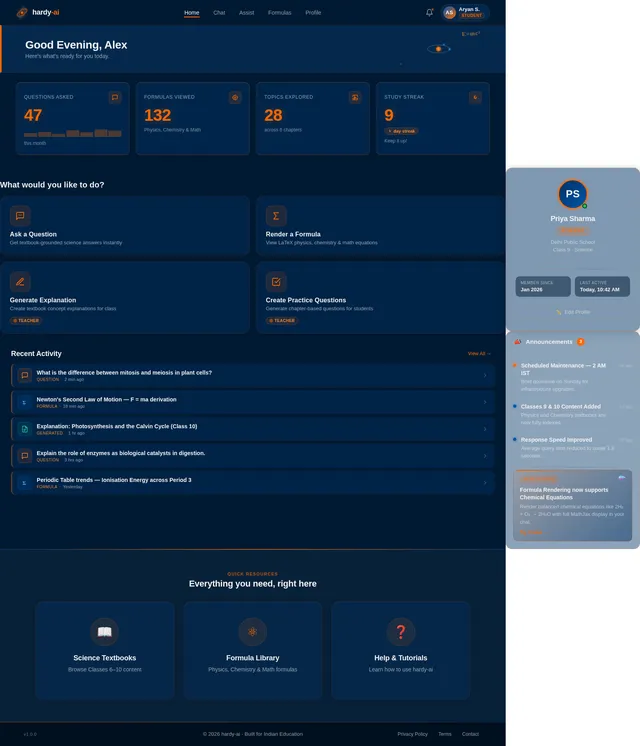
Build Home Dashboard Page
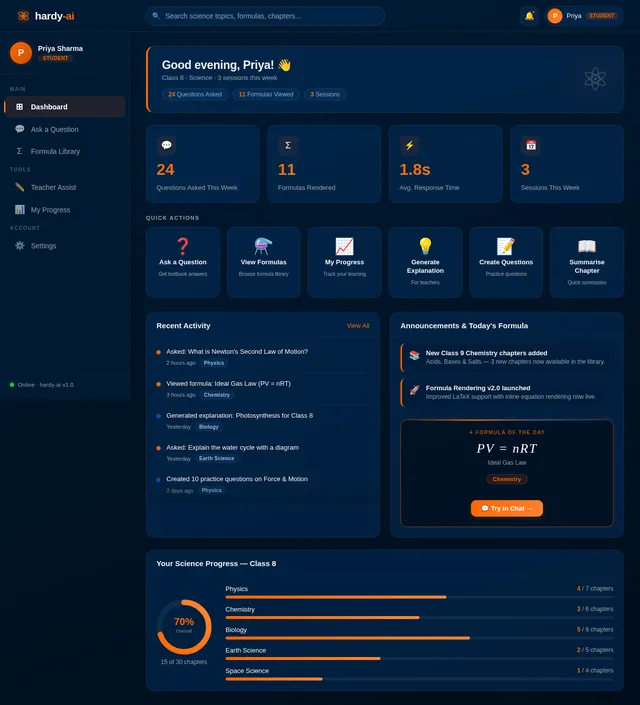
As a student or teacher, I want to view my personalized Home dashboard so I can quickly access all platform features. Implement the Home (v2) design including: TopBar (sticky, frosted glass, nav links, avatar chip, notification bell), WelcomeBanner (personalized greeting, animated molecule illustration), StatsOverview (4 stat cards: Questions Asked, Formulas Viewed, Topics Explored, Streak), QuickActions (2x2 grid tiles: Ask Question, Render Formula, Generate Explanation [Teacher], Create Practice Questions [Teacher]), RecentActivity (scrollable feed of last 5 interactions), ProfileCard (sidebar: avatar with orange ring, role badge, stats, Edit Profile button), AnnouncementsPanel (sidebar: announcements with colored dots), ResourceShortcuts (3 resource cards), and Footer. Navigates to: Chat, Assist, Formula pages.
Build Settings Page
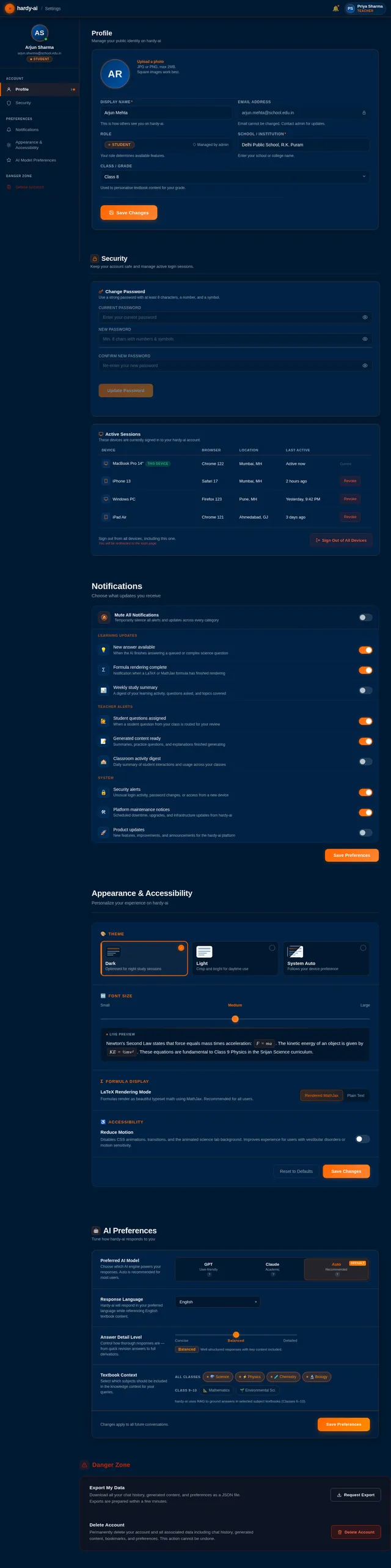
As a user, I want to manage my account settings, preferences, and notification options. Implement the Settings (v2) design including profile settings, notification preferences, appearance options (theme), accessibility settings, and security/password management. Consistent with the overall dark navy design system.
Build Users Management Page
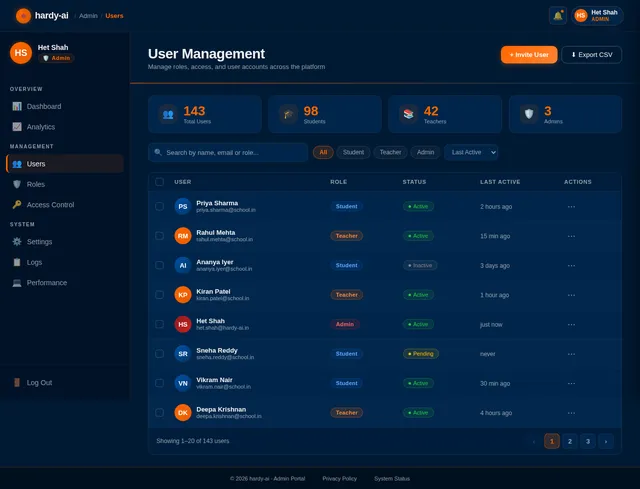
As an admin, I want to manage user roles and access control so I can assign Student, Teacher, or Admin roles and control platform access. Implement the Users (v1) design including: user list table with search and filter, role badge display, edit access controls, role assignment modal, and bulk actions. Admin flow: Dashboard → Users → Manage Roles → Edit Access.
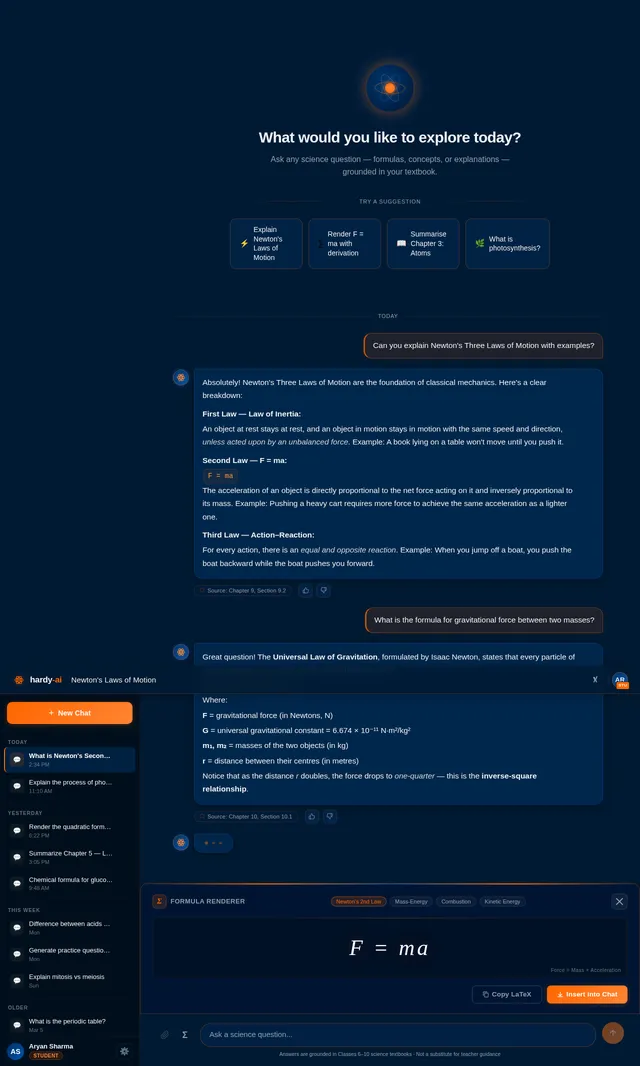
Build Chat Page
As a student, I want to ask science questions in a chat interface and receive textbook-grounded answers with rendered formulas. Implement the Chat (v2) design including: ChatTopBar (breadcrumb, session controls), ChatSidebar (conversation history, new chat button, chapter filter), ChatMessageThread (message bubbles with LaTeX/MathJax rendering, source citations, typing indicator), ChatInputBar (textarea with send button, formula toggle, file attach), and ChatFooterBar. Flow: Home → Chat → View Answer → View Formula. Support LaTeX/MathJax rendering in message output.
Build Assist Page
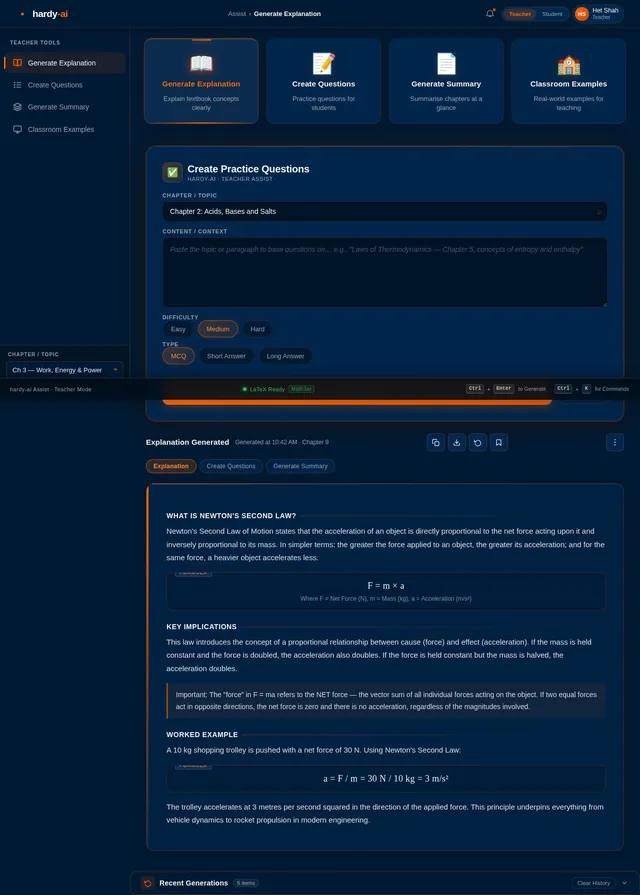
As a teacher, I want to access all teacher assistance tools in one place so I can generate explanations, questions, summaries, and classroom examples. Implement the Assist (v2) design including: AssistTopBar (breadcrumb, Switch to Student View toggle), AssistSidebar (four tool nav items: Generate Explanation, Create Questions, Generate Summary, Classroom Examples — with orange active indicator), AssistToolSelector (4-tile quick-switcher grid), AssistInputPanel (dynamic form with chapter/topic autocomplete, textarea, option chips for difficulty/length, Generate CTA), AssistOutputPanel (rich-text output with LaTeX rendering, Copy/Download/Regenerate/Bookmark actions), and AssistHistoryDrawer (collapsible recent generations panel) and AssistFooterBar. Flow: Home → Assist → Generate/View Output.
Integrate LaTeX/MathJax Rendering
As a user, I want to view beautifully rendered scientific formulas (physics equations, chemical formulas, math expressions) inline in the chat and assist output. Integrate MathJax or KaTeX library into the React frontend. Implement: inline and block LaTeX rendering in ChatMessageThread and AssistOutputPanel, formula detection from AI response text, chemical formula rendering (H₂SO₄, H₂O), physics equation display (E=mc², F=ma), math expression support. Ensure rendering works on mobile PWA with acceptable performance.
Connect Admin Dashboard to Backend
As an admin, I want the Dashboard and Users pages to display live analytics and user management data from the backend APIs. Wire up Dashboard page charts to GET /api/admin/analytics/* endpoints, connect Users page table to GET /api/admin/users with search/filter/pagination, implement role assignment via PUT /api/admin/users/{id}/role, and access toggle via PUT /api/admin/users/{id}/access. Enforce admin-only route guards on frontend.
Connect Assist Page to Backend
As a teacher, I want the Assist page to call the teacher assistance API and display generated content with formula rendering. Wire up AssistInputPanel Generate button to the appropriate POST /api/assist/* endpoint based on active tool, display streamed or returned output in AssistOutputPanel with LaTeX rendering, implement Copy/Download/Bookmark actions, load generation history from GET /api/assist/history into AssistHistoryDrawer, and handle loading/error states.
Connect Chat Page to Backend
As a student, I want the Chat page to send my science questions to the backend RAG API and display grounded answers with formula rendering in real time. Wire up ChatInputBar to POST /api/chat/message, implement streaming or polling for AI response display, render source citations in message thread, load chat history from GET /api/chat/sessions/{id}/messages, and handle loading/error states with appropriate UI feedback.
No comments yet. Be the first!