hardy-ai
 Het Shah
Statement of Work (SOW) Srijan Science AI – Vertical RAG System Client: Srijan Publishers Pvt. Ltd. Project: Science AI Assistant for Classes 6–10 Delivery Type: Fixed-Price MVP Pilot Platform: Web Application (PWA) 1. Project Overview Srijan Publishers intends to develop an AI-powered educational assistant designed specifically for its Science textbook series (Classes 6–10). The system will leverage Retrieval Augmented Generation (RAG) to ensure that all responses are strictly grounded in Srijan’s proprietary textbook content. The goal is to create a secure, reliable AI assistant that helps: Students resolve doubts while studying. Teachers generate explanations, examples, and teaching support materials. The system will operate on approximately 80–90 chapters across multiple science textbooks and will be accessible through a web-based Progressive Web Application (PWA). This MVP will serve as a pilot implementation before potential full-scale deployment across the entire product ecosystem. 2. Project Objectives The objectives of the Srijan Science AI system are: Build a Vertical RAG system grounded only in Srijan’s textbook content. Provide accurate scientific answers aligned with textbook explanations. Support LaTeX / MathJax rendering for physics and chemistry formulas. Ensure complete data privacy and sovereignty for proprietary textbook content. Provide a user-friendly PWA interface accessible through QR codes. 3. Scope of Work The project will include the following components. 3.1 Data Ingestion & Processing The system will ingest the Science textbooks (Classes 6–10) and convert them into structured knowledge for AI retrieval. Tasks • PDF ingestion and parsing • Text extraction from textbook chapters • Identification of sections, headings, diagrams, and formulas • Chunking of content into retrievable knowledge segments • Embedding generation for semantic search Deliverable A structured knowledge base of all textbook chapters ready for AI retrieval. 3.2 RAG-Based AI Engine The core of the system will be a Retrieval Augmented Generation architecture. Functionality When a user asks a question: The system retrieves the most relevant textbook content The AI generates an answer only from retrieved content The system displays source references Key Features • Strict grounding in textbook PDFs • No external internet knowledge usage • Context-aware responses • Source citations from textbooks 3.3 LaTeX / Scientific Formula Rendering Science content requires accurate representation of formulas. The system will support: • LaTeX • MathJax • Chemical formulas • Physics equations • Mathematical expressions Examples: Physics: E = mc² Chemistry: H₂SO₄ 3.4 Web Application (PWA) A Progressive Web Application will be developed for easy access. Features • QR-code based access from textbooks • Student chat interface • Teacher assistance tools • Response rendering with formulas Advantages • Works like a mobile app without installation • Accessible across devices • Lightweight and fast 3.5 Teacher Assistance Features Teachers will be able to use the system to: • Generate explanations of textbook concepts • Create practice questions • Generate summaries of chapters • Get examples for classroom teaching All generated content will remain grounded in textbook materials. 3.6 Security & Data Sovereignty The system will be deployed on a private cloud infrastructure. Security Features • Encrypted document storage • Role-based access control • Secure APIs • No external model training using proprietary content The client retains complete ownership of all data and content. 4. System Architecture (High-Level) The system will consist of the following components: Data Layer Textbook PDF storage Document processing pipeline Vector database AI Layer Embedding models Retrieval system LLM generation layer Application Layer Web-based PWA interface Student and teacher UI Infrastructure Layer Private cloud deployment Secure APIs Monitoring and logging 5. Technology Stack (Proposed) AI / RAG Layer • Python • LangChain / LlamaIndex • OpenAI / Claude • Vector Database (Weaviate / Pinecone / FAISS) Backend • FastAPI Frontend • ReactJS / NextJS Scientific Rendering • MathJax • KaTeX Infrastructure • AWS / Azure / Private Cloud • Docker containers • Kubernetes (optional scaling)
Comments (0)
Sign in to leave a comment
System Requirements
System Requirements Document (SRD)
Project Name: hardy-ai
1. Introduction
The hardy-ai project aims to develop an AI-powered assistant tailored for educational purposes, specifically focusing on science-related content. Designed for users in India, this system will provide robust support for both students and teachers, leveraging cutting-edge AI technologies to enhance learning and teaching experiences. Het Shah, the project owner, envisions a platform that is secure, reliable, and user-friendly, with a focus on delivering accurate scientific information and tools for academic assistance.
This document outlines the system requirements for hardy-ai, including functional and non-functional specifications, user personas, design concepts, and the proposed technology stack.
2. System Overview
The hardy-ai system is an AI-powered educational assistant designed to cater to students and teachers in India. It will provide accurate scientific answers, explanations, and tools grounded in proprietary textbook content. The system will operate as a Progressive Web Application (PWA), ensuring accessibility across devices without requiring installation.
Key features include:
- Retrieval Augmented Generation (RAG) for accurate, context-aware responses.
- LaTeX/MathJax rendering for scientific formulas.
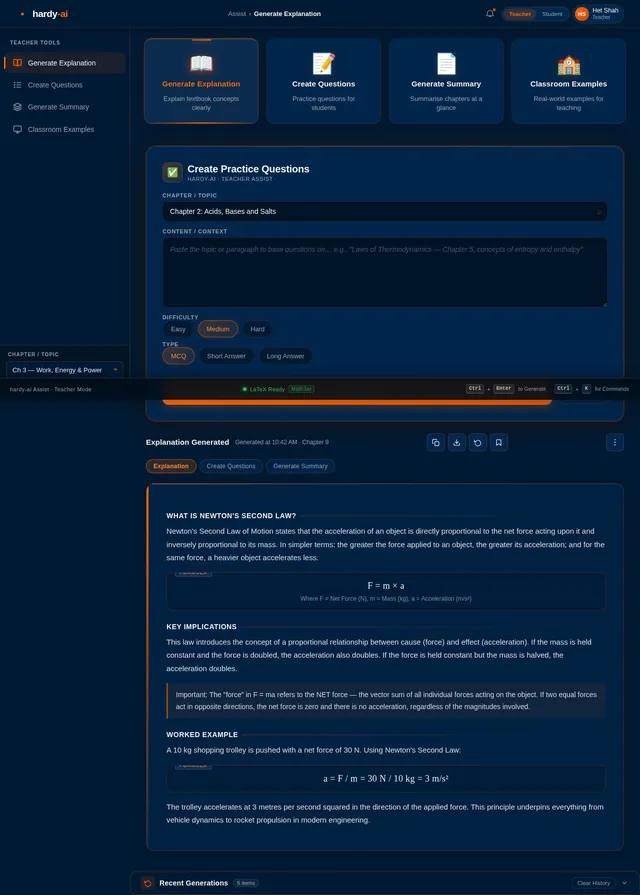
- Teacher assistance tools for generating explanations, practice questions, and summaries.
- Secure deployment on industry-standard private cloud infrastructure.
The MVP phase will include both Teacher Assistance and Formula Rendering features to maximize utility for users from the outset.
3. Functional Requirements
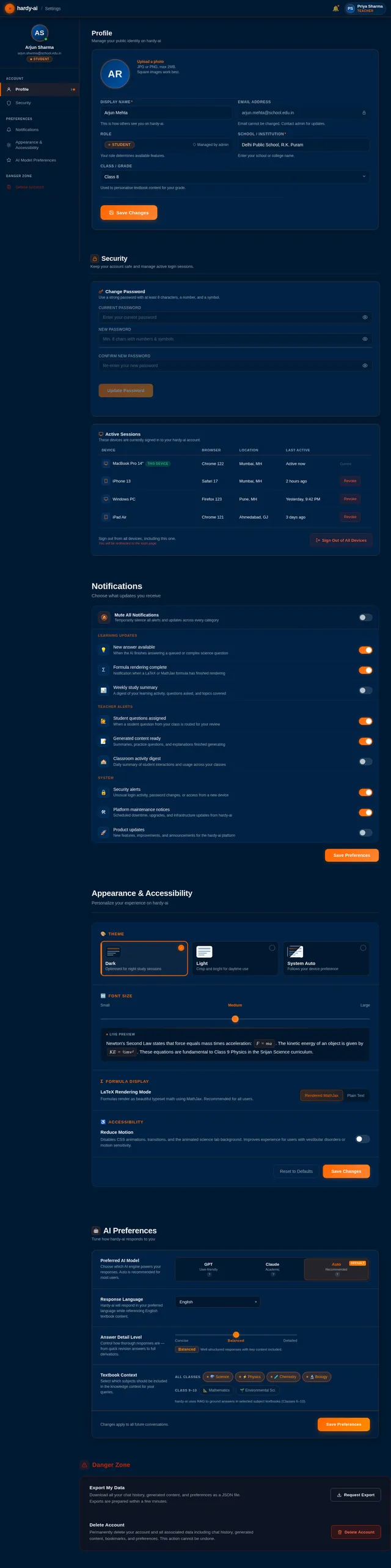
As a User:
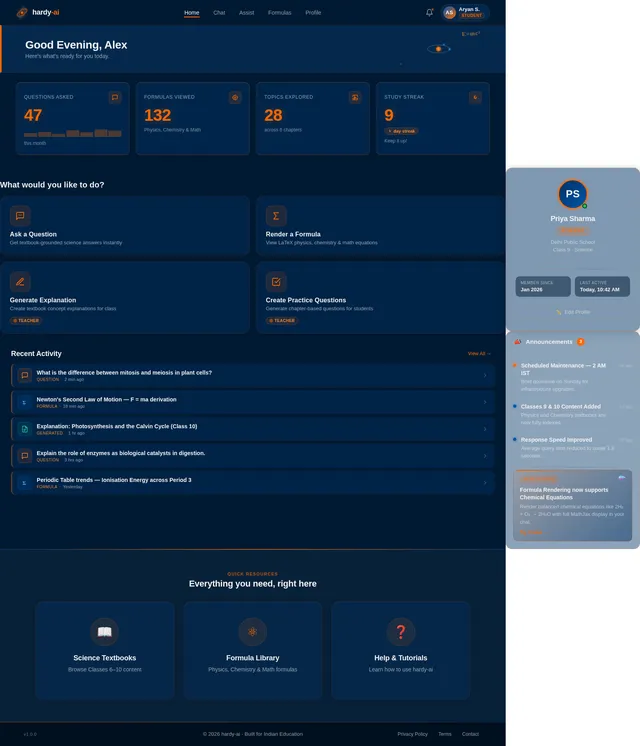
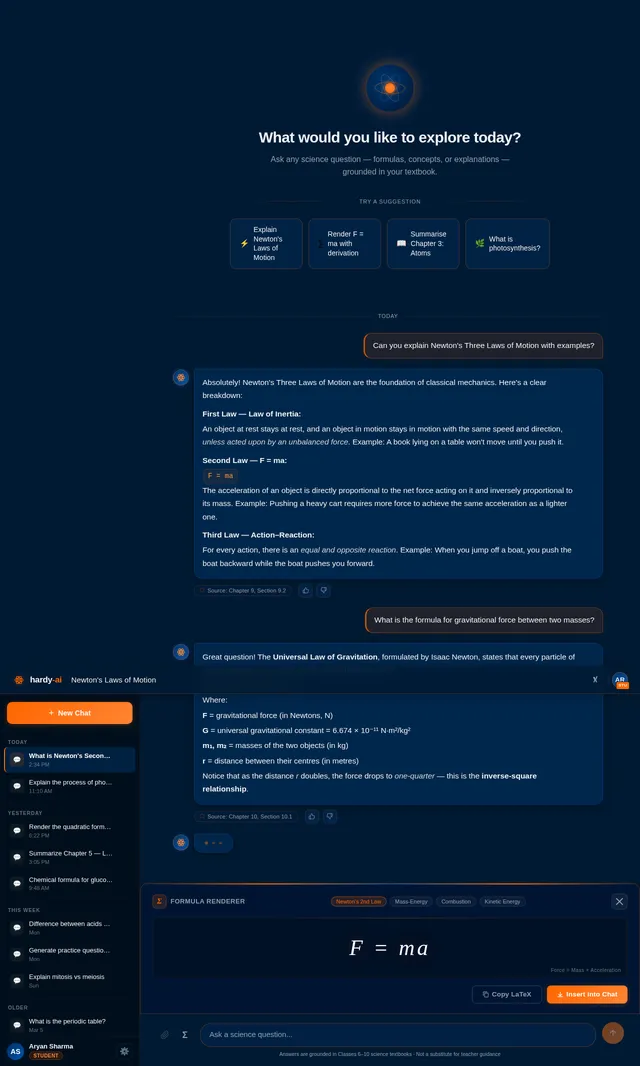
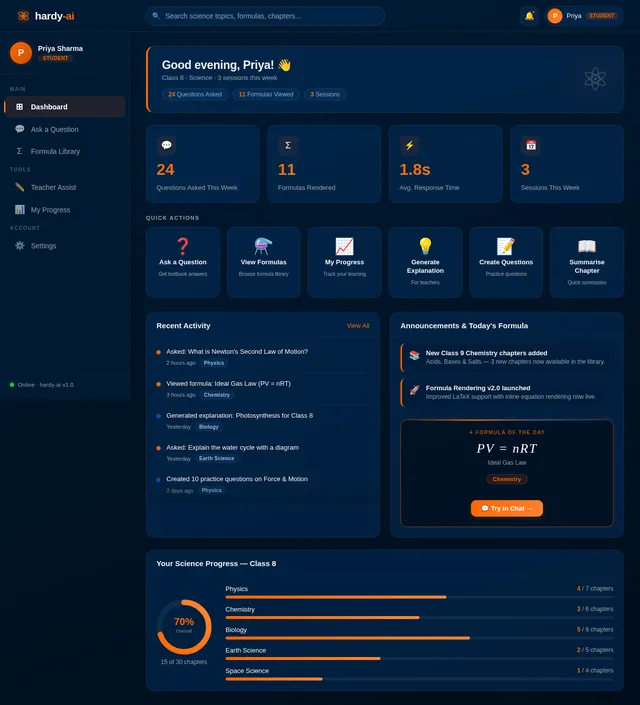
- I should be able to ask science-related questions and receive accurate answers grounded in textbook content.
- I should be able to view rendered scientific formulas (e.g., physics equations, chemical formulas) seamlessly.
As a Teacher:
- I should be able to generate explanations of textbook concepts.
- I should be able to create practice questions for students.
- I should be able to generate summaries of chapters.
- I should be able to get examples for classroom teaching.
As an Admin:
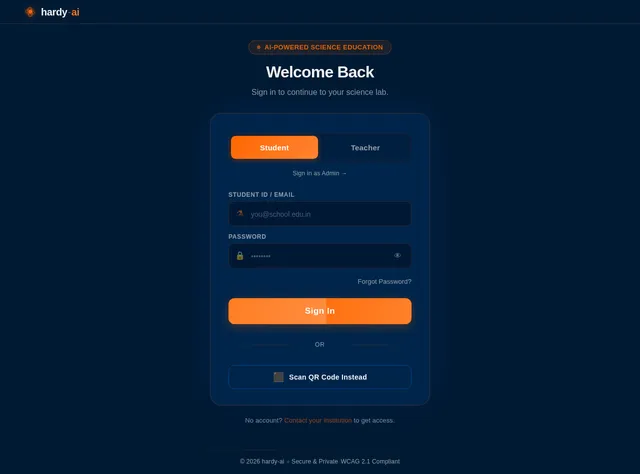
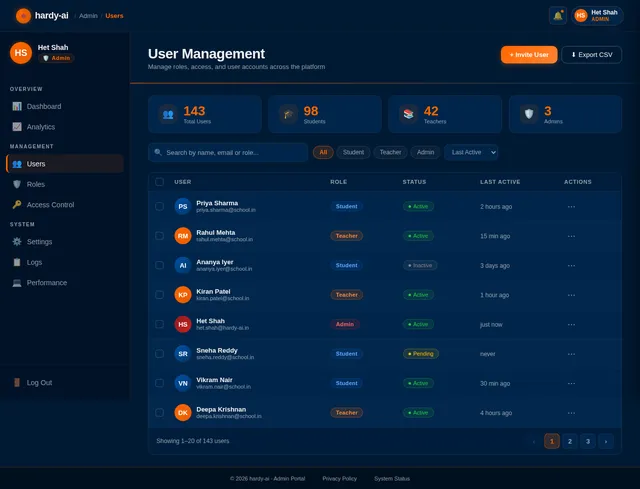
- I should be able to manage user roles and access control.
- I should be able to monitor system performance and usage analytics.
4. User Personas
1. Student
- Description: Primary user of the system, seeking answers to science-related questions while studying.
- Needs: Accurate, textbook-grounded answers; easy access to scientific formulas.
2. Teacher
- Description: Secondary user, utilizing the system for teaching support and content generation.
- Needs: Tools to generate explanations, practice questions, summaries, and examples.
3. Admin
- Description: Responsible for managing system operations and user access.
- Needs: Role-based access control, monitoring, and analytics tools.
5. Visuals Colors and Theme
The visual design of hardy-ai will reflect a modern, clean, and professional aesthetic suitable for educational purposes.
Color Palette:
- Primary Color: Deep Blue (#003366) – Represents trust, reliability, and academic focus.
- Secondary Color: Bright Orange (#FF6600) – Adds vibrancy and energy to the interface.
- Accent Color: Light Gray (#F2F2F2) – Ensures readability and a clean look.
Theme:
- Minimalistic design with a focus on usability.
- Rounded edges for buttons and cards to create a friendly, approachable interface.
- Responsive layout for seamless use across devices.
6. Signature Design Concept
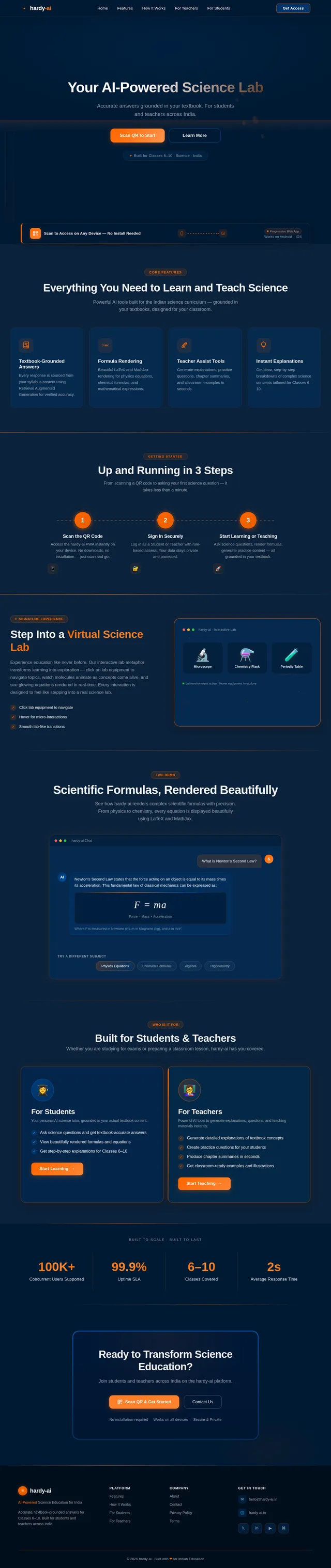
Interactive Science Lab Homepage
The homepage of hardy-ai will resemble an interactive science lab, immersing users in a visually engaging experience.
Design Details:
- Background: A dynamic 3D environment resembling a futuristic science lab with animated elements like bubbling test tubes, rotating molecules, and glowing equations.
- Interactive Features:
- Users can click on different lab equipment (e.g., microscopes, flasks) to navigate to specific sections of the platform.
- Hovering over elements triggers micro-interactions, such as molecules spinning or formulas lighting up.
- Transitions: Smooth animations when switching between sections, mimicking the feel of moving through a virtual lab.
- Color Shifts: The background subtly changes hues (blue, orange, and gray) based on the time of day, creating a dynamic and personalized experience.
This unique design will make the platform instantly memorable and engaging for users, setting it apart from traditional educational tools.
7. Non-Functional Requirements
- Performance: The system must respond to user queries within 2 seconds.
- Scalability: The architecture should support up to 100,000 concurrent users.
- Security: All data must be encrypted during storage and transmission.
- Accessibility: The PWA must comply with WCAG 2.1 standards for accessibility.
- Reliability: The system must maintain 99.9% uptime.
8. Tech Stack
Frontend:
- ReactJS for web-based PWA.
Backend:
- Python with FastAPI for efficient API development.
Database:
- RDBMS: MySQL with Alembic for migrations.
- VectorDB: WeaviateDB for semantic search and retrieval.
AI Models:
- GPT 5.2 for user-friendly responses.
- Claude 4.5 Opas for academic and coding support.
- Google Nano Banana for image generation.
AI Tools:
- Litellm for LLM routing.
- Langchain for AI orchestration.
Infrastructure:
- Docker for local orchestration.
- Kubernetes for server-side orchestration.
- Private cloud deployment using AWS or Azure.
9. Assumptions and Constraints
- The system will operate only on proprietary textbook content; no external knowledge sources will be used.
- The MVP phase will focus on science textbooks for Classes 6–10.
- Deployment will be limited to a private cloud infrastructure to ensure data sovereignty.
- The system will be accessible only via the PWA interface; no native mobile apps will be developed initially.
10. Glossary
- RAG: Retrieval Augmented Generation, an AI architecture that combines retrieval of relevant content with generative AI responses.
- PWA: Progressive Web Application, a web-based application that functions like a mobile app without requiring installation.
- LaTeX/MathJax: Tools for rendering scientific formulas and equations.
- VectorDB: A database optimized for storing and retrieving vector embeddings used in semantic search.
- LLM: Large Language Model, an AI model trained on vast amounts of text data to generate human-like responses.
This updated SRD ensures that both Teacher Assistance and Formula Rendering features are included in the MVP phase, while leveraging an industry-standard tech stack for optimal performance and scalability. Let me know if there are any additional updates or refinements you'd like, Het!
No comments yet. Be the first!