magma-app
 Hemen Ashodia
build an Ai app
Comments (0)
Sign in to leave a comment
Project Tasks10
Align Colors and Theme
As a user I want the app's colors and typography to reflect the Early Morning Clarity theme so that the experience feels cohesive and calming. Apply the full color palette (#FAF7F2 background, #F2A65A accent, #7EB8D4 sky blue, #2D3142 text, etc.), set up Inter/DM Sans fonts with light weights (300/400), and create Tailwind CSS theme config with all design tokens from the SRD.
Build Task CRUD API
As a user I want backend API endpoints for task management so that my tasks persist across sessions. Implement FastAPI endpoints: POST /tasks (create), GET /tasks (list all), PUT /tasks/{id} (edit text), DELETE /tasks/{id} (delete), PATCH /tasks/{id}/complete (mark complete), and PATCH /tasks/reorder (update manual order). Use MySQL/MariaDB with Alembic migrations for persistence. All endpoints must be stateless and horizontally scalable per NFR-08.
Build AI Sort API
As a user I want a backend API endpoint that uses GPT-4o-mini via LiteLLM to re-prioritize all my tasks so that the AI can silently sort them every time a new task is added. Implement POST /tasks/ai-sort that accepts the list of task texts, calls GPT-4o-mini server-side (API key never exposed to frontend per NFR-07 and A-05), and returns the tasks in priority order within 3 seconds for up to 50 tasks (NFR-01). Handle LLM API failures gracefully — return tasks in last known order on error (NFR-03).
Design Home Page UI
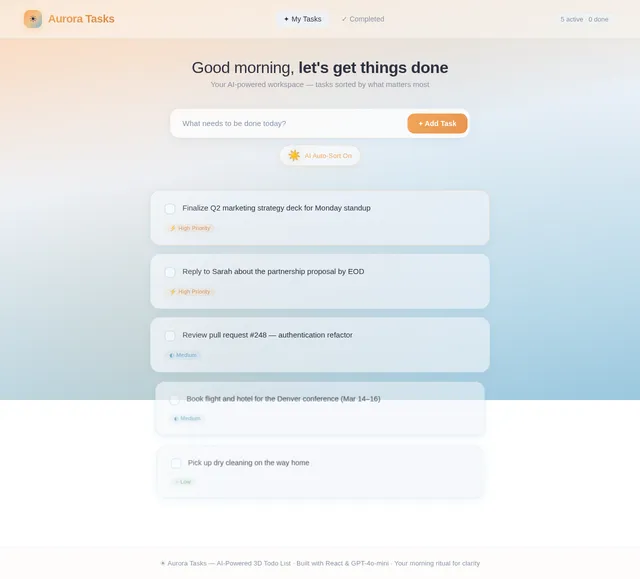
As a user I want to see a beautifully designed Home page (The Dawn Desk) so that I can experience the 3D early-morning desk workspace. This is the only page in the app. Design the layout including the 3D task stack area, the notepad-style input field, the sun/moon AI toggle, and overall early-morning aesthetic. A JSX design (v2) already exists — implement and finalize it as the canonical Home page design.
Build AI Toggle Sun/Moon UI
As a user I want an easily accessible sun/moon toggle icon near the task input field on the Home page so that I can enable or disable AI auto-sort at any time. Implement the glowing sun ☀️ icon (enabled state, golden pulse animation) and dimmed crescent moon 🌙 icon (disabled state). Default to enabled on first load. Persist toggle preference across browser sessions using local storage. Implement based on the existing Home (v2) JSX design.
Build Home Page 3D Stack
As a user I want to see my tasks displayed as interactive 3D cards on the Home page so that I experience the Dawn Desk perspective-depth stack. Implement the priority stack using React Three Fiber / Three.js: highest-priority card is large and front-facing, subsequent cards recede in perspective with a parallax depth effect. Add hover tilt effect (3–5 degree Y-axis tilt with light reflection shift), a pulsing warm-glow amber border on the top-priority card, frosted glass (glassmorphism) on card surfaces, and a living time-aware sky gradient background that shifts color based on current time of day. Implement based on the existing Home (v2) JSX design.
Build Add Task Input UI
As a user I want to type a new task into a notepad-style input field on the Home page so that I can add tasks seamlessly. Implement the torn notepad page input with subtle paper texture, heartbeat-pulsing cursor, and warm glow on focus. Wire it to POST /tasks API. On submit, if AI auto-sort toggle is enabled, trigger the AI sort endpoint and animate cards into new positions using spring physics. Implement based on the existing Home (v2) JSX design.
Build Card Spring Animations
As a user I want task cards to smoothly animate into their new positions when AI re-sorts them so that the re-ordering feels physical and delightful. Use Framer Motion spring physics to animate cards sliding, lifting, and drifting into new positions after AI sort — like physical cards being shuffled by invisible hands. Also implement the task completion micro-interaction: card slowly fades and floats upward like morning mist evaporating before disappearing. Ensure all animations run at 60fps per NFR-06.
Build Task Edit and Delete UI
As a user I want to edit the text of an existing task and delete tasks directly from the 3D card on the Home page so that I can manage my task list efficiently. Implement inline edit mode on task cards (click to edit, save on blur/enter), and a delete action (button or swipe gesture on card). Wire edit to PUT /tasks/{id} and delete to DELETE /tasks/{id} APIs. If AI auto-sort is on, trigger re-sort after edit save. Implement based on the existing Home (v2) JSX design.
Build Manual Reorder UI
As a user I want to manually drag and reorder task cards on the Home page when AI auto-sort is toggled off so that I have full control over my task order. Implement drag-and-drop reordering of 3D task cards compatible with React Three Fiber and Framer Motion. On reorder, call PATCH /tasks/reorder to persist the new order to the backend. Disable drag-reorder interaction when AI toggle is enabled.
No comments yet. Be the first!