magma-app
 Hemen Ashodia
build an Ai app
Comments (0)
Sign in to leave a comment
System Requirements
System Requirements Document (SRD)
Project Name: Aurora Tasks — AI-Powered 3D Todo List Version: 1.0 Date: 2026-02-27 Status: Draft
1. Introduction
This document outlines the system requirements for Aurora Tasks, an AI-powered todo list web application that combines a visually immersive 3D user interface with intelligent task prioritization driven by a Large Language Model (LLM). The application is designed to provide users with a seamless, beautiful, and smart task management experience inspired by the calm clarity of early morning.
This SRD serves as the foundational specification for design, development, and QA teams.
2. System Overview
Aurora Tasks is a single-user web application that allows users to add, manage, and organize tasks through a visually rich 3D interface. Upon adding a new task, an integrated LLM (GPT-4o-mini) silently analyzes all existing tasks and re-orders them by priority based on the text content, urgency signals, and contextual keywords. The user can toggle this auto-sort behavior on or off from the main interface at any time.
The application emphasizes:
- Simplicity — clean, distraction-free input and task view
- Intelligence — LLM-driven silent task prioritization
- Visual Delight — 3D task card interactions with an early morning aesthetic
3. Functional Requirements
- As a User I should be able to add a new task by typing raw text into an input field
- As a User I should be able to see my tasks displayed as interactive 3D cards on the main screen
- As a User I should be able to have all tasks automatically re-prioritized by the AI every time a new task is added
- As a User I should be able to see tasks silently re-ordered without any confirmation prompts or explanations
- As a User I should be able to toggle AI auto-sort on or off directly from the main screen, near the task input field
- As a User I should have the AI auto-sort toggle defaulted to enabled when I first open the app
- As a User I should be able to manually reorder tasks when AI auto-sort is toggled off
- As a User I should be able to mark a task as complete
- As a User I should be able to delete a task
- As a User I should be able to edit an existing task's text
- As a User I should be able to see my tasks persist between sessions (local or remote storage)
4. User Personas
🌅 The Everyday Planner — Primary User
A professional or student who manages daily tasks and wants a smarter, more engaging way to stay organized. They appreciate AI assistance and aesthetically pleasing tools that reduce cognitive load. They prefer things to "just work" without manual sorting.
⚙️ The Power Organizer
A detail-oriented user who wants control over their task order. They will use the auto-sort toggle to turn off AI sorting when they want to manually arrange tasks by their own logic. They interact frequently with reordering features.
5. Visuals, Colors, and Theme
Theme Concept: Early Morning Clarity
Inspired by the soft light of dawn — the quiet moment just after sunrise when the world feels fresh, organized, and full of potential. Colors are gentle, warm-cool contrasts that evoke a crisp morning sky.
| Role | Color | Hex |
|---|---|---|
| Background | Warm White / Cream | #FAF7F2 |
| Primary Surface | Soft Morning Mist | #EEF3F9 |
| Accent / Primary | Warm Golden Hour | #F2A65A |
| Secondary Accent | Sky Blue | #7EB8D4 |
| Text Primary | Charcoal Soft | #2D3142 |
| Text Secondary | Morning Gray | #8A93A6 |
| Success / Complete | Sage Green | #7DBF8E |
| Card Shadow | Subtle Lavender Mist | rgba(126, 184, 212, 0.2) |
Typography:
- Headings:
InterorDM Sans— clean, modern, light-weight - Body:
Inter— readable and minimal - Font weights: Primarily Light (300) and Regular (400) to match the airy theme
3D Design Language:
- Soft drop shadows with warm-cool color bleed
- Smooth card tilt/hover effects (subtle perspective transforms)
- Frosted glass (glassmorphism) on task cards for depth
- Rounded corners everywhere (
border-radius: 16px–24px) - Light refraction-style shimmer on card surfaces
6. Signature Design Concept ✦
"The Dawn Desk" — A Living 3D Morning Workspace
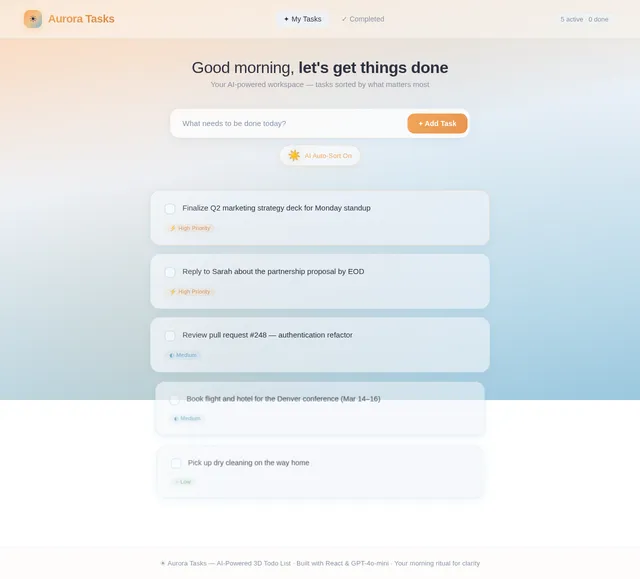
The Big Idea: When the user opens Aurora Tasks, they don't see a flat webpage — they see a softly lit 3D desk surface stretching into a shallow depth perspective, bathed in the warm amber-pink glow of a sunrise that slowly transitions in real-time based on the current time of day.
The Landing / Home Screen Experience:
Imagine you're sitting at a beautiful wooden desk at 6:47 AM. The window behind it glows with a gradient sky — amber at the horizon bleeding into pale blue above. On the desk surface, task cards are physically stacked and layered in 3D space, the highest-priority card closest and most prominent (slightly larger, casting a soft shadow onto the ones behind it), descending gently into the background in a parallax depth stack.
Specific Visual & Interaction Details:
- Depth Stack Layout: Tasks are arranged in a perspective-transformed stack. Task #1 (highest priority) is large and front-facing. Task #2 sits slightly behind and smaller. The stack creates a natural visual hierarchy — no numbers needed.
- Card Physics on Add: When a new task is added and the AI re-sorts, cards don't just jump positions — they slide, lift, and drift into their new positions with a smooth spring animation, like physical cards being shuffled by invisible hands.
- Living Sky Background: The background gradient is time-aware. At 5–7 AM it shows deep dawn purples and amber. At 8–10 AM it's soft golden. By noon it transitions to full sky blue. This creates a unique experience every morning visit.
- Input Field as a "Notepad": The task input at the bottom looks like a torn notepad page with a subtle paper texture, a blinking cursor that pulses like a heartbeat, and a warm glow when focused.
- AI Toggle as a Sun Icon: The auto-sort toggle is rendered as a small glowing sun ☀️ icon next to the input field. When enabled, it gently pulses with a warm golden glow. When disabled, it dims to a gray crescent moon 🌙 — a natural metaphor for "AI resting."
- Task Completion Micro-Interaction: When a task is marked complete, the card slowly fades and floats upward like morning mist evaporating, then disappears — satisfying and poetic.
- Hover Tilt Effect: Hovering over any task card causes it to tilt 3–5 degrees on the Y-axis with a soft light reflection shift, giving it a tactile, physical card feel.
- Priority Pulse: The top-priority task card has a subtle pulsing warm-glow border (amber/golden), like the first ray of sun catching its edge — drawing the eye without being aggressive.
This design concept makes Aurora Tasks feel less like a productivity app and more like a daily ritual — something users look forward to opening every morning.
7. Non-Functional Requirements
| # | Requirement | Detail |
|---|---|---|
| NFR-01 | Performance | AI sorting call must complete within 3 seconds for up to 50 tasks |
| NFR-02 | Responsiveness | App must be fully usable on desktop and tablet screen sizes |
| NFR-03 | Reliability | LLM API failure must be handled gracefully; tasks remain in last known order |
| NFR-04 | Persistence | Tasks must persist across browser sessions using local storage or backend DB |
| NFR-05 | Accessibility | Color contrast ratios must meet WCAG 2.1 AA standards |
| NFR-06 | Latency | 3D animations must run at 60fps on modern hardware |
| NFR-07 | Security | GPT-4o-mini API key must never be exposed on the frontend; all LLM calls routed through backend |
| NFR-08 | Scalability | Backend API must be stateless and horizontally scalable |
8. Tech Stack
Frontend
- React (Web) — component-based UI
- Three.js or React Three Fiber — 3D card rendering and animations
- Framer Motion — spring physics animations and card transitions
- Tailwind CSS — utility-first styling for the early morning theme
Backend
- Python with FastAPI — lightweight REST API for LLM routing and task persistence
Database
- MySQL / MariaDB — relational storage for tasks and user preferences
- Alembic — schema migrations
AI / LLM
- GPT-4o-mini (OpenAI) — LLM for intelligent task prioritization via text analysis
- LiteLLM — LLM routing and API abstraction layer
Infrastructure
- Docker + Docker Compose — local development orchestration
9. Assumptions and Constraints
| # | Type | Description |
|---|---|---|
| A-01 | Assumption | The application is designed for single-user use initially; no multi-user or auth system is required in v1.0 |
| A-02 | Assumption | GPT-4o-mini API access is available and the API key is provided via environment variable |
| A-03 | Assumption | Users have a modern browser with WebGL support for 3D rendering |
| A-04 | Assumption | Internet connectivity is required for LLM-powered sorting; app degrades gracefully offline |
| A-05 | Constraint | All LLM API calls must be made server-side to protect the API key |
| A-06 | Constraint | The 3D experience targets desktop and tablet; mobile support is out of scope for v1.0 |
| A-07 | Constraint | AI sorting does not provide explanations or breakdowns to the user — it sorts silently |
| A-08 | Constraint | The LLM uses only the raw task text for prioritization — no external calendar or deadline integrations in v1.0 |
10. Glossary
| Term | Definition |
|---|---|
| LLM | Large Language Model — an AI model (e.g., GPT-4o-mini) capable of understanding and reasoning about natural language text |
| Auto-Sort | The feature by which all tasks are automatically re-prioritized by the LLM each time a new task is added |
| AI Toggle | A UI control (sun/moon icon) that enables or disables the auto-sort feature, located near the task input field |
| 3D Card | A task displayed as a visually three-dimensional card with tilt, shadow, and depth effects |
| Priority Stack | The visual arrangement of task cards in perspective depth order, where higher-priority tasks appear closer and larger |
| LiteLLM | An open-source LLM routing library that abstracts API calls across multiple LLM providers |
| Alembic | A database migration tool for SQLAlchemy used with MySQL/MariaDB |
| React Three Fiber | A React renderer for Three.js, enabling declarative 3D scene composition in React |
| Framer Motion | A React animation library supporting spring physics and gesture-driven animations |
| WCAG 2.1 AA | Web Content Accessibility Guidelines — a standard for accessible color contrast and UI design |
| Dawn Desk | The signature design concept for Aurora Tasks — a time-aware, 3D desk surface experience inspired by early morning |
Document prepared by: System Requirements Engineer (AI) Last Updated: 2026-02-27 Version: 1.0 — Initial Draft
No comments yet. Be the first!