plasma-app
 Monin Modi
create an todo app with 2 pages
Comments (0)
Sign in to leave a comment
Project Tasks6
Implement Theme and Structure
As a user, I want the app to visually match the mock-design pages exactly. This task covers implementing the global theme (colors: #F5F7FA background, #FFFFFF surface, #1F2937 text, #3B82F6 accent, #9CA3AF muted), typography (clean modern sans-serif with generous line height), layout structure, subtle animations (opacity fades, gentle drifts), and removing any scaffold pages not needed by the SRD (login, signup, welcome, dashboard pages). Only Homepage and Task Details pages should remain. Apply global CSS/theme variables and shared layout components.
Implement Tasks Backend API
As a user, I want to use the backend API for task management so I can create, read, update, and delete tasks. Build FastAPI endpoints: GET /tasks (list all), POST /tasks (create), PUT /tasks/{id} (update), DELETE /tasks/{id} (delete), GET /tasks/{id} (get details). Use MySQL with Alembic migrations for the tasks table (fields: id, title, description, status, created_at, updated_at). Supports the Homepage and Task Details pages.
Implement Selective Re-Run API
As a user, I want to use the backend API for selective re-run so I can trigger specific SRD regeneration processes on demand. Build a FastAPI endpoint POST /rerun/{process_id} that accepts a process identifier and triggers the targeted SRD regeneration with minimal delay. This supports the re-run button on the Task Details page.
Build Task Details Page
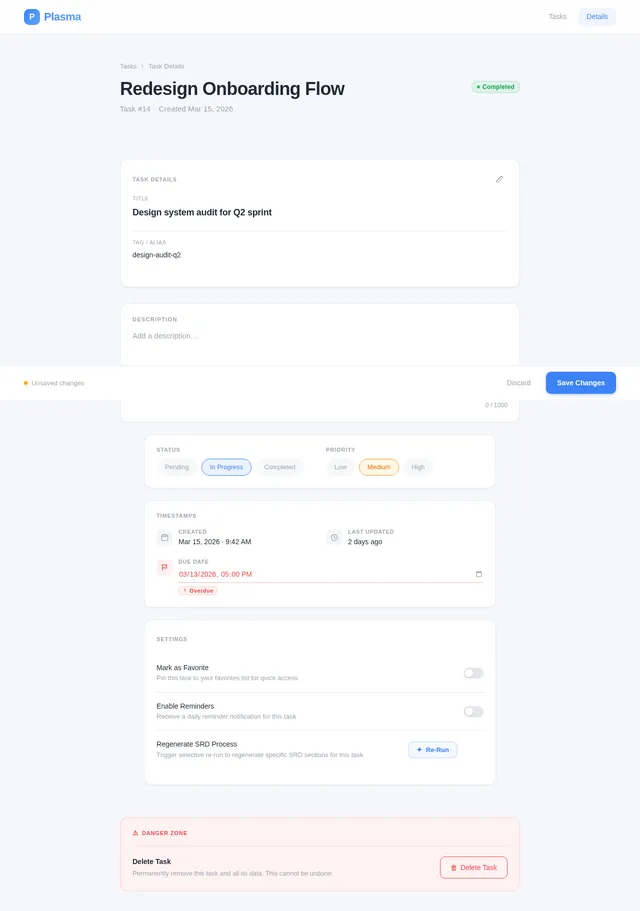
As a user, I want to use the frontend Task Details page so I can view additional details for a task, update its settings, and trigger the selective SRD re-run capability. Implement based on the existing JSX design (Task Details v4). The page includes a glowing hover effect button for the selective re-run feature. User flow: Homepage → Task Details → Update Settings → Homepage.
Build Homepage Page
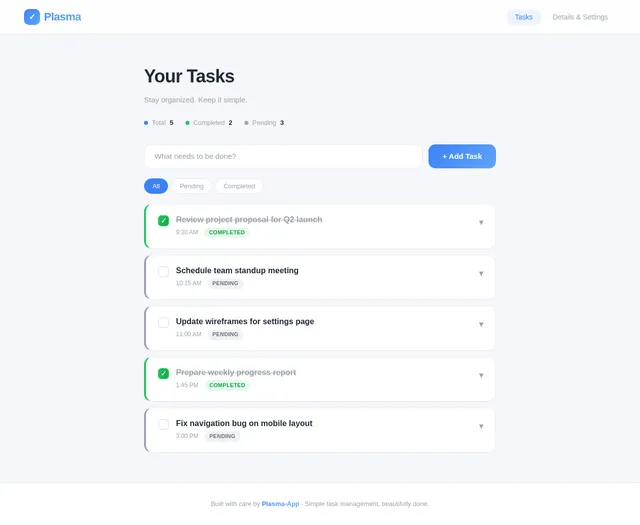
As a user, I want to use the frontend Homepage so I can view my task list, add new tasks, edit existing tasks, and delete tasks. Implement the Homepage based on the existing JSX design (Homepage v5). The page should feature dynamic task cards with hover lift effect and soft shadow (#E5E7EB), color-coded status (green border for completed, gray for pending), expandable card details with smooth animation, and micro-interaction animations (fade-in on add, slide-out on delete). This is the main entry point of the app per the user flow: Homepage → Add Task, Edit Task, Delete Task, and navigate to Task Details.
Integrate Frontend with Backend
As a user, I want the frontend to connect to the backend API so my tasks are persisted and all CRUD operations work end-to-end. Wire up the Homepage and Task Details React components to the FastAPI endpoints using fetch/axios. Handle loading states, error states, and optimistic UI updates. Also connect the selective re-run button on Task Details to the POST /rerun endpoint.
No comments yet. Be the first!