plasma-app
 Monin Modi
create an todo app with 2 pages
Comments (0)
Sign in to leave a comment
System Requirements
System Requirements Document (SRD) for Plasma-App
1. Introduction
This document outlines the system requirements for Plasma-App, a minimalistic two-page todo application designed for local use without user accounts. The app is tailored to provide a simple and intuitive user experience for managing tasks efficiently. Developed for Monin Modi in the US, the app will adhere to locale-specific defaults, such as US English and a 12-hour time format.
2. System Overview
Plasma-App is a lightweight todo application with two primary pages:
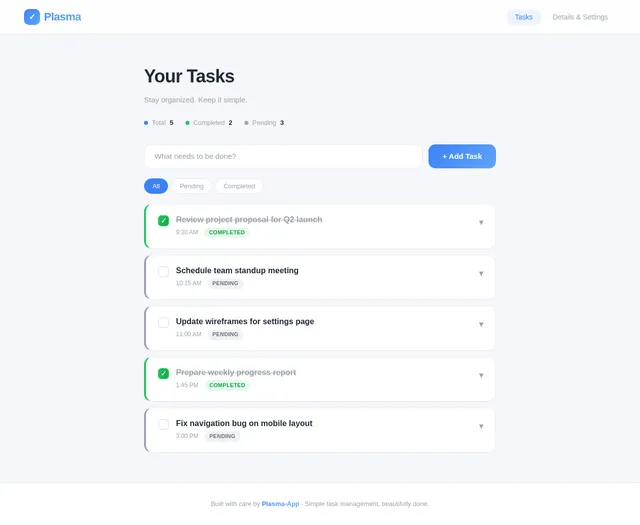
- Homepage: Displays the task list, allowing users to view, add, edit, and delete tasks.
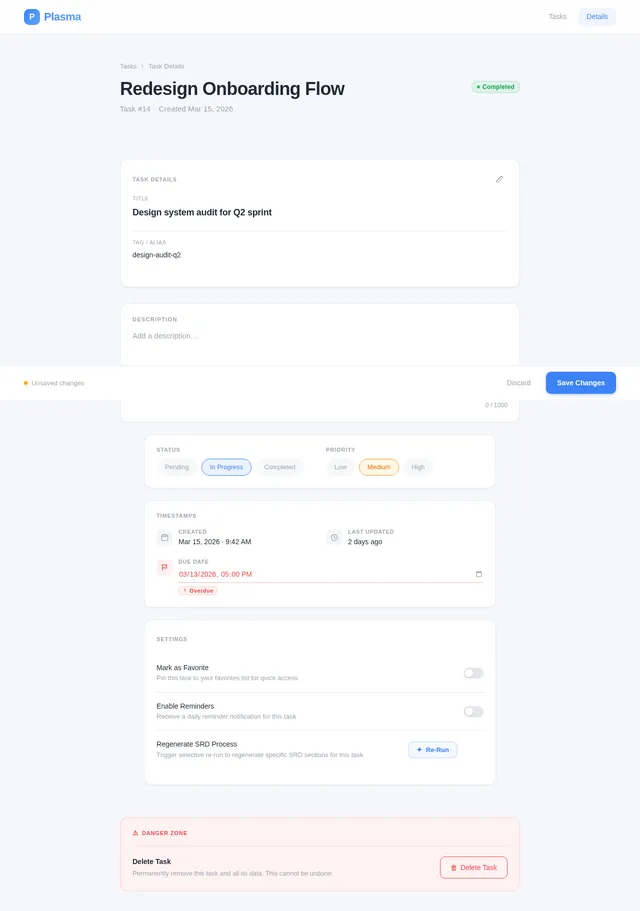
- Task Details/Settings Page: Provides additional details or settings for individual tasks.
The app is designed for local use, meaning no login or authentication is required. It will prioritize simplicity, speed, and ease of use, making it ideal for users who want a quick and efficient way to manage their daily tasks. Additionally, the app will include a selective re-run capability to allow users to trigger specific SRD regeneration processes as needed.
3. Functional Requirements
- As a User, I should be able to view a list of tasks on the homepage.
- As a User, I should be able to add new tasks to the list.
- As a User, I should be able to edit existing tasks.
- As a User, I should be able to delete tasks from the list.
- As a User, I should be able to navigate to a task details/settings page for more information or configuration.
- As a User, I should be able to trigger selective re-run capability to regenerate specific SRD processes.
4. User Personas
- User:
- Primary user of the app.
- Needs a simple and fast interface to manage tasks.
- Does not require login or account management.
- May occasionally need to regenerate specific SRD processes for updates or corrections.
5. Creative Reference Stories (AI Inspiration)
Based on the simplicity and functionality of Plasma-App, the Pure Form Pure Space design story is the most suitable. This story emphasizes minimalism, clarity, and precision, aligning perfectly with the app's purpose of providing a clean and straightforward task management experience.
Design Interpretation:
- Mood: Minimal, calm, and precise.
- Typography: Clean modern sans-serif fonts with generous line height for readability.
- Layout: Maximum negative space with a focus on simplicity and usability.
- Motion: Subtle animations, such as opacity fades and gentle drifts, to enhance the user experience without overwhelming it.
- Components: Rounded buttons and cards with subtle borders and hover effects for a polished look.
6. Visuals Colors and Theme
A unique color palette has been created for Plasma-App to reflect its minimalistic and user-friendly nature:
- Background: #F5F7FA (soft cool white for a clean and calming backdrop)
- Surface: #FFFFFF (pure white for task cards and input fields)
- Text: #1F2937 (deep slate gray for high readability)
- Accent: #3B82F6 (vivid blue for actionable elements like buttons and highlights)
- Muted Tones: #9CA3AF (soft gray for secondary elements and dividers)
This palette ensures a modern and professional appearance while maintaining a sense of simplicity and focus.
7. Signature Design Concept
Dynamic Task Cards with Interactive Micro-Features
The homepage will feature task cards that dynamically respond to user interactions. Each card will have the following features:
- Hover Effect: Cards will slightly lift and cast a soft shadow (#E5E7EB) when hovered over, providing a tactile feel.
- Expandable Details: Clicking on a task will smoothly expand the card to reveal additional details or quick actions (e.g., edit or delete).
- Color-Coded Status: Tasks can be marked as "completed" or "pending," with a subtle color indicator (e.g., a green border for completed tasks and a gray border for pending tasks).
- Micro-Interactions: Adding or deleting tasks will trigger a brief animation, such as a fade-in or slide-out effect, to make the app feel alive and responsive.
- Selective Re-Run Button: A dedicated button on the settings page will allow users to trigger specific SRD regeneration processes. This button will have a glowing hover effect to draw attention without being intrusive.
This design concept ensures that the app is not only functional but also engaging and delightful to use.
8. Non-Functional Requirements
- Performance: The app should load within 2 seconds on modern devices.
- Usability: The interface should be intuitive and require no learning curve for first-time users.
- Accessibility: The app should adhere to WCAG 2.1 guidelines, ensuring it is usable by individuals with disabilities.
- Compatibility: The app should work seamlessly on modern web browsers (Chrome, Firefox, Safari, Edge).
- Selective Re-Run Capability: The app should allow users to selectively trigger SRD regeneration processes with minimal delay.
9. Tech Stack
Frontend:
- React: For building the web interface.
Backend:
- Python: For any required backend logic.
- FastAPI: To handle API requests efficiently.
Database:
- MySQL: For storing task data locally, with Alembic for migrations.
Local Orchestration:
- Docker: For containerization.
- docker-compose: For managing multi-container applications.
10. Assumptions and Constraints
- The app will not include user authentication or account management.
- All data will be stored locally on the user's device.
- The app will be optimized for desktop and mobile browsers but will not include a native mobile app at this stage.
- The app will use a 12-hour time format by default, as it is designed for US users.
- Selective re-run capability will be limited to SRD regeneration processes and will not affect other app functionalities.
11. Glossary
- Task Card: A visual representation of a task on the homepage.
- WCAG: Web Content Accessibility Guidelines, a set of standards for making web content accessible to all users.
- FastAPI: A modern, fast (high-performance) web framework for building APIs with Python.
- Alembic: A lightweight database migration tool for use with SQLAlchemy.
- Selective Re-Run Capability: A feature allowing users to trigger specific SRD regeneration processes as needed.
This document provides a comprehensive overview of the requirements for Plasma-App. Monin, your todo app will be simple, elegant, and highly functional, ensuring a delightful user experience. The addition of selective re-run capability enhances the app's flexibility and responsiveness to user needs.
No comments yet. Be the first!