rapid-documents
# Document Chat Assistant — Product Requirements (Prompt for Tool Evaluation) ## Goal Build a production-ready **Chat with Documents assistant** that allows users to upload a large collection of files and ask natural language questions to retrieve accurate information from them. The system should understand document content, identify relevant information, and generate clear answers based on the available documents. This document describes the **expected capabilities and behaviors** of the system so that it can be tested using existing production-ready tools in the market. --- # Core Capabilities ## 1. Document Understanding The system should be able to process different types of documents and understand the content inside them. Examples of supported content include: - Text paragraphs - Structured tables - Lists and bullet points - Headings and sections - Multi-page documents - Spreadsheet-style data The assistant should treat the documents as a knowledge base and use them to answer questions. --- ## 2. Question Answering Users should be able to ask questions in natural language such as: - Product related questions - Information lookup - Comparison questions - Summary requests - Clarification questions - Follow‑up questions based on previous answers The system should respond with **clear and accurate answers based only on the available documents**. --- ## 3. Table Understanding Many documents contain structured data in tables. The assistant should be able to: - Understand table structure - Read rows and columns - Extract values from tables - Compare numbers - Identify patterns or differences in rows If a question is related to numerical or tabular information, the system should return answers based on that data. --- ## 4. Multi‑Document Reasoning Some questions may require information from **multiple documents**. The assistant should be able to: - Combine information from different sources - Compare data between files - Provide consolidated answers - Mention the relevant sources used for the answer --- ## 5. Document Discovery Users may also want to discover documents themselves. The assistant should support queries such as: - Finding documents related to a topic - Identifying which document contains certain information - Listing available documents - Suggesting relevant files for further reading --- ## 6. Conversation Context The assistant should support **multi‑turn conversations**. Example behavior: User question → assistant answers User follow‑up → assistant understands context and continues the conversation. The system should remember recent conversation context so follow‑up questions make sense. --- ## 7. Answer Quality Generated answers should: - Be concise and easy to read - Be factually grounded in the documents - Avoid hallucinating information not present in documents - Clearly present structured information when necessary Responses may include: - Text explanations - Bullet points - Short summaries - Tables when relevant --- ## 8. Source Awareness Whenever possible, the assistant should indicate **which document or section the information came from**. This helps users verify answers and explore the original source. --- ## 9. Large Knowledge Base Support The system should be able to operate with a **large document repository**, potentially containing thousands of files. Expected capabilities include: - Fast search across many documents - Accurate retrieval of relevant information - Stable performance as the dataset grows --- ## 10. User Experience Expectations The assistant interface should allow users to: - Ask questions easily - View clear answers - See referenced sources - Continue conversation naturally The experience should feel similar to interacting with a knowledgeable assistant that has read all the uploaded documents. --- # Evaluation Objective This requirement document is intended to test and evaluate **existing AI document assistant tools available in the market**. The goal is to observe: - How accurately the tool retrieves information - How well it understands structured data - Whether it handles multi‑document queries - How natural and helpful the generated responses are The system should behave like a **reliable knowledge assistant for document collections**.

Comments (0)
Sign in to leave a comment
System Requirements
System Requirements Document (SRD)
Project Name: rapid-documents
1. Introduction
The rapid-documents project aims to create a production-ready Chat with Documents Assistant that enables users to upload a large collection of files and ask natural language questions to retrieve accurate information from them. This system will serve as a reliable knowledge assistant for document collections, providing clear, concise, and factually grounded answers based on the content of the uploaded documents.
This document outlines the system requirements, functional capabilities, and design considerations for the rapid-documents project. The system will be tailored to meet the needs of users in Iran (IR), with locale-specific defaults such as Persian calendar support, timezone (IRST), and currency (IRR) where applicable.
2. System Overview
The rapid-documents assistant will process structured and unstructured data from various document types, including text, tables, lists, and spreadsheets. Users will interact with the system through a conversational interface to retrieve information, compare data, and explore document content.
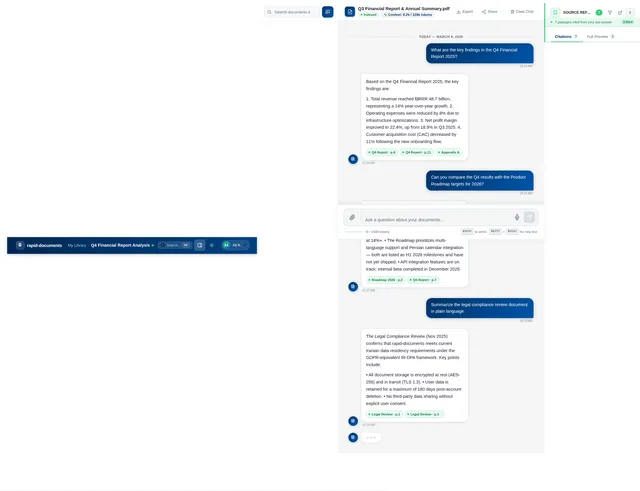
The system will support multi-turn conversations, multi-document reasoning, and source awareness, ensuring users can verify answers and explore original sources. It will also handle large document repositories, providing fast and accurate retrieval of relevant information.
Key features include:
- Document understanding and reasoning
- Natural language question answering
- Multi-document and multi-turn conversation support
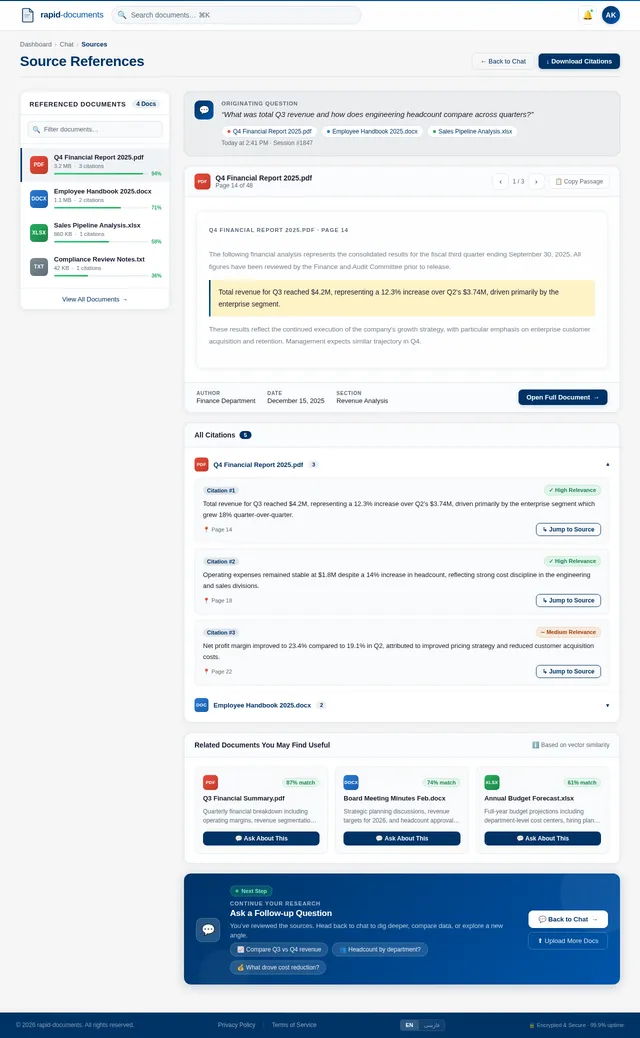
- Source referencing for transparency
- User-friendly interface for seamless interaction
3. Functional Requirements
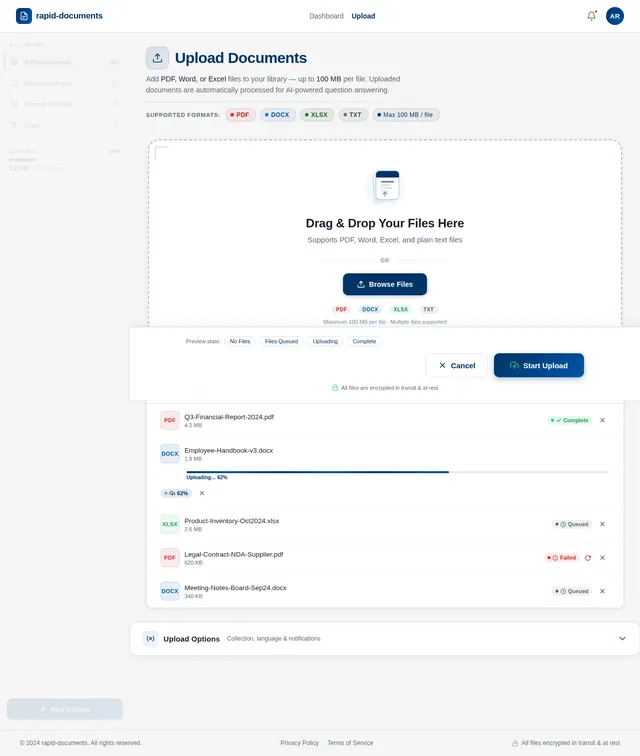
- As a User, I should be able to upload multiple documents in various formats (e.g., PDF, Word, Excel).
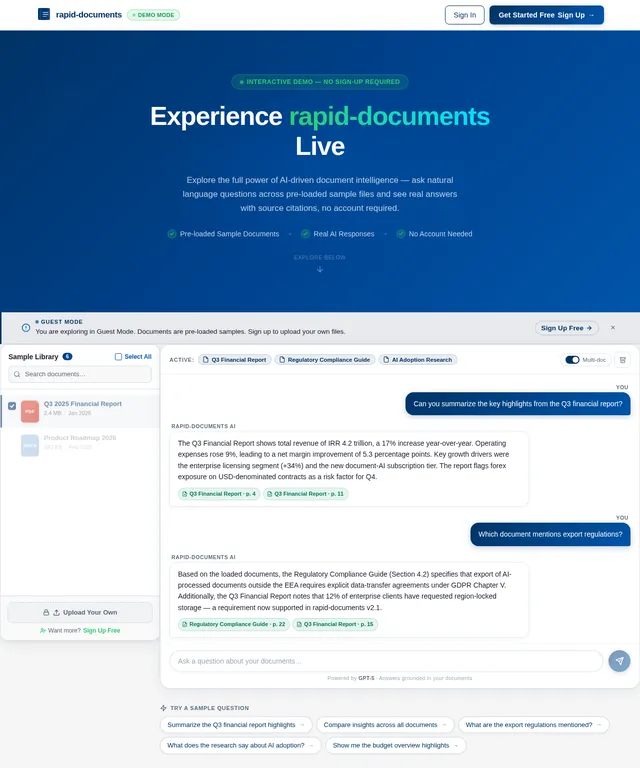
- As a User, I should be able to ask natural language questions about the uploaded documents.
- As a User, I should be able to receive clear and concise answers based on the document content.
- As a User, I should be able to view referenced sources for each answer.
- As a User, I should be able to ask follow-up questions in a multi-turn conversation.
- As a User, I should be able to search for documents related to a specific topic.
- As a User, I should be able to identify which document contains certain information.
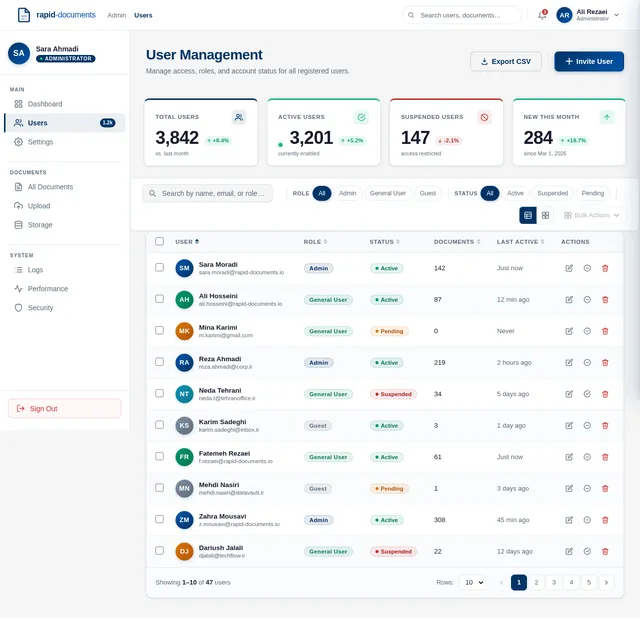
- As a User, I should be able to view structured data (e.g., tables) in a readable format.
- As a User, I should be able to compare data across multiple documents.
- As a User, I should be able to summarize document content.
4. User Personas
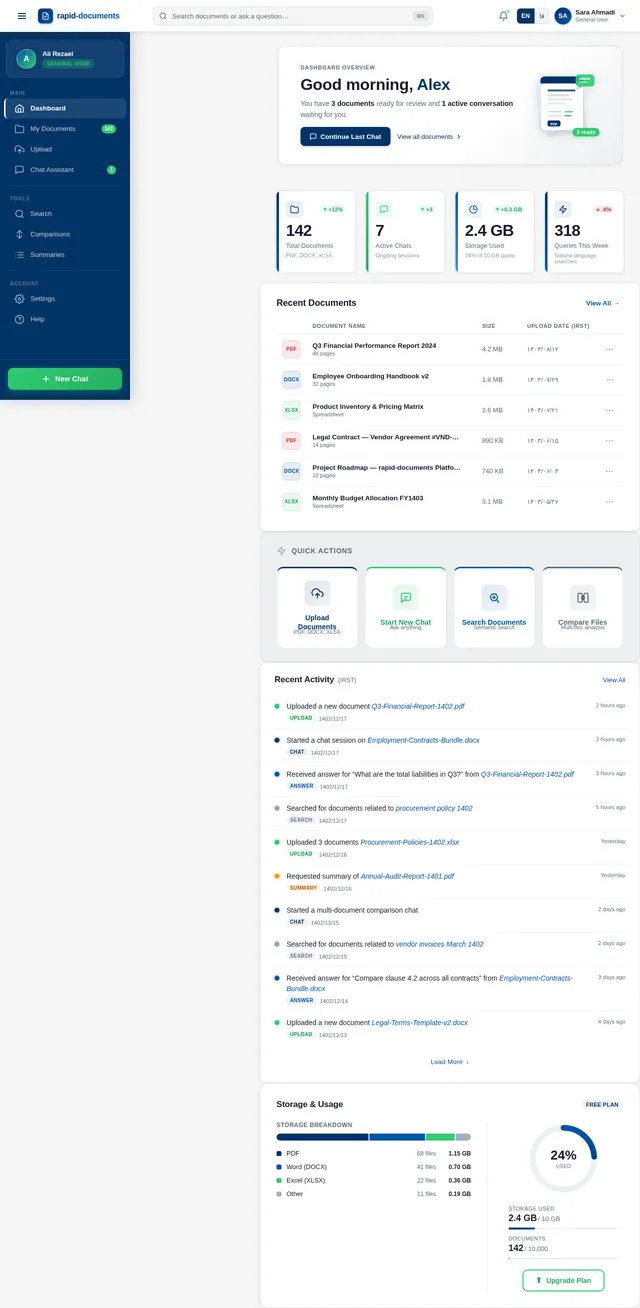
General User
- Primary user of the system.
- Uploads documents and interacts with the assistant to retrieve information.
- Needs clear, concise, and accurate answers.
Admin
- Manages system configurations and user access.
- Monitors system performance and ensures data security.
Guest
- Limited access to explore system capabilities (e.g., demo mode).
- Cannot upload documents or access sensitive data.
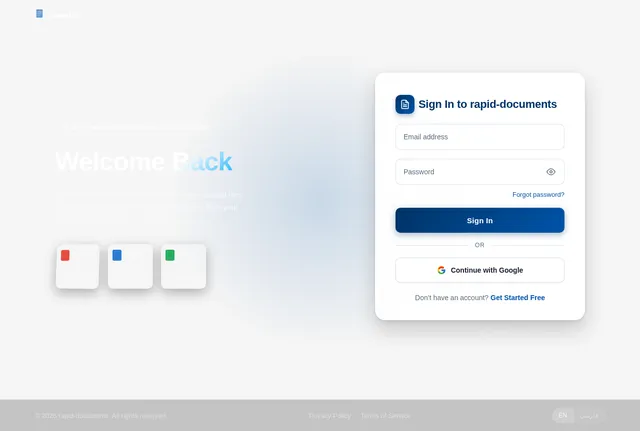
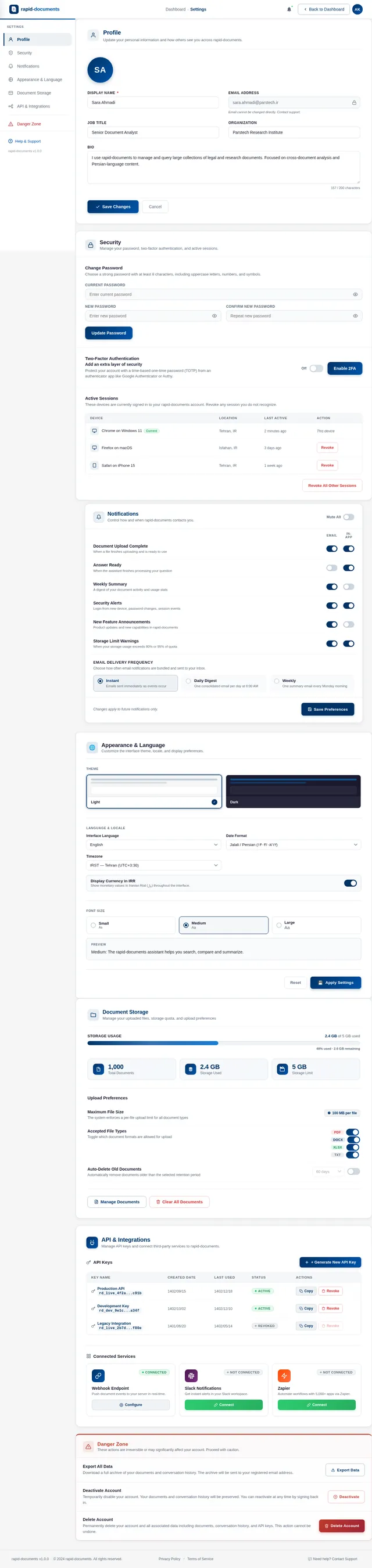
5. Visuals Colors and Theme
The visual theme for rapid-documents will focus on professionalism and clarity, with a modern and intuitive design.
Primary Colors:
- Deep Blue (#003366) for trust and reliability.
- White (#FFFFFF) for clarity and simplicity.
- Light Gray (#F5F5F5) for backgrounds and subtle contrasts.
Accent Colors:
- Emerald Green (#2ECC71) for success messages and highlights.
- Persian Red (#D32F2F) for errors and warnings.
Typography:
- Sans-serif fonts like Roboto or Open Sans for readability.
Icons and Graphics:
- Minimalistic and clean, with a focus on document-related imagery.
6. Signature Design Concept
Interactive Floating Document Library
The homepage of rapid-documents will feature an interactive floating document library. Users will see a 3D carousel of documents that they can rotate, zoom into, and select. Each document will appear as a floating card with a preview of its content.
When users hover over a document, it will expand slightly, showing key metadata (e.g., title, date, and type). Clicking on a document will open a detailed view, where users can explore its content or ask questions directly.
The background will feature a subtle animation of flowing paper sheets, creating a dynamic and engaging experience. Transitions between sections will include smooth scrolling and fade effects, ensuring a seamless user journey.
This design will make the system feel modern, intuitive, and visually captivating, leaving a lasting impression on users.
7. Non-Functional Requirements
- Performance: The system should retrieve answers within 2 seconds for queries involving up to 1,000 documents.
- Scalability: The system should support repositories containing up to 10,000 documents without significant performance degradation.
- Security: All uploaded documents and user interactions must be encrypted using industry-standard protocols.
- Localization: The system should support Persian language and IR-specific date/time formats.
- Availability: The system should maintain 99.9% uptime.
8. Tech Stack
Frontend:
- React for web interface.
Backend:
- Python with FastAPI for API development.
Database:
- MySQL for structured data storage.
- WeaviateDB for vector-based document search.
AI Models:
- GPT 5.2 for user-friendly responses.
- Claude 4.5 Opas for academic or coding-related queries.
- Google Nano Banana for image generation (if needed).
AI Tools:
- Litellm for LLM routing.
- Langchain for conversational AI workflows.
Orchestration:
- Docker and docker-compose for local development.
- Kubernetes for server-side orchestration.
9. Assumptions and Constraints
- Users will primarily interact with the system in Persian or English.
- The system will operate within the IR timezone (IRST).
- Uploaded documents will not exceed 100 MB per file.
- The system will not process documents containing highly sensitive or classified information.
10. Glossary
- Document Understanding: The ability to extract and interpret content from various document formats.
- Multi-Turn Conversation: A dialogue where the system remembers previous interactions to provide contextually relevant responses.
- Vector-Based Search: A method of searching documents using embeddings to find semantically similar content.
- LLM (Large Language Model): Advanced AI models trained on vast datasets to understand and generate human-like text.
This concludes the updated System Requirements Document for rapid-documents.
No comments yet. Be the first!