frozen-task
Create a task management system for Make sure there is drag and drop functionality for task status

Comments (0)
Sign in to leave a comment
Project Tasks15
Implement Theme & Global Styles
As a user I want to experience a consistent Frozen Flow visual theme across all pages. Implement the frozen-task design system: Ice Blue (#A8DADC), Deep Navy (#1D3557), Coral (#E63946), Soft White (#F1FAEE) color palette, Roboto + Lato typography, global CSS variables, frosted-glass component patterns, and micro-animation keyframes. Remove any scaffold pages not present in the defined page set (keep: Login, Dashboard, Tasks, Users, Settings). This task is independent and must be completed first.
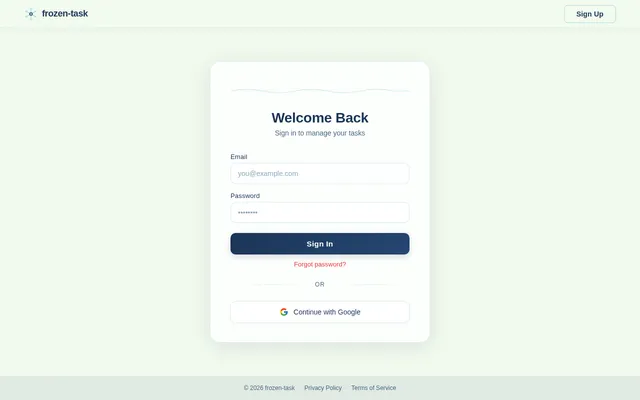
Build Login Page
As a user I want to sign in securely via a polished Login page. Implement the Login page (v3) based on the existing JSX design — includes email/password fields, frosted-glass card, Ice Blue focus rings, Coral CTA button with ice-crack hover animation, and error state display. Page connects to: Dashboard (on success). Auth token storage in httpOnly cookie / localStorage.
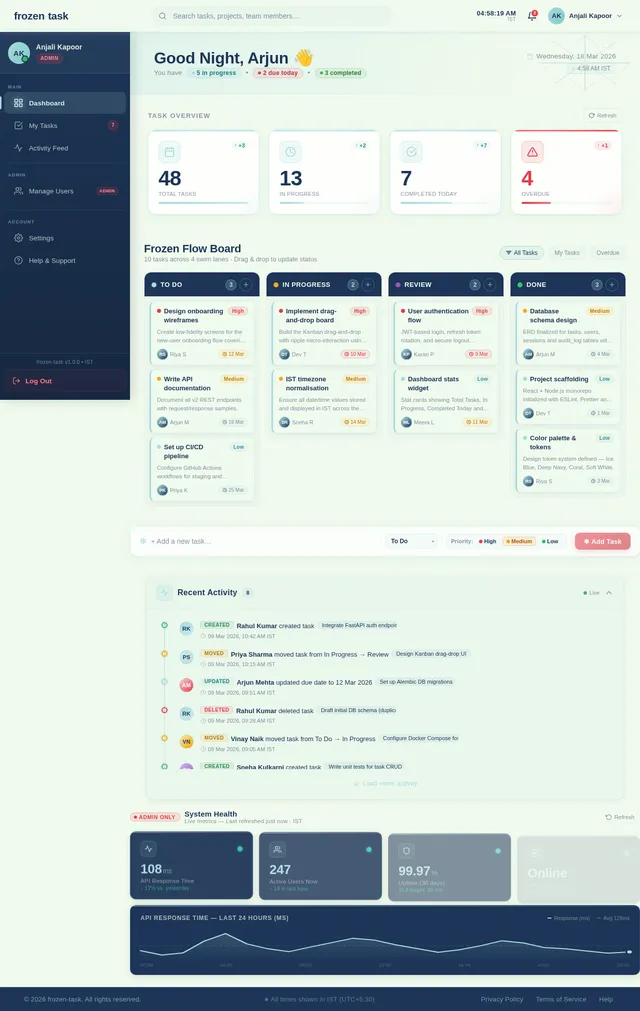
Build Dashboard Page
As a user I want to view my tasks and system stats on a Dashboard page. Implement the Dashboard page (v3) based on the existing JSX design — includes frozen-lake animated background, task stat cards, drag-and-drop Kanban columns (ice-block task cards), health monitoring widgets for Admin, smooth ripple drag animations, and seasonal background theming. Navigates from: Login. Links to: Tasks (create/edit), Users (admin).
Build Users Page
As an admin I want to view and manage all user accounts on the Users page. Implement the Users page (v3) based on the existing JSX design — includes users data table with avatar, name, email, role badge (Admin=coral, User=ice-blue), status badge, registered date (IST), last login (relative), edit/toggle/delete action buttons, bulk selection with floating bulk-action bar, and mobile card-list view. Navigates from: Dashboard (admin only).
Implement Seasonal Background Theming
As a user I want the dashboard background to subtly reflect the current season (snowflakes in winter, blooming flowers in spring, etc.). Implement a seasonal theming utility in React that detects the current date (IST) and applies the appropriate CSS animation layer (SVG particle overlays) on the frozen-lake dashboard background. Smooth CSS transitions between themes.
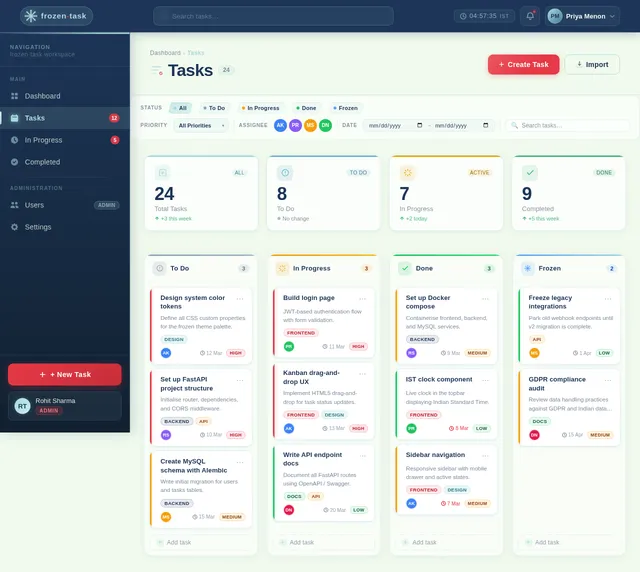
Build Tasks Page
As a user I want to create, view, edit and delete tasks on a dedicated Tasks page. Implement the Tasks page (v3) based on the existing JSX design — includes task list/board view, Create Task form modal (title, description, status, due date in IST), task detail panel with Edit/Delete actions, drag-and-drop status update, and ice-crack modal open animation. Navigates from: Dashboard. Sub-routes: Task Detail, Edit Task.
Implement Task CRUD API
As a user I want to use a backend API for creating, reading, updating, and deleting tasks. Build FastAPI endpoints: POST /tasks, GET /tasks, GET /tasks/{id}, PUT /tasks/{id}, DELETE /tasks/{id}. Include status field (To Do, In Progress, Done), due_date stored/returned in IST, owner association, and proper HTTP status codes. MySQL persistence via SQLAlchemy + Alembic migration.
Implement User Management API
As an admin I want to use a backend API for managing user accounts. Build FastAPI endpoints: GET /users (list with pagination/filter), GET /users/{id}, PUT /users/{id} (role, status), DELETE /users/{id}, PATCH /users/{id}/status (activate/deactivate). Role-based access control — admin only. Returns registered_at and last_login in IST format.
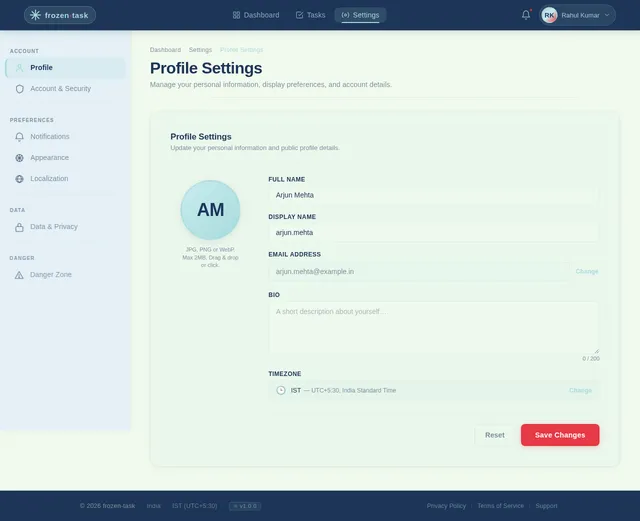
Build Settings Page
As an admin I want to configure system settings on the Settings page. Implement the Settings page (v3) based on the existing JSX design — includes system configuration panels, user preference controls, locale defaults (IST timezone, INR currency), frosted-glass form sections, Coral save CTA, and success/error toast notifications. Navigates from: Users page / Dashboard sidebar.
Implement Task Status Update API
As a user I want to use a backend API for updating task status via drag-and-drop. Build PATCH /tasks/{id}/status endpoint accepting new status value with optimistic concurrency support and WebSocket or polling endpoint for real-time board refresh. Ensure response time under 2 seconds per NFR.
Connect Users Page to API
As an admin I want the Users page to display real user data fetched from the API. Wire the Users (v3) frontend to GET /users, PUT /users/{id}, DELETE /users/{id}, and PATCH /users/{id}/status endpoints. Implement search/filter query params, pagination state, bulk action API calls, and optimistic UI updates with error rollback.
Implement Settings API
As an admin I want to use a backend API for reading and saving system configuration. Build FastAPI endpoints: GET /settings, PUT /settings. Support locale configuration (timezone=IST, currency=INR), system toggles, and admin-only access guard. Persist settings in MySQL. Return validation errors with clear messages.
Add AI Assistant Integration
As a user I want to use an AI assistant on the dashboard for user-friendly task suggestions and responses. Integrate GPT 5.2 via FastAPI AI proxy endpoint POST /ai/chat. Frontend AI assistant panel (already scaffolded in dashboard/ai-assistant page) streams responses, supports task-context injection (current task list), and renders markdown output with frozen-task typography styling.
Connect Settings Page to API
As an admin I want the Settings page to load and save real configuration via the API. Wire the Settings (v3) frontend to GET /settings and PUT /settings endpoints. Show loading skeleton on fetch, inline validation on save, and success/error toast notifications matching the frozen-task design system.
Integrate Drag-and-Drop Frontend
As a user I want to drag and drop task cards on the Dashboard and Tasks pages to update their status. Integrate a drag-and-drop library (e.g. dnd-kit or react-beautiful-dnd) into the frozen-lake board. On drop: call PATCH /tasks/{id}/status API, trigger ripple animation on the lake surface, and animate the ice-block card into its new column. Ensure touch-device compatibility for mobile.
No comments yet. Be the first!