work-flow
 Pacer
PacerI want to break down my new project/idea into a step-by-step user flow or process. My idea is: [Insert your project or idea description here]. Please divide the entire process into a logical sequence of steps, where each step represents a clear action, screen, or page (like a user journey map). Provide the output as a clean, sequential list of steps so I can easily convert them into a flowchart or diagram.

Comments (0)
Sign in to leave a comment
System Requirements
System Requirements Document for work-flow
Introduction
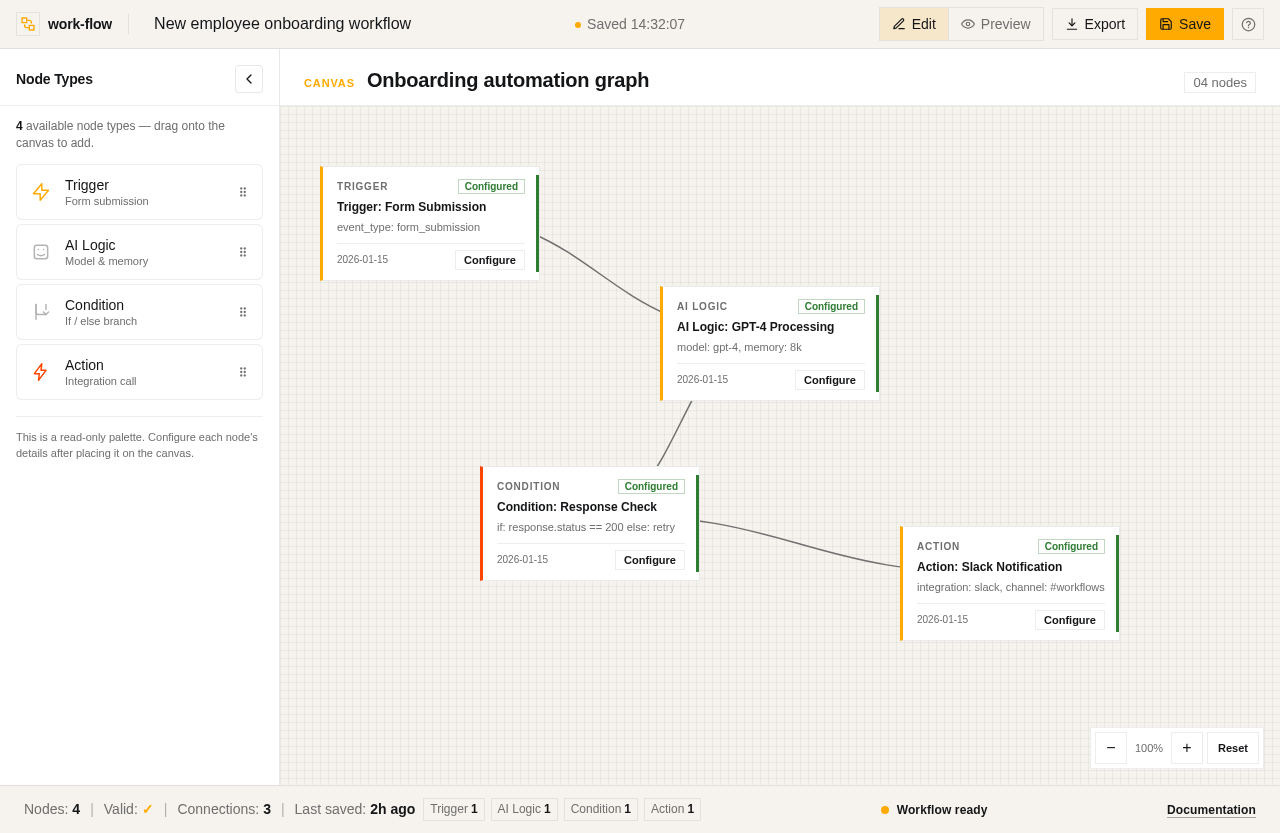
The work-flow project aims to design a node-based AI workflow automation tool, similar to an agentic workflow builder. This tool is intended for tech-savvy users who need to break down projects or ideas into step-by-step user flows or processes. The product will allow users to structure workflows into interconnected nodes and blocks, focusing on triggers, AI agent/core logic, conditions/branching, and actions/integrations.
System Overview
The work-flow system is a node-based AI workflow automation tool designed to help users create structured workflows for various use cases. The system will allow users to define triggers, AI logic, conditional branching, and actions or integrations. The target audience is tech-savvy users who appreciate precision and clarity in workflow design.
Product Interpretation and Delivery Boundary
The work-flow system will be delivered as a web-based application, accessible to users who need to design and visualize complex workflows. The system will not include generic SaaS blue themes or overly decorative animations, focusing instead on a systematic and warm design approach. The system will not manage user accounts or permissions beyond the necessary access to create and manage workflows.
Page Content and Component Coverage
Workflow Builder
-
Trigger Definition
- Input: Event or form submission details
- Actions: Define what starts the workflow
- States: Loading, success, error
-
AI Agent / Core Logic
- Input: Model, memory, or processing requirements
- Actions: Configure AI logic
- States: Loading, success, error
-
Conditions/Branching
- Input: Decision-making logic (if/else)
- Actions: Set up conditional paths
- States: Loading, success, error
-
Actions / Integrations
- Input: Final outputs or tools to call
- Actions: Configure integrations (e.g., Slack, database)
- States: Loading, success, error
Functional Requirements
- As a user, I should be able to define a trigger event or form submission that starts the workflow, so that the workflow can be initiated automatically. (explicit)
- As a user, I should be able to configure the AI agent or core logic required for the workflow, so that the necessary processing is performed. (explicit)
- As a user, I should be able to set up conditions or branching logic to handle decision-making within the workflow, so that different paths can be taken based on conditions. (explicit)
- As a user, I should be able to configure actions or integrations to execute final outputs or call external tools, so that the workflow can interact with other systems. (explicit)
User Personas
- Tech-Savvy User: Responsible for designing and managing workflows. This persona values precision, clarity, and systematic approaches in workflow design.
Core User Flows
-
Defining a Trigger
- User accesses the Workflow Builder.
- User inputs details for the trigger event or form submission.
- System processes the input and confirms the trigger setup.
- User receives confirmation of successful trigger definition.
-
Configuring AI Agent/Core Logic
- User selects the AI Agent/Core Logic component.
- User inputs model, memory, or processing requirements.
- System configures the AI logic and confirms setup.
- User receives confirmation of successful AI logic configuration.
-
Setting Up Conditions/Branching
- User accesses the Conditions/Branching component.
- User inputs decision-making logic (if/else conditions).
- System sets up conditional paths and confirms setup.
- User receives confirmation of successful branching setup.
-
Configuring Actions/Integrations
- User selects the Actions/Integrations component.
- User inputs details for final outputs or external tool integrations.
- System configures the integrations and confirms setup.
- User receives confirmation of successful integration configuration.
Visuals Colors and Theme
- Muse: Rasmus Andersson
- Palette:
- Background: #F6F3EE
- Surface: #FFFFFF
- Text: #141517
- Primary: #FFAA00
- Accent: #FF4500
- Muted: #B3B3B3
- Typography:
- Headings: Space Grotesk — Bold
- Body: Work Sans
- Scale: 1.25 modular (48/32/24/16/14)
- Shape Language: Compact controls, hairline borders, editorial numerals
- Layout: 4/8-pt spacing scale, clear hierarchy, tabular numerals for data emphasis
Signature Design Concept
The public entry page will feature an asymmetric grid with oversized Space Grotesk headlines. The background will include subtle schematics in grey, with prominent #FFAA00 highlights. The design will emphasize structure and hierarchy with hairline borders and editorial use of tabular numerals for node data.
Interaction Model & Motion Direction
- Interaction Model: Static
- Motion Tempo: Restrained
- Hero Dimensionality: Flat
- Landing Hero Motion Brief: The hero section will feature a composed layout with a large Space Grotesk headline overlapping a schematic background. Fast, functional transitions will provide clear feedback without decoration.
Non-Functional Requirements
- The system must provide fast and functional transitions to enhance user experience.
- The design must avoid generic SaaS blue themes and overly decorative animations.
Tech Stack
- Frontend: React
- Backend: Python/FastAPI
- Storage: Appropriate database solution
- Deployment: Docker/docker-compose
Assumptions and Constraints
- The system assumes users have a basic understanding of workflow design and AI logic.
- The system will not include user account management or differentiated permissions.
Glossary
- Trigger: An event or form submission that initiates a workflow.
- AI Agent/Core Logic: The model, memory, or processing required for workflow execution.
- Conditions/Branching: Decision-making logic that determines the workflow path.
- Actions/Integrations: Final outputs or tools that the workflow interacts with.
No comments yet. Be the first!