winter-website
 Priya Mandaviya
help me to build food recipe website where user will select whatever they have in ingredients categories wise like vegetables, spices, other options and this website will guide that what user can cook with available options.... Ui should be as per current trend like minimal and card based also user friendly. use illustrations of food to attract the audience. all buttons can CTAs should be working. use orange or red color code like swiggy or zomato. every page of website should be open.
Comments (0)
Sign in to leave a comment
Project Tasks20
Implement Theme & Base Structure
As a user, I want to see a consistent visual theme and base layout across all pages so that the website feels cohesive and matches the mock-design pages exactly. This task covers: applying the color palette (#FFF8F0 background, #FF4500 accent, #333333 text, #FFE4D1 surface, #FFB199 muted), setting up global typography, spacing, and component tokens in the React project, removing any scaffold pages not present in the final design (e.g. welcome page, ai-assistant page, generic dashboard sub-pages not aligned with design), and ensuring the base layout shell (navbar, footer, page wrapper) matches the mock designs. All 8 designed pages (Home, Login, Signup, Recipe Detail, Dashboard, Profile, Recipes, Ingredients) must render within this theme shell. This task must be completed before any individual page implementation begins.
Implement Ingredient Selection API
As a user, I want to use a backend API to fetch categorized ingredients (vegetables, spices, other) so that the ingredient pantry on the homepage is dynamically populated. Implement FastAPI endpoints: GET /ingredients (list all with category filter), POST /ingredients (admin only), PUT /ingredients/{id} (admin only), DELETE /ingredients/{id} (admin only). Include MySQL models with Alembic migration for the ingredients table (id, name, category, image_url, created_at).
Implement User Preferences API
As a registered user, I want to use a backend API to save and retrieve my ingredient preferences and recipe history so that I can access personalized suggestions on return visits. Implement FastAPI endpoints: GET /users/me/preferences, POST /users/me/preferences (save ingredient selections), GET /users/me/history (saved recipes), POST /users/me/history (save a recipe). Include MySQL models for user_preferences and user_recipe_history tables.
Implement Admin Stats API
As an admin, I want to use a backend API to retrieve platform statistics and user activity data so that I can monitor the health of the website. Implement FastAPI endpoints under /admin prefix (protected by admin role): GET /admin/stats (total users, total recipes, active users today), GET /admin/activity (recent user actions log). Ensure role-based access control restricts these endpoints to admin users only.
Build Home Page UI
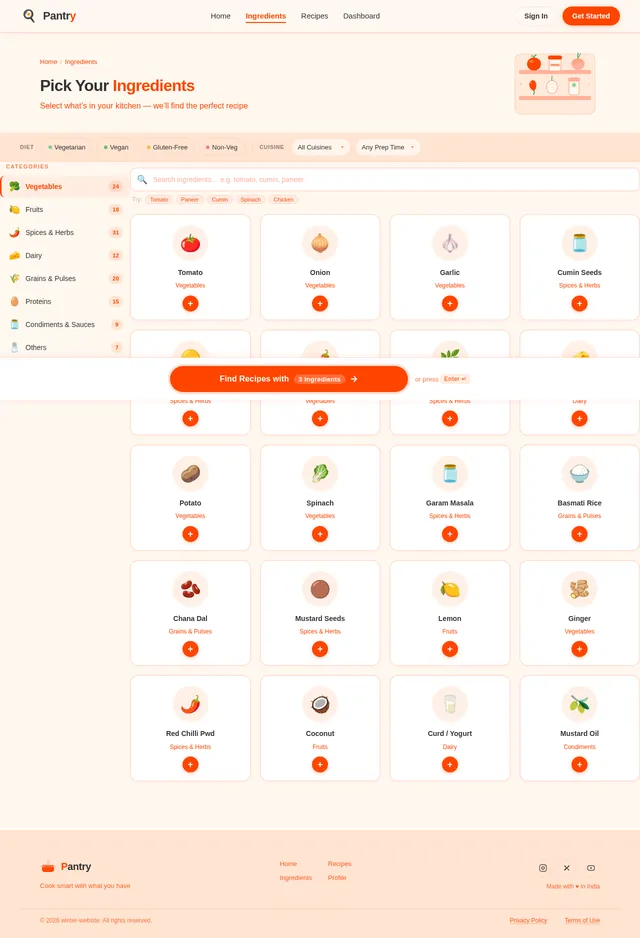
As a user, I want to interact with a beautifully illustrated pantry-style homepage so that I can browse ingredient categories, select ingredients, and add them to a virtual cooking pot. Implement the Home page based on the existing Home (v2) JSX design. The page should include: categorized ingredient cards (vegetables, spices, other) with hover animations, a drag-and-drop virtual cooking pot at the center, real-time recipe suggestion previews as ingredients are added, smooth page transition animations, and functional CTA buttons. This is the entry point for both Guest and Registered users per the user flow.
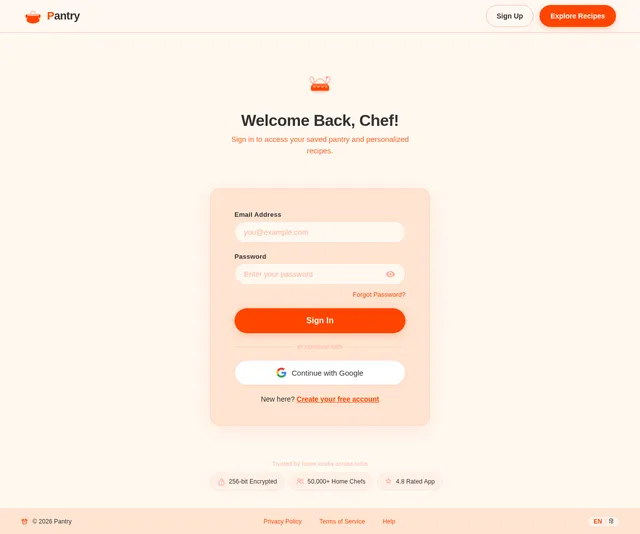
Build Login Page UI
As a user, I want to sign in to my account through a clean and intuitive login page so that I can access personalized recipe suggestions and saved preferences. Implement the Login page based on the existing Login (v2) JSX design. The page should include: email/password form fields, a sign-in CTA button styled in the accent color (#FF4500), a link to the Signup page, and error state handling. This page is the entry point for Registered Users and Admins per the user flow.
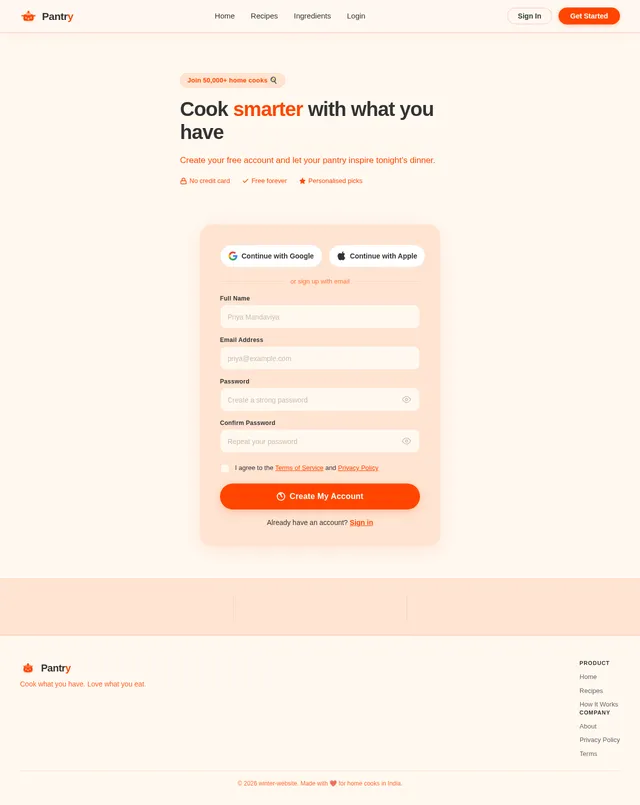
Build Signup Page UI
As a user, I want to create a new account through a clear and welcoming signup page so that I can save my ingredient preferences and recipe history. Implement the Signup page based on the existing Signup (v2) JSX design. The page should include: name, email, and password fields, a create account CTA button, a link back to Login, and form validation feedback. This page is accessible from the Recipes page per the Guest User flow.
Build Recipes Page UI
As a user, I want to view recipe suggestions in a minimal card-based layout so that I can quickly browse and filter recipes based on my selected ingredients. Implement the Recipes page based on the existing Recipes (v2) JSX design. The page should include: a grid of recipe cards with food illustrations, filter controls for cuisine type and preparation time, a results count indicator, and navigation to the Recipe Detail page. This page is reached from the Home page (Add to Pot action) in both Guest and Registered user flows.
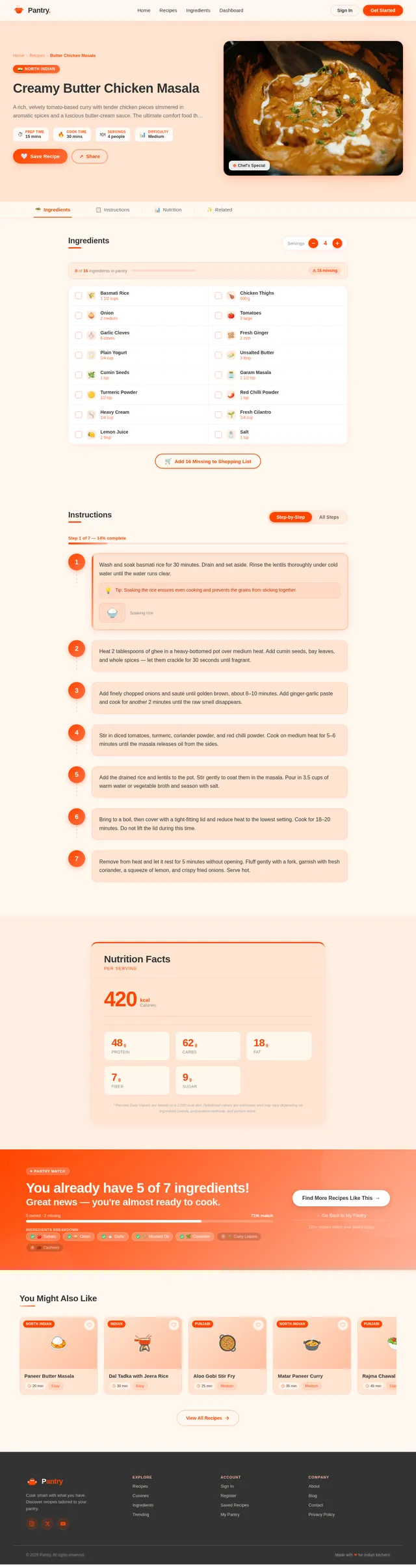
Build Recipe Detail Page UI
As a user, I want to view detailed step-by-step instructions for a recipe so that I can follow along while cooking. Implement the Recipe Detail page based on the existing Recipe Detail (v2) JSX design. The page should include: recipe name and hero illustration, ingredient list, step-by-step preparation instructions, preparation time and cuisine type badges, and a Save Recipe CTA button (visible for Registered Users). This page is navigated to from the Recipes page in both Guest and Registered user flows.
Build Profile Page UI
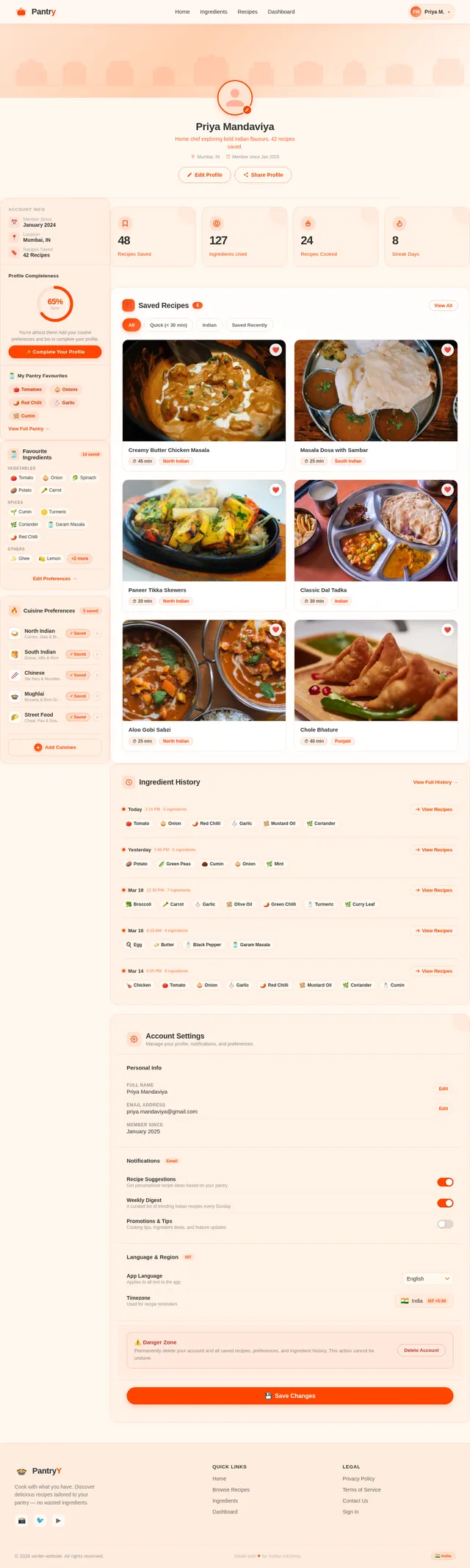
As a registered user, I want to view my profile page with my saved ingredient history and recipe preferences so that I can quickly revisit past selections and saved recipes. Implement the Profile page based on the existing Profile (v2) JSX design. The page should include: user details section, saved ingredient preferences, recipe history cards, and a link back to the Home pantry. This page is accessible from the Home page in the Registered User flow.
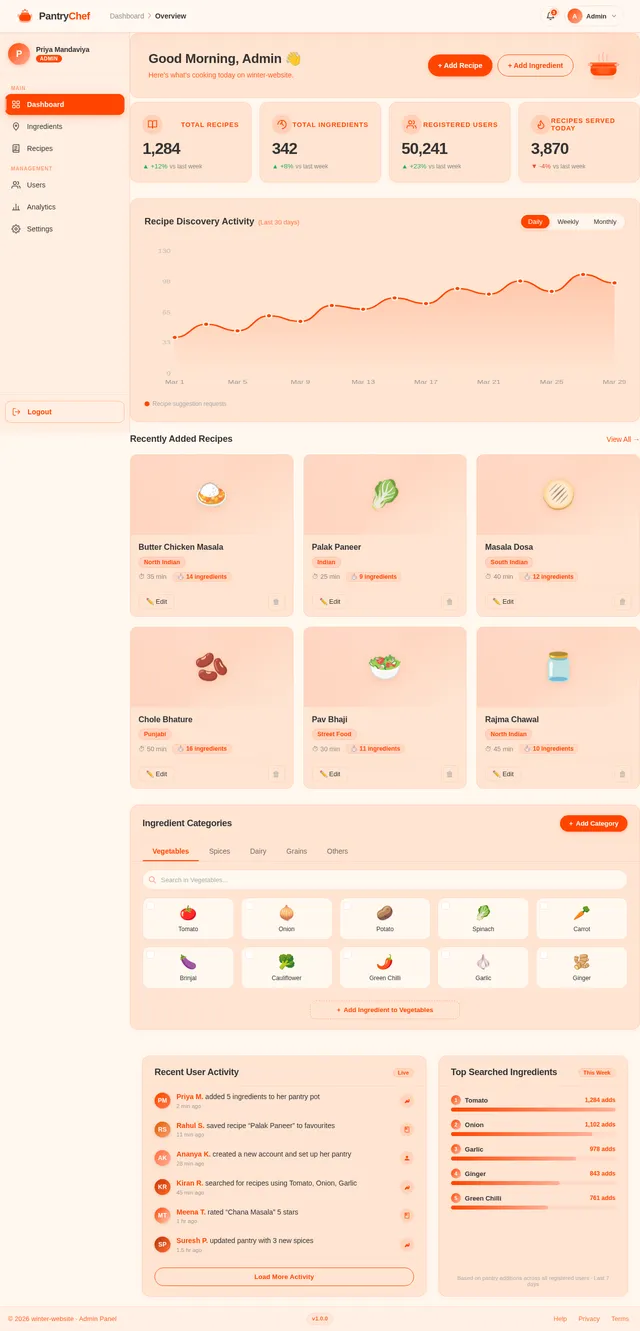
Build Dashboard Page UI
As an admin, I want to access a dashboard with site statistics and activity monitoring so that I can manage the platform effectively. Implement the Dashboard page based on the existing Dashboard (v2) JSX design. The page should include: stats overview cards (users, recipes, activity), navigation links to Ingredients management and Recipes management sections, and an activity monitoring panel. This page is the landing page for Admins after login per the Admin user flow.
Build Ingredients Management UI
As an admin, I want to manage ingredient categories and add new ingredients through a dedicated page so that I can keep the ingredient database up to date. Implement the Ingredients page based on the existing Ingredients (v2) JSX design. The page should include: a list/table of ingredient categories, an Add Ingredient form or modal, edit and delete actions per ingredient, and navigation back to the Dashboard. This page is accessible from the Dashboard in the Admin user flow.
Implement Recipe Suggestion API
As a user, I want to use a backend API to receive recipe suggestions based on my selected ingredients so that I can discover what I can cook. Implement a FastAPI endpoint POST /recipes/suggest that accepts a list of ingredient IDs and returns matching recipes. Include MySQL models for recipes (id, name, cuisine_type, prep_time, steps, image_url) and a recipe-ingredients mapping table. Support filtering by cuisine_type and prep_time query parameters.
Integrate AI Recipe Suggestions
As a user, I want to receive intelligent and personalized recipe suggestions powered by GPT so that I can get creative meal ideas even when exact recipe matches are not available. Integrate GPT 5.2 via Langchain to generate user-friendly recipe suggestions when selected ingredients do not fully match stored recipes. Implement a fallback AI suggestion endpoint POST /recipes/ai-suggest that uses the ingredient list as context and returns GPT-generated recipe ideas with steps and ingredient notes.
Connect Recipes Page to APIs
As a user, I want the Recipes page to display real recipe suggestions and respond to filter interactions so that I can find recipes matching my available ingredients and preferences. Wire up the Recipes page UI to: receive and display recipe results from the suggestion API, apply cuisine type and prep time filters via query params, handle empty states and loading indicators, and link each recipe card to the Recipe Detail page.
Connect Recipe Detail to APIs
As a registered user, I want to view full recipe details from the backend and save recipes to my history so that I can refer back to them later. Wire up the Recipe Detail page to: fetch recipe details from GET /recipes/{id}, render steps, ingredients, and metadata dynamically, trigger POST /users/me/history on Save Recipe button click (authenticated users only), and show login prompt for guest users.
Connect Profile Page to APIs
As a registered user, I want to view my saved ingredients and recipe history on my profile page fetched from the backend so that I can review my past activity. Wire up the Profile page to: fetch GET /users/me/preferences and GET /users/me/history on load, display saved ingredient tags and recipe history cards, handle empty states with encouraging CTAs to explore the pantry.
Connect Dashboard to Admin APIs
As an admin, I want the dashboard to show real platform statistics and activity data fetched from the backend so that I can monitor platform health. Wire up the Dashboard page to: fetch GET /admin/stats (users count, recipes count, daily activity), display live data in the stats cards, link navigation to Ingredients and Recipes management pages.
Connect Ingredients Management to APIs
As an admin, I want the Ingredients management page to load, create, edit, and delete ingredients via the backend API so that ingredient data stays current. Wire up the Ingredients page to: fetch GET /ingredients on load, open Add Ingredient form that calls POST /ingredients, trigger PUT /ingredients/{id} on edit save, call DELETE /ingredients/{id} on delete confirmation, and show success/error toasts.
Connect Home Page to APIs
As a user, I want the homepage ingredient pantry to load real ingredients from the backend and send my selections to the recipe suggestion API so that my cooking pot interactions produce real recipe results. Wire up the Home page UI to: fetch /ingredients on load grouped by category, send selected ingredient IDs to /recipes/suggest or /recipes/ai-suggest on pot submission, and display loading/error states during API calls.
No comments yet. Be the first!