winter-single
 Diya Trivedi
start a project to build simple single page design of caluclator

Comments (0)
Sign in to leave a comment
System Requirements
System Requirements Document for winter-single
1. Introduction
winter-single is a small, self-contained calculator delivered as a single web page. The product intent, taken directly from the user's request, is to build a simple single page design of a calculator: one page that presents the calculator interface itself as the whole product surface. There is no marketing site, no navigation, no account system, and no secondary screens — the calculator is the product.
The audience is a single anonymous visitor who wants quick, everyday arithmetic from a calm, legible surface. The emotional register is not "productivity tool" but "a good desk object": unhurried, trustworthy, warm, and a little hand-made. Success is a correct result obtained from a simple, self-contained page.
2. System Overview
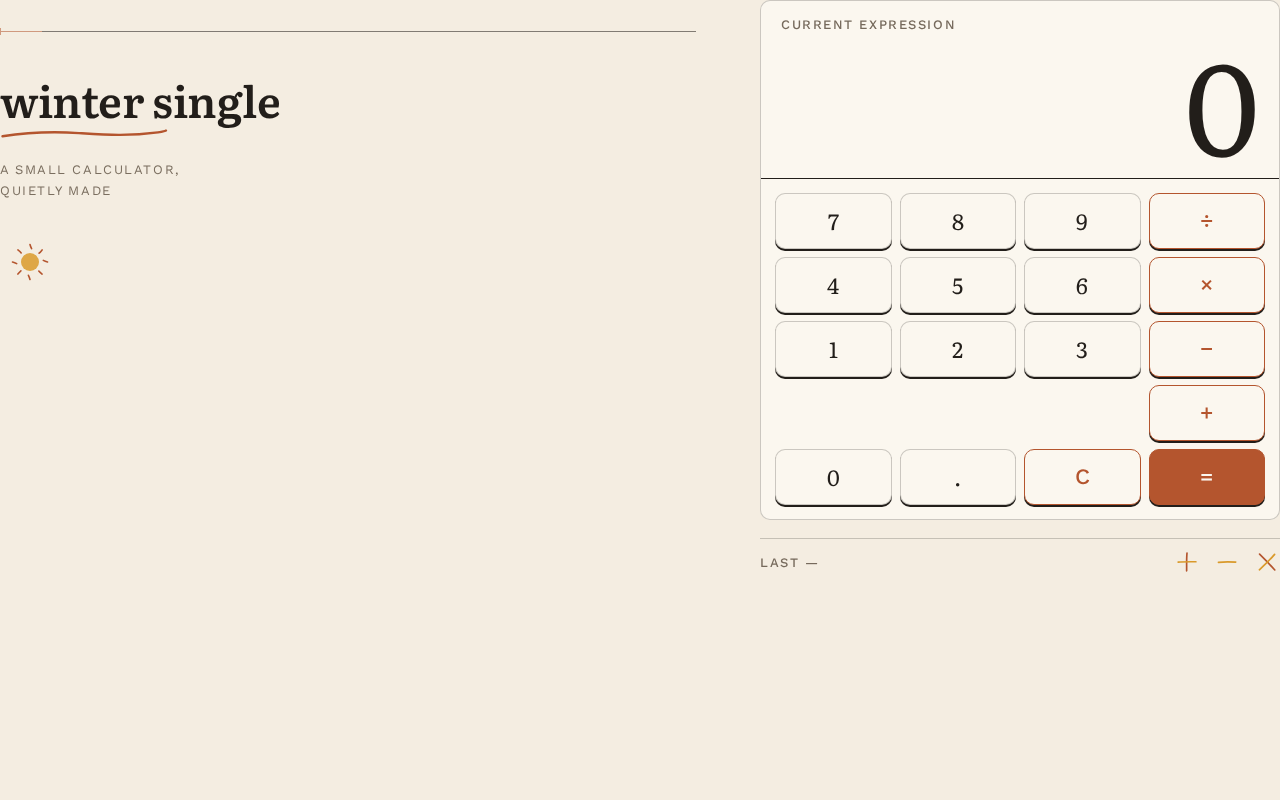
winter-single is a client-side single-page calculator. A visitor opens the page and immediately sees the calculator: an editorial title block ("winter single" wordmark with a hand-drawn rust underline and the caption "a small calculator, quietly made"), a paper card holding a large right-aligned numeric display, and a 4×5 keypad. The visitor enters numbers and operators, reads the displayed result, and clears or corrects input to begin a new calculation.
Actors
- Calculator User (human, anonymous) — the sole supported human role; enters numbers and operators, reads results, clears or corrects input.
- Calculator Engine (system process) — evaluates the entered expression and produces the displayed result. It is not a persona and has no independent UI.
Accepted behavior
- A single page that is the calculator interface itself.
- Expression entry via a 4×5 keypad of digits, operators, equals, clear, and decimal.
- A large right-aligned numeric display showing the current entry or result.
- Clearing/correcting input to start a new calculation.
- A ruled footer line echoing the last full expression as an editorial footnote.
Narrow exclusions
- No additional pages, routes, or navigation (exact single-page constraint).
- No accounts, sign-in, or identity of any kind (access requirement: none).
- No scientific functions, memory registers, history log panel, unit conversion, or graphing — none are requested.
- No photography, 3D, glassmorphism, or stock icons.
2a. Product Interpretation and Delivery Boundary
The entire product is one anonymously reachable page. There is no protected state, no durable actor-specific data, and no commitment or value transfer that must remain bound to a participant, so no application-owned identity is established and no sign-in, invitation, or provisioning flow exists. The calculator runs entirely in the browser; the Calculator Engine is a client-side system process supporting the human interaction, not a separate destination.
Everything described in this document is current. No future-horizon features are accepted; anything beyond basic arithmetic on a single page is explicitly out of scope for this generation.
2b. Source Content Inventory
Not applicable — no reference directive declares a content_source.
2c. Page Content and Component Coverage
The page contract is exact: one page, named Calculator, with access requirement none (anonymous public entry).
Calculator
The single page and the whole product surface. It is the anonymous public entry and owns the calculator interface, expression entry, result display, and clearing for a new calculation.
Information and state
- Current expression / entry string (the operand being typed or the evaluated result).
- A 13px uppercase muted label "current expression" above the display strip.
- The last completed full expression (e.g.
12 × 4 = 48) shown as a ruled footer footnote. - No loading state is meaningful (client-side, instant); no empty-data state beyond the initial display of
0.
Primary actions
- Press digit keys
0–9to append digits to the current entry. - Press operator keys
+,−,×,÷to select an operation. - Press the decimal key
.to begin a fractional entry. - Press the rust-filled equals key
=to evaluate the expression and show the result. - Press the clear key
C(orAC) to reset the entry and start a new calculation.
Supporting actions
- Correct input by clearing and re-entering (the accepted recovery path).
Domain entities
- Expression — the sequence of operands and operators currently entered.
- Result — the numeric outcome of evaluating the expression.
- Last Expression — the most recently completed expression, rendered in the footer footnote.
Component responsibilities
- Title block — Literata wordmark "winter single" with an inline-SVG hand-drawn rust underline; small-caps caption "a small calculator, quietly made".
- Display strip — full card width, ink hairline rule, right-aligned Literata tabular numerals at
clamp(56px, 13vw, 128px), with the muted "current expression" micro-label above. - Keypad — 4×5 grid of equal cells with 8px gutters (6px at 375px); letterpress keys (10px radius, 1px ink hairline, 2px hard offset shadow); digits in Literata, operators and words in Work Sans 500; operator column in rust outline; equals key the only rust-filled cell, bottom-right.
- Footer — a ruled line in 13px small caps reading the last full expression, plus three hand-drawn flat spot illustrations (plus, minus, times) in rust and mustard.
- Paper ground — cream
#F4EDE1with a subtle SVG-noise paper-grain texture at 4% opacity.
States
- Initial / empty — display shows
0; footer footnote empty or hidden until a first expression completes. - Entry — digits and operators accumulate in the display.
- Success — equals evaluates and the result cross-fades into the display over 140ms; the completed expression moves to the footer footnote.
- Error / recovery — an invalid or incomplete expression (e.g. a trailing operator, division by zero) shows a clear, legible error indication in the display; the user recovers by pressing clear and re-entering. No crash, no silent wrong answer.
- Pressed — a key depresses 1px with a 90ms ease-out and its offset shadow collapses to 0.
3. Functional Requirements
FR-1 — Single-page calculator surface (explicit) As a Calculator User, I should open one page that presents the calculator interface itself as the whole product surface, so that I can do arithmetic without navigating anywhere.
- Trigger: the visitor loads the page.
- Observable result: the Calculator page renders the title block, display strip, and 4×5 keypad; no other page or route exists.
- Access: anonymous, no identity.
- Failure/recovery: if the page fails to load, reloading the page is the recovery path.
- Continuation: the user proceeds to enter an expression.
FR-2 — Enter digits and operators (explicit) As a Calculator User, I should press digit and operator keys to build an arithmetic expression, so that I can compute a result.
- Input: digit keys
0–9, operator keys+,−,×,÷, and the decimal key.. - Observable result: the current entry appears in the large right-aligned display; each key press depresses 1px with a 90ms ease-out and its offset shadow collapses to 0.
- Access: anonymous.
- Failure/recovery: malformed entry (e.g. two decimals, leading operator) is prevented or corrected by clearing.
- Continuation: the user presses equals.
FR-3 — Evaluate and display the result (explicit) As a Calculator User, I should press the equals key to evaluate my expression and see the result, so that I get the answer I came for.
- Trigger: pressing the rust-filled equals key.
- Observable result: the Calculator Engine evaluates the expression; the result appears in the display, cross-fading over 140ms; the completed expression (e.g.
12 × 4 = 48) is echoed in the ruled footer footnote. - Access: anonymous.
- Failure/recovery: an invalid expression or division by zero shows a legible error in the display; the user clears and re-enters.
- Continuation: the user may continue calculating from the result or clear to start fresh.
FR-4 — Clear and start a new calculation (explicit) As a Calculator User, I should clear the current entry to start a new calculation, so that I can correct mistakes or begin again.
- Trigger: pressing the clear key.
- Observable result: the display resets to
0and the current entry is discarded. - Access: anonymous.
- Failure/recovery: this is itself the recovery path for any erroneous entry.
- Continuation: the user enters a new expression.
FR-5 — Editorial footnote of the last expression (explicit, from creative direction) As a Calculator User, I should see the last full expression echoed as a ruled footer footnote, so that I can confirm what I just computed.
- Trigger: completion of an evaluation.
- Observable result: a 13px small-caps ruled line reads the last full expression (e.g.
12 × 4 = 48). - Access: anonymous.
- Failure/recovery: if no expression has completed, the footnote is empty or hidden.
- Continuation: the footnote updates on the next completed evaluation.
4. User Personas
Calculator User
Product context. An anonymous visitor who lands on winter-single to do a quick piece of everyday arithmetic — a sum, a split bill, a rough product. They did not come to manage anything; they came for one correct number from a calm surface.
Primary goal. Get a correct arithmetic result quickly and legibly, then leave or start another calculation.
Distinct accepted responsibilities.
- Enter numbers and operators on the keypad.
- Read the result from the large display.
- Clear or correct input to start a new calculation.
- Glance at the footer footnote to confirm the last expression.
Relevant inputs and decisions. Which digits and operators to press; when to press equals; whether to continue from a result or clear and start over.
Interactions with other participants. The Calculator User is the only human participant. They interact with the Calculator Engine (system process), which evaluates expressions and returns results; the engine has no independent UI and no persona.
Observable success. A correct result appears in the display, the completed expression is echoed in the footer, and the page remains a single, simple, self-contained surface throughout.
5. Core User Flows
Flow A — Perform a calculation
- Start. The Calculator User opens the winter-single page (anonymous, no sign-in). The Calculator page fades its card up 8px once and shows the display reading
0. - Enter the first operand. The user presses digit keys; each key depresses 1px with a 90ms ease-out and its shadow collapses. The digits appear right-aligned in the large Literata display.
- Select an operator. The user presses an operator key in the rust-outlined operator column; the operator is recorded in the current expression.
- Enter the second operand. The user presses further digit keys (and the decimal key if needed); the display updates.
- Commit. The user presses the rust-filled equals key. The Calculator Engine evaluates the expression.
- Observe the result. The result cross-fades into the display over 140ms, and the completed expression (e.g.
12 × 4 = 48) appears in the ruled footer footnote. - Continue or finish. The user either continues calculating from the result or presses clear to start a new calculation.
Flow B — Correct a mistake and start over
- Start. Mid-entry, the Calculator User realizes the expression is wrong (or an invalid expression / division by zero has produced a legible error in the display).
- Clear. The user presses the clear key; the display resets to
0and the current entry is discarded. - Re-enter. The user enters a fresh expression following Flow A from step 2.
- Complete. The user presses equals and reads the corrected result; the footer footnote updates to the new expression.
Flow C — Confirm the last expression
- Start. After completing a calculation, the Calculator User wants to confirm what was computed.
- Read the footnote. The user reads the ruled footer line in 13px small caps, which echoes the last full expression (e.g.
12 × 4 = 48). - Continue. The user proceeds with a new calculation or leaves the page.
6. Visuals, Colors and Theme
Muse and headline. Warm editorial arithmetic after Frank Chimero — "a good desk object, quietly made." The page should feel composed like a book title page, not templated like an app.
Mode. Light mode only.
Color tokens (exact hex by role)
- Background (cream paper ground, ~65% of page):
#F4EDE1 - Surface (paper card behind display and keypad):
#FBF7EF - Text (ink — all readable type and the operand display):
#221E1A - Primary (rust — the single action colour: equals key, operator column, focus ring):
#B4552E - Accent (mustard — only the hand-drawn underline beneath the wordmark and the pressed-state tint on digit keys):
#D99A2B - Muted (warm grey — labels, memory strip, supporting caption):
#7A6E5F
No pure white, no pure black, no blue or indigo anywhere.
Typography
- Headings: Literata at 500–600, optical-size large, leading −0.01em, normal case — the wordmark and "winter single" title read like a book half-title.
- Numeric display: Literata 400 with tabular figures, right-aligned, at
clamp(56px, 13vw, 128px). - Body: Work Sans.
- Scale: 1.25 modular — 64 / 48 / 32 / 22 / 17 / 14. Page title
clamp(28px, 5vw, 44px); body 17px; keypad labels 22px (Literata for numerals, Work Sans 500 for operators and words); micro-labels 13px uppercase with 0.12em tracking. - Forbidden fonts: Inter, Roboto, Arial, Helvetica, Poppins, system-ui.
Shape language. Softly squared, hand-cut paper: keys are 10px-radius rectangles with a 1px ink hairline and a 2px hard offset "pressed" shadow (no blur). Section dividers are single ruled lines, never boxes. The only curves are the hand-drawn rust underline stroke and the small illustrated sun/compass spot art.
Layout. Single centred column on a 12-column grid with a wide outer margin. Wordmark and one-line caption at top left; then a paper card holding the display strip above a 4×5 keypad of equal cells with 8px gutters. Below the card, a short ruled "how it works" line in small caps and three hand-drawn spot illustrations (plus, minus, times) as a quiet footer. Max width 520px for the card, 720px for page text; at 375px the card bleeds 16px to each edge and keypad gaps tighten to 6px.
Imagery. Warm flat spot illustration only: a small hand-drawn sun, a compass rose, and arithmetic marks in rust and mustard, plus a subtle paper-grain texture (SVG noise at 4% opacity) on the cream ground. No photography, no 3D, no glass, no stock icons.
Accessibility of text and controls. Headlines, wordmarks, labels, numbers, and controls stay entirely inside the viewport and their container at 375px, 768px, and 1280px, wrapping or scaling via clamp(...) to fit; no element covers any readable text or control.
7. Signature Design Concept
The public entry is composed as an editorial title page for a desk object. At left, the wordmark "winter single" is set in Literata with a single hand-drawn rust underline stroke (an inline SVG path that doubles as the page's only decorative curve), and beneath it a small-caps line reads "a small calculator, quietly made." To its right on desktop (stacked above on mobile) sits the calculator itself as the dominant object: a cream paper card, 520px wide, with a full-width ink-ruled display strip showing 0 in 128px Literata numerals, and below it the 4×5 keypad where the rust equals key is the single saturated element on the page. The whole composition sits in generous cream margin with a thin rule across the top — closer to a book title page than an app. The signature moves are the 128px right-aligned numeral display with its tiny uppercase "current expression" label, the letterpress keys whose hard offset shadow collapses on press, the rust equals key as the only filled cell with the operator column in rust outline, and the ruled footer footnote echoing the last full expression like a margin note.
8. Interaction Model & Motion Direction
Interaction Model: Animated Motion Tempo: restrained Hero Dimensionality: flat
Landing Hero Motion Brief
- Focal subject. The calculator card itself — the cream paper card with its ink-ruled display strip and 4×5 letterpress keypad — as the dominant object beside the editorial wordmark.
- Input → transformation → outcome thesis. A key press (input) depresses the letterpress key 1px with a 90ms ease-out and collapses its offset shadow to 0 (transformation), and the display updates — digits appear as typed, and on equals the result cross-fades over 140ms while the completed expression moves to the footer footnote (outcome). Only accepted calculator behavior is animated.
- Motion vocabulary. Physical, letterpress, no bounce: 90ms ease-out key depression; 140ms result cross-fade; a single 8px card fade-up on load. Nothing loops; nothing parallaxes.
- Composed first frame. Cream ground with 4% paper grain; thin rule across the top; wordmark with rust underline and caption at left; the calculator card at right (stacked above on mobile) showing
0in 128px Literata numerals and the rust equals key as the only saturated element. - Reduced-motion state. With
prefers-reduced-motion, the load fade-up and result cross-fade are removed (content appears immediately and results swap instantly); key press feedback reduces to a static pressed tint with no transition. The layout remains fully usable and every control and label stays whole.
9. Non-Functional Requirements
- NFR-1 — Single page (explicit). The design must be simple and limited to a single page; the calculator page is the whole product surface. No additional routes, navigation, or screens.
- NFR-2 — Anonymous access (explicit). The page is publicly reachable with no account, sign-in, or identity of any kind.
- NFR-3 — Simplicity (explicit). The interface must remain simple: no scientific functions, memory registers, history panel, or adjacent calculator features beyond basic arithmetic entry, evaluation, and clearing.
- NFR-4 — Legibility and containment (creative direction). Readable text and controls stay whole at 375px, 768px, and 1280px, scaling via
clamp(...)and wrapping as needed; no element covers any readable text or control. - NFR-5 — Warm editorial palette (creative direction). Only the specified cream, ink, rust, mustard, and muted warm grey tokens are used; no pure white, pure black, blue, or indigo.
- NFR-6 — Restrained motion (creative direction). Motion is limited to the 90ms key depression, 140ms result cross-fade, and one-time 8px card fade-up; no looping, springy, or parallax motion; a usable static arrangement is provided under
prefers-reduced-motion. - NFR-7 — Correctness (required inference). The Calculator Engine must return correct arithmetic results for valid expressions and show a legible error rather than a silent wrong answer for invalid input or division by zero.
10. Tech Stack
- Frontend: React single-page application (client-side rendering), styled to the creative direction with the specified fonts (Literata, Work Sans) and color tokens.
- Calculator Engine: client-side JavaScript module within the same frontend process; no separate backend service is required for the accepted behavior.
- Storage: none — no persistence, no accounts, no server-side state.
- Deployment: static hosting of the built single-page frontend. No Docker services, database, or Kubernetes are required for the current scope.
11. Assumptions and Constraints
- A-1 (explicit constraint). The product is exactly one page; the calculator interface is the whole surface.
- A-2 (explicit constraint). Access is anonymous with no identity; no account-management capability is introduced.
- A-3 (required inference). The keypad is a 4×5 grid of equal cells as specified by the creative direction, covering digits
0–9, the four operators, decimal, equals, and clear. - A-4 (required inference). "Clear" resets the current entry to
0; correction is achieved by clearing and re-entering, since no backspace key is specified. - A-5 (required inference). Invalid expressions and division by zero produce a legible error in the display; recovery is via clear.
- A-6 (creative direction). All palette, typography, shape, layout, imagery, and motion values follow the supplied Frank Chimero warm-editorial direction; unspecified details default to that direction rather than to generic SaaS conventions.
- A-7 (scope). No future-horizon features are accepted; scientific functions, memory, history panels, and graphing are out of scope.
12. Glossary
- Calculator User — the sole human persona; an anonymous visitor performing everyday arithmetic.
- Calculator Engine — the client-side system process that evaluates expressions and returns results; not a persona.
- Expression — the sequence of operands and operators currently entered.
- Result — the numeric outcome of evaluating an expression.
- Last Expression — the most recently completed expression, echoed in the ruled footer footnote.
- Letterpress key — a keypad key styled as a hand-cut paper block with a 1px ink hairline, 10px radius, and a 2px hard offset shadow that collapses on press.
- Display strip — the full-width, ink-ruled area showing the current entry or result in large right-aligned Literata tabular numerals.
- Paper grain — the subtle SVG-noise texture at 4% opacity on the cream ground.
winter single
a small calculator, quietly made
2 expressions recorded.
winter single
a small calculator, quietly made
2 expressions recorded.
No comments yet. Be the first!