winter-metro

byDev Kalyani

make me a metro booking app make 8 pages

Landing
Landing

Comments (0)

No comments yet. Be the first!

System Requirements

System Requirements Document for winter-metro

1. Introduction

winter-metro is a metro booking application for riders who need to move from an origin station to a destination station with certainty. The product intent is drawn directly from the authoritative requirement: build a metro booking app with exactly eight pages. The app is public transport infrastructure rendered as software — a rider searches for a route, compares available journeys and fares, books and pays for a ticket, and holds a valid ticket for travel. A returning rider can revisit their bookings, reopen a ticket, and cancel a booking when applicable.

The audience is the commuter or traveller standing in the cold, often on a phone, who needs speed, legibility, and trust rather than delight. The interface is treated as transit-authority wayfinding: coded colour, ruled tables, strict columns, and unmistakable type. Success means a rider completes a booking and has a valid ticket available at the station.

Page 1 of 36

2. System Overview

winter-metro is a custom-UI web application with an application-owned backend. It delivers exactly eight pages: Landing, Search, Journeys, Booking, Payment, Ticket, Bookings, and Booking Details. Two accepted human personas use it: the Metro Rider and the Booking Manager / Account Holder.

The current delivery covers the full booking lifecycle: anonymous entry and identity interaction on Landing, journey search, journey comparison and selection, traveller detail entry and booking confirmation, payment and confirmation, issued-ticket viewing, a revisitable booking list, and a focused booking detail view with cancellation when applicable. Booking and payment state persists so a confirmed booking produces a retrievable ticket and later supports viewing or cancellation.

Narrow exclusions: no adjacent capabilities beyond the accepted eight-page booking lifecycle are in scope. No account-management module, no loyalty programme, no admin console, no operator-facing tooling, and no third-party marketplace are introduced. Identity interaction is embedded in Landing because the app must support self-service enrollment and returning verification within the exact eight-page limit.

Page 2 of 36

2a. Product Interpretation and Delivery Boundary

winter-metro is delivered as a first-party application with its own custom interface and its own backend. The application owns the rider's identity, booking records, payment state, and issued tickets. A verified account is required before confirming a booking, paying, viewing protected tickets, or managing bookings; the anonymous entry point is Landing, where a rider can understand the product and begin a search or establish identity.

Landing, Search, and Journeys are reachable without signing in, so a rider can evaluate routes and fares before committing. Booking, Payment, Ticket, Bookings, and Booking Details require a verified account because they create, hold, or expose durable rider-specific state — a commitment, a payment, an entitlement, or a value transfer bound to the correct participant.

Everything described in this document is current. No future-horizon capabilities are accepted, and none are planned into the current pages or acceptance criteria.

2b. Source Content Inventory

No reference directive in this project declares content_source authority, so no source content inventory is included.

2c. Page Content and Component Coverage

Page 3 of 36

Landing

  • Information and state: Anonymous public entry surface. Explains the metro booking app and guides riders into journey search or identity interaction. Presents the product identity, a one-line value statement, and the entry into search. Identity state is reflected here: signed-out riders see enrollment and returning-verification entry; signed-in riders see a continuation into their bookings.
  • Primary actions: Begin a journey search (origin, destination, date); establish identity through self-service enrollment; verify a returning account; continue to Bookings when already verified.
  • Supporting actions: Swap origin and destination; read the product explanation; move to Search with the entered values.
  • Domain entities: Rider identity, origin station, destination station, travel date.
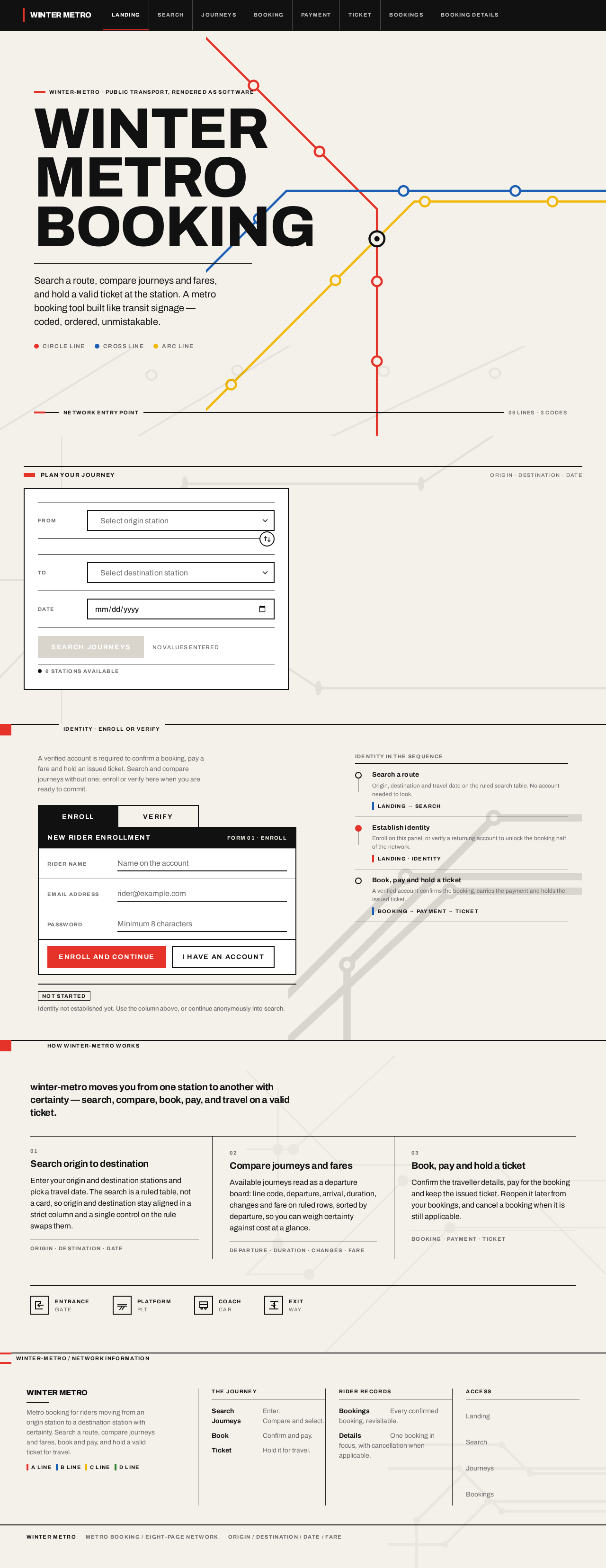
  • Component responsibilities: Hero composition with the geometric metro diagram and stacked display headline; a ruled search table (From / To / Date) with a swap control on the rule; a solid red rectangular Search button; an identity panel for enrollment and returning verification; a full-width section rule with an ALL-CAPS label.
  • States: Loading — identity check in progress, search controls remain usable. Empty — no search values entered, identity panel shows both enrollment and verification entry. Success — identity established, rider routed to the intended destination. Error — invalid credentials or incomplete enrollment fields, with the failing field identified and the entered values preserved. Recovery — rider retries verification, corrects the field, or continues anonymously into Search.
Page 4 of 36

Search

  • Information and state: Search workspace for entering metro origin, destination, and travel date or time. Reachable without signing in.
  • Primary actions: Enter or select origin station; enter or select destination station; set travel date or time; submit the search.
  • Supporting actions: Swap origin and destination; clear a field; correct an invalid station.
  • Domain entities: Origin station, destination station, travel date or time.
  • Component responsibilities: Ruled form with label/value rows aligned in a strict column and hairlines between rows; swap control sitting on the rule between origin and destination; station selection control; date or time control; submit control.
  • States: Loading — station data resolving, submit disabled until required fields are present. Empty — no values entered, submit unavailable. Success — valid origin, destination, and date submitted, rider moved to Journeys. Error — missing field, identical origin and destination, or unrecognised station, with the specific field flagged. Recovery — rider corrects the flagged field and resubmits without losing other values.
Page 5 of 36

Journeys

  • Information and state: Results page for comparing available metro journeys or fare options and selecting one. Renders as a dense departure-board table sorted by departure, with line code, departure, arrival, duration, changes, and fare.
  • Primary actions: Compare journeys; select one journey to book.
  • Supporting actions: Re-sort or re-read the result set; return to Search to change origin, destination, or date.
  • Domain entities: Journey, line code, departure time, arrival time, duration, number of changes, fare.
  • Component responsibilities: Departure-board table with ruled rows, ALL-CAPS column headers on a black band, tabular numerals, and line-code colour bars in the first column; staggered row reveal on load; selection control per row; empty-result notice.
  • States: Loading — rows reveal in a 40ms staggered cascade as results arrive. Empty — no journeys match the search, with a clear notice and a route back to Search. Success — journey selected, rider moved to Booking. Error — results could not be retrieved, with a retry control. Recovery — rider retries the search or adjusts origin, destination, or date and searches again.
Page 6 of 36

Booking

  • Information and state: Booking workspace for entering traveller details and confirming the selected journey. Requires a verified account.
  • Primary actions: Enter traveller details; review the selected journey and fare; confirm the booking.
  • Supporting actions: Edit traveller details; return to Journeys to choose a different journey; abandon the booking.
  • Domain entities: Selected journey, traveller details, fare, booking.
  • Component responsibilities: Ruled summary of the selected journey with tabular numerals; traveller detail form; fare summary; confirm control; identity gate that routes an unverified rider to Landing identity interaction and returns them here afterward.
  • States: Loading — selected journey and fare resolving. Empty — no journey selected, with a route back to Journeys. Success — booking confirmed, rider moved to Payment. Error — missing or invalid traveller detail, or the journey is no longer available, with the specific cause shown. Recovery — rider corrects the detail and reconfirms, or returns to Journeys to reselect.
Page 7 of 36

Payment

  • Information and state: Payment step for paying for the selected booking and receiving confirmation. Requires a verified account.
  • Primary actions: Enter payment details; pay for the booking; receive confirmation.
  • Supporting actions: Review the amount and booking summary; return to Booking to correct traveller details.
  • Domain entities: Booking, amount due, payment, confirmation.
  • Component responsibilities: Ruled amount and booking summary with tabular numerals; payment detail form; pay control; confirmation state; identity gate consistent with Booking.
  • States: Loading — payment processing, controls locked to prevent duplicate submission. Empty — no pending booking to pay, with a route back to Bookings. Success — payment confirmed, rider moved to Ticket. Error — payment declined or details invalid, with the reason shown and the booking preserved. Recovery — rider corrects payment details and retries, or returns to Booking; the booking is not lost on failure.
Page 8 of 36

Ticket

  • Information and state: Issued-ticket destination for viewing a completed booking's valid travel ticket. Requires a verified account. Rendered as a printed document with the fare and line code in tabular numerals.
  • Primary actions: View the valid ticket; present the ticket for travel.
  • Supporting actions: Open the related booking details; return to Bookings.
  • Domain entities: Ticket, booking, line code, fare, travel date, QR code.
  • Component responsibilities: Ticket document panel with a 2px black border, perforation rule across the middle, punched circular corners, centred QR code, and fare and line code beneath the rule; live ticket state marked in signal red; identity gate consistent with Booking.
  • States: Loading — ticket resolving. Empty — no issued ticket for this booking, with a route back to Bookings. Success — ticket displayed with QR faded in once and held. Error — ticket could not be retrieved, with a retry control. Recovery — rider retries retrieval or opens the booking from Bookings.
Page 9 of 36

Bookings

  • Information and state: Revisitable booking list for finding upcoming or past user bookings and opening one. Requires a verified account.
  • Primary actions: Browse upcoming and past bookings; open a booking.
  • Supporting actions: Distinguish upcoming from past; start a new search.
  • Domain entities: Booking, travel date, journey, status.
  • Component responsibilities: Ruled booking list with ALL-CAPS column headers, tabular numerals for dates and fares, and line-code colour bars; upcoming and past grouping; row selection into Booking Details; identity gate consistent with Booking.
  • States: Loading — booking list resolving. Empty — rider has no bookings yet, with a route into Search. Success — list rendered, rider opens a booking. Error — list could not be retrieved, with a retry control. Recovery — rider retries, or starts a new search.
Page 10 of 36

Booking Details

  • Information and state: Focused booking destination for reviewing an individual booking and cancelling it when applicable. Requires a verified account.
  • Primary actions: Review the booking's journey, traveller details, fare, and status; cancel the booking when applicable.
  • Supporting actions: Open the associated ticket; return to Bookings.
  • Domain entities: Booking, journey, traveller details, fare, status, cancellation.
  • Component responsibilities: Ruled booking summary with tabular numerals; status indicator; cancellation control shown only when cancellation applies; link to the issued ticket; identity gate consistent with Booking.
  • States: Loading — booking detail resolving. Empty — booking not found or not owned by the signed-in rider, with a route back to Bookings. Success — booking reviewed; cancellation confirmed and status updated when requested. Error — detail could not be retrieved or cancellation failed, with the reason shown. Recovery — rider retries retrieval or cancellation, or returns to Bookings.
Page 11 of 36

3. Functional Requirements

FR-1 — Build a metro booking app. (explicit) As a Metro Rider, I should use a metro booking application so that I can book and hold a valid metro ticket.

  • Trigger/input: Rider opens the application.
  • Observable result: The application presents the metro booking experience across its eight pages.
  • Access state: Landing, Search, and Journeys are reachable anonymously; Booking, Payment, Ticket, Bookings, and Booking Details require a verified account.
  • Failure/recovery: If the application cannot load, the rider can retry.
  • Continuation: Rider proceeds into search or identity interaction.

FR-2 — The app must contain exactly 8 pages. (explicit) As a Metro Rider, I should move through exactly eight pages — Landing, Search, Journeys, Booking, Payment, Ticket, Bookings, and Booking Details — so that the product stays within its stated scope.

  • Trigger/input: Rider navigates the application.
  • Observable result: Exactly these eight pages exist and are reachable.
  • Access state: As declared per page.
  • Failure/recovery: Not applicable; this is a structural constraint.
  • Continuation: Rider continues within the eight-page set.
Page 12 of 36

FR-3 — Anonymous entry and product explanation. (required_inference) As a Metro Rider, I should land on an anonymous entry surface that explains the metro booking app and guides me into journey search or identity interaction.

  • Trigger/input: Rider opens the application without a verified session.
  • Observable result: Landing renders the product explanation, the search entry, and the identity entry.
  • Access state: Anonymous.
  • Failure/recovery: If the identity check fails, the rider can still use search.
  • Continuation: Rider begins a search or establishes identity.

FR-4 — Self-service enrollment and returning verification embedded in Landing. (required_inference) As a Metro Rider, I should establish identity from Landing — enrolling myself or verifying a returning account — so that I can reach protected booking work without leaving the eight-page limit.

  • Trigger/input: Rider submits enrollment details or returning credentials on Landing.
  • Observable result: Identity is established and the rider is routed to the destination they intended.
  • Access state: Anonymous entry; protected state remains unavailable until identity is established.
  • Failure/recovery: Invalid credentials or incomplete enrollment fields are flagged with the failing field identified and entered values preserved; the rider retries or continues anonymously into Search.
  • Continuation: Rider proceeds to Booking, Payment, Ticket, Bookings, or Booking Details.
Page 13 of 36

FR-5 — Search for a metro journey. (required_inference) As a Metro Rider, I should enter origin, destination, and travel date or time so that I can find available journeys.

  • Trigger/input: Rider enters or selects origin station, destination station, and travel date or time, then submits.
  • Observable result: A valid search is submitted and results are produced.
  • Access state: Anonymous.
  • Failure/recovery: Missing field, identical origin and destination, or unrecognised station is flagged on the specific field; the rider corrects it and resubmits without losing other values.
  • Continuation: Rider moves to Journeys.

FR-6 — Compare available journeys and fares. (required_inference) As a Metro Rider, I should see available metro journeys or fare options in a comparable form so that I can choose the right one.

  • Trigger/input: A submitted search.
  • Observable result: Journeys render as a departure-board table sorted by departure, showing line code, departure, arrival, duration, changes, and fare.
  • Access state: Anonymous.
  • Failure/recovery: If results cannot be retrieved, a retry control is offered; if no journeys match, a clear empty notice and a route back to Search are shown.
  • Continuation: Rider selects a journey or returns to Search.
Page 14 of 36

FR-7 — Select a journey. (required_inference) As a Metro Rider, I should select one journey so that I can proceed to book it.

  • Trigger/input: Rider selects a journey row.
  • Observable result: The journey is selected and carried into Booking.
  • Access state: Anonymous selection; Booking itself requires a verified account.
  • Failure/recovery: If the selected journey is no longer available, the rider is returned to Journeys to reselect.
  • Continuation: Rider moves to Booking.

FR-8 — Enter traveller details and confirm the booking. (required_inference) As a Metro Rider, I should enter traveller details and confirm the selected journey so that a booking is created.

  • Trigger/input: Rider enters traveller details and confirms the selected journey.
  • Observable result: A booking is created and persisted.
  • Access state: Requires a verified account; an unverified rider is routed to Landing identity interaction and returned to Booking afterward.
  • Failure/recovery: Missing or invalid traveller detail, or an unavailable journey, is shown with the specific cause; the rider corrects the detail and reconfirms, or returns to Journeys to reselect.
  • Continuation: Rider moves to Payment.
Page 15 of 36

FR-9 — Pay for the booking and receive confirmation. (required_inference) As a Metro Rider, I should pay for the selected booking so that it is confirmed.

  • Trigger/input: Rider enters payment details and pays.
  • Observable result: Payment is confirmed and the booking is confirmed.
  • Access state: Requires a verified account.
  • Failure/recovery: A declined payment or invalid details are shown with the reason, and the booking is preserved; the rider corrects payment details and retries, or returns to Booking.
  • Continuation: Rider moves to Ticket.

FR-10 — View the issued ticket. (required_inference) As a Metro Rider, I should view the valid travel ticket for a completed booking so that I can present it for travel.

  • Trigger/input: Rider opens the ticket for a confirmed booking.
  • Observable result: The ticket renders as a printed document with the QR code, fare, and line code.
  • Access state: Requires a verified account.
  • Failure/recovery: If the ticket cannot be retrieved, a retry control is offered; if no ticket exists for the booking, a route back to Bookings is shown.
  • Continuation: Rider presents the ticket for travel or opens the related booking details.
Page 16 of 36

FR-11 — Find upcoming or past bookings. (required_inference) As a Booking Manager / Account Holder, I should browse my upcoming and past bookings so that I can find the one I need.

  • Trigger/input: Rider opens Bookings while verified.
  • Observable result: A ruled booking list renders with upcoming and past bookings and tabular numerals for dates and fares.
  • Access state: Requires a verified account.
  • Failure/recovery: If the list cannot be retrieved, a retry control is offered; if the rider has no bookings, an empty state routes into Search.
  • Continuation: Rider opens a booking.

FR-12 — Review an individual booking. (required_inference) As a Booking Manager / Account Holder, I should open a booking and review its journey, traveller details, fare, and status so that I can confirm what I hold.

  • Trigger/input: Rider selects a booking from Bookings.
  • Observable result: The focused booking detail renders with its journey, traveller details, fare, and status.
  • Access state: Requires a verified account; a booking not owned by the signed-in rider is not shown.
  • Failure/recovery: If the detail cannot be retrieved, or the booking is not found or not owned, the rider is shown the cause and a route back to Bookings.
  • Continuation: Rider opens the associated ticket, cancels when applicable, or returns to Bookings.
Page 17 of 36

FR-13 — Cancel a booking when applicable. (required_inference) As a Booking Manager / Account Holder, I should cancel a booking when cancellation applies so that I am not held to a journey I no longer need.

  • Trigger/input: Rider uses the cancellation control on a booking where cancellation applies.
  • Observable result: The booking status updates to reflect the cancellation.
  • Access state: Requires a verified account.
  • Failure/recovery: If cancellation fails, the reason is shown and the booking's prior status is preserved; the rider retries or returns to Bookings.
  • Continuation: Rider returns to Bookings or opens the associated ticket.

FR-14 — Persist booking and payment state. (required_inference) As a Booking Manager / Account Holder, I should have my confirmed booking and payment state persist so that a confirmed booking produces a retrievable ticket and later supports viewing or cancellation.

  • Trigger/input: A confirmed payment.
  • Observable result: The booking, its payment state, and its ticket remain retrievable across sessions.
  • Access state: Requires a verified account; state is bound to the correct rider.
  • Failure/recovery: If retrieval fails, the rider can retry from Bookings or Booking Details.
  • Continuation: Rider views the ticket or cancels the booking later.

4. User Personas

Page 18 of 36

Metro Rider

The Metro Rider is the primary human actor in winter-metro. Their context is a station or a phone in the cold, where the cost of ambiguity is a missed train. Their primary goal is to move from an origin station to a destination station with certainty: find a route, choose a journey, book it, pay for it, and hold a valid ticket at the station.

Their distinct accepted responsibilities are searching for a journey by origin, destination, and travel date or time; comparing available journeys and fares; selecting one journey; entering traveller details and confirming the booking; paying and receiving confirmation; and viewing the issued ticket. They are the initiator of the entire booking lifecycle.

Their relevant inputs and decisions are the origin and destination stations, the travel date or time, the choice among competing journeys on line code, departure, arrival, duration, changes, and fare, the traveller details, and the payment details. Their key decision is which journey to commit to, made against a departure-board comparison rather than a marketing pitch.

They interact with the Booking Manager / Account Holder role as the same human in a different mode: the rider who books is the person who later returns to find that booking. They interact with the application's identity interaction on Landing when they need to reach protected booking work, and with the payment step when they commit money.

Their observable success is a confirmed booking and a valid ticket available at the station. Their observable failure states are a search that returns nothing, a journey that disappears before booking, a declined payment, or a ticket that cannot be retrieved — each of which they can recover from without losing their work.

Page 19 of 36

Booking Manager / Account Holder

The Booking Manager / Account Holder is a rider who also maintains their own booking account. Their context is return and reuse: they are not starting from zero, they are looking for something they already hold. Their primary goal is to find, reuse, or cancel their own bookings without re-entering everything.

Their distinct accepted responsibilities are browsing upcoming and past bookings, opening an individual booking to review its journey, traveller details, fare, and status, opening the associated ticket, and cancelling a booking when cancellation applies. They also depend on persisted booking and payment state so that a confirmed booking remains retrievable across sessions.

Their relevant inputs and decisions are which booking to open, whether the booking still matches their need, and whether to cancel. Their key decision is whether to keep or cancel a booking, made against the booking's status and travel date.

They interact with the Metro Rider role as the same human in a different mode: the booking they manage is the booking they made. They interact with the application's identity interaction on Landing to verify their returning account before any protected booking state is shown.

Their observable success is being able to find, reuse, or cancel their own bookings without re-entering everything. Their observable failure states are a booking list that cannot be retrieved, a booking that is not found or not owned, or a cancellation that fails — each of which leaves the prior state intact and offers a retry or a route back to Bookings.

5. Core User Flows

Page 20 of 36

Flow 1 — Metro Rider searches for a journey and compares results

  1. The Metro Rider opens winter-metro and arrives on Landing without a verified session. Landing explains the metro booking app and presents the ruled search table and the identity entry.
  2. The rider enters an origin station and a destination station in the ruled search table, using the swap control on the rule if the two are reversed, and sets a travel date or time.
  3. The rider submits the search and is taken to Search, where the entered values are shown in the strict label/value column.
  4. If a field is missing, origin and destination are identical, or a station is unrecognised, Search flags that specific field and preserves the other values. The rider corrects the field and resubmits.
  5. On a valid submission the rider moves to Journeys, where available journeys render as a departure-board table sorted by departure, with line code, departure, arrival, duration, changes, and fare in ruled rows and tabular numerals. Rows reveal in a 40ms staggered cascade as results arrive.
  6. If no journeys match, Journeys shows a clear empty notice and a route back to Search. The rider adjusts origin, destination, or date and searches again.
  7. If results cannot be retrieved, Journeys offers a retry control. The rider retries.
  8. The rider compares journeys and selects one. The selected row's line-code bar wipes horizontally and the journey is carried forward.
Page 21 of 36

Flow 2 — Metro Rider books and pays for the selected journey

  1. From Journeys, the Metro Rider selects a journey and moves to Booking.
  2. Booking requires a verified account. If the rider is not verified, they are routed to the identity interaction on Landing, establish identity there, and are returned to Booking with the selected journey intact.
  3. On Booking, the rider reviews the ruled summary of the selected journey and fare, then enters traveller details.
  4. If a traveller detail is missing or invalid, or the journey is no longer available, Booking shows the specific cause. The rider corrects the detail and reconfirms, or returns to Journeys to reselect.
  5. The rider confirms the booking. The booking is created and persisted.
  6. The rider moves to Payment, where the amount and booking summary are shown in tabular numerals.
  7. The rider enters payment details and pays. Controls lock during processing to prevent duplicate submission.
  8. If payment is declined or details are invalid, Payment shows the reason and the booking is preserved. The rider corrects payment details and retries, or returns to Booking.
  9. On confirmed payment, the rider moves to Ticket.
Page 22 of 36

Flow 3 — Metro Rider views the issued ticket

  1. From confirmed payment, the Metro Rider arrives on Ticket, which requires a verified account.
  2. Ticket renders the ticket as a printed document: white panel, 2px black border, perforation rule across the middle, punched circular corners, centred QR code, and fare and line code in tabular numerals under the rule. The QR fades in once and holds. The live ticket state is marked in signal red.
  3. If the ticket cannot be retrieved, Ticket offers a retry control. The rider retries.
  4. If no ticket exists for the booking, Ticket shows an empty state with a route back to Bookings.
  5. The rider presents the ticket for travel, or opens the related booking details.
Page 23 of 36

Flow 4 — Booking Manager / Account Holder finds and reviews a booking

  1. The Booking Manager / Account Holder opens winter-metro and establishes identity through the returning-verification interaction on Landing.
  2. The rider moves to Bookings, which requires a verified account, and sees a ruled booking list with upcoming and past bookings, ALL-CAPS column headers, tabular numerals for dates and fares, and line-code colour bars.
  3. If the list cannot be retrieved, Bookings offers a retry control. The rider retries.
  4. If the rider has no bookings, Bookings shows an empty state with a route into Search.
  5. The rider opens a booking and moves to Booking Details, which requires a verified account, and reviews the journey, traveller details, fare, and status.
  6. If the detail cannot be retrieved, or the booking is not found or not owned by the signed-in rider, Booking Details shows the cause and a route back to Bookings.
  7. The rider opens the associated ticket on Ticket, or returns to Bookings.
Page 24 of 36

Flow 5 — Booking Manager / Account Holder cancels a booking when applicable

  1. From Bookings, the Booking Manager / Account Holder opens a booking and arrives on Booking Details.
  2. The rider reviews the booking's journey, traveller details, fare, and status, and decides to cancel.
  3. The rider uses the cancellation control, which is shown only when cancellation applies to that booking.
  4. If cancellation fails, Booking Details shows the reason and the booking's prior status is preserved. The rider retries or returns to Bookings.
  5. On successful cancellation, the booking status updates to reflect the cancellation.
  6. The rider returns to Bookings, where the booking now appears with its updated status, or opens the associated ticket.

Flow 6 — Booking Manager / Account Holder relies on persisted booking and payment state

  1. The Booking Manager / Account Holder returns to winter-metro in a later session and establishes identity through the returning-verification interaction on Landing.
  2. The rider moves to Bookings and finds the previously confirmed booking still present, with its payment state and ticket retrievable.
  3. If retrieval fails, the rider retries from Bookings or Booking Details.
  4. The rider opens the booking on Booking Details and views the ticket on Ticket, or cancels the booking when cancellation applies.
Page 25 of 36

6. Visuals Colors and Theme

The creative direction is authoritative for this section. The muse is Massimo Vignelli, and the headline idea is Metro wayfinding as interface — Vignelli discipline for winter-metro. A metro booking app is public transport infrastructure rendered as software; the register is trust, speed, legibility, and the quiet authority of a system that works. The result should look like it belongs to a transit authority, not a SaaS template.

Colour tokens — light mode

RoleHexUse
Background#F4F1EAWarm paper-white ground across all pages
Surface#FFFFFFPure white panels for data surfaces
Text#111111All type, rules, and primary controls — the authority
Primary#111111Primary controls and structural rules
Accent#E63329The single signal red: active line, CTA, selected journey, live ticket state
Muted#6B6B6BMetadata, labels, secondary rows
Line code — blue#1A5FB44px line-identity bars and category tags only
Line code — yellow#F2B7054px line-identity bars and category tags only
Line code — green#2E7D324px line-identity bars and category tags only

Proportion: 70% paper/white, 20% black, 10% colour codes. The three coded line colours are applied only as 4px line-identity bars and category tags, never as decoration. Signal red is the single action colour across all eight pages, so red always means "this is the one".

Typography

Page 26 of 36
  • Headings: Archivo at heavy weight (700/800), tight tracking (-0.02em). Sentence case for headlines; ALL-CAPS for labels, station codes, and section headers at small size with wide tracking (+0.12em).
  • Body: Archivo.
  • Scale: 1.25 modular with a strong display jump — display clamp(64px, 12vw, 128px); UI sizes 40 / 28 / 20 / 16 / 14 / 12. Labels 11px ALL-CAPS tracked +0.12em.
  • Tabular numerals are mandatory for times, fares, and platform numbers.
  • Hierarchy is built from weight and rules, not from many sizes.

Shape language

Hard edges: zero border-radius on cards, buttons, and inputs. Structure comes from 1px and 2px black rules, not shadows. Colour-coded 4px bars mark lines and categories. Circles appear only where they carry meaning — line bullets, platform dots, the ticket punch-hole motif. Controls are rectangles with a visible 2px black border and a solid black fill on active state.

Layout

A strict 12-column grid, flush-left, ragged-right, asymmetric. Search is a ruled table, not a card: origin and destination as two aligned label/value rows separated by a hairline, with a swap control on the rule. Journeys render as a dense departure-board table — line code, departure, arrival, duration, changes, fare — with ruled rows and tabular numerals, sorted by departure. The ticket is a bordered document with punched corners and a horizontal perforation rule. Section transitions are full-width horizontal rules with a small ALL-CAPS section label sitting on the rule.

Imagery

Page 27 of 36

Diagrammatic, not photographic. A simplified geometric metro diagram — straight lines, 45° bends, station dots — is the hero image and reappears as a faint watermark behind section rules. Small pictograms for entrance, platform, coach, and exit. No stock photography of trains or people. The ticket is rendered as a document object, not a mockup.

Avoid

Rounded cards, soft shadows, hover-lift on list items; blue or indigo primary buttons on white; gradient blobs, glassmorphism, frosted panels; Inter, Roboto, Arial, Helvetica, Open Sans, Lato, Poppins, system-ui; photographic hero imagery of trains, stations, or commuters; more than the three coded line colours plus red used as accents; centred hero headline with subtext beneath and a button under it; icon-only navigation without ALL-CAPS text labels. The generic indigo/blue-on-white SaaS template is forbidden for this project.

Readable text and controls stay whole at every viewport: headlines, wordmarks, labels, numbers, cards' text, and controls stay entirely inside the viewport and their container at 375px, 768px, and 1280px, wrapping or scaling (for example font-size: clamp(...) with its mobile size) to fit, and no other element covers any part of them. Imagery, decoration, and motion follow the creative direction and may be cropped, bled off an edge, rotated, overlapped, or cut as the direction asks, as long as they cover no readable text or control. Moving and scrollable content may cross the viewport or container edge by design and is judged by whether it actually moves or scrolls and whether every item becomes fully readable as it passes. With prefers-reduced-motion, a usable static arrangement wraps items into rows or allows horizontal scrolling so each item can be brought fully into view.

Page 28 of 36

7. Signature Design Concept

The public entry — Landing — is a full-viewport composition on the warm paper ground #F4F1EA. The dominant element is a large geometric metro diagram: three coloured lines (red #E63329, blue #1A5FB4, yellow #F2B705) crossing the right two-thirds of the viewport at 45° angles with station dots, bleeding off the right and bottom edges. The left column holds a stacked display headline in black Archivo 800 — WINTER METRO set at clamp(64px, 12vw, 128px), tight leading, three lines, flush-left, spanning from the left margin to the first diagram line — with a single 2px black rule beneath it and a one-line subhead at 20px. Beneath that, the ruled search table (From / To / Date) sits with a solid red rectangular Search button pinned flush-left. No centred text, no gradient, no blue button, no floating card.

The signature moves carry through the whole product: the journey results as a departure-board table with ruled rows, ALL-CAPS column headers on a black band, tabular numerals, and line-code colour bars in the first column — a table, never a grid of cards; section transitions built from a full-width 2px black rule with a small ALL-CAPS label sitting on the rule and the section's colour code as a 24px bar at the left end; the ticket as a printed document with a white panel, 2px black border, perforation rule across the middle, punched circular corners, a centred QR code, and fare and line code in tabular numerals under the rule; search as a ruled form with label/value rows aligned in a strict column, separated by hairlines, and a swap control sitting on the rule between origin and destination; and one signal red used as the single action colour across all eight pages — selected journey, active step, primary button, live ticket state — so red always means "this is the one".

Page 29 of 36

8. Interaction Model & Motion Direction

Interaction Model: Static (direction) Motion Tempo: still Hero Dimensionality: flat

Landing Hero Motion Brief

Page 30 of 36
  • Focal subject: The geometric metro diagram — three coloured lines at 45° with station dots, bleeding off the right and bottom edges — composed against the warm paper ground, with the stacked WINTER METRO display headline flush-left.
  • Input → transformation → outcome thesis: The rider's attention moves from the display headline to the ruled search table; entering origin, destination, and date and pressing the red Search button transforms the static diagram into a live departure-board result set on Journeys. The hero itself does not animate; the transformation happens in the product's state, not in the composition.
  • Motion vocabulary: Functional and instant. State changes snap in 120ms linear. No easing theatrics. Nothing floats, nothing bounces. The one purposeful motion in the product is the 40ms staggered cascade of journey rows on results load, like a departure board refreshing, and the horizontal wipe of line-code bars on selection. The ticket QR fades in once, then holds.
  • Composed first frame: Full-viewport paper ground; the metro diagram occupying the right two-thirds with lines bleeding off the right and bottom edges; the stacked black Archivo 800 headline flush-left in the left column; a 2px black rule beneath it; a 20px subhead; the ruled From / To / Date table with the swap control on the rule; the solid red Search button pinned flush-left.
  • Reduced-motion state: With prefers-reduced-motion, the hero renders as the same static composition with no cascade and no wipe; journey rows appear fully formed, selection is indicated by the red state change alone, and the ticket QR appears immediately without fading. All content remains fully readable and every control remains reachable.
Page 31 of 36

9. Non-Functional Requirements

NFR-1 — Exact page count. (explicit) The application must contain exactly 8 pages: Landing, Search, Journeys, Booking, Payment, Ticket, Bookings, and Booking Details. Rationale: the authoritative requirement states "make 8 pages" and the planning scope fixes the count at exactly 8.

NFR-2 — Identity continuity for protected state. (required_inference) A verified account is required before confirming a booking, paying, viewing protected tickets, or managing bookings. Rationale: these actions create or expose durable rider-specific state — a commitment, a payment, an entitlement, or a value transfer — that must remain bound to the correct participant.

NFR-3 — Anonymous reachability of pre-commitment surfaces. (required_inference) Landing, Search, and Journeys must be reachable without a verified account so a rider can evaluate routes and fares before committing. Rationale: the accepted journey begins anonymously and only requires identity at the point of commitment.

NFR-4 — Persistence of booking and payment state. (required_inference) Booking and payment state must persist so a confirmed booking produces a retrievable ticket and later supports viewing or cancellation. Rationale: the accepted lifecycle includes returning to a booking in a later session.

NFR-5 — Legibility and viewport integrity. (explicit, from the creative direction) Readable text and controls stay whole at 375px, 768px, and 1280px, wrapping or scaling to fit, with no element covering them. Rationale: the audience is a commuter on a phone who needs certainty at a glance.

Page 32 of 36

NFR-6 — Reduced-motion support. (explicit, from the creative direction) With prefers-reduced-motion, the product provides a usable static arrangement in which every item can be brought fully into view. Rationale: motion is functional, not decorative, and must never be the only way to reach content.

NFR-7 — Tabular numerals for time, fare, and platform data. (explicit, from the creative direction) Times, fares, and platform numbers use tabular numerals. Rationale: comparison across ruled rows depends on column alignment.

NFR-8 — Backend integration. (required_inference) The application requires backend integration to hold identity, bookings, payment state, and tickets. Rationale: the accepted lifecycle cannot be completed with client-only state.

10. Tech Stack

  • Frontend: React with a custom component layer implementing the Vignelli wayfinding system — ruled tables, hard edges, Archivo typography, and the coded colour set. [Default — not specified by user]
  • Backend: Python with FastAPI, serving identity, journey search, booking, payment, and ticket endpoints. [Default — not specified by user]
  • Storage: A relational database for riders, bookings, payments, and tickets, with persisted booking and payment state as required by NFR-4. [Default — not specified by user]
  • Containerisation: Docker and docker-compose for local and single-host deployment. [Default — not specified by user]
  • Orchestration: Kubernetes is not required by any source-backed constraint and is therefore not included. [Default — not specified by user]
  • Typography: Archivo (headings and body), loaded as a webfont. (explicit, from the creative direction)
Page 33 of 36

11. Assumptions and Constraints

Constraints

  • The application must have exactly 8 pages. (explicit)
  • The eight pages are Landing, Search, Journeys, Booking, Payment, Ticket, Bookings, and Booking Details, in that order, with the access declared for each. (explicit page contract)
  • Identity interaction is embedded in Landing because the app must support self-service enrollment and returning verification within the exact eight-page limit. (required_inference)
  • A verified account is required before confirming a booking, paying, viewing protected tickets, or managing bookings. (required_inference)
  • Booking and payment state must persist so a confirmed booking can produce a retrievable ticket and later support viewing or cancellation. (required_inference)
  • The visual system is fixed by the creative direction: warm paper ground #F4F1EA, white surfaces, black type and rules, one signal red #E63329, three coded line colours used only as 4px bars and category tags, Archivo typography, hard edges, and ruled tables. (explicit)
  • The generic indigo/blue-on-white SaaS template is forbidden for this project. (explicit)

Assumptions

Page 34 of 36
  • Station data used by Search and Journeys is available to the application. [Default — not specified by user]
  • Payment processing is handled by the application's backend as part of the accepted Payment step. [Default — not specified by user]
  • Cancellation applies to some bookings and not others; the cancellation control is shown only when it applies. (required_inference)
  • The two accepted personas are the same human in different modes — the rider who books is the person who later manages that booking. (required_inference)
Page 35 of 36

12. Glossary

  • Metro Rider — The primary human actor who searches for a route, selects a journey, books and pays for a ticket, and holds the resulting ticket for travel.
  • Booking Manager / Account Holder — A rider who also maintains their own booking account: reviews past and upcoming bookings, retrieves or reopens a previously booked ticket, and cancels a booking when applicable.
  • Journey — An available metro trip between an origin and a destination on a given date or time, described by line code, departure, arrival, duration, changes, and fare.
  • Line code — The coded identity of a metro line, rendered as a 4px colour bar and category tag using the coded set (blue #1A5FB4, yellow #F2B705, green #2E7D32).
  • Fare — The price of a selected journey, rendered in tabular numerals.
  • Booking — The persisted record created when a rider confirms a selected journey with traveller details.
  • Ticket — The issued travel document for a confirmed and paid booking, rendered as a printed document with a perforation rule, punched corners, and a centred QR code.
  • Signal red — #E63329, the single action colour used across all eight pages for the selected journey, active step, primary button, and live ticket state.
  • Departure-board table — The ruled results table used on Journeys, with ALL-CAPS column headers on a black band, tabular numerals, and line-code colour bars in the first column.
  • Verified account — An identity established through self-service enrollment or returning verification on Landing, required before confirming a booking, paying, viewing protected tickets, or managing bookings.
Page 36 of 36
Landing design preview
Landing: Read product explanation
Landing: 1. Verify returning account
Landing: 2. Correct credentials and retry
Bookings: 1. Browse upcoming and past bookings
Bookings: 2. Retry retrieving booking list
Bookings: 3. Start new search
Booking Details: 4. Review journey, fare and status
Booking Details: 5. Retry retrieving booking
Booking Details: 6. Cancel the booking
Ticket: Open associated ticket
Booking Details: 7. Retry cancellation
Bookings: 8. Confirm updated status
Landing design preview
Landing: Read product explanation
Landing: 1. Verify returning account
Landing: 2. Correct credentials and retry
Bookings: 1. Browse upcoming and past bookings
Bookings: 2. Retry retrieving booking list
Bookings: 3. Start new search
Booking Details: 4. Review journey, fare and status
Booking Details: 5. Retry retrieving booking
Booking Details: 6. Cancel the booking
Ticket: Open associated ticket
Booking Details: 7. Retry cancellation
Bookings: 8. Confirm updated status
