windy-todo
 Diya Trivedi
start a project to build a simple single page design of todo

Comments (0)
Sign in to leave a comment
System Requirements
System Requirements Document for windy-todo
1. Introduction
windy-todo is a simple todo application delivered as a single page design. The product intent is narrow and explicit: one page on which a person can add todo items and view their todo items. There is no multi-page navigation, no account system, and no workflow beyond capturing a task and seeing it in the list.
The audience is a single everyday person — the "Todo user" — who wants to capture tasks and review them in one calm place. The design brief frames this as a small daily ritual that should feel light, optimistic, and tactile rather than administrative.
2. System Overview
windy-todo is a single-page web application. The page is the entire product surface: it introduces the todo app and hosts both the add-item interaction and the list of todo items. The page is reachable without any identity step; no durable application-owned identity or account boundary is established by the source.
Actors
- Todo user (active human persona) — the single person who adds todo items and views them on the page.
- Frontend application (system) — the React application that renders the single page and its interactions.
- Backend API (system) — the shared FastAPI process that serves the application's API routes and domain modules.
- Database (system) — MariaDB, holding application-owned persistent data for todo items.
Accepted behavior
- The product is a simple todo app delivered as a single page design.
- Users can add todo items.
- Users can view their todo items on the single page.
Ownership and delivery
The single page, named Todo, is the only destination. It is a custom first-party page owned by the application, reachable without an access requirement. Adding and viewing todo items both happen on this page. The backend and database support the page's behavior; they are not separate user-facing destinations.
Exclusions
No capabilities beyond adding and viewing todo items are established by the source. No authentication, accounts, sharing, collaboration, notifications, scheduling, categories, or multi-page navigation are part of the current product.
Removed from scope
- None — no concepts were explicitly removed by the user.
2a. Product Interpretation and Delivery Boundary
windy-todo is a first-party, single-page web product. The whole experience lives on one page: the visitor lands on it, sees the todo list, types a task into the input, adds it, and sees it appear in the list. There is no sign-in, no separate settings area, and no second screen.
The frontend React application renders the page. The shared FastAPI backend serves the API the page uses to persist and retrieve todo items, and MariaDB stores them. These services exist to make the single page work; they do not introduce additional user-facing surfaces.
Everything described in this document is current. No future-horizon requirements were stated by the user.
2c. Page Content and Component Coverage
Todo
The single page of the product. It introduces the todo app and hosts both adding and viewing todo items.
Information and state
- The current list of todo items, each with its text and its completion state.
- A count of today's items, shown in a status chip.
- A remaining-items count and a "clear done" text link in the footer.
- Empty state: when no todo items exist, the list area shows an empty state rather than blank space.
- Loading state: while the initial list is being retrieved, the list area shows a loading indication.
- Error state: if the list cannot be retrieved or an add request fails, an inline error message is shown and the user can retry.
Primary actions
- Type a task into the full-width pill input.
- Submit via the magenta circular add button pinned to the right edge of the input (or by pressing Enter).
- Toggle a task's completion via its circular checkbox.
- Delete a task via the delete glyph revealed on hover/focus.
- Clear completed tasks via the "clear done" text link.
Supporting actions
- Retry a failed list load or failed add.
Domain entities
- Todo item — text, completion state, creation order. Persisted by the backend in MariaDB.
Component responsibilities
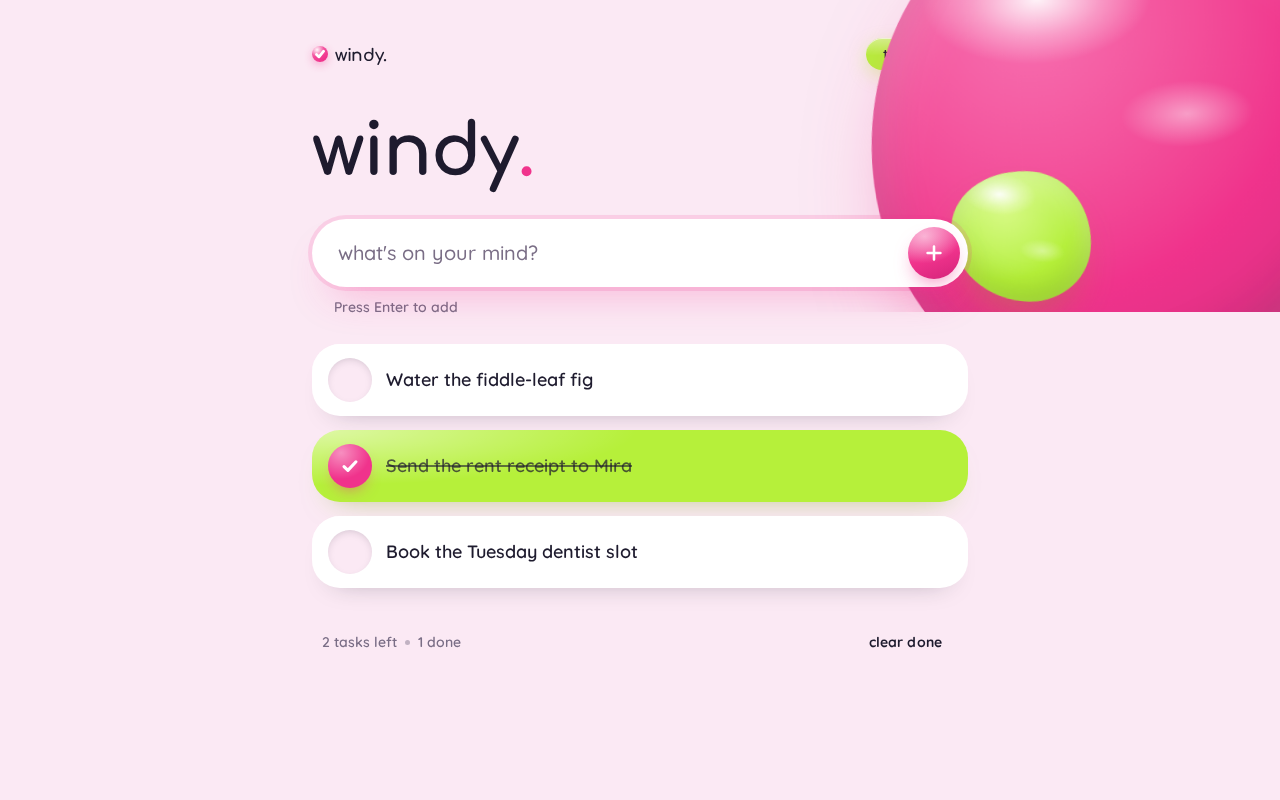
- Top chip row — wordmark on the left; a lime "today · N" count chip on the right.
- Hero wordmark — oversized lowercase "windy." in Comfortaa, flush-left.
- Add-task pill input — full-width white pill with placeholder text; the hero's dominant element.
- Add button — magenta circular button pinned to the input's right edge, with a glossy specular sweep on hover.
- Task list — stacked capsule cards (radius 28px), each with a circular checkbox at the left, task text, and a delete glyph revealed on hover/focus.
- Footer line — remaining count and "clear done" text link.
- Decorative blobs — one large glossy magenta blob bleeding off the top-right, one small lime blob near the input; purely decorative, never covering readable text or controls.
States
- Loading — list area shows a loading indication while items are fetched.
- Empty — list area shows an empty state when there are no items.
- Success — a newly added item appears in the list; a toggled item shows its completed styling.
- Error — inline error message with a retry action.
- Recovery — retry re-requests the list or re-submits the add.
3. Functional Requirements
FR-1 — Single-page delivery (explicit) As a Todo user, I should use the todo app entirely on one page, so that I never have to navigate between screens.
- Trigger: opening the app.
- Observable result: the Todo page renders with the wordmark, add input, and task list.
- Access: no identity step; the page is reachable directly.
- Failure/recovery: if the page fails to load, reloading the page restores it.
- Continuation: all further actions happen on this same page.
FR-2 — Add a todo item (explicit) As a Todo user, I should add a todo item by typing its text and submitting, so that the task is captured.
- Trigger: the user types text into the pill input and activates the add button (or presses Enter).
- Observable result: the new item appears in the task list on the same page.
- Access: no identity step.
- Failure/recovery: if the add request fails, an inline error is shown and the user can retry; the typed text is preserved for retry.
- Continuation: the input clears and is ready for the next task.
FR-3 — View todo items (explicit) As a Todo user, I should see my todo items listed on the single page, so that I know what I have captured.
- Trigger: opening or returning to the page.
- Observable result: the task list shows each item's text and completion state.
- Access: no identity step.
- Failure/recovery: if the list cannot be retrieved, an inline error is shown with a retry action.
- Continuation: the user can add more items or act on existing ones.
FR-4 — Toggle completion (required_inference) As a Todo user, I should mark a task complete or incomplete via its circular checkbox, so that the list reflects what is done.
- Trigger: the user activates a task's circular checkbox.
- Observable result: the capsule's fill morphs from white to lime and the text strikes through (or reverses).
- Access: no identity step.
- Failure/recovery: if the update fails, the checkbox reverts and an inline error is shown.
- Continuation: the remaining count updates.
FR-5 — Delete a task (required_inference) As a Todo user, I should remove a task via its delete glyph, so that the list stays accurate.
- Trigger: the user activates the delete glyph revealed on hover/focus.
- Observable result: the task is removed from the list.
- Access: no identity step.
- Failure/recovery: if the delete fails, the task remains and an inline error is shown.
- Continuation: the remaining count updates.
FR-6 — Clear completed tasks (required_inference) As a Todo user, I should clear all completed tasks via the "clear done" link, so that finished work leaves the list in one action.
- Trigger: the user activates the "clear done" text link in the footer.
- Observable result: all completed tasks are removed; the remaining count updates.
- Access: no identity step.
- Failure/recovery: if the clear fails, the list is unchanged and an inline error is shown.
- Continuation: the user can continue adding tasks.
4. User Personas
Todo user
Product context. A single everyday person using windy-todo as a small daily ritual. They open the one page, capture what they need to do, and glance at what remains. The product is personal and low-stakes; there is no team, no sharing, and no administrative overhead.
Primary goal. Capture tasks quickly and see them in one calm place, so nothing is forgotten and finishing a task feels satisfying.
Distinct accepted responsibilities.
- Adding todo items by typing text and submitting.
- Viewing the current list of todo items on the single page.
- Marking tasks complete or incomplete.
- Removing tasks individually or clearing completed ones.
Relevant inputs and decisions. The task text they type; whether a task is done; whether to remove a task or clear finished ones.
Interactions with other participants. None — the Todo user is the only human actor. The frontend, backend, and database support their actions without requiring any response from another person.
Observable success. Their tasks appear in the list immediately after adding, completion is visibly reflected, and the remaining count is accurate.
5. Core User Flows
Flow 1 — Add a todo item
- The Todo user opens the app and lands on the Todo page. The page shows the "windy." wordmark, the pill input, and the current task list (or an empty state).
- The user clicks into the full-width pill input and types a task.
- The user activates the magenta circular add button (or presses Enter).
- The frontend sends the add request to the backend, which persists the item in MariaDB.
- The new task appears as a capsule card in the list; the input clears; the "today · N" chip and remaining count update.
- Failure/recovery: if the add request fails, an inline error appears, the typed text is preserved, and the user can retry.
- Continuation: the user can add another task immediately.
Flow 2 — View todo items
- The Todo user opens or returns to the Todo page.
- While items load, the list area shows a loading indication.
- The backend returns the stored items and the list renders each as a capsule card with its text and completion state.
- If there are no items, the list area shows an empty state.
- Failure/recovery: if the list cannot be retrieved, an inline error appears with a retry action; retrying re-requests the list.
- Continuation: the user can add a task or act on an existing one.
Flow 3 — Complete a task
- From the Todo page, the Todo user activates a task's circular checkbox.
- The capsule's fill morphs from white to lime with a liquid ease and the text strikes through.
- The remaining count updates.
- Failure/recovery: if the update fails, the checkbox reverts and an inline error is shown.
- Continuation: the user can complete further tasks or clear done.
Flow 4 — Remove tasks
- From the Todo page, the Todo user hovers or focuses a task to reveal its delete glyph and activates it; the task is removed.
- Alternatively, the user activates the "clear done" text link in the footer; all completed tasks are removed.
- The remaining count updates.
- Failure/recovery: if the removal fails, the list is unchanged and an inline error is shown.
- Continuation: the user can continue adding or managing tasks.
6. Visuals Colors and Theme
Muse and headline. Karim Rashid — sensual pop minimalism for a todo list that feels good to finish.
Mode. Light mode only.
Colour tokens
| Role | Hex | Usage |
|---|---|---|
| Background | #FBE9F4 | Bubblegum-pink ground filling the page |
| Surface | #FFFFFF | Glossy white cards and pill input |
| Text | #1E1B2E | All readable text on white and pink |
| Primary | #F0338C | Add button, checked-task fill, one hero accent blob |
| Accent | #B6F03A | Completion moment and small glossy blob |
| Muted | #7A6E86 | Secondary metadata only (counts, timestamps) |
Typography
- Headings: Comfortaa at 700 weight, tracking
-0.02em, soft rounded terminals. - Body: Quicksand at medium weight.
- Scale: 1.25 modular — 72 / 56 / 40 / 28 / 20 / 18 / 16.
- Hero headline:
clamp(2.5rem, 6vw, 4.5rem)(40px mobile, 56px tablet, 72px desktop). - Body: 18px mobile to 20px desktop; task rows 18px; labels 14px.
Shape language. Capsules and blobs: pill input and buttons (border-radius: 999px), task rows as soft capsule cards (border-radius: 28px), section edges curved with a single large organic blob cut. Glossy white-to-transparent sheen on the primary button and one floating blob. No sharp corners, no hairline borders — separation comes from soft shadow and colour.
Layout. One centred column, max-width 720px, inside a soft pink field with generous breathing room. Top: chip row (wordmark left, "today · N" count chip right). Below: oversized lowercase wordmark, then full-width pill input with magenta circular add button pinned right, then stacked capsule task cards. Bottom: thin footer line with remaining count and "clear done" link. Everything stacks to a single column at 375px with the input and button wrapping to their own row.
Imagery. No photography. Two or three glossy CSS/SVG blobs — one large pink-to-magenta blob bleeding off the top-right, one small lime blob near the input, one white glossy capsule highlight — rendered as soft radial-gradient shapes with a specular streak. A tiny rounded checkmark glyph drawn as a thick stroke.
Accessibility. Readable text and controls stay whole at 375px, 768px, and 1280px; decoration may bleed off edges but never covers text or controls.
7. Signature Design Concept
The first screen is a full-bleed bubblegum-pink field (#FBE9F4) with a large glossy magenta blob bleeding off the top-right corner and a small lime blob tucked behind the input. A small chip row sits at the very top: the wordmark mark on the left and a lime "today · N" count chip on the right.
The dominant element is an oversized lowercase "windy." wordmark in Comfortaa, set flush-left in a 720px column at clamp(2.5rem, 6vw, 4.5rem), sitting directly above a full-width white pill input with a magenta circular add button pinned to its right edge. The input is the hero, not an illustration. Below it, the first three task capsules peek into view.
There is no centred headline, no subtext paragraph, no blue button, and no gradient blob behind a centred stack. The composition is a single confident, flush-left column that carries the whole identity.
8. Interaction Model & Motion Direction
Interaction Model: Animated Motion Tempo: expressive Hero Dimensionality: layered_2d
Landing Hero Motion Brief
- Focal subject: the oversized lowercase "windy." wordmark and the pill input beneath it, framed by the glossy magenta blob bleeding off the top-right and the small lime blob behind the input.
- Input → transformation → outcome thesis: as the user types into the pill input and submits, the new task capsule appears in the list with a liquid-ease entrance; on completion, the capsule's fill morphs white → lime and the text strikes through — finishing a task is the page's most satisfying moment.
- Motion vocabulary: liquid easing
cubic-bezier(0.34, 1.56, 0.64, 1)on check and add; a glossy white specular sweep across the add button on hover; one floating blob drifting slowly behind the hero. - Composed first frame: pink field, magenta blob bleeding top-right, lime blob behind the input, "windy." flush-left, pill input with magenta add button, first three task capsules peeking into view.
- Reduced-motion state:
prefers-reduced-motionremoves the blob drift and the morph, replacing them with instant state changes; the static arrangement remains fully usable.
9. Non-Functional Requirements
- Single-page constraint (explicit): the product must be a simple single page design; no additional pages or navigation are introduced.
- Responsive integrity (explicit, from design direction): readable text and controls stay entirely inside the viewport and their container at 375px, 768px, and 1280px; decoration may bleed off edges but never covers text or controls.
- Reduced motion (explicit, from design direction): with
prefers-reduced-motion, blob drift and morph are removed and replaced with instant state changes. - Contrast (explicit, from design direction): ink
#1E1B2Eon white and pink is well above AA at body size; muted mauve#7A6E86is used only for secondary metadata, never primary copy. - Persistence (required_inference): todo items are persisted by the backend in MariaDB so that viewing the list reflects previously added items.
10. Tech Stack
- Frontend: React application UI.
- Backend: shared FastAPI process for application APIs and domain modules.
- Database: MariaDB for application-owned persistent data.
- Infrastructure: docker-compose with the
frontend,backend, anddatabaseservices.
11. Assumptions and Constraints
- A-1 (required_inference): Todo items persist across page reloads via the backend and MariaDB, so that "viewing todo items" reflects previously added items.
- A-2 (required_inference): Completion toggling, individual deletion, and "clear done" are treated as indispensable mechanics of viewing and managing the list on the single page; they introduce no new destination.
- A-3 (explicit): The page is reachable without any identity step; no account or authentication boundary is established.
- A-4 (explicit): The design is light mode only, per the creative direction.
- A-5 (explicit): No photography, clip art, or illustrated characters are used; imagery is limited to CSS/SVG blobs and a checkmark glyph.
12. Glossary
- Todo item — a single task with text and a completion state, shown as a capsule card on the Todo page.
- Todo page — the single page of the product, hosting the wordmark, add input, task list, and footer.
- Capsule card — a task row rendered as a soft rounded card (radius 28px) with a circular checkbox at the left.
- "today · N" chip — the lime status chip in the top chip row showing the count of today's items.
- Clear done — the footer text link that removes all completed tasks.
- Liquid ease — the motion curve
cubic-bezier(0.34, 1.56, 0.64, 1)used on check and add.
windy.
Press Enter to add
- Water the fiddle-leaf fig
- Send the rent receipt to Mira
- Book the Tuesday dentist slot
windy.
Press Enter to add
- Water the fiddle-leaf fig
- Send the rent receipt to Mira
- Book the Tuesday dentist slot
No comments yet. Be the first!