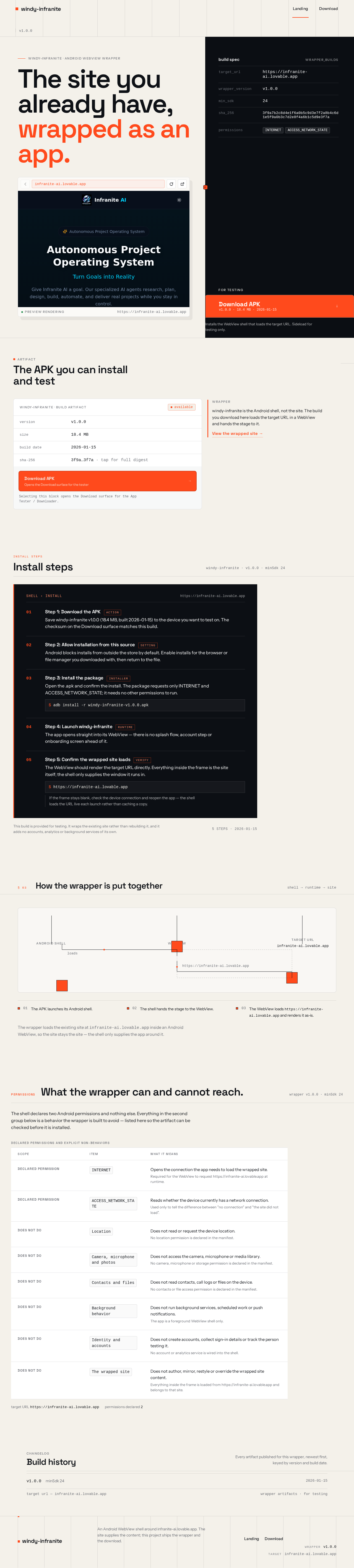
windy-infranite · build artifactavailable
- version
- v1.0.0
- size
- 18.4 MB
- build date
- 2026-01-15
- sha-256
- 3f9a…3f7a · tap for full digest
Selecting this block opens the Download surface for the App Tester / Downloader.
 founder finiXxus
https://infranite-ai.lovable.app , I want this website webview rapper Apk u made, and I can download it for test.

Sign in to leave a comment
windy-infranite · android webview wrapper
Installs the WebView shell that loads the target URL. Sideload for testing only.
Selecting this block opens the Download surface for the App Tester / Downloader.
windy-infranite is the Android shell, not the site. The build you download here loads the target URL in a WebView and hands the stage to it.
View the wrapped site →Save windy-infranite v1.0.0 (18.4 MB, built 2026-01-15) to the device you want to test on. The checksum on the Download surface matches this build.
Android blocks installs from outside the store by default. Enable installs for the browser or file manager you downloaded with, then return to the file.
Open the .apk and confirm the install. The package requests only INTERNET and ACCESS_NETWORK_STATE; it needs no other permissions to run.
adb install -r windy-infranite-v1.0.0.apkThe app opens straight into its WebView — there is no splash flow, account step or onboarding screen ahead of it.
The WebView should render the target URL directly. Everything inside the frame is the site itself; the shell only supplies the window it runs in.
https://infranite-ai.lovable.appIf the frame stays blank, check the device connection and reopen the app — the shell loads the URL live each launch rather than caching a copy.
This build is provided for testing. It wraps the existing site rather than rebuilding it, and it adds no accounts, analytics or background services of its own.
5 steps · 2026-01-15https://infranite-ai.lovable.app and renders it as-is.infranite-ai.lovable.app inside an Android WebView, so the site stays the site — the shell only supplies the app around it.Wrapper architecture: an Android shell launches a WebView runtime, which loads and renders the target URL https://infranite-ai.lovable.app. Three stages, two connectors, in that order.
Changelog
Every artifact published for this wrapper, newest first, keyed by version and build date.
windy-infranite · android webview wrapper
Installs the WebView shell that loads the target URL. Sideload for testing only.
Selecting this block opens the Download surface for the App Tester / Downloader.
windy-infranite is the Android shell, not the site. The build you download here loads the target URL in a WebView and hands the stage to it.
View the wrapped site →Save windy-infranite v1.0.0 (18.4 MB, built 2026-01-15) to the device you want to test on. The checksum on the Download surface matches this build.
Android blocks installs from outside the store by default. Enable installs for the browser or file manager you downloaded with, then return to the file.
Open the .apk and confirm the install. The package requests only INTERNET and ACCESS_NETWORK_STATE; it needs no other permissions to run.
adb install -r windy-infranite-v1.0.0.apkThe app opens straight into its WebView — there is no splash flow, account step or onboarding screen ahead of it.
The WebView should render the target URL directly. Everything inside the frame is the site itself; the shell only supplies the window it runs in.
https://infranite-ai.lovable.appIf the frame stays blank, check the device connection and reopen the app — the shell loads the URL live each launch rather than caching a copy.
This build is provided for testing. It wraps the existing site rather than rebuilding it, and it adds no accounts, analytics or background services of its own.
5 steps · 2026-01-15https://infranite-ai.lovable.app and renders it as-is.infranite-ai.lovable.app inside an Android WebView, so the site stays the site — the shell only supplies the app around it.Wrapper architecture: an Android shell launches a WebView runtime, which loads and renders the target URL https://infranite-ai.lovable.app. Three stages, two connectors, in that order.
Changelog
Every artifact published for this wrapper, newest first, keyed by version and build date.
No comments yet. Be the first!