windy-infranite · build artifactavailable
- version
- v1.0.0
- size
- 18.4 MB
- build date
- 2026-01-15
- sha-256
- 3f9a…3f7a · tap for full digest
Selecting this block opens the Download surface for the App Tester / Downloader.
 founder finiXxus
https://infranite-ai.lovable.app , I want this website webview rapper Apk u made, and I can download it for test.

Sign in to leave a comment
windy-infranite is an Android application that wraps the existing website https://infranite-ai.lovable.app inside a native WebView shell and is distributed as a downloadable APK so the requester can install it on a device and test it.
The product intent is deliberately narrow and explicit: the existing site is the content and the functionality; this project does not rebuild, restyle, or re-implement that site. The project's own deliverable is the wrapper — an Android shell that loads the target URL in a WebView, plus a first-party surface from which the built APK artifact can be downloaded for testing.
The audience is a single technical actor: the App Tester / Downloader, who must be able to (a) understand exactly what the artifact is and what it does, (b) download the APK, (c) install it on an Android device, and (d) confirm that the wrapped site loads and behaves inside the shell.
The current delivery consists of two first-party surfaces and one native runtime:
https://infranite-ai.lovable.app (or an honest "preview unavailable" state when the site cannot be rendered at build/crawl time). It carries the primary Download APK action.https://infranite-ai.lovable.app in its WebView and hands the stage to the site.Actors:
https://infranite-ai.lovable.app (external, provider-owned) — supplies all wrapped content and behavior; it is not owned, rebuilt, or restyled by this project.Narrow exclusions:
This project is a distribution and shell project, not a website project. The authoritative instruction is to wrap an existing website in an Android WebView APK and make that APK downloadable for testing; the site itself is explicitly out of scope for rebuilding.
Delivery ownership therefore splits cleanly:
Access boundary: both first-party surfaces are anonymous and require no identity. There is no durable actor-specific state that must be privately owned or resumed, and no commitment, entitlement, or value transfer that must remain bound to a particular participant. Application-owned identity is therefore not introduced.
Current vs. future: everything described in this document is current. No future-horizon capabilities are accepted.
The reference directive for https://infranite-ai.lovable.app declares uses: ["content_source", "feature_reference"] with authority: authoritative. However, the verified source observations record that no visible content could be retrieved from that URL — no HTML, text, links, or structural data were captured, and no fields, features, descriptions, links, or media references could be extracted or confirmed.
Consequently there are no verified content-source facts to inventory. No factual entities, collection items, field values, descriptions, dates, contacts, links, or media references from the target site can be preserved, and none are invented here. The wrapper's obligation toward that content is structural only: load the URL, render it faithfully, and never substitute fabricated content for it.
Information and state
infranite-ai.lovable.app.v1.0.0, minSdk 24, permissions list, artifact SHA-256.Primary actions
for testing micro-label above it. Navigates to the Download surface / initiates the artifact download.Supporting actions
Domain entities
Component responsibilities
States
Information and state
Primary actions
Supporting actions
Domain entities
Component responsibilities
States
FR-1 — Wrap the existing website in an Android WebView APK (explicit)
As an App Tester / Downloader, I should have an Android APK that wraps the existing website https://infranite-ai.lovable.app in a WebView, so that I can run the site as an app on a device.
https://infranite-ai.lovable.app.explicit.FR-2 — The APK must be downloadable for testing (explicit) As an App Tester / Downloader, I should be able to download the APK, so that I can install it on a device and test it.
explicit.FR-3 — The wrapped content is the existing site; the site is not rebuilt (explicit)
As an App Tester / Downloader, I should see the real https://infranite-ai.lovable.app inside the wrapper, so that what I test is the actual site and not a reimplementation.
explicit.FR-4 — The Android APK must be built and made available for download (required_inference) As an App Tester / Downloader, I should have a built, versioned APK artifact available, so that the download action has something real to deliver.
required_inference — required to make the accepted download journey executable; introduces no new product capability.FR-5 — The APK must load the target URL in its WebView (required_inference)
As an App Tester / Downloader, I should have the wrapper's WebView pointed at https://infranite-ai.lovable.app, so that launching the app lands me on the site.
https://infranite-ai.lovable.app and renders it.required_inference — required to make the accepted wrapping journey executable; introduces no new product capability.FR-6 — Present the build facts honestly on the Landing surface (required_inference) As an App Tester / Downloader, I should see the target URL, wrapper version, minSdk, permissions, and artifact SHA-256 before downloading, so that I know exactly what I am installing.
v1.0.0, minSdk 24, permissions list, and SHA-256.required_inference — required to make the accepted download decision executable; introduces no new product capability.FR-7 — Provide install steps and a permissions / what-it-does-not-do table (required_inference) As an App Tester / Downloader, I should have numbered install steps and a clear statement of what the app does and does not do, so that I can install it correctly and trust it.
required_inference — required to make the accepted install-and-test journey executable; introduces no new product capability.Product context. This is the sole active human actor for the project. They asked for an Android WebView wrapper of an existing website and for a downloadable build they can install and test. They are technical: they read build specifications, verify checksums, and judge the artifact by whether the real site loads correctly inside the shell.
Primary goal. Obtain a working, installable WebView wrapper of https://infranite-ai.lovable.app, install it on a device, and confirm that the wrapped site's pages work inside the app.
Distinct accepted responsibilities.
https://infranite-ai.lovable.app.Relevant inputs and decisions.
Interactions with other accepted participants.
Observable success. The APK downloads, its checksum matches the published SHA-256, it installs on an Android device, and launching it renders https://infranite-ai.lovable.app inside the WebView with the site's own pages working.
What makes this role's work different. The tester is not a consumer of the wrapped site's product — they are validating the shell. Their attention is on the seam between shell and site: does the URL load, does the frame render, does the artifact match its checksum, does the app behave as the build spec claims. That is why the build facts, the checksum, and the honest unavailable state matter as much as the site itself.
https://infranite-ai.lovable.app; the right half shows the dark monospace build-spec panel.v1.0.0, minSdk 24, permissions list, and artifact SHA-256.for testing micro-label.https://infranite-ai.lovable.app and renders it.The creative direction is authoritative for this section. Muse: Adham Dannaway — "two halves in dialogue." Headline idea: the site on one half, the shell on the other.
Color tokens — light mode
| Role | Hex | Use |
|---|---|---|
| Background | #F4F1EA | Warm paper ground — never pure white |
| Surface | #FFFFFF | Artifact and install panels |
| Text | #0E1116 | Type, rules, buttons |
| Primary | #0E1116 | Primary ink for type, rules and buttons |
| Accent | #FF4A1C | Signal orange: Download APK action, live-URL chip, active tab underline, code-half cursor/selection |
| Muted | #6B6F76 | Labels, metadata, ruled spec rows |
| Code panel ink | #0B0E13 | Monospace technical half and install-steps terminal block |
White text on the #0B0E13 code panel must stay at or above 7:1 contrast. Proportion: roughly 70% paper/white, 20% dark panels, 10% orange — orange never fills a large area.
Typography
clamp(3rem, 8vw, 7.5rem).Shape language. Precise and near-square: 4px and 8px radii only (buttons 8px, chips 4px, panels 8px). 1px hairline borders in a 12% ink tint. No soft blobs; no pill buttons except the small status chip. The signature shape is the vertical seam: a 1px ink rule down the centre of the hero with a small orange square handle at its midpoint that the cursor can drag to shift the split ratio. Code blocks use a square-cornered inset panel with a 3px orange left rule.
Layout. A true split-screen hero: left half is the "design" side — the wrapped site presented as a live, scrollable WebView frame with a browser-chrome-like top bar (URL chip, reload, back, external-open); right half is the "code" side — a dark monospace panel with the build spec. Below the hero, a 12-column grid with a visible 1px column rule system (the grid is shown, not hidden) holds the Download section, install instructions as numbered ruled rows, the permissions/what-it-does-not-do table, and a changelog strip. Everything aligns to an 8-pt baseline and to the visible columns; section headers sit flush-left with a hairline that runs to the viewport edge.
Imagery. No stock photography and no illustration for its own sake. The imagery is the interface itself: a live WebView frame of https://infranite-ai.lovable.app on the left, monospace code and spec tables on the right, a schematic diagram of the wrapper architecture (Android shell → WebView → target site) drawn as 1px line art with orange accent nodes, and small pixel-precise UI details (URL chip, reload glyph, checksum block). If the live site cannot render at build time, the frame shows an honest "preview unavailable — the app loads this URL" state rather than a fake screenshot.
Avoid. Any blue/indigo primary or accent (#0057FF, #2563EB, #4F46E5, #6366F1, #7C3AED) on white; a centred SaaS hero with headline + subtext + button, or any gradient-blob background; a grid of identical hover-lift cards; Inter, Roboto, Arial, Helvetica, Open Sans, Lato, Poppins or system-ui as heading or body faces; fake or stock screenshots of the wrapped site; rebuilding or restyling the wrapped site's own content; soft pill buttons, 24px+ radii, glassmorphism or frosted panels; playful bounce easing, confetti, or motion that delays the Download action.
The seam is the product. The public entry is a full-viewport split hero divided by a single 1px ink rule with a draggable orange square handle at its midpoint. The left half is the site — an oversized two-line Space Grotesk 600 headline, "The site you already have, wrapped as an app.", set flush-left and allowed to run under the left edge of a live, scrollable WebView frame whose browser-chrome top bar carries a #FF4A1C URL chip reading infranite-ai.lovable.app. The right half is the shell — a dark #0B0E13 monospace panel listing target URL, wrapper v1.0.0, minSdk 24, permissions, and SHA-256, with the primary Download APK action physically cut into its bottom edge as a signal-orange block under an 11px uppercase for testing label, so the primary action reads as a terminal command rather than a floating SaaS CTA.
Dragging the handle resizes the WebView against the spec panel. That single interaction is the whole thesis: the hero does not describe the product's dual nature, it demonstrates it. The tester can widen the site to confirm it is real, or widen the spec to read the build facts before committing to the download.
Below the hero, the visible 12-column grid carries the Download section, install steps as numbered ruled rows in a square-cornered terminal block with a 3px orange left rule, the permissions/what-it-does-not-do table, and the changelog strip — with the 1px line-art wrapper architecture diagram (Android shell → WebView → target URL, orange nodes) as the divider between Download and Permissions.
The concept recomposes only accepted content, states, and controls: the target URL, the build facts, the live-or-unavailable WebView frame, and the Download APK action. It introduces no new behavior, page, or destination.
Interaction Model: Animated Motion Tempo: restrained Hero Dimensionality: layered_2d
Landing Hero Motion Brief
https://infranite-ai.lovable.app on the paper side,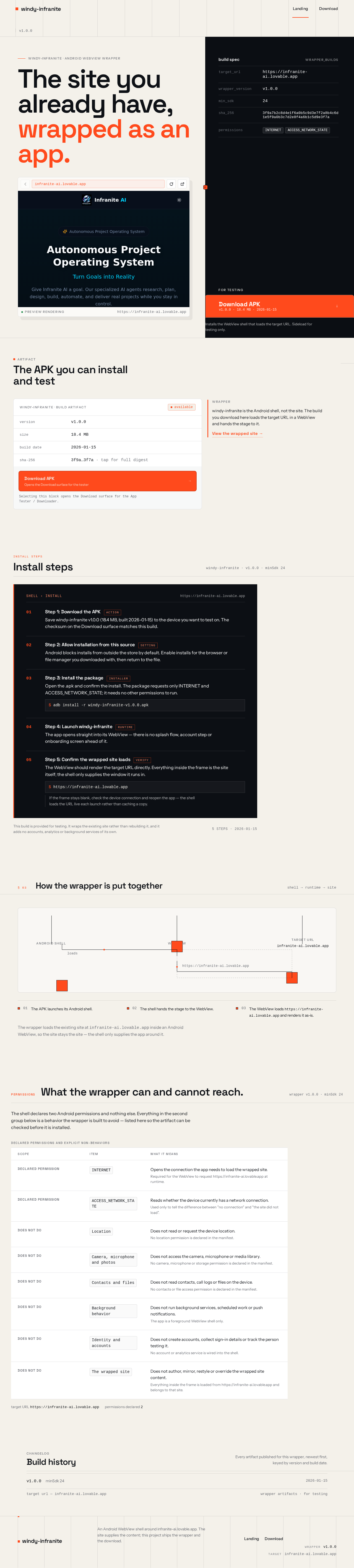
windy-infranite · android webview wrapper
Installs the WebView shell that loads the target URL. Sideload for testing only.
Selecting this block opens the Download surface for the App Tester / Downloader.
windy-infranite is the Android shell, not the site. The build you download here loads the target URL in a WebView and hands the stage to it.
View the wrapped site →Save windy-infranite v1.0.0 (18.4 MB, built 2026-01-15) to the device you want to test on. The checksum on the Download surface matches this build.
Android blocks installs from outside the store by default. Enable installs for the browser or file manager you downloaded with, then return to the file.
Open the .apk and confirm the install. The package requests only INTERNET and ACCESS_NETWORK_STATE; it needs no other permissions to run.
adb install -r windy-infranite-v1.0.0.apkThe app opens straight into its WebView — there is no splash flow, account step or onboarding screen ahead of it.
The WebView should render the target URL directly. Everything inside the frame is the site itself; the shell only supplies the window it runs in.
https://infranite-ai.lovable.appIf the frame stays blank, check the device connection and reopen the app — the shell loads the URL live each launch rather than caching a copy.
This build is provided for testing. It wraps the existing site rather than rebuilding it, and it adds no accounts, analytics or background services of its own.
5 steps · 2026-01-15https://infranite-ai.lovable.app and renders it as-is.infranite-ai.lovable.app inside an Android WebView, so the site stays the site — the shell only supplies the app around it.Wrapper architecture: an Android shell launches a WebView runtime, which loads and renders the target URL https://infranite-ai.lovable.app. Three stages, two connectors, in that order.
Changelog
Every artifact published for this wrapper, newest first, keyed by version and build date.
windy-infranite · android webview wrapper
Installs the WebView shell that loads the target URL. Sideload for testing only.
Selecting this block opens the Download surface for the App Tester / Downloader.
windy-infranite is the Android shell, not the site. The build you download here loads the target URL in a WebView and hands the stage to it.
View the wrapped site →Save windy-infranite v1.0.0 (18.4 MB, built 2026-01-15) to the device you want to test on. The checksum on the Download surface matches this build.
Android blocks installs from outside the store by default. Enable installs for the browser or file manager you downloaded with, then return to the file.
Open the .apk and confirm the install. The package requests only INTERNET and ACCESS_NETWORK_STATE; it needs no other permissions to run.
adb install -r windy-infranite-v1.0.0.apkThe app opens straight into its WebView — there is no splash flow, account step or onboarding screen ahead of it.
The WebView should render the target URL directly. Everything inside the frame is the site itself; the shell only supplies the window it runs in.
https://infranite-ai.lovable.appIf the frame stays blank, check the device connection and reopen the app — the shell loads the URL live each launch rather than caching a copy.
This build is provided for testing. It wraps the existing site rather than rebuilding it, and it adds no accounts, analytics or background services of its own.
5 steps · 2026-01-15https://infranite-ai.lovable.app and renders it as-is.infranite-ai.lovable.app inside an Android WebView, so the site stays the site — the shell only supplies the app around it.Wrapper architecture: an Android shell launches a WebView runtime, which loads and renders the target URL https://infranite-ai.lovable.app. Three stages, two connectors, in that order.
Changelog
Every artifact published for this wrapper, newest first, keyed by version and build date.
No comments yet. Be the first!