welfare-schemes
 Rishik Reddy Santosh
vVoice-first scheme agent Citizens miss welfare schemes they qualify for because the rules are scattered and complex. The problem Citizens miss welfare schemes they qualify for because the rules are scattered and complex. What to build A voice agent in at least two languages that asks questions, determines eligibility, and explains its reasoning. Teams must gather the scheme rules themselves and convert them into a structured form the agent can reason over. Data The government’s myScheme portal, and open speech datasets such as Mozilla Common Voice and AI4Bharat’s collections. Live test Judges role-play callers who give vague or contradictory answers, and score eligibility accuracy and the number of questions asked.and add multilingulal language support and ai voice agent should appear on the left side of the page and add text font size increase and decrease and add catogries based on age ,gender,cast .and every scheem present in india from job scheme for every catogity and screenmodes dark,light neutral. Multilingual voice Smart eligibility engine Adaptive questioning Explainable Al Contradiction detection Scheme recommendation Offline support Application guidance.And aslo add animation while speaking, add a human version while speaking to make voice first scheme .Dark mode, saturation, the voice button in themiddle of the screen big that every one can see . as simple as possible how an illitralte can use this app very easy without any login and ask only name, age ,gender,cast .and add regional speach recognation .multi voice suppoet and ai can talk in multilpe vioces in multilple languages.likr telugu,hindi, english.conflict dectition .use a girl voice which can talk in multilpe in multiple languages


Comments (0)
Sign in to leave a comment
System Requirements
System Requirements Document for Voice-First Scheme Agent
1. Introduction
The Voice-First Scheme Agent is a public, voice-first service that helps citizens in India discover the welfare schemes they qualify for. Citizens miss schemes because the rules are scattered across many programmes and written in complex language. This product replaces that search with a spoken conversation: a friendly girl voice asks a small set of questions, determines eligibility against structured scheme rules, and explains its reasoning in plain language.
The audience is the citizen caller — including people who read with difficulty or not at all — who needs the simplest possible path to an answer: no login, no forms, only name, age, gender and caste spoken aloud. A second audience is the team that gathers scheme rules from the government's myScheme portal and converts them into a structured form the agent can reason over. A third is the judge evaluator who role-plays callers with vague or contradictory answers and scores eligibility accuracy and the number of questions asked.
The agent speaks in at least two languages, and specifically Telugu, Hindi and English, using a girl voice that can talk in multiple voices across multiple languages. It supports regional speech recognition, adaptive questioning, contradiction detection, explainable reasoning, scheme recommendation, application guidance and offline support.
2. System Overview
2a. Product Interpretation and Delivery Boundary
The product is a first-party React web application backed by a shared FastAPI service and a MariaDB store. It is deliberately anonymous: there is no login and no sign-up screen anywhere in the citizen journey. The citizen opens the app, picks a language, and speaks. The only personal facts the agent asks for are name, age, gender and caste — nothing else.
The voice agent is presented on the left side of the page as a persistent agent panel with a flat girl avatar, while a large 168px coral voice button sits in the middle of the main column so that anyone can find it. The agent speaks with a girl voice, animates while speaking, and shows a human avatar that nods and moves its mouth in time with the speech. Text is always paired with voice so a low-literacy user can follow, and font size can be increased or decreased. Dark, light and neutral screen modes are available.
Scheme rules are owned by the team, not by the citizen: a scheme rules curator gathers rules from the government myScheme portal and converts them into a structured form the agent reasons over. That curation surface is role-restricted and separate from the citizen surfaces. Open speech datasets such as Mozilla Common Voice and AI4Bharat's collections are used as speech data sources for the voice and recognition layers.
Offline support means the citizen surfaces remain usable when connectivity drops: the last loaded scheme rules and the conversation state are kept locally so the agent can continue asking and answering, and results reconcile when the connection returns. Model-provider calls for language understanding and speech run through the LiteLLM gateway; the application's own data lives in MariaDB, and PostgreSQL exists only to support LiteLLM.
Everything described here is current scope. No future-horizon features are defined in this document.
2b. Source Content Inventory
Government myScheme portal (content_source, authoritative). The portal is the authoritative source of scheme rules. Each scheme gathered from it is converted into a structured record the agent reasons over, carrying at minimum: scheme name, the categories it serves by age, gender and caste, its eligibility conditions, the plain-language reason it applies, and its application guidance. The portal also supplies the breadth requirement that every scheme present in India is covered, including job schemes for every category.
Mozilla Common Voice (content_source). An open speech dataset used as a source of speech audio for the voice and regional speech recognition layers, covering the supported languages.
AI4Bharat speech collections (content_source). An open speech dataset used alongside Common Voice as a source of speech audio for Telugu, Hindi and English voice and recognition work.
2c. Page Content and Component Coverage
Landing
- Information and state: the public entry. Headline "Speak. We find your scheme." over a coral block, subline "Tell us your name, age, gender and caste. A girl voice asks and explains in Telugu, Hindi or English.", and the call to action "Start speaking". Language tags for Telugu, Hindi and English sit under the voice button as teal sticker tags. No login or sign-up is shown.
- Primary action: "Start speaking" begins the voice session.
- Supporting actions: choose Telugu, Hindi or English; increase or decrease text font size; switch between dark, light and neutral screen modes.
- Domain entities: language selection, display preferences (font scale, screen mode).
- Component responsibilities: left agent panel with the flat girl avatar over a coral block; centred 168px coral voice button with a soft ring; Sora headline flush left; sticker-like age, gender and caste chips; font-size and screen-mode controls.
- States: loading (avatar and button render immediately, language list resolves); empty (no session yet — the button invites the first press); success (language chosen, session starts); error (microphone unavailable — a plain spoken and written prompt to allow the microphone and retry); recovery (retry the button, or continue in text).
Voice Session
- Information and state: the live conversation. The agent panel stays on the left with the girl avatar; the big voice button stays centred in the main column. The current question, the caller's spoken answer as recognised text, and the running list of the four facts (name, age, gender, caste) are shown. A contradiction notice appears when answers conflict.
- Primary action: press the big voice button and speak the answer.
- Supporting actions: repeat the question; correct a previous answer; change language mid-session; adjust font size; change screen mode.
- Domain entities: conversation turn, recognised answer, the four collected facts, contradiction record, question count.
- Component responsibilities: animated speaking avatar (nods, mouth moves with speech); pulse ring on the voice button while the agent speaks; adaptive question presenter; contradiction detector surface; offline indicator when the connection drops.
- States: loading (agent preparing the next question); empty (session just started — the agent greets and asks the first question); success (answer accepted, next adaptive question asked); error (speech not recognised — the agent re-asks simply and offers to repeat); recovery (contradiction detected — the agent names the conflict and asks a clarifying question); offline (questions and answers continue from locally held rules and state, with a visible offline badge).
Eligibility Results
- Information and state: the outcome. Eligible schemes appear as teal-bordered panels, each with a plain-language reason line under the name explaining why the caller qualifies. Ineligible schemes are shown with the reason they do not apply. Application guidance is shown for each eligible scheme. The reasoning is spoken by the girl voice as well as written.
- Primary action: hear and read the eligibility explanation.
- Supporting actions: replay the spoken explanation; open application guidance for a scheme; start a new conversation; adjust font size; change screen mode.
- Domain entities: eligibility determination, reasoning explanation, recommended scheme, application guidance, question count.
- Component responsibilities: teal eligible-scheme panels with reason lines; ineligible list with reasons; application guidance blocks; replay control; speaking avatar.
- States: loading (agent computing eligibility); empty (no scheme matched — a plain explanation and a prompt to review answers); success (eligible schemes with reasons and guidance); error (rules unavailable — a plain message and retry); recovery (return to the session to correct an answer and recompute).
Schemes
- Information and state: browsable scheme catalogue covering every scheme present in India, including job schemes for every category, organised by categories based on age, gender and caste. Each entry shows the scheme name and a plain-language summary.
- Primary action: browse and filter by age, gender and caste category.
- Supporting actions: open a scheme's detail and application guidance; hear a scheme read aloud; adjust font size; change screen mode.
- Domain entities: scheme, category (age, gender, caste), job scheme, application guidance.
- Component responsibilities: sticker-like category chips; scheme list; spoken read-out control; speaking avatar.
- States: loading (catalogue resolving); empty (no scheme in the selected category — a plain message and a prompt to clear the filter); success (matching schemes listed); error (catalogue unavailable — retry, or use the last cached catalogue offline); recovery (clear filters, retry).
Scheme Rules
- Information and state: the curator's working surface. It lists schemes gathered from the myScheme portal and shows each one's structured form — name, age/gender/caste categories, eligibility conditions, plain-language reason and application guidance — with a status of structured or incomplete.
- Primary action: convert a gathered scheme's rules into the structured form the agent reasons over and save it.
- Supporting actions: edit a structured record; mark a record incomplete; review which schemes are covered.
- Domain entities: scheme rule record, eligibility condition, category mapping, coverage status.
- Component responsibilities: scheme rule editor; structured-form preview; coverage list; save and validation feedback.
- States: loading (records resolving); empty (no rules loaded yet — prompt to add the first scheme); success (record saved and available to the agent); error (validation failure — the incomplete field is named); recovery (correct and re-save).
3. Functional Requirements
FR-1 — Voice agent asks, determines and explains. As a citizen caller, I should speak with a voice agent that asks me questions, determines my eligibility and explains its reasoning, so that I understand why a scheme does or does not apply. Provenance: explicit. Lifecycle: the caller presses the voice button (trigger); the agent asks adaptive questions and the caller answers by speech (input); the agent produces an eligibility determination with a spoken and written reason (observable result); if the agent cannot determine eligibility it says so plainly and offers to re-ask (failure/recovery); the caller continues to results or corrects an answer (continuation). Access: no login. Acceptance: every determination is accompanied by a plain-language reason.
FR-2 — At least two languages, including Telugu, Hindi and English. As a citizen caller, I should use the agent in Telugu, Hindi or English, so that I can speak and listen in a language I understand. Provenance: explicit. Lifecycle: the caller selects a language before the session (input); the agent asks, recognises and speaks in that language (result); if recognition fails in that language the agent re-asks simply (recovery); the caller may change language mid-session (continuation). Acceptance: all three languages are selectable and the agent speaks and recognises each.
FR-3 — Girl voice across multiple voices and languages. As a citizen caller, I should hear a girl voice that can talk in multiple voices and multiple languages, so that the agent feels friendly and natural. Provenance: explicit. Lifecycle: the agent speaks each turn in the selected language using a girl voice (result); the voice is consistent across languages (observable); if audio output is unavailable the text remains (recovery). Acceptance: the speaking voice is a girl voice in Telugu, Hindi and English.
FR-4 — Only name, age, gender and caste; no login. As a citizen caller, I should be asked only my name, age, gender and caste and never be asked to log in, so that using the app is as easy as possible. Provenance: explicit. Lifecycle: the session begins with no account (access state); the agent asks exactly these four facts (input); the agent proceeds to eligibility (result); if an answer is missing the agent re-asks only that fact (recovery). Acceptance: no login or sign-up appears anywhere in the citizen journey, and no fact beyond the four is requested.
FR-5 — Contradiction detection. As a citizen caller, I should have contradictions in my answers detected, so that my result is not based on conflicting facts. Provenance: explicit. Lifecycle: the caller gives answers that conflict (input); the agent detects the conflict and names it in plain language (result); the agent asks a clarifying question (recovery); the caller resolves it and the session continues (continuation). Acceptance: a conflicting answer pair produces a visible and spoken contradiction notice and a clarifying question.
FR-6 — Adaptive questioning. As a citizen caller, I should be asked only the questions needed for my situation, so that the conversation stays short. Provenance: explicit. Lifecycle: the agent uses prior answers to choose the next question (result); questions that cannot change the outcome are skipped (observable); if an answer is unclear the agent re-asks that question (recovery). Acceptance: the number of questions asked is tracked and reported for scoring.
FR-7 — Scheme recommendation and application guidance. As a citizen caller, I should receive recommended schemes and guidance on how to apply, so that I can act on my eligibility. Provenance: explicit. Lifecycle: eligibility is determined (input); eligible schemes are recommended with a reason line and application guidance (result); if no scheme matches the agent explains why (recovery); the caller opens guidance or starts a new conversation (continuation). Acceptance: each eligible scheme shows a plain-language reason and application guidance.
FR-8 — Offline support. As a citizen caller, I should keep using the agent when connectivity drops, so that a weak connection does not end my conversation. Provenance: explicit. Lifecycle: connectivity drops mid-session (trigger); the agent continues asking and answering from locally held rules and state, showing an offline badge (result); when the connection returns, results reconcile (continuation); if a needed rule is not cached the agent says so plainly (recovery). Acceptance: the session continues offline and the offline state is visible.
FR-9 — Structured scheme rules from myScheme. As a scheme rules curator, I should gather scheme rules from the government myScheme portal and convert them into a structured form the agent can reason over, so that eligibility is accurate. Provenance: explicit. Lifecycle: the curator gathers a scheme's rules (input); converts them into the structured form and saves (action); the record becomes available to the agent (result); validation failure names the incomplete field (recovery); the curator continues with the next scheme (continuation). Access: role-restricted curator surface. Acceptance: saved structured records drive eligibility determinations.
FR-10 — Open speech datasets. As a builder of the voice layer, I should use open speech datasets such as Mozilla Common Voice and AI4Bharat's collections, so that regional speech recognition and the girl voice work across Telugu, Hindi and English. Provenance: explicit. Acceptance: the speech layer is built on these datasets.
FR-11 — Categories by age, gender and caste. As a citizen caller, I should see categories based on age, gender and caste, so that I can browse schemes that fit me. Provenance: explicit. Lifecycle: the caller opens the scheme catalogue (trigger); selects age, gender or caste category chips (input); matching schemes are listed (result); an empty category shows a plain message and a prompt to clear the filter (recovery). Acceptance: age, gender and caste categories are present and filter the catalogue.
FR-12 — Every scheme in India, including job schemes. As a citizen caller, I should find every scheme present in India, including job schemes for every category, so that nothing I qualify for is missing. Provenance: explicit. Acceptance: the catalogue covers all schemes gathered from myScheme, including job schemes across every category.
FR-13 — Big voice button in the middle. As a citizen caller, I should see a big voice button in the middle of the screen, so that anyone can find it immediately. Provenance: explicit. Acceptance: the voice button is a 168px circle centred in the main column at every width.
FR-14 — Animation and human avatar while speaking. As a citizen caller, I should see an animation and a human version while the agent speaks, so that the voice-first experience feels alive and human. Provenance: explicit. Lifecycle: the agent begins speaking (trigger); the avatar nods and its mouth moves with the speech and the button pulses (result); with reduced motion a still avatar and static ring are shown (recovery). Acceptance: the avatar animates in time with speech and degrades to a still state under reduced motion.
FR-15 — Font size increase and decrease. As a citizen caller, I should increase or decrease the text size, so that I can read comfortably. Provenance: explicit. Lifecycle: the caller presses increase or decrease (input); text scales within 0.9x to 1.4x (result); the setting persists across pages (continuation). Acceptance: both controls work and text stays whole at every scale.
FR-16 — Dark, light and neutral screen modes. As a citizen caller, I should switch between dark, light and neutral screen modes, so that the screen suits my eyes and light. Provenance: explicit. Lifecycle: the caller selects a mode (input); the interface recolours (result); the choice persists (continuation). Acceptance: all three modes are selectable and legible.
FR-17 — Regional speech recognition. As a citizen caller, I should have my regional speech recognised, so that I can speak naturally in my language. Provenance: explicit. Lifecycle: the caller speaks (input); regional speech recognition transcribes in the selected language (result); unrecognised speech triggers a simple re-ask (recovery). Acceptance: Telugu, Hindi and English speech are recognised.
FR-18 — As simple as possible for an illiterate user. As a citizen caller who reads with difficulty, I should be able to use the app with voice and large simple controls alone, so that literacy is never a barrier. Provenance: explicit. Acceptance: every citizen action is reachable by voice or a large labelled control, and text is always paired with speech.
FR-19 — Voice agent on the left. As a citizen caller, I should see the AI voice agent on the left side of the page, so that the conversation has a stable home. Provenance: explicit. Acceptance: the agent panel sits on the left at 1280px and stacks above the content at 375px.
FR-20 — Language selection before the session. As a citizen caller, I should choose Telugu, Hindi or English before the voice session, so that the agent speaks my language from the first word. Provenance: required_inference. Acceptance: the session does not begin until a language is chosen.
FR-21 — Speak the four facts. As a citizen caller, I should give my name, age, gender and caste by speech, so that I never have to type. Provenance: required_inference. Acceptance: each of the four facts is captured from speech and shown as recognised text.
FR-22 — Curator loads structured rules before eligibility. As a scheme rules curator, I should load structured scheme rules before eligibility checks run, so that the agent reasons over current rules. Provenance: required_inference. Acceptance: eligibility uses the saved structured records.
FR-23 — Judge scores accuracy and question count. As a judge evaluator, I should role-play a caller with vague or contradictory answers and score eligibility accuracy and the number of questions asked, so that the agent's quality is measured. Provenance: explicit. Lifecycle: the judge opens the voice session and role-plays a caller (input); the agent asks, detects contradictions and determines eligibility (result); the judge reads the eligibility outcome and the question count (observable); the judge scores accuracy and question count (completion). Access: no login, same citizen surfaces. Acceptance: the question count is visible on the results and the eligibility outcome is inspectable.
4. User Personas
Citizen caller
The citizen caller is a person in India who may qualify for welfare schemes but cannot easily find or read the rules. They may read with difficulty or not at all, so the product must work by voice and large simple controls. Their primary goal is to learn, in their own language, which schemes they qualify for and why. Their distinct responsibilities are: choosing Telugu, Hindi or English; speaking their name, age, gender and caste; answering adaptive questions; resolving contradictions when the agent names one; and hearing and reading the eligibility reasoning and application guidance. Their inputs are spoken answers and their decisions are which language to use, whether to correct an answer, and whether to open application guidance. They interact with the agent (the girl voice and avatar) and, indirectly, with the scheme rules the curator has structured. Their observable success is a clear, spoken and written list of eligible schemes with plain-language reasons and application guidance, reached without any login.
Scheme rules curator
The scheme rules curator is a team member responsible for the accuracy behind the agent. Their product context is the Scheme Rules surface, which is role-restricted and separate from the citizen journey. Their primary goal is to convert scheme rules gathered from the government myScheme portal into a structured form the agent can reason over. Their distinct responsibilities are gathering rules, mapping each scheme to age, gender and caste categories, writing eligibility conditions and plain-language reasons, adding application guidance, and saving complete records. Their inputs are the myScheme portal rules; their decisions are how to express a condition in structured form and when a record is complete. They interact with the agent indirectly — their saved records drive every eligibility determination the citizen caller hears — and with the coverage list to see which schemes are structured. Their observable success is a saved, validated structured record that the agent uses, and a coverage list showing every scheme present in India, including job schemes for every category.
Judge evaluator
The judge evaluator is a person running the live test. Their product context is the same anonymous citizen surfaces, used deliberately as a caller. Their primary goal is to score eligibility accuracy and the number of questions asked. Their distinct responsibilities are role-playing a caller who gives vague or contradictory answers, observing how the agent handles the ambiguity and detects contradictions, reading the eligibility outcome, and counting the questions asked. Their inputs are deliberately vague or contradictory spoken answers; their decisions are what to answer and how to score. They interact with the agent as a caller would, and their observable success is a recorded eligibility outcome and question count they can score against the correct answer.
5. Core User Flows
Flow A — Citizen caller finds eligible schemes by voice
- The citizen caller opens the Landing page. The left agent panel shows the flat girl avatar over a coral block, and the 168px coral voice button sits centred in the main column under the headline "Speak. We find your scheme."
- The caller chooses Telugu, Hindi or English from the teal language tags under the button. The agent confirms the choice in that language with the girl voice.
- The caller presses the big voice button. The Voice Session opens; the agent greets the caller and asks for their name.
- The caller speaks their name. Regional speech recognition transcribes it and the recognised text appears. The agent asks age, then gender, then caste — only these four facts.
- If an answer is unclear, the agent re-asks that one question simply. If two answers conflict, the agent names the contradiction in plain language and asks a clarifying question; the caller resolves it and the session continues.
- The agent asks only the adaptive questions needed for the caller's situation, skipping any that cannot change the outcome. While it speaks, the avatar nods and its mouth moves and the voice button pulses.
- The agent determines eligibility and opens Eligibility Results. Eligible schemes appear as teal-bordered panels with a plain-language reason line and application guidance; ineligible schemes show why they do not apply. The girl voice speaks the same reasoning.
- The caller replays the explanation, opens application guidance for a scheme, or starts a new conversation. If no scheme matches, the agent explains why and offers to review an answer.
Flow B — Citizen caller browses schemes by category
- The citizen caller opens the Schemes page.
- The caller selects age, gender or caste category chips, which are sticker-like tags.
- The catalogue lists matching schemes, including job schemes for every category, each with a plain-language summary.
- The caller hears a scheme read aloud or opens its application guidance.
- If a category is empty, a plain message appears and the caller clears the filter. If the catalogue is unavailable, the caller retries or uses the last cached catalogue offline.
Flow C — Citizen caller continues offline
- Mid-session, connectivity drops. An offline badge appears on the Voice Session.
- The agent continues asking and answering from locally held rules and conversation state, so the caller is not interrupted.
- When the connection returns, the results reconcile with the current structured rules.
- If a needed rule is not cached, the agent says so plainly and offers to continue once connected.
Flow D — Scheme rules curator structures myScheme rules
- The scheme rules curator opens the role-restricted Scheme Rules page.
- The curator gathers a scheme's rules from the government myScheme portal and adds it to the list.
- The curator converts the rules into the structured form — name, age/gender/caste categories, eligibility conditions, plain-language reason and application guidance — and saves it.
- If validation fails, the incomplete field is named; the curator corrects it and re-saves.
- The saved record becomes available to the agent for eligibility determinations, and the coverage list shows the scheme as structured. The curator continues with the next scheme until every scheme present in India, including job schemes for every category, is covered.
Flow E — Judge evaluator runs the live test
- The judge evaluator opens the Voice Session without logging in and chooses a language.
- The judge role-plays a caller, giving vague or contradictory answers.
- The agent asks adaptive questions, detects contradictions and asks clarifying questions; the judge observes how many questions are asked.
- The agent determines eligibility and opens Eligibility Results, where the judge reads the eligibility outcome and the question count.
- The judge scores eligibility accuracy and the number of questions asked.
6. Visuals Colors and Theme
The muse is Haraldur Thorleifsson: big-hearted boldness for a voice that speaks for people. The headline is "Speak. We find your scheme."
Colour tokens (light mode). Background #FFF6E9 (cream ground, ~70% of the page); surface #FFFFFF; text #1B1A17; primary #E94F37 (coral — voice button and key actions); accent #1F8A70 (teal — eligible schemes); muted #6B6459.
Colour tokens (dark mode). Ground #14130F; text #FFF6E9; primary and accent retain coral #E94F37 and teal #1F8A70 for continuity.
Neutral mode. A low-saturation variant of the light tokens: cream ground softened toward a neutral surface, coral and teal desaturated while keeping contrast for the voice button and eligible panels.
Typography. Headings: Sora, bold at large sizes with tight tracking. Telugu and Hindi text: Noto Sans Telugu and Noto Sans Devanagari at the same weight. Body: Outfit. Modular scale 1.25 — 44/36/28/22/18/16 — with a user font-size control from 0.9x to 1.4x.
Shape language. Large rounded blocks with 28px radii and soft offset shadows. The voice button is a 168px circle with a coral ring. Sticker-like tags mark age, gender and caste.
Layout. The agent panel sits on the left at 1280px and stacks above the content at 375px. The big voice button stays centred in the main column at every width. Category chips for age, gender and caste sit below it. The Sora headline runs at 44px on mobile and 72px on desktop, flush left over the coral block.
Imagery. One flat vector girl avatar with warm skin tones and a coral headset. Small spot illustrations show documents, a phone and a check mark. No stock photos.
Avoid. No gradient blobs or glass panels; no blue or indigo primary colour; no dense tables or small grey labels; no stock photography of people; no login or sign-up screen.
7. Signature Design Concept
The public entry is a cream page with a left agent column holding the flat girl avatar over a coral block. The centre holds the 168px coral voice button with a soft ring, and a bold Sora line above it reads "Speak. We find your scheme." Teal sticker tags under the button show Telugu, Hindi and English. The gesture is a warm, oversized invitation: the biggest object on the page is the thing you press to speak, and the friendly face beside it tells you who will answer. The concept recomposes only accepted content — the headline, subline, language tags, voice button, avatar and the font-size and screen-mode controls — and adds no new behaviour.
8. Interaction Model & Motion Direction
Interaction Model: Animated Motion Tempo: expressive Hero Dimensionality: layered_2d
Landing Hero Motion Brief. Focal subject: the flat girl avatar over the coral block and the centred 168px coral voice button. Thesis: the caller presses the big voice button → the ring pulses slowly and the avatar nods with her mouth moving in time with the girl voice → the caller hears the first question and knows the conversation has begun. Motion vocabulary: slow pulse ring while the agent speaks, gentle avatar nod and mouth movement, soft offset shadows on sticker tags. Composed first frame: cream ground, coral block on the left with the avatar, Sora headline flush left, the coral button centred with its ring at rest, teal language tags beneath. Reduced-motion state: a still avatar and a static ring, with all text and controls fully readable and usable.
9. Non-Functional Requirements
- No login anywhere in the citizen journey. The citizen surfaces are anonymous and ask only name, age, gender and caste. Provenance: explicit. Rationale: the app must be as simple as possible for an illiterate user.
- Role-restricted curation. The Scheme Rules surface is restricted to the scheme rules curator; citizen surfaces are not. Provenance: required_inference. Rationale: rule authoring changes what every caller is told and must not be open to callers.
- Voice-first accessibility. Every citizen action is reachable by voice or a large labelled control, and text is always paired with speech. Provenance: explicit.
- Readable text and controls stay whole at 375px, 768px and 1280px, wrapping or scaling to fit, with no element covering them. Provenance: explicit (creative direction).
- Reduced motion. With
prefers-reduced-motion, a usable static arrangement is provided: still avatar, static ring, wrapped or scrollable rows. Provenance: explicit (creative direction). - Offline resilience. The citizen surfaces continue from locally held rules and conversation state when connectivity drops, and reconcile on reconnect. Provenance: explicit.
- Language coverage. Telugu, Hindi and English are supported for both speech recognition and the girl voice. Provenance: explicit.
- Explainability. Every eligibility determination carries a plain-language reason. Provenance: explicit.
- Measurable quality. The number of questions asked is tracked and visible so judges can score accuracy and question count. Provenance: explicit.
10. Tech Stack
- Frontend: React application UI.
- Backend: shared FastAPI process for application APIs and domain modules (voice session orchestration, eligibility engine, contradiction detection, scheme catalogue, scheme rules).
- Database: MariaDB for application-owned persistent data (structured scheme rules, scheme catalogue, conversation state).
- Model gateway: LiteLLM gateway for the backend's model-provider calls (language understanding, reasoning, speech).
- PostgreSQL: supports LiteLLM only; separate from application-owned storage.
- Speech data: Mozilla Common Voice and AI4Bharat speech collections for regional speech recognition and the girl voice.
- Scheme data: government myScheme portal, converted into structured rules.
11. Assumptions and Constraints
- The agent asks only name, age, gender and caste; no other fact is requested. (explicit)
- There is no login or sign-up in the citizen journey. (explicit)
- The voice agent appears on the left side of the page. (explicit)
- The voice button is big and in the middle of the screen. (explicit)
- The app is as simple as possible for an illiterate user. (explicit)
- The agent uses a girl voice. (explicit)
- The app supports at least two languages, and specifically Telugu, Hindi and English. (explicit)
- Scheme rules are gathered by the team from myScheme and structured before eligibility runs. (explicit / required_inference)
- The Scheme Rules surface is role-restricted to the curator. (required_inference)
- The judge evaluator uses the anonymous citizen surfaces to run the live test. (explicit)
- Offline support relies on locally cached rules and conversation state; a rule not cached is reported plainly. (explicit / required_inference)
12. Glossary
- Citizen caller: the person who speaks with the agent to find schemes they qualify for.
- Scheme rules curator: the team member who converts myScheme rules into structured form.
- Judge evaluator: the person who role-plays a caller and scores eligibility accuracy and question count.
- Structured scheme rule: a scheme's name, age/gender/caste categories, eligibility conditions, plain-language reason and application guidance in a form the agent reasons over.
- Adaptive questioning: asking only the questions needed for the caller's situation.
- Contradiction detection: identifying conflicting answers and asking a clarifying question.
- Eligibility reasoning: the plain-language explanation of why a scheme does or does not apply.
- Application guidance: the instructions for how to apply to an eligible scheme.
- myScheme portal: the government portal that is the authoritative source of scheme rules.
- Girl voice: the friendly female voice the agent speaks with across languages.
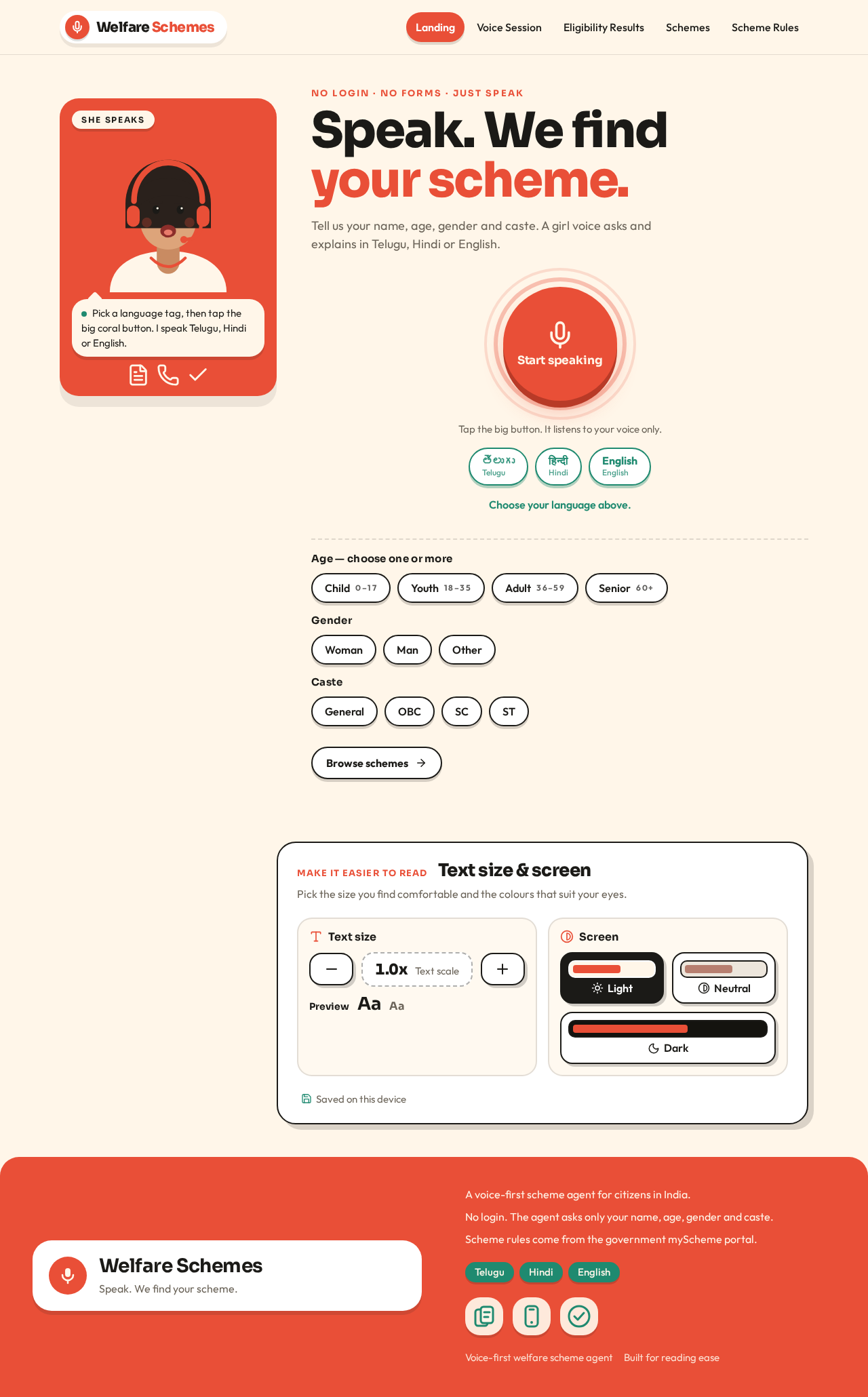
No login · No forms · Just speak
Speak. We find your scheme.
Tell us your name, age, gender and caste. A girl voice asks and explains in Telugu, Hindi or English.
Tap the big button. It listens to your voice only.
Choose your language above.
Age — choose one or more
Gender
Caste
Text size & screen
Pick the size you find comfortable and the colours that suit your eyes.
Saved on this device
No login · No forms · Just speak
Speak. We find your scheme.
Tell us your name, age, gender and caste. A girl voice asks and explains in Telugu, Hindi or English.
Tap the big button. It listens to your voice only.
Choose your language above.
Age — choose one or more
Gender
Caste
Text size & screen
Pick the size you find comfortable and the colours that suit your eyes.
Saved on this device
No comments yet. Be the first!